


Device management is the process of deploying, configuring, monitoring, securing, maintaining, and updating physical or virtual devices throughout their lifecycle. These devices may include computers, mobile phones, IP phones, network cameras, routers, switches, access points, industrial terminals, IoT sensors, gateways, printers, servers, and other connected endpoints used in enterprise environments.
As organizations become more connected, device management is no longer only an IT maintenance task. It directly affects cybersecurity, service availability, user productivity, compliance, asset visibility, operational continuity, and long-term system cost. A device that is not properly registered, updated, configured, or monitored can become a weak point in the entire network.
A Practical View of Device Management
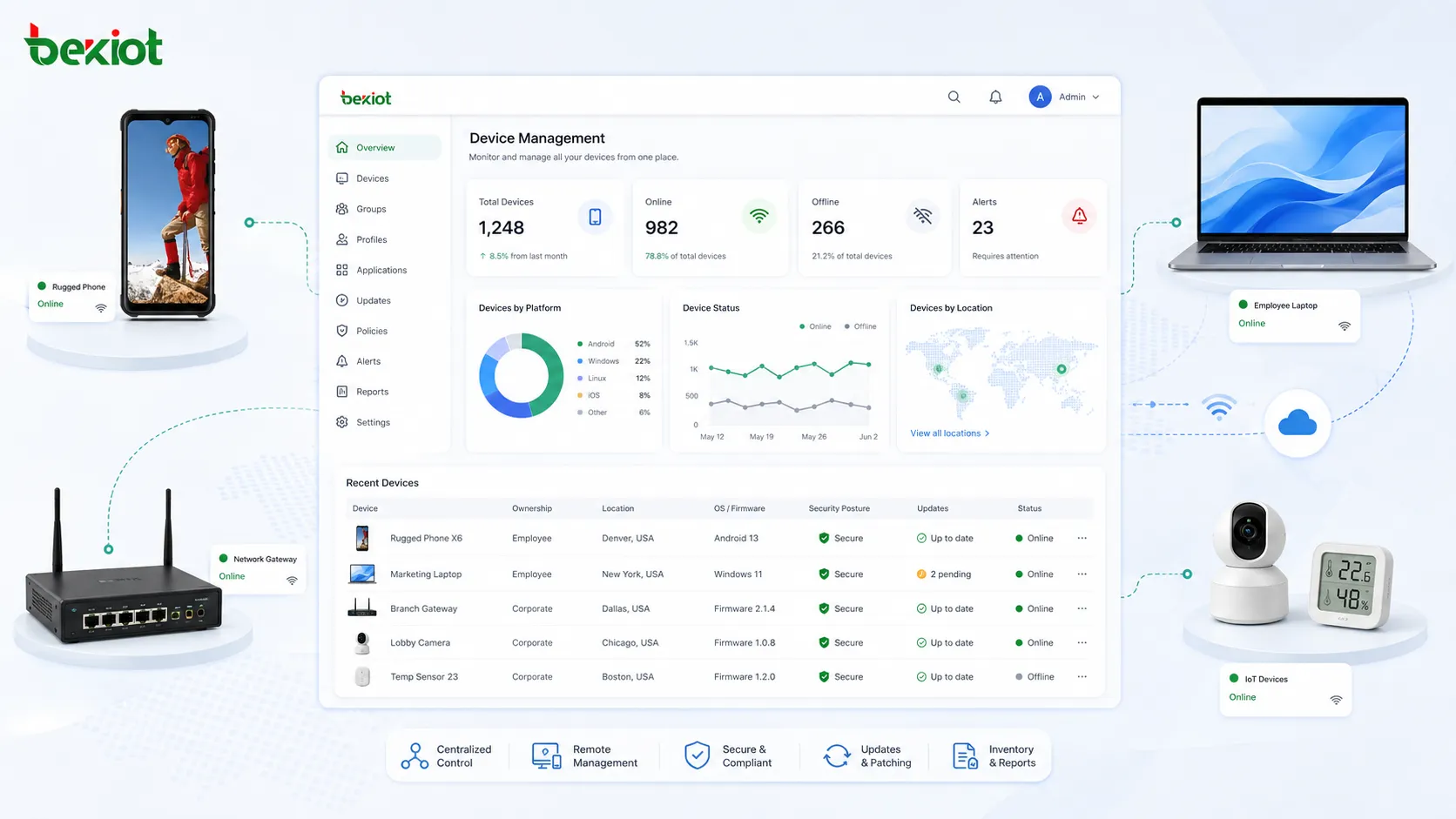
At its core, device management answers several operational questions: what devices are in the environment, where are they located, who owns them, what software or firmware do they run, whether they are secure, whether they are online, and whether they are performing as expected.
In a small office, device management may be as simple as maintaining an inventory spreadsheet and manually updating equipment. In a larger enterprise, it usually requires centralized platforms, automated provisioning, remote monitoring, configuration templates, role-based permissions, update policies, audit logs, and integration with security tools.
The goal is not just to “control devices.” A well-designed device management process helps organizations keep devices usable, secure, traceable, recoverable, and aligned with business workflows.
How Device Management Works
Device Discovery and Inventory
The first step is identifying devices that exist in the environment. Discovery may be performed through network scanning, agent installation, directory integration, cloud enrollment, serial number registration, QR code labeling, or manual asset entry.
A useful inventory should include device name, model, serial number, IP address, MAC address, operating system, firmware version, owner, location, department, warranty status, configuration profile, and lifecycle stage. Without a reliable inventory, administrators may not know which devices require updates, replacement, security review, or troubleshooting.
Enrollment and Provisioning
Enrollment connects a device to the management system. Once enrolled, the device can receive settings, security policies, certificates, network profiles, software packages, and usage restrictions. This reduces manual setup work and helps standardize deployment.
Provisioning is especially important when many devices need to be deployed at the same time. Instead of configuring each device individually, administrators can apply templates or zero-touch deployment methods so that devices become operational with fewer errors.
Configuration Control
Device configuration includes network settings, user permissions, application settings, security policies, update rules, service parameters, and system preferences. A centralized configuration model helps keep devices consistent across departments, branches, and user groups.
Configuration control also supports recovery. If a device is replaced, reset, or moved to another location, the correct configuration can be restored quickly. This reduces downtime and avoids inconsistent field settings.
Monitoring and Alerting
Managed devices should be monitored for online status, resource usage, connectivity, battery health, storage capacity, firmware version, error logs, security posture, and abnormal behavior. Monitoring allows administrators to detect issues before they become service failures.
Alerts may be triggered by offline devices, failed updates, unauthorized configuration changes, weak passwords, high CPU usage, expired certificates, low storage, or repeated connection failures. The value of monitoring depends on clear thresholds and practical response workflows.
Core Features of Device Management
Centralized Asset Visibility
Centralized visibility gives administrators one place to review all managed devices. This makes it easier to identify outdated equipment, missing assets, duplicate records, unmanaged endpoints, and devices that have not checked in for a long time.
Visibility also supports budgeting and planning. Organizations can understand which devices are approaching end of life, which models are most common, which locations need upgrades, and which departments consume the most endpoint resources.
Remote Configuration
Remote configuration allows administrators to apply settings without physically visiting each device. This is useful for branch offices, remote workers, field equipment, distributed IoT devices, and large campuses.
For example, administrators may remotely update Wi-Fi settings, change security policies, adjust device names, enable or disable services, configure user access, or apply a new application profile. Remote control reduces travel time and accelerates service changes.
Software and Firmware Updates
Regular updates help fix security vulnerabilities, improve stability, add features, and maintain compatibility with other systems. Device management platforms can schedule updates, test deployment groups, track success rates, and report failed installations.
In production environments, updates should be controlled carefully. A staged rollout is often safer than updating every device at once. Critical devices may require maintenance windows, rollback plans, and pre-update validation.
Security Policy Enforcement
Device management helps enforce security requirements such as password rules, encryption, certificate use, firewall settings, application restrictions, remote wipe, screen lock, USB control, and compliance checks.
Security enforcement is especially important for mobile devices, remote endpoints, shared terminals, cloud-connected equipment, and devices that access sensitive data. If a device falls out of compliance, the system may block access, alert administrators, or apply corrective actions.
Lifecycle Management
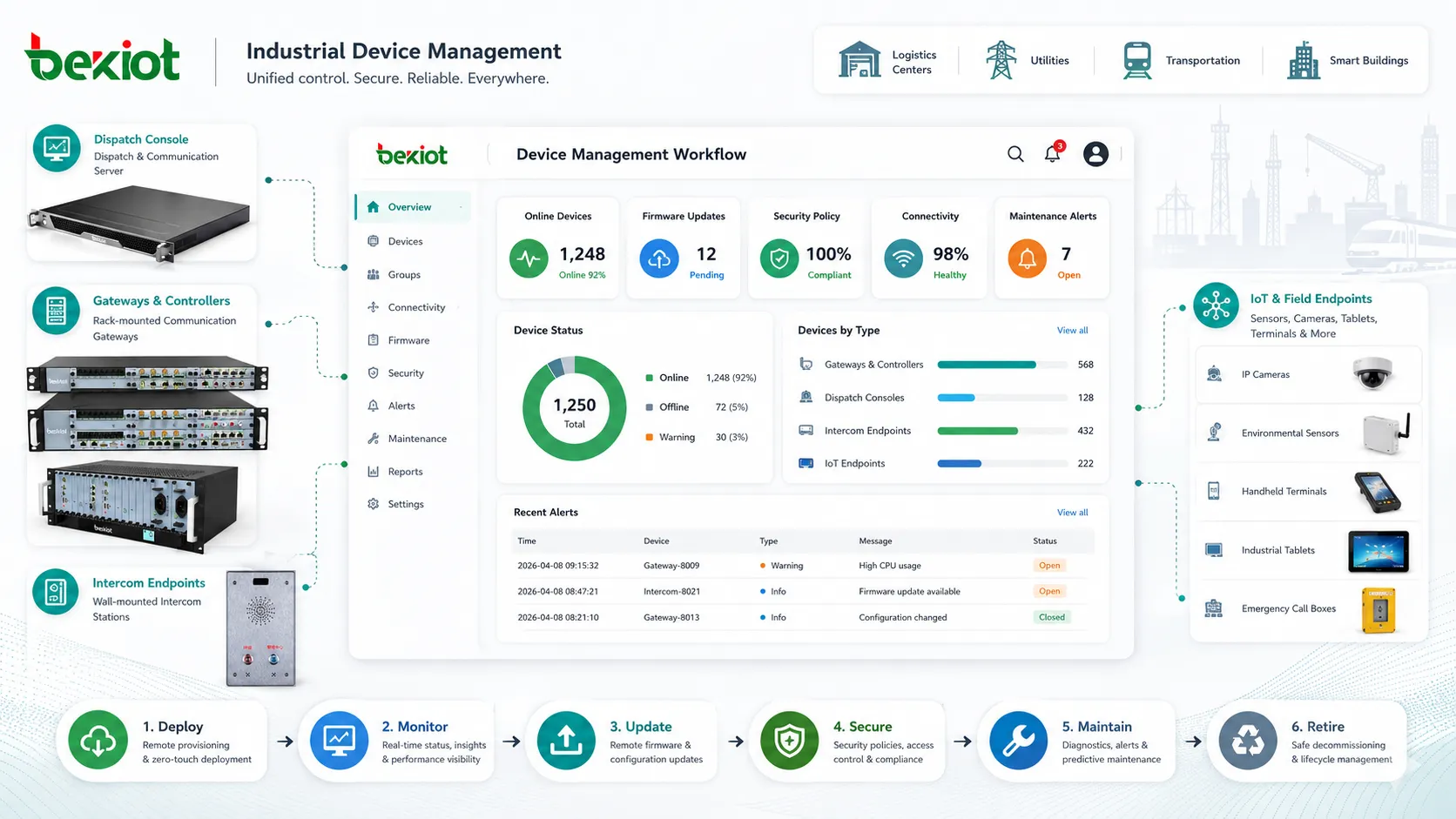
Every device moves through a lifecycle: planning, purchasing, enrollment, deployment, operation, maintenance, repair, reassignment, retirement, and disposal. Device management keeps this lifecycle organized.
Lifecycle tracking helps prevent old devices from remaining active without support. It also helps organizations manage warranty claims, spare parts, replacement cycles, license usage, and secure decommissioning.
Device management works best when it is treated as a lifecycle discipline, not as a one-time installation task.
Deployment Benefits
Faster Rollout
Centralized device management makes deployment faster by reducing repeated manual steps. With templates, bulk enrollment, remote configuration, and automated policy assignment, new devices can be prepared more efficiently.
This is valuable during office expansion, new branch opening, school semester preparation, hospital department upgrades, factory line deployment, warehouse digitization, or enterprise-wide hardware refresh projects.
Fewer Configuration Errors
Manual configuration increases the chance of inconsistent settings. A device may receive the wrong network profile, outdated firmware, weak credentials, incorrect permissions, or missing application settings.
Device management reduces these risks by applying standardized profiles. Consistent configuration improves reliability, simplifies support, and makes troubleshooting easier.
Better Scalability
As the number of devices grows, manual management becomes difficult. A process that works for 20 devices may fail when the environment grows to 500, 5,000, or more. Device management platforms help scale operations without increasing administrative workload at the same rate.
Scalability is not only about device count. It also includes different locations, device types, user groups, operating systems, network segments, ownership models, and security requirements.
Improved User Experience
Users expect devices to work when they receive them. Device management improves the first-use experience by preloading settings, accounts, applications, certificates, and access policies before the device is handed over.
When devices are maintained properly, users also experience fewer interruptions caused by expired credentials, outdated software, failed updates, or inconsistent settings.
Maintenance Tips for Managed Devices
Keep the Inventory Accurate
An outdated inventory weakens the entire management process. Devices should be updated when they are moved, reassigned, repaired, retired, replaced, or returned from users. Inventory data should be reviewed regularly to remove duplicate, inactive, or unknown devices.
Useful maintenance depends on accurate ownership. If nobody is responsible for a device, alerts may be ignored and updates may be delayed.
Use Update Rings
Update rings divide devices into groups for staged rollout. A small pilot group receives updates first, followed by a larger group, then the full production environment. This reduces the risk of widespread problems caused by a faulty update.
Critical devices should be placed into carefully controlled groups. They may need additional testing, backup configuration, or scheduled maintenance windows before updates are applied.
Monitor Configuration Drift
Configuration drift occurs when devices gradually move away from the approved baseline. This may happen because of manual changes, emergency fixes, user modifications, failed updates, or unmanaged local settings.
Regular compliance checks help detect drift. When a device no longer matches its assigned profile, administrators can investigate, approve the change, or restore the correct configuration.
Document Exceptions
Not every device can follow the same policy. Some devices may need special network access, older firmware, unique software, or restricted update schedules. These exceptions should be documented clearly.
Undocumented exceptions create confusion during audits and troubleshooting. They may also become security risks if nobody remembers why a device was configured differently.
Plan Device Retirement
Device retirement should include data backup, account removal, certificate revocation, license recovery, secure wipe, asset record update, and environmentally responsible disposal. Retired devices should not remain connected to the network.
For devices that store sensitive information, secure erasure or physical destruction may be required. The retirement process should match the organization’s security and compliance policies.
Applications of Device Management
Enterprise IT Endpoints
Companies use device management to control laptops, desktops, tablets, smartphones, printers, and shared workstations. This helps IT teams manage software, access policies, operating system updates, encryption, remote support, and endpoint security.
For hybrid work environments, device management is essential because many endpoints operate outside the office network. Administrators still need visibility and control even when users are working from home, traveling, or connecting through different networks.
Network Infrastructure
Routers, switches, wireless access points, firewalls, gateways, and controllers need proper configuration and maintenance. Device management helps network teams monitor uptime, apply firmware updates, back up configurations, track changes, and detect failures.
For distributed networks, centralized management can reduce on-site maintenance. A branch office device can be configured or diagnosed remotely before sending a technician.
Healthcare and Public Services
Hospitals, clinics, public service offices, and emergency support organizations often use many connected devices across departments. These devices may support registration, patient communication, scheduling, access control, imaging, communications, and facility operations.
Device management helps keep these environments organized by tracking device ownership, software status, security posture, and maintenance needs. It also supports operational continuity where device downtime can affect service delivery.
Education and Campus Environments
Schools and universities manage student devices, staff computers, classroom screens, tablets, network equipment, lab systems, printers, and security devices. Device management helps apply consistent policies across classrooms, departments, dormitories, libraries, and administrative offices.
Education environments often experience seasonal changes. Device management supports bulk preparation before a new semester, reassignment after graduation, and policy changes for different student groups.
Industrial, IoT, and Field Devices
Industrial facilities, logistics centers, utilities, transportation systems, and smart buildings may use sensors, gateways, rugged tablets, handheld terminals, cameras, communication devices, and control-related endpoints.
These devices may be deployed in remote, outdoor, mobile, or harsh environments. Device management helps monitor availability, firmware, connectivity, security certificates, and replacement needs without depending entirely on manual site inspection.
Common Challenges
Device Diversity
Modern organizations rarely manage only one type of device. They may have Windows computers, macOS laptops, Android tablets, iOS phones, Linux servers, IP cameras, network appliances, and specialized industrial equipment in the same environment.
Different operating systems, vendors, firmware versions, and management protocols make unified control more difficult. A strong device management strategy should define which devices can be managed centrally and which require specialized tools.
Unmanaged or Shadow Devices
Shadow devices are devices connected to the environment without proper registration or approval. They may include personal devices, test equipment, temporary IoT devices, unmanaged cameras, or old hardware that remains connected after a project ends.
These devices create security and operational risk because administrators may not know they exist. Network discovery, access control, and inventory reconciliation can help reduce this problem.
Update Failures
Updates may fail because of low storage, unstable connectivity, incompatible software, insufficient permissions, power loss, or vendor issues. Failed updates can leave devices vulnerable or unstable.
Administrators should monitor update success rates and keep a rollback or recovery process for important devices. High-risk updates should be tested before broad deployment.
Ownership Confusion
When multiple teams use the same infrastructure, it may be unclear who is responsible for a device. IT may manage the network connection, operations may own the device function, and a vendor may control the firmware.
Clear ownership prevents ignored alerts, delayed repairs, and unmanaged configuration changes. Every important device should have a responsible team or contact.
Security Considerations
Device management and security are closely connected. A device that is unmanaged may miss updates, use weak credentials, run vulnerable firmware, store sensitive data without encryption, or connect to systems it should not access.
Administrators should define minimum security baselines for each device category. These baselines may include encryption, password policy, certificate use, secure boot, firewall rules, remote access restrictions, logging, and approved software lists.
Lost or stolen devices require special attention. Depending on device type, the organization may need remote lock, remote wipe, certificate revocation, SIM deactivation, account reset, or access token removal. These actions should be prepared before incidents happen.
The most difficult device to secure is the one that is connected, active, and useful—but not visible to the management team.
How to Build a Device Management Strategy
A practical strategy should begin with classification. Not all devices require the same management depth. Office laptops, shared tablets, network devices, industrial sensors, and cloud-hosted virtual devices may need different policies and tools.
Next, organizations should define lifecycle rules. These rules should cover purchasing standards, enrollment requirements, naming conventions, ownership, configuration baselines, monitoring thresholds, update schedules, support procedures, and retirement steps.
Integration is also important. Device management may need to connect with identity platforms, endpoint security tools, IT service management systems, network access control, asset management databases, cloud consoles, and compliance reporting tools.
Finally, the strategy should remain flexible. Device environments change as organizations adopt new platforms, remote work models, IoT systems, cloud services, and automation tools. Regular review keeps the management process aligned with current operational needs.
FAQ
Is device management the same as asset management?
No. Asset management focuses on tracking ownership, purchase information, location, cost, and lifecycle status. Device management includes asset visibility but also covers configuration, monitoring, updates, security policies, remote actions, and operational control.
Do small businesses need device management?
Yes, but the scale may be simpler. Even a small business benefits from knowing which devices exist, who uses them, whether they are updated, and how they are secured. The process does not always need a complex platform at the beginning.
What is the risk of unmanaged devices?
Unmanaged devices may contain outdated software, weak passwords, unknown vulnerabilities, incorrect configurations, or unauthorized access to business resources. They also make troubleshooting harder because administrators may not have reliable status information.
How often should devices be reviewed?
High-risk and business-critical devices should be reviewed frequently, especially for updates, security status, and availability. General office devices may be reviewed on a monthly or quarterly basis, depending on the organization’s risk level and support model.
What should be checked before retiring a device?
Before retirement, administrators should back up required data, remove accounts, revoke certificates, recover licenses, wipe storage, update inventory records, remove network access, and confirm whether the device should be recycled, reused, returned, or destroyed.







