


Video integration is the process of connecting video sources, monitoring platforms, communication systems, alarms, access control, analytics engines, storage systems, and command workflows into one coordinated environment. Instead of allowing cameras, recorders, intercoms, security devices, and dispatch platforms to work as isolated tools, video integration enables them to exchange information and support unified response.
In modern buildings, factories, transport hubs, campuses, hospitals, energy sites, retail spaces, smart cities, and emergency command centers, video is no longer used only for passive observation. It becomes a real-time decision resource. When linked with events, maps, calls, alarms, identity systems, and automation rules, video helps operators understand what is happening, where it is happening, and what action should be taken next.
From Standalone Surveillance to Connected Operations
Traditional surveillance systems were often designed around cameras and recording. A camera captured images, a recorder stored video, and operators reviewed footage when needed. This model is useful, but it is limited when fast response is required.
Connected video changes the role of visual information. A camera feed can appear automatically when an emergency button is pressed. A control room can link a door alarm to the nearest camera. A dispatch platform can show live video during a voice call. A facility system can use video analytics to detect intrusion, crowding, smoke, vehicle movement, or abnormal behavior.
This shift reflects a broader industry trend: security, communication, and operation platforms are moving from separate subsystems toward event-driven visual command. Video becomes part of the workflow, not just a background recording resource.
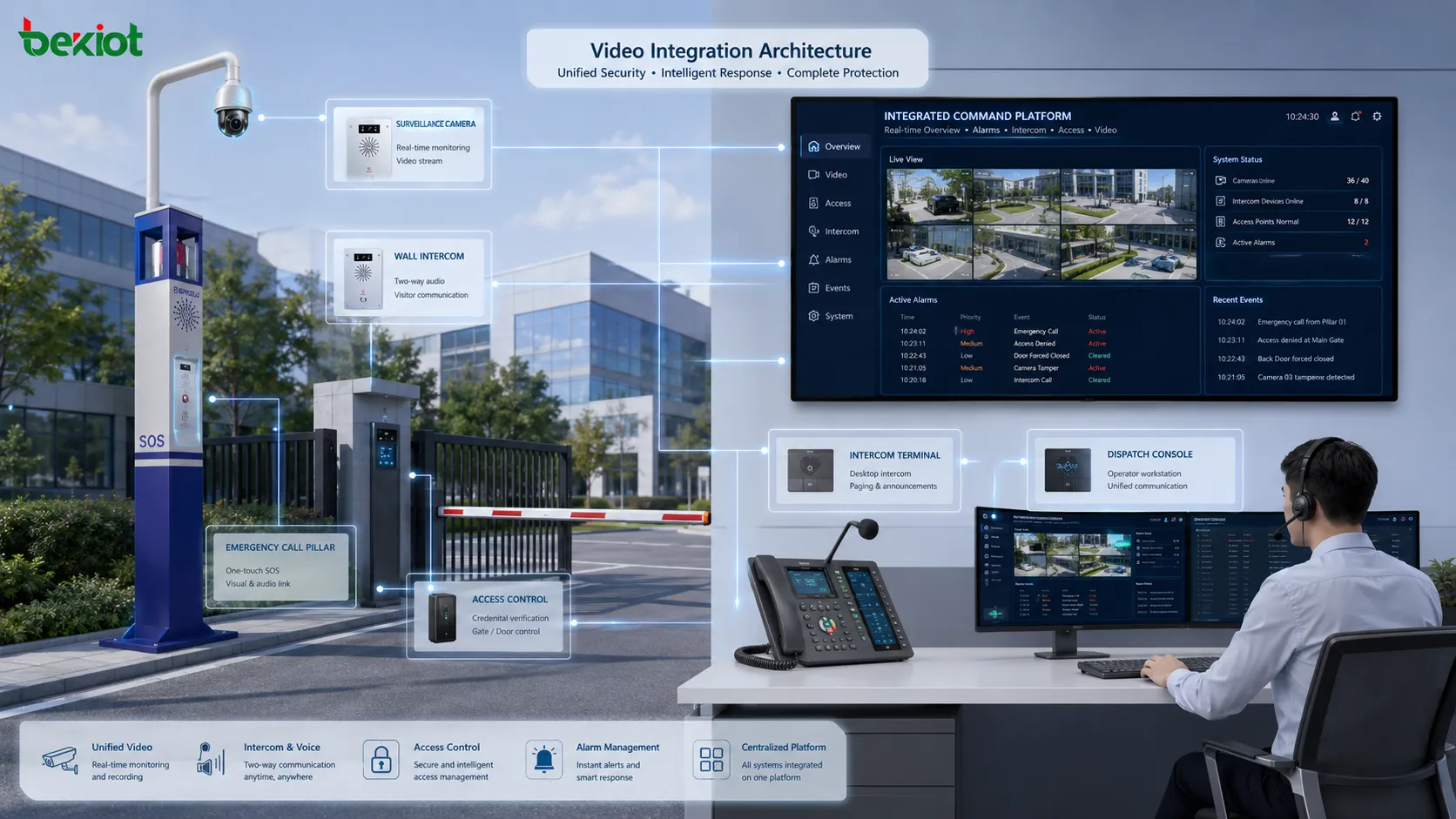
Core Architecture
Video Source Layer
The source layer includes IP cameras, analog cameras through encoders, body cameras, vehicle cameras, drone cameras, video intercoms, thermal cameras, panoramic cameras, and mobile video devices. These devices provide the raw visual stream.
The quality of the source layer affects the whole system. Resolution, frame rate, low-light capability, lens angle, compression format, network stability, and installation position all influence whether the video is useful during real operations.
Transport and Network Layer
Video traffic usually depends on IP networks, fiber links, wireless bridges, private networks, cellular links, or LAN infrastructure. Because video consumes more bandwidth than ordinary signaling, network design is critical.
QoS, VLAN planning, multicast design, uplink capacity, latency, jitter, packet loss, firewall policy, and redundancy should be considered before connecting many cameras to a central platform.
Platform Layer
The platform layer may include video management software, NVR systems, cloud video services, command platforms, security operation centers, dispatch systems, analytics engines, or building management platforms.
This layer indexes cameras, controls permissions, manages recording, receives events, displays live video, retrieves playback, applies analytics, and sends linked actions to other systems.
Application Layer
The application layer is where users interact with the system. It may include a control room screen, mobile app, web dashboard, dispatch console, alarm pop-up panel, GIS map, access control interface, or incident review tool.
A good interface should help operators find the correct video quickly. During an emergency, a user should not need to search through hundreds of camera names manually.
Important Functions
Live Viewing
Live viewing allows operators to see real-time scenes from selected cameras. This is the most basic function, but integration makes it more powerful by connecting live views with events, locations, users, and devices.
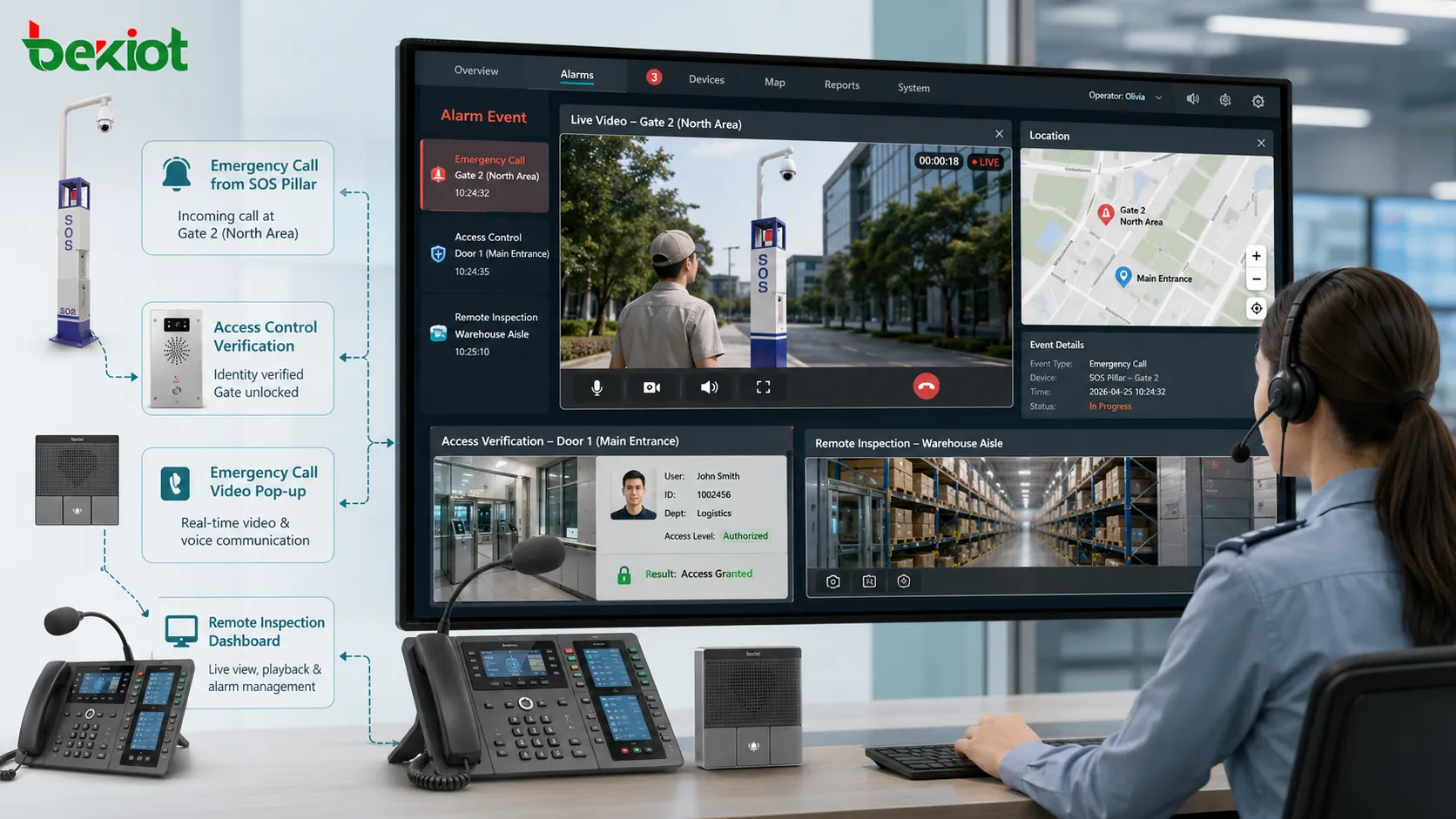
For example, a live image can appear automatically when a gate intercom calls the control room, when a fire alarm is triggered, or when a restricted door is opened.
Event Linkage
Event linkage connects video with non-video systems. A call, alarm, access event, sensor trigger, emergency button, motion detection, or dispatch request can automatically open the related video feed.
This reduces response time because the operator does not need to identify the location and search for the correct camera manually. It also reduces the chance of viewing the wrong area.
Recording and Playback
Recording preserves visual evidence for incident review, training, compliance, investigation, dispute handling, and operational improvement. Integrated systems can associate recordings with alarms, calls, access events, or incident numbers.
Playback should support search by time, device, event type, location, operator action, and alarm record. Without good indexing, stored video may be difficult to use when needed.
Visual Verification
Many alarms require verification. A door contact, smoke sensor, intrusion detector, or emergency call may indicate a problem, but video helps operators confirm what is actually happening.
Visual verification reduces false dispatch, improves response accuracy, and helps operators choose the right action. It is especially useful in large sites, unmanned facilities, and high-risk areas.
Remote Inspection
Video integration supports remote inspection of equipment rooms, entrances, production lines, public spaces, warehouses, and outdoor facilities. Operators can check conditions without traveling to the site immediately.
This improves maintenance efficiency, especially for distributed facilities and locations that are difficult or unsafe to access frequently.
Functional Value by Application Area
| Application Area | Integrated Function | System Value |
|---|---|---|
| Security Operation | Alarm pop-up, live monitoring, playback search | Improves verification speed and incident handling accuracy. |
| Command Center | Video linkage with calls, maps, and dispatch events | Supports visual decision-making during urgent operations. |
| Industrial Site | Remote inspection, safety monitoring, process observation | Reduces blind spots and improves operational awareness. |
| Smart Building | Access control linkage, visitor verification, facility monitoring | Connects security, service, and building management workflows. |
| Retail and Public Venue | Crowd observation, queue analysis, loss prevention | Improves service management and risk control. |
Integration with Communication Systems
One of the most valuable trends is linking video with voice communication. A voice call tells the operator that someone needs communication. Video shows the surrounding scene. When the two are combined, the operator can understand both the spoken request and the visual context.
This is useful for video intercoms, emergency phones, help points, access gates, dispatch centers, industrial control rooms, and public safety systems. When a caller presses an emergency button, the nearby camera can open automatically, and the operator can speak while watching the scene.
Video and communication integration improves response quality. The operator can confirm whether the caller is safe, whether there is a crowd, whether an intruder is present, whether an accident occurred, or whether additional teams should be dispatched.
Integration with Access Control
Access control systems record who enters, exits, unlocks, fails authentication, or triggers a door alarm. When linked with video, these events become easier to verify.
For example, when a door is forced open, the platform can display the nearest camera. When a badge is used at a secure entrance, the system can record both the credential event and the visual scene. When a visitor calls from a gate, the operator can visually confirm identity before opening.
This improves security because access events are not treated as abstract logs. They are connected with real visual evidence.
Integration with Alarms and Sensors
Alarm systems may detect fire, smoke, intrusion, temperature, water leakage, equipment fault, emergency call, or perimeter breach. Video helps determine whether the alarm is real, what is happening, and how serious the situation is.
In large facilities, video linkage can also guide responders to the correct area. Instead of dispatching based only on a sensor label, operators can check live images, review nearby cameras, and follow the event path.
For safety-critical sites, this reduces uncertainty and supports faster command decisions.
Analytics and Intelligent Recognition
Video analytics is becoming a major driver of industry development. Instead of relying only on human observation, systems can detect patterns, objects, movement, or abnormal conditions automatically.
Common analytics functions may include motion detection, line crossing, intrusion detection, people counting, vehicle recognition, license plate recognition, crowd density, smoke detection, object left behind, PPE detection, and behavior analysis.
Analytics should be treated as decision support, not perfect judgment. Lighting, camera angle, weather, obstruction, crowd movement, and model accuracy can affect results. Human verification and clear alarm rules remain important.
Role in Smart City and Public Infrastructure
Smart city projects often connect video with traffic systems, emergency platforms, public safety systems, city management, environmental monitoring, and facility operation centers.
Integrated visual data helps operators monitor roads, public spaces, stations, tunnels, bridges, parks, and municipal facilities. When combined with alarms, maps, and dispatch workflows, it supports faster response to accidents, congestion, crowding, and infrastructure events.
The challenge is scale. Large city systems may include thousands of cameras and many departments. Permission control, data retention, privacy rules, and platform interoperability become critical.
Role in Industrial Digitalization
Industrial sites increasingly use video as part of digital operations. Cameras can support production monitoring, safety supervision, unmanned inspection, equipment room observation, vehicle management, and remote expert support.
When integrated with industrial alarms, access control, communication systems, and maintenance platforms, video helps teams understand field conditions without relying only on voice reports or sensor values.
For hazardous or difficult-to-access areas, this can reduce unnecessary site visits and improve maintenance safety.
Key Technical Considerations
Protocol Compatibility
Different cameras and platforms may use different protocols, stream formats, authentication methods, and control interfaces. Compatibility should be verified before deployment.
Common concerns include RTSP, ONVIF support, SDK access, API integration, stream profiles, PTZ control, and video codec compatibility.
Bandwidth and Storage
Video consumes network and storage resources. Resolution, frame rate, compression, retention time, number of cameras, and recording mode all affect system cost and performance.
Planning should include peak bandwidth, uplink capacity, storage redundancy, backup policy, and archive retrieval speed.
Latency and Real-Time Response
Some use cases can tolerate delay, while others require near real-time viewing. Emergency response, remote control, gate verification, and dispatch linkage need lower latency than ordinary archive review.
Network design, encoding settings, server load, and client performance all affect latency.
Permission and Privacy
Video data may contain sensitive scenes, personal information, workplace activity, license plates, or restricted facility views. Access control is essential.
Organizations should define who can view live video, who can play recordings, who can export evidence, and how long footage is retained.
Common Deployment Mistakes
One mistake is adding cameras without defining workflows. More video does not automatically mean better management. The system must connect cameras with real events and operator actions.
Another mistake is poor camera naming. If operators cannot identify camera location quickly, linkage and search efficiency will suffer.
A third mistake is ignoring network capacity. High-resolution video may overload links if bandwidth planning is weak.
A fourth mistake is treating analytics as error-free. Intelligent detection needs calibration, testing, and false alarm management.
A fifth mistake is not testing multi-system linkage. A camera may work alone, and an alarm may work alone, but the integrated event flow may still fail if rules or interfaces are wrong.
Deployment Planning Method
Start with event scenarios rather than equipment lists. Define what should happen when a door alarm occurs, an emergency call arrives, a vehicle enters, a sensor detects danger, or an operator needs remote inspection.
Next, map each event to the correct camera, platform, operator role, response action, recording rule, and escalation path.
Then test camera placement and stream quality. The best integration rule is useless if the camera angle cannot capture the relevant scene.
After deployment, review logs and operator feedback. If operators still search manually or ignore pop-ups, the workflow may need simplification.
Industry Development Direction
The industry is moving toward visual intelligence, cloud-edge collaboration, open APIs, unified command platforms, and event-driven automation. Video is becoming part of a larger operational data layer.
Future systems may combine video with AI analytics, digital twins, IoT sensors, indoor positioning, drone inspection, mobile command, and predictive maintenance.
However, practical value will still depend on clear workflows, stable infrastructure, accurate camera mapping, and responsible data governance.
Video integration is valuable because it turns visual streams into connected operational evidence, real-time awareness, automated response, and smarter decision support.
FAQ
Can video integration work with existing cameras?
Often yes, but it depends on protocol support, stream format, authentication, network access, and whether the target platform can receive or control the camera.
Does every camera need AI analytics?
No. Analytics should be used where it solves a real problem. Some cameras are only needed for verification, recording, or manual inspection.
Why does live video sometimes open slowly after an alarm?
Delay may come from network latency, stream negotiation, overloaded servers, high-resolution settings, authentication delay, or client device performance.
How should camera names be designed?
Names should include building, floor, area, direction, and function where possible. Clear naming helps operators find the correct view quickly.
What is the biggest risk in integration projects?
The biggest risk is building technical connections without defining operational workflows. Cameras, alarms, and platforms must be linked to real response actions.







