


A company with one office can often solve networking problems by adding a switch, upgrading a router, or adjusting a firewall rule. A company with many locations faces a different challenge: every branch, plant, warehouse, campus, data center, cloud region, and remote access point becomes part of one operating system. If these sites are connected without planning, the result may be fragmented access, duplicated resources, inconsistent security, slow troubleshooting, and unstable collaboration.
Industry lens: the value of a distributed network is no longer limited to basic connectivity. Modern organizations use it to support cloud access, unified communication, remote monitoring, video surveillance, IoT platforms, centralized management, disaster recovery, zero-trust access, and real-time business applications. The question is not only how to connect different places, but how to turn those connections into a controllable and intelligent service foundation.
Fully utilizing this architecture means treating it as a strategic digital platform. Each site should not operate as a separate island. It should share the right resources, follow the right security rules, exchange the right data, and remain resilient when links, devices, or services fail.
From Branch Connectivity to Operational Integration
The earliest purpose of connecting multiple locations was usually simple: allow users in branch offices to reach headquarters systems. This model often used leased lines, VPN tunnels, private WAN links, or point-to-point connections. It solved access problems, but it did not always create flexible digital operations.
Today, the operating environment is more complex. Applications may run in public cloud, private cloud, edge servers, local data centers, or SaaS platforms. Users may work from offices, vehicles, remote homes, field sites, and mobile devices. Security threats may come from the internet, compromised endpoints, misconfigured cloud services, or internal lateral movement.
Because of this shift, a distributed architecture must support more than traffic transport. It must support application performance, identity-based access, centralized policy, segmentation, monitoring, automation, and resilience across all connected sites.
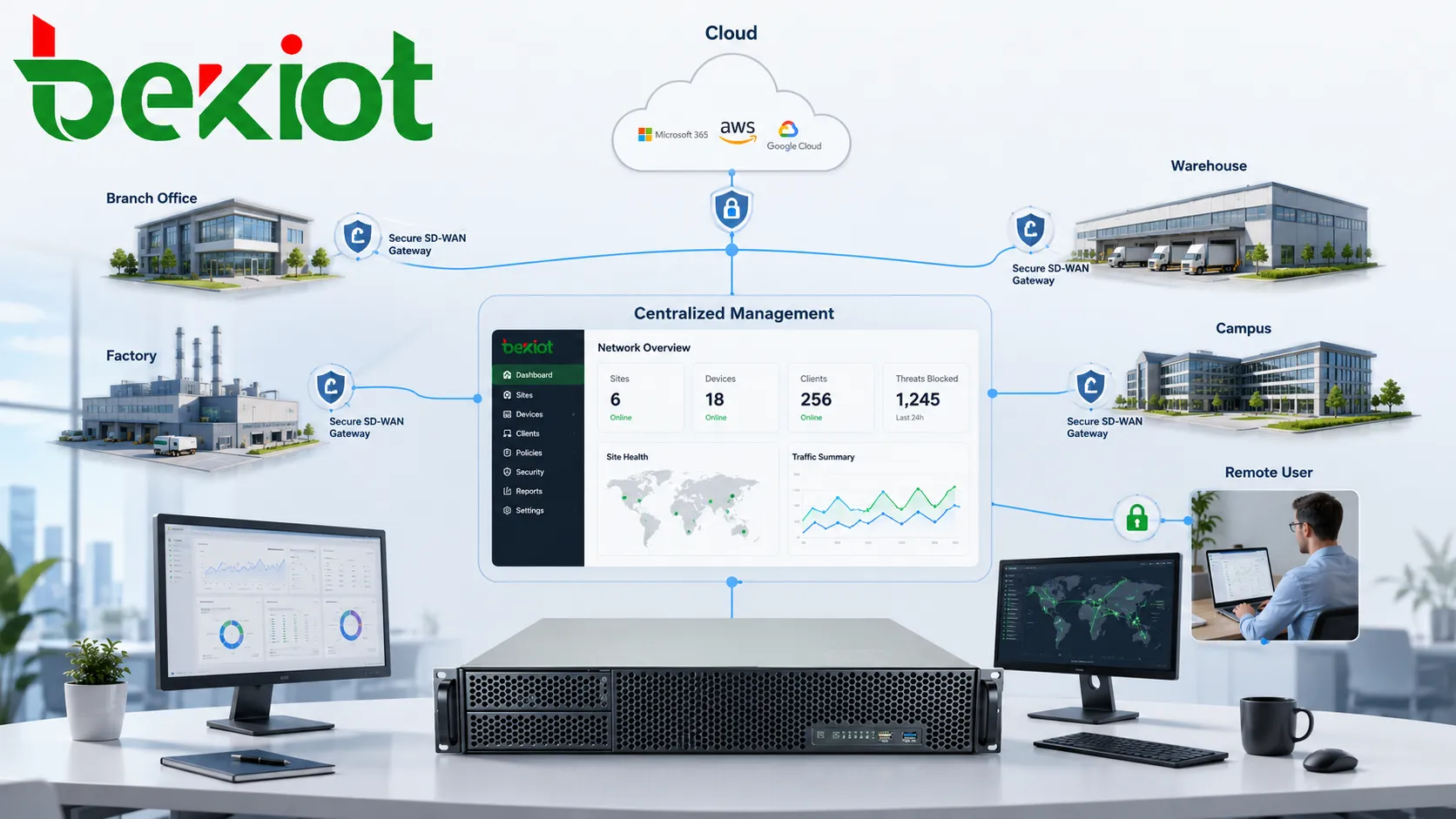
Define the Role of Each Location
Not every location has the same function. A headquarters site may host core business systems, executive teams, data rooms, and central security equipment. A factory may prioritize operational technology, production monitoring, industrial terminals, and local control systems. A warehouse may focus on barcode systems, logistics platforms, cameras, wireless coverage, and handheld devices. A small office may need only secure access to cloud applications and shared voice services.
Before optimization, each site should be classified by business role, application dependency, user count, traffic type, uptime requirement, and security sensitivity. This classification helps determine bandwidth, routing, redundancy, segmentation, device selection, monitoring depth, and support model.
Without this step, organizations may overbuild small sites and underprotect critical sites. A strong design matches the network level to the business importance of each location.
Build a Clear Connectivity Model
A distributed environment may use MPLS, broadband internet, 4G/5G, private fiber, microwave, satellite, VPN, SD-WAN, or hybrid connectivity. Each option has different performance, cost, reliability, and management characteristics.
Traditional private WAN links can provide controlled performance, but they may be expensive and slow to deploy. Internet VPN can be flexible and economical, but performance may vary. SD-WAN can combine multiple links, steer traffic based on application policy, and provide centralized orchestration. Cellular links can provide rapid deployment or backup connectivity. Satellite can cover remote sites where terrestrial links are unavailable.
The best model is often hybrid. Critical sites may use dual links. Small branches may use broadband plus cellular backup. Remote industrial sites may use private fiber or wireless backhaul. Cloud traffic may go directly to cloud platforms rather than hairpinning through headquarters.
Use Centralized Management Without Losing Local Resilience
Centralized management allows administrators to configure, monitor, update, and secure many sites from one platform. This reduces manual configuration errors, improves standardization, and makes large-scale operation more efficient.
However, centralization should not create a single point of failure. A branch should not completely stop working just because it temporarily loses contact with the central controller. Local breakout, cached policy, backup routing, local DHCP, local DNS forwarding, and emergency communication paths may be necessary depending on site importance.
The design goal is balanced control. The organization should manage consistently from the center while allowing sites to continue essential operations during link failures or controller outages.
Segment Traffic by Function and Risk
Segmentation is essential in a distributed architecture. User traffic, voice traffic, video surveillance, guest Wi-Fi, industrial control systems, payment systems, server traffic, management interfaces, and IoT devices should not all share the same security space.
VLANs, VRFs, firewall zones, access control lists, micro-segmentation, zero-trust policies, and software-defined security groups can help separate traffic. The goal is to reduce risk, control access, and prevent one compromised area from affecting the entire organization.
Segmentation should follow business logic. For example, a visitor Wi-Fi user should not reach internal servers. A camera network may need to send video to a storage platform but should not access office devices. Industrial terminals may need strict communication paths to control systems and monitoring servers.
Optimize Application Paths
Application performance is one of the main reasons to modernize multi-location connectivity. Users do not judge the network by link diagrams; they judge it by whether calls are clear, dashboards load quickly, files synchronize, video streams remain stable, and business systems respond without delay.
Application-aware routing can select paths according to latency, packet loss, jitter, bandwidth, and service priority. Voice and video may need lower latency and jitter. Large file transfers may tolerate delay but require bandwidth. Cloud business applications may benefit from direct internet breakout. Sensitive data may need inspection through security gateways.
Traffic engineering should be based on actual application behavior. A generic “all traffic through headquarters” model may become inefficient when most applications are cloud-hosted.
Strengthen Cloud and SaaS Access
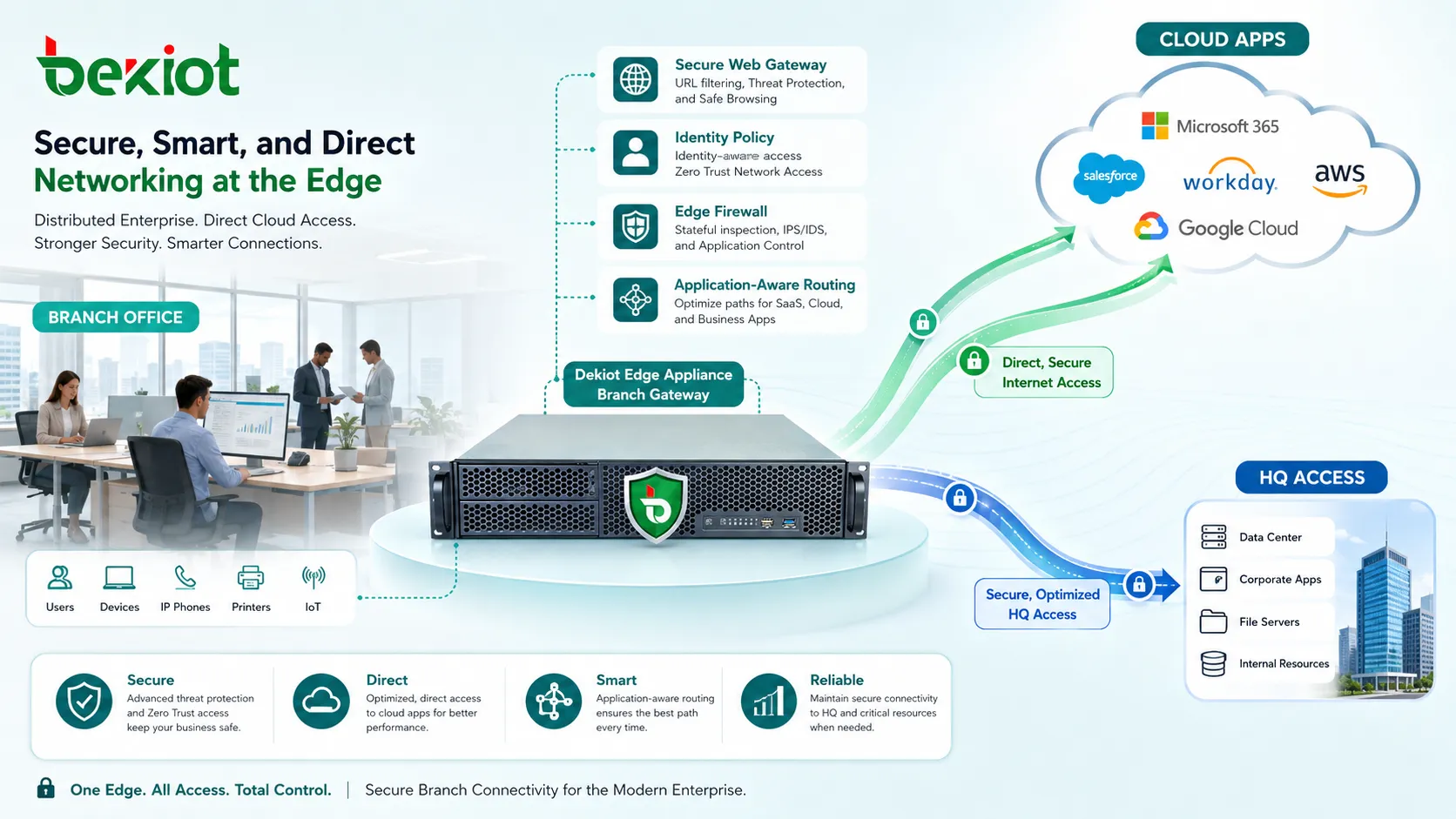
Cloud access has changed network design. Many organizations now use SaaS platforms, public cloud workloads, identity services, cloud storage, remote desktops, and API-driven business systems. If all cloud traffic is forced through a central data center, users may experience unnecessary delay.
Direct cloud access can improve performance, but it must be secured. This may involve secure web gateways, cloud access security broker functions, identity-based policy, DNS security, endpoint posture checks, and encrypted traffic inspection where appropriate.
Cloud connectivity should also be planned for reliability. Critical workloads may need redundant cloud regions, dedicated cloud interconnects, backup internet links, or failover routing policies.
Support Unified Communication Across Sites
Voice, video, messaging, conferencing, intercom, paging, and dispatch systems often depend on the same network foundation. Poor routing, jitter, packet loss, or firewall misconfiguration can quickly affect communication quality.
A well-designed distributed network should classify real-time media traffic, prioritize delay-sensitive streams, ensure NAT traversal where needed, and monitor voice quality indicators. It should also support branch survivability for critical communication if central services are unreachable.
For organizations with many sites, unified communication should be integrated with directory services, numbering plans, emergency routing, recording policy, and security rules. This avoids isolated communication islands and improves coordination during daily operation and incidents.
Enable Video and IoT at Scale
Video surveillance, sensors, access control, environmental monitoring, smart meters, industrial terminals, and IoT devices can create large amounts of traffic. They may also have different security characteristics from ordinary user devices.
To use these systems effectively, the network should define where data is processed. Some video analytics can happen at the edge. Some recordings may be stored locally and synchronized centrally. Some sensor data may be sent to cloud platforms. Not every data stream needs to cross the WAN continuously.
Edge processing reduces bandwidth pressure and improves response time. Central platforms provide visibility and management. The best approach depends on the site, application, data value, and retention requirements.
Use Policy-Based Security
Traditional security often focused on site perimeters. Modern distributed environments require more granular control. A user may access applications from a branch, home office, mobile device, or cloud workspace. A device may move between networks. A service may run in multiple regions.
Policy should be based on identity, device health, location, application, data sensitivity, and risk level. This is where zero-trust principles become useful. Access should be granted according to verified context rather than simply trusting a site because it is inside the WAN.
Policy-based security also improves consistency. Instead of manually configuring every firewall and router differently, organizations can define standard access models and push them across sites.
Design for Failure, Not Just Normal Operation
A distributed system will experience failures. Internet links go down. Power fails. Devices crash. Cloud services may become unreachable. Fiber may be cut. Configuration changes may create unexpected routing behavior. The real test is whether business-critical functions can continue or recover quickly.
Resilience planning should include redundant links, backup power, dual devices, automatic failover, local survivability, out-of-band management, configuration backup, and disaster recovery procedures. Critical sites should have more protection than low-risk sites.
Failover should be tested. A backup link that has never been tested may fail when needed most. Testing should include routing, security policy, voice service, application access, and monitoring alerts.
Improve Visibility With Monitoring and Telemetry
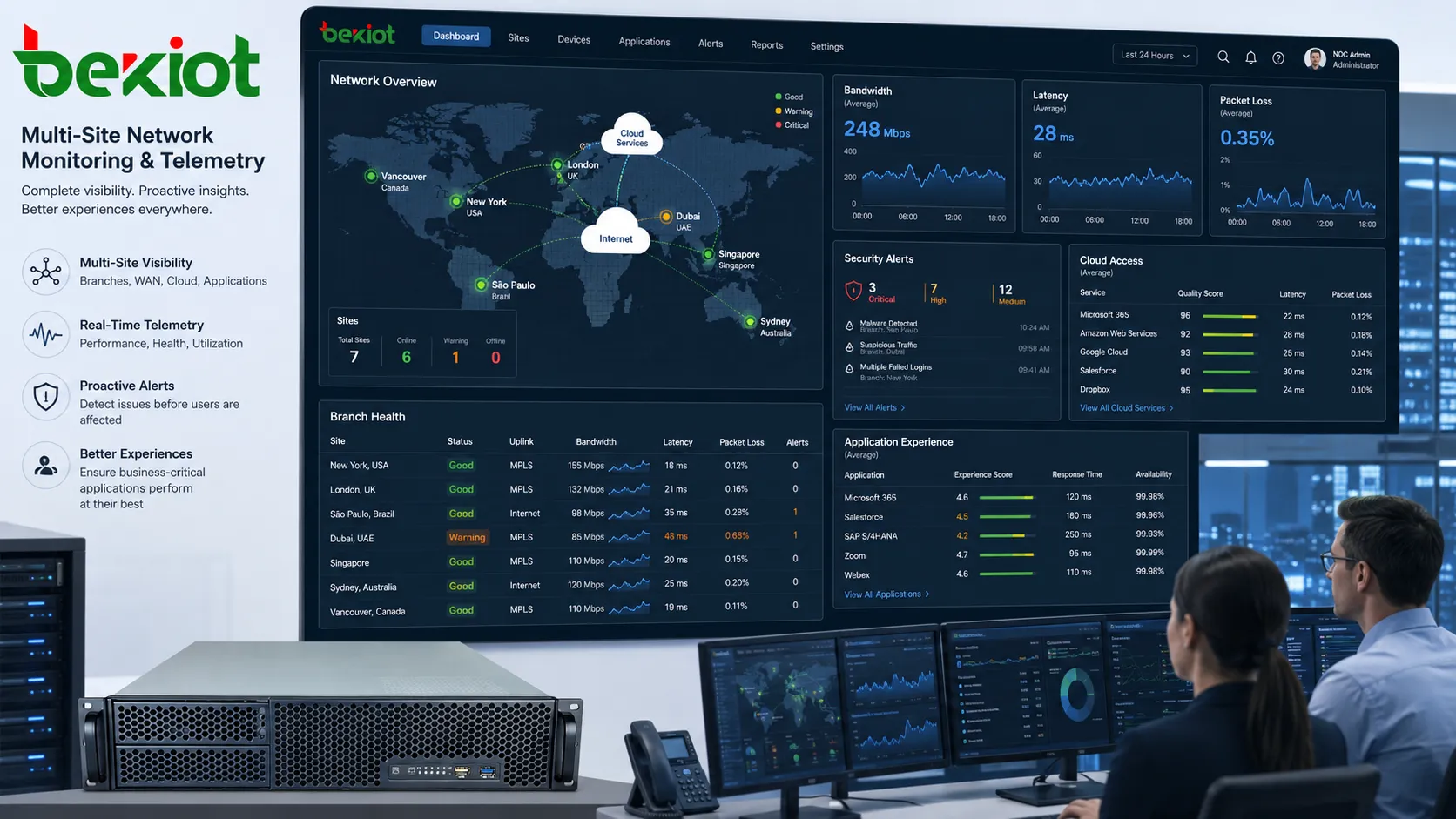
Large distributed environments cannot be managed by manual observation. Administrators need real-time and historical data about link status, bandwidth use, latency, packet loss, device health, application performance, security events, user experience, and configuration changes.
Monitoring should be layered. Device monitoring shows whether equipment is online. Link monitoring shows transport quality. Application monitoring shows whether users can actually complete tasks. Security monitoring shows suspicious behavior. Log analysis shows what changed before an incident.
Good visibility reduces troubleshooting time. Instead of asking whether the problem is “the network,” engineers can see whether it is a DNS issue, WAN congestion, firewall block, cloud service outage, wireless problem, or endpoint failure.
Automate Repetitive Operations
Automation helps reduce repeated manual work. Common automation tasks include device onboarding, configuration templates, policy deployment, firmware updates, certificate renewal, backup configuration, alert response, and compliance checks.
Template-based configuration is especially valuable for new branches. Instead of rebuilding routing, VLANs, VPNs, firewall rules, and monitoring settings manually, administrators can apply a standard profile and adjust only site-specific parameters.
Automation should be controlled through approval, version tracking, testing, and rollback. Fast deployment is useful only when changes are reliable.
Standardize Addressing and Naming
Address planning becomes difficult when many sites grow independently. Overlapping IP ranges, unclear VLAN names, inconsistent DNS records, and undocumented subnets can create routing conflicts and troubleshooting delays.
A central addressing plan should define site codes, IP blocks, VLAN ranges, loopback addresses, management networks, DHCP scopes, and reserved ranges. Naming rules should identify site, device type, function, and role clearly.
Good naming and addressing reduce confusion. They also make automation, monitoring, firewall policy, and documentation easier to maintain.
Plan Wireless and Edge Access Consistently
Many sites rely heavily on Wi-Fi, handheld terminals, mobile devices, barcode scanners, tablets, cameras, sensors, and guest access. Wireless design must be consistent enough to support roaming, security, and management, but flexible enough for local building layout.
Centralized wireless controllers or cloud-managed access points can simplify policy deployment. However, radio frequency planning still requires site surveys, channel design, interference analysis, and capacity planning.
Edge access should also consider physical security. Network ports in public areas, warehouses, and industrial sites should not provide unrestricted internal access.
Connect Operational Technology Carefully
Industrial and building systems often include operational technology such as PLCs, SCADA terminals, sensors, access control, energy systems, and production equipment. These systems may require low latency, stable operation, strict segmentation, and controlled maintenance windows.
Connecting operational networks to enterprise systems can improve monitoring and data analysis, but it can also introduce cyber risk. Access should be controlled through firewalls, gateways, jump hosts, identity checks, and logging.
IT and OT teams should agree on ownership, maintenance procedures, emergency access, and change control. A configuration change that is harmless in an office network may affect production systems if applied carelessly.
Use Local Breakout Strategically
Local internet breakout allows a branch to access cloud and internet services directly instead of sending all traffic through headquarters. This can reduce latency and improve application experience.
The risk is that branch traffic may bypass central security controls. To avoid this, local breakout should be paired with secure web gateways, DNS filtering, endpoint protection, cloud security services, and policy-based inspection.
Not all traffic should break out locally. Sensitive internal applications may still use private paths, while SaaS and low-risk web traffic may use controlled local exit.
Align Network Design With Business Continuity
Business continuity planning should define which services must survive different failure scenarios. A retail branch may need payment processing. A hospital site may need clinical access and emergency communication. A factory may need production monitoring. A warehouse may need scanning and logistics systems.
Once critical functions are identified, the network can provide the right level of redundancy and local survivability. This may include local servers, cached authentication, backup WAN, cellular failover, local voice routing, or emergency procedures.
Business continuity should be tested with real scenarios. A written plan is not enough if users do not know how to operate during a network outage.
Governance and Change Control
Multi-location environments need disciplined governance. A quick firewall change at one site may affect access from another site. A new cloud connection may alter routing. A temporary VPN may become permanent without review.
Change control should include request reason, affected sites, risk level, rollback plan, test method, maintenance window, approval, and documentation update. Emergency changes should be reviewed after the incident.
Governance does not mean slowing everything down. It means making changes safe, traceable, and repeatable.
Cost Optimization
Fully utilizing a distributed architecture also means controlling cost. Some organizations overpay for bandwidth where traffic is low, while underinvesting in critical links. Others maintain old private circuits even after cloud access patterns have changed.
Cost analysis should compare business value, performance need, risk level, and redundancy requirement. A high-cost link may be justified for a critical site but unnecessary for a small office with cloud-only applications.
Monitoring data helps guide decisions. Real bandwidth use, packet loss, application response time, and failover events provide better evidence than assumptions.
Implementation Roadmap
Start with discovery. Map sites, links, devices, applications, users, security zones, cloud services, and operational dependencies. Identify duplicate systems, weak links, unmanaged equipment, and undocumented traffic flows.
Then define target architecture. Decide which sites need redundancy, which traffic should use private paths, which services can use local breakout, how segmentation should work, and how policies will be managed.
Next, implement in stages. Standardize naming and addressing first, improve monitoring, deploy security segmentation, optimize cloud access, introduce automation, and test resilience. Avoid changing every site at once unless the organization has strong rollback capability.
Common Mistakes
One mistake is treating every site the same. Sites have different risks, traffic profiles, and business importance. The architecture should reflect these differences.
Another mistake is focusing only on bandwidth. More bandwidth does not solve routing errors, security gaps, poor Wi-Fi, bad DNS, application latency, or lack of visibility.
A third mistake is allowing local exceptions to grow without control. Temporary routes, unmanaged switches, shadow internet lines, and untracked VPNs can create long-term risk.
A fourth mistake is ignoring user experience. The network may look healthy from device status alone, while users still experience slow applications or poor voice quality.
A fifth mistake is delaying documentation. In a distributed environment, undocumented design becomes a future outage risk.
Industry Trend Outlook
Distributed networks are moving toward cloud-managed control, SD-WAN, SASE, zero-trust access, edge computing, AI-assisted monitoring, and stronger integration between networking and security. The boundary between WAN, cloud access, identity, and threat protection is becoming less separate.
At the same time, organizations are adding more connected devices and real-time services. Video, voice, sensors, industrial telemetry, and remote operations are increasing pressure on network design.
The most successful direction is not simply adding more tools. It is building a coherent operating model where connectivity, security, monitoring, automation, and business workflow support each other.
A multi-site network is fully utilized when it becomes a managed digital foundation that connects locations, secures access, optimizes applications, supports resilience, and gives administrators clear visibility across the entire organization.
FAQ
Why do different branches experience different network quality?
Each branch may use different access links, Wi-Fi environments, routing paths, equipment models, cloud distances, and local traffic loads. Monitoring should compare site-level conditions rather than assuming one common cause.
Should all traffic return to headquarters?
Not always. Cloud and SaaS traffic may perform better through controlled local breakout, while sensitive internal traffic may still require private routing or central inspection.
How can small sites be protected without complex equipment?
Use standardized templates, managed firewalls, secure cloud gateways, endpoint protection, DNS filtering, strong authentication, and centralized monitoring. Complexity should match site risk.
Why is segmentation important across locations?
Segmentation limits unnecessary access between users, devices, servers, IoT systems, and operational networks. It reduces the impact of compromise and improves policy control.
What should be checked before adding a new branch?
Review bandwidth needs, application access, IP addressing, security zones, Wi-Fi design, redundancy requirement, cloud access, monitoring integration, naming rules, and support responsibility.







