


DNS often works silently in the background, but almost every connected service depends on it. A website, mail server, API, certificate, cloud platform, VoIP service, or internal tool may fail simply because one record, TTL value, delegation, or resolver setting is wrong.
This article explains correct DNS use as an infrastructure management discipline. It covers naming planning, resolution flow, record selection, TTL strategy, public and internal zones, authoritative service reliability, secure resolvers, email authentication, migration planning, monitoring, subdomain cleanup, DNSSEC, load-balancing limits, reverse lookup, and troubleshooting methods.
Start With Clear Naming Planning
Before creating records, the organization should define how domains and subdomains will be used. A simple domain may support a website and email, but growing systems often require many names for applications, APIs, regions, testing environments, customer portals, support systems, monitoring services, remote access, and internal tools.
A good naming plan should be readable, predictable, and maintainable. Names such as api.example.com, status.example.com, mail.example.com, and vpn.example.com are easier to understand than random or temporary names that become permanent by accident.
Planning also prevents conflicts. If development, testing, staging, and production environments are mixed without naming rules, teams may update the wrong record or expose a non-production service. A stable naming structure improves both operation and security.
Understand the Resolution Path
When a client looks up a domain name, the query may pass through several layers. The client may first check local cache, then ask a recursive resolver. The resolver may ask root servers, top-level domain servers, and authoritative name servers until it finds the correct answer. The result is then returned to the client and often cached for a period of time.
This layered process explains why DNS changes are not always instant. Old answers can remain in resolver caches until their TTL expires. Some applications and operating systems also cache results locally. When troubleshooting, administrators must consider where the old answer may still be stored.
Correct use therefore requires understanding both the authoritative side and the resolver side. Updating the authoritative record is only one part of the process. The change must also propagate through caches and clients before all users see the new result.

Choose the Right Record Type
Different record types serve different purposes. Using the wrong type can make services unreliable or difficult to manage. Administrators should understand what each common record does before making changes.
| Record Type | Main Purpose | Typical Use |
|---|---|---|
| A | Maps a name to an IPv4 address | Website, server, application endpoint |
| AAAA | Maps a name to an IPv6 address | IPv6-enabled services and dual-stack networks |
| CNAME | Creates an alias to another canonical name | Cloud service mapping, hosted platforms, CDN aliases |
| MX | Defines mail exchange servers | Email receiving and mail routing |
| TXT | Stores text-based verification or policy data | SPF, DKIM, DMARC, domain verification |
| SRV | Locates services by protocol, priority, and port | VoIP, messaging, directory and service discovery |
| NS | Delegates a zone to name servers | Authoritative server configuration |
| CAA | Controls which certificate authorities may issue certificates | TLS certificate security policy |
Record selection should follow service requirements. For example, a mail domain needs MX records and email authentication records. A website may need A, AAAA, or CNAME records depending on hosting architecture. A SIP or VoIP deployment may require SRV records for service discovery. A TLS-secured domain may benefit from CAA records.
Avoid Common Alias Mistakes
CNAME records are useful, but they must be used carefully. A CNAME points one name to another name, not directly to an IP address. This is helpful when a cloud provider or CDN controls the target address and may change it over time.
However, a name that uses CNAME should not normally have other record types at the same name. For example, mixing CNAME with MX or TXT at the same label can create conflicts. The root domain, sometimes called the zone apex, also has special limitations because it usually needs NS and SOA records and may not support ordinary CNAME usage in standard DNS.
Some providers offer alias, ANAME, or flattened CNAME-style features to solve apex-domain hosting needs. These are provider-specific conveniences and should be documented clearly so future administrators understand how the record behaves.
Manage TTL With Operational Intent
TTL, or time to live, controls how long a resolver can cache a DNS response. A long TTL reduces repeated lookups and can improve efficiency, but it also makes changes slower. A short TTL allows faster changeover, but it increases query volume and may create unnecessary resolver traffic.
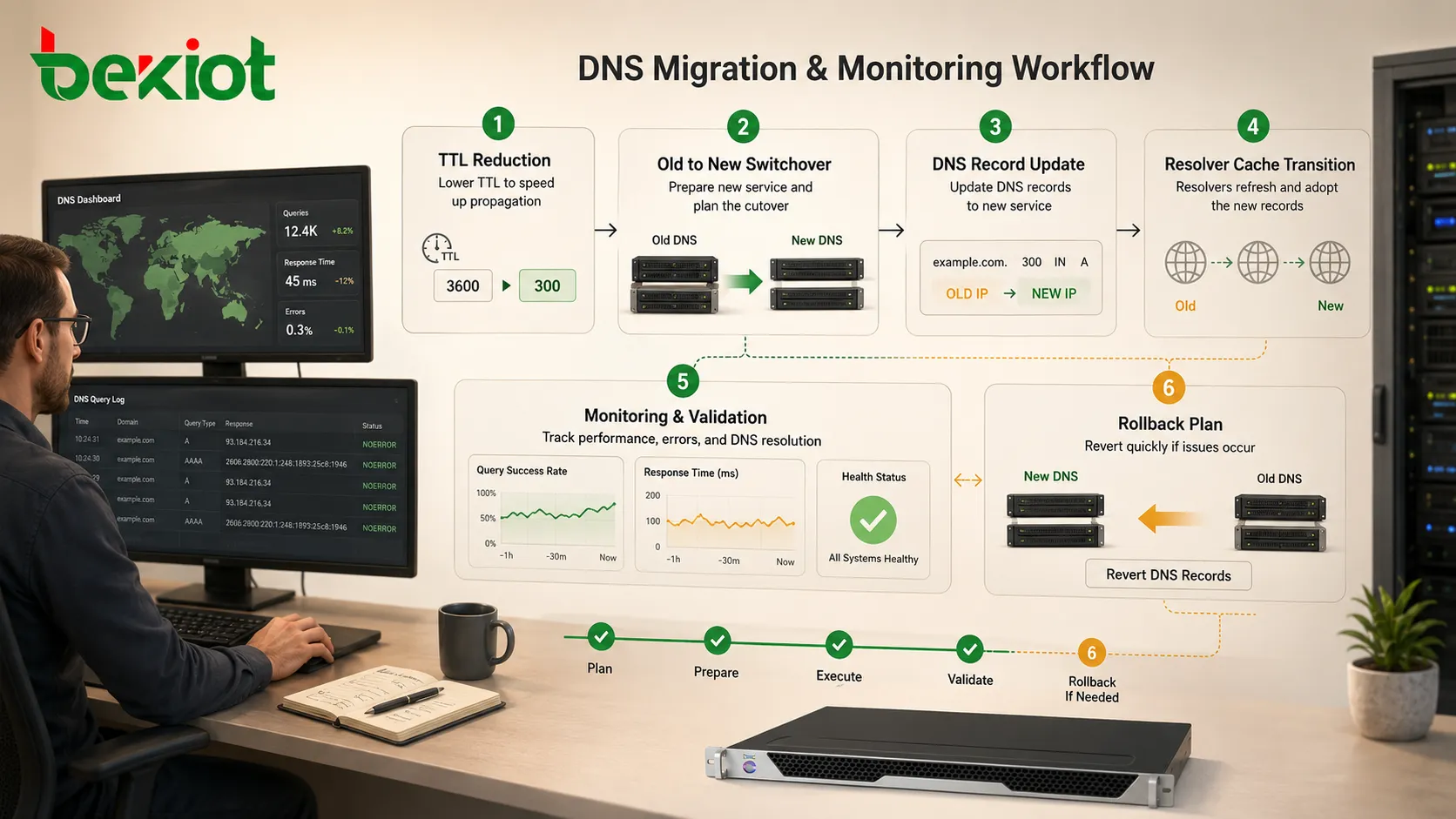
For stable records, a moderate or long TTL may be appropriate. For records that may change during migration, failover, or testing, administrators often reduce TTL before the change window. After the change is complete and verified, TTL can be raised again.
Timing matters. Lowering TTL at the moment of migration may not help users who already cached the old value with the previous long TTL. The TTL should be reduced sufficiently ahead of the planned change.
Separate Public and Internal Names Carefully
Many organizations use both public DNS and internal DNS. Public zones provide records visible to the internet, while internal zones may provide private addresses, internal applications, service discovery, and administrative systems.
Separation must be clear. Accidentally publishing internal records can reveal private hostnames, architecture details, service names, or security-sensitive information. On the other hand, failing to provide internal resolution can break local applications or remote access.
Some environments use split-horizon DNS, where the same name returns different answers depending on where the query comes from. This can be useful, but it requires careful documentation because troubleshooting becomes more complex when internal and external users receive different answers.
Build Reliable Authoritative Service
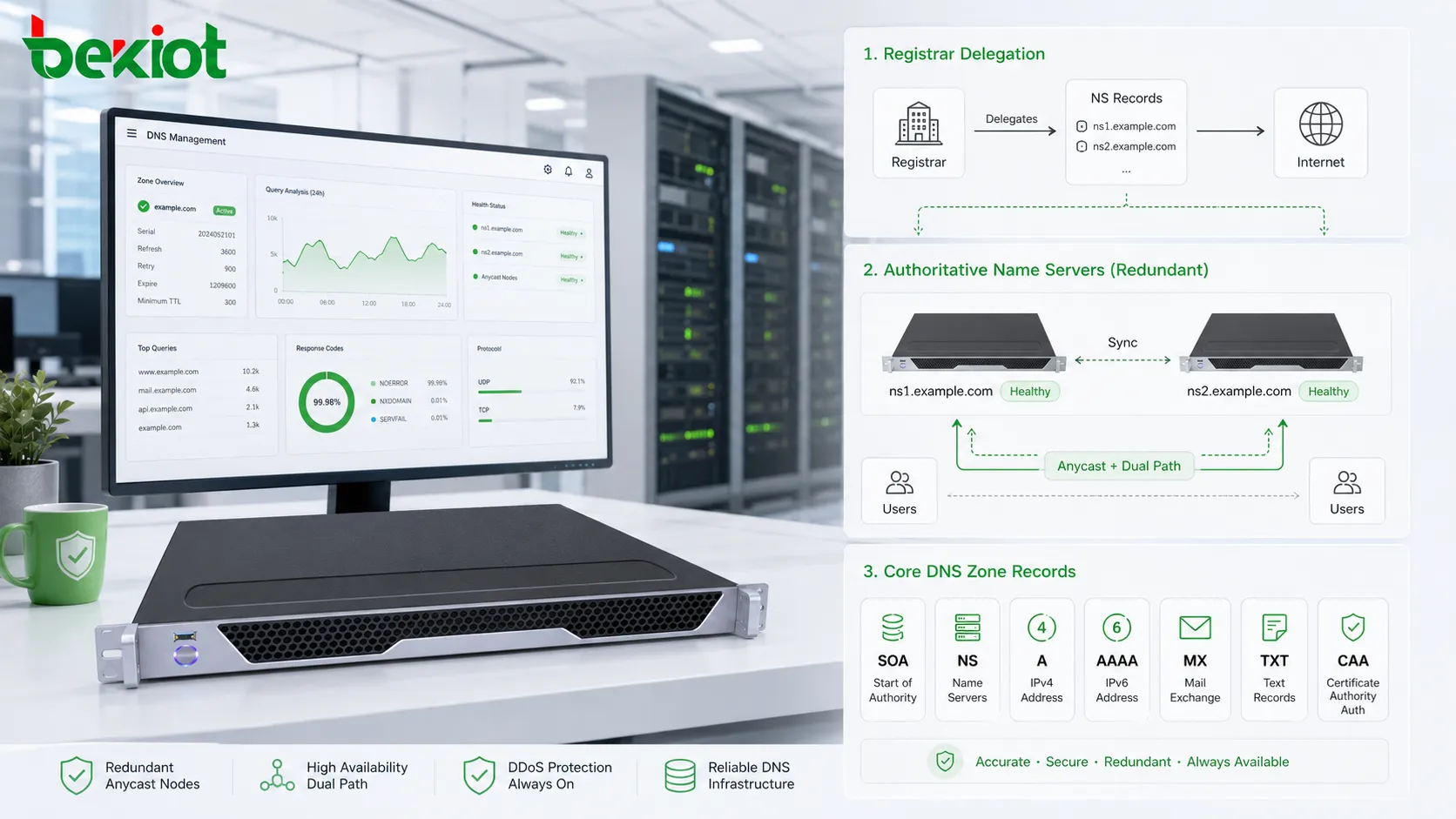
Authoritative name servers hold the official answers for a domain zone. If these servers are unavailable or incorrectly configured, users may not be able to resolve the domain. Reliability should therefore be planned from the beginning.
Domains should normally use multiple authoritative name servers, preferably distributed across different networks and locations. Registrar configuration should match the actual zone configuration. Name server changes should be tested carefully because errors at this layer can affect the entire domain.
Administrators should also monitor authoritative response health. A website server may be online, but users cannot reach it if the name servers fail to answer correctly.
Use Secure Recursive Resolvers
A recursive resolver performs lookups on behalf of clients. Organizations may use ISP resolvers, public resolvers, enterprise resolvers, local caching resolvers, or security-filtering resolvers. The choice affects performance, privacy, filtering, logging, and security policy.
Enterprise environments should define approved resolvers rather than allowing every client or device to use random external DNS services. Central resolver policy makes it easier to enforce filtering, detect suspicious domains, apply logging rules, and troubleshoot name resolution problems.
Where appropriate, encrypted resolver protocols such as DNS over TLS or DNS over HTTPS can protect resolver queries from passive observation on untrusted networks. However, they should be implemented according to the organization’s monitoring and security requirements.
Protect Domains Against Abuse
Domain security is a major part of correct DNS use. Attackers may target domain registrar accounts, change records, hijack name servers, spoof email, poison caches, or create lookalike domains. A small configuration weakness can affect websites, email, authentication, and brand trust.
Important controls include registrar account protection, multi-factor authentication, role-based access, change approval, DNSSEC where appropriate, registry lock for critical domains, careful API key handling, and monitoring for unauthorized record changes.
Administrative access should be limited. Not every developer, marketer, vendor, or contractor needs full domain control. Permission design should reflect operational need and risk.
Plan Email Records Correctly
Email depends heavily on DNS. MX records tell the internet where mail should be delivered. SPF records indicate which servers are authorized to send mail for a domain. DKIM records publish public keys for message signing. DMARC records define policy and reporting for authentication alignment.
If these records are missing or incorrect, email may be rejected, marked as spam, spoofed by attackers, or delivered inconsistently. Correct configuration improves deliverability and helps protect the domain from impersonation.
Email-related TXT records should be maintained carefully. Duplicate SPF records, incorrect include mechanisms, oversized policies, missing DKIM keys, or overly strict DMARC policies introduced too quickly can cause delivery problems.
Understand Propagation and Cache Behavior
DNS propagation is often misunderstood. There is no single global switch that instantly updates every resolver. Instead, each resolver follows caching rules based on TTL and its own behavior. Some applications also cache results independently.
After a change, some users may reach the new service while others still reach the old service. This is normal during transition periods. Administrators should plan migrations so both old and new targets can handle traffic during overlap when possible.
For critical migrations, test from multiple networks and resolvers. Check authoritative answers, public resolver results, local resolver behavior, and application-level connectivity.
Use Monitoring and Change Records
DNS should be monitored like other infrastructure. Useful checks include domain expiration, name server availability, record correctness, certificate-related records, email authentication records, DNSSEC health, query anomalies, and unauthorized changes.
Change records are equally important. Every modification should include who changed it, when it changed, why it changed, what service it affects, and how to roll it back. Without change history, troubleshooting becomes slower and riskier.
For organizations with many domains, a centralized inventory helps prevent forgotten subdomains, expired domains, abandoned cloud records, and unmanaged vendor entries.
Handle Service Migration Safely
Service migration may involve moving a website, application, API, mail server, CDN, or cloud endpoint. DNS changes are often part of the process, but they should not be treated as the only task.
Before migration, reduce TTL if faster switchover is required. Verify the new target service. Confirm certificates, firewall rules, application routing, email acceptance, and logging. Prepare rollback records. Keep the old service available during the transition if possible.
After migration, monitor both old and new endpoints. Some users may continue reaching the old address until caches expire. Removing the old service too quickly can cause partial outages.
Use Subdomains for Service Boundaries
Subdomains help separate services and responsibilities. For example, website, API, mail, documentation, status page, authentication, and regional services can use different names. This makes records easier to manage and reduces confusion.
Subdomain delegation can also assign responsibility to another team or provider. For example, a vendor-managed platform may receive control over a specific subdomain rather than the entire domain. This limits risk while allowing integration.
However, delegated subdomains should be reviewed regularly. Forgotten delegations can become security risks if vendor services are discontinued or ownership becomes unclear.
Prevent Subdomain Takeover
Subdomain takeover can occur when a DNS record points to an external service that is no longer claimed or configured. An attacker may register the abandoned resource and take control of content under the trusted subdomain.
This is common when cloud storage, app hosting, CDN, SaaS platforms, or temporary environments are removed without cleaning up DNS records. The record remains, but the resource behind it is no longer owned by the organization.
To prevent this, administrators should audit CNAME and alias records, remove unused entries, verify external service ownership, and include DNS cleanup in decommissioning procedures.
Apply DNSSEC With Understanding
DNSSEC adds cryptographic validation to DNS responses. It can help protect against certain spoofing and cache poisoning attacks by allowing resolvers to verify that responses are authentic and not modified.
However, DNSSEC must be configured correctly. Broken signatures, expired keys, incorrect DS records, or poor rollover planning can make a domain fail validation for users whose resolvers enforce DNSSEC checks.
Organizations should deploy it with proper key management, monitoring, registrar coordination, and rollback planning. It is a useful security layer, but not a replacement for registrar protection, access control, or application security.
Understand Load Balancing Limits
DNS can be used for simple traffic distribution by returning multiple addresses or region-specific answers. It can support failover and routing strategies when combined with health checks and provider logic.
However, DNS is not a full real-time load balancer. Caching can delay traffic shifts. Some resolvers may not follow expected ordering. Clients may reuse cached answers. A failed server may still receive traffic until caches expire unless the design accounts for this behavior.
For high-availability applications, DNS-based steering should be combined with application load balancers, health checks, CDN services, or multi-region architecture where appropriate.
Use Reverse Lookup When Needed
Reverse DNS maps an IP address back to a name. It is often important for mail servers, logging, security analysis, and network operations. Some receiving mail systems check whether sending IP addresses have proper reverse records.
Reverse records are usually managed by the organization that controls the IP address block, such as an ISP, hosting provider, or enterprise network team. They are not always configured in the same place as the public domain zone.
Administrators should ensure that reverse names are consistent with service identity where required, especially for mail and infrastructure systems.
Document Ownership and Responsibility
Many DNS problems are not caused by lack of technical knowledge, but by unclear ownership. A domain may be registered by one team, hosted by another, used by a third, and integrated with vendors. When something breaks, no one is sure who can change records.
Each domain and important subdomain should have an owner, technical contact, business contact, registrar account owner, DNS provider, renewal responsibility, and emergency change procedure.
Documentation should also include record purpose. A record such as verify-abc123.example.com may be obvious when created but meaningless one year later. Clear notes reduce accidental deletion and cleanup mistakes.
Common Configuration Mistakes
One common mistake is creating duplicate or conflicting records. Another is setting a very long TTL before a migration. A third is leaving old records pointing to retired servers or external services. A fourth is editing the wrong DNS zone because internal and external zones have similar names.
Email mistakes are also frequent. These include multiple SPF records, missing DKIM records, DMARC policies that are too strict too early, and MX records pointing to inactive mail systems.
Security mistakes include weak registrar accounts, shared administrator passwords, unrestricted API tokens, unmonitored changes, and forgotten vendor delegations.
Troubleshooting Method
When a name resolution problem occurs, start by identifying the exact name, record type, expected answer, and affected users. Then query the authoritative name servers directly to see the official current answer.
Next, compare results from recursive resolvers. If authoritative servers return the correct answer but public resolvers return old data, caching may be the reason. If authoritative servers return the wrong answer, the zone record itself may be incorrect.
Also check local cache, application cache, split-horizon behavior, firewall rules, certificate configuration, and service health. A DNS lookup may succeed while the application still fails for another reason.
Best-Practice Checklist
Use clear subdomain naming and avoid temporary names that become permanent without review. Select the right record type for each service. Keep authoritative name servers reliable and monitored. Manage TTL according to change plans. Protect registrar and DNS provider accounts. Configure email authentication records correctly.
Audit records regularly. Remove unused entries. Track external aliases. Monitor domain expiration. Document ownership. Test changes before and after implementation. Prepare rollback records for critical services.
Most importantly, treat DNS as a controlled infrastructure system. Small casual edits can have wide service impact.
Correct DNS use depends on planning, accurate records, secure administration, cache-aware changes, monitoring, and documented ownership rather than one-time domain setup.
FAQ
Why does a domain work on one network but not another?
Different resolvers may have different cached answers, filtering policies, split-horizon views, or connectivity paths. Compare authoritative answers with several recursive resolver results.
Can a domain point to more than one IP address?
Yes. A name can return multiple A or AAAA records, but client behavior and resolver caching may vary. For reliable traffic control, use proper load balancing or provider-based steering.
Why does email fail after changing website records?
Website records and mail records are separate, but changes can still affect email if MX, SPF, DKIM, DMARC, or root-domain records are accidentally modified.
How long should TTL be?
There is no universal value. Stable services can use longer TTLs, while planned migrations often need shorter TTLs prepared in advance. The value should match operational intent.
Is deleting unknown records safe?
No. Unknown records may support verification, email, certificates, vendors, or internal systems. Investigate ownership and purpose before deletion.







