


A Simple Audio Connection Used Everywhere
Unbalanced audio is an audio signal connection method that carries sound through a signal conductor and a shared ground or shield. It is widely used in consumer audio devices, desktop speakers, media players, guitars, keyboards, laptops, RCA outputs, 3.5mm audio jacks, short patch cables, small mixers, home studios, and many simple audio systems.
The main reason unbalanced audio is common is simplicity. It is easy to wire, inexpensive to implement, and suitable for short-distance connections where electrical noise is not a major problem. However, because the signal and ground are not separated in the same way as balanced audio, unbalanced connections are more vulnerable to hum, buzz, interference, and signal degradation over longer cable runs.
Unbalanced audio is practical and widely used, but it works best when the cable is short, the environment is electrically clean, and the connected devices share a stable grounding condition.
Basic Meaning of Unbalanced Audio
Unbalanced audio describes an analog audio connection where the audio signal travels on one conductor and returns through a ground or shield path. The shield often also helps reduce external noise, but it cannot cancel interference as effectively as a balanced connection.
In daily use, many familiar audio ports are unbalanced. RCA connectors on home audio equipment, TS guitar cables, 3.5mm stereo headphone-style outputs, and many AUX connections are commonly unbalanced. They are suitable for simple playback, instrument connection, short patching, and low-cost audio systems.
One Signal Path and One Ground Path
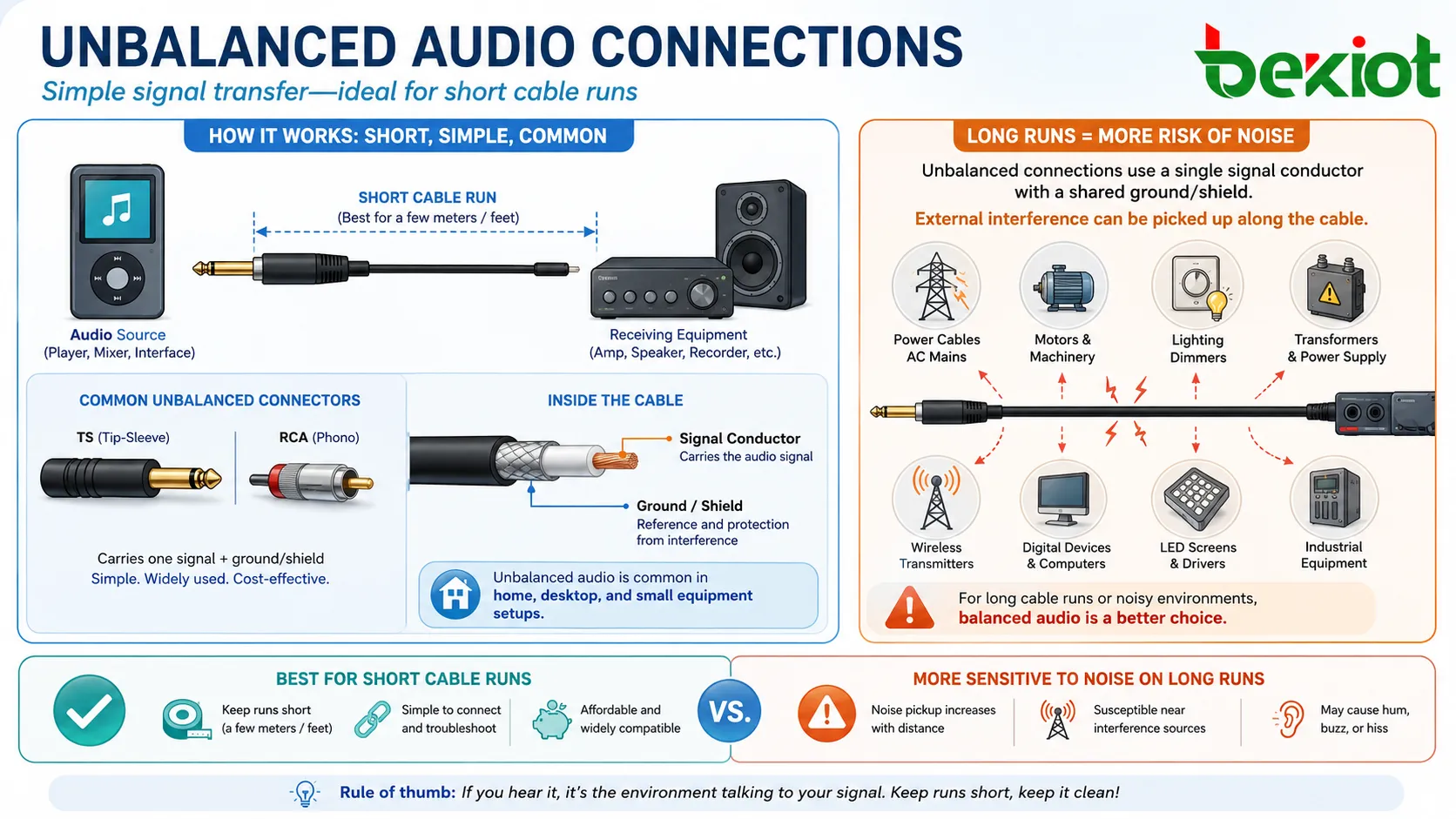
An unbalanced connection usually uses one active signal path and one ground reference. In a mono TS cable, the tip carries the signal and the sleeve carries ground. In an RCA cable, the center pin carries the signal and the outer ring carries ground.
Because the signal uses the ground as a reference, any noise entering the ground path can become part of the audio. This is why unbalanced audio can produce hum or buzz when cables are too long, shielding is poor, or devices are connected to different power grounds.
Short-Distance Audio Transfer
Unbalanced audio is best suited for short cable runs. In many home, desktop, and small equipment setups, the distance between devices is only a few meters, so unbalanced audio can work very well.
When the cable becomes long or passes near power cables, motors, lighting dimmers, transformers, wireless transmitters, or industrial equipment, noise pickup becomes more likely. In those cases, balanced audio may be a better choice.
How Unbalanced Audio Works
Unbalanced audio works by sending an analog voltage signal from an output device to an input device. The receiving device reads the voltage difference between the signal conductor and the ground reference. That changing voltage represents the audio waveform.
The connection is straightforward, but the signal path is exposed to several practical problems. The cable shield may reduce interference, but it also acts as the ground reference. If unwanted electrical noise enters that path, the receiving device may reproduce it as hum, buzz, hiss, or radio-frequency interference.
Signal Transmission
The source device creates an audio signal, such as music from a media player, instrument sound from a guitar, or line-level output from a mixer. The signal travels through the cable to the receiving input.
The input device may be an amplifier, powered speaker, audio interface, recorder, mixer, pedal, or processor. If the signal level and impedance are suitable, the receiving device amplifies, records, or processes the audio normally.
Shield and Ground Role
The shield helps protect the signal conductor from external electromagnetic interference. At the same time, it normally serves as the ground or return path. This dual role is simple and cost-effective, but it is also the reason unbalanced audio is more noise-sensitive.
In a clean environment with a short cable, this design can perform well. In a complex electrical environment, the ground path may carry unwanted noise from nearby equipment or power systems.
Noise Pickup
Noise pickup happens when the cable acts like an antenna or when the ground path carries unwanted electrical energy. This can produce hum from power systems, buzz from dimmers, clicks from switching devices, or interference from radio-frequency sources.
Long unbalanced cables are more likely to collect noise because they expose the signal path over a greater distance. Cable quality, shielding, routing, and grounding all affect the result.
Common Connector Types
Unbalanced audio can use several connector types. The connector shape alone does not always prove whether a signal is balanced or unbalanced, but some connectors are commonly associated with unbalanced audio.
RCA Connectors
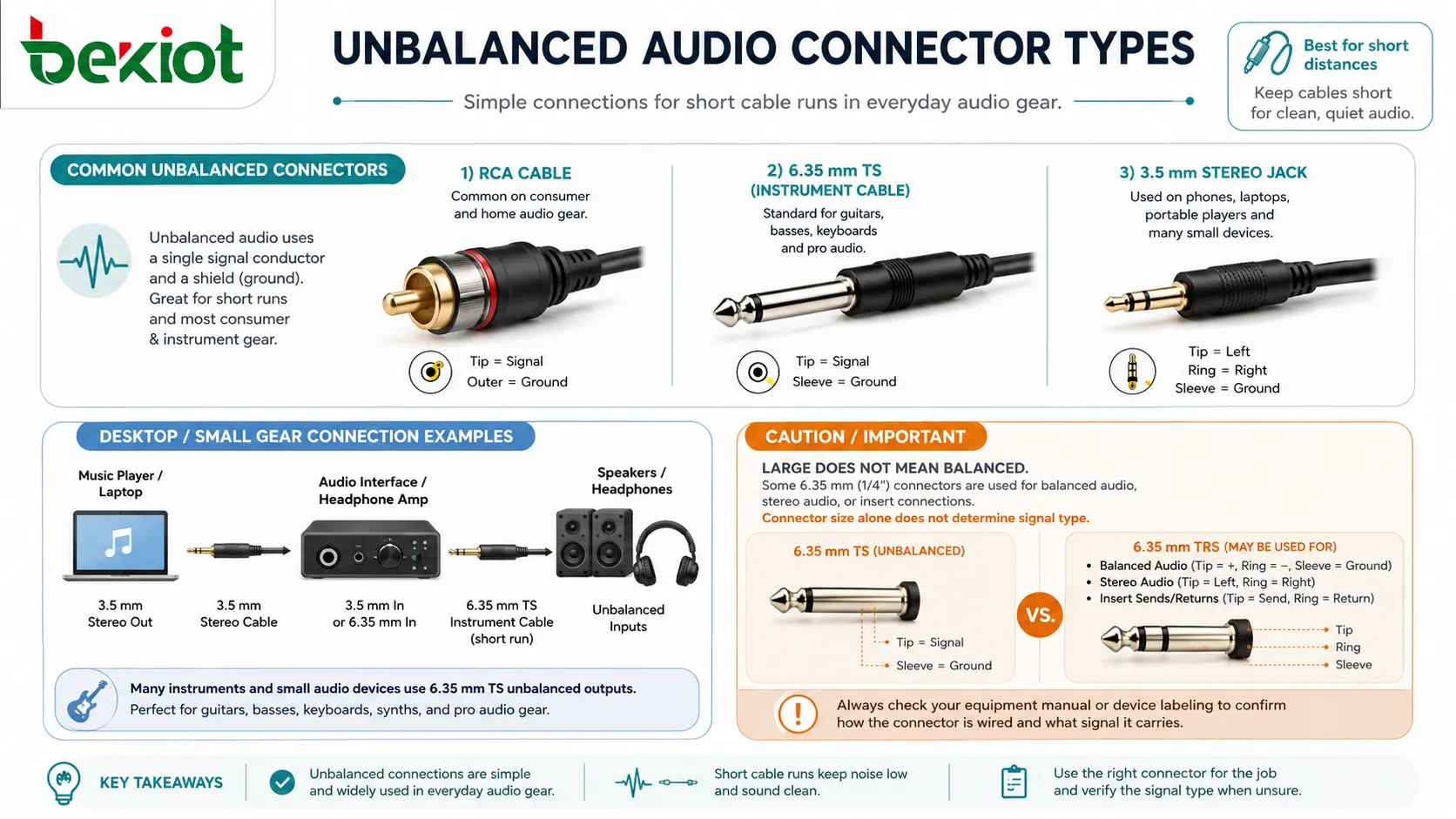
RCA connectors are widely used in home audio, media players, turntables, amplifiers, televisions, DJ equipment, and consumer playback systems. They usually carry unbalanced line-level audio.
RCA connections are simple and convenient. A stereo connection normally uses two RCA cables or plugs: one for left channel and one for right channel.
TS Connectors
TS connectors have tip and sleeve contacts. They are common on electric guitars, bass guitars, keyboards, instrument pedals, patch cables, and some audio outputs. TS cables are normally unbalanced.
Because instrument-level signals can be relatively weak and high-impedance, long TS cable runs can become noisy. Guitar and instrument systems often keep cables short or use DI boxes when longer transmission is needed.
3.5mm Audio Jacks
3.5mm audio jacks are common on laptops, phones, tablets, small speakers, headphones, car AUX inputs, and consumer devices. A stereo 3.5mm output is usually unbalanced, carrying left signal, right signal, and common ground.
These connections are convenient for personal and desktop use, but they are not ideal for long-distance professional audio routing.
6.35mm Instrument Outputs
Many instruments and small audio devices use 6.35mm TS unbalanced outputs. Some devices may use 6.35mm TRS connectors for balanced audio, stereo audio, or insert connections, so the equipment manual should be checked.
This is a common source of confusion. A large quarter-inch connector is not automatically balanced. The wiring and device design determine the signal type.
Unbalanced Audio vs Balanced Audio
Unbalanced and balanced audio are both used to transfer analog audio signals, but they handle noise differently. Unbalanced audio uses a signal conductor and ground. Balanced audio uses two signal conductors with opposite polarity plus a shield or ground, allowing the receiving input to reject common noise.
This makes balanced audio better for long cable runs and professional environments. Unbalanced audio remains useful for short, simple, and low-cost connections.
| Item | Unbalanced Audio | Balanced Audio |
|---|---|---|
| Signal conductors | One signal conductor plus ground or shield | Two signal conductors plus shield or ground |
| Noise rejection | Limited noise rejection | Strong common-mode noise rejection |
| Typical cable length | Best for short runs | Suitable for longer runs |
| Common connectors | RCA, TS, 3.5mm AUX | XLR, TRS, balanced terminal block |
| Typical use | Consumer audio, guitars, desktop systems, short patching | Professional audio, stage systems, studios, installed sound |
| Main advantage | Simple, low-cost, widely compatible | Cleaner transmission over distance and noisy environments |
Why Balanced Audio Rejects Noise Better
Balanced audio sends the same signal in two opposite electrical forms. Any noise picked up along the cable tends to affect both conductors similarly. The receiving input subtracts one signal from the other, which cancels much of the shared noise.
Unbalanced audio does not have this same cancellation mechanism. It depends more on shielding, short cable length, and clean grounding conditions.
Why Unbalanced Audio Still Exists
Unbalanced audio remains popular because it is simple, inexpensive, and good enough for many everyday systems. A short RCA cable between a media player and amplifier can perform well. A short guitar cable between an instrument and pedal may be practical. A short 3.5mm cable from a laptop to desktop speakers is easy and effective.
Not every system needs the complexity of balanced audio. The key is knowing when unbalanced audio is suitable and when it becomes a risk.
Benefits of Unbalanced Audio
Although balanced audio is often preferred in professional environments, unbalanced audio has real advantages. It is not a “bad” format; it is a simple format with clear use limits.
Simple Connection
Unbalanced audio is easy to connect. Most users can plug an RCA, TS, or 3.5mm cable into compatible devices without special configuration. This makes it practical for consumer devices, small studios, musical instruments, and desktop systems.
Simple wiring also makes troubleshooting easier in small setups. If there is no sound, users can usually check the cable, port, volume, and input selection quickly.
Low Cost
Unbalanced ports and cables are usually cheaper than balanced alternatives. They require fewer conductors and simpler input/output circuitry. This keeps costs low for mass-market devices.
For short-distance connections, the cost advantage can be meaningful without sacrificing much performance.
Wide Compatibility
Unbalanced audio is supported by many devices. Home amplifiers, powered speakers, laptops, televisions, musical instruments, DJ controllers, media players, and small recorders often include unbalanced connections.
This wide compatibility makes it easy to connect equipment from different categories, especially in home, desktop, and semi-professional environments.
Useful for Instruments
Electric guitars, bass guitars, and many keyboards commonly use unbalanced outputs. Pedalboards and instrument amplifiers are also designed around these connections.
For instrument setups, cable choice and cable length matter. Short, high-quality instrument cables help reduce noise and preserve tone.
Limitations and Risks
Unbalanced audio has limitations that should be understood before use in larger or more demanding systems. Most problems are related to noise, cable length, grounding, and level mismatch.
Noise Susceptibility
Unbalanced cables are more likely to pick up noise from power cables, transformers, lighting systems, dimmers, motors, wireless devices, and other electrical equipment.
The problem becomes more noticeable when the cable is long, the signal is weak, or the environment is electrically noisy. Keeping cables short and properly routed helps reduce the risk.
Ground Loops
A ground loop can occur when connected devices have different ground paths. This may create hum or buzz, often heard as a low-frequency noise through speakers.
Ground loops are common when audio equipment is connected to different power outlets or when consumer devices connect to professional systems. Balanced audio, isolation transformers, proper power distribution, and correct grounding practices can help.
Limited Cable Distance
Unbalanced audio is not ideal for long cable runs. There is no single maximum distance that applies to every system, but shorter is generally better. Long unbalanced cables increase the chance of noise and high-frequency loss.
For installed systems, stage runs, conference rooms, and facility audio routing, balanced audio is usually preferred for longer distances.
Level and Impedance Mismatch
Some unbalanced sources operate at consumer line level, while professional inputs may expect a different level. Instrument outputs also differ from line outputs. If levels are mismatched, the sound may be too quiet, noisy, or distorted.
Matching the source output and receiving input is important. A DI box, line-level converter, audio interface, or mixer may be needed in some systems.
Common Applications
Unbalanced audio is used in many everyday and professional-adjacent applications. It is most effective when the connection is short, the environment is controlled, and the signal path is simple.
Home Audio Systems
Home audio systems often use RCA unbalanced connections between media players, amplifiers, turntables, televisions, and powered speakers. The cable runs are usually short, so performance can be reliable.
For home listening, unbalanced audio is often sufficient. Problems usually appear when cables are very long, equipment grounds are different, or low-quality cables are used near power sources.
Desktop and Computer Audio
Laptops and desktop computers commonly use 3.5mm unbalanced audio outputs. These outputs can connect to headphones, powered speakers, small mixers, or recording devices.
Computer audio may produce noise if the device’s internal audio circuit is poor or if USB power noise and grounding issues are present. External audio interfaces can improve quality in more demanding setups.
Musical Instruments
Electric guitars, bass guitars, some keyboards, and instrument pedals commonly use unbalanced TS connections. This format is deeply established in instrument systems.
For longer runs from stage to mixer, a DI box is often used. It converts the unbalanced instrument signal into a balanced signal that travels better over distance.
Small Mixers and Portable Equipment
Small mixers, portable recorders, DJ controllers, media players, and compact audio devices may include unbalanced outputs or inputs. These are useful for quick setups and short patching.
When connecting portable devices to professional systems, level matching and noise control should be checked carefully.
Consumer Playback and AUX Connections
AUX connections in cars, small speakers, televisions, and portable players are usually unbalanced. They are convenient for casual playback and personal use.
Because these systems are often short-distance and low-cost, unbalanced audio is a practical choice. The main concern is cable quality and connector reliability.
Short Patch Connections
Unbalanced cables may be used inside a rack or on a desktop when devices are very close together. Short patching reduces noise risk and keeps wiring simple.
If hum or buzz appears, cable routing, power grounding, and device compatibility should be checked before replacing equipment.

Setup and Wiring Considerations
Good setup practices can make unbalanced audio much more reliable. Many noise problems are caused not by the format itself, but by poor cable choice, long cable runs, wrong routing, or mismatched devices.
Keep Cables Short
Short cables reduce the chance of noise pickup. For desktop, instrument, or home audio setups, use the shortest practical cable length rather than leaving long coils of cable near power supplies or other equipment.
Long cable coils can act like antennas and increase interference. Neat cable routing helps preserve signal quality.
Separate Audio and Power Cables
Unbalanced audio cables should be kept away from power cables, lighting dimmers, transformers, motors, and switching power supplies. If audio and power cables must cross, crossing at a right angle can reduce interference.
This is especially important in racks, studios, stages, workshops, and equipment rooms where many cables run together.
Use Good Shielded Cables
A good unbalanced cable should have proper shielding, reliable connectors, and suitable construction for the application. Instrument cables, RCA cables, and 3.5mm cables are not all built the same.
Poor shielding can allow buzz and radio interference. Weak connectors can cause crackling, intermittent sound, or channel loss.
Avoid Unnecessary Adapters
Adapters can be useful, but too many adapters create weak points. Each adapter may add contact resistance, looseness, wiring mismatch, or channel confusion.
Use the correct cable type whenever possible. If conversion is needed, use a proper interface, DI box, or audio converter rather than a random chain of adapters.
Check Mono and Stereo Wiring
Unbalanced audio may be mono or stereo. A TS cable carries mono unbalanced audio. A 3.5mm TRS cable may carry stereo unbalanced audio. RCA stereo usually uses separate left and right cables.
Connecting stereo outputs to mono inputs incorrectly can cause missing sound, weak center content, or phase cancellation. Use proper summing methods when needed.
Troubleshooting Unbalanced Audio Problems
When unbalanced audio has problems, the cause is usually in the signal path, cable, grounding, level matching, or device selection. A step-by-step check is better than changing many settings at once.
Hum or Buzz
Hum or buzz often comes from ground loops, nearby power cables, dimmers, transformers, or poor shielding. Try shortening the cable, moving it away from power wiring, using the same power source for connected devices, or using an isolation transformer where appropriate.
Do not remove protective earth connections as a quick fix. Electrical safety should always come before noise reduction.
Weak Signal
A weak signal may come from connecting an instrument-level output to a line input, using the wrong input type, low source volume, bad cable, or impedance mismatch.
Check whether the source is instrument level, consumer line level, or professional line level. A preamp, DI box, mixer, or audio interface may be needed to raise the signal correctly.
Distortion
Distortion can happen when a strong signal is connected to an input that is too sensitive. For example, a line-level output connected to a microphone input may overload the input.
Reduce the output level, use the correct input mode, or insert an attenuator if needed. Watch for clipping indicators on mixers, interfaces, and recorders.
Crackling or Intermittent Sound
Crackling may be caused by loose connectors, worn jacks, dirty contacts, damaged cables, or strain on the plug. Move the cable gently while listening to identify intermittent faults.
Replacing a cable is often the fastest test. If the problem remains, the device jack or internal connection may need service.
One Channel Missing
One missing channel often comes from a stereo cable issue, wrong adapter, damaged RCA plug, incorrect left/right connection, software balance setting, or mono input mismatch.
Test left and right channels separately. Swap cables to see whether the problem follows the cable or stays with the device.
Best Practices for Better Results
Unbalanced audio can work very well when used correctly. The key is to respect its limits and design the connection around short distance, clean routing, and proper level matching.
Use Unbalanced Audio Where It Fits
Use unbalanced audio for short runs, consumer devices, desktop audio, instrument connections, and simple systems. It is often the most practical choice in these cases.
For long runs, stage-to-console connections, installed audio, large conference rooms, or electrically noisy environments, consider balanced audio instead.
Convert Properly When Needed
When an unbalanced signal must travel a long distance or connect to professional balanced equipment, use a DI box, line isolator, balancing interface, or audio converter.
Proper conversion helps reduce noise and protects signal quality. It also makes the connection more compatible with professional inputs.
Label Cables and Ports
In racks, studios, classrooms, and equipment rooms, label unbalanced connections clearly. RCA, TS, TRS, headphone, line, and speaker connections may look similar to non-technical users.
Labeling prevents wrong connections and makes troubleshooting faster.
Test Under Real Conditions
A connection that sounds clean during setup may become noisy when lights, motors, computers, or other equipment are turned on. Test the system under normal operating conditions.
This is especially important for events, studios, classrooms, small venues, and facilities where electrical loads change during use.
Keep a Spare Cable
Unbalanced audio problems are often cable-related. Keeping a known good spare cable helps identify faults quickly.
This simple practice can save time during live events, recordings, presentations, or troubleshooting sessions.
FAQ
Can unbalanced audio be converted to balanced audio?
Yes. A DI box, line-level balancing converter, isolation transformer, or audio interface can convert an unbalanced signal to balanced. This is useful for long cable runs or professional audio inputs.
Is RCA always unbalanced?
In most common audio applications, RCA is used for unbalanced audio. Some special equipment may use RCA differently, but ordinary home audio RCA connections should be treated as unbalanced.
Why does my unbalanced cable hum when connected to two powered devices?
The hum may come from a ground loop between the two devices. It can also come from poor shielding or nearby electrical interference. Proper grounding, shorter cables, balanced conversion, or isolation may help.
How long can an unbalanced audio cable be?
There is no universal limit, but shorter is better. Many systems work well with short runs of a few meters. Longer runs increase noise risk, especially in electrically noisy environments.
Is a TRS connector always balanced?
No. TRS connectors can be used for balanced mono audio, stereo unbalanced audio, insert cables, or other wiring formats. The device specification determines how the connector is used.
Should electric guitars use balanced cables?
Most electric guitars use unbalanced high-impedance outputs and standard TS instrument cables. For long runs to a mixer, a DI box is commonly used to convert the signal to balanced audio.







