


When Systems Need a Clear and Consistent Voice
Pre-recorded voice prompts are spoken audio messages recorded in advance and played by a system when a specific event, command, call flow, alarm, or user action occurs. They are commonly used in IVR systems, call centers, public address platforms, emergency notification systems, elevators, access control points, transport announcements, smart devices, industrial equipment, and customer service workflows.
Instead of generating every message live, the system plays an approved recording. This makes the voice output predictable, professional, easy to recognize, and consistent across repeated use. In environments where users must understand instructions quickly, a well-designed pre-recorded prompt can be more reliable than improvised speech or unclear system tones.
A pre-recorded voice prompt is not only an audio file. It is a prepared communication element that guides users, confirms actions, warns people, or supports automated service workflows.
Basic Meaning of Pre-Recorded Voice Prompts
A pre-recorded voice prompt is an audio message created before it is needed. The message may be recorded by a professional voice actor, internal staff member, announcer, safety officer, customer service team, or synthetic voice system that is later reviewed and approved. Once stored in the system, it can be played automatically or manually according to defined rules.
These prompts can be short, such as “Please enter your extension,” or longer, such as evacuation instructions, service announcements, product guidance, or after-hours customer messages. The purpose is to deliver spoken information without requiring a live person to repeat the same message every time.
Recorded Voice vs Live Voice
Live voice is spoken in real time by an operator, agent, dispatcher, receptionist, or announcer. It is flexible and can respond to unexpected situations. Pre-recorded voice is fixed, controlled, and repeatable. It is better when the message must remain consistent.
For example, an IVR menu should not sound different every day. An evacuation instruction should not depend on whether the operator speaks clearly under stress. A device prompt should use the same voice and wording every time the user performs the same action.
Voice Prompt vs Alert Tone
An alert tone attracts attention, but it does not explain what happened. A voice prompt can provide meaning. It can tell users what to do, where to go, what option to select, or what condition has occurred.
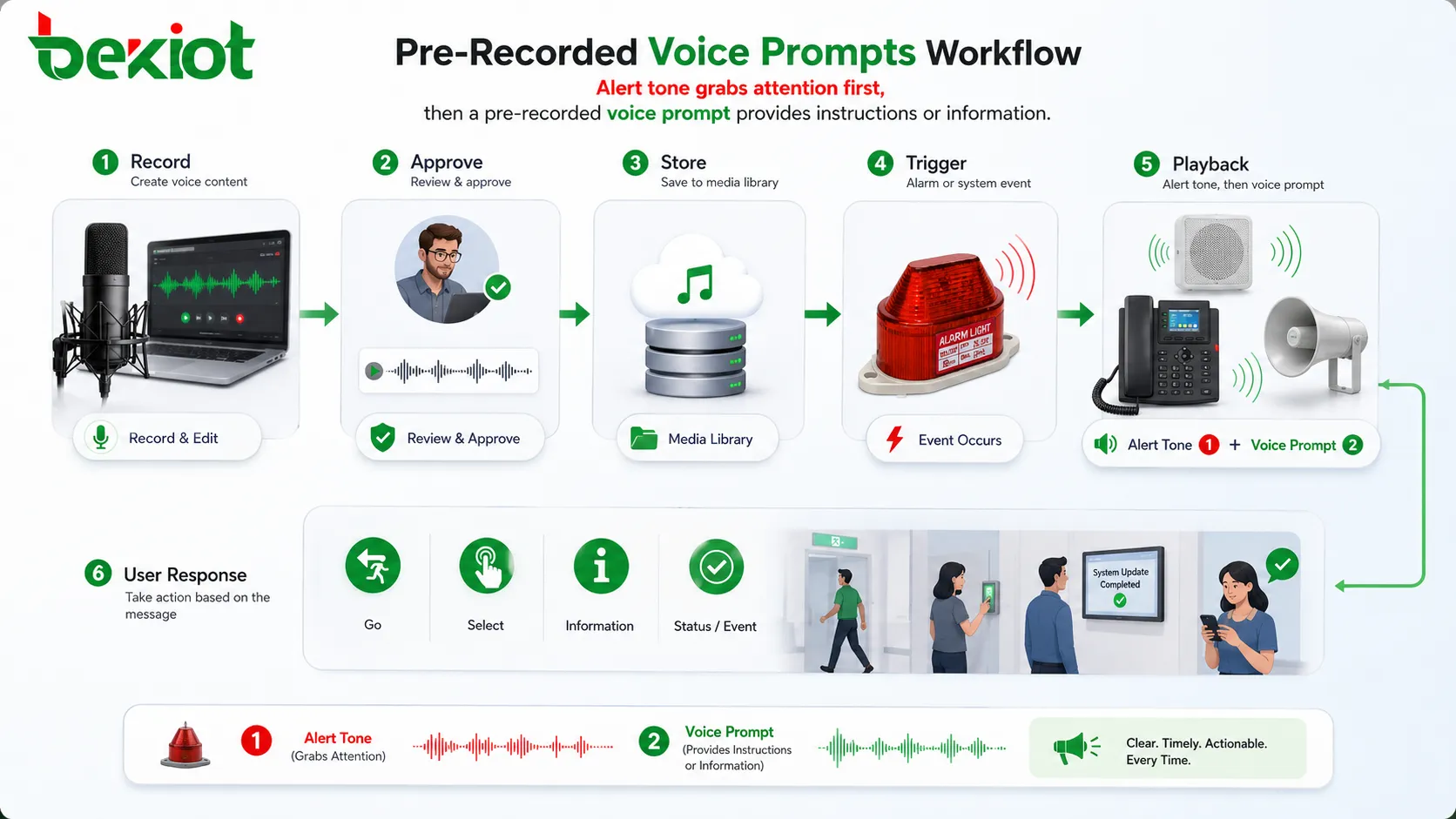
This is why many systems combine tones with voice prompts. A tone captures attention first, and the voice prompt delivers the instruction or status information.
How Pre-Recorded Voice Prompts Work
The working process usually includes script preparation, audio recording, editing, file formatting, storage, system configuration, trigger mapping, playback, and later review. In a simple system, the prompt may be uploaded manually and played when a button is pressed. In a larger platform, prompts may be linked to call routing, alarm events, schedules, user language, or device status.
The technical workflow should be planned carefully because a prompt must not only sound good. It must play at the right time, through the right channel, at the right volume, and in the right language for the target audience.
script Preparation
The script is the foundation of the prompt. It should be short, clear, and easy to understand when heard once. Spoken messages should avoid overly long sentences, complex grammar, unnecessary technical terms, and unclear action words.
A good prompt script answers the listener’s immediate question. What happened? What should I do? Which option should I choose? Where should I go? What will happen next?
Recording and Editing
After the script is approved, the voice is recorded. The recording should have clear pronunciation, stable volume, low background noise, and a tone suitable for the application. A customer service prompt may sound friendly, while an emergency prompt should sound calm, firm, and direct.
Editing may include noise reduction, trimming silence, adjusting loudness, removing mistakes, balancing tone, and exporting the file in the required format. Overprocessing should be avoided because it may make speech sound unnatural or distorted.
File Format and System Upload
Different systems require different audio formats. Common formats include WAV, MP3, OGG, or telephony-specific formats. Some PBX and IVR systems require a specific sample rate, bit depth, channel mode, or codec.
If the format is wrong, the prompt may not play, may sound distorted, or may play at the wrong speed. Before full deployment, each prompt should be tested through the actual playback device or communication system.
Trigger and Playback Logic
The system must know when to play each prompt. A trigger may be a phone call, keypad input, alarm signal, button press, schedule, door status, queue event, machine fault, sensor input, or operator command.
Playback logic should prevent confusion. If multiple prompts can play at the same time, priority rules are needed. Emergency prompts should usually override routine announcements or background music.
Main Features of Effective Voice Prompts
A useful pre-recorded voice prompt should be clear, consistent, correctly formatted, easy to update, and suitable for the environment. The best prompt is not always the longest or most polished; it is the one that helps users understand and act.
Clear Pronunciation
Pronunciation should be easy to understand for the intended audience. Numbers, names, technical terms, locations, codes, and safety instructions should be spoken carefully.
If a prompt includes extension numbers, emergency zones, floor names, product codes, or menu options, unclear pronunciation can cause user errors. Testing with real listeners can reveal problems that are missed during editing.
Consistent Tone and Style
Consistency makes a system feel professional. IVR menus, public announcements, device prompts, and service messages should use a similar voice style, pace, volume, and wording structure.
Inconsistent prompts can make the system feel fragmented. One message may sound formal, another casual, and another too fast. This reduces user confidence and makes the experience less predictable.
Suitable Length
Voice prompts should be long enough to explain the message but short enough to avoid listener fatigue. Long prompts can frustrate callers in IVR systems and may delay action during emergencies.
For repeated prompts, concise wording is especially important. Users may hear the same message many times, so unnecessary words should be removed.
Multi-Language Support
Many systems need prompts in more than one language. Airports, hotels, hospitals, campuses, public transport, international businesses, and customer service centers may need localized versions.
Localization should not be a literal word-for-word translation only. The message should sound natural in the target language and match local speaking habits, safety wording, and user expectations.
Volume and Loudness Control
Prompts should play at a suitable loudness. If the voice is too quiet, users may miss important information. If it is too loud, it may sound harsh or uncomfortable.
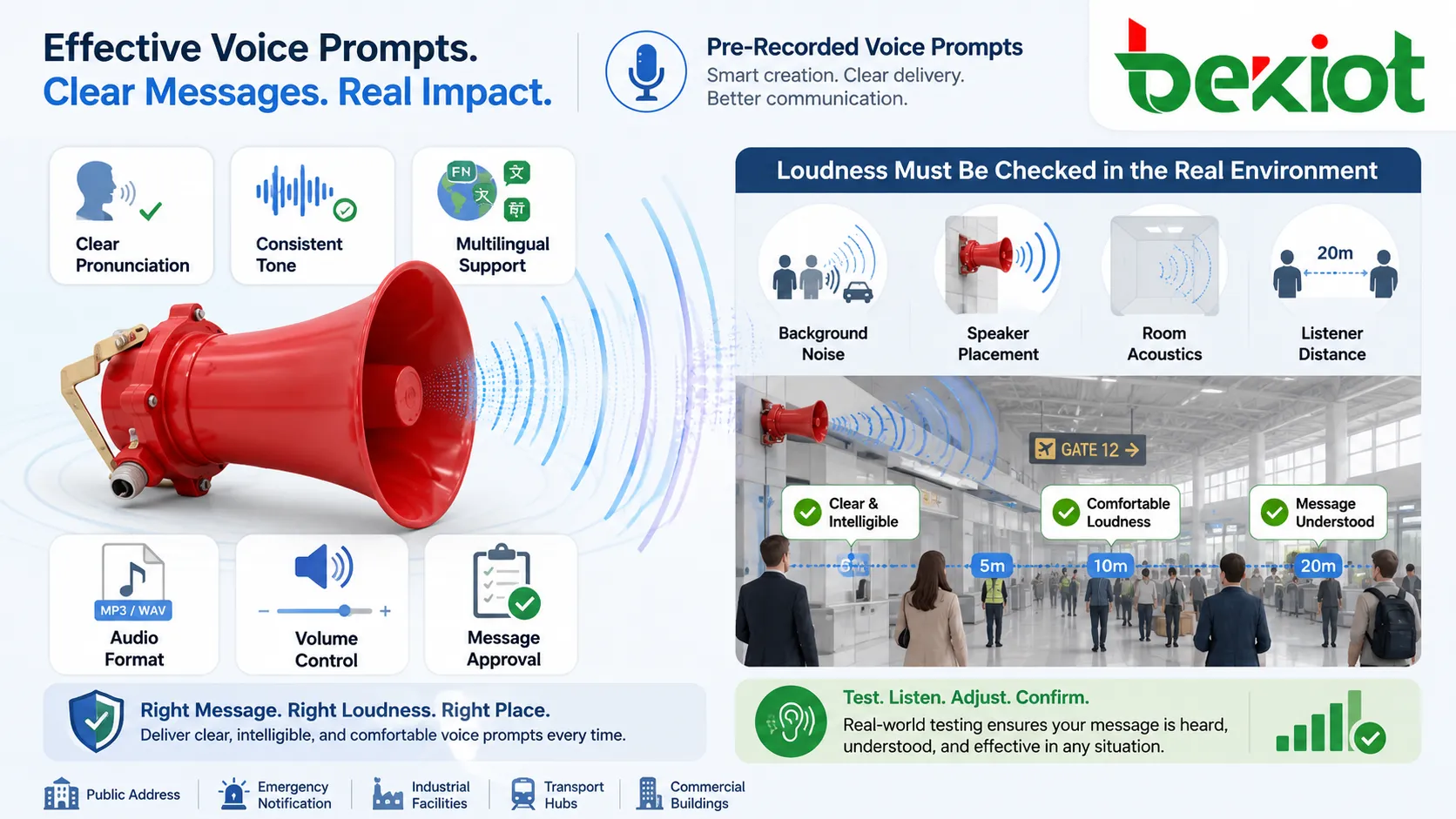
In public address and emergency systems, loudness should be checked in the real environment because background noise, speaker placement, room acoustics, and distance affect intelligibility.
Benefits for Communication and Operations
Pre-recorded voice prompts improve communication by making repeated messages more consistent and easier to manage. They help organizations deliver information without relying on live staff for every interaction.
Consistent Message Delivery
Every listener hears the same approved message. This is important for safety instructions, customer service greetings, queue announcements, payment reminders, after-hours messages, and equipment operation prompts.
Consistency reduces misunderstanding. It also helps organizations control wording, tone, legal statements, brand voice, and operational instructions.
Lower Workload for Staff
Voice prompts reduce repetitive speaking tasks. Receptionists do not need to repeat basic options. Operators do not need to announce routine reminders manually. Devices can guide users without staff intervention.
This allows staff to focus on tasks that require judgment, problem solving, or direct human support.
Faster User Guidance
A prompt can guide users immediately. In an IVR menu, it tells callers which option to press. In an access system, it confirms whether entry is allowed. In an emergency system, it gives a direct instruction.
Fast guidance is especially valuable when users are uncertain, stressed, or unfamiliar with the system.
Improved Professional Image
Clear voice prompts make a system feel more organized and professional. A well-recorded greeting or announcement can improve the first impression of a business, service center, hotel, hospital, campus, or public facility.
Poor prompts, by contrast, can make even a technically capable system feel outdated or confusing.
Better Accessibility
Voice prompts support users who may not read a screen easily, including visually impaired users, elderly users, drivers, workers wearing gloves, or people using hands-free systems.
When combined with visual indicators, text displays, or tactile controls, voice prompts can support more inclusive communication.
Common Applications
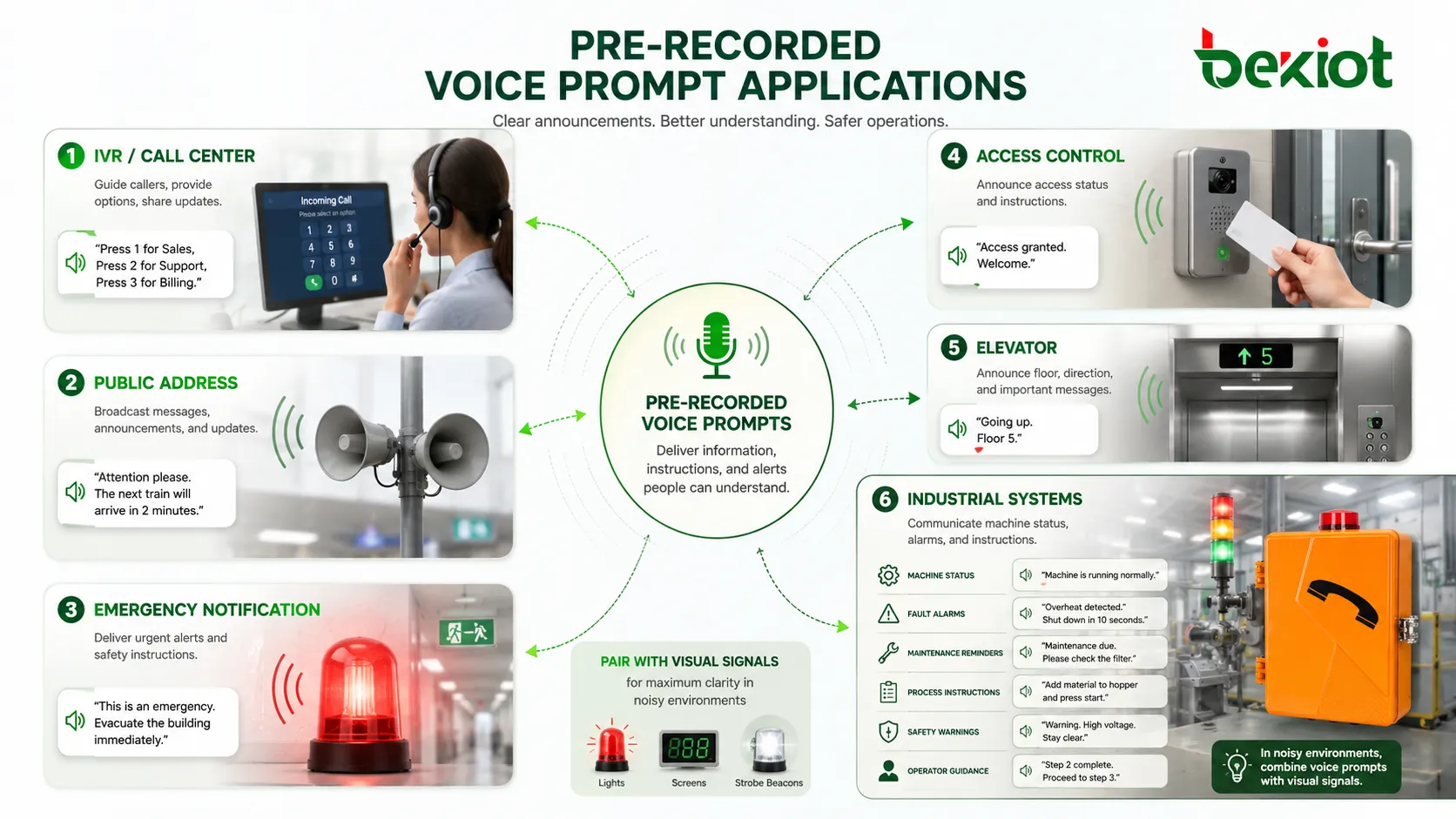
Pre-recorded voice prompts are used wherever systems need to speak predictable information. Their role changes depending on whether the application is customer service, safety, device control, public announcement, or user navigation.
IVR and Call Center Systems
Interactive Voice Response systems use pre-recorded prompts to greet callers, present menu options, request input, confirm selections, announce queue status, and route calls to the correct department.
In call centers, prompts help manage high call volume and reduce repeated manual explanation. They should be short, easy to navigate, and updated whenever service options change.
Public Address and Facility Announcements
Public address systems use prompts for scheduled announcements, safety reminders, opening and closing messages, shift changes, school bells, transport guidance, and facility instructions.
Pre-recorded announcements are useful because they keep wording and voice quality consistent across different operators and locations.
Emergency Notification Systems
Emergency systems may use pre-recorded prompts for evacuation, shelter-in-place, fire alarm guidance, severe weather instructions, lockdown messages, hazardous area warnings, or emergency assembly information.
These messages should be carefully approved, tested, and kept current. In emergencies, wording must be calm, direct, and easy to understand.
Access Control and Security Systems
Access control systems may play prompts such as access granted, access denied, door not closed, visitor call connected, restricted area, or please present card again.
Security prompts can guide users and reduce confusion at gates, turnstiles, door stations, parking systems, and visitor terminals.
Elevators and Building Equipment
Elevators, escalators, kiosks, parking machines, vending machines, and building equipment often use voice prompts to confirm status and guide operation. Examples include floor announcements, overload warnings, door closing messages, and payment instructions.
These prompts should be clear in noisy public spaces and should not become irritating through excessive repetition.
Industrial and Technical Systems
Industrial systems may use prompts for machine status, fault alarms, maintenance reminders, process instructions, safety warnings, and operator guidance. Voice prompts can help workers understand system conditions without constantly looking at a display.
In noisy environments, voice prompts should be paired with visual signals such as lights, screens, or strobe beacons when necessary.
Pre-Recorded Prompts vs Text-to-Speech
Pre-recorded prompts and Text-to-Speech both provide spoken output, but they serve different needs. Pre-recorded prompts are better for fixed, approved, high-value messages. Text-to-Speech is better for dynamic content that changes frequently.
| Item | Pre-Recorded Voice Prompts | Text-to-Speech |
|---|---|---|
| Best for | Fixed messages, IVR menus, emergency templates, brand greetings | Dynamic messages, personalized content, real-time information |
| Voice quality | Can be highly natural and professionally directed | Depends on synthesis engine and configuration |
| Update method | Requires new recording when wording changes | Can update quickly by changing text |
| Consistency | Very consistent for repeated playback | Consistent voice, but pronunciation may vary by content |
| Control | Strong control over tone, pace, and delivery | More flexible for variable messages |
When Pre-Recorded Prompts Are Better
Pre-recorded prompts are better when message accuracy, voice quality, legal wording, emotional tone, or brand consistency matters. Emergency instructions, customer greetings, payment notices, and safety announcements often benefit from approved recordings.
They are also useful when the same message will be played many times and must sound polished every time.
When Text-to-Speech Is Better
Text-to-Speech is better when content changes frequently or includes personalized information such as names, numbers, times, order status, ticket numbers, weather data, or account details.
Many systems use both methods. Fixed core prompts are recorded in advance, while variable details are generated through Text-to-Speech.
Audio Quality and File Requirements
Voice prompt quality depends on recording environment, microphone choice, voice talent, editing, file format, playback device, and installation environment. A good script can still fail if the audio file is noisy, distorted, or incompatible with the system.
Recording Environment
Prompts should be recorded in a quiet space with low echo and stable background conditions. Room noise, air conditioning, keyboard sounds, traffic, and microphone handling can reduce quality.
For professional systems, recording should use suitable microphones and controlled gain settings. The voice should be clean before editing begins.
Audio Format
The required file format depends on the platform. Some systems accept compressed files, while others require uncompressed WAV files with specific sample rate and bit depth.
Telephony systems may require narrowband or wideband audio formats. If the prompt is recorded at high quality but converted incorrectly, it may sound worse after upload.
Loudness Normalization
All prompts in the same system should have similar loudness. If one prompt is loud and the next is quiet, users may miss information or feel discomfort.
Loudness normalization helps maintain a consistent experience across menus, announcements, and alarm messages.
Playback Device Testing
The prompt should be tested on the actual playback device. A voice file that sounds good through studio headphones may sound different through a phone handset, ceiling speaker, horn speaker, elevator speaker, kiosk, or mobile device.
Real-device testing helps identify problems such as low volume, distortion, unclear consonants, or excessive background noise.
Designing Better Voice Prompt Scripts
Voice prompt design is part writing, part user experience, and part system logic. The message must be easy to hear, easy to understand, and easy to act on.
Use Direct Language
Spoken prompts should use direct language. Instead of long explanations, give the listener a clear next step. For example, “Press 1 for sales” is easier than “If your inquiry is related to sales information, please select option number one.”
Short messages are especially important in IVR menus, emergency notifications, and repeated equipment prompts.
Put Important Information First
Listeners may not remember long messages. Put the most important information early. In emergency prompts, the action should be clear immediately.
For example, “Evacuate through the nearest safe exit” is more direct than beginning with a long description of the event.
Avoid Too Many Options
In IVR systems, too many menu options create frustration. Users may forget the first option before hearing the last. Menu prompts should be grouped logically and kept short.
If many services are required, use layers of simple choices instead of one long menu.
Write for Listening, Not Reading
Text that looks good on a page may sound awkward when spoken. Long clauses, abbreviations, symbols, and dense technical language can reduce comprehension.
Every prompt should be read aloud during review. If the reviewer struggles to say it naturally, users may struggle to understand it.
Management and Maintenance
Pre-recorded prompts should be managed like system content. They need version control, approval, testing, backup, and periodic review. Old prompts can create confusion if services, schedules, locations, or policies change.
Prompt Library
A prompt library stores all approved audio files with names, descriptions, languages, versions, dates, and usage locations. This prevents confusion when many prompts are used across different systems.
Good naming rules help administrators find the correct file quickly. Names should describe the message purpose instead of using vague labels such as “audio1” or “newprompt.”
Approval Process
Important prompts should be approved before deployment. Customer-facing messages may need review by service teams. Emergency messages may need safety review. Legal statements may need compliance review.
An approval process prevents incorrect wording from entering live systems.
Version Control
When a prompt changes, the system should keep track of the old and new versions. This is useful for rollback, audit, and multi-site consistency.
Version control also prevents different locations from using different wording when they should deliver the same message.
Regular Review
Prompts should be reviewed periodically. Opening hours, menu options, emergency procedures, department names, extension numbers, and location information may change over time.
Outdated prompts can mislead users. A scheduled review helps keep the voice system accurate.
Common Mistakes to Avoid
One common mistake is recording prompts before the call flow or announcement logic is finalized. This often leads to re-recording because menu options, wording, or event triggers change later.
Another mistake is using different voices, volumes, and tones across one system. This makes the experience feel inconsistent and may reduce clarity.
A third mistake is making prompts too long. Users do not want to wait through unnecessary wording, especially when calling a service line or responding to an alarm.
A fourth mistake is forgetting to test prompts in the real playback environment. Audio that sounds clear on a computer may be unclear through a phone line, public speaker, or noisy facility.
Best Practices for Deployment
Successful deployment depends on clear scripts, good recording quality, correct file format, realistic testing, and ongoing management. The goal is to make voice prompts reliable communication tools, not just audio decorations.
Finalize Workflow Before Recording
Before recording, confirm the IVR structure, alarm logic, user journey, language versions, and playback sequence. This reduces rework and helps the voice talent record messages with the correct context.
For emergency and safety prompts, workflow review should include the people responsible for response procedures.
Keep Voice Style Consistent
Use a consistent voice, speed, tone, and pronunciation style across related prompts. This makes the system easier to recognize and more comfortable to use.
Different prompt groups may use different tones. Routine customer service can sound friendly, while safety messages should sound calm and firm.
Test with Real Users
Real users should test important prompts. They can reveal whether the message is too fast, too long, unclear, too quiet, too formal, or hard to follow.
User testing is especially useful for IVR menus, public announcements, multilingual prompts, and emergency instructions.
Prepare Backup Prompts
Some systems need backup prompts for failure cases. Examples include system busy, service unavailable, invalid input, transfer failed, network issue, and emergency fallback messages.
Backup prompts prevent silence and help users understand what is happening when normal workflow cannot continue.
FAQ
How many voice prompt versions should a system keep?
Important systems should keep at least the current approved version and a previous working version for rollback. Larger systems may also keep language variants, seasonal versions, and archived audit versions.
Should prompts be recorded by staff or professional voice talent?
It depends on the application. Professional voice talent is usually better for customer-facing, public, and safety-related systems. Internal staff recording may be acceptable for temporary or low-risk messages if audio quality is clear.
Can one prompt be reused across different systems?
Yes, but only if the wording, format, loudness, language, and context are suitable. A prompt made for phone playback may need conversion before use in a public address or device system.
What should be checked after uploading a new prompt?
Check playback quality, volume, language, trigger condition, file name, call flow position, repeat behavior, interruption priority, and whether the old prompt has been replaced correctly.
How can outdated prompts be avoided?
Create a prompt inventory, assign content owners, review prompts after policy or service changes, and schedule periodic checks. Prompts containing dates, opening hours, locations, or department names should be reviewed more often.
Should emergency prompts be longer for more detail?
Not usually. Emergency prompts should be clear, direct, and action-focused. Detailed explanations can be provided later through trained staff, signage, or follow-up announcements if needed.







