


SSH, short for Secure Shell, is a secure network protocol used to access, manage, and operate remote systems over an untrusted network. It allows administrators, developers, engineers, and automated systems to log in to remote servers, run commands, transfer files, create encrypted tunnels, and manage infrastructure without sending sensitive information in plain text.
Before SSH became widely used, remote administration often relied on older tools that transmitted usernames, passwords, and session data with little or no encryption. This created serious security risks, especially when systems were accessed across shared networks, public networks, or the internet. SSH was designed to solve this problem by providing encryption, authentication, and integrity protection for remote communication.
Today, SSH is widely used in Linux and Unix server administration, cloud computing, network device management, software development, DevOps automation, Git access, secure file transfer, remote troubleshooting, database tunneling, embedded systems, industrial gateways, and cybersecurity operations. It is one of the most important tools for secure infrastructure management.
What Is SSH?
Definition and Core Meaning
SSH is a cryptographic network protocol that creates a secure channel between a client and a server. The client is usually a user’s computer, terminal, automation tool, or management workstation. The server is the remote machine, device, virtual machine, cloud instance, router, firewall, gateway, or embedded system being accessed.
The core purpose of SSH is secure remote access. It protects communication by encrypting the session, verifying the server identity, authenticating the user, and checking that transmitted data has not been modified in transit. This makes SSH suitable for administrative tasks that require confidentiality and trust.
In practical terms, SSH allows a user to open a secure terminal session on a remote system. Once connected, the user can execute commands, edit files, restart services, check logs, deploy software, manage permissions, and perform maintenance as if they were working directly on the machine.
SSH provides a secure way to control remote systems by protecting login credentials, commands, files, and session data from exposure on the network.
Why SSH Matters
SSH matters because remote management is a normal part of modern IT operations. Servers, cloud platforms, routers, virtual machines, containers, firewalls, databases, and application environments often need to be managed remotely. Without a secure protocol, every remote session could expose sensitive credentials or operational data.
SSH reduces this risk by encrypting the communication path. Even if traffic passes through a shared network, wireless network, public internet route, or untrusted segment, the session content is protected from casual interception. Attackers may see that a connection exists, but they should not be able to read the commands or credentials if SSH is configured securely.
SSH also supports automation. Deployment scripts, backup tools, configuration systems, monitoring jobs, and CI/CD pipelines can connect to systems securely without requiring interactive access every time. This makes SSH valuable for both human administrators and automated operations.

How SSH Works
Client and Server Model
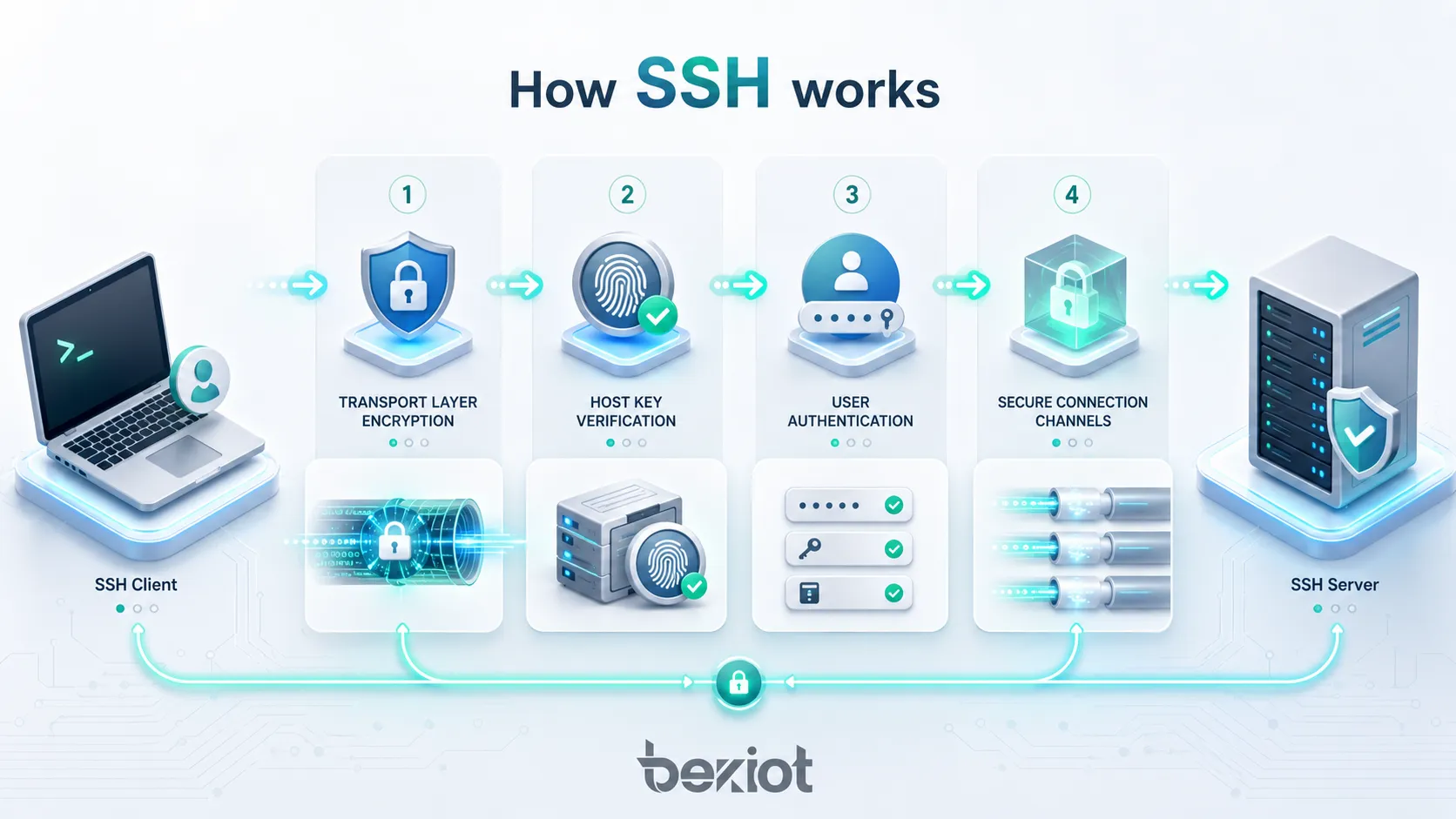
SSH uses a client and server model. The SSH server runs on the remote machine and listens for incoming SSH connection requests. The SSH client runs on the user’s device or automation system. When the user starts an SSH session, the client contacts the server and begins a secure negotiation process.
During this process, the client and server agree on supported algorithms, establish encryption keys, verify the server identity, and authenticate the user. After the secure session is established, the user can access a shell, run a command, transfer files, or create a tunnel depending on permissions and configuration.
This model is simple but powerful. The same basic SSH structure can be used for interactive administration, automated deployment, Git operations, secure file copy, port forwarding, and many other secure remote workflows.
Transport Layer Security
The SSH transport layer establishes the protected communication channel. It handles algorithm negotiation, key exchange, server authentication, encryption, integrity checking, and sometimes compression. This layer is responsible for making sure that the data moving between client and server is protected against eavesdropping and tampering.
Key exchange allows both sides to create shared session keys without sending the keys directly across the network. These session keys are then used to encrypt communication. Integrity protection helps detect whether packets have been altered during transmission.
Server authentication is also important. The client checks the server’s host key to reduce the risk of connecting to an impostor server. If the server key changes unexpectedly, the SSH client may warn the user because this could indicate a legitimate server replacement or a possible man-in-the-middle attack.
User Authentication
After the transport layer is established, SSH authenticates the user. Common authentication methods include password authentication and public key authentication. Public key authentication is widely preferred for administrative access because it avoids sending reusable passwords and can be combined with passphrases, access controls, and key management policies.
In public key authentication, the user keeps a private key on the client side and places the matching public key on the server. During login, the server verifies that the client has the correct private key without requiring the private key to be transmitted. This provides a strong authentication method when keys are generated, stored, and protected correctly.
Some environments also use multi-factor authentication, certificates, hardware security keys, centralized identity systems, or host-based authentication. The right method depends on security requirements, user scale, operational workflow, and compliance needs.
Connection Layer and Channels
The SSH connection layer allows multiple secure channels to run inside one SSH session. A channel may provide an interactive shell, execute a command, transfer files, forward ports, or support another service. This layered design makes SSH flexible.
For example, a user may open a terminal session, run a remote command, and forward a local port through the same general SSH protocol design. Tools such as SCP, SFTP, Git over SSH, and SSH tunneling use this secure foundation to provide specific services.
This is one reason SSH remains widely used. It is not only a remote login tool; it is a secure transport framework for multiple administrative and development tasks.
Main Features of SSH
Encrypted Remote Login
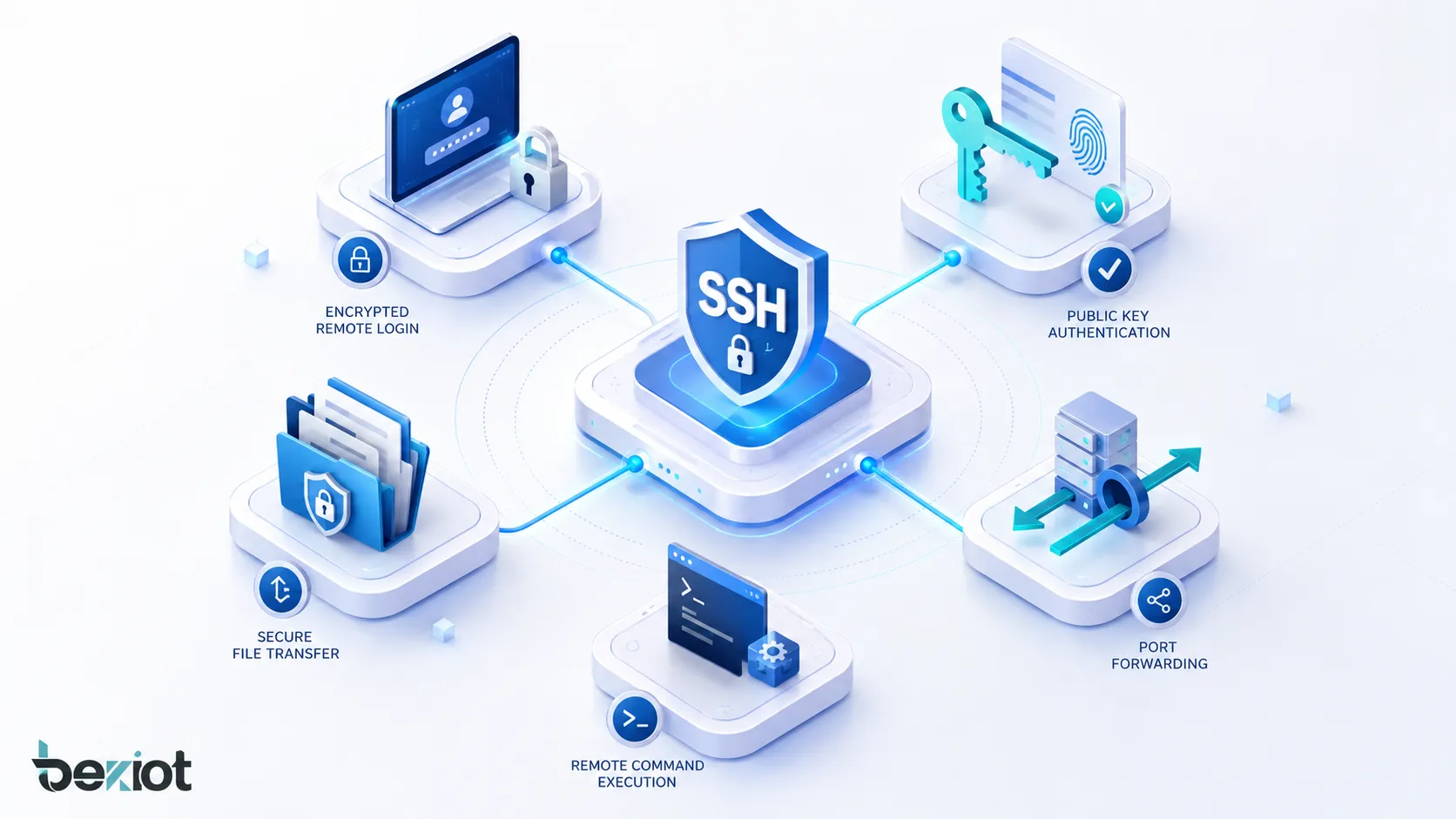
Encrypted remote login is the most recognized SSH feature. It allows users to access a remote shell securely and perform administrative tasks. All session content, including commands and output, is protected by encryption.
This feature is essential for server administration. Administrators can manage systems from remote locations without exposing credentials or command content to the network. It is especially important for cloud servers, remote data centers, managed hosting, and distributed infrastructure.
Encrypted remote login also supports emergency troubleshooting. When a service fails, administrators can connect securely, inspect logs, restart processes, modify configuration, and restore service.
Public Key Authentication
Public key authentication improves security and convenience when compared with password-only access. Users can authenticate using cryptographic key pairs instead of typing a password for every session. A private key remains on the client side, while the public key is installed on the server.
This method is useful for both people and automation. Deployment tools, backup scripts, configuration management systems, and CI/CD pipelines can authenticate securely using dedicated keys. Access can also be limited by user account, command restriction, source address, or key policy.
Public key authentication must be managed carefully. Private keys should be protected with strong file permissions, passphrases where appropriate, secure storage, rotation policies, and removal when users leave the organization.
Secure File Transfer
SSH supports secure file transfer through tools and protocols such as SCP and SFTP. These methods allow users to upload, download, and manage files over an encrypted connection. This is useful for transferring configuration files, logs, scripts, backups, software packages, and reports.
SFTP is commonly used because it provides file management capabilities such as listing directories, changing permissions, renaming files, and transferring files securely. Unlike older file transfer methods that may expose credentials or data, SFTP uses the SSH security layer.
Secure file transfer is important in system administration, software deployment, data exchange, backup workflows, and managed service operations.
Port Forwarding and Tunneling
SSH port forwarding allows users to create encrypted tunnels for other network traffic. This can be used to access internal services securely, protect database connections, reach a development service behind a firewall, or forward traffic through a bastion host.
Local forwarding sends traffic from a local port through the SSH connection to a remote destination. Remote forwarding exposes a port on the remote side and forwards it back through the SSH session. Dynamic forwarding can act like a SOCKS proxy for selected traffic.
SSH tunneling is powerful, but it must be controlled. Unmanaged tunnels can bypass network security controls or create hidden access paths. Organizations should define clear policies for where and how tunneling is allowed.
Remote Command Execution
SSH can execute a command on a remote system without opening a full interactive shell. This is useful for automation, monitoring, maintenance, deployment, and batch operations. For example, an administrator can run a status check, restart a service, collect logs, or execute a script remotely.
Remote command execution is widely used in DevOps and infrastructure automation. Tools can connect to many servers, apply updates, collect information, or run maintenance tasks securely.
Because remote command execution can be powerful, permissions should be limited carefully. Service accounts should have only the access needed for their tasks.
Common Uses of SSH
Server Administration
Server administration is the most common SSH use case. Administrators use SSH to connect to Linux, Unix, and other compatible systems to manage services, users, packages, logs, storage, firewall rules, and application configuration.
SSH is especially important for headless servers that do not have a local monitor or graphical interface. Cloud instances, virtual machines, hosting servers, container hosts, and remote appliances are often managed almost entirely through SSH.
Good SSH access design should include strong authentication, limited user privileges, logging, key management, and restricted administrative access.
Cloud Infrastructure Management
Cloud infrastructure often depends on SSH for initial access, maintenance, recovery, and automation. Engineers use SSH to manage virtual machines, troubleshoot cloud workloads, configure services, and inspect system behavior.
In cloud environments, SSH access should be controlled carefully. Public exposure of SSH ports, weak passwords, reused keys, or unmanaged administrator accounts can create serious risk. Many organizations use bastion hosts, private networks, just-in-time access, security groups, or identity-based access controls to reduce exposure.
SSH remains valuable in cloud operations, but it should be combined with strong access governance.
Software Development and Git Access
Developers use SSH to access Git repositories, deploy code, manage development servers, connect to build systems, and run remote tasks. Git over SSH allows developers to authenticate with keys and interact with repositories securely.
SSH is also useful for remote development workflows. A developer may connect to a remote machine, edit code, run tests, inspect logs, or access a development environment located in a cloud server or internal network.
For development teams, SSH keys should be assigned to individual users rather than shared broadly. This improves accountability and makes access easier to revoke.
Secure File Transfer and Backup
SSH-based file transfer is used for backups, log collection, configuration export, software distribution, and secure data exchange. Tools such as SFTP, SCP, and rsync over SSH can move files between systems while protecting data in transit.
Backup scripts often use SSH keys for automated authentication. This allows scheduled jobs to copy files securely without manual password input. However, automation keys should be limited to the required directories and commands where possible.
Secure backup transfer is important because backup data may contain sensitive configuration, user information, application data, or security logs.
Network Device Management
Many routers, switches, firewalls, wireless controllers, industrial gateways, and security appliances support SSH for command-line management. SSH provides a safer alternative to unencrypted management protocols.
Network engineers use SSH to inspect interfaces, change configuration, view routing tables, update firmware, review logs, and troubleshoot connectivity. Because network devices are critical infrastructure, SSH access should be limited to trusted management networks or authorized jump hosts.
Network device SSH access should also use strong passwords or keys, role-based permissions, logging, and configuration backups.
Applications of SSH
Enterprise IT Operations
Enterprise IT teams use SSH to manage servers, cloud instances, internal tools, backup systems, monitoring servers, development environments, and network devices. It provides a standard secure access method across many technical systems.
In enterprise environments, SSH access should be integrated into broader identity and security policy. This may include centralized user management, privileged access management, multi-factor authentication, access logging, session recording, and approval workflows for sensitive systems.
A well-managed SSH environment improves operational efficiency while reducing the risk of unauthorized access.
DevOps and Automation
DevOps workflows often use SSH for automated deployment, configuration management, remote script execution, and infrastructure maintenance. Automation platforms can use SSH to connect to servers, apply configuration, restart services, distribute files, and collect system state.
SSH is valuable because it is widely supported and works across many server environments. However, automation access should be designed carefully. Each automation key should have a clear purpose, limited privilege, and documented ownership.
Secure automation depends on key rotation, access review, command restrictions, and logging.
Cybersecurity and Incident Response
Security teams use SSH during incident response and forensic investigation. They may connect to affected systems to collect logs, isolate services, inspect processes, preserve evidence, or apply emergency fixes.
SSH logs can also help detect suspicious activity. Failed login attempts, unusual source addresses, unexpected key usage, new authorized keys, or access outside normal hours may indicate compromise attempts.
In incident response, SSH should be used carefully to avoid altering evidence unnecessarily. Access should be logged and coordinated with the investigation plan.
Embedded Systems and Industrial Devices
SSH is used in embedded systems, IoT gateways, industrial controllers, Linux-based appliances, telecom devices, and edge computing nodes. Engineers may use SSH to configure devices, check logs, update software, or troubleshoot field issues.
These environments often have limited resources and may be deployed in remote or harsh locations. SSH access can make maintenance much easier, but exposed or poorly secured SSH services can create serious security risks.
Embedded and industrial SSH access should use strong authentication, network restriction, secure firmware practices, and careful account management.
Secure Access Through Bastion Hosts
A bastion host, also called a jump server, is a controlled system used as an entry point to reach internal servers. Instead of exposing every server directly to administrators or the internet, organizations route SSH access through a hardened bastion host.
This approach improves control and visibility. The bastion host can enforce authentication, record sessions, restrict destinations, and centralize access logging. Internal servers can be placed on private networks and allow SSH only from the bastion.
Bastion-based SSH access is common in cloud infrastructure, regulated environments, and large enterprise networks.
Benefits of SSH
Strong Confidentiality
SSH encrypts communication between client and server, which helps protect usernames, commands, output, file transfers, and tunneled traffic from being read by unauthorized parties. This is essential when remote access occurs over untrusted networks.
Confidentiality is not only important for passwords. Commands, configuration files, database dumps, log files, and system output can also contain sensitive information. SSH helps protect this operational data during transmission.
Strong confidentiality makes SSH suitable for remote administration and secure file transfer.
Authentication and Trust
SSH supports both server authentication and user authentication. Server authentication helps the client verify that it is connecting to the expected server. User authentication helps the server verify that the user is allowed to access the system.
This two-sided trust model reduces the risk of credential theft and unauthorized access. Public key authentication, host key verification, and multi-factor controls can strengthen the trust relationship further.
Authentication is one of the reasons SSH is preferred for administrative access instead of older unencrypted protocols.
Operational Flexibility
SSH is flexible because it supports interactive login, remote command execution, secure file transfer, port forwarding, tunneling, Git access, automation, and device management. One protocol can support many operational tasks.
This flexibility reduces the need for separate tools and creates a consistent access method across different systems. Administrators and developers can use familiar commands and workflows across servers, cloud instances, and network devices.
The same flexibility also requires governance. Organizations should control which SSH features are allowed for different users and systems.
Automation Support
SSH works well with automation because it supports non-interactive key-based authentication and remote command execution. Scripts and tools can use SSH to perform repeatable tasks across many systems.
Automation reduces manual effort and helps maintain consistency. However, automated SSH access should be carefully limited because a compromised automation key may provide broad access.
Good automation design uses least privilege, dedicated accounts, key rotation, command restrictions, and logging.
SSH Security Best Practices
Use Public Key Authentication
Public key authentication is generally preferred for administrative SSH access because it is stronger and more manageable than password-only access when used correctly. Users should generate secure key pairs and protect private keys from unauthorized access.
Private keys should not be shared between users. Each administrator or automation process should have its own key. This makes access easier to track and revoke when needed.
For high-risk systems, public key authentication can be combined with passphrases, hardware security keys, certificates, or multi-factor authentication.
Limit Direct Exposure
SSH services should not be exposed more widely than necessary. Public internet exposure increases the risk of brute-force attempts, credential attacks, vulnerability scanning, and unauthorized access attempts.
Organizations can reduce exposure by using firewalls, VPNs, private networks, bastion hosts, allowlists, security groups, or zero-trust access gateways. Administrative access should be limited to trusted users and trusted network paths.
Reducing exposure is one of the simplest ways to lower SSH attack surface.
Disable Unused Accounts and Weak Login Methods
Unused accounts, shared accounts, default accounts, and weak passwords create risk. SSH access should be reviewed regularly. Accounts that are no longer needed should be disabled or removed.
Many organizations disable password login for administrative accounts and require key-based authentication. Root login may also be disabled, requiring administrators to log in with individual accounts and elevate privileges when needed.
These controls improve accountability and reduce the chance of unauthorized login.
Protect and Rotate SSH Keys
SSH keys are powerful credentials. If a private key is stolen, the attacker may gain access to systems that trust the matching public key. Keys should be stored securely and removed when they are no longer needed.
Organizations should maintain an inventory of authorized keys, review key ownership, rotate keys when users change roles, and remove keys belonging to former employees or old automation tools.
Key management is one of the most important parts of SSH security.
Monitor SSH Activity
SSH activity should be logged and monitored. Important events include failed login attempts, successful logins, new authorized keys, use of privileged accounts, logins from unusual locations, and access outside normal operating hours.
Monitoring can help detect brute-force attempts, compromised credentials, unauthorized key changes, and suspicious administrator activity. Logs should be protected from tampering and integrated into security monitoring where possible.
SSH monitoring is especially important for critical servers, cloud instances, bastion hosts, and production environments.
Common SSH Misunderstandings
SSH Is Not Automatically Secure in Every Configuration
SSH is a secure protocol, but an SSH deployment can still be insecure if configured poorly. Weak passwords, exposed services, shared keys, old algorithms, unmanaged accounts, and broad administrator access can all create risk.
Security depends on configuration, authentication policy, user behavior, patching, monitoring, and access control. Simply using SSH does not guarantee that remote access is safe.
A secure SSH environment requires ongoing management.
SSH and SSL/TLS Are Not the Same
SSH and SSL/TLS both use cryptography, but they are used differently. SSH is commonly used for remote login, command execution, tunneling, and secure file transfer. TLS is commonly used to secure web traffic, APIs, email transport, and many application-layer services.
They solve related security problems but are not interchangeable. A web server normally uses HTTPS with TLS, while a Linux administrator normally uses SSH for remote shell access.
Understanding the difference helps avoid incorrect architecture decisions.
Changing the SSH Port Is Not a Complete Security Strategy
Some administrators change the default SSH listening port to reduce automated scanning noise. This may reduce low-effort login attempts, but it is not a complete security control.
Strong authentication, limited exposure, firewall rules, key management, logging, patching, and least-privilege access are much more important. A determined attacker can still discover SSH on a non-standard port.
Port changes can be part of operational hygiene, but they should not replace real access security.
Maintenance and Operation Tips
Review SSH Configuration Regularly
SSH configuration should be reviewed regularly to confirm that login policies, authentication methods, allowed users, key settings, forwarding rules, and algorithm choices match current security requirements.
Configuration files can drift over time as administrators make temporary changes, add automation, or troubleshoot access issues. Regular review helps prevent temporary exceptions from becoming permanent weaknesses.
Configuration review should be documented, especially for production and compliance-sensitive systems.
Keep SSH Software Updated
SSH server and client software should be kept updated. Updates may fix vulnerabilities, remove weak algorithms, improve compatibility, and strengthen security behavior.
Systems that remain unpatched for long periods may expose known weaknesses. This is especially risky for internet-facing servers, bastion hosts, and infrastructure management systems.
Patch management should include SSH services as part of the normal operating system and security update process.
Document Access Paths
Organizations should document which users, automation systems, and support teams have SSH access to which systems. Documentation should include account names, key ownership, bastion paths, firewall rules, and escalation procedures.
Good documentation helps during audits, incident response, staff changes, and system migration. It also reduces dependency on informal knowledge held by a few administrators.
SSH access is powerful, so it should be visible and controlled.
Test Recovery Access
SSH is often used during emergency recovery. Administrators should test whether they can still access systems through approved paths when normal services fail. This may include testing bastion hosts, backup accounts, break-glass procedures, and cloud console access.
Recovery access should be secure but practical. If access controls are too fragile, administrators may be locked out during an incident. If they are too loose, attackers may exploit them.
A balanced recovery plan keeps SSH useful during outages without weakening everyday security.
Conclusion
SSH, or Secure Shell, is a secure network protocol for encrypted remote login, command execution, file transfer, tunneling, and system administration. It protects communication through encryption, server authentication, user authentication, and integrity checking.
SSH works through a layered architecture that includes a transport layer, user authentication layer, and connection layer. This design allows SSH to support interactive shells, remote commands, secure file transfer, port forwarding, Git access, automation, and secure device management.
Its main benefits include confidentiality, authentication, operational flexibility, automation support, secure file transfer, and safer remote administration. SSH is widely used in enterprise IT, cloud operations, DevOps, cybersecurity, network management, embedded systems, and remote infrastructure maintenance. When configured with strong authentication, limited exposure, good key management, monitoring, and regular updates, SSH becomes a dependable foundation for secure remote operations.
FAQ
What is SSH in simple terms?
SSH is a secure way to connect to a remote computer or server. It encrypts the connection so that commands, login details, and transferred data are protected while traveling across the network.
It is commonly used by administrators and developers to manage servers remotely.
What is SSH used for?
SSH is used for remote login, server administration, secure file transfer, Git access, remote command execution, port forwarding, tunneling, cloud management, and network device administration.
It is especially useful when systems must be managed securely over an untrusted network.
How does SSH authentication work?
SSH authentication verifies that the user is allowed to access the remote system. Common methods include password authentication and public key authentication.
Public key authentication uses a private key on the client and a matching public key on the server, allowing the server to verify the user without sending the private key across the network.
Is SSH secure?
SSH can be very secure when configured properly. It provides encryption, server authentication, user authentication, and integrity protection.
However, weak passwords, exposed services, unmanaged keys, outdated software, and poor access control can make an SSH deployment insecure.
What is the difference between SSH and SFTP?
SSH is the secure protocol used for remote access and other secure services. SFTP is a secure file transfer protocol that runs over SSH.
In simple terms, SSH provides the secure channel, while SFTP uses that channel to transfer and manage files safely.







