


The Role Behind Modern Software Systems
An application server is a software or hardware-based server environment that runs application logic, manages backend services, processes user requests, connects databases, handles APIs, and supports communication between clients and enterprise systems. It sits between the user-facing interface and the underlying data or infrastructure layer, helping applications work reliably, securely, and at scale.
In a simple website, a web server may only deliver static pages. In a business system, however, users often need login control, database queries, workflow processing, file handling, notifications, reporting, device integration, and real-time service coordination. These tasks are commonly handled by an application server.
An application server is not only a place where software runs. It is the execution layer that connects users, business rules, data, APIs, and system services into one working application environment.
Basic Definition and Core Purpose
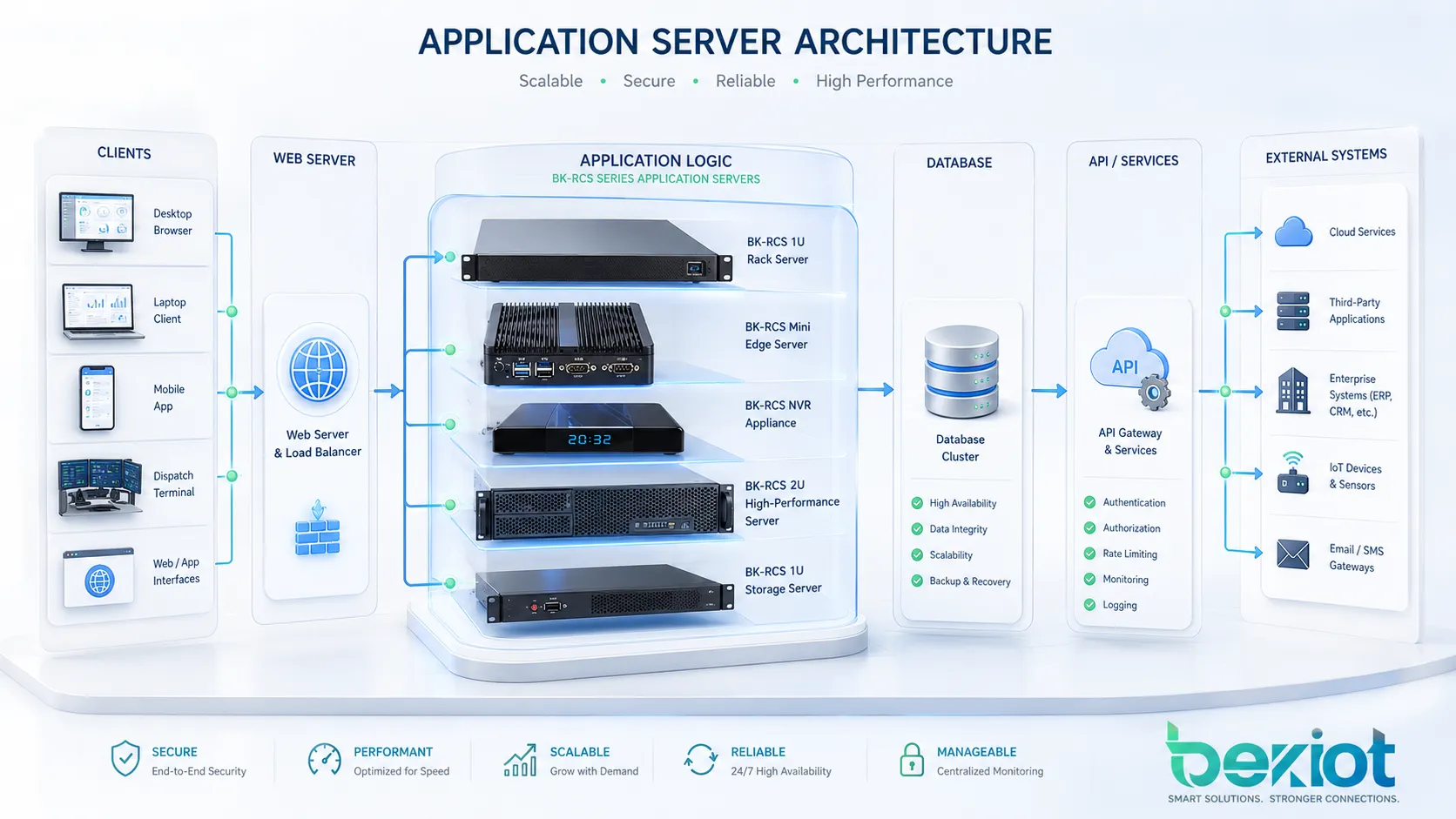
An application server provides the runtime environment for application programs. It receives requests from clients, executes business logic, communicates with databases or external systems, and returns results to the user interface or another service. The client may be a browser, mobile app, desktop program, industrial terminal, dispatch console, API consumer, or another backend service.
The main purpose of an application server is to separate application logic from presentation and data storage. This separation makes software easier to manage, expand, secure, and maintain. Instead of putting all logic inside the user interface or database, developers place the main processing rules in the application server layer.
What It Does in a System
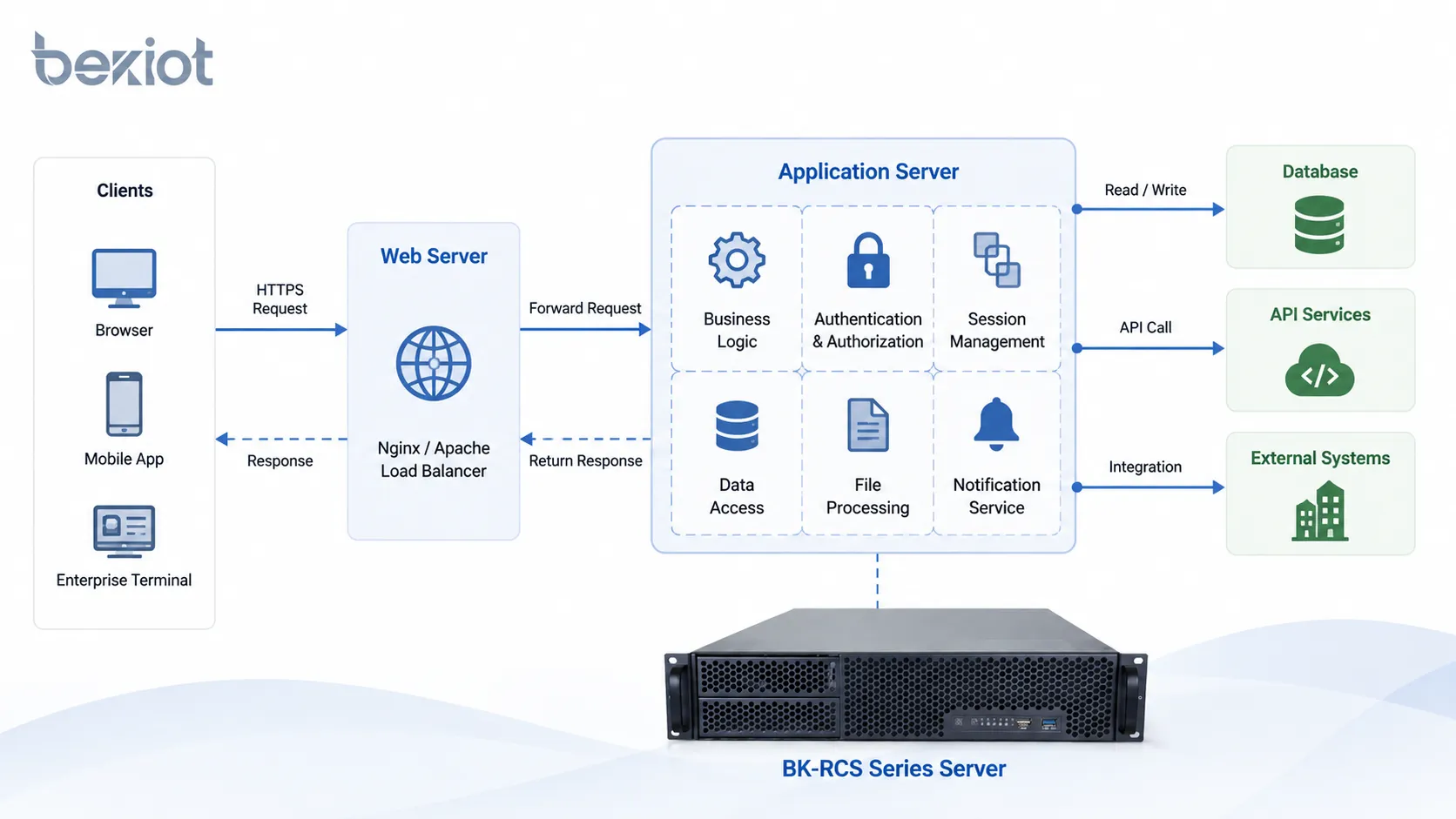
An application server may handle authentication, user sessions, business workflows, transaction processing, message routing, API access, file processing, data validation, permission control, logging, and integration with other platforms. In enterprise environments, it often acts as the central logic engine for business applications.
For example, when a user submits an order, the application server may verify login status, check inventory, calculate pricing, write data to a database, trigger a payment process, send a notification, and update the user interface. The user only sees a simple action, but many backend steps happen through the application server.
Why It Is Different from a Web Server
A web server mainly handles HTTP requests and delivers web content such as HTML, CSS, JavaScript, images, or files. An application server goes further by executing application logic and interacting with backend systems. In many modern deployments, the two roles may work together or be included in the same platform.
For example, Nginx or Apache may act as a front-end web server, while Tomcat, JBoss, WebLogic, Node.js, .NET, or another runtime handles application logic behind it. In cloud-native systems, containers, API gateways, and microservices may also share some of these responsibilities.
How the Request Process Works
The workflow of an application server begins when a client sends a request. The request may come from a web browser, mobile app, API call, enterprise terminal, or connected device. The system then routes the request to the proper application component for processing.
After receiving the request, the application server checks security rules, runs the required business logic, connects to databases or services if needed, and returns a response. This response may be a web page, JSON data, status message, transaction result, file, alert, or command instruction.
Request Reception and Routing
The first step is request reception. The application server or a front-end web server receives the request and determines where it should go. In a large system, routing may depend on the URL path, API endpoint, user role, service type, load-balancing rule, or microservice architecture.
Routing is important because one application may contain many modules. A login request, report query, file upload, alarm event, payment action, and user profile update may all require different processing logic. Good routing keeps the system organized and responsive.
Business Logic Execution
Business logic is the set of rules that defines how the application behaves. It may include calculations, workflow rules, approval steps, access checks, event triggers, data validation, and decision logic. The application server executes these rules before returning a result.
For example, in a maintenance management system, the application server may decide whether a fault report should become a work order, which technician should receive it, what priority it should have, and whether the supervisor needs to be notified. These decisions are not simple page delivery; they are application logic.
Response and Session Handling
After processing is complete, the application server sends a response back to the client or calling system. It may also maintain session information, such as user login state, preferences, permissions, transaction context, or temporary workflow status.
Session handling is especially important for enterprise applications where users move through multiple pages or steps. Without proper session management, users may lose progress, permissions may be applied incorrectly, or security risks may increase.
Key Components in the Architecture
An application server usually works as part of a larger software architecture. It may connect to databases, caches, message queues, file systems, identity services, third-party APIs, monitoring tools, and front-end applications. Understanding these components helps explain why the application server is central to many systems.
Runtime Environment
The runtime environment is where application code runs. Depending on the technology stack, this may involve Java, .NET, Node.js, Python, PHP, Go, or another platform. The runtime provides the libraries, execution engine, memory management, and process model required by the application.
In enterprise systems, the runtime may also provide transaction management, connection pooling, dependency injection, scheduling, security modules, and standardized service interfaces. These capabilities reduce the amount of low-level work developers need to build from scratch.
Database and Data Access Layer
Most application servers connect to one or more databases. The application server receives user requests, applies business rules, queries or updates the database, and returns the result. This protects the database from direct exposure to end users and allows access control to be managed through the application layer.
The data access layer may include SQL queries, object-relational mapping, stored procedure calls, cache access, or API-based data retrieval. In high-performance systems, caching is often used to reduce repeated database load and improve response speed.
API and Middleware Services
Application servers often expose APIs for other systems to use. These APIs may allow mobile apps, external platforms, IoT devices, payment systems, CRM software, ERP systems, dispatch platforms, or monitoring tools to exchange data and commands.
Middleware services help different systems communicate even when they use different protocols, formats, or platforms. This is especially useful in enterprise integration, industrial control, public safety systems, and multi-vendor software environments.
Main Features and Capabilities
A good application server provides more than code execution. It supports security, scalability, reliability, integration, and maintainability. These capabilities are the reason application servers are widely used in business-critical and mission-critical systems.
Centralized Business Logic
Centralizing business logic makes application behavior easier to control. Instead of duplicating rules across many clients, the core logic is placed in the server layer. This means web users, mobile users, API clients, and internal tools can follow the same rules.
This approach improves consistency. If a company changes a pricing rule, access policy, workflow step, or notification condition, developers can update the application server rather than modifying every client separately.
Security and Access Control
Application servers commonly handle user authentication, authorization, session protection, API access tokens, role-based permissions, encryption support, audit logs, and input validation. These features help protect sensitive data and reduce security risks.
Security is especially important because application servers often sit close to business data and operational systems. A poorly secured application server can expose databases, user accounts, system commands, or internal services to attack.
Scalability and Load Management
As user traffic grows, application servers can be scaled vertically or horizontally. Vertical scaling increases CPU, memory, and storage resources on one server. Horizontal scaling adds more server instances behind a load balancer.
In cloud and container environments, application server instances can be deployed across multiple nodes. This supports high availability, traffic distribution, rolling updates, and improved fault tolerance.
Integration with Other Systems
Many organizations rely on application servers to connect business systems together. The server may integrate with databases, identity platforms, email servers, SMS gateways, payment systems, monitoring platforms, alarm systems, communication systems, and third-party APIs.
In communication and dispatch environments, for example, Becke Telcom BK-RCS series servers can act as part of a unified communication and dispatch architecture, supporting centralized service operation, voice dispatch, alarm linkage, video integration, and system coordination for industrial parks, transportation sites, campuses, and command centers.
Benefits for Business and Technical Teams
Application servers are valuable because they make complex software easier to build, operate, and expand. They support the needs of developers, IT administrators, security teams, operations managers, and end users.
Better System Organization
By separating presentation, logic, and data storage, application servers make software architecture cleaner. Front-end teams can focus on user experience, backend teams can focus on business logic, and database teams can focus on data integrity and performance.
This separation also makes long-term maintenance easier. When the system needs upgrades, developers can change one layer without rewriting the entire application.
Improved Reliability and Availability
Application servers can support redundancy, clustering, failover, health checks, logging, and monitoring. These features help reduce service interruptions and make it easier to detect problems before they affect users.
For critical systems, multiple application server instances may run at the same time. If one instance fails, traffic can be routed to another instance. This improves service continuity and supports stronger availability targets.
Faster Development and Deployment
Application servers often provide standard frameworks, reusable services, database connection pools, security modules, and deployment tools. These features help development teams build applications faster and with fewer repeated components.
Modern deployment methods such as containers, CI/CD pipelines, automated testing, and cloud orchestration further improve release efficiency. Teams can deploy updates more frequently while reducing manual configuration errors.
Easier Monitoring and Maintenance
Application servers can provide logs, metrics, error reports, performance traces, user activity records, and health status. These tools help administrators understand how the system is performing and where bottlenecks may exist.
Good monitoring also supports maintenance planning. Teams can identify high CPU usage, memory leaks, slow database queries, failed API calls, network delays, or abnormal user activity before they become major incidents.
Common Application Areas
Application servers are used across many industries because most modern systems need centralized logic and reliable data processing. They appear in enterprise software, online services, industrial platforms, communication systems, public safety systems, healthcare systems, financial platforms, and smart building applications.
Enterprise Management Systems
Enterprise systems such as ERP, CRM, HR, finance, asset management, and supply chain platforms commonly rely on application servers. These systems handle business rules, user permissions, approval workflows, reports, and data exchange between departments.
Because enterprise applications often serve many users at the same time, the application server must support stable performance, secure access, and integration with databases and identity systems.
Web and Mobile Applications
Many web and mobile applications use application servers to process user actions, manage accounts, store data, send notifications, handle payments, and connect to external services. The front-end interface may look simple, but the backend logic can be complex.
For example, a mobile app may send a request to the application server to update a profile, upload a file, retrieve messages, or check order status. The server processes the request and returns structured data to the app.
Industrial and Infrastructure Platforms
Industrial systems may use application servers for monitoring, alarm management, device integration, maintenance workflows, reporting, and command coordination. These systems often connect to PLCs, sensors, gateways, SCADA platforms, video systems, and operator consoles.
In infrastructure environments such as transportation, energy, tunnels, ports, and public facilities, application servers can support event processing, user management, data visualization, device control, and emergency response workflows.
Communication and Dispatch Systems
Communication platforms may use application servers to manage users, call routing, dispatch workflows, recording, device status, alarm linkage, map data, and integration with video or public address systems. This type of deployment requires stable processing and strong system coordination.
For sites that require unified communication, dispatch, and emergency linkage, BK-RCS series servers can be positioned as backend service nodes within the overall architecture. The key value is not only hardware capacity, but also coordinated application services that help operators manage communication events from a central platform.
Deployment Models and Infrastructure Choices
Application servers can be deployed in different ways depending on business size, security policy, performance requirements, budget, and system architecture. Common deployment models include on-premises servers, private cloud, public cloud, hybrid cloud, virtual machines, and container clusters.
On-Premises Deployment
On-premises deployment means the application server runs inside the organization’s own data center, equipment room, or local server environment. This model is common in industries that require strict data control, local network performance, or offline operation.
It is often used in manufacturing, public safety, transportation, energy, government, healthcare, and industrial communication systems. The organization has more control over hardware, network access, data storage, and maintenance policy.
Cloud-Based Deployment
Cloud deployment allows the application server to run on public cloud or private cloud infrastructure. This model can improve scalability, remote access, backup options, and resource flexibility. It also reduces the need to purchase and maintain all physical hardware.
Cloud environments are suitable for applications that need rapid expansion, multi-region access, elastic resource allocation, or integration with cloud-native services such as managed databases, monitoring, storage, and serverless functions.
Container and Microservice Architecture
Modern applications often use containers and microservices. Instead of running one large application server, the system is divided into smaller services that communicate through APIs or message queues. Each service may run in its own container and scale independently.
This approach can improve flexibility, but it also increases operational complexity. Teams must manage service discovery, logging, tracing, configuration, network security, deployment automation, and failure isolation.
Selection Factors for a Reliable Platform
Choosing an application server requires both technical and operational evaluation. The best option depends on the application workload, integration requirements, security needs, developer skills, and long-term maintenance plan.
| Selection Factor | Why It Matters | What to Check |
|---|---|---|
| Performance | The server must handle expected user traffic and processing load | CPU, memory, concurrency, response time, database access, caching |
| Security | The application layer often controls sensitive data and system access | Authentication, authorization, encryption, audit logs, patch policy |
| Scalability | The system may need to support more users or services in the future | Clustering, load balancing, cloud support, container readiness |
| Integration | Enterprise applications rarely work alone | API support, database drivers, message queues, third-party connectors |
| Maintainability | Long-term operation depends on easy updates and monitoring | Logs, metrics, backup, documentation, deployment tools, support lifecycle |
Workload and Performance Planning
Before deployment, teams should estimate user count, request volume, data size, peak traffic, transaction complexity, and response-time expectations. A small internal tool may need only one server instance, while a large enterprise platform may require multiple servers, load balancing, and database optimization.
Performance planning should also consider future growth. If the architecture cannot scale, the system may become slow or unstable when more users, devices, or integrations are added.
Security and Compliance Requirements
Application servers should be protected with strong access control, secure configuration, regular patching, encrypted communication, vulnerability scanning, and audit logging. Administrative interfaces should not be exposed unnecessarily.
Organizations in regulated industries may also need compliance controls related to data privacy, user identity, access records, system logs, backup retention, and incident response. Security should be designed from the beginning, not added after deployment.
Operational Support and Lifecycle
A reliable application server platform should be easy to monitor, back up, update, and troubleshoot. Teams should consider vendor support, community ecosystem, documentation quality, compatibility roadmap, and internal technical skills.
Lifecycle planning is important because application servers often run core business systems for many years. Unsupported software versions, outdated runtimes, and unpatched dependencies can create security and reliability risks.
Common Problems and How to Avoid Them
Application server problems often come from poor planning, weak security, insufficient resources, bad code, slow database queries, or unmanaged growth. Many issues can be prevented through proper architecture and continuous monitoring.
Performance Bottlenecks
Slow response may be caused by insufficient CPU, memory pressure, database delays, network latency, inefficient code, blocked threads, or excessive API calls. Monitoring tools should be used to identify where the delay actually occurs.
Adding hardware is not always the right solution. Sometimes the real fix is query optimization, caching, code refactoring, connection pool tuning, or separating workloads into different services.
Single Point of Failure
If one application server supports a critical system with no backup, any failure can stop the entire service. High-availability design may require clustering, load balancing, redundant power, backup network paths, database replication, and tested recovery procedures.
Disaster recovery should also be considered. Teams should know how to restore the application server, configuration, database connection, certificates, user data, and dependent services after a major failure.
Poor Configuration Management
Configuration errors can cause downtime, security gaps, or inconsistent behavior between environments. Common examples include wrong database credentials, expired certificates, missing environment variables, incorrect API endpoints, and inconsistent software versions.
Configuration should be documented, version-controlled where possible, and separated from application code. Automated deployment tools can reduce manual mistakes and make recovery easier.
Best Practices for Long-Term Operation
Application servers should be managed as critical infrastructure. Even when the application itself is well designed, poor operation can lead to downtime, security risk, and user dissatisfaction. A structured maintenance process helps keep the platform stable.
Monitor Health and Performance
Key indicators may include CPU usage, memory usage, disk space, request latency, error rate, active sessions, thread usage, database connection pool status, API response time, and application logs. Alerts should be configured for abnormal conditions.
Monitoring should show both infrastructure health and application behavior. A server may appear online while the application is failing internally. Deep monitoring helps detect real service quality issues.
Use Backup and Recovery Procedures
Backups should include application code, configuration files, database data, certificates, logs where required, and deployment scripts. Recovery procedures should be tested regularly to confirm that backups are usable.
For critical applications, backup alone is not enough. Organizations should define recovery time objectives, recovery point objectives, failover procedures, and emergency contact responsibilities.
Keep the Platform Updated
Application server software, runtime environments, libraries, frameworks, and operating systems should be patched regularly. Updates fix security vulnerabilities, improve stability, and maintain compatibility with modern tools.
Updates should be tested before production deployment. A staging environment can help teams verify compatibility and reduce the risk of unexpected failures during upgrade.
FAQ
What is an application server?
An application server is a server environment that runs application logic, processes user requests, manages backend services, connects databases, handles APIs, and supports communication between clients and enterprise systems.
What is the difference between a web server and an application server?
A web server mainly delivers web content and handles HTTP requests. An application server executes business logic, manages sessions, connects databases, processes workflows, and integrates with other systems. In many modern platforms, the two roles may work together.
Where are application servers used?
Application servers are used in enterprise software, web applications, mobile apps, industrial platforms, dispatch systems, communication systems, healthcare systems, financial platforms, public safety systems, and smart building solutions.
Is an application server hardware or software?
It can refer to both. In most technical discussions, an application server means software or a runtime environment. In deployment planning, it may also refer to the physical or virtual server that hosts the application service.
Why is an application server important for enterprise systems?
It centralizes business logic, improves security, supports integration, manages user sessions, connects databases, and makes systems easier to scale and maintain. This helps enterprise applications operate more reliably and consistently.
Can BK-RCS series servers be used as application servers?
Becke Telcom BK-RCS series servers can be used in unified communication and dispatch scenarios where backend services, dispatch logic, alarm linkage, video coordination, and communication management need to run on a centralized server platform.







