


An emergency command workflow is a structured process that helps organizations turn an unexpected incident into a coordinated response. It defines how alarms are received, how information is verified, how resources are dispatched, how field teams communicate, and how the event is closed after review. A well-designed workflow is important for public safety, industrial sites, campuses, transportation systems, utilities, hospitals, commercial buildings, and large facilities where delayed decisions can increase risk.
A command workflow is not only a checklist. It is the operational path that connects people, devices, communication systems, maps, video, alarms, and field resources during a high-pressure event.
Why a Clear Response Process Matters
During an emergency, teams often face incomplete information, changing conditions, limited time, and multiple communication channels. Without a clear process, reports may be repeated, key details may be missed, and field responders may receive inconsistent instructions. This can slow down decision-making and increase operational uncertainty.
A clear workflow gives dispatchers, supervisors, security teams, maintenance staff, and emergency responders a shared operating method. It helps each role understand what should happen first, who should be notified, which communication channel should be used, and when the incident should be escalated.
From Incident Signal to Coordinated Action
The workflow usually begins with an incident signal. This may come from an emergency call, panic button, fire alarm, access control event, CCTV analytics, sensor trigger, patrol report, public hotline, radio message, or manual report from on-site personnel. The first task is to make sure the signal is captured quickly and routed to the right command position.
After the signal is received, the command center must verify what happened, locate the event, evaluate severity, and select the correct response plan. This transition from raw signal to organized action is the foundation of emergency command management.
Step One: Incident Detection and Intake
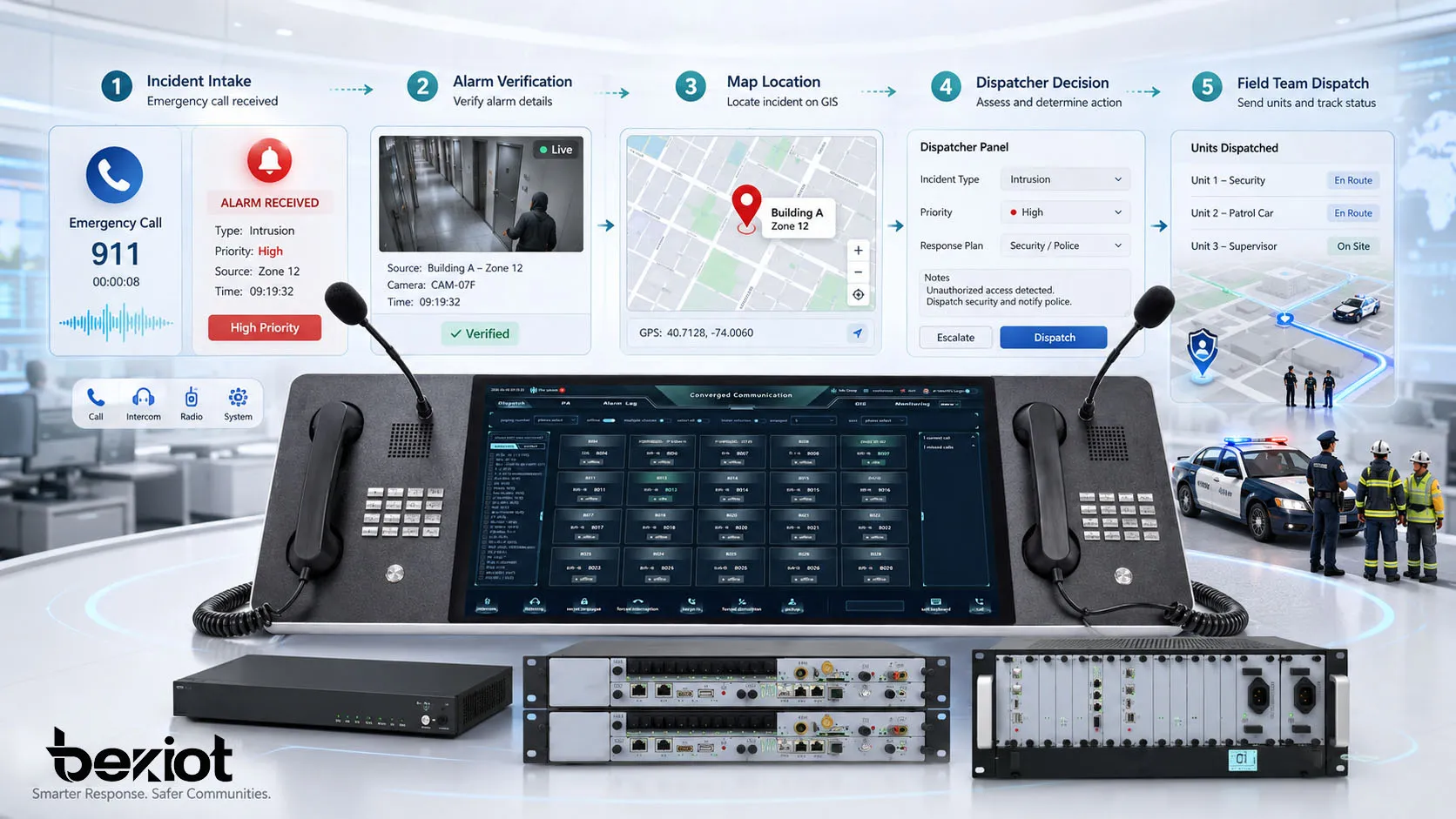
The first step is to receive and register the incident. In a modern command environment, incident intake may involve multiple systems, including emergency phones, SIP intercoms, radio channels, public address systems, alarm panels, video monitoring, IoT sensors, access control, and mobile reporting tools.
The purpose of intake is not only to answer a call or see an alarm. The command center should capture the incident type, location, time, source, reporter identity if available, priority level, and any immediate threat information. These details help the dispatcher decide whether the event is routine, urgent, critical, or life-safety related.
Multi-Source Event Collection
Emergency events rarely come from one source only. A tunnel accident may trigger CCTV alerts, emergency phone calls, fire alarms, and radio reports at nearly the same time. A campus security incident may involve access control data, panic buttons, voice calls, and patrol staff feedback.
For this reason, command systems should support multi-source event collection. When different signals are displayed together, operators can understand the situation faster and avoid treating related signals as separate incidents.
Initial Classification
After intake, the incident should be classified. Common categories may include fire, medical emergency, intrusion, equipment failure, traffic accident, hazardous gas alarm, elevator entrapment, crowd incident, environmental risk, or communication failure.
Classification helps the command center apply the correct response rule. For example, a fire alarm may require evacuation broadcast and fire team notification, while a maintenance alarm may require technician dispatch and equipment isolation.
Step Two: Verification and Situation Assessment
Not every alarm represents the same level of risk. Some alarms are false, some are duplicate reports, and some are early signs of a larger incident. Verification helps the command center confirm the situation before resources are deployed or major escalation is triggered.
Verification can be done through voice communication, video review, sensor comparison, map location, patrol confirmation, access records, radio contact, or feedback from nearby staff. The goal is to reduce uncertainty and build a reliable operational picture.
Location Confirmation
Accurate location is one of the most important elements in emergency response. Dispatchers need to know where the incident is, which entrance is closest, which zone is affected, which camera should be viewed, and which field team is nearest.
Map-based command platforms can improve this step by showing incident points, device locations, camera positions, emergency phones, patrol units, vehicles, exits, hazardous areas, and response routes. This is especially useful in tunnels, campuses, industrial parks, transport hubs, mines, and large public facilities.
Severity Evaluation
Severity evaluation determines how urgent the response should be. A minor equipment alert may require routine inspection, while a fire, gas leak, violent incident, or trapped-person call requires immediate escalation. The workflow should define how severity levels are assigned and who has authority to upgrade or downgrade them.
Clear severity levels also help prevent over-response and under-response. If every incident is treated as critical, resources may be wasted. If a serious event is underestimated, response may be delayed.
Step Three: Command Decision and Response Planning
Once the incident is verified, the command center must decide what to do. This step may involve selecting a predefined emergency plan, assigning a response team, notifying supervisors, activating communication groups, linking video feeds, sending public alerts, or coordinating with external emergency services.
In high-risk environments, decision rules should be prepared before an incident happens. Operators should not have to create a response plan from scratch while the situation is developing. A practical workflow uses predefined procedures but still allows supervisors to adjust actions based on real-time conditions.
Predefined Plans and Flexible Adjustment
Predefined plans can include response roles, notification lists, escalation levels, broadcast messages, evacuation zones, access control actions, camera presets, radio groups, and recovery steps. These plans help reduce hesitation during urgent events.
However, emergencies are rarely identical. A workflow should allow authorized users to adjust the plan when conditions change. For example, a road accident in a tunnel may require different lane control, ventilation, and rescue routing depending on the exact location and traffic condition.
Role-Based Responsibility
Every command workflow should define who receives the incident, who verifies it, who approves escalation, who dispatches teams, who communicates with the public, who records the event, and who closes the incident. Role clarity prevents overlapping instructions and missed responsibilities.
In multi-department operations, this is especially important. Security, maintenance, fire safety, medical support, IT, facility management, and external agencies may all participate in one incident. A role-based workflow helps them coordinate without confusion.
Step Four: Dispatch and Communication Coordination
Dispatch is the point where command decisions become field action. The command center assigns personnel, vehicles, equipment, or specialist teams to the incident location. Dispatch instructions should be clear, concise, and traceable.
Communication coordination is equally important. Responders may use radios, phones, intercoms, mobile apps, video calls, or public address systems. The workflow should define which channel is used for command instructions, which channel is used for field feedback, and which channel is used for public notification.
Voice, Video, Map, and Alarm Linkage
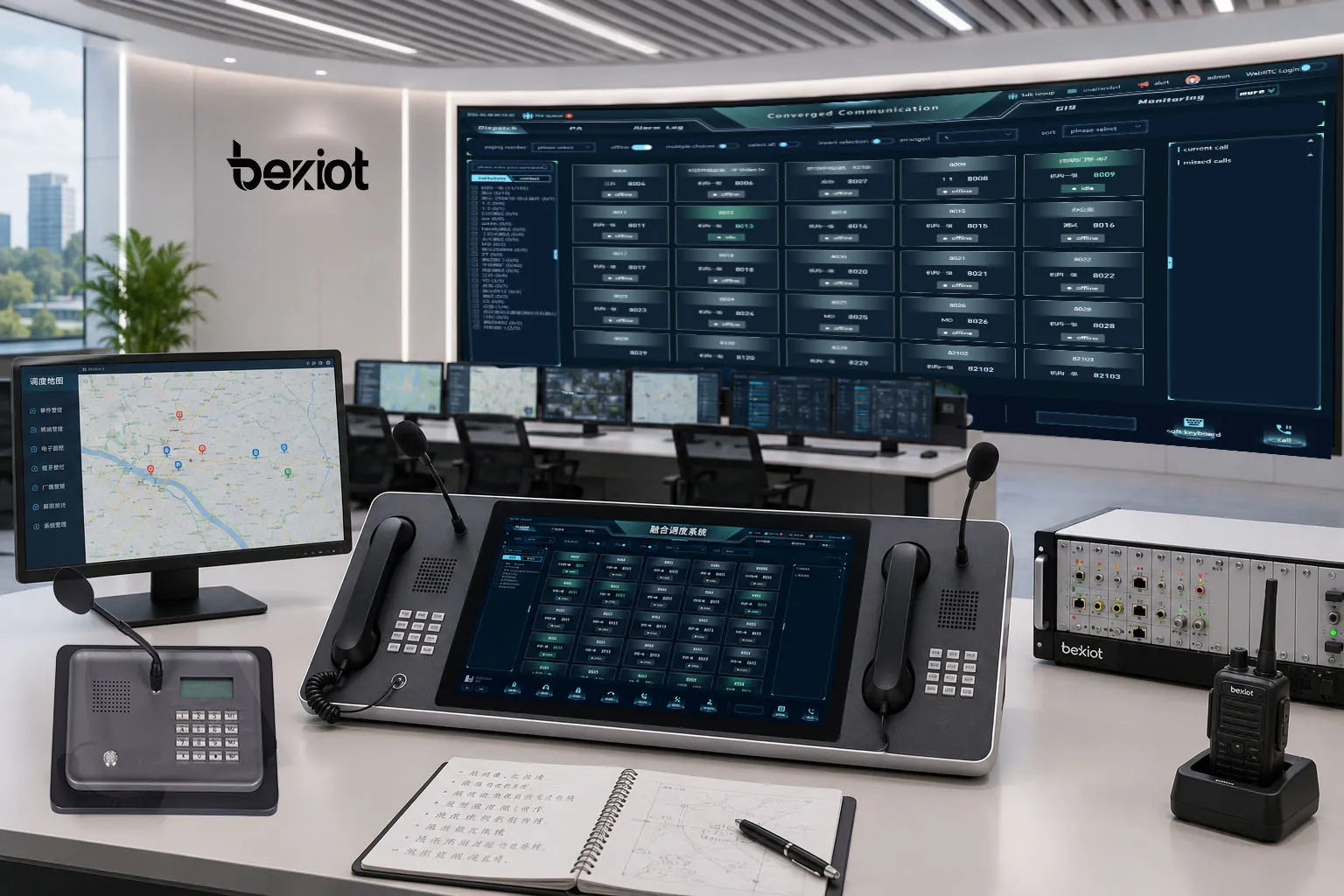
Modern emergency command often requires more than voice communication. A dispatcher may need to open nearby CCTV, call an emergency phone, broadcast instructions to a zone, view a map, check sensor status, and record the entire process in one incident log.
For projects that need this type of integrated workflow, Becke Telcom BK-RCS unified dispatch system can be used as a practical platform option. It supports voice dispatch, video linkage, broadcast coordination, alarm integration, GIS-based operation, and multi-system communication management, making it suitable for industrial parks, tunnels, campuses, transportation sites, and public safety command rooms.
Keeping Field Teams Aligned
Field responders need timely updates as the incident changes. A command workflow should include regular status reporting, arrival confirmation, task progress updates, risk warnings, and completion feedback. This helps the command center maintain situational awareness and avoid sending teams into unsafe or unclear conditions.
When several teams work at the same time, communication grouping becomes important. For example, medical responders, security staff, maintenance teams, and evacuation coordinators may need separate instructions while the command center still maintains an overall view.
Step Five: Escalation and Multi-Agency Coordination
Some incidents can be handled by on-site teams. Others require escalation to senior management, emergency services, police, fire departments, medical teams, utility providers, or local authorities. The workflow should define escalation conditions and notification methods in advance.
Escalation should be based on severity, risk spread, legal requirement, public impact, safety threat, or inability of the internal team to resolve the incident. Delayed escalation can create serious consequences, while unnecessary escalation can waste resources and create communication overload.
Internal Escalation
Internal escalation may involve duty managers, department heads, safety officers, technical supervisors, executive teams, or crisis management groups. The workflow should define which people are notified at each severity level and what information they receive.
Notification messages should include incident type, location, severity, current status, assigned resources, immediate risks, and next action. This avoids vague alerts that require recipients to call back for basic details.
External Coordination
External coordination may be required when the incident exceeds internal capability or involves public safety. Examples include major fire events, serious injuries, hazardous material release, public security incidents, transport disruption, large power failure, or emergency evacuation.
When working with external agencies, the command center should provide accurate location information, access routes, site contacts, risk details, and communication channels. If video, maps, or incident logs are available, they can support faster situational understanding.
Step Six: Public Notification and On-Site Guidance
In many emergencies, the public or building occupants need instructions. These may include evacuation guidance, shelter-in-place instructions, route changes, service interruption notices, hazard warnings, or all-clear announcements.
Public notification should be accurate, calm, and timely. Poorly worded messages can cause confusion or panic. The workflow should include approved message templates and rules for who can trigger public announcements.
Broadcast and Visual Alerting
Public address systems, IP speakers, sirens, strobe lights, digital signage, SMS, mobile apps, email, and desktop alerts can all be part of the notification process. The right channel depends on the environment and the audience.
For noisy industrial areas, visual and audio alerts may need to work together. For campuses or buildings, zone-based announcements can prevent unnecessary disruption. For transportation sites, multilingual or location-specific messages may be needed.
Message Control and Approval
Emergency messages should be controlled carefully. A workflow should define whether operators can send messages directly, whether supervisor approval is required, and which messages can be automated after a confirmed alarm.
Templates can improve response speed, but they should be reviewed regularly. Outdated instructions, unclear wording, or wrong zone mapping can reduce the effectiveness of emergency notification.
Step Seven: Event Logging and Evidence Management
Every important action during the incident should be recorded. Event logs help with accountability, legal review, training, maintenance, insurance claims, and performance improvement. A complete log may include alarm time, operator actions, calls, video snapshots, dispatch records, response arrival time, escalation messages, public announcements, and closure notes.
Manual notes are useful, but automated logging can reduce missing information. When communication systems, alarms, video, and dispatch actions are connected to a central platform, the incident record becomes easier to review after the event.
Traceable Decision Records
In emergency command, decisions should be traceable. The record should show who made the decision, when it was made, what information was available, and what action followed. This is important for improving future response and protecting the organization during audits or investigations.
Traceability also helps identify workflow gaps. If a delay occurred between alarm receipt and dispatch, the log can show whether the delay came from verification, approval, communication failure, or resource availability.
Video and Communication Records
Video clips, call recordings, radio logs, intercom conversations, and system events can provide useful evidence. These records help reconstruct the incident and confirm whether the response followed procedure.
Retention policies should be defined according to legal, operational, and privacy requirements. Not all recordings need to be stored forever, but critical incident evidence should be protected from accidental deletion or unauthorized access.
Step Eight: Closure, Review, and Improvement
An incident should not be closed simply because the immediate danger has passed. Closure should confirm that the response task is complete, the affected area is safe, communication channels are updated, public messages are ended, and recovery actions are assigned.
After closure, the organization should review the workflow. The review should focus on facts rather than blame. It should identify what worked, what failed, what was delayed, and what should be improved before the next incident.
Post-Incident Review
A post-incident review may examine response time, dispatch accuracy, communication quality, alarm validity, equipment performance, field coordination, escalation timing, public notification, and documentation completeness.
The review should result in practical improvements. These may include updating response plans, improving device maintenance, changing notification rules, training dispatchers, adding cameras, adjusting map data, or improving integration between systems.
Continuous Workflow Optimization
Emergency command workflow should evolve with the site. New buildings, new equipment, new risks, new teams, and new regulations may require workflow changes. Regular drills and simulations help verify whether the workflow still works in real conditions.
Organizations should also test communication tools, emergency phones, dispatch consoles, radio links, PA zones, alarm inputs, video linkage, and backup power. A workflow is only reliable when the supporting systems are tested and maintained.
Key Design Considerations
A good emergency command workflow must be practical, not just complete. If the process is too complex, operators may not follow it under pressure. If it is too simple, it may not cover real emergency conditions. The best design balances speed, control, clarity, and traceability.
| Consideration | Why It Matters | Practical Focus |
|---|---|---|
| Incident source integration | Multiple alarm and communication sources may report the same event | Connect alarms, calls, video, sensors, and manual reports into one workflow |
| Location accuracy | Responders need the correct position and access route | Use maps, device locations, zone labels, and nearby resource visibility |
| Role definition | Unclear authority can delay response | Define dispatcher, supervisor, responder, notifier, and reviewer roles |
| Communication reliability | Field teams need stable contact during changing conditions | Use redundant voice, radio, intercom, mobile, and broadcast channels where needed |
| Event traceability | Logs support review, compliance, and improvement | Record alarms, decisions, dispatch actions, communications, and closure notes |
System Integration
Emergency command is more effective when communication, security, automation, and monitoring systems can work together. Integration may include CCTV, access control, fire alarm, public address, emergency intercom, radio, GIS, IoT sensors, building management, and maintenance platforms.
Integration should be designed around workflow needs, not only around technology. The key question is what the operator needs to see, hear, control, and record at each stage of the incident.
Redundancy and Failover
Emergency systems should remain usable when part of the infrastructure fails. Backup power, redundant networks, secondary communication channels, local manual control, and offline response procedures can improve resilience.
For critical sites, failure scenarios should be tested. A command workflow should still function when the main network is unstable, a camera is unavailable, a radio channel is congested, or one operator position is offline.
Training and Drills
Even the best workflow will fail if people do not know how to use it. Operators, supervisors, field teams, and maintenance staff should receive regular training based on realistic scenarios.
Drills should test not only response speed but also communication clarity, role understanding, system operation, escalation rules, and event documentation. After each drill, the workflow should be adjusted based on real performance.
Common Mistakes to Avoid
One common mistake is building a workflow that depends too much on one person’s experience. If only one operator knows how to handle complex incidents, the process is fragile. The workflow should be documented and repeatable.
Another mistake is treating alarms, cameras, phones, radios, and PA systems as separate tools. During emergencies, operators need a connected view. If they must switch between too many disconnected systems, response may slow down.
A third mistake is ignoring the review stage. Without post-incident analysis, the same communication problems, dispatch delays, and coordination gaps may happen again. Continuous improvement is part of the workflow, not an optional extra.
FAQ
What is an emergency command workflow?
An emergency command workflow is a structured process for receiving incidents, verifying information, making decisions, dispatching resources, coordinating communication, escalating response, recording actions, and reviewing results after the event.
What are the main steps in emergency command?
The main steps usually include incident intake, verification, situation assessment, command decision, dispatch, field communication, escalation, public notification, event logging, closure, and post-incident review.
Why is map-based dispatch useful in emergency response?
Map-based dispatch helps operators locate incidents, nearby responders, cameras, emergency devices, access routes, zones, and risk areas. This improves situational awareness and supports faster resource assignment.
How can communication systems improve emergency workflow?
Communication systems help connect dispatchers, field teams, supervisors, public address devices, emergency phones, intercoms, radios, and mobile users. Integrated communication reduces delays and keeps response teams aligned.
Where can BK-RCS unified dispatch system be used?
Becke Telcom BK-RCS unified dispatch system can be used in industrial parks, transportation facilities, tunnels, campuses, utilities, command centers, and public safety environments that require voice dispatch, video linkage, alarm integration, broadcast coordination, and GIS-based emergency management.
How often should an emergency command workflow be reviewed?
It should be reviewed after major incidents, after drills, after system upgrades, and whenever the site layout, risk profile, team structure, or operating procedure changes. Regular review helps keep the workflow practical and reliable.







