


In a busy communication or control system, some resources cannot wait for users or devices to release them naturally. Forced release gives authorized operators or system logic a controlled way to clear them.
Forced release is a system control function that forcibly terminates, clears, or releases an active session, call, channel, connection, task, device resource, or occupied service state. It is commonly used when a normal release process fails, when a higher-priority operation must take control, or when system resources must be recovered quickly to maintain service continuity.
The meaning of forced release may vary by industry. In communication systems, it may refer to forced call release, channel clearing, dispatch override, or emergency resource recovery. In software and operating systems, it may refer to releasing a waiting task, locked resource, connection, or process state. In access control, industrial automation, and command systems, it may refer to clearing occupied states so that the next authorized action can continue.
Basic Definition and Operating Logic
Forced release is different from a normal release. A normal release happens when a user hangs up, a process ends, a device completes its task, or a system resource is returned according to standard workflow. Forced release is triggered by an authorized command, automatic rule, timeout condition, priority event, or fault recovery mechanism.
The purpose is not to interrupt systems randomly. It is to keep the system controllable when a resource is blocked, misused, stuck, or needed for a more important task. For this reason, forced release should always be managed with permissions, logs, priority rules, and clear operating procedures.
Normal Release vs Forced Release
Normal release follows the expected end of a session or process. For example, a phone call ends when one party disconnects, a communication channel becomes free after a transmission ends, or a software task returns a resource after completing its work.
Forced release bypasses the normal ending path. It may be used when a user forgets to disconnect, a session remains locked, a device does not respond, a channel is occupied too long, or a higher-priority emergency event requires immediate access.
Who Can Trigger It
Forced release can be triggered manually by an authorized operator, dispatcher, administrator, supervisor, or maintenance engineer. It can also be triggered automatically by system rules such as timeout, priority escalation, alarm linkage, overload protection, or fault detection.
In critical systems, manual operation should be limited to trained users. Automatic operation should be carefully designed so that the system does not accidentally terminate important services or interrupt safety-related communication.
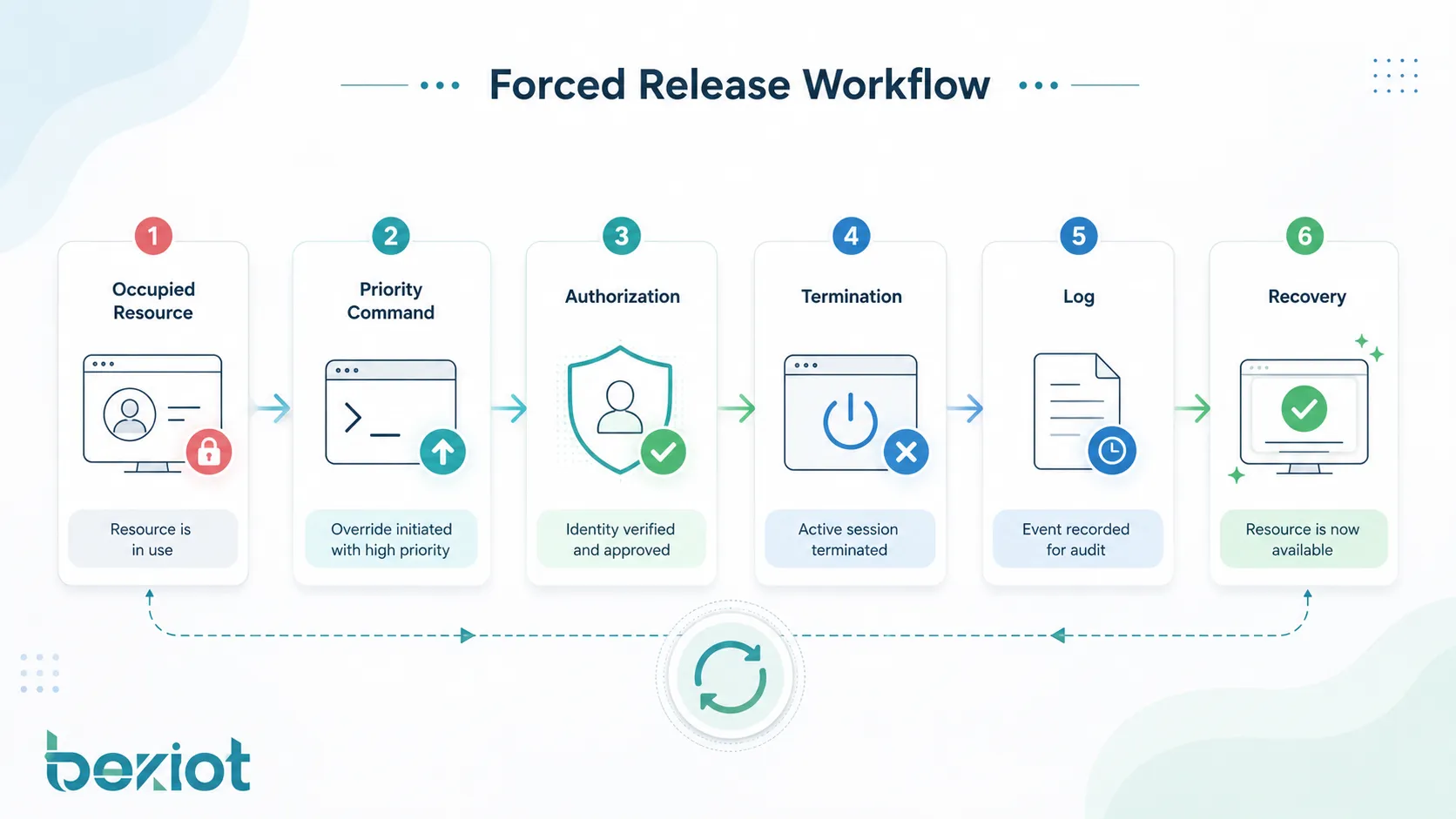
How the Process Works
A forced release process usually begins when the system identifies an occupied or abnormal state. This may be an active call, locked channel, unavailable terminal, busy resource, waiting task, blocked process, or service connection that cannot continue normally.
After the condition is detected, the system checks whether forced release is allowed. If the command or rule passes permission and priority checks, the system terminates the occupied state, frees the resource, updates the status, and records the action for future review.
State Detection
The system first needs to know that a resource is occupied. This may be shown as a busy call, active session, allocated channel, locked device, occupied queue, pending task, or unavailable service object. In communication platforms, this state may appear in a dispatch console, call control module, radio channel monitor, or SIP session management interface.
Accurate state detection is important. If the system incorrectly identifies a normal active session as abnormal, forced release may interrupt legitimate work. If it fails to detect a stuck state, the resource may remain unavailable for too long.
Authorization and Priority Check
Before execution, the system should verify whether the user, rule, or system event has permission to perform forced release. This prevents ordinary users from clearing important sessions or disrupting critical operations.
Priority logic is equally important. A routine operator request should not override an emergency command unless the workflow allows it. Emergency calls, command channels, alarm sessions, and safety-related operations may require protected priority levels.
Termination and Resource Recovery
After approval, the system sends a release instruction to the relevant module. This may terminate a call, clear a channel, unlock a port, close a session, release a task, reset a device state, or remove a blocked connection.
Once the resource is released, the system should update its status so that other users or processes can use it again. The release event should also be logged with time, operator, target resource, reason, result, and related incident information where available.
Main Functions in System Operation
Forced release is valuable because it gives systems a way to recover control. In real operation, resources may become occupied for reasons that are not always planned. Users may fail to disconnect, devices may hang, network sessions may remain open, or software processes may wait indefinitely.
Clearing Occupied Channels
In communication systems, channels and sessions are limited resources. If a call, radio channel, dispatch line, or intercom session remains occupied unnecessarily, other users may be blocked from communication.
Forced release allows an authorized operator or system rule to clear that occupied state. This is useful when a channel must be made available for higher-priority communication, emergency coordination, maintenance testing, or normal service recovery.
Ending Abnormal Sessions
Some sessions do not end correctly because of network interruption, device crash, software error, user inactivity, or signaling failure. The system may still show the session as active even though the user is no longer communicating.
Forced release helps remove these abnormal sessions. This prevents ghost calls, locked connections, unavailable lines, or misleading status displays from affecting system operation.
Supporting Priority Override
In command and dispatch systems, priority matters. Emergency communication, control-room instructions, public safety response, and operational command may need to override lower-priority activities.
Forced release can support priority override by clearing a lower-priority session or resource when a higher-priority event occurs. This must be handled carefully, with clear rules and audit records, because forced interruption may affect active users.
Recovering System Resources
In software systems, forced release may be used to recover locked memory, waiting tasks, database connections, session tokens, device handles, or thread resources. When resources are not released properly, performance and availability can decline.
By clearing blocked or expired resources, the system can avoid resource exhaustion and keep services stable. This is especially important in high-concurrency platforms, communication servers, access systems, and industrial control applications.
System Value and Operational Benefits
The value of forced release is not only technical. It improves control, responsiveness, resource availability, and emergency handling. When designed correctly, it helps operators manage abnormal conditions without restarting the whole system.
Improved Availability
Occupied resources can reduce system availability. If a line, port, channel, session, or task remains locked, other users may not be able to access the service. Forced release helps restore availability faster.
This is especially important in systems with limited channels or shared communication paths. Instead of waiting for a timeout or manual device restart, the system can release the resource through a controlled command.
Better Emergency Response
Emergency systems need fast access to communication and control resources. If low-priority activity occupies a required channel, response may be delayed. Forced release can help ensure that emergency commands and high-priority operations get access when needed.
For example, a command center may need to interrupt a non-critical call, clear a busy intercom session, or free a communication channel for urgent coordination. The function should be integrated with priority management rather than used as an informal manual shortcut.
Reduced Maintenance Burden
Without forced release, operators may need to restart equipment, disconnect cables, reboot services, or wait for long timeout periods to clear stuck sessions. These actions can affect more users than necessary.
A controlled forced release function gives maintenance teams a more precise way to resolve problems. It can reduce downtime, avoid unnecessary system restart, and make troubleshooting more efficient.
Stronger Command Control
In dispatch centers, control rooms, industrial sites, and public safety environments, operators need reliable authority over communication resources. Forced release supports this authority by allowing authorized users to clear resource conflicts and maintain command order.
However, stronger control also requires stronger governance. The system should define who can use forced release, under what conditions, and how each action is recorded.
Common Application Scenarios
Forced release can appear in many systems that manage shared resources, priority communication, or active sessions. Its exact behavior depends on the platform, but the purpose is usually the same: clear an occupied state and make the resource available again.
Dispatch Communication Systems
In dispatch communication, forced release may be used to terminate a lower-priority call, clear an occupied dispatch line, recover a stuck session, or free a communication channel for emergency command. It helps dispatchers maintain control when many users compete for limited communication resources.
This is common in transportation, energy, industrial parks, airports, ports, emergency services, utilities, and security command centers. In these environments, communication priority and resource control directly affect response efficiency.
Intercom and Paging Systems
In intercom and paging systems, a terminal or line may remain occupied because a user does not hang up, a device fails to release, or a session is interrupted abnormally. Forced release allows the system to clear the line and restore normal operation.
It can also support emergency paging. If a routine announcement or intercom session conflicts with urgent notification, a higher-priority event may require lower-priority audio or session activity to be released.
Telephony and Call Control
In telephony systems, forced release may be used by administrators, operators, or call control logic to clear stuck calls, release busy trunks, terminate abnormal sessions, or recover signaling resources.
This is useful in PBX, SIP, trunk gateway, call center, and carrier interconnection scenarios where session state must be accurate. Improperly released calls can consume channels, create billing confusion, or affect call routing.
Software and Operating Systems
In software environments, forced release may apply to locks, semaphores, waiting tasks, sessions, file handles, connection pools, or other shared resources. When a process waits too long or becomes blocked, the system may need to release it forcibly to avoid wider service impact.
This type of forced release should be designed carefully. Releasing a resource at the wrong time can cause data inconsistency, transaction failure, or application errors. Good software design should combine forced release with timeout logic, rollback handling, and error recovery.
Access Control and Facility Systems
In access control or facility management systems, forced release may be used to clear a locked door state, release an occupied device command, reset a turnstile status, or restore a control point after abnormal operation.
For safety-related systems, forced release must follow strict rules. For example, releasing a door or gate may affect security, evacuation, or restricted-area control. Operator permission and event logging are essential.
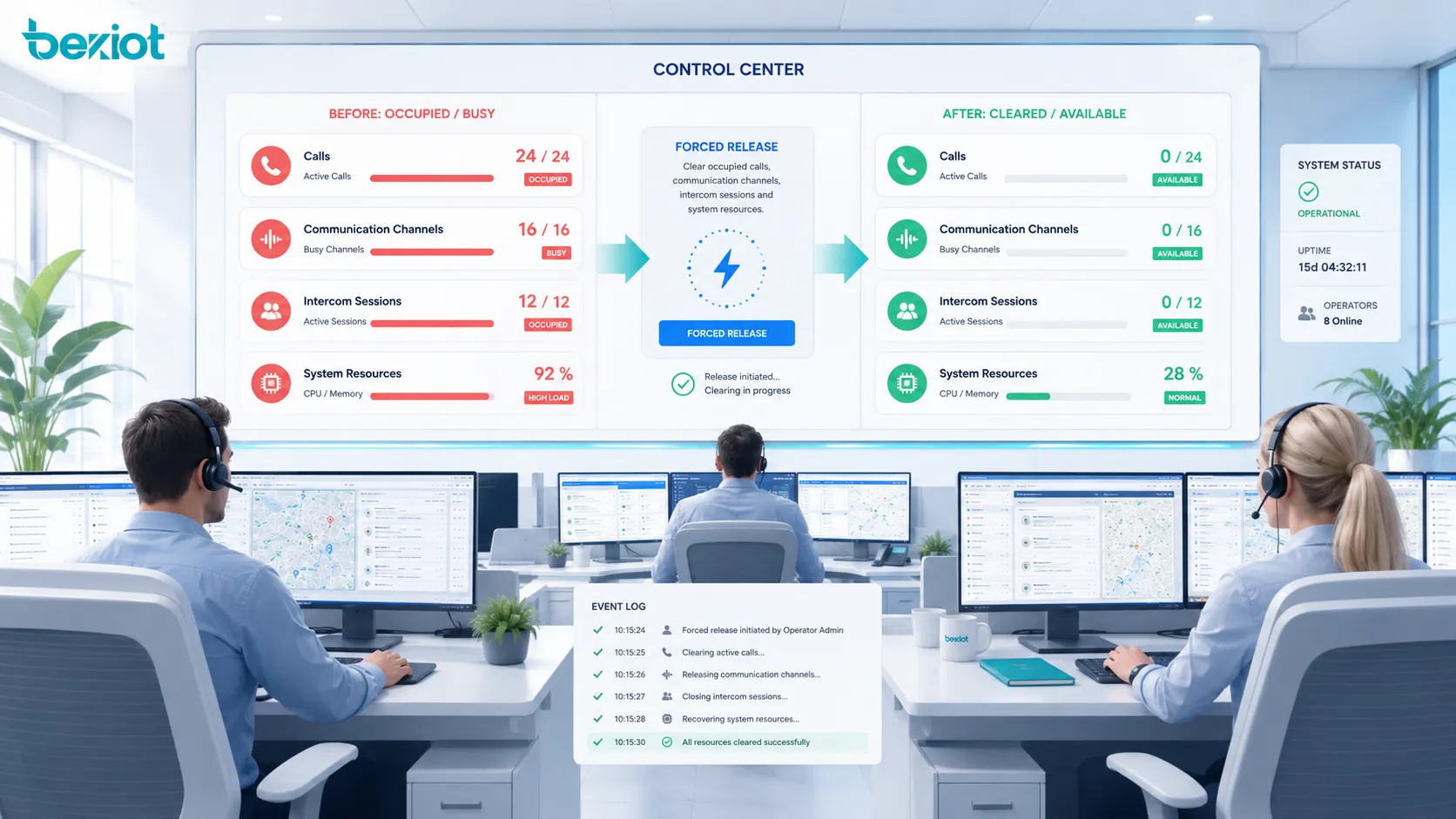
Permission, Priority, and Safety Design
Forced release should never be treated as an unrestricted button. Because it can interrupt active services, it must be designed with authorization, priority control, safety rules, and traceability.
Role-Based Access Control
Only authorized roles should be able to perform forced release. These roles may include system administrators, dispatch supervisors, control-room operators, maintenance engineers, or emergency commanders.
Role-based access control helps prevent misuse. A normal user may be allowed to end their own session, but not release another user’s call, channel, or system resource. Higher-level users may have wider control depending on operational policy.
Priority Rules
Priority rules define which sessions can be released and which sessions must be protected. Emergency calls, safety alarms, fire communication, security command, and critical control sessions may need higher protection than routine communication.
Priority rules should be visible to operators. If a forced release command is rejected because the target session has higher priority, the system should provide a clear reason instead of simply failing silently.
Audit Logs
Every forced release action should be logged. The log should include operator identity, target resource, release time, reason, command source, result, and related event if applicable.
Audit logs support accountability and troubleshooting. If a communication session was interrupted, the organization can review why it happened, who performed the release, and whether the action followed procedure.
Comparison with Related Functions
Forced release is often confused with reset, disconnect, timeout, override, and preemption. These functions may overlap, but they are not exactly the same. Understanding the difference helps engineers design clearer workflows.
| Function | Main Meaning | Typical Use |
|---|---|---|
| Forced Release | Forcibly clears an occupied session, channel, task, or resource | Recover stuck states or free resources for priority operations |
| Normal Disconnect | Ends a session through standard user or system procedure | User hangs up, task completes, service closes normally |
| Timeout | Automatically ends a state after a defined waiting period | Clear inactive sessions or expired connections |
| Reset | Restarts a device, module, or service state | Recover from abnormal device or software behavior |
| Preemption | Higher-priority operation takes over from a lower-priority operation | Emergency command, priority dispatch, critical resource access |
Forced Release and Timeout
Timeout is usually automatic. If a session remains inactive for too long, the system ends it based on a configured time limit. Forced release may happen immediately through operator command or priority logic, even before timeout expires.
Both functions can work together. Timeout handles routine cleanup, while forced release handles urgent or abnormal cases that cannot wait.
Forced Release and Reset
Reset often affects a whole device, module, or service. Forced release is usually more targeted because it clears a specific session, channel, or resource. This makes it less disruptive when only one occupied state needs to be cleared.
In maintenance, a targeted forced release is often preferred before restarting a larger system. If forced release fails, reset may become the next recovery step.
Implementation Considerations
Implementing forced release requires more than adding a command button. The function must be connected with system state management, user permissions, priority rules, logs, user interface design, and recovery procedures.
Clear User Interface
The interface should make it clear which resource will be released. Operators should see the target session, user, channel, device, location, status, and priority before confirming the action.
For critical systems, a confirmation step may be required. This helps prevent accidental interruption caused by clicking the wrong item or misunderstanding the resource state.
Reason Code and Confirmation
Some systems require the operator to select a reason code before performing forced release. Common reason codes may include stuck session, emergency priority, maintenance test, user request, abnormal signaling, or supervisor instruction.
Reason codes improve audit quality. They help managers review whether forced release is being used correctly or too frequently.
Event Notification
Depending on the application, affected users may need to receive a notification when their session is forcibly released. This can reduce confusion and support service transparency.
In emergency or command systems, notification behavior should be carefully designed. In some cases, immediate user notification is useful. In other cases, silent release may be required by operational policy.
Fail-Safe Behavior
If forced release fails, the system should provide a clear result. It should not leave the operator unsure whether the resource was cleared. The system may offer retry, escalation, reset, or maintenance guidance.
Fail-safe behavior is especially important in safety-related systems. Operators must know whether the command succeeded, failed, or is still pending.
Risks and Misuse to Avoid
Forced release can improve control, but misuse can create service interruption, operational confusion, data loss, user complaints, or safety risk. The function should be used only when there is a valid reason.
Interrupting Critical Sessions
The most serious risk is interrupting a critical session by mistake. If an emergency call, safety command, medical communication, or operational control session is released incorrectly, the result may be severe.
This risk can be reduced through priority protection, role-based permissions, confirmation prompts, visual warnings, and clear operating procedures.
Using Forced Release Instead of Root Cause Analysis
If a system frequently needs forced release, there may be an underlying problem. The cause could be signaling instability, software defects, device failure, poor network quality, user training issues, or incorrect timeout settings.
Forced release should not become a substitute for solving recurring faults. Event logs should be reviewed to identify patterns and improve system reliability.
Lack of Logging
Without logs, forced release becomes difficult to audit. Operators may not remember why a session was cleared, and managers cannot confirm whether procedures were followed.
Logging is not only for accountability. It also helps engineers troubleshoot abnormal sessions, improve configuration, and verify whether priority rules are working correctly.
Best Practices for Deployment
A well-designed forced release function should be controlled, traceable, targeted, and easy to understand. The goal is to recover resources quickly without creating unnecessary disruption.
Define Use Conditions
The organization should define when forced release is allowed. Typical conditions may include stuck calls, inactive sessions, emergency priority needs, maintenance operations, abnormal device status, blocked tasks, or system resource exhaustion.
Operators should not need to guess. Clear procedures reduce hesitation during urgent events and prevent unnecessary forced release during normal operation.
Protect High-Priority Operations
High-priority sessions should be protected from accidental release. The system can use priority levels, protected states, confirmation prompts, and supervisor approval to reduce risk.
In emergency environments, the protection model should be tested through drills. Operators should know which sessions can be released and which must remain active.
Review Forced Release Records
Forced release records should be reviewed regularly. Frequent use on the same device, channel, line, or application module may indicate a technical problem that needs correction.
Reviewing records can also reveal training needs. If operators use forced release for routine cases that should be handled by normal disconnect or timeout, procedures may need to be improved.
FAQ
What does forced release mean?
Forced release means forcibly clearing or terminating an occupied session, call, channel, connection, task, or system resource. It is used when normal release does not happen, when a resource is stuck, or when a higher-priority operation needs access.
Where is forced release commonly used?
It is commonly used in dispatch communication systems, telephony platforms, intercom systems, paging systems, software platforms, operating systems, access control, facility management, and industrial control environments.
Is forced release the same as disconnect?
No. A normal disconnect happens through the standard ending process, such as a user hanging up or a task completing. Forced release is an authorized action that clears the resource even when normal release has not occurred.
Why is forced release important in dispatch systems?
Dispatch systems often manage limited communication channels and priority operations. Forced release helps clear stuck or lower-priority sessions so that emergency communication, command instructions, or critical coordination can continue.
Can forced release create risks?
Yes. If used incorrectly, it may interrupt important communication, break a workflow, cause data inconsistency, or create user confusion. This is why permissions, priority rules, confirmation, and audit logs are important.
How should forced release be managed?
It should be managed with role-based access control, clear use conditions, priority protection, reason codes, event logs, operator training, and regular review of release records. The function should support recovery and control, not replace proper fault analysis.







