


Security Information and Event Management, commonly known as SIEM, is a cybersecurity technology that collects security data from many systems, analyzes events, detects suspicious activity, generates alerts, and helps security teams investigate incidents. It brings together logs, alerts, network activity, user behavior, endpoint events, cloud records, authentication data, firewall traffic, application logs, and other security-relevant information into one centralized platform.
The main purpose of SIEM is to improve security visibility. In a modern organization, threats may appear across many different systems at the same time. A failed login on one server may seem harmless, but when combined with unusual VPN access, endpoint malware activity, privilege escalation, and data transfer logs, it may indicate a real attack. SIEM helps connect these signals so that security teams can identify patterns that would be hard to see manually.
SIEM is widely used in enterprise cybersecurity, cloud security, financial services, healthcare, government, manufacturing, education, retail, managed security services, data centers, telecommunications, industrial networks, and compliance-driven environments. It supports threat detection, incident response, log management, compliance reporting, forensic investigation, insider threat monitoring, and security operations center workflows.
What Is SIEM?
Definition and Core Meaning
SIEM is a security platform that combines security information management and security event management. Security information management focuses on collecting, storing, searching, and reporting security logs over time. Security event management focuses on real-time monitoring, event correlation, alerting, and incident detection. SIEM brings these capabilities together in one system.
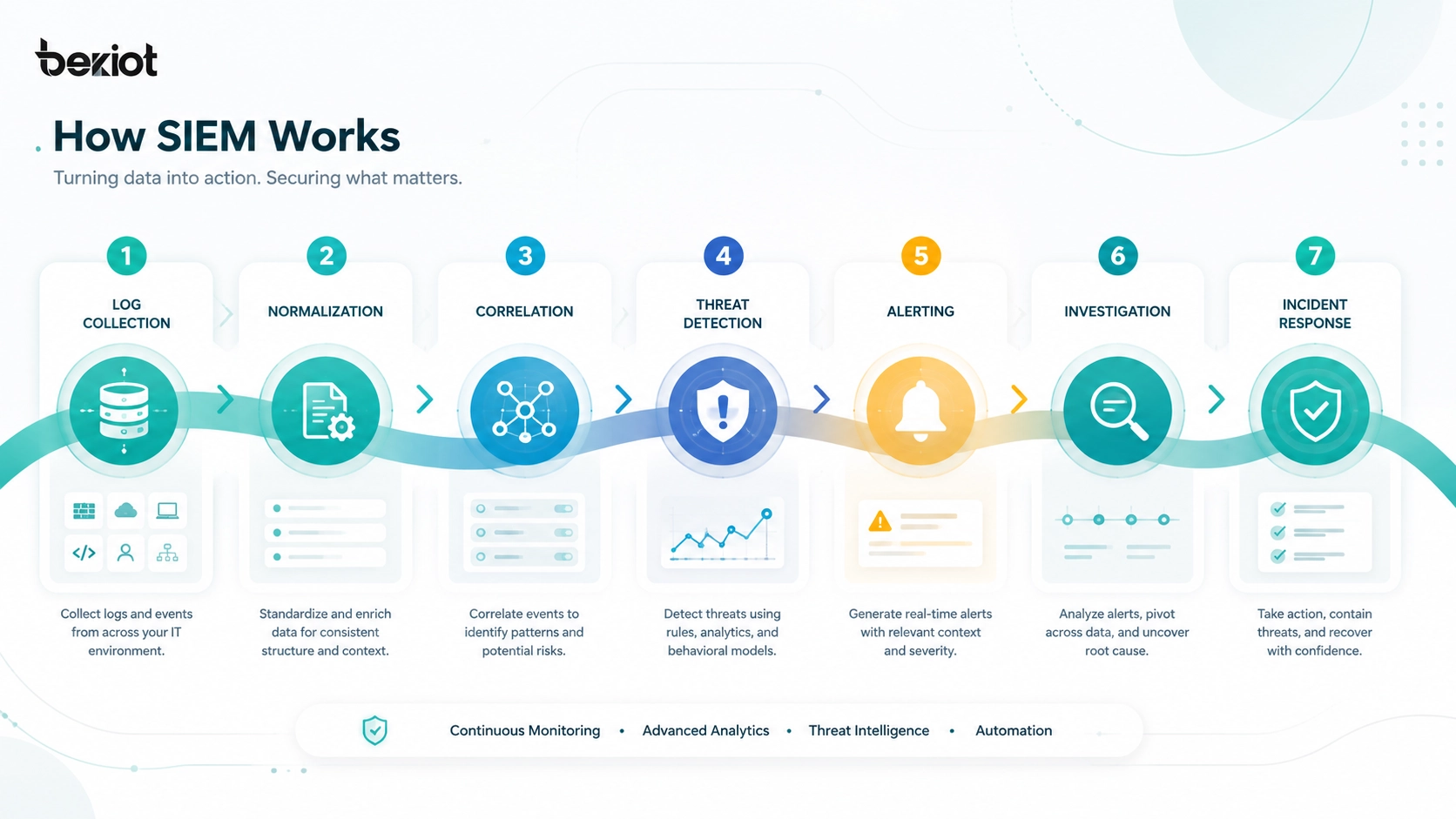
In practical terms, SIEM acts as a central security data and analysis platform. It receives logs and events from many sources, normalizes the data into a usable format, correlates related activity, applies detection rules or analytics, and notifies security teams when suspicious behavior is found.
The core meaning of SIEM is centralized security visibility and event analysis. Instead of forcing analysts to check every firewall, server, endpoint, cloud account, and application separately, SIEM provides a unified place to search, monitor, investigate, and report on security activity.
SIEM helps security teams turn scattered technical logs into meaningful security events, alerts, timelines, and investigation evidence.
Why SIEM Matters
SIEM matters because cyberattacks often create signals across many different systems. An attacker may first attempt password guessing, then log in through a remote access service, move laterally to another system, create a new privileged account, disable security tools, access sensitive files, and exfiltrate data. Each step may appear in a different log source.
Without SIEM, these signals may remain disconnected. A firewall may show unusual traffic, an identity platform may show suspicious login behavior, an endpoint tool may show process activity, and a database may show abnormal access. SIEM helps combine these signals into one investigation view.
SIEM also supports compliance and audit needs. Many organizations must retain security logs, prove that security monitoring is in place, generate reports, and review access activity. SIEM provides a structured way to manage this data and demonstrate security control.

How SIEM Works
Data Collection from Multiple Sources
SIEM begins with data collection. It gathers logs and events from security tools, infrastructure, applications, and user systems. Common sources include firewalls, routers, switches, VPN gateways, identity providers, domain controllers, endpoint detection platforms, antivirus tools, email security gateways, web proxies, servers, databases, cloud platforms, SaaS applications, and business systems.
Data can be collected through agents, syslog, APIs, log forwarders, cloud connectors, event streaming, database integration, or file ingestion. Some SIEM platforms collect raw logs directly, while others use collectors or data pipelines to process information before it reaches the central system.
The quality of SIEM depends heavily on the quality of data collection. If important systems are not connected, the SIEM may miss key attack signals. If logs are incomplete, inconsistent, or delayed, investigation becomes harder.
Normalization and Parsing
After data is collected, the SIEM parses and normalizes it. Different systems record logs in different formats. A firewall, Windows server, Linux server, cloud platform, database, and web application may describe user, IP address, timestamp, action, and result in different ways.
Normalization converts these different log formats into a more consistent structure. For example, the SIEM may map fields such as source IP, destination IP, username, event type, device name, process name, authentication result, and severity. This makes it easier to search, correlate, and analyze events across different systems.
Parsing and normalization are essential because SIEM is only useful if analysts can compare events from different sources in a meaningful way.
Correlation and Threat Detection
Correlation is one of the most important SIEM functions. It connects related events across time, systems, users, IP addresses, devices, and behaviors. A single failed login may not be a serious incident, but hundreds of failed logins followed by a successful login from an unusual location may trigger an alert.
SIEM correlation may use predefined rules, custom detection logic, threat intelligence, behavior analytics, anomaly detection, risk scoring, or machine learning depending on the platform. The goal is to identify suspicious patterns that indicate malware, credential theft, insider misuse, privilege escalation, lateral movement, data exfiltration, policy violation, or system compromise.
Effective correlation helps reduce noise and gives analysts more meaningful alerts. Instead of reviewing millions of raw logs, the security team can focus on higher-risk events.
Alerting and Incident Workflow
When the SIEM detects suspicious activity, it can generate an alert. The alert may include event details, related logs, affected users, source and destination systems, severity, timeline, rule name, recommended action, and linked investigation data.
Alerts may be sent to a security operations center, ticketing system, incident response platform, email, dashboard, messaging tool, or SOAR platform. Analysts then triage the alert, investigate the evidence, determine whether the activity is malicious, and take response actions.
In mature security operations, SIEM alerts become part of a defined workflow. Alerts are prioritized, assigned, investigated, documented, escalated, and closed according to incident response procedures.
A SIEM is most valuable when its alerts are connected to a clear investigation and response process, not when it only produces more dashboards.
Main Features of SIEM
Centralized Log Management
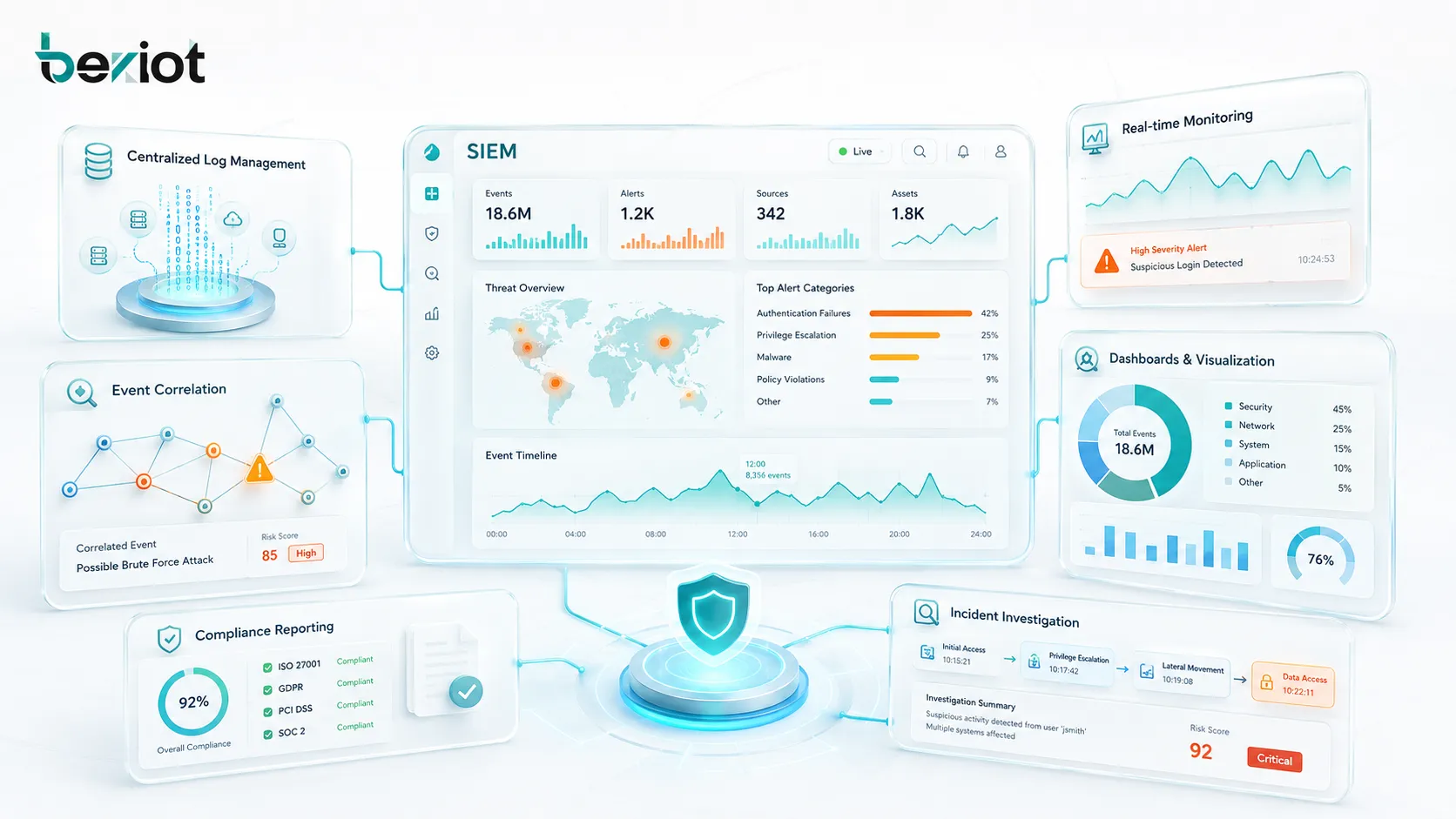
Centralized log management is the foundation of SIEM. The platform collects logs from many devices and systems, stores them in a searchable format, and allows analysts to query historical activity. This is essential for investigations because attackers may operate over hours, days, weeks, or even months.
Central log storage helps security teams understand what happened before, during, and after an incident. Analysts can search for a username, IP address, file hash, process name, device ID, domain, failed login, configuration change, or network connection across multiple systems.
Log management also supports compliance reporting, audit preparation, troubleshooting, and security control validation.
Real-Time Monitoring
SIEM platforms provide real-time or near-real-time monitoring of security events. This allows security teams to detect active threats instead of discovering them long after damage has occurred. Real-time monitoring can include authentication activity, endpoint alerts, network traffic, firewall blocks, privilege changes, cloud activity, and application events.
Real-time visibility is important because many attacks progress quickly. A compromised account can be used to access sensitive data within minutes. A malware infection can spread across endpoints. A malicious administrator account can create new access paths before defenders notice.
SIEM helps reduce the delay between suspicious activity and security response.
Event Correlation Rules
Event correlation rules allow the SIEM to detect patterns that individual systems may not identify alone. A rule may look for multiple failed logins followed by success, login from a new country, impossible travel behavior, privilege escalation, malware alert followed by outbound traffic, or suspicious PowerShell execution.
Rules can be vendor-provided, community-based, or custom-built for the organization. Custom rules are often needed because each organization has different systems, normal behavior, business hours, user roles, and risk tolerance.
Good correlation rules should be specific enough to reduce false positives but broad enough to detect real threats.
Dashboards and Visualization
SIEM dashboards provide visual summaries of security activity. They may show active alerts, top source IP addresses, failed login trends, malware detections, endpoint health, cloud activity, firewall events, user risk scores, compliance status, and incident queues.
Dashboards help analysts and managers understand security posture quickly. A security operations center may use large screens to monitor high-severity alerts, current incidents, geographic login patterns, and threat trends.
Visualizations should be designed for decision-making. A dashboard with too much information can become noise. The best dashboards highlight what needs attention.
Compliance Reporting
SIEM platforms often include reporting features for compliance, audit, and governance. Reports may cover user access, privileged activity, authentication attempts, firewall events, policy violations, data access, incident history, and log retention.
Compliance reporting is important for industries such as finance, healthcare, government, retail, energy, and critical infrastructure. Organizations may need to show that security events are monitored, logs are retained, access is reviewed, and incidents are investigated.
SIEM does not automatically make an organization compliant, but it provides the data and reporting structure needed to support compliance programs.
Core Components of a SIEM System
Log Collectors and Agents
Log collectors and agents gather data from systems and send it to the SIEM. An agent may run on a server or endpoint to collect local events. A collector may receive syslog messages, API data, cloud logs, firewall events, or application logs from multiple sources.
Collectors help organize data ingestion and reduce the burden on the central SIEM system. They may filter logs, compress data, buffer events during network interruption, and forward information securely.
A reliable collection layer is essential because missing logs can create blind spots during security incidents.
Data Storage and Indexing
SIEM platforms store large volumes of security data. Storage may include hot storage for recent searchable events, warm storage for less frequently used logs, and archive storage for long-term retention. Indexing allows analysts to search logs quickly.
Storage planning is a major part of SIEM deployment. Security logs can grow rapidly, especially in large environments with many endpoints, cloud services, network devices, and applications. Organizations must plan capacity based on events per second, retention period, data volume, compression, and query needs.
Poor storage planning can lead to high cost, slow searches, missing data, or early log deletion.
Analytics and Detection Engine
The analytics and detection engine applies rules, correlation logic, threat intelligence, anomaly detection, and risk scoring to incoming events. It determines which events are normal, suspicious, or high priority.
Detection quality depends on the platform’s analytics capability and the organization’s tuning effort. Out-of-the-box rules can provide a starting point, but they often need adjustment to match the environment. A rule that is useful for one company may create excessive noise in another.
Continuous tuning improves alert quality and helps analysts focus on real risk.
Investigation and Case Management
Many SIEM platforms include investigation tools such as alert timelines, event search, entity views, user activity history, asset context, related alerts, and case notes. These tools help analysts move from an alert to a complete understanding of what happened.
Case management may allow analysts to assign incidents, add comments, attach evidence, set severity, track status, and document response actions. This creates a structured record of the investigation.
Good investigation tools reduce analyst workload and support consistent incident response.
How SIEM Supports Threat Detection
Credential Attack Detection
Credential attacks are common because attackers often try to steal or guess passwords. SIEM can detect suspicious authentication patterns such as repeated failed logins, successful login after many failures, login from unusual locations, impossible travel, use of disabled accounts, or access outside normal hours.
SIEM becomes more effective when identity data is combined with endpoint, VPN, cloud, and network data. For example, a suspicious login may become more serious if it is followed by privilege escalation, access to sensitive files, or connection to unusual external destinations.
Credential attack detection is one of the most common and valuable SIEM use cases.
Malware and Endpoint Activity Detection
SIEM can ingest alerts and events from endpoint detection tools, antivirus platforms, operating system logs, and application activity. It can correlate malware detections with process execution, file changes, network connections, user accounts, and lateral movement indicators.
An endpoint tool may detect malware on one machine, but SIEM can help determine whether the same file, process, user, or external IP appears elsewhere in the environment. This helps security teams understand the scope of compromise.
SIEM is useful for turning individual endpoint alerts into broader incident investigations.
Network and Firewall Event Detection
Firewalls, intrusion detection systems, web proxies, DNS systems, and routers generate large volumes of network security data. SIEM can analyze this data to identify suspicious connections, blocked traffic, data transfer patterns, command-and-control indicators, scanning activity, and policy violations.
Network events become more meaningful when correlated with user identity and endpoint data. For example, outbound traffic to a suspicious domain may be more important if it comes from a server that recently showed unusual login activity.
SIEM helps connect network behavior with the users and assets involved.
Cloud Security Monitoring
Modern SIEM platforms often collect data from cloud environments, including identity logs, API activity, storage access, configuration changes, workload events, container logs, and SaaS audit records. This is important because many attacks now target cloud accounts, misconfigured services, and exposed credentials.
SIEM can detect cloud risks such as unusual administrative activity, public storage changes, suspicious API calls, impossible travel logins, disabled security controls, new access keys, and abnormal data downloads.
Cloud security monitoring is increasingly important as organizations move applications, data, and users outside traditional network boundaries.
Benefits of SIEM
Improved Security Visibility
The biggest benefit of SIEM is improved visibility. Security teams can see activity across many systems from one place. This reduces blind spots and makes it easier to understand what is happening across the organization.
Visibility is essential because security incidents rarely stay inside one system. A meaningful investigation may require identity logs, endpoint events, network data, cloud activity, application logs, and administrator actions. SIEM brings these data sources together.
Better visibility helps security teams detect threats sooner and investigate them more effectively.
Faster Threat Detection
SIEM helps detect threats faster by applying correlation rules, analytics, and real-time monitoring. Instead of waiting for manual log review, the platform can generate alerts when suspicious activity matches defined patterns.
Faster detection can reduce the time attackers remain inside the environment. This is important because longer dwell time gives attackers more opportunity to steal data, expand access, disable controls, or disrupt operations.
A well-tuned SIEM can help security teams respond before an incident becomes more damaging.
Better Incident Investigation
SIEM supports investigation by storing logs, building timelines, linking related events, and allowing analysts to search across systems. When an alert appears, analysts can quickly look for related activity before and after the event.
For example, if a suspicious login is detected, analysts can check whether the same user accessed sensitive files, created new accounts, connected through VPN, used a new device, or triggered endpoint alerts. This helps determine whether the alert is a false positive or part of a real incident.
Strong investigation capability improves response quality and reduces guesswork.
Compliance and Audit Support
SIEM supports compliance by collecting logs, retaining event records, generating reports, and helping demonstrate monitoring controls. Many compliance frameworks require organizations to track access, review security events, protect sensitive data, and investigate incidents.
SIEM can provide evidence for audits, such as privileged account activity, authentication history, firewall events, system changes, policy violations, and incident response records. Reports can be scheduled or generated on demand.
Compliance should not be the only reason to deploy SIEM, but SIEM can significantly reduce the burden of audit preparation.
Centralized Security Operations
SIEM helps security teams centralize operations. Analysts can use one platform to monitor alerts, search logs, investigate incidents, review dashboards, and generate reports. This is especially useful in organizations with many locations, cloud services, and security tools.
Centralized operations improve consistency. Instead of different teams using separate logs and tools, the organization can establish shared detection rules, response procedures, reporting standards, and escalation paths.
This helps build a more mature security operations center.

Applications of SIEM
Enterprise Security Operations Centers
Security operations centers use SIEM as a central monitoring and investigation platform. Analysts monitor alerts, review dashboards, investigate suspicious activity, escalate incidents, and generate reports. SIEM provides the data foundation for day-to-day security operations.
In an enterprise SOC, SIEM may integrate with endpoint detection, identity systems, network tools, cloud security platforms, ticketing systems, and SOAR tools. This helps analysts move from alert detection to incident response more efficiently.
SIEM is often considered one of the core technologies in mature security operations.
Cloud and Hybrid Environment Monitoring
Organizations with cloud and hybrid environments use SIEM to monitor activity across on-premises systems, cloud workloads, SaaS platforms, remote users, and identity providers. This is important because security boundaries are no longer limited to the corporate network.
SIEM can collect cloud audit logs, identity events, workload alerts, storage access logs, firewall records, and application events. It helps security teams detect suspicious activity across distributed environments.
Hybrid monitoring gives organizations a more complete view of risk across both traditional infrastructure and cloud services.
Compliance-Driven Industries
Finance, healthcare, government, retail, energy, education, and critical infrastructure organizations often use SIEM to support compliance requirements. These industries may need to retain logs, monitor access, detect suspicious activity, and produce audit reports.
SIEM helps automate parts of compliance monitoring by collecting evidence and generating repeatable reports. It can also help identify policy violations before they become audit findings.
Compliance-driven SIEM deployments should still focus on real security value, not only report generation.
Managed Security Service Providers
Managed security service providers use SIEM to monitor multiple customer environments from a central platform. Each customer may have separate log sources, detection rules, reports, and incident workflows.
For MSSPs, SIEM supports multi-customer monitoring, alert triage, reporting, and incident escalation. It allows security analysts to provide monitoring services without logging into each customer environment separately.
Strong tenant separation, access control, and reporting are especially important in managed service SIEM operations.
Industrial and Critical Infrastructure Security
Industrial organizations and critical infrastructure operators use SIEM to monitor IT systems, OT networks, control servers, remote access, operator workstations, firewalls, engineering stations, and security appliances. These environments often require high availability and careful separation between operational networks and business IT.
SIEM can help detect suspicious remote access, unauthorized configuration changes, abnormal authentication, malware activity, and unusual network connections. It can also support incident investigation and compliance reporting for critical environments.
Industrial SIEM deployment should consider operational safety, network segmentation, passive monitoring, and the sensitivity of control systems.
SIEM and Related Security Technologies
SIEM Versus SOAR
SIEM and SOAR are related but different. SIEM focuses on collecting, correlating, analyzing, and alerting on security events. SOAR focuses on security orchestration, automation, and response workflows. SOAR can take alerts from SIEM and automate actions such as ticket creation, enrichment, notification, blocking, or containment.
In many environments, SIEM detects and prioritizes security events, while SOAR helps coordinate response. The two technologies often work together in a security operations center.
SIEM provides visibility and detection. SOAR helps automate and standardize response actions.
SIEM Versus EDR
Endpoint Detection and Response, or EDR, focuses on endpoint activity such as processes, files, registry changes, memory behavior, malware alerts, and device-level investigation. SIEM collects data from many sources, including EDR, identity platforms, network devices, cloud systems, and applications.
EDR provides deep endpoint visibility. SIEM provides cross-environment correlation. If an EDR alert appears on one device, SIEM can help determine whether related login, network, cloud, or server events occurred elsewhere.
EDR and SIEM are complementary, not replacements for each other.
SIEM Versus XDR
Extended Detection and Response, or XDR, aims to combine detection and response across multiple security layers such as endpoints, email, identity, network, and cloud. SIEM is broader in log collection and compliance reporting, while XDR often focuses on integrated threat detection and response within a vendor ecosystem or connected security stack.
Some organizations use both. SIEM may serve as the central log and compliance platform, while XDR provides advanced detection and response across selected security tools.
The right choice depends on environment complexity, existing tools, compliance needs, data sources, and security operations maturity.
Deployment Considerations
Define Use Cases First
A SIEM deployment should begin with clear use cases. Examples include detecting brute-force attacks, monitoring privileged account activity, identifying malware spread, detecting impossible travel, monitoring cloud changes, tracking data access, or generating compliance reports.
Without defined use cases, organizations may collect large volumes of logs without knowing what they want to detect. This can create high cost and alert noise without meaningful security improvement.
Use cases help determine which data sources to connect, which rules to enable, which dashboards to build, and which response procedures to document.
Select the Right Log Sources
SIEM value depends on data sources. Important sources often include identity systems, endpoint security tools, firewalls, VPN, email security, cloud platforms, critical servers, databases, domain controllers, and important business applications.
Organizations should prioritize high-value data sources first. It is usually better to collect and tune important logs well than to ingest every possible log without context. Excessive logging can increase cost and make investigations harder.
Log source selection should align with threat risks, compliance needs, business priorities, and incident response requirements.
Plan Storage and Retention
SIEM storage and retention planning affects cost, investigation depth, and compliance. Recent events may need fast search and real-time analytics. Older logs may be archived for compliance or forensic review. Different log types may require different retention periods.
Retention policy should consider legal requirements, industry standards, investigation needs, storage cost, privacy rules, and data sensitivity. Keeping too little data may limit investigations. Keeping too much data may increase cost and privacy exposure.
A practical retention strategy balances security value, compliance obligation, and cost control.
Tune Rules and Reduce False Positives
SIEM rules must be tuned to match the environment. If rules are too broad, analysts receive too many false positives. If rules are too narrow, real threats may be missed. Tuning is an ongoing process that improves detection quality over time.
Tuning may include adjusting thresholds, excluding known safe activity, adding asset context, using risk scoring, improving user baselines, and refining severity levels. Analysts should review why alerts are triggered and update logic accordingly.
A well-tuned SIEM increases trust in alerts and reduces analyst fatigue.
SIEM success depends less on collecting every log and more on collecting the right logs, defining useful detections, and building a disciplined response process.
Common Challenges in SIEM
Alert Fatigue
Alert fatigue occurs when analysts receive too many alerts, especially low-quality or repetitive alerts. When every event seems urgent, analysts may miss real threats. This is one of the most common SIEM challenges.
Alert fatigue can be reduced through better rule tuning, severity scoring, suppression of known benign activity, enrichment with asset context, automation, and clear escalation procedures.
SIEM should help analysts focus, not overwhelm them.
High Data Volume and Cost
SIEM platforms can ingest huge volumes of data. More data can improve visibility, but it can also increase storage, licensing, processing, and management costs. Some organizations discover that unmanaged log ingestion becomes expensive quickly.
Cost can be managed by prioritizing valuable data sources, filtering low-value logs, using tiered storage, defining retention rules, and reviewing ingestion regularly. Data should be collected because it supports detection, investigation, or compliance—not simply because it exists.
A cost-effective SIEM strategy is based on security value and risk.
Poor Data Quality
Poor data quality reduces SIEM effectiveness. Logs may have missing fields, incorrect timestamps, inconsistent usernames, duplicate events, unclear asset names, or incomplete context. This makes correlation and investigation harder.
Improving data quality may require time synchronization, asset inventory, log parsing updates, consistent naming, identity mapping, and proper configuration of log sources.
Reliable data is the foundation of reliable detection.
Skill and Staffing Requirements
SIEM is not a tool that runs itself. It requires skilled people to configure data sources, build detection rules, investigate alerts, tune logic, maintain dashboards, manage storage, and improve response workflows.
Organizations without enough security staff may struggle to use SIEM effectively. In these cases, managed detection services, MSSP support, automation, and focused use cases can help.
SIEM technology must be matched with realistic operational capability.
Maintenance and Optimization Tips
Review Detection Rules Regularly
Detection rules should be reviewed regularly because systems, users, attackers, and business processes change over time. A rule that was useful last year may now create noise. A new cloud service or remote access tool may require new detection logic.
Rule review should consider alert volume, false positive rate, true positive rate, analyst feedback, incident history, and new threat intelligence. High-value rules should be documented and tested.
Continuous rule improvement keeps SIEM relevant and effective.
Maintain Accurate Asset and User Context
SIEM alerts become more useful when they include asset and user context. An alert involving a domain controller, database server, executive account, administrator account, or critical application is more important than the same event on a low-risk test system.
Asset inventory, user role information, department data, device ownership, criticality tags, and network zones help the SIEM prioritize alerts. Without context, analysts may waste time treating all events the same.
Context turns raw alerts into risk-based decisions.
Test Incident Response Workflows
SIEM alerts should be linked to incident response procedures. Security teams should test how alerts are triaged, assigned, escalated, investigated, and closed. Tabletop exercises and simulated attacks can reveal gaps in workflows.
Testing helps answer practical questions. Who receives the alert? How quickly is it reviewed? What evidence is required? Who approves containment? Which systems should be checked? How is the incident documented?
A tested workflow makes SIEM alerts more actionable.
Monitor SIEM Health
The SIEM itself must be monitored. If log collection stops, storage fills up, parsing breaks, time synchronization fails, or collectors go offline, the organization may lose visibility. SIEM health monitoring should include data ingestion, collector status, storage capacity, search performance, rule execution, and system availability.
Health alerts should be treated seriously because a silent SIEM failure can create dangerous blind spots. Administrators should regularly verify that critical log sources are still sending data.
A SIEM that is not healthy cannot protect the environment effectively.
Conclusion
Security Information and Event Management, or SIEM, is a central cybersecurity platform that collects logs, normalizes events, correlates activity, detects threats, generates alerts, supports investigations, and helps produce compliance reports. It gives security teams a unified view across endpoints, networks, identities, cloud systems, applications, and infrastructure.
SIEM works through data collection, parsing, normalization, storage, correlation, analytics, alerting, and incident workflow. Its main features include centralized log management, real-time monitoring, event correlation, dashboards, compliance reporting, investigation tools, threat intelligence integration, and case management.
The benefits of SIEM include improved security visibility, faster threat detection, better incident investigation, compliance support, centralized security operations, and stronger recordkeeping. It is widely used in enterprise SOCs, cloud monitoring, compliance-driven industries, managed security services, industrial environments, and critical infrastructure. When deployed with clear use cases, tuned rules, high-quality data, and disciplined response processes, SIEM becomes a powerful foundation for modern cybersecurity operations.
FAQ
What is SIEM in simple terms?
SIEM is a cybersecurity platform that collects security logs and events from many systems, analyzes them, and alerts security teams when suspicious activity is detected.
It helps organizations see, investigate, and respond to security threats from one central place.
How does SIEM work?
SIEM works by collecting logs from systems such as firewalls, servers, endpoints, cloud platforms, and identity tools. It normalizes the data, correlates related events, applies detection rules or analytics, and generates alerts for security teams.
Analysts then investigate the alerts and decide whether response actions are needed.
What are the main benefits of SIEM?
The main benefits of SIEM include better security visibility, faster threat detection, centralized log management, incident investigation support, compliance reporting, and improved security operations.
It helps security teams connect activity across many different systems.
What systems can send data to SIEM?
SIEM can collect data from firewalls, routers, VPNs, identity providers, domain controllers, endpoint security tools, servers, databases, cloud platforms, SaaS applications, email security tools, web proxies, and business applications.
The best data sources depend on the organization’s security risks and monitoring goals.
Is SIEM only for large enterprises?
No. SIEM is common in large enterprises, but smaller organizations can also use SIEM through cloud services, managed security providers, or focused deployments. The key is to choose realistic use cases and avoid collecting more data than the team can manage.
SIEM is most useful when it is matched with the organization’s security needs, staffing level, and response process.







