


In video integration projects, one problem appears again and again: connecting different video sources to web platforms is often more complicated than expected. Cameras, recorders, monitoring platforms, command systems, browsers, and mobile terminals may all use different protocols, formats, and playback methods. The result can be high integration cost, long delivery cycles, playback delay, black screens, and repeated troubleshooting during project acceptance.
Traditional surveillance systems often depend on dedicated clients, ActiveX controls, private SDKs, or specific operating systems. This creates obvious barriers when users want to view live video through a browser, a Web application, an IoT platform, or a command dashboard. WebRTC changes this logic by making real-time video playback possible directly inside modern browsers without additional plug-ins or client software.
Why Browser-Based Video Access Matters
For many years, video surveillance integration was built around closed software environments. Users often had to install a dedicated monitoring client, configure plug-ins, or use a specific browser version. This was acceptable in traditional control rooms, but it is no longer suitable for modern web-based command platforms, smart parks, industrial dashboards, and cloud-connected applications.
Project owners increasingly expect a simpler experience. They want to open a browser, log in to a platform, and view real-time video immediately. They also expect the same video source to be available across desktops, tablets, laptops, and mobile browsers. This requirement makes browser-native real-time communication extremely valuable.
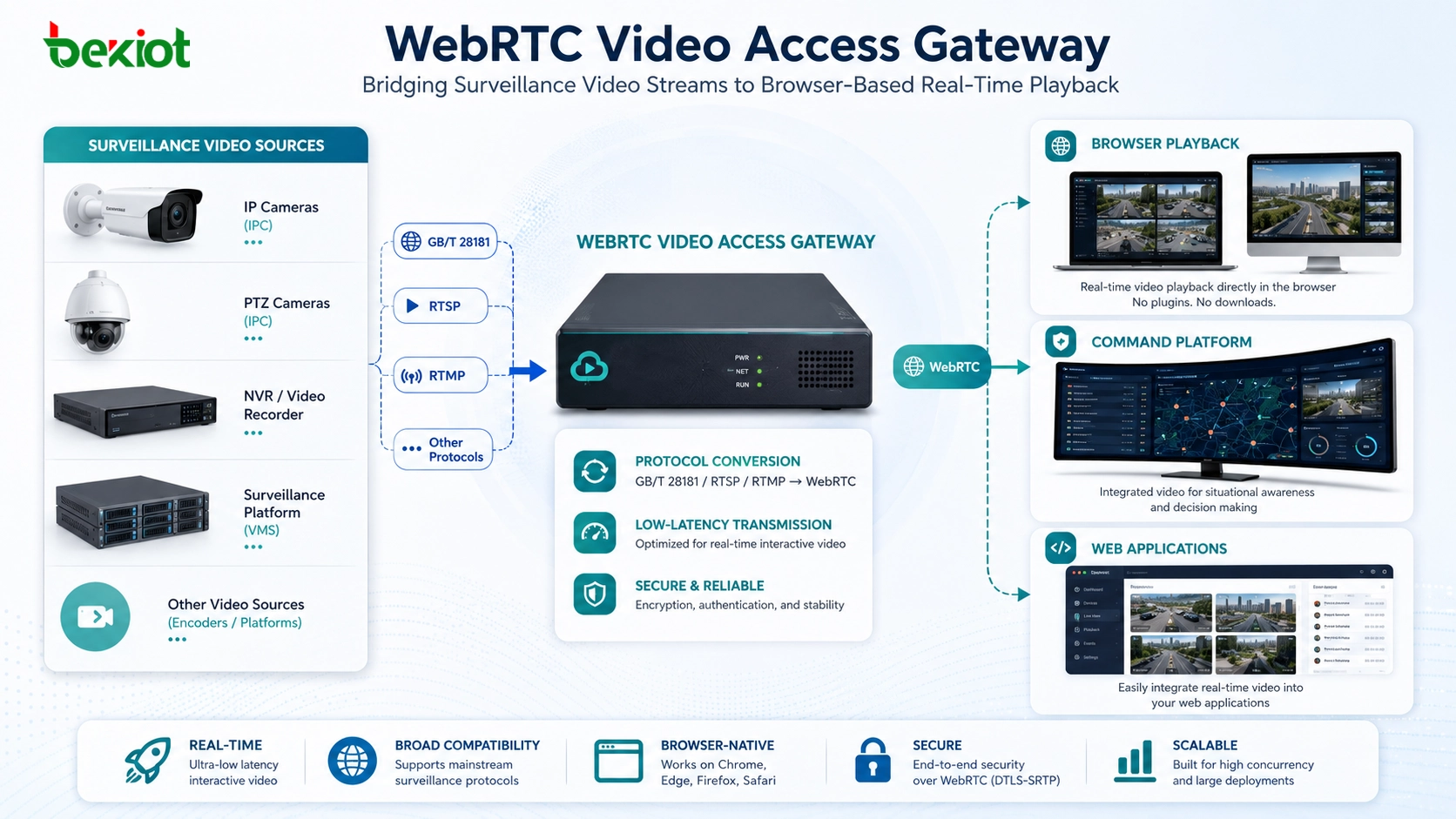
WebRTC is designed for this type of real-time communication. Because it is natively supported by Chrome, Edge, Firefox, Safari, and most modern mobile browsers, it allows users to view live video without installing plug-ins, private clients, or extra playback components.
What WebRTC Brings to Video Integration
WebRTC is a real-time communication technology originally promoted by Google and standardized by W3C. It is widely known for audio and video calls in browser-based meeting systems, but it also has strong value in surveillance video integration. Its biggest advantage is that it can provide low-latency media delivery directly through the browser.
In a video fusion or command platform scenario, this means a user can open a URL and view live video from a camera or monitoring system directly in a web page. The front end can use standard browser APIs, such as RTCPeerConnection, to complete signaling negotiation and render video into a standard element.
This simplifies development work significantly. Instead of building separate playback logic for each camera vendor, platform, or client system, developers can use a unified browser playback model. The result is lower integration cost, easier maintenance, and a cleaner user experience.
The real value of WebRTC in video access is not only low latency. It is the ability to make live surveillance video usable inside standard web applications.
The Gateway Solves the Protocol Gap
A video access gateway sits between traditional video systems and modern web applications. On one side, cameras, NVRs, video platforms, and field monitoring devices may use GB/T 28181, RTSP, RTMP, or other traditional streaming protocols. On the other side, browsers, Web applications, IoT platforms, and command systems usually need WebRTC, HTTP-FLV, HLS, or other web-friendly streaming methods.
The gateway performs real-time translation between these two environments. It receives traditional video streams, processes the media, and generates browser-accessible playback resources. In a practical project, the gateway may generate a standard WebRTC playback address for each video stream, allowing the web front end to request and display the stream directly.
This approach reduces the need for custom SDK development. Developers do not need to understand every detail of each camera protocol. They only need a stable gateway interface, a playback address, and standard WebRTC logic on the browser side.
Direct Links and API-Generated Streams
A practical gateway should support more than one access method. Direct playback links are useful when the system can access streams by a known device ID or channel ID. This allows simple projects to display live video quickly with minimal development.
For more complex systems, API-generated streams are often more suitable. The platform can request a temporary stream ID through an HTTP API, apply permission rules, bind the stream to a user session, and then return a playback address to the browser. This method is better for multi-level platforms, access control, video sharing, and enterprise-grade system integration.
The two methods serve different project requirements. Direct links simplify basic access, while API-based stream creation provides better control for large platforms with user permissions, audit requirements, and multi-system forwarding.
H.265 Compatibility Cannot Be Ignored
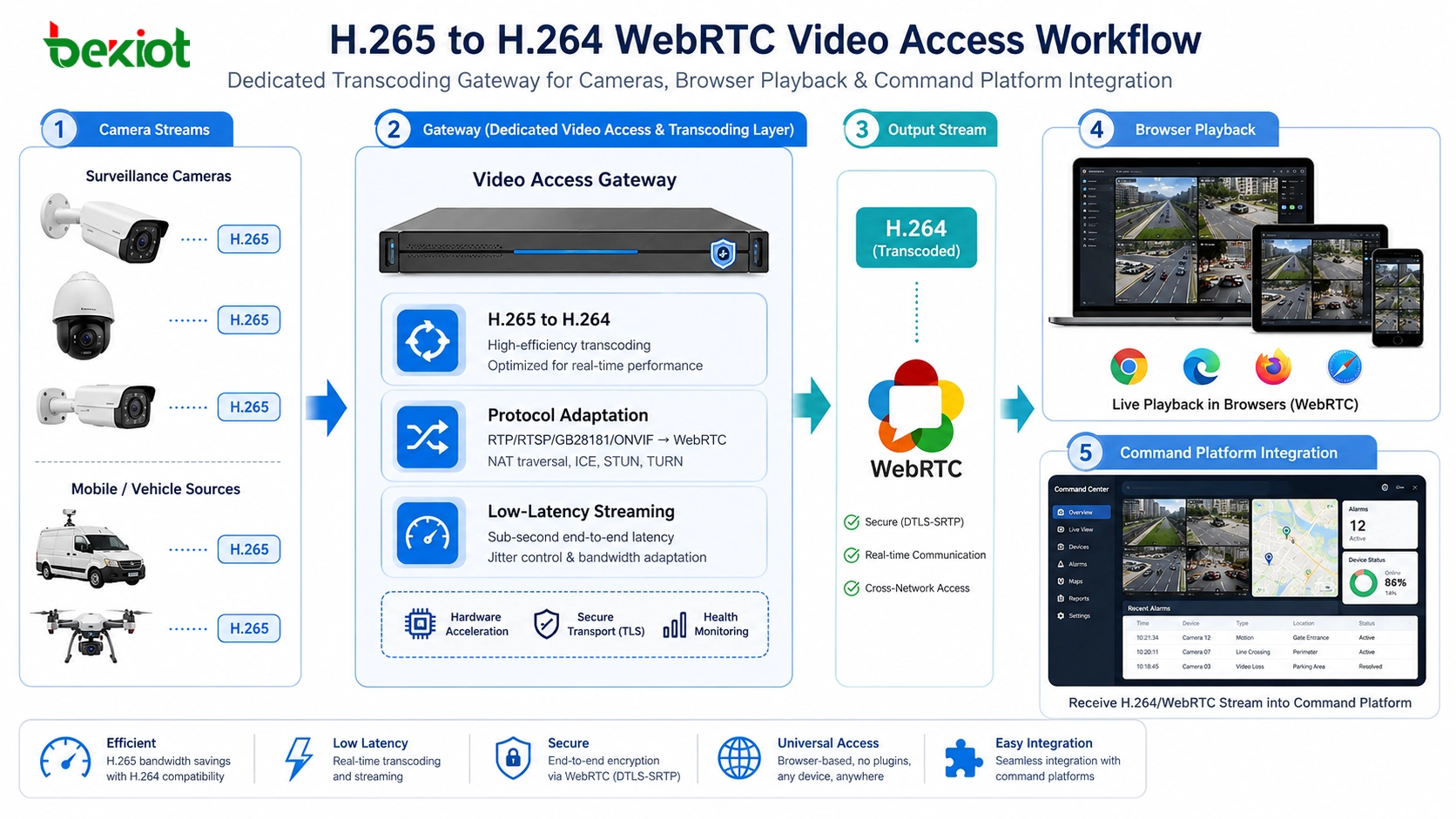
One of the most easily overlooked issues in WebRTC video access is codec compatibility. Many modern surveillance cameras output H.265 by default because it provides higher compression efficiency. Under similar image quality, H.265 can reduce bandwidth and storage consumption compared with H.264, which is valuable for large-scale monitoring systems.
However, browser-side WebRTC environments still rely heavily on H.264 compatibility. If a camera outputs only H.265 and the browser cannot decode it directly, the video may fail to play even though the camera stream itself is normal. This creates a common paradox: newer cameras may actually be harder to display in web-based systems.
A video access gateway should therefore support H.265-to-H.264 transcoding. When the gateway converts H.265 streams into browser-compatible H.264 streams before pushing them through WebRTC, the front-end application does not need to handle codec complexity. Users simply see smooth video in the browser.
Low Latency Requires Gateway-Level Processing
Real-time video integration is not only about whether the image can be opened. In command, security, industrial monitoring, and emergency response scenarios, latency directly affects operational value. If the video lags too far behind the actual scene, it becomes difficult for operators to make timely decisions.
A dedicated video access gateway can process buffering, stream adaptation, packet loss handling, and protocol conversion at the gateway layer. This prevents the front end from carrying too much media complexity and helps maintain a smoother playback experience under unstable network conditions.
This is especially important for field monitoring points, temporary surveillance sites, and wide-area network environments. When the network has packet loss, bandwidth fluctuation, or unstable routing, gateway-side buffering and compensation can improve video continuity and reduce user-side playback problems.
Two-Way Audio Adds Operational Value
Video access becomes more useful when it is combined with voice communication. In many command and security scenarios, operators do not only want to view the site. They also need to speak with on-site personnel, verify conditions, or issue instructions through an intercom or audio channel.
A gateway that integrates WebRTC video with SIP-based two-way audio can support this type of workflow. Operators can view the live video and communicate through the same web interface instead of switching between separate monitoring and communication systems.
This improves workflow efficiency. In a security center, industrial control room, emergency desk, or smart park platform, video and voice can become part of one coordinated response process.
PTZ Control Should Be Exposed Through APIs
Video viewing is only the first step. Many projects also require PTZ camera control, including pan, tilt, zoom, preset positions, and movement commands. If PTZ control remains locked inside a dedicated surveillance client, web platforms cannot build a complete operational interface.
A practical video access gateway should expose PTZ control through HTTP APIs or similar integration methods. The web front end can then provide buttons, map controls, or visual operation panels that allow users to control the camera directly from the browser.
This is valuable for emergency command, large-screen monitoring, smart park management, and industrial supervision. Operators can view the stream, control the camera, and coordinate response actions from one interface.
Security and Network Isolation Are Part of the Design
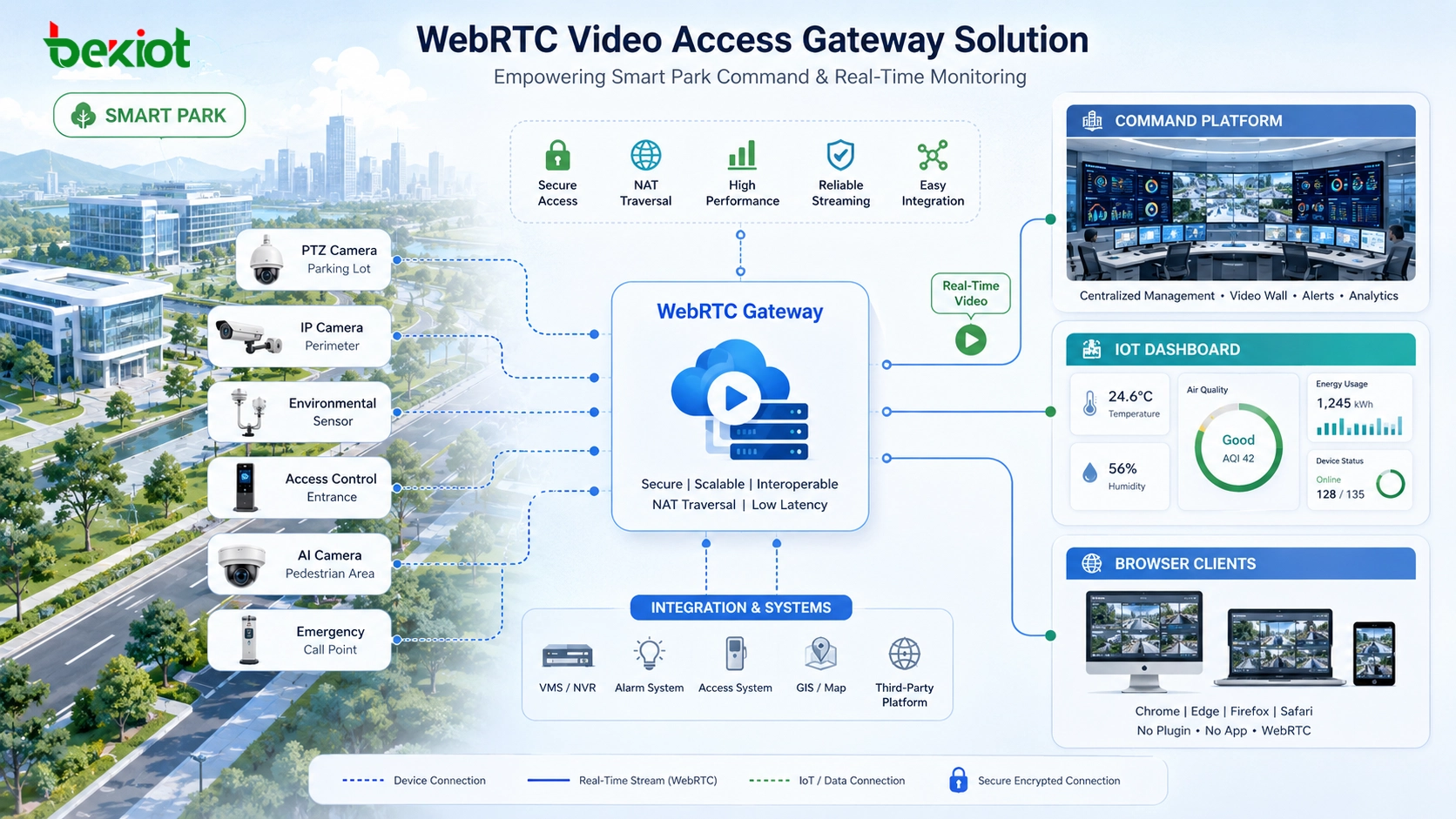
In many projects, cameras and surveillance systems are deployed inside a private network. Exposing camera addresses directly to external networks creates security risks and increases management difficulty. A video access gateway can act as a controlled distribution point between the internal video network and external web users.
With gateway-based distribution, internal camera addresses do not need to be exposed directly. The gateway handles video access, protocol conversion, permission control, and stream delivery. This makes the architecture safer and easier to manage.
For enterprise and government-style projects, this design is especially important. It supports network isolation, centralized access control, and cleaner integration between video systems and application platforms.
Where This Architecture Fits Best
A WebRTC video access gateway is suitable for smart parks, smart construction sites, emergency command platforms, industrial monitoring systems, IoT dashboards, digital twin systems, transportation monitoring, campus safety, energy facilities, ports, mines, and large commercial properties.
For system integrators, it reduces repeated communication about installing clients or configuring plug-ins. For Web application developers, it provides standard APIs and browser playback methods instead of forcing the team to rely on private SDKs. For end users, it changes the experience from “install a client first” to “open the browser and watch.”
This shift may look small, but it saves significant integration, training, deployment, and after-sales maintenance work. The gateway keeps technical complexity inside the device and leaves a simpler interface for developers and users.
Engineering Checks Before Deployment
Before selecting a WebRTC video access gateway, project teams should confirm the input protocol types, including GB/T 28181, RTSP, RTMP, and other required video sources. They should also verify whether the gateway can generate stable WebRTC playback resources for each channel.
The second check is codec handling. If cameras output H.265, the gateway should support H.265-to-H.264 transcoding so that browser playback remains compatible. The third check is API capability, including stream creation, playback address generation, PTZ control, authentication, and system integration.
The fourth check is real-time performance. Engineers should test delay, playback stability, multi-channel access, network fluctuation behavior, and compatibility across Chrome, Edge, Firefox, Safari, and mobile browsers.
| Design Area | Key Requirement | Project Value |
|---|---|---|
| Protocol access | Support GB/T 28181, RTSP, RTMP, and other common video sources | Reduces integration difficulty across existing monitoring systems |
| WebRTC output | Generate browser-ready real-time playback resources | Allows users to view live video without plug-ins or dedicated clients |
| Codec conversion | Convert H.265 into browser-compatible H.264 where required | Solves common playback failures caused by codec mismatch |
| API integration | Support stream creation, permission control, and PTZ operation | Helps developers build video functions into web platforms more easily |
| Security isolation | Avoid direct exposure of internal camera addresses | Improves network security and centralized video management |
Conclusion
WebRTC has changed the way real-time video can be integrated into web platforms. Instead of relying on dedicated clients, plug-ins, private SDKs, or specific operating systems, users can view live video directly in modern browsers. This is a major advantage for command platforms, smart parks, IoT systems, industrial monitoring, and emergency communication projects.
A video access gateway makes this practical by bridging the gap between traditional video protocols and browser-based applications. It can receive GB/T 28181, RTSP, RTMP, and other streams, convert them into WebRTC playback resources, handle H.265-to-H.264 transcoding, support API-based integration, provide PTZ control, and improve security through controlled stream distribution.
For developers and integrators, the key value is simplicity. The gateway hides protocol complexity, codec mismatch, and media processing details behind a standard access layer. This allows teams to focus more on real business functions and less on repeated video playback problems.
FAQ
Why is WebRTC useful for video access projects?
WebRTC is useful because it is natively supported by modern browsers and can deliver low-latency real-time video without plug-ins or dedicated clients. This makes it suitable for web platforms, command systems, and browser-based monitoring applications.
What does a WebRTC video access gateway do?
It receives traditional video streams such as GB/T 28181, RTSP, or RTMP, then converts them into browser-ready WebRTC streams. It can also provide APIs, playback addresses, codec conversion, PTZ control, and secure stream distribution.
Why is H.265 a problem for browser playback?
Many modern cameras output H.265 because it reduces bandwidth and storage usage. However, browser-based WebRTC environments still commonly depend on H.264 compatibility. Without transcoding, H.265 streams may fail to play in the browser.
Can WebRTC video be embedded into an IoT or digital twin platform?
Yes. A gateway can provide WebRTC playback addresses and APIs so developers can embed live monitoring video into IoT dashboards, digital twin systems, smart park platforms, and command applications.
Why not expose camera streams directly to the browser?
Direct exposure may create security risks, compatibility issues, and maintenance problems. A gateway provides protocol conversion, centralized access control, network isolation, and browser-friendly playback, making the overall system safer and easier to manage.







