


Converged communication systems are now widely used in emergency command, public safety, fire rescue, industrial dispatch, transportation, and large-scale security projects. A dispatcher can sit in front of one platform and coordinate voice, radio, video, alarms, and field resources at the same time. This sounds like a complete solution, but many real projects encounter the same hidden problem: video compatibility is often much harder than expected.
The issue is not only whether a camera can be connected to the network. The real challenge comes from video encoding, protocol compatibility, terminal decoding capability, browser support, and real-time performance. In a project that includes surveillance video access, command dispatch, WebRTC clients, IP phones, software terminals, and mobile field devices, a video transcoding device is not an optional accessory. It becomes a necessary infrastructure layer.
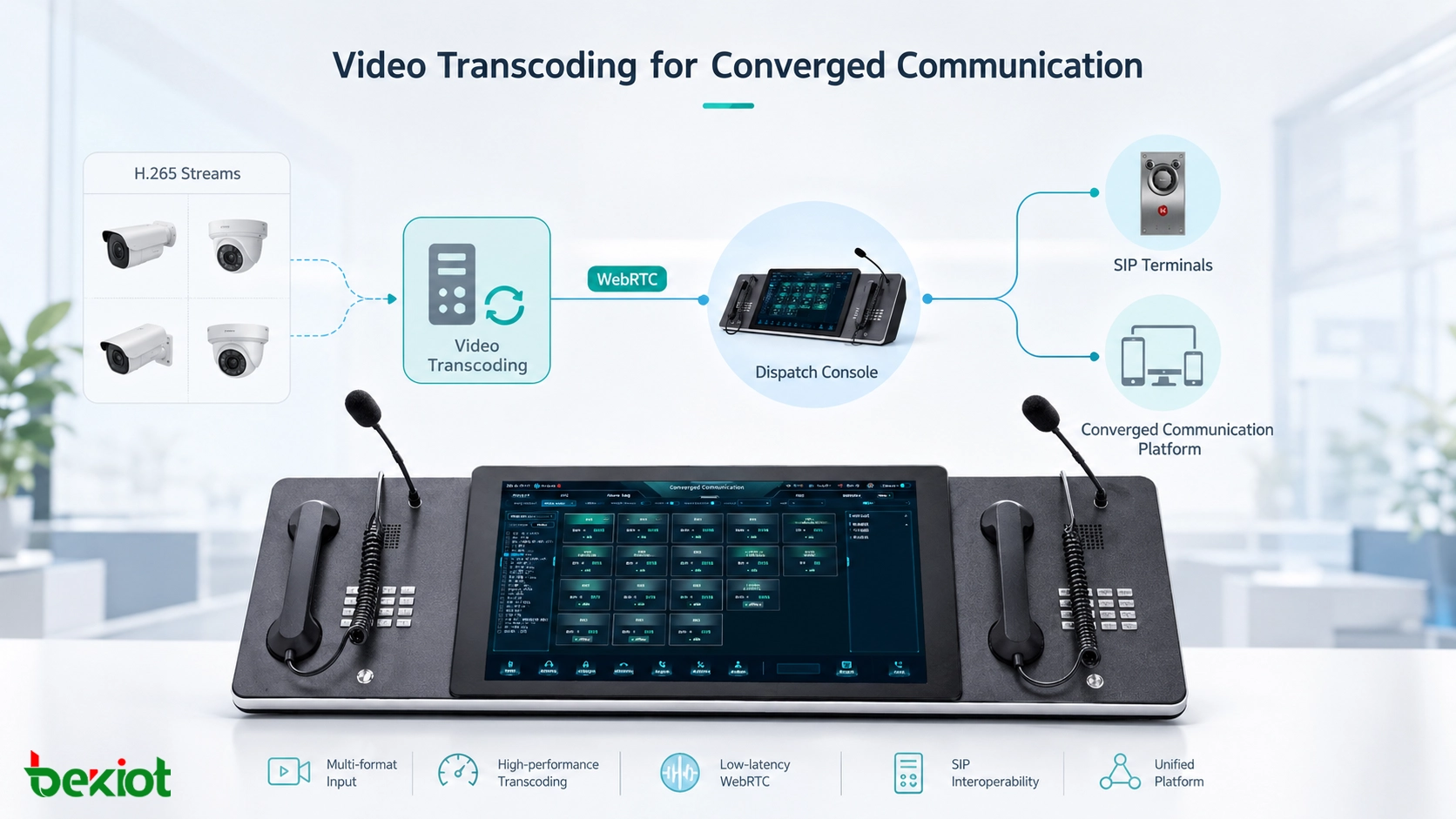
The Hidden Gap in Unified Dispatch Projects
Many converged communication projects are designed around a unified command platform. The system may include voice dispatch, video meetings, SIP calls, radio interconnection, alarm linkage, GIS positioning, and surveillance video integration. From a system diagram, everything appears to be connected. However, when the project enters real deployment, video access is often where compatibility problems appear.
A surveillance camera may provide a clear and stable video stream in a traditional video management system, but that does not mean the same stream can be consumed directly by a WebRTC-based dispatch console or a communication terminal. The camera, platform, browser, terminal, and media server may all support different formats, protocols, and decoding methods.
This is why the video layer should be planned as part of the core communication architecture. If video compatibility is left to the terminal side, the final result may be black screens, failed playback, high latency, blurry images, or unstable dispatch experience during project acceptance.
The Root Cause Is Video Encoding
Over the past few years, security surveillance systems have widely moved toward H.265 encoding. This is a reasonable technical choice. Under similar image quality, H.265 can reduce bitrate by nearly half compared with H.264. For large-scale video surveillance networks, this can significantly reduce storage and bandwidth pressure.
In city-level monitoring systems, industrial parks, transportation networks, energy facilities, and public safety deployments, the storage savings from H.265 can be substantial. Lower bitrate means less network load, longer storage time, and more efficient use of server and disk resources. From the perspective of traditional video surveillance, H.265 is a practical and cost-effective choice.
However, converged communication platforms face a different technical environment. Many dispatch consoles and browser-based clients are built on WebRTC. WebRTC provides strong advantages such as browser-native access, low latency, and good network traversal capability, but its support for H.265 remains incomplete in mainstream browsers. This creates a direct conflict between surveillance video systems and communication dispatch systems.
Why WebRTC Cannot Simply Decode Every Camera Stream
WebRTC is widely used in modern communication platforms because it allows real-time audio and video communication through browsers and software clients. It is suitable for dispatch consoles, video calls, remote collaboration, and command center applications. However, WebRTC does not automatically solve all video format problems.
A large number of cameras output H.265 streams, while many WebRTC environments still rely heavily on H.264 or other browser-supported formats. If the camera stream remains in H.265 and the browser or terminal cannot decode it, the video cannot be displayed normally. This is especially common in projects where surveillance systems are upgraded faster than communication terminals.
The same issue also exists on endpoint devices. Many deployed IP phones, dispatch terminals, software clients, and field communication devices do not have strong H.265 hardware decoding capability. Even when the platform can receive the stream, the terminal may still fail to display it smoothly.
In a converged communication project, the question is not only whether the video stream exists. The real question is whether every required terminal can decode, display, and use that stream in real time.
Media Servers Are Not Always Built for Real-Time Conversion
Another common problem appears on the server side. Many converged communication platforms are built around mature SIP and media frameworks. These systems are strong in voice processing, SIP signaling, multi-party audio communication, conferencing, and call control. However, video transcoding is a much heavier task than audio forwarding or signaling control.
In many platform architectures, the media server handles video more like pass-through forwarding. It may forward video streams during multi-party communication, but real-time server-side video transcoding is not always its strength. In actual engineering projects, solving large-scale video transcoding directly inside the communication server can increase system complexity and create stability concerns.
This means that the format compatibility problem is often passed directly to the terminal. If the terminal does not support the required codec, the video fails. A dedicated video transcoding device solves this problem by taking over the heavy conversion task before the stream reaches the communication platform or terminal.
A Dedicated Conversion Layer Becomes Necessary
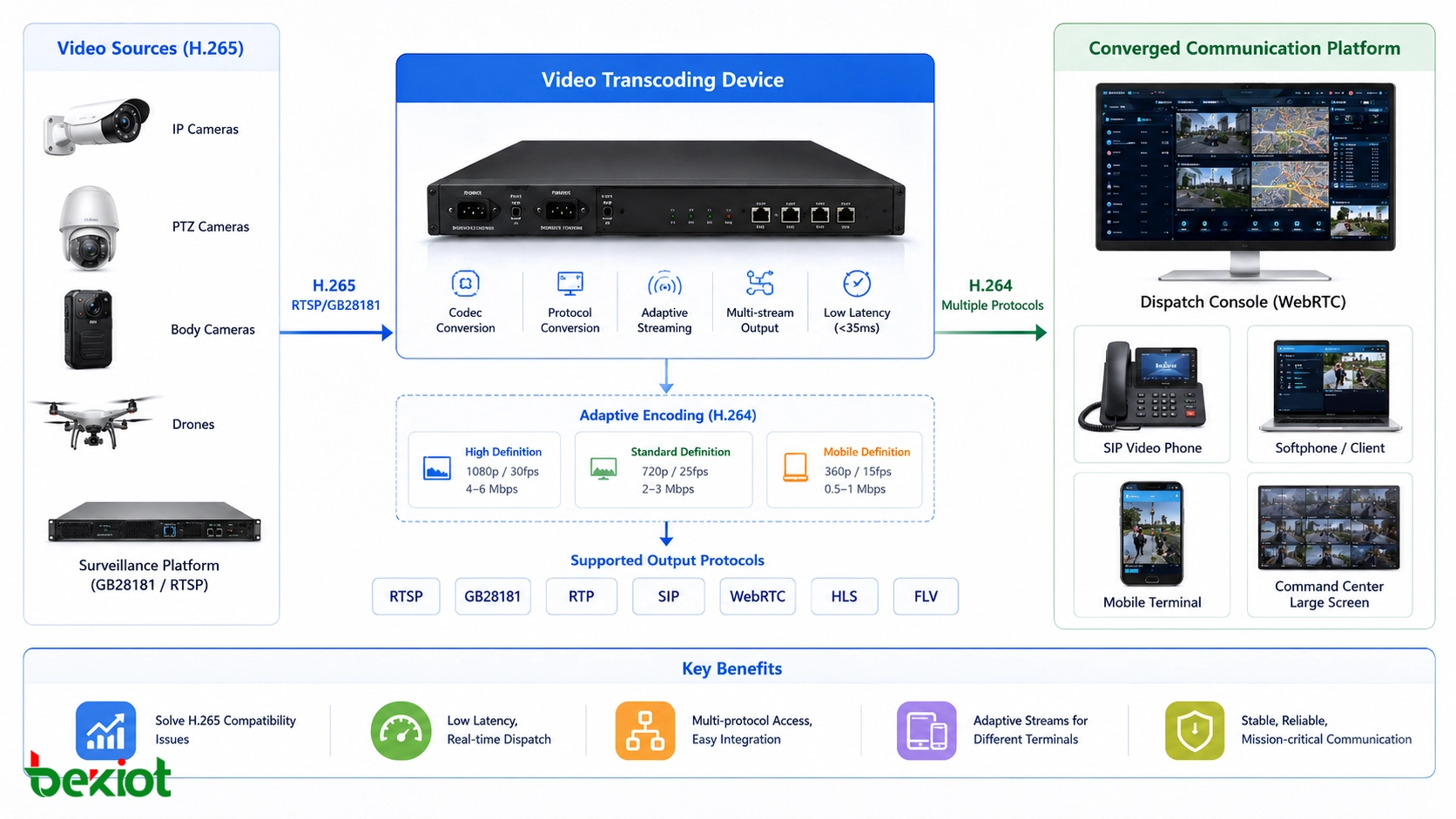
In projects that include video surveillance access, a video transcoding device should be treated as necessary infrastructure. Its core job is to translate video formats between the surveillance network and the communication network. It converts H.265 streams from cameras, mobile video sources, enforcement recorders, temporary monitoring devices, or existing video platforms into H.264 or another target format that the dispatch platform and terminals can use.
Real-time performance is critical. In command and dispatch scenarios, video cannot lag far behind voice instructions. A practical transcoding layer should keep latency low enough for operational decision-making. In the original engineering logic, latency should be controlled within about 35 milliseconds so that video does not become a burden during command coordination.
Without this layer, the project may look complete in design documents but fail during real operation. Video may not enter the platform, may play with delay, may appear blurred or distorted, or may remain black on certain terminals. These problems are often discovered late, and late-stage correction is usually more difficult than planning transcoding from the beginning.
Adaptive Streams Matter for Different Terminals
Encoding conversion is only one part of the requirement. In a real converged communication project, the terminal environment is highly diverse. Some users may view video on a high-definition dispatch screen inside a Gigabit LAN. Others may use handheld terminals over a 4G network. The available bandwidth, screen size, decoding capability, and usage scenario can vary greatly.
A qualified video transcoding device should support adaptive processing of resolution, frame rate, and bitrate. The same video source may need to be output as multiple stream profiles so that different terminals can access the most suitable version. A command center screen may need a high-resolution stream, while a field terminal may need a lower-bitrate stream for stable mobile viewing.
If the system pushes one high-bitrate stream to every terminal, low-bandwidth users may experience freezes, delay, or failed playback. Adaptive transcoding helps each terminal receive video according to its actual network and processing capability, making the whole system more stable and usable.
Protocol Fragmentation Creates Another Barrier
The converged communication ecosystem is highly fragmented. A project may involve SIP, GB/T 28181, RTP, RTSP, FLV, HLS, WebRTC, and other media or signaling protocols. Each protocol may be connected to a different type of platform, device, vendor system, or application scenario.
A video transcoding device must therefore do more than convert H.265 to H.264. It should also support mainstream streaming protocols and provide flexible input and output options. This allows cameras, video surveillance platforms, command systems, browser clients, mobile terminals, and communication platforms to interconnect with less custom development.
For system integrators, this protocol compatibility is valuable because it reduces project risk. Instead of developing a separate adaptation method for each video source or platform, the transcoding layer provides a more standardized media access point.
What a Practical Architecture Looks Like
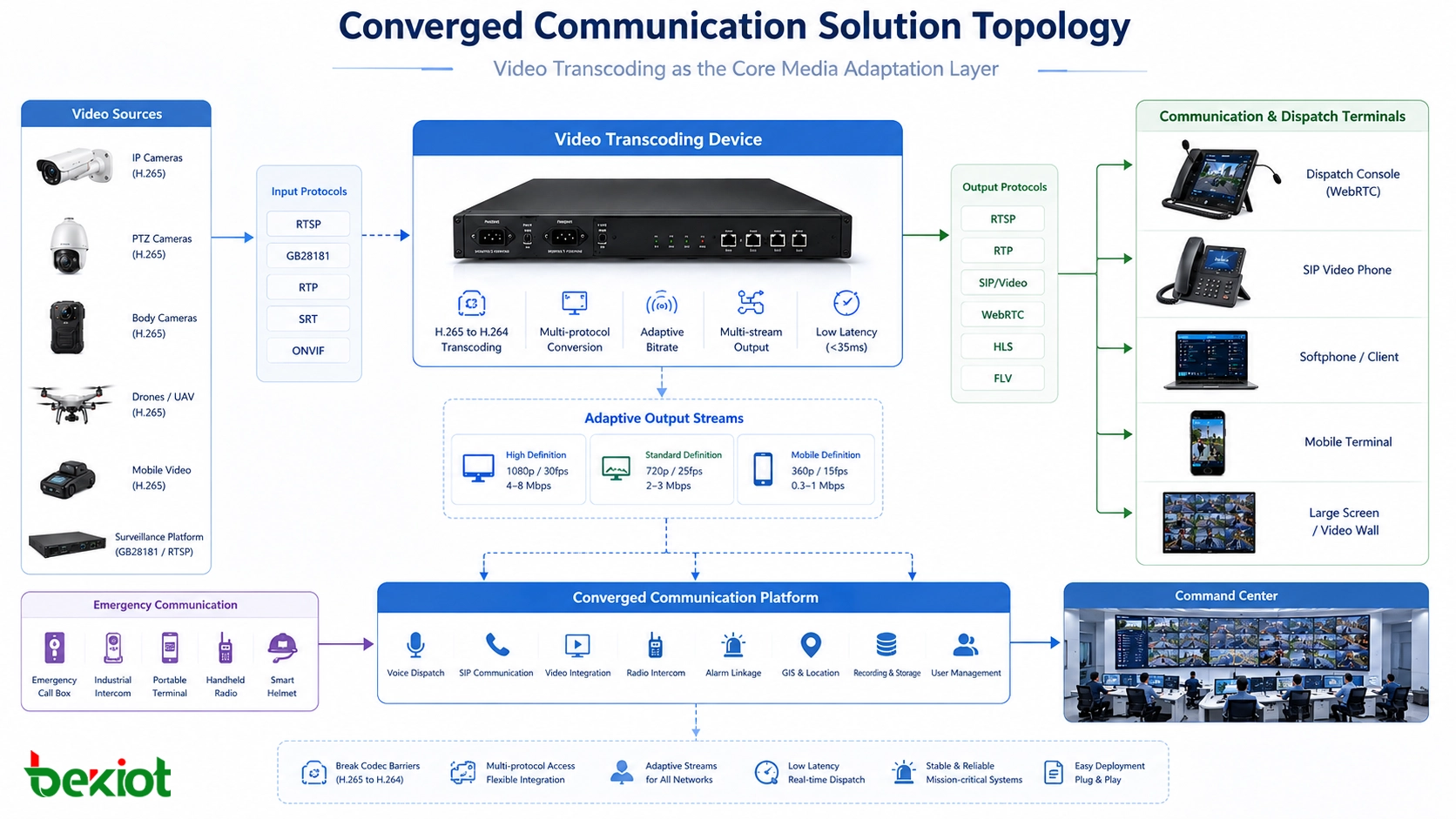
A practical converged communication video architecture usually places the transcoding device between the video surveillance side and the communication platform side. On the input side, the device receives streams from cameras, GB/T 28181 platforms, RTSP sources, or other video systems. On the output side, it provides video streams that can be used by WebRTC dispatch consoles, SIP video terminals, browsers, command screens, and software clients.
This architecture separates video compatibility from the core dispatch platform. The communication system can focus on command workflow, user management, call control, alarm linkage, and dispatch logic, while the transcoding layer handles media conversion, stream adaptation, and protocol access.
For projects that combine video, voice dispatch, SIP communication, emergency calls, and industrial command workflows, Becke Telcom can be considered as a converged communication solution partner. The video transcoding layer can work together with SIP dispatch, industrial telephones, emergency communication terminals, and platform integration to build a more complete response system.
Engineering Risks When Transcoding Is Ignored
Video transcoding devices are often underestimated because they are not as visible as dispatch consoles, recording servers, video walls, or communication terminals. In the early design stage, some project teams assume that if a camera can provide a stream, the communication platform can use it. This assumption often causes problems later.
In real delivery, the system may encounter codec mismatch, browser playback failure, terminal decoding limitations, excessive bitrate, unsupported protocols, or unstable video forwarding. These issues directly affect command efficiency because video is no longer a usable situational awareness resource.
During acceptance testing, users usually focus on whether video can be opened quickly, whether the image is clear, whether the delay is acceptable, and whether the same source can be displayed on different terminals. If the transcoding layer is missing, these requirements become difficult to meet consistently.
Selection Factors for Project Design
When selecting a video transcoding device, project teams should first confirm the input video sources. This includes camera encoding format, stream protocol, resolution, frame rate, bitrate, and platform access method. H.265 input is especially important because it is common in modern surveillance systems but not always compatible with communication terminals.
The second step is to confirm the output requirements. The project may need H.264, WebRTC-compatible streams, HLS for browser viewing, RTSP for internal systems, or other formats. Different terminals may require different stream profiles, so multi-profile output and adaptive stream control should be considered.
The third step is to test real-time behavior. For dispatch applications, low latency, stable decoding, smooth switching, and multi-terminal access are more important than theoretical protocol support. Engineers should test actual cameras, actual terminals, and actual network conditions before final deployment.
| Design Area | Key Requirement | Project Value |
|---|---|---|
| Codec conversion | Convert H.265 video into H.264 or other target formats | Allows surveillance streams to work with WebRTC and communication terminals |
| Low-latency processing | Keep conversion delay suitable for command and dispatch use | Prevents video from falling behind operational decisions |
| Adaptive stream output | Adjust resolution, frame rate, and bitrate for different terminals | Improves access quality across LAN, 4G, and mixed networks |
| Protocol compatibility | Support SIP, GB/T 28181, RTP, RTSP, FLV, HLS, WebRTC, and related workflows | Reduces integration difficulty across vendors and platforms |
| System integration | Work with dispatch platforms, video systems, browsers, and communication terminals | Turns video access into a reliable part of the command system |
Where This Layer Is Most Useful
Video transcoding is valuable in any project where surveillance video must enter a communication or dispatch environment. Typical applications include emergency command centers, public safety platforms, fire rescue systems, industrial control rooms, transportation command centers, smart parks, energy facilities, ports, mines, campuses, and large commercial properties.
In emergency response, video can help dispatchers understand the site before making decisions. In industrial operations, video can support remote inspection, fault confirmation, and safety monitoring. In transportation projects, video can help coordinate stations, tunnels, traffic hubs, and maintenance teams. In public safety projects, video access can improve situational awareness and evidence review.
The common requirement is the same: video must be usable inside the communication workflow, not isolated inside a separate surveillance platform. A transcoding device helps make that possible.
Conclusion
A real converged communication project cannot rely only on voice dispatch, SIP signaling, and platform integration. If video surveillance access is part of the system, video transcoding must be included in the architecture. Modern cameras commonly output H.265 streams, while WebRTC dispatch consoles, browsers, IP phones, and many communication terminals cannot reliably decode H.265 directly.
A dedicated transcoding device solves this gap by converting encoding formats, adapting bitrate, adjusting frame rate and resolution, and bridging fragmented protocols such as SIP, GB/T 28181, RTP, RTSP, FLV, HLS, and WebRTC. It prevents black screens, delay, blurry images, and failed playback from becoming project delivery risks.
For engineers and integrators, the key lesson is clear: video transcoding is not a decorative feature. It is the foundation that allows surveillance video to become a practical, real-time, and reliable part of converged communication.
FAQ
Why do converged communication projects need video transcoding?
They need video transcoding because many surveillance cameras output H.265 streams, while WebRTC dispatch consoles, browsers, IP phones, and communication terminals may not support H.265 decoding. Transcoding converts the video into formats that these systems can use.
Is H.265 better than H.264?
H.265 is more efficient for storage and bandwidth. Under similar image quality, its bitrate can be nearly half of H.264. However, H.264 is still more widely supported in many communication terminals and browser-based systems, which is why conversion is often required.
Can a communication platform solve video transcoding by itself?
Not always. Many communication platforms are strong in SIP signaling, voice processing, and conferencing, but real-time video transcoding is resource-intensive and may not be stable when handled directly inside the core communication server. A dedicated transcoding device is often more practical.
What protocols should a video transcoding device support?
A practical device should support common project protocols such as SIP, GB/T 28181, RTP, RTSP, FLV, HLS, WebRTC, and related video access workflows. The exact protocol set should be confirmed based on the cameras, platforms, and terminals used in the project.
What happens if video transcoding is ignored?
The project may experience black screens, unsupported streams, high latency, blurred video, unstable playback, or terminal compatibility problems. These issues are often discovered during testing or acceptance, when they are much harder to correct.







