


The Classic Voice Service Behind Traditional Landlines
Plain Old Telephone Service, commonly abbreviated as POTS, is the traditional analog telephone service that connects users through copper telephone lines and circuit-switched telephone networks. It is often associated with basic landline phones, analog voice calling, dial tone, telephone numbers, and legacy public telephone infrastructure.
For decades, POTS was the standard method for homes, offices, public facilities, and businesses to make and receive voice calls. Even though VoIP, SIP trunks, mobile networks, fiber broadband, and cloud communication platforms are now widely used, POTS remains important in many legacy systems, safety applications, remote sites, alarm circuits, elevator phones, fax machines, and backup communication scenarios.
POTS is simple, stable, and widely understood. Its long history is one reason many legacy devices and critical service circuits were originally designed around analog telephone lines.
Basic Meaning of POTS
Plain Old Telephone Service refers to basic analog voice telephone service delivered over a pair of copper wires between the customer premises and the telephone company’s local exchange or central office. The service provides dial tone, call setup, ringing, voice transmission, and call release using traditional telephony methods.
In many contexts, POTS is part of the broader Public Switched Telephone Network, or PSTN. POTS describes the analog access service at the user side, while PSTN refers to the larger switched telephone network that connects local exchanges, trunks, carriers, and telephone subscribers.
Analog Voice over Copper Lines
POTS uses analog electrical signals to carry human voice. A traditional telephone converts sound waves into electrical variations, sends them across the copper loop, and receives similar analog signals from the other party.
This analog nature makes POTS different from modern digital services. VoIP turns voice into data packets, while POTS sends voice as an electrical signal through a dedicated circuit path during the call.
Dial Tone and Telephone Numbering
One of the most familiar characteristics of POTS is dial tone. When a user lifts the handset, the central office provides a dial tone to show that the line is ready. The user then dials digits, and the telephone network interprets the number to route the call.
POTS also works with traditional telephone numbering plans. Each line usually has an assigned phone number, and the network uses the dialed number to connect calls locally, nationally, or internationally.
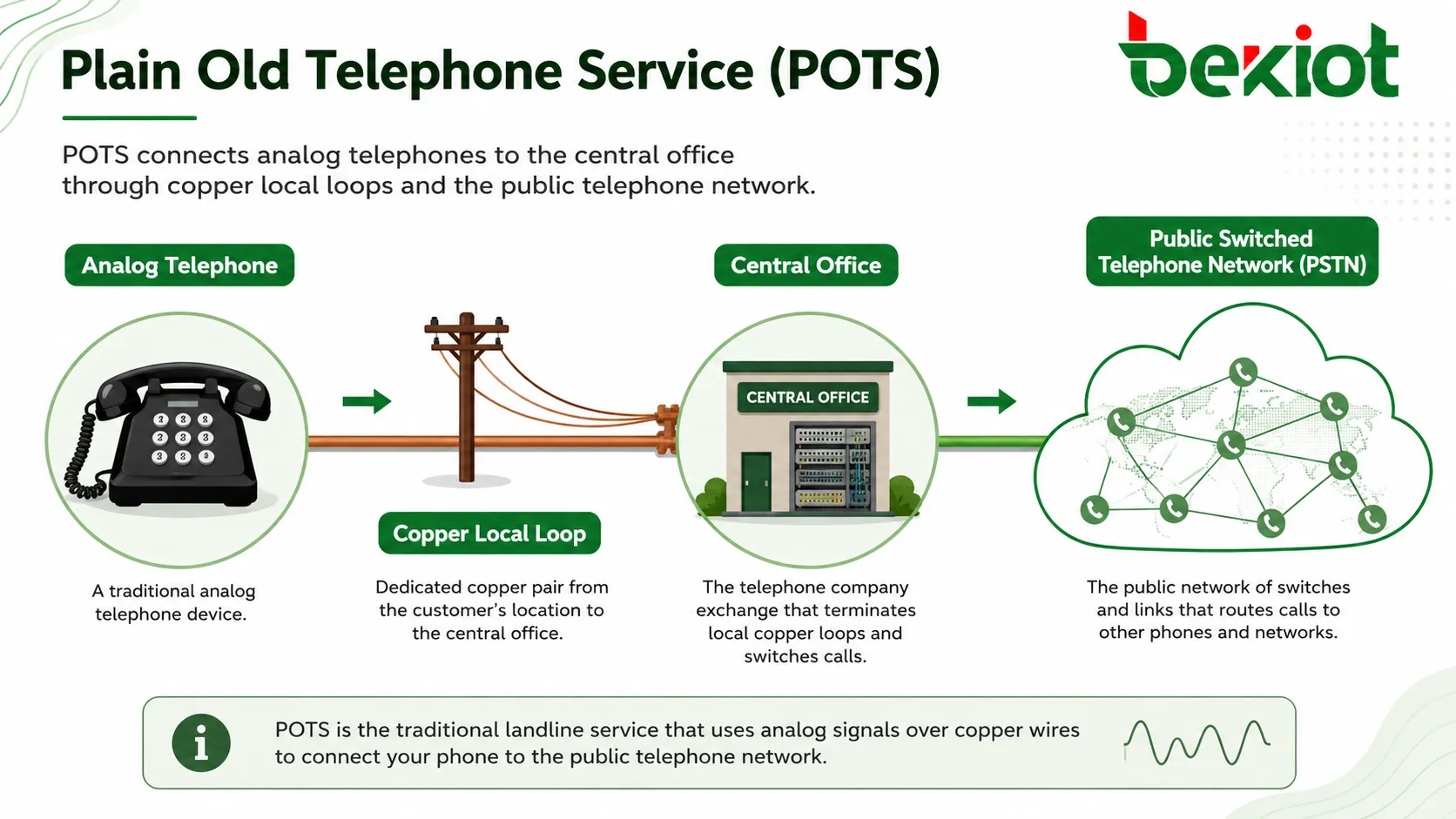
How POTS Works
A POTS line works through a basic but effective process. The telephone company provides power and signaling from the central office. The customer’s telephone connects to the network through a local loop. When the user lifts the handset, dials a number, and speaks, the network establishes a circuit and carries the voice signal between both parties.
This circuit-switched approach means a dedicated communication path is established for the call. The path remains in use until one party hangs up. This is different from packet-switched IP communication, where voice is divided into packets and sent across shared data networks.
The Local Loop
The local loop is the physical copper pair that connects the customer premises to the telephone company’s local exchange or central office. It is one of the defining parts of traditional landline service.
The loop carries voice signals, ringing voltage, supervision signals, and basic line power. Because it is a physical connection, distance, cable quality, moisture, corrosion, splices, and line condition can affect service quality.
Central Office Switching
The central office provides line power, dial tone, switching, and call routing. In older systems, switching was electromechanical. In later systems, digital switching became common, but the subscriber access line could still remain analog.
When a user dials a number, the central office analyzes the digits and routes the call to the destination. The destination may be another local subscriber, a long-distance carrier, a mobile network, an international gateway, or a business PBX trunk.
Ringing and Call Supervision
When an incoming call arrives, the telephone network sends a ringing signal to the subscriber line. The telephone rings, and the called party can answer by lifting the handset. The network detects off-hook and on-hook states to know whether the phone is in use or idle.
These simple supervision signals are important. They allow the network to start calls, end calls, detect line status, and manage billing or call records where applicable.
Core Technical Features
POTS is technically simple compared with modern IP communication, but its features made it reliable and practical for many decades. The system was designed for voice communication, predictable call setup, and broad compatibility with basic telephone devices.
Line Power from the Telephone Network
Traditional POTS lines often receive power from the central office. This means many basic corded phones can continue working during a local power outage, as long as the telephone network itself remains operational and the line is intact.
This feature made POTS valuable for emergency communication and backup calling. However, not every modern landline-like service provides the same power behavior, especially when voice service is delivered through fiber terminals, cable modems, or VoIP adapters that depend on local electricity.
Simple Voice Band Transmission
POTS is designed for voice-band audio. It does not provide the wide audio bandwidth of modern high-definition voice systems, but it is generally sufficient for basic speech communication.
The limited bandwidth also shaped the design of legacy devices such as fax machines, dial-up modems, alarm dialers, and analog PBX lines. These devices were built to operate within traditional telephone line characteristics.
Compatibility with Analog Devices
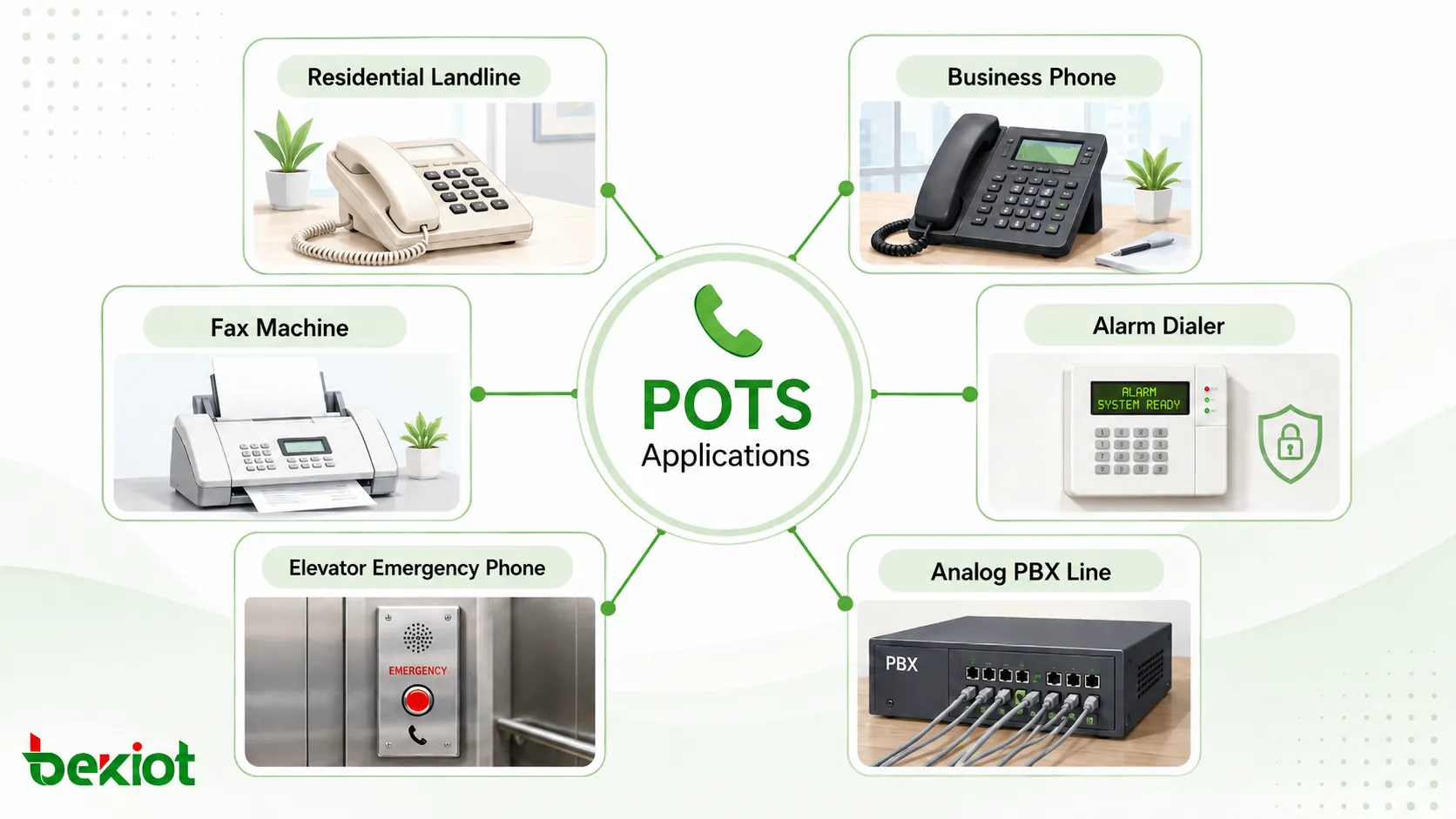
POTS supports many analog devices, including standard telephones, fax machines, analog modems, alarm panels, elevator phones, point-of-sale terminals, and legacy PBX interfaces.
This compatibility is one reason POTS has remained in service even as many organizations move to IP-based communication. Some equipment may require special testing or replacement before analog lines are removed.
Dedicated Circuit Behavior
During a POTS call, the telephone network establishes a circuit for the conversation. This provides predictable voice continuity once the call is connected.
Modern IP systems can also provide excellent voice quality, but they depend on data network conditions such as bandwidth, latency, jitter, packet loss, routing, and power availability. POTS avoids many of those IP-specific variables, but it has its own limitations related to copper infrastructure and service availability.
Common Uses of POTS
POTS has been used in residential, business, public, industrial, and safety-related environments. Its main role is basic voice calling, but many non-voice systems were also designed to use analog phone lines.
Residential Landline Calling
For households, POTS historically provided basic telephone service for local and long-distance calls. It allowed people to make voice calls without mobile coverage, broadband service, or internet connectivity.
Although many households now rely on mobile phones or internet-based voice services, some still keep landlines for simplicity, reliability, elderly users, emergency calling, or compatibility with existing home systems.
Business Telephone Lines
Businesses used POTS lines for reception phones, fax machines, analog PBX trunks, credit card terminals, alarm dialers, backup lines, and direct department numbers. Small offices often relied on several analog lines before IP PBX and SIP trunking became common.
In larger organizations, analog lines may still exist for special circuits, legacy devices, backup calling, or systems that have not yet been migrated to digital or IP-based platforms.
Fax, Modems, and Alarm Dialers
Fax machines and dial-up modems were designed to use analog telephone lines. Many alarm systems also used POTS lines to dial a monitoring center when an intrusion, fire, or fault condition occurred.
These applications can be sensitive to line quality and service changes. When replacing POTS with VoIP or other alternatives, compatibility testing is important because fax tones and alarm signaling may not always work reliably over every IP voice service.
Elevator and Emergency Phones
Elevator phones, emergency call boxes, and some safety phones have historically used analog telephone lines because they provide simple call access to monitoring or emergency response points.
When modernizing these systems, organizations should consider power backup, call routing, location identification, regulatory requirements, line supervision, and long-term service availability.
POTS and PSTN Relationship
POTS and PSTN are closely related, but they are not exactly the same term. POTS usually describes the traditional analog telephone service delivered to a subscriber. PSTN describes the broader public telephone network that interconnects telephone users and carriers.
A POTS phone connects into the PSTN through the local exchange. From there, the call may travel through local, long-distance, mobile, or international network segments depending on the destination.
POTS as the Subscriber Access Service
At the customer side, POTS provides the analog access line. This includes the copper pair, dial tone, ringing, and voice path between the user and the service provider’s local equipment.
This access layer is what most people recognize as a landline. It is the part of the network that connects directly to the wall jack, telephone set, fax machine, or analog interface.
PSTN as the Larger Switching Network
The PSTN includes switching centers, trunk lines, signaling systems, numbering plans, interconnection points, and carrier networks. It supports the routing of calls between different subscribers and regions.
Even when the access side is analog POTS, parts of the wider PSTN may use digital transmission and switching. This means a traditional analog phone call may enter a network that is digital beyond the local loop.
Benefits of POTS
POTS remains relevant because it is simple, familiar, and compatible with many legacy systems. For specific applications, these benefits may still matter even when modern alternatives are available.
Simplicity and Ease of Use
A basic POTS phone is easy to use. Users lift the handset, hear dial tone, dial the number, and talk. There is no software login, network configuration, app update, or complex interface.
This simplicity can be useful for elderly users, public phones, emergency phones, basic service points, and environments where a straightforward voice channel is preferred.
Legacy Device Compatibility
Many older systems were designed around analog phone lines. POTS compatibility can reduce the need for immediate device replacement when maintaining legacy infrastructure.
However, long-term planning is still important. Copper network retirement, carrier service changes, and rising maintenance costs may make direct POTS service harder or more expensive to keep in some regions.
Predictable Basic Voice Service
POTS was designed specifically for voice. It provides a familiar call experience with dial tone, ringing, and circuit-based communication. For simple voice needs, this predictability remains valuable.
Modern VoIP and mobile services provide many more features, but they also depend on power, broadband, IP routing, endpoint configuration, and service platform availability. POTS may still be kept as a fallback in some facilities.
Limitations and Modern Challenges
POTS also has clear limitations. It was designed for a different era of communication and does not provide the flexibility, scalability, data integration, or advanced features expected in modern systems.
Limited Features
Traditional POTS supports basic voice calling, but it does not natively provide the same features as modern IP systems. Advanced functions such as video calling, presence, softphone mobility, centralized analytics, API integration, call recording, and unified communications require additional systems.
Some supplementary services may exist on analog lines, such as caller ID, call waiting, and voicemail, but the feature set remains limited compared with cloud PBX or SIP-based platforms.
Copper Infrastructure Aging
Many copper telephone networks are aging. Maintenance may become more difficult as cable plant, switching equipment, and service-provider support change over time.
Older copper lines may be affected by moisture, corrosion, physical damage, distance, and noise. Service providers in many markets are also transitioning away from traditional copper-based voice services toward fiber, IP, and wireless alternatives.
Higher Long-Term Cost
Maintaining multiple analog lines can become expensive compared with SIP trunks, hosted voice, or centralized VoIP services. Costs may include monthly line rental, long-distance charges, maintenance, and special service fees.
For organizations with many sites, analog line inventory can also become difficult to manage. Auditing existing POTS lines is often the first step before modernization.
Limited Scalability
Adding more POTS lines usually requires physical line installation and provider provisioning. This makes scaling slower than adding SIP trunks, virtual numbers, or cloud users.
For growing businesses, multi-site organizations, and contact centers, modern IP-based systems usually provide more flexible capacity management.
Migration and Replacement Options
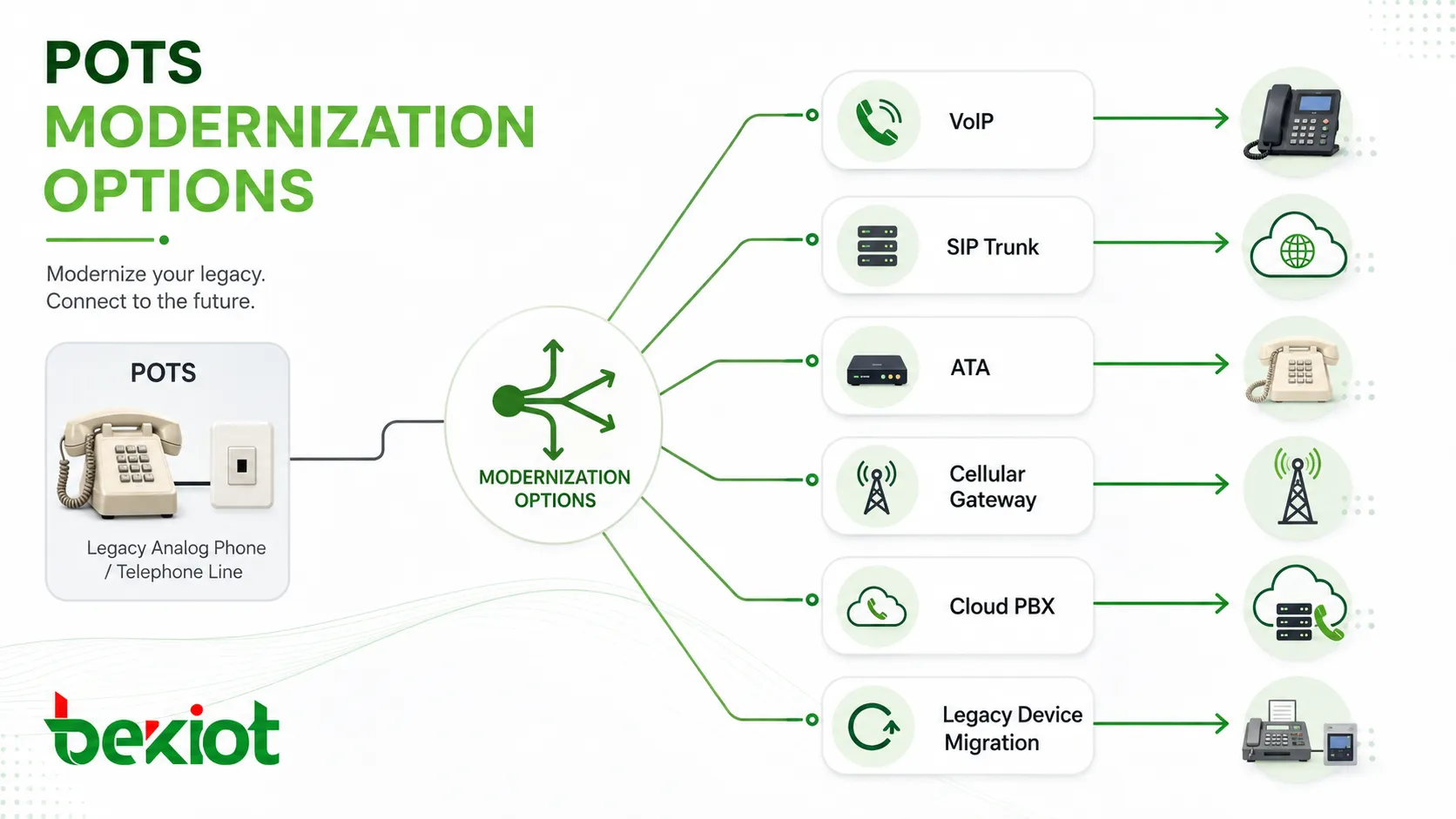
Many organizations are reviewing POTS replacement strategies. The right path depends on what the line is used for. A normal office voice line may be easy to move to VoIP, while an elevator phone, alarm line, fax machine, or regulated safety circuit may need more careful planning.
VoIP and SIP Trunks
VoIP and SIP trunks are common replacements for business voice lines. They allow voice calls to run over IP networks and provide more flexible routing, numbering, management, and integration options.
For office phones, contact centers, remote workers, and multi-site communication, SIP-based services can reduce line complexity and support modern PBX features. Network quality, power backup, and emergency calling design should be planned carefully.
Analog Telephone Adapters
An analog telephone adapter, or ATA, allows an analog phone or device to connect to an IP voice service. It converts analog voice and signaling into VoIP traffic.
ATAs can help preserve some legacy devices during transition, but they are not a universal solution. Fax machines, modems, alarm panels, and elevator phones may require special compatibility testing.
Cellular and Wireless Gateways
Cellular gateways can replace some analog lines by connecting devices through mobile networks. They are often considered for remote sites, temporary locations, backup calling, alarm circuits, or places where wired service is unavailable.
Wireless replacement should consider signal strength, battery backup, monitoring requirements, carrier coverage, antenna placement, and compatibility with the connected device.
Cloud PBX and Hosted Voice
Cloud PBX services move call control to a hosted platform. Users can connect through IP phones, softphones, mobile apps, web clients, or analog adapters where needed.
This model can simplify management for distributed teams, but it depends on internet reliability, endpoint provisioning, security settings, and service-provider support.
Applications That Need Careful Review
Not every POTS line should be disconnected immediately. Some circuits support equipment that may have safety, compliance, or operational importance. Before migration, each line should be identified and tested.
Alarm and Monitoring Lines
Alarm panels may use analog dialers to contact monitoring centers. If the line is replaced with an incompatible service, alarm transmission may fail or become unreliable.
Organizations should confirm monitoring-center requirements, communication format, line supervision, backup path, and test results before replacing alarm lines.
Fax and Modem Devices
Fax and modem devices can be difficult to migrate because they depend on tone transmission and timing behavior. Some VoIP services support fax better than others, but results may vary.
For business-critical fax workflows, alternatives such as digital fax services, email-based fax, or secure document platforms may be more reliable than trying to preserve analog fax indefinitely.
Elevator, Fire, and Safety Circuits
Some elevator phones, fire panels, emergency phones, and life-safety systems may be subject to local codes or authority requirements. Replacement must be reviewed carefully and tested under real conditions.
Power backup, automatic dialing, call routing, location identification, line supervision, and maintenance responsibility should all be considered before changing the communication path.
Best Practices for Managing POTS Lines
Whether an organization plans to keep, reduce, or replace POTS lines, it should manage them with clear inventory and testing. Many companies pay for unused analog lines because no one knows what they support.
Create a Line Inventory
A line inventory should identify each telephone number, physical location, service provider, monthly cost, connected device, business owner, and purpose. This helps determine which lines are still needed.
Inventory work may require tracing cables, checking bills, calling numbers, inspecting telecom rooms, and asking departments to confirm usage. It is often the most important first step in POTS modernization.
Test Before Disconnecting
Before disconnecting any line, test what it supports. Some lines may appear unused but actually serve alarm panels, elevator phones, emergency devices, fax machines, or backup systems.
A controlled test avoids accidental service interruption. The result should be documented so future teams understand why the line was kept, migrated, or removed.
Plan Power and Backup Requirements
When replacing POTS with IP or wireless alternatives, power backup becomes important. A traditional analog phone may work during a local power outage, but a VoIP adapter, router, modem, fiber terminal, or wireless gateway may not.
Backup power should match the importance of the service. Critical communication points may require UPS systems, battery monitoring, redundant paths, and periodic testing.
FAQ
Can a POTS line be used for internet access today?
A POTS line can support old dial-up modem access, but it is extremely slow by modern standards. Broadband, fiber, cable, fixed wireless, and mobile data services are far more suitable for current internet use.
Why do some organizations still pay for unused analog lines?
Analog lines are often left in place because no one has documented what they support. They may appear on old telecom bills, serve hidden devices, or remain after system upgrades. A line audit is usually needed to identify and remove unnecessary services safely.
Can fax machines work after moving away from POTS?
Sometimes, but not always. Fax over VoIP depends on codec support, T.38 compatibility, network quality, device behavior, and provider configuration. Business-critical fax workflows should be tested or moved to a digital fax alternative.
What should be checked before replacing an elevator phone line?
Check local code requirements, emergency call routing, monitoring destination, backup power, location identification, line supervision, cellular or IP gateway compatibility, and periodic test procedures before changing the line.
Is a POTS replacement always cheaper?
Not automatically. SIP, VoIP, cellular, or cloud options may reduce monthly line costs, but projects may also require adapters, gateways, battery backup, rewiring, testing, monitoring changes, and compliance review.
How can a company decide which POTS lines to keep?
The company should classify each line by purpose, risk, usage, cost, connected equipment, replacement difficulty, and regulatory requirement. Lines supporting safety or critical systems should be reviewed more carefully than ordinary voice lines.







