


Latency is the time delay between an action and the system response. In audio systems, it usually means the delay between when sound is captured, processed, transmitted, or played back and when the listener actually hears it. Latency may appear in microphones, audio interfaces, DSP processors, Bluetooth devices, VoIP systems, SIP calls, video conferencing, live streaming, recording software, public address systems, and networked audio platforms.
Small amounts of latency are normal in digital audio. However, when the delay becomes noticeable, it can affect speech interaction, music performance, monitoring accuracy, synchronization, and user experience. Understanding latency helps engineers, installers, musicians, broadcasters, IT teams, and communication system designers build systems that feel natural and responsive.
In real-time audio, latency is not only a technical number. It directly affects how natural a conversation feels, how accurately performers monitor themselves, and how well sound stays synchronized with video or events.
Basic Meaning of Latency
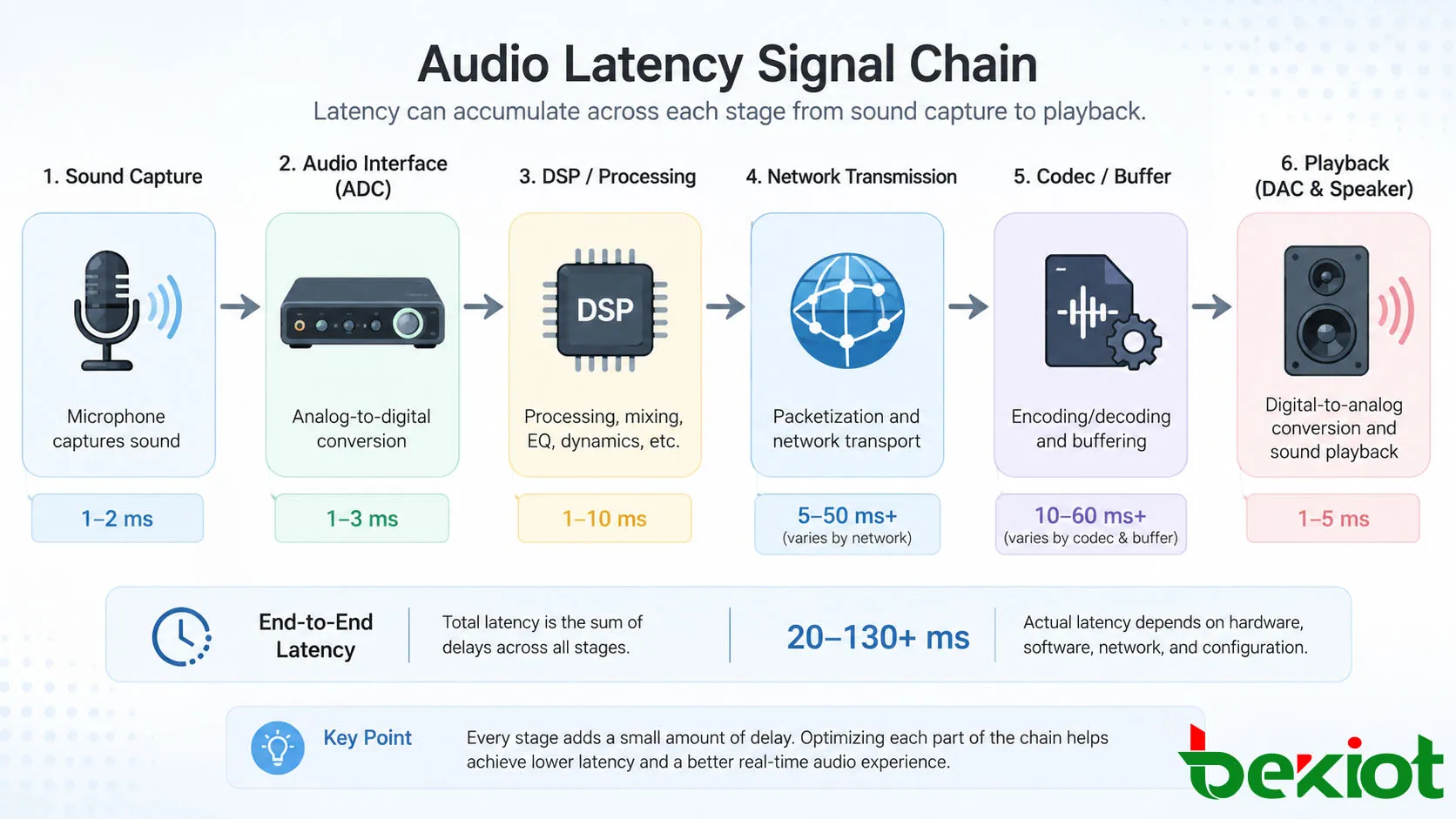
Latency refers to delay. In audio, this delay can happen at many points in the signal chain. A microphone may capture sound, an analog-to-digital converter may convert it, software may process it, a network may transmit it, a decoder may reconstruct it, and a speaker may play it. Each stage can add a small amount of delay.
The total delay is often called end-to-end latency. This is the complete time from the original sound or user action to the final audio output. In voice communication, end-to-end latency affects how smoothly people can talk. In music production, it affects how naturally performers hear themselves while recording.
Latency in Milliseconds
Latency is usually measured in milliseconds, abbreviated as ms. One millisecond is one thousandth of a second. A delay of 5 ms may be nearly unnoticeable in many situations, while 200 ms can feel awkward in a two-way conversation.
Different applications tolerate different latency levels. Studio monitoring, live performance, intercom, and musical collaboration need very low latency. Background music playback, file streaming, and non-interactive audio can tolerate higher delay because users are not responding in real time.
Audio Latency vs Network Latency
Audio latency includes all audio-related delay in the full system. Network latency is only the delay caused by data traveling across a network. In VoIP or networked audio, both matter because audio must be encoded, packetized, transmitted, buffered, decoded, and played.
A system may have low network latency but still suffer from high audio latency if the codec, buffer, software processing, or playback device adds too much delay. For this reason, troubleshooting should examine the full signal path rather than only the network ping result.
How Latency Is Created in Audio Systems
Latency is created when audio needs time to be captured, converted, processed, transmitted, stored temporarily, or reproduced. Analog audio systems can have very low delay, while digital systems often add latency because they process audio in samples, frames, packets, and buffers.
Digital processing brings many advantages such as noise reduction, echo cancellation, compression, routing flexibility, recording, and network transmission. The tradeoff is that each processing step may add delay if not designed carefully.
Conversion Delay
When analog sound enters a digital system, it passes through an analog-to-digital converter. When digital audio is played back, it passes through a digital-to-analog converter. These conversion stages require a small amount of time.
In professional audio interfaces, conversion latency is usually low. In consumer devices, wireless devices, or heavily processed systems, conversion and internal processing may add more delay. The exact value depends on hardware design, sample rate, driver quality, and processing method.
Buffering Delay
Buffering is one of the most common causes of audio latency. A buffer temporarily stores audio data so that the system can process it smoothly. Larger buffers reduce dropouts and glitches, but they also increase delay.
In recording software, users often adjust buffer size. A smaller buffer gives lower monitoring latency but requires more CPU power. A larger buffer is more stable for mixing large sessions but may feel delayed when recording vocals or instruments.
Codec Delay
Audio codecs compress and decompress audio. This is common in VoIP, Bluetooth audio, video conferencing, streaming, and networked communication. Encoding and decoding take time, and some codecs also work in frames that add extra delay.
Low-latency codecs are important for real-time communication. High-compression codecs may save bandwidth, but they can add delay and may reduce audio quality if configured poorly.
Network and Jitter Buffer Delay
In IP-based audio, packets travel through switches, routers, wireless links, firewalls, and internet paths. Network latency, jitter, congestion, packet loss, and retransmission behavior can all affect real-time audio.
Jitter buffers are used to smooth uneven packet arrival. They help prevent choppy sound, but larger jitter buffers increase delay. The best setting balances stability and responsiveness.
Technical Features Related to Latency
Latency is affected by several technical parameters. Understanding these features helps teams select the right equipment, configure audio systems, and troubleshoot delay problems.
Sample Rate and Frame Size
Sample rate defines how many audio samples are captured per second. Common values include 44.1 kHz, 48 kHz, and higher professional rates. Frame size defines how much audio is processed at one time.
Smaller frames can reduce latency because the system waits for less audio before processing. However, smaller frames may increase CPU load and network overhead. The best configuration depends on the application and system capacity.
Driver and Hardware Performance
Audio drivers affect latency, especially in computer-based recording and playback. Professional drivers such as ASIO on Windows or optimized Core Audio setups on macOS can reduce monitoring delay compared with generic drivers.
Hardware also matters. A high-quality audio interface, DSP processor, or communication endpoint may process audio faster and more predictably than low-cost devices with limited processing power.
Processing Chain Length
Every inserted processor can add delay. Equalizers, compressors, limiters, noise reduction, acoustic echo cancellation, beamforming, automatic gain control, virtual surround, and AI-based enhancement may all add processing time.
Some processing is necessary, especially for speech clarity and echo control. The goal is to use the required processing without creating unnecessary delay. In live systems, low-latency processing modes may be preferred.
Synchronization with Video
Audio latency becomes especially noticeable when it does not match video. If a speaker’s mouth movement appears before or after the sound, users notice lip-sync problems.
Audio-video synchronization is important in conferencing, broadcasting, streaming, distance learning, live events, security monitoring, and public displays. Systems may use delay compensation to align audio and video streams.
| Latency Source | Common Cause | Typical Impact |
|---|---|---|
| Audio conversion | Analog-to-digital and digital-to-analog conversion | Small but unavoidable delay |
| Software buffer | Large buffer size for stable processing | Delayed monitoring or playback response |
| Codec processing | Audio compression and decompression | Delay in VoIP, Bluetooth, and streaming |
| Network transmission | Routing, congestion, packet loss, wireless conditions | Delay, jitter, or choppy audio |
| DSP processing | Echo cancellation, noise reduction, effects, enhancement | Improved clarity but possible added delay |
Audio Benefits of Low Latency
Low latency improves the sense of immediacy. When audio responds quickly, conversations feel natural, musicians can perform accurately, and operators can react faster to live situations. This is why latency is an important quality factor in real-time audio systems.
More Natural Conversations
In phone calls, VoIP meetings, intercom systems, and video conferences, excessive delay can make people interrupt each other or pause unnaturally. Low latency helps participants speak and respond more smoothly.
Natural conversation is especially important in customer service, command centers, telemedicine, remote support, online teaching, and business meetings. Users may not know the exact latency value, but they can feel when the call is delayed.
Better Music Monitoring
Musicians and singers need to hear themselves almost immediately while performing. If monitoring latency is too high, timing becomes difficult and performance quality suffers.
Low-latency monitoring is therefore critical in recording studios, live sound systems, digital mixers, in-ear monitors, and online music collaboration. Direct monitoring and optimized audio interfaces are often used to reduce delay.
Improved Speech Intelligibility in Live Systems
In live sound reinforcement, delay between direct sound and amplified sound can affect clarity. If the delayed sound arrives too late, it may create echo or reduce intelligibility.
Proper latency control and speaker delay alignment help listeners hear speech more clearly in halls, auditoriums, classrooms, stations, houses of worship, and public address systems.
Better Audio-Video Experience
Low and well-controlled latency helps keep audio synchronized with video. This improves user experience in online meetings, live streaming, video production, surveillance review, distance learning, and digital signage.
Even if total latency is not extremely low, consistent and synchronized delay can be acceptable for non-interactive content. The key is matching the latency requirement to the application.
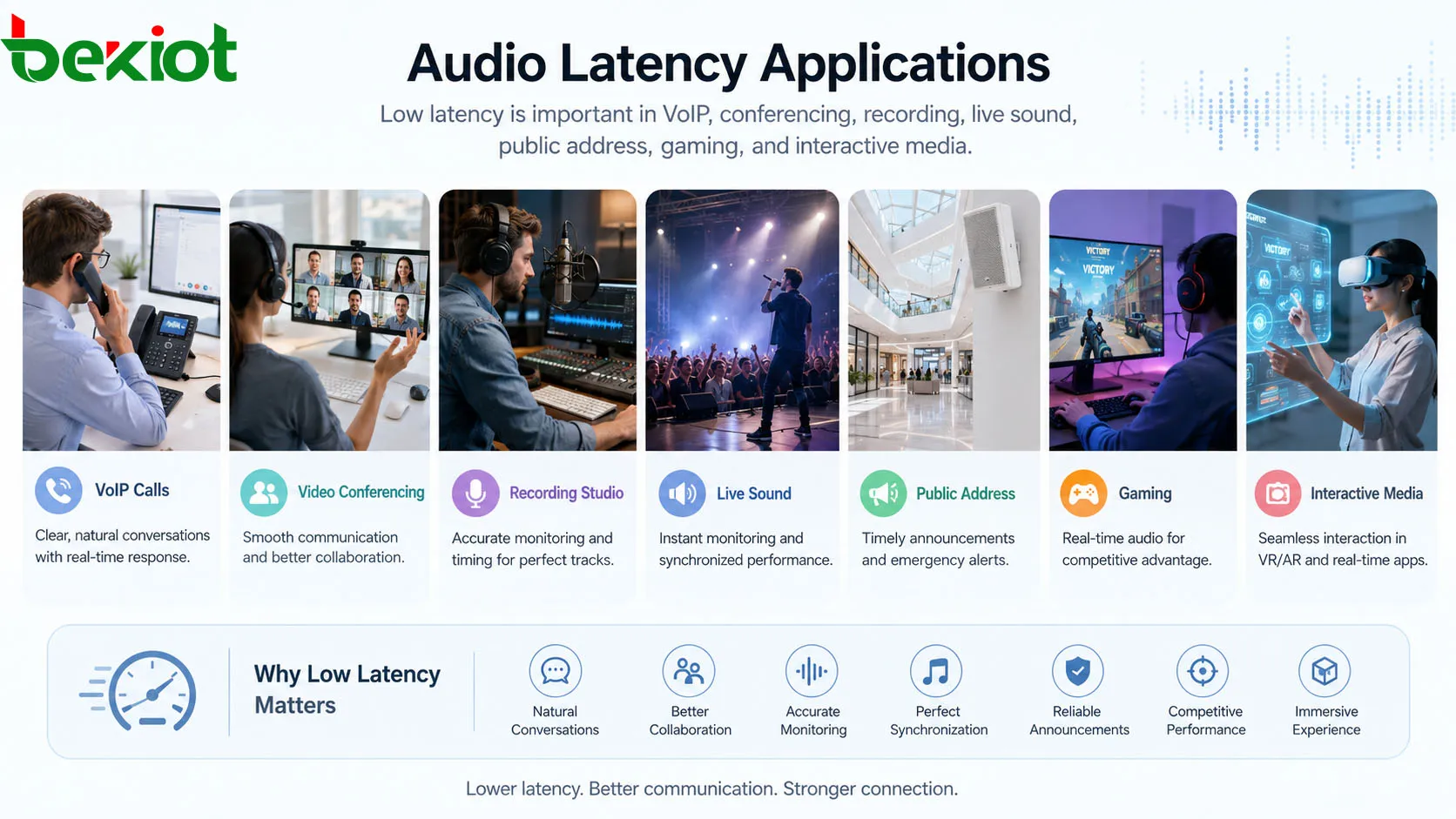
Applications in Real-Time Audio Systems
Latency matters most where users interact with sound in real time. Different systems have different tolerance levels, but low and predictable delay is generally preferred for interactive communication.
VoIP and SIP Communication
VoIP and SIP systems convert voice into IP packets and send them over networks. Latency may come from codecs, jitter buffers, routing paths, firewalls, VPNs, wireless links, and endpoint processing.
Good VoIP design uses suitable codecs, quality of service policies, stable network links, controlled jitter buffers, and properly configured endpoints. This helps keep calls responsive and clear.
Video Conferencing
Video conferencing depends on both audio and video timing. If latency is too high, participants may talk over each other or feel disconnected from the conversation.
Conference systems must balance delay with noise reduction, echo cancellation, camera processing, network stability, and cloud routing. In many cases, slightly higher latency is accepted to improve overall stability.
Recording and Music Production
Recording systems require low monitoring latency so performers can stay in time. Audio interface drivers, buffer size, plug-in processing, sample rate, and computer performance all affect the result.
During recording, engineers often use low buffer settings, direct monitoring, or hardware DSP monitoring. During mixing, they may increase buffer size for stability because real-time performance response is less critical.
Live Sound and Public Address
Live sound systems use microphones, mixers, processors, amplifiers, and speakers. Each device may add delay. If delay is not controlled, sound may become unclear or feel disconnected from the source.
In larger venues, delay speakers are intentionally aligned so that sound from different speakers reaches listeners at the right time. This is a controlled use of latency rather than an unwanted problem.
Gaming and Interactive Media
Gaming, VR, AR, and interactive media need low audio latency because sound must respond quickly to user actions. Delayed sound effects can make gameplay feel sluggish and reduce immersion.
Wireless headphones, Bluetooth codecs, game engines, operating system audio pipelines, and display synchronization all affect the final experience.
How to Measure Latency
Latency can be measured in several ways depending on the system. The most useful measurement is often end-to-end latency because it reflects what the user actually experiences.
Round-Trip Latency
Round-trip latency measures the time it takes for audio to enter a system, pass through processing, and return to the output. This is common in recording systems where microphone input and headphone monitoring are both involved.
Round-trip latency helps musicians and engineers understand whether a recording setup is suitable for real-time monitoring. It includes input conversion, driver buffering, software processing, and output conversion.
One-Way Latency
One-way latency measures delay from source to destination. It is important for VoIP, broadcasting, networked audio, intercom, and streaming systems.
One-way latency can be harder to measure accurately because both endpoints need synchronized timing. Specialized tools or test methods may be required for precise results.
Subjective Listening Test
In practical projects, subjective testing is still useful. Users can test whether conversations feel natural, whether performers can monitor comfortably, and whether audio stays aligned with video.
Measurement tools provide numbers, but user experience confirms whether the system is acceptable for its purpose.
How to Reduce Audio Latency
Reducing latency requires looking at the full signal chain. Lowering one delay source may not solve the problem if another part of the system remains slow.
Optimize Buffer Settings
In recording and software audio systems, buffer size is one of the first settings to check. Lower buffer sizes reduce delay but increase CPU demand. Higher buffer sizes improve stability but add latency.
The best setting depends on the task. Use lower buffers for recording and live monitoring. Use higher buffers for mixing large sessions or processing many plug-ins.
Choose Suitable Codecs
For VoIP, Bluetooth, and streaming, codec selection affects latency. Some codecs are optimized for low delay, while others prioritize compression efficiency or audio quality.
Codec choice should match the application. Real-time speech and monitoring require low delay, while non-interactive music streaming may tolerate more buffering.
Improve Network Quality
Network latency can be reduced by using stable wired connections, quality switches, proper QoS settings, lower congestion, reliable internet links, and suitable routing. Wireless networks should be checked for signal strength and interference.
For real-time audio, packet loss and jitter are often as important as average latency. A network with low average delay but high jitter may still produce poor audio.
Reduce Unnecessary Processing
Disable or simplify processing that is not needed. Heavy noise reduction, virtual effects, AI enhancement, and multiple plug-in chains can increase delay.
In live and real-time systems, choose low-latency processing modes when available. Keep the signal path as direct as possible while still meeting clarity and quality requirements.
Common Problems and Troubleshooting
Latency problems can appear as delayed voice, echo, lip-sync mismatch, late monitoring, poor musical timing, or slow response in interactive systems. The cause may be hardware, software, network, or configuration.
Delayed Monitoring
Delayed monitoring happens when a performer hears their own voice or instrument too late. This is common when recording through software with large buffers or delay-heavy plug-ins.
Solutions include using direct monitoring, reducing buffer size, bypassing high-latency plug-ins, using a better audio driver, or monitoring through hardware DSP.
Echo in Communication Systems
Echo is not the same as latency, but high latency makes echo more noticeable. If a user hears their own voice returned after a delay, the conversation becomes uncomfortable.
Echo cancellation, proper speaker and microphone placement, headset use, and lower end-to-end delay can help reduce the problem.
Lip-Sync Mismatch
Lip-sync mismatch happens when audio and video arrive at different times. This may come from video processing delay, audio buffering, wireless transmission, streaming software, or display processing.
Many systems allow audio delay adjustment or synchronization settings. The goal is to align what viewers see with what they hear.
Unstable Latency
Unstable latency is often worse than constant latency. If delay changes over time, users may notice irregular audio timing, dropouts, or jittery communication.
Network jitter, CPU spikes, wireless interference, overloaded devices, and dynamic buffering can all cause unstable delay. Monitoring tools and controlled testing can help identify the source.
Selection and Deployment Considerations
When choosing audio equipment or designing a system, latency should be evaluated according to the real application. A system designed for background playback does not need the same latency performance as a studio monitoring chain or emergency intercom.
| Application | Latency Priority | Design Focus |
|---|---|---|
| Studio recording | Very high | Low buffer, direct monitoring, efficient drivers |
| VoIP and conferencing | High | Low delay codec, jitter control, echo cancellation |
| Live sound | High | Low-latency DSP and speaker alignment |
| Streaming playback | Medium | Stable buffering and audio-video sync |
| Background music | Low | Reliability and sound quality over instant response |
Check Published Latency Specifications
Manufacturers may publish latency values for audio interfaces, DSP processors, wireless systems, codecs, and networked audio devices. These values can help compare equipment, but the test conditions should be reviewed.
A published latency number may not include the full system path. Real-world latency can be higher after adding software, network routing, buffers, and endpoint devices.
Test Under Real Conditions
Latency should be tested in the actual environment. A system that performs well in a lab may behave differently on a congested network, in a large venue, or with all processing enabled.
Real-condition testing should include normal operation, peak load, wireless use, video synchronization, and user feedback. This helps avoid surprises after deployment.
Balance Latency with Stability
The lowest possible latency is not always the best setting. If buffers are too small, audio may click, pop, or drop out. If jitter buffers are too small, network audio may become unstable.
The goal is usable low latency with reliable performance. A stable system with slightly higher latency may be better than an unstable system with extremely low delay.
FAQ
Why does Bluetooth audio often feel delayed?
Bluetooth audio usually needs encoding, wireless transmission, buffering, and decoding before playback. Some codecs and devices are designed for better sound quality rather than very low delay, which can make video, gaming, or live monitoring feel late.
Can latency be completely removed?
No. Every real system has some delay because sound must be captured, converted, processed, transmitted, and reproduced. The practical goal is to reduce latency below the level where it affects the application.
Why does my voice sound delayed when recording?
This usually happens when monitoring through software with a large buffer or delay-heavy plug-ins. Using direct monitoring, reducing buffer size, or bypassing high-latency processing can often improve the experience.
Is low latency always more important than audio quality?
Not always. Real-time applications need low latency, but music playback and non-interactive streaming may prioritize sound quality and stability. The right balance depends on how the audio is used.
How does latency affect remote music collaboration?
Remote music collaboration is very sensitive to delay because performers must stay in time. Even moderate latency can make synchronized playing difficult, so these systems need optimized networks, low-latency codecs, and careful monitoring setup.
Why can two devices on the same network have different audio latency?
Different devices may use different codecs, processors, buffers, drivers, wireless chipsets, and playback paths. Even on the same network, endpoint hardware and software design can create different delay levels.







