


A network paging system is an IP-based audio communication solution that sends voice announcements, alert tones, scheduled messages, and emergency broadcasts through a data network. Instead of relying only on traditional analog paging amplifiers and long speaker wiring, it uses Ethernet, SIP, IP speakers, paging gateways, software platforms, and network-connected paging terminals to deliver audio across buildings, campuses, industrial sites, offices, schools, hospitals, transportation hubs, and public facilities.
The main purpose is simple: deliver the right message to the right area at the right time. A receptionist may page one office zone, a security team may broadcast to an entire campus, a factory control room may send a safety notice to a workshop, and an emergency system may trigger evacuation messages across selected zones. With IP networking, paging becomes easier to manage, expand, monitor, and integrate with other communication systems.
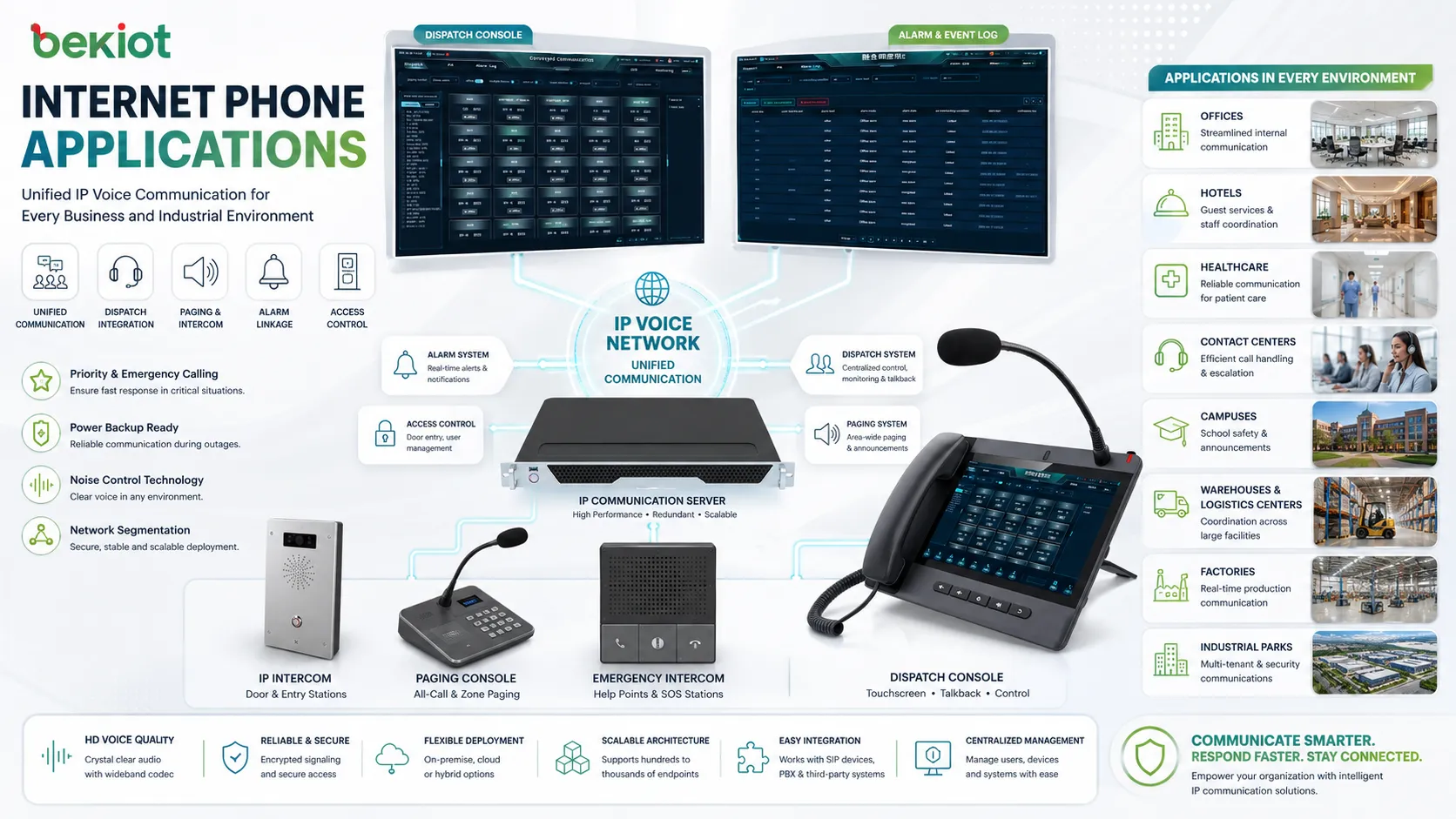
From Traditional Paging to IP-Based Audio
Traditional paging systems usually depend on centralized amplifiers, analog speaker lines, microphones, and zone selectors. They can be reliable, but expansion and remote control may become difficult when a site grows across multiple floors, buildings, or locations.
IP-based paging changes the structure. Speakers, amplifiers, gateways, and control terminals can connect to the network. Audio can be routed by software rules, SIP calls, multicast streams, scheduled tasks, or emergency triggers. This makes it easier to create flexible paging zones and integrate audio announcements with modern communication platforms.
The shift does not mean every analog device must be replaced immediately. Many deployments use hybrid designs where IP paging gateways connect existing analog amplifiers and speakers to a new network control platform. This allows organizations to modernize gradually while protecting earlier investment.
How the Audio Flow Works
Message Source
The paging source may be a desk microphone, SIP phone, paging console, dispatch terminal, web interface, mobile app, scheduled audio file, alarm input, fire system interface, or building management platform. Once a user or system starts a paging event, the source sends audio or a control command to the paging platform.
In daily operation, a receptionist may use a paging console to announce a visitor. In a school, a scheduled bell tone may trigger automatically. In a factory, an alarm contact may activate a warning message. Different sources can share the same audio network but follow different priority rules.
Control and Routing
The system decides where the message should go. It may route audio to one zone, several zones, all zones, or a group defined by building, department, floor, emergency area, or device type. Routing may be controlled manually or automatically according to event rules.
This routing layer is what makes network paging more flexible than a basic amplifier system. Administrators can change zones in software, assign priority levels, and build different paging workflows for routine announcements, security notices, and emergency alerts.
Audio Transport
Audio can be transported through SIP, multicast, unicast, RTP streams, or vendor-specific IP audio protocols. In many enterprise environments, SIP paging is useful because it allows paging devices to work with IP PBX systems, softswitches, SIP phones, and unified communication platforms.
Multicast is often used when the same audio needs to reach many endpoints at the same time. It can reduce network load compared with sending separate streams to every speaker. However, multicast requires proper network switch and router configuration.
Playback Devices
The message is played through IP speakers, network amplifiers, ceiling speakers, horn speakers, wall speakers, paging adapters, analog amplifier interfaces, intercom terminals, or PA gateways. The final sound quality depends on speaker placement, power output, room acoustics, background noise, and audio tuning.
For voice announcements, intelligibility is more important than loudness alone. A message that is loud but unclear still fails its purpose. Good speaker design, zoning, volume control, and testing are essential.
Essential Building Blocks
Paging Server or Management Platform
The server or management platform controls users, zones, schedules, device status, priorities, audio files, logs, and integrations. It may be installed on-premises, hosted in a private network, or provided as part of a communication system.
A centralized platform helps administrators manage many devices from one place. It also supports user permissions, event history, remote configuration, and system monitoring.
Control Console
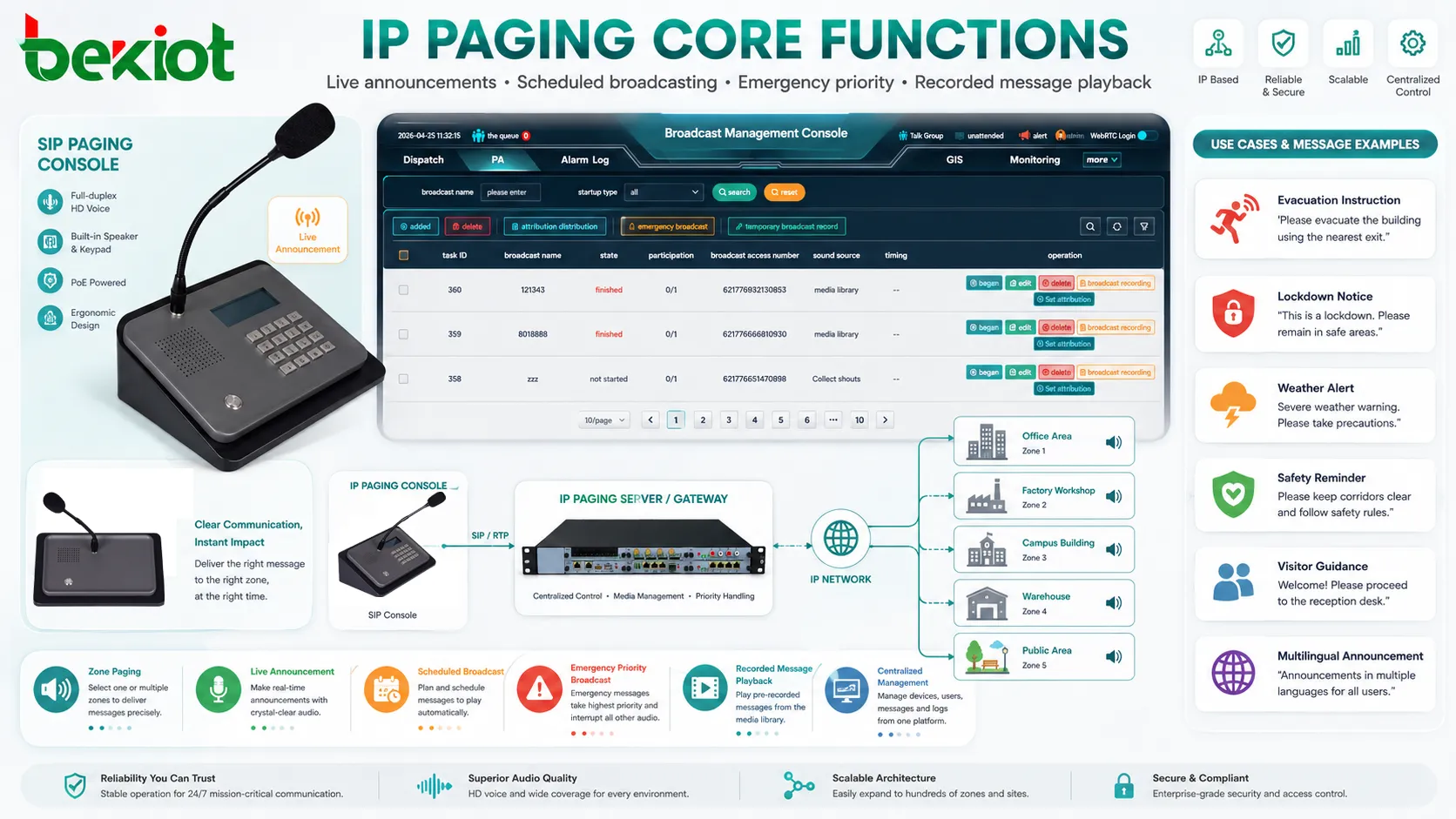
A paging console gives operators a simple interface for selecting zones, starting broadcasts, sending emergency messages, or making live announcements. Physical keys, touchscreens, microphones, and programmable buttons can make daily operation faster.
For projects that require a dedicated operator-side paging endpoint, the Becke Telcom GP100 paging console can be used as a practical control point for zone selection, live paging, and communication workflow integration in enterprise or industrial environments.
IP Speakers and Network Amplifiers
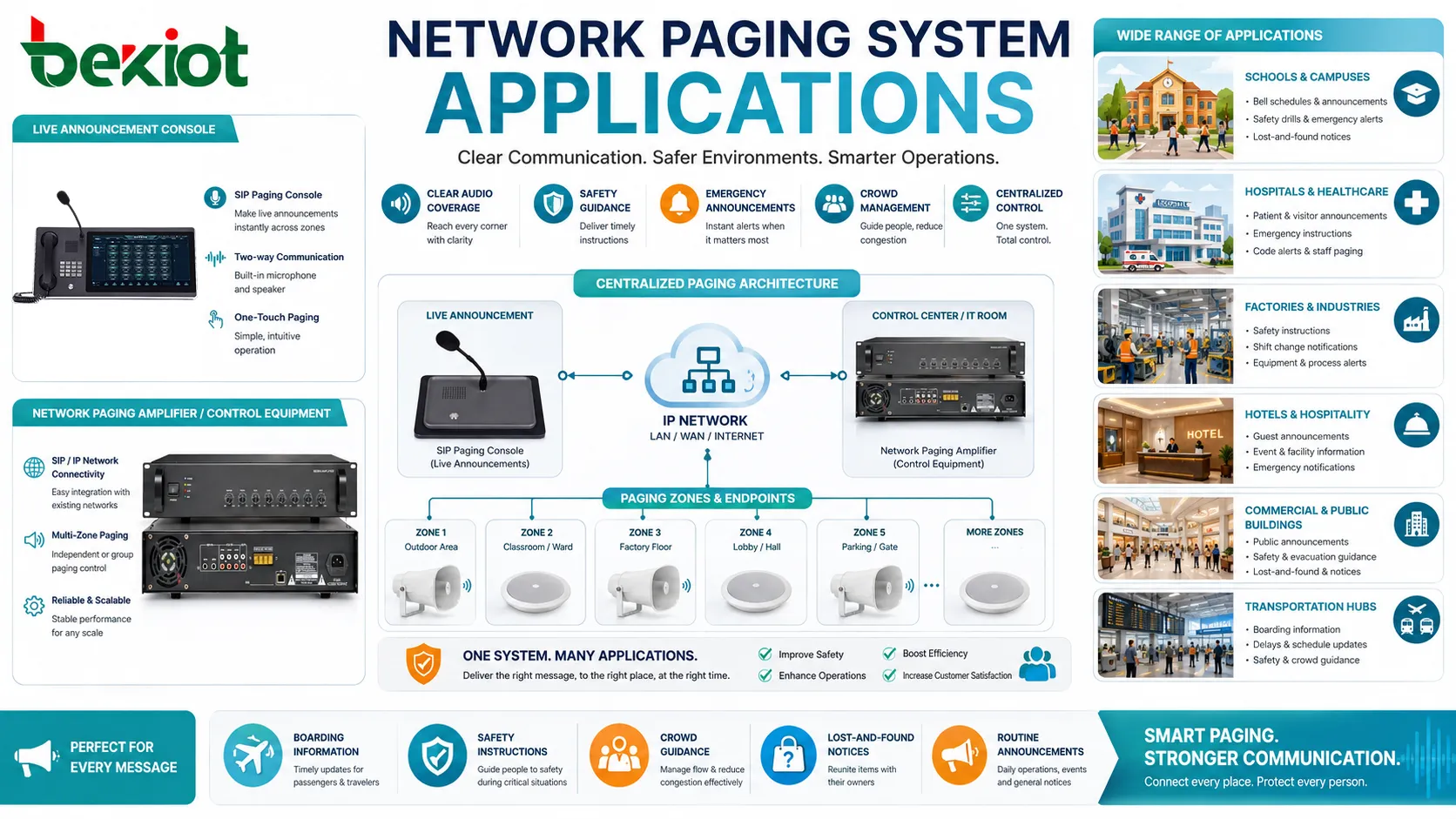
IP speakers connect directly to the network and receive audio streams or SIP calls. Network amplifiers can drive traditional passive speakers while receiving audio through IP. These devices reduce the need for long analog audio lines from a central amplifier room.
Different speaker types serve different spaces. Ceiling speakers fit offices and classrooms, horn speakers suit outdoor or noisy areas, wall speakers fit corridors and public halls, and high-power speakers may be needed in factories or transportation sites.
Paging Gateways
Paging gateways connect IP platforms with legacy analog PA systems, amplifiers, speakers, or contact inputs. They are useful when an organization wants to upgrade control and integration without replacing every speaker immediately.
A gateway may support SIP registration, relay control, audio output, input contacts, zone triggering, or amplifier connection. It becomes the bridge between existing infrastructure and modern IP communication.
Network Infrastructure
The IP network carries paging traffic, so switches, VLANs, QoS settings, PoE power, routing rules, and multicast support matter. A paging system should not be deployed as an afterthought on an unstable network.
For critical alerts, network redundancy, backup power, and monitored device status should be considered. A paging endpoint that loses power or network connection cannot deliver emergency audio.
A good paging design is not only about speakers. It combines control logic, network reliability, zone planning, audio intelligibility, and emergency priority into one coordinated workflow.
Key Features for Daily Operation
Zone Selection
Zone selection allows users to send announcements to specific areas instead of broadcasting everywhere. A school may page only the gym, a hotel may page only the service area, and a factory may page only one production line.
Good zone design reduces unnecessary interruptions. It also makes emergency communication more targeted when only certain areas are affected.
Live Announcements
Live paging allows authorized users to speak directly into selected zones. This is useful for reception calls, visitor notices, shift coordination, facility instructions, security updates, and transport information.
Live announcements should be easy to start but controlled by permissions. Not every user should have access to all zones or emergency broadcast functions.
Scheduled Broadcasts
Scheduled broadcasts can play bells, reminders, work shift tones, opening notices, closing messages, safety reminders, or routine announcements at predefined times. This reduces manual work and improves consistency.
Schools, factories, warehouses, offices, and public facilities often use scheduling to standardize daily operations.
Priority Management
Priority management decides which message takes control when multiple audio events happen at the same time. An emergency alert should override background music and routine announcements. A security notice may override a general paging message.
Without priority rules, important messages may be blocked, delayed, or mixed with lower-priority audio. This can create confusion during urgent events.
Pre-Recorded Messages
Pre-recorded messages improve consistency and reduce stress during emergency or routine announcements. Instead of asking staff to speak under pressure, the system can play a clear, approved message.
Recorded messages are useful for evacuation instructions, lockdown notices, weather alerts, safety reminders, visitor guidance, and multilingual announcements.
System Value for Organizations
Faster Information Delivery
Paging is valuable because it reaches many people quickly. When a message must be heard across a warehouse, campus, office floor, workshop, station, or public area, a voice broadcast can be faster than calling individuals one by one.
This speed supports daily coordination and urgent response. Staff can receive instructions immediately without checking phones, email, or messaging apps.
Clearer Operational Control
Network-based control makes it easier to define who can broadcast, where they can broadcast, and what priority their message has. This reduces random use and helps keep audio communication organized.
Administrators can also manage zones, schedules, device groups, and permissions through software rather than rewiring physical zone selectors.
Scalable Expansion
When a site grows, new IP speakers or gateways can often be added through the network. This is useful for expanding offices, campuses, factories, logistics centers, hospitals, hotels, and transportation facilities.
Scalability also supports multi-site operation. Central teams can manage distributed paging points across different buildings or branches if the network design allows it.
Better Emergency Readiness
A paging platform can support emergency response by broadcasting evacuation instructions, warning tones, severe weather alerts, security messages, or all-clear notices. When integrated with alarm systems, access control, sensors, or dispatch platforms, it becomes part of a wider emergency communication process.
Emergency readiness requires testing. The system should be checked under realistic conditions, including power backup, network failure scenarios, audio coverage, and operator procedures.
Reduced Dependency on Manual Calling
In many organizations, staff spend too much time calling different teams for routine updates. Paging allows one announcement to reach the selected audience immediately.
This is especially valuable in spaces where people are moving, working away from desks, operating equipment, or unable to check screen-based notifications.
Where These Systems Are Used
Schools and Universities
Education environments use paging for class changes, visitor notices, emergency drills, lockdown alerts, sports events, dormitory announcements, and campus-wide communication. Zone control helps separate classrooms, halls, outdoor areas, and administrative offices.
Schools should plan user permissions carefully so that routine paging, administrative announcements, and emergency alerts follow clear rules.
Hospitals and Healthcare Facilities
Healthcare sites use paging for staff calls, department notices, emergency codes, visitor guidance, facility alerts, and operational coordination. Audio zoning is important because some areas require quiet operation while others need immediate announcements.
Privacy should be considered. Sensitive patient information should not be broadcast through public speakers.
Factories and Warehouses
Industrial and logistics sites use paging for shift changes, safety reminders, equipment notices, loading dock coordination, maintenance calls, and emergency warnings. In noisy environments, speaker type and placement are critical.
Paging may need to work with visual alarms, strobes, industrial phones, radio systems, and control room platforms to ensure messages are noticed.
Hotels and Commercial Buildings
Hotels, office towers, malls, and commercial facilities use paging for service calls, background music override, visitor announcements, evacuation messages, and facility management. Smooth operation matters because the audio experience affects guests, tenants, and visitors.
Zone design helps avoid unnecessary disturbance. A staff-only message should not interrupt all public spaces.
Transportation and Public Spaces
Airports, railway stations, bus terminals, ports, parking facilities, and public venues rely on paging for boarding information, safety instructions, lost-and-found notices, crowd guidance, and emergency messages.
These locations often have high ambient noise, large open areas, and moving crowds. Audio coverage and speech intelligibility testing are essential.
Design Details That Affect Performance
Speaker Placement
Speaker placement determines whether people can hear and understand the message. Too few speakers may create dead zones. Too many speakers at high volume may cause echo and discomfort.
Designers should consider ceiling height, wall materials, machinery noise, open spaces, corridors, outdoor areas, and listener distance.
Speech Intelligibility
Speech intelligibility is more important than raw volume. If a message is loud but unclear, the system fails. Reverberation, echo, background noise, poor microphone quality, and bad equalization can all reduce clarity.
Testing should include normal operating conditions, not only empty rooms. A factory during production or a station during peak travel may sound very different from a quiet test environment.
Network Quality
Paging audio must arrive on time. Packet loss, high jitter, congestion, multicast misconfiguration, or switch overload can affect playback. Voice traffic should be planned with QoS and suitable network segmentation where needed.
For emergency paging, backup paths and monitored device status may be necessary.
Power Strategy
Many IP speakers and paging devices use Power over Ethernet. PoE simplifies installation, but switch power capacity and backup power must be planned. If the PoE switch fails, connected paging devices may also stop working.
Critical zones may require UPS-backed switches, redundant power, or local backup amplifiers.
Cybersecurity
Network-connected paging devices should be protected from unauthorized access. Weak passwords, exposed management ports, outdated firmware, or poorly segmented networks may create security risks.
Administrators should use strong credentials, network segmentation, firmware updates, access control, and monitoring. Emergency broadcast functions should be especially protected.
Integration Possibilities
Network-based paging can integrate with many other systems. It may connect to IP PBX platforms for SIP paging, access control systems for door or security alerts, fire alarm interfaces for evacuation messages, CCTV platforms for incident response, and building management systems for facility notifications.
It can also work with background music systems, digital signage, mobile notification platforms, intercoms, radio systems, and dispatch consoles. Integration helps create a multi-channel notification workflow where audio is one part of a larger response process.
Integration should be planned carefully. Each trigger should have a defined priority, target zone, message type, fallback rule, and responsible owner. Otherwise, multiple systems may send conflicting messages during the same event.
The strongest deployments treat paging as part of a communication ecosystem, not as a standalone speaker network.
Deployment Planning Checklist
Before installation, define the communication scenarios. Identify which messages are routine, which are urgent, which are emergency-related, and which zones should receive each type. This prevents over-broadcasting and keeps the system useful.
Map speaker zones according to real building use. A floor plan is helpful, but daily movement patterns, noise areas, restricted spaces, and public zones should also be considered.
Test endpoints, paging consoles, microphone quality, SIP registration, multicast behavior, amplifier output, emergency triggers, and scheduled messages before going live. A paging system should be tested as a workflow, not only as individual hardware.
Train users on permissions and procedures. Operators should know which zone to select, what message type to use, when to use emergency priority, and how to confirm that a broadcast has been completed.
Maintenance and Optimization
Routine maintenance should include checking speaker output, device online status, firmware versions, power supply, network connectivity, paging logs, scheduled tasks, and zone routing. If a speaker is offline or a zone is misconfigured, the problem should be fixed before an urgent message is needed.
Audio levels should be reviewed after room changes, equipment changes, wall modifications, or increased background noise. A zone that was clear during installation may become unclear after a layout change or machinery upgrade.
Administrators should also review user permissions. Former employees, inactive extensions, or outdated roles should not keep access to paging functions. Emergency broadcast authority should be limited to trained users.
Choosing a Suitable Setup
The best setup depends on building size, number of zones, existing speaker infrastructure, emergency requirements, network readiness, and daily communication needs. A small office may need simple SIP paging to a few IP speakers. A large campus may need a centralized platform with zone maps, paging consoles, scheduled messages, gateways, and emergency integration.
Organizations with existing analog PA systems may choose a hybrid path. They can add gateways and IP control first, then replace speakers or amplifiers over time. This reduces project disruption and helps manage budget.
For mission-critical sites, consider redundancy, monitored endpoints, backup power, role-based permissions, and documented emergency procedures. The goal is not only to make announcements convenient, but to keep important messages available when they are needed most.
FAQ
Can network paging work across multiple buildings?
Yes. It can work across multiple buildings if the network, routing, security rules, bandwidth, and device management are planned correctly. Multi-building systems should also consider backup power and local survivability.
Is multicast required for every deployment?
No. Some systems use unicast or SIP-based streams. Multicast is useful when the same audio must reach many endpoints efficiently, but the network must support it properly.
Can existing analog speakers be reused?
Often yes. Existing analog speakers may be reused through paging gateways or network amplifiers. The condition of the speakers, cable quality, amplifier compatibility, and zone design should be checked first.
What causes delay before an announcement starts?
Delay may come from SIP call setup, network routing, multicast joining, amplifier wake-up time, audio file loading, priority checks, or endpoint buffering. Testing helps identify which part of the path causes the delay.
Who should be allowed to send emergency broadcasts?
Only trained and authorized users should have emergency broadcast permission. Access should be controlled by role, logged by the system, and reviewed regularly as staff responsibilities change.







