


Integrated Services Digital Network, commonly known as ISDN, is a digital telecommunications technology that carries voice, data, fax, and signaling over traditional telephone network infrastructure. Unlike older analog telephone lines that transmit voice as continuous electrical signals, ISDN converts communication into digital channels, making call setup, voice transmission, data transfer, and service control more structured and predictable.
ISDN played an important role in the evolution from analog telephony to modern digital communication. It was widely used for business phone systems, PBX trunks, video conferencing, dial-up data access, fax services, backup connectivity, point-of-sale terminals, broadcast audio, and enterprise network access. Although many organizations have moved toward SIP trunking, VoIP, fiber, and cloud communication, ISDN remains important to understand because many legacy systems, gateways, and migration projects still reference it.
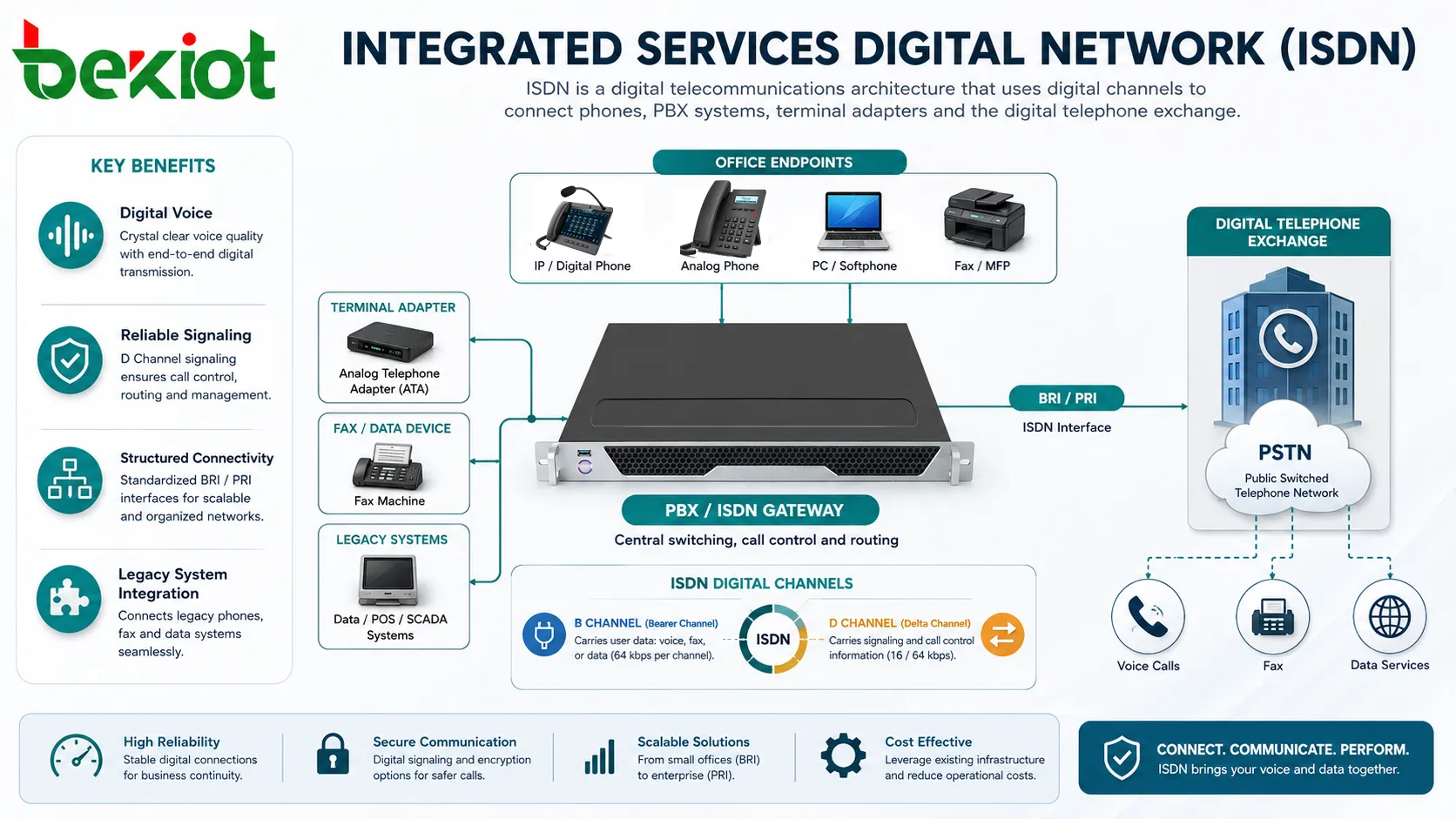
From Analog Lines to Digital Channels
Traditional analog telephone lines were designed mainly for voice. They could carry data through modems, but the data had to be converted into analog tones, which limited speed and reliability. ISDN introduced a cleaner digital approach by carrying voice and data as digital information across circuit-switched channels.
This change made communication more predictable. A digital channel could provide a defined bandwidth, faster call setup, clearer signaling, and more consistent service behavior. For businesses that needed multiple voice lines, data access, fax reliability, or PBX connectivity, this was a major improvement over purely analog services.
One of the key ideas behind ISDN is integration. Voice, data, and signaling can be carried within the same service framework. This allowed organizations to use one network access method for several communication needs instead of maintaining separate systems for every service type.
How the Channel Structure Works
B Channels
B channels, or bearer channels, carry user information such as voice, data, or video. A standard B channel usually provides 64 kbps of digital capacity. In voice applications, this channel carries the actual conversation. In data applications, it can carry digital data between endpoints.
Multiple B channels can sometimes be combined for higher bandwidth. This was useful for early video conferencing, faster dial-up access, and certain business data applications before broadband services became common.
D Channel
The D channel, or delta channel, carries signaling and control information. It handles tasks such as call setup, call clearing, caller identification, service negotiation, and network control messages.
Separating signaling from user traffic was one of the strengths of ISDN. Instead of using the same voice path for call control tones, the network could manage signaling digitally and more efficiently.
Bearer Services and Supplementary Services
Bearer services define how user information is transported, such as circuit-switched voice or digital data. Supplementary services add features such as caller ID, call forwarding, call waiting, multiple subscriber numbers, direct inward dialing, and closed user group services.
These service layers made ISDN useful for business telephony because PBX systems could use digital signaling to manage more advanced call behavior than basic analog trunks.
Access Types Used in Real Networks
Basic Rate Interface
Basic Rate Interface, commonly called BRI, provides two B channels and one D channel. This is often described as 2B+D. Each B channel typically provides 64 kbps, while the D channel provides signaling capacity.
BRI was often used by small offices, remote workers, small PBX systems, video conferencing units, and specialized data terminals. It could support two simultaneous voice calls, one voice call and one data session, or combined channels for certain data applications.
Primary Rate Interface
Primary Rate Interface, commonly called PRI, is designed for larger business and carrier applications. It provides multiple B channels plus one D channel. The exact number of channels depends on the regional digital carrier standard.
PRI became popular for connecting PBX systems to the public telephone network because it could carry many simultaneous calls over one digital trunk. It also supported direct inward dialing, caller ID, and cleaner call control between the PBX and the carrier network.
BRI and PRI Comparison
| Access Type | Typical Structure | Common Use |
|---|---|---|
| BRI | 2 bearer channels plus 1 signaling channel. | Small offices, remote sites, legacy video units, data terminals, and low-capacity voice access. |
| PRI | Multiple bearer channels plus 1 signaling channel. | PBX trunking, call centers, enterprise telephony, hotel phone systems, and carrier interconnection. |
| BRI Aggregation | Multiple BRI lines used together. | Sites needing more than two channels but not a full PRI service. |
| PRI Gateway | Digital trunk connected to IP PBX or VoIP gateway. | Migration from legacy telephony to SIP, VoIP, or hybrid communication platforms. |
Network Architecture and Main Components
Customer Premises Equipment
Customer premises equipment includes the devices installed at the user site. These may include ISDN phones, terminal adapters, PBX systems, routers, video conferencing units, fax equipment, or digital gateways.
Some devices connect directly to ISDN interfaces, while others require adapters. For example, an analog phone or modem may need a terminal adapter to communicate through a digital ISDN line.
Network Termination
The network termination device provides the boundary between the carrier network and the customer-side equipment. In some regions, this function may be provided by an NT1 device. It converts and manages the interface between the network line and local ISDN equipment.
Correct termination is important because ISDN depends on defined electrical, timing, and signaling behavior. Poor cabling, wrong termination, or incompatible equipment can cause registration, call setup, or stability problems.
Local Exchange
The local exchange or central office switch handles call routing, signaling, numbering, and connection to the wider public telephone network. It processes call setup messages and establishes circuit-switched paths through the network.
In enterprise deployments, the exchange may connect to a PBX through a PRI trunk, allowing many internal extensions to make and receive external calls through shared digital channels.
Signaling Layer
ISDN uses structured signaling protocols to manage calls. The signaling layer carries messages for setup, alerting, connect, disconnect, release, and supplementary services. This allows the network and customer equipment to exchange call control information digitally.
For PBX systems, reliable signaling is essential because features such as caller ID, direct inward dialing, and call status reporting depend on accurate signaling messages.
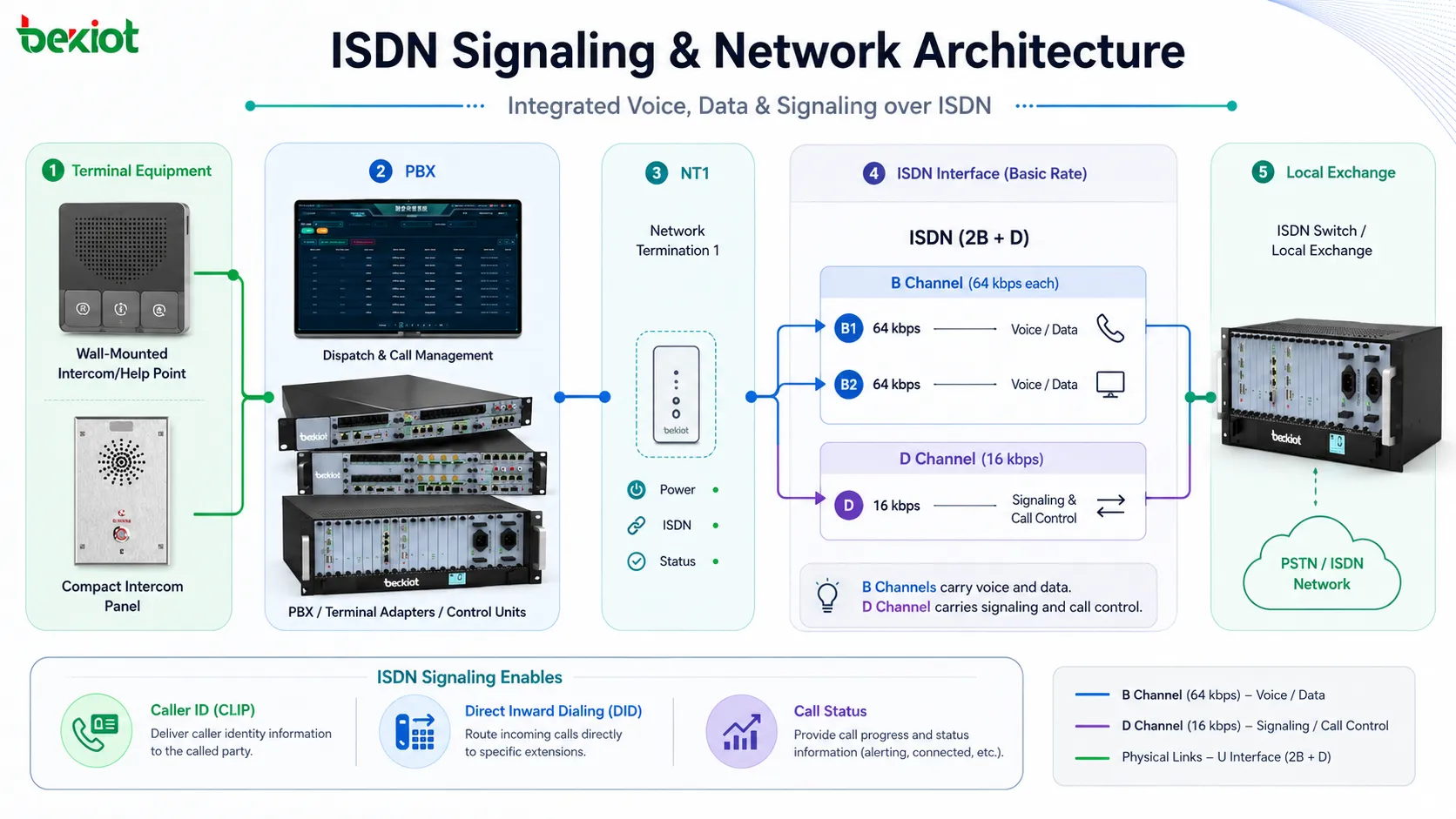
Technical Features That Made It Useful
Digital Voice Transmission
ISDN carries voice digitally, which can provide more stable call quality than analog lines affected by noise, distance, and signal degradation. Since the voice channel is defined and circuit-switched, users can receive predictable audio behavior during a call.
However, call quality also depends on handset quality, PBX equipment, carrier network condition, wiring, and any gateways used in the communication path.
Fast Call Setup
Because signaling is handled digitally through the D channel, call setup can be faster and more informative than older analog dialing methods. The system can exchange call control messages quickly and support features such as caller number delivery and call progress status.
This was especially useful for PBX environments, where call setup speed and signaling accuracy affected daily business communication.
Multiple Services on One Access
ISDN can carry different service types through the same access structure. Voice, data, fax, and video sessions can use bearer channels according to service needs. This made it flexible for organizations before modern broadband and IP networks became dominant.
For example, a small office could use one B channel for a voice call and another B channel for data. A larger office could use PRI channels for many voice calls through one PBX trunk.
Direct Inward Dialing
Direct inward dialing allows external callers to reach internal PBX extensions directly without going through a receptionist. PRI services were commonly used with number ranges assigned to business users, departments, hotel rooms, or service desks.
This improved caller experience and reduced manual call transfer workload.
Clear Channel Data
ISDN B channels can carry digital data without analog modem conversion. This made it useful for applications that needed predictable point-to-point data transmission, such as early remote access, broadcast contribution, financial terminals, and backup links.
Although the bandwidth is limited by modern standards, the predictable nature of the channel was valuable for certain specialized applications.
The strength of ISDN was not only that it was digital, but that it combined defined channels, structured signaling, and predictable service behavior for voice and data.
Applications Across Business and Legacy Systems
PBX Trunking
One of the most common uses was connecting business PBX systems to the public telephone network. PRI trunks allowed many simultaneous calls through a digital connection, reducing the need for many separate analog lines.
This model was widely used in offices, hotels, hospitals, contact centers, government buildings, schools, and enterprise campuses. Many migration projects from legacy PBX to VoIP still need to understand PRI behavior because gateways may be used during transition.
Video Conferencing
Before broadband video meetings became common, ISDN was frequently used for professional video conferencing. Multiple B channels could be bonded together to provide more bandwidth for video and audio sessions.
Although modern IP video has largely replaced this use case, some older conferencing systems and archived infrastructure still reference ISDN channel bonding.
Broadcast and Audio Contribution
Broadcasters used ISDN for remote interviews, contribution audio, and studio links because it provided predictable digital audio paths. Radio stations, journalists, and production teams valued its reliability compared with noisy analog lines.
In some workflows, ISDN codecs became a standard tool for remote audio contribution before IP audio platforms became widely accepted.
Backup Connectivity
Some organizations used ISDN as a backup link for data or management access. If a primary leased line or broadband connection failed, ISDN could provide a secondary path for limited but reliable access.
This was useful for remote offices, financial terminals, network management, and service continuity in earlier enterprise networks.
Fax and Point-of-Sale Systems
Fax machines, payment terminals, ticketing systems, alarm panels, and specialized business devices sometimes used ISDN lines or adapters. Digital service could improve reliability compared with some analog paths, especially where call control and connection stability mattered.
When migrating these systems to IP, compatibility must be tested carefully because some legacy devices expect circuit-switched behavior.
Role in Migration to IP Telephony
Many organizations have moved from ISDN to SIP trunking and VoIP, but migration is not always instant. Existing PBX systems, elevator phones, fax systems, alarm panels, hotel room phones, and legacy terminals may still depend on older interfaces.
Gateways can help bridge these environments. An ISDN PRI gateway, for example, can connect a legacy PBX to an IP network or connect an IP PBX to an older digital trunk during a transition period.
A successful migration should identify which services use voice channels, which use data, which require direct inward dialing, which depend on fax or modem behavior, and which have emergency or compliance requirements. Replacing the trunk without checking these details can create service gaps.
Advantages and Limitations
Advantages
The main advantages include digital call quality, structured signaling, reliable circuit-switched behavior, support for multiple calls, direct inward dialing, and compatibility with many legacy PBX systems. For its time, ISDN provided a professional and predictable communication service.
It also created a bridge between analog telephony and modern digital networks. Many concepts used in business communication, such as digital signaling and channelized trunks, helped shape later enterprise voice systems.
Limitations
The limitations are also clear today. Bandwidth is low compared with modern broadband and fiber. Hardware and carrier support may be limited in many areas. Scaling capacity often requires adding channels or trunks, which may be less flexible than SIP-based services.
ISDN is also less suited to cloud-first communication because it depends on circuit-switched network access. Modern organizations usually prefer IP-based services that support remote users, software integration, flexible routing, and centralized management.
Design and Maintenance Considerations
For organizations still using ISDN, documentation is important. Administrators should know which numbers, channels, devices, PBX ports, adapters, and services depend on the connection. This avoids surprises during repair, migration, or carrier changes.
Maintenance should include checking physical cabling, termination devices, PBX interface cards, error logs, clock source settings, channel status, and signaling traces. Many faults appear as intermittent call failures, busy signals, dropped calls, or missing caller ID.
For PRI services, channel utilization should also be reviewed. If all channels are frequently busy, users may experience failed outbound calls or blocked inbound calls. If utilization is very low, the organization may be paying for unnecessary capacity.
Planning a Replacement or Hybrid Setup
Before replacing ISDN, organizations should audit all connected services. Voice extensions are only one part of the picture. Fax, alarms, elevators, payment terminals, door systems, emergency phones, modems, and broadcast equipment may also depend on the line.
A hybrid setup may be useful during transition. Gateways can connect legacy digital trunks to IP-based platforms, allowing the organization to migrate users gradually. This reduces risk and gives teams time to test call routing, fax behavior, emergency calls, and number porting.
Long-term planning should consider SIP trunking, hosted PBX, cloud communications, fiber access, SBC security, redundancy, and number management. The goal is not only to replace an old connection, but to preserve important communication functions in a more modern architecture.
ISDN migration should begin with service discovery. The biggest risks are often hidden devices and business workflows that depend on old circuit-switched behavior.
FAQ
Can ISDN support internet access?
Yes, it can support data access, but the speed is very limited by modern standards. It was useful before broadband became common, but today it is generally not suitable for normal internet-heavy business use.
Why do some legacy systems still depend on it?
Some older PBX systems, broadcast codecs, fax devices, alarm panels, and specialized terminals were designed around circuit-switched digital lines. They may need gateways, adapters, or replacement planning before migration.
What should be checked before disconnecting a digital trunk?
Check all phone numbers, DID ranges, fax lines, alarm devices, elevator phones, payment terminals, emergency call routes, PBX settings, carrier contracts, and backup communication paths before disconnection.
Can SIP trunking fully replace PRI?
In many cases, yes, but the migration must be planned. SIP trunking uses IP networks and different signaling behavior, so compatibility, security, QoS, emergency calling, numbering, and failover should be tested.
Why do ISDN calls sometimes fail even when the line appears active?
Possible causes include signaling mismatch, clocking errors, PBX card faults, channel exhaustion, incorrect number formatting, carrier-side routing issues, or unstable physical line conditions.







