


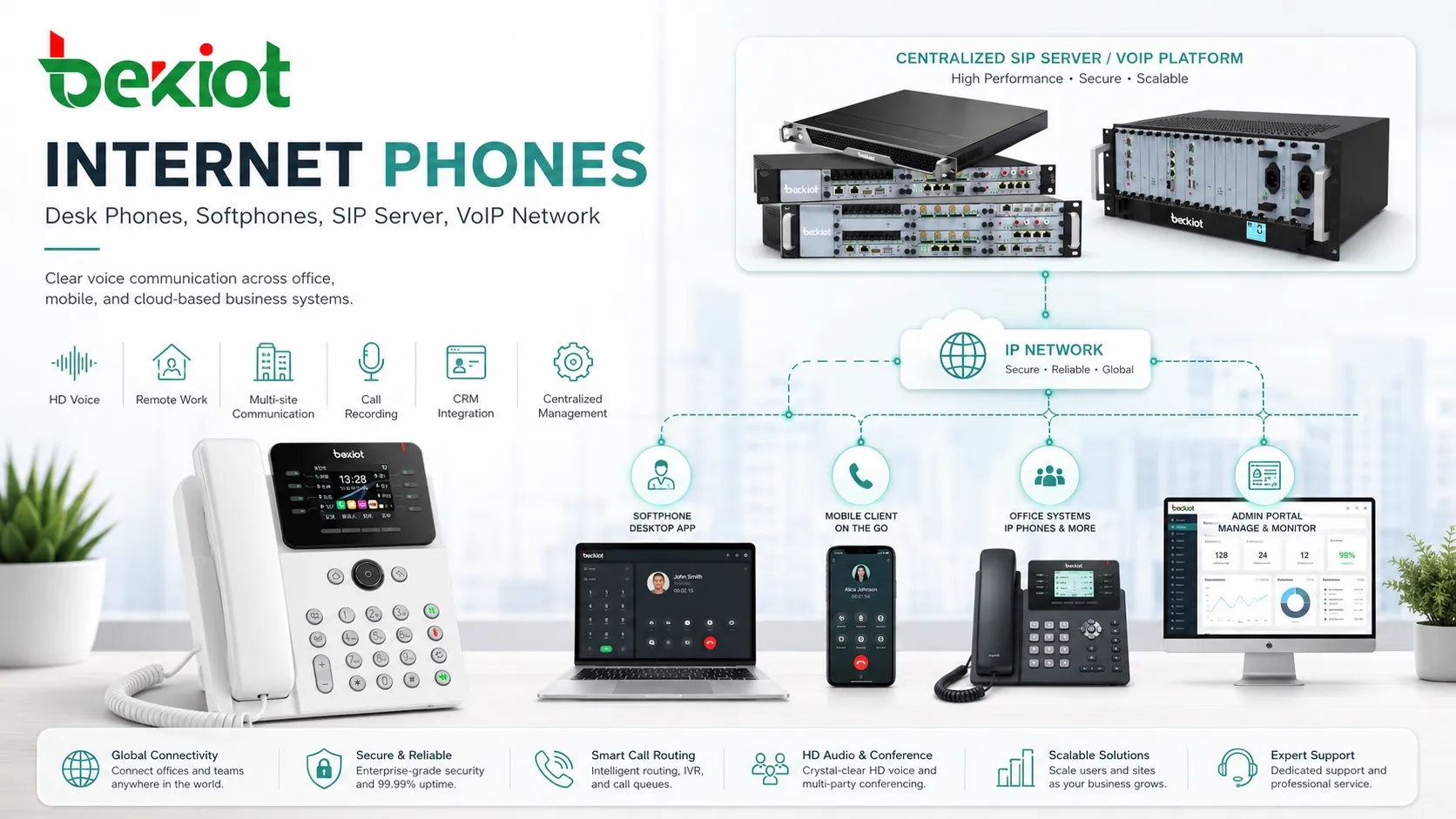
Internet phones are communication devices or software-based calling tools that use an IP network to make and receive voice calls. Instead of relying only on traditional analog telephone lines, they transmit voice as digital data through local networks, broadband connections, SIP platforms, cloud phone systems, IP PBX systems, and VoIP service providers.
For businesses, internet phones are more than a replacement for old desk phones. They support flexible extension management, remote work, multi-site communication, call recording, voicemail, conferencing, call routing, CRM integration, and centralized administration. Their call quality can be very clear when the network, codec, endpoint, and system configuration are properly planned.
From Voice to Data Packets
When a person speaks into an internet phone, the microphone captures the voice signal and converts it into digital audio. The phone or application then encodes the audio using a voice codec. The encoded voice is divided into small data packets and sent across the IP network to the destination.
At the receiving side, the process is reversed. The endpoint receives the packets, reorders them if needed, decodes the audio, and plays the voice through the speaker, handset, headset, or conference device. This process happens in real time, so the system must handle audio quickly and smoothly.
The quality of the final call depends on several parts working together: the microphone, codec, network path, packet timing, jitter buffer, speaker, echo cancellation, noise reduction, and the communication platform controlling the call.
What Happens During a Call
Signaling Sets Up the Session
Before two people can talk, the system must set up the call. In many business environments, this is handled by SIP signaling. SIP helps endpoints register to a server, dial extensions, invite other users, negotiate media settings, and end the session when the call is complete.
Signaling does not usually carry the voice itself. It controls who is calling, where the call should go, which codec may be used, and how the session should behave.
Media Carries the Voice
After the call is established, voice media usually travels through RTP or a similar real-time transport method. RTP is designed for time-sensitive audio because voice cannot wait like an ordinary file download.
If packets arrive late, out of order, or not at all, the user may hear choppy audio, gaps, delay, or robotic sound. This is why network stability is so important for IP-based voice communication.
Codecs Shape the Audio
A codec determines how voice is compressed, transmitted, and decoded. Some codecs use more bandwidth but deliver very clear audio. Others use less bandwidth but may sound less natural. Common voice codecs include G.711, G.729, Opus, G.722, and other platform-specific options.
Wideband codecs can provide clearer speech because they preserve more voice frequency detail. However, endpoint support and network capacity must be considered before choosing a codec.
Servers and Platforms Manage Features
Internet phones usually connect to a communication platform such as an IP PBX, hosted PBX, SIP server, cloud calling service, or unified communications system. This platform manages extensions, call routing, voicemail, call forwarding, conferencing, recording, permissions, and trunk connections.
In industrial or enterprise communication projects, providers such as Becke Telcom may be considered when businesses need SIP-compatible endpoints, IP phones, voice gateways, dispatch integration, or system-level communication deployment support.
How Clear Can the Call Quality Be?
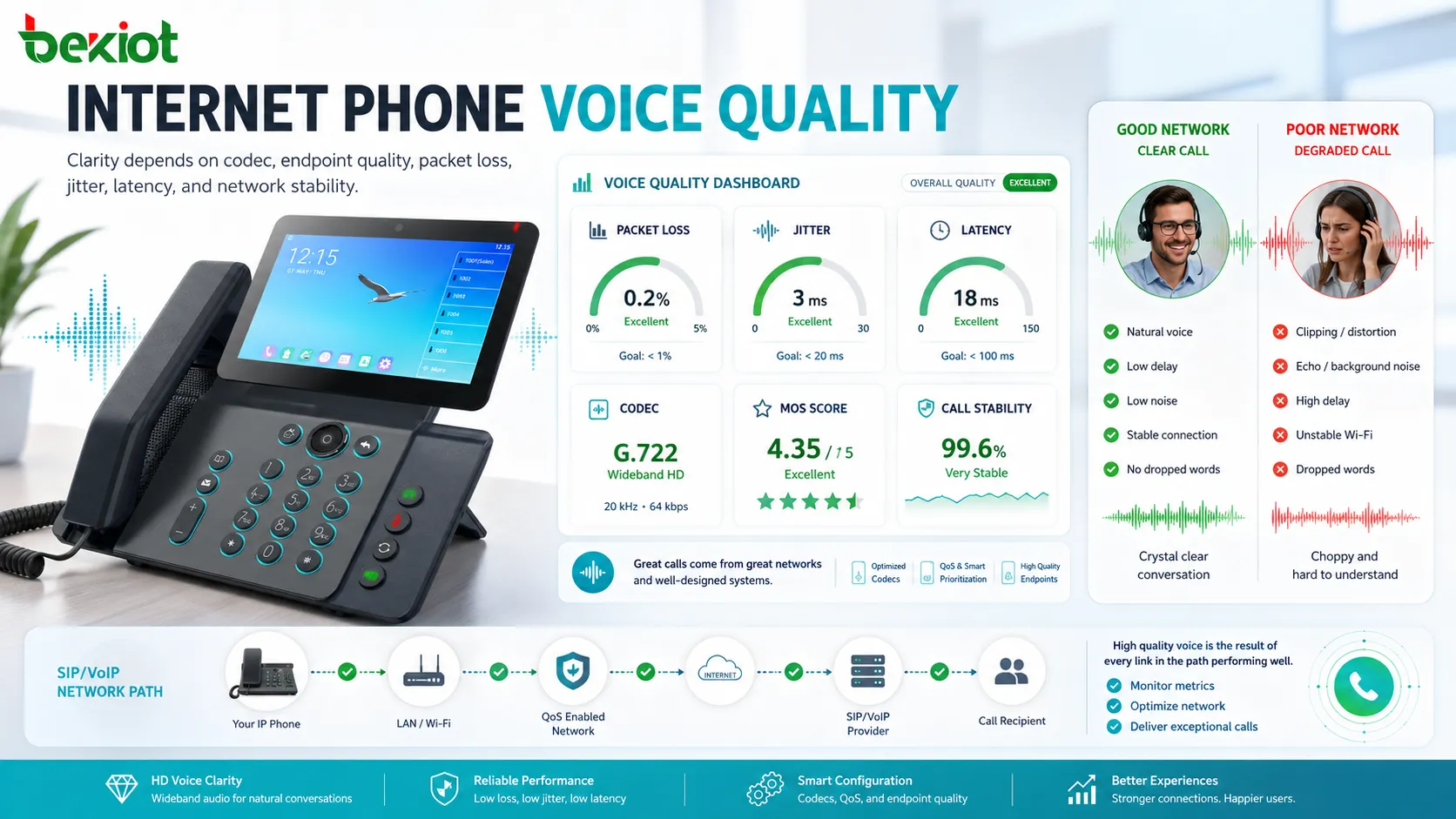
Call quality can be very clear when the system is properly designed. In many cases, an internet phone using a good codec and stable network can sound clearer than an old narrowband analog line. Wideband audio can make speech more natural and easier to understand, especially during long business calls.
However, quality is not automatic. A poor network, overloaded Wi-Fi, low-quality headset, misconfigured router, wrong codec, or unstable SIP trunk can make calls sound worse. The technology can support excellent clarity, but the deployment must protect the audio path.
Users usually judge quality by whether the voice sounds natural, whether there is delay, whether words are clipped, whether background noise is controlled, and whether both sides can talk without interruption. Technical teams may also measure packet loss, jitter, latency, codec, MOS score, and call failure rate.
Factors That Make Speech Sound Better
Stable Bandwidth
Voice calls do not require massive bandwidth, but they require consistent bandwidth. A small amount of stable network capacity is usually better than a high-speed connection that drops packets or fluctuates heavily.
When many users make calls at the same time, administrators should calculate total concurrent call traffic and reserve enough network capacity for voice.
Low Jitter
Jitter means that packets arrive at uneven intervals. If jitter is too high, the receiving phone may struggle to play audio smoothly. A jitter buffer can help, but excessive jitter may still create delay or audio gaps.
Quality of service settings, stable routing, wired connections, and well-designed Wi-Fi can reduce jitter.
Low Latency
Latency is the delay between speaking and hearing the voice at the other end. If latency is too high, people may interrupt each other or experience awkward pauses.
For natural conversation, voice traffic should use efficient network paths and avoid unnecessary routing, overloaded VPNs, or long-distance detours when possible.
Good Endpoint Hardware
The phone, headset, handset, microphone, and speaker strongly affect perceived quality. Even with a perfect network, a poor microphone can make the call sound unclear.
Business-grade phones and headsets often provide better echo control, microphone pickup, speaker tuning, and noise reduction than basic consumer audio devices.
Proper Codec Selection
A wideband codec may improve clarity, while a low-bitrate codec may reduce bandwidth usage. The best choice depends on the network and business requirements.
For internal office calls, a higher-quality codec may be suitable. For bandwidth-limited remote sites, a more efficient codec may be needed. Codec negotiation should be tested across phones, gateways, trunks, and conferencing platforms.
Network Planning for Reliable Voice
Internet phones work best when the network treats voice traffic as time-sensitive. This does not always mean building a separate network, but voice traffic should be protected from heavy downloads, backups, video streaming, and uncontrolled Wi-Fi congestion.
Quality of service can prioritize voice packets so they move through switches, routers, and WAN links with less delay. VLAN separation can also help organize phones, computers, cameras, and other devices into cleaner network segments.
For larger organizations, monitoring is important. Administrators should track call quality trends, SIP registration status, packet loss, jitter, latency, trunk capacity, device health, and network utilization. This helps identify problems before users complain.
Device and System Options
Desk Phones
IP desk phones are physical devices that connect to the network through Ethernet or Wi-Fi. They usually support SIP accounts, extension dialing, call transfer, voicemail access, headset ports, speed keys, conference calling, and programmable buttons.
Desk phones are still popular in reception areas, offices, control rooms, hotels, hospitals, factories, and service desks where users need a dedicated calling device.
Softphones
A softphone is a software application that runs on a computer, tablet, or smartphone. It allows users to make and receive calls through a headset or built-in audio device.
Softphones are useful for remote work, mobile employees, hybrid teams, and users who need calling features integrated with business applications.
Conference Devices
Conference phones and meeting room devices are designed for group conversations. They usually include multiple microphones, echo cancellation, speaker optimization, and wide audio coverage.
Good room acoustics and proper placement are important. A high-quality conference device can still sound poor in a room with heavy echo or background noise.
Gateways and Adapters
VoIP gateways and analog telephone adapters connect IP voice systems with traditional phones, PSTN lines, radio systems, paging systems, or legacy equipment. They are useful when organizations need to modernize gradually instead of replacing everything at once.
Gateway quality affects call stability, codec conversion, caller ID handling, DTMF transmission, and interoperability between old and new systems.
Where Businesses Use IP-Based Calling
Office Communication
Businesses use internet phones for internal extension calling, external customer calls, voicemail, reception routing, call transfer, call forwarding, and department communication. Centralized management makes it easier to add users, change extensions, and adjust call routing.
Compared with traditional systems, IP calling is more flexible when offices expand, move, or adopt remote work.
Contact Centers
Contact centers use IP voice for agent calls, queues, IVR menus, call recording, supervisor monitoring, reporting, and CRM integration. The system can connect agents across different locations while maintaining centralized control.
Audio quality is especially important in contact centers because unclear calls can increase handle time, reduce customer trust, and affect quality scoring.
Hotels and Hospitality
Hotels may use IP phones in guest rooms, reception, back offices, service areas, and management teams. IP-based systems can connect voice with PMS systems, wake-up calls, room status, and service workflows.
For hospitality environments, reliability, simple operation, and clear guest communication are more important than excessive feature complexity.
Healthcare Facilities
Clinics and hospitals use internet phones for reception, nurse stations, administration, maintenance, pharmacy, emergency coordination, and internal departments. Clear voice communication supports patient service and staff coordination.
Privacy, access control, call logging, and reliable uptime should be considered during deployment.
Industrial and Campus Environments
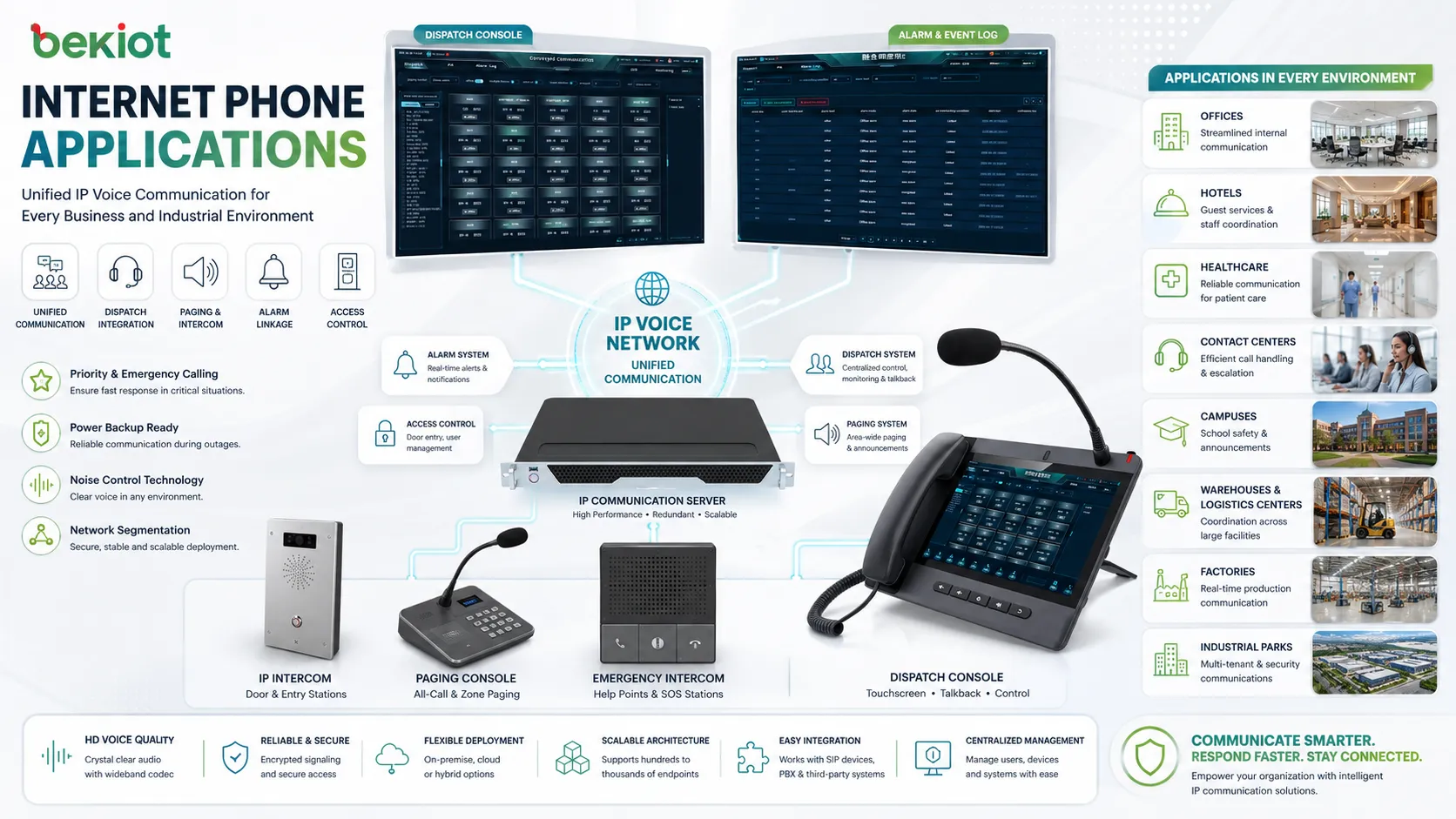
Factories, warehouses, schools, universities, logistics centers, and industrial parks may use IP phones together with intercoms, paging, dispatch systems, alarm systems, and access control. This creates a more unified communication environment.
In these sites, rugged endpoints, priority calling, noise control, power backup, and network segmentation may be required.
Common Problems and Practical Fixes
Choppy Audio
Choppy audio is often caused by packet loss, unstable Wi-Fi, overloaded routers, or network congestion. Moving phones to wired Ethernet, enabling QoS, checking switch capacity, and reducing competing traffic can help.
Echo
Echo may come from speakerphones, poor acoustic design, low-quality headsets, or echo cancellation issues. Use suitable headsets, adjust speaker volume, update firmware, and test different audio devices.
One-Way Audio
One-way audio usually points to NAT, firewall, RTP port, or routing problems. SIP signaling may complete successfully while media packets fail to pass in one direction.
Registration Failure
If a phone cannot register, check network connectivity, SIP credentials, server address, DNS, firewall rules, time settings, and account status. Certificates may also matter when secure SIP is used.
Delay During Conversation
Noticeable delay may be caused by long network paths, VPN routing, overloaded gateways, high jitter buffers, or distant service regions. Check latency and simplify the media path where possible.
Deployment Checklist for Better Results
Start with the network. Confirm stable LAN performance, proper switch configuration, sufficient WAN bandwidth, and voice traffic prioritization. Voice should not compete equally with large file transfers, video uploads, or backup jobs.
Choose suitable endpoints. A receptionist, executive, contact center agent, meeting room, hotel room, and industrial operator may all need different phone types. Match the device to the workflow instead of using one model everywhere.
Test the full call path. Internal extension calls, outbound PSTN calls, inbound customer calls, voicemail, call transfer, conference calls, remote users, and emergency numbers should all be tested before full deployment.
Plan management and maintenance. Firmware updates, extension changes, password policies, device provisioning, backup configuration, and call quality monitoring should be part of the ongoing operation plan.
Clear calls are usually the result of a complete design: reliable network, suitable codec, good endpoints, correct routing, and continuous monitoring.
How to Evaluate Call Quality
Evaluation should include both user experience and technical data. Users can report whether speech sounds clear, delayed, echoing, robotic, or unstable. Administrators can compare those reports with packet loss, jitter, latency, MOS, codec, and endpoint logs.
Test calls should be performed from different locations and device types. An office desk phone may sound excellent, while a remote softphone over weak Wi-Fi may sound poor. A complete evaluation should include real working conditions.
Recordings can also help. A live call may seem acceptable, but recordings may reveal low microphone volume, background noise, clipping, or codec artifacts. This is especially important for contact centers and compliance workflows.
When This Technology Is the Right Choice
Internet phones are a strong choice when businesses need flexible extensions, remote access, multi-site connectivity, centralized management, lower wiring complexity, and integration with modern software systems. They are especially useful for organizations that want voice communication to connect with CRM, helpdesk, conferencing, recording, analytics, or dispatch platforms.
They may not perform well if the network is unstable, if the organization ignores endpoint quality, or if phones are deployed without proper configuration. The technology is mature, but it still requires planning.
For most modern business environments, IP-based calling offers a practical path to clearer, more manageable, and more scalable communication when deployed with the right design discipline.
FAQ
Can internet phones work during a power outage?
Only if the network equipment, phone system, and endpoints have backup power. PoE switches, routers, gateways, and servers may need UPS support to keep calls working during an outage.
Do these phones require a public IP address?
Usually no. Most phones work behind routers and firewalls, but SIP and RTP traffic must be handled correctly. NAT traversal, SBCs, VPNs, or proper firewall rules may be needed in some deployments.
Can a business keep its existing phone numbers?
Often yes, through number porting or SIP trunking. The process depends on the current carrier, region, number type, and provider requirements. Businesses should plan porting timelines carefully.
Are emergency calls handled the same way as traditional lines?
Not always. Emergency calling with VoIP may require correct location information, provider support, and regulatory compliance. Multi-site and remote users need special attention so emergency services receive accurate location details.
What is the best way to test before switching fully?
Run a pilot with real users, real headsets, real network conditions, inbound and outbound calls, voicemail, transfers, conference calls, and remote access. Compare user feedback with call quality metrics before full migration.







