


Music on Hold, commonly known as MOH, is an audio feature that plays music, recorded messages, announcements, or branded audio content to callers while they are waiting on a phone line. It is widely used in PBX systems, IP PBX platforms, SIP phone systems, contact centers, cloud telephony services, hotel phone systems, healthcare reception lines, service desks, and enterprise communication networks.
Instead of leaving callers in silence, MOH helps confirm that the call is still connected. It can make waiting feel shorter, reduce abandoned calls, deliver useful information, and create a more professional caller experience. In SIP and PBX environments, MOH is not only an audio file; it is part of call control, media routing, codec handling, queue management, and system configuration.

Why Callers Need Audio While Waiting
Silence during a phone call can be uncomfortable. When callers hear nothing after being placed on hold, they may think the call has dropped, the agent has disconnected, or the system has failed. This uncertainty can increase hang-ups and repeat calls.
MOH solves this by creating an active waiting experience. The audio tells the caller that the connection is still alive. It can also provide estimated service information, office hours, product reminders, safety notices, support instructions, or promotional messages depending on the organization’s needs.
The best on-hold experience is balanced. The audio should not be too loud, repetitive, distorted, or intrusive. It should support the caller journey without turning the waiting period into an annoyance.
Where the Audio Comes From
Uploaded Audio Files
Many PBX systems allow administrators to upload audio files for hold music. These files may contain music, spoken messages, multilingual announcements, compliance notices, or a combination of music and voice prompts.
Before uploading, the file usually needs to match the PBX platform’s supported format. Common requirements may include WAV format, mono channel, specific sample rate, and compatible codec. If the format is wrong, the system may reject the file or play it with poor quality.
Streaming Audio Source
Some systems can use a live audio stream or external music source. This may be useful for organizations that want regularly updated music or scheduled audio content.
Streaming should be used carefully because network interruptions, licensing issues, or source instability can affect the caller experience. For critical call flows, a local backup audio file is often safer.
PBX Default Library
Many phone systems include default MOH tracks. These can be useful during initial setup or testing, but they may not match the organization’s brand, language, or caller expectations.
Default audio should be replaced or reviewed before a system goes into production. A generic track may be acceptable for internal calls but less suitable for customer-facing queues.
External Audio Input
Some legacy PBX or hybrid systems support external audio input from a media player, mixer, or audio interface. The PBX then feeds that source to callers on hold.
This approach requires proper line-level input, stable playback, and volume control. If the external source is unplugged, muted, or distorted, callers may hear silence or poor-quality audio.
How It Works Inside a PBX
When a caller is placed on hold, transferred, parked, or waiting in a queue, the PBX changes the media path. Instead of sending the caller’s audio directly to an agent or extension, the system connects the caller to a hold audio source.
In a traditional PBX, the system may play audio from an internal module or external source. In an IP PBX, the audio may be streamed from the PBX media server to the caller’s endpoint through RTP. In a contact center, the queue engine may decide which audio or announcement should play based on waiting time, caller priority, language, or campaign.
When the call is resumed, transferred, or answered by an agent, the PBX stops the hold audio and reconnects the caller to the active conversation. This transition should be smooth. Abrupt audio cuts, long silence, or delayed resume behavior can make the system feel unprofessional.
MOH is simple from the caller’s point of view, but inside a phone system it depends on media handling, call state, queue logic, codecs, and audio file preparation.
SIP Behavior and Media Handling
Hold Signaling
In SIP systems, placing a call on hold usually involves signaling changes that tell the other side the media state has changed. This may happen through re-INVITE or UPDATE messages depending on the platform and endpoint behavior.
The SIP message may indicate that the media stream should be held, changed, or redirected. The PBX or media server then supplies the MOH audio according to its configuration.
RTP Audio Stream
The actual hold music is typically carried as RTP audio. The PBX media server sends audio packets to the caller while the call is in the hold state. If RTP is blocked by firewall rules, NAT problems, or codec mismatch, the caller may hear silence.
This is why MOH troubleshooting often requires checking both signaling and media. The SIP call may appear active, but the RTP audio path may still fail.
Codec Compatibility
MOH audio must be encoded into a codec supported by the call path. If the PBX has to transcode the file for every held call, it may consume processing resources. If no compatible codec is available, the caller may hear no audio or poor-quality playback.
Common practice is to store MOH files in a format that matches the most commonly used voice codec in the system. This reduces unnecessary transcoding and improves reliability.
Direct Media Considerations
Some SIP systems use direct media, where endpoints exchange RTP directly after call setup. However, MOH may require the PBX to anchor media so it can inject hold audio into the call.
If direct media is enabled without proper handling, hold music may fail in certain call scenarios. Administrators should test MOH with internal calls, external SIP trunks, remote extensions, transfers, queues, and conference scenarios.
Common PBX Configuration Areas
| Configuration Area | What It Controls | Why It Matters |
|---|---|---|
| Audio File Format | Sample rate, codec, channel type, file extension, and encoding. | Wrong format can cause silence, distortion, or playback failure. |
| Hold Class | Which MOH source is used for a user, queue, trunk, or department. | Different teams may need different hold audio or languages. |
| Queue Announcements | Periodic messages, estimated wait notices, and position prompts. | Improves caller information during longer wait times. |
| SIP Media Settings | Codec negotiation, RTP routing, NAT, direct media, and transcoding. | Determines whether callers actually receive the hold audio. |
| Volume Level | Playback loudness of music and messages. | Prevents audio from being too loud, too quiet, or inconsistent. |
Features That Improve the Caller Experience
Custom Audio Classes
Custom audio classes allow different departments, queues, or call flows to use different hold audio. A sales queue may use product information, while a support queue may use troubleshooting tips or service-hour reminders.
This makes MOH more relevant. Callers waiting for technical support do not need the same message as callers waiting for billing or reception.
Queue Position Messages
Some contact center systems can tell callers their queue position or estimated wait time. This can reduce uncertainty and help callers decide whether to keep waiting or request a callback.
These messages should be accurate. If the system gives unrealistic wait estimates, callers may become more frustrated than if no estimate was given.
Periodic Announcements
Periodic announcements interrupt or overlay hold music at defined intervals. They may provide opening hours, self-service instructions, website links, service notices, emergency information, or policy reminders.
The interval should be planned carefully. Announcements that repeat too often can feel annoying, while announcements that are too rare may not help the caller.
Language Selection
Multi-language organizations may configure different MOH or queue messages based on caller selection, dialed number, region, or IVR choice. This improves accessibility and caller comfort.
Language routing should be tested across call transfers. A caller who selects one language should not suddenly hear a different language after being transferred to another queue.
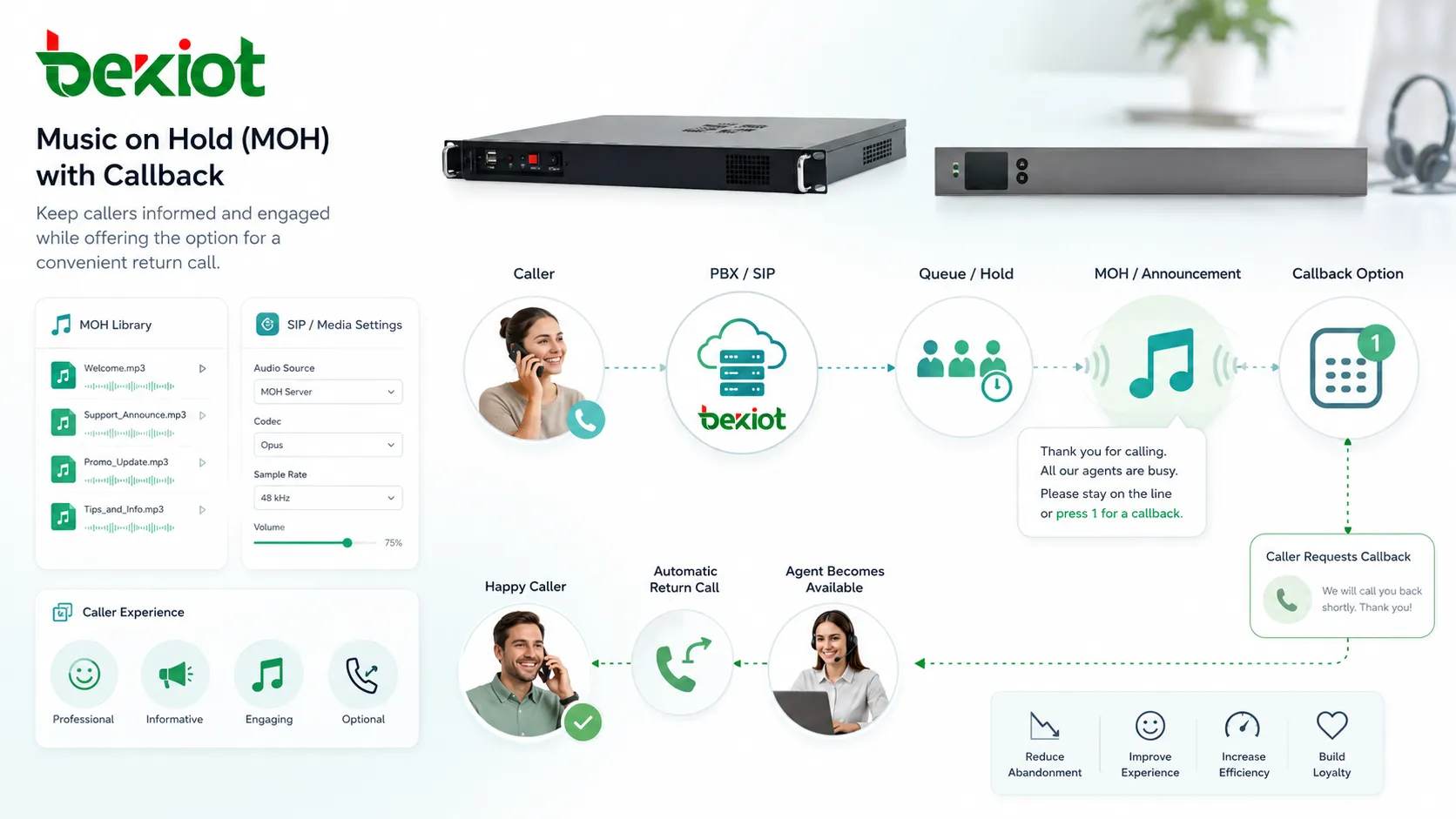
Callback Integration
Some systems offer callback options while callers are waiting. Instead of staying on the line, the caller can request a return call when an agent becomes available.
MOH can support this workflow by explaining the callback option clearly. This reduces queue pressure and improves caller satisfaction during busy periods.
Audio File Preparation
Audio quality begins before the file is uploaded. The source should be clean, properly edited, and free of clipping, excessive compression, loud volume jumps, or long silent sections. Poorly prepared files become more noticeable when callers listen through telephone codecs.
Telephony audio often has a narrower frequency range than studio music. A song that sounds good on headphones may sound harsh or muddy through a phone call. Spoken messages should be recorded clearly, with moderate pacing, consistent volume, and simple wording.
File length also matters. Very short loops become repetitive quickly. Very long tracks may be harder to manage and update. A practical MOH file often combines short music segments with useful voice messages at reasonable intervals.
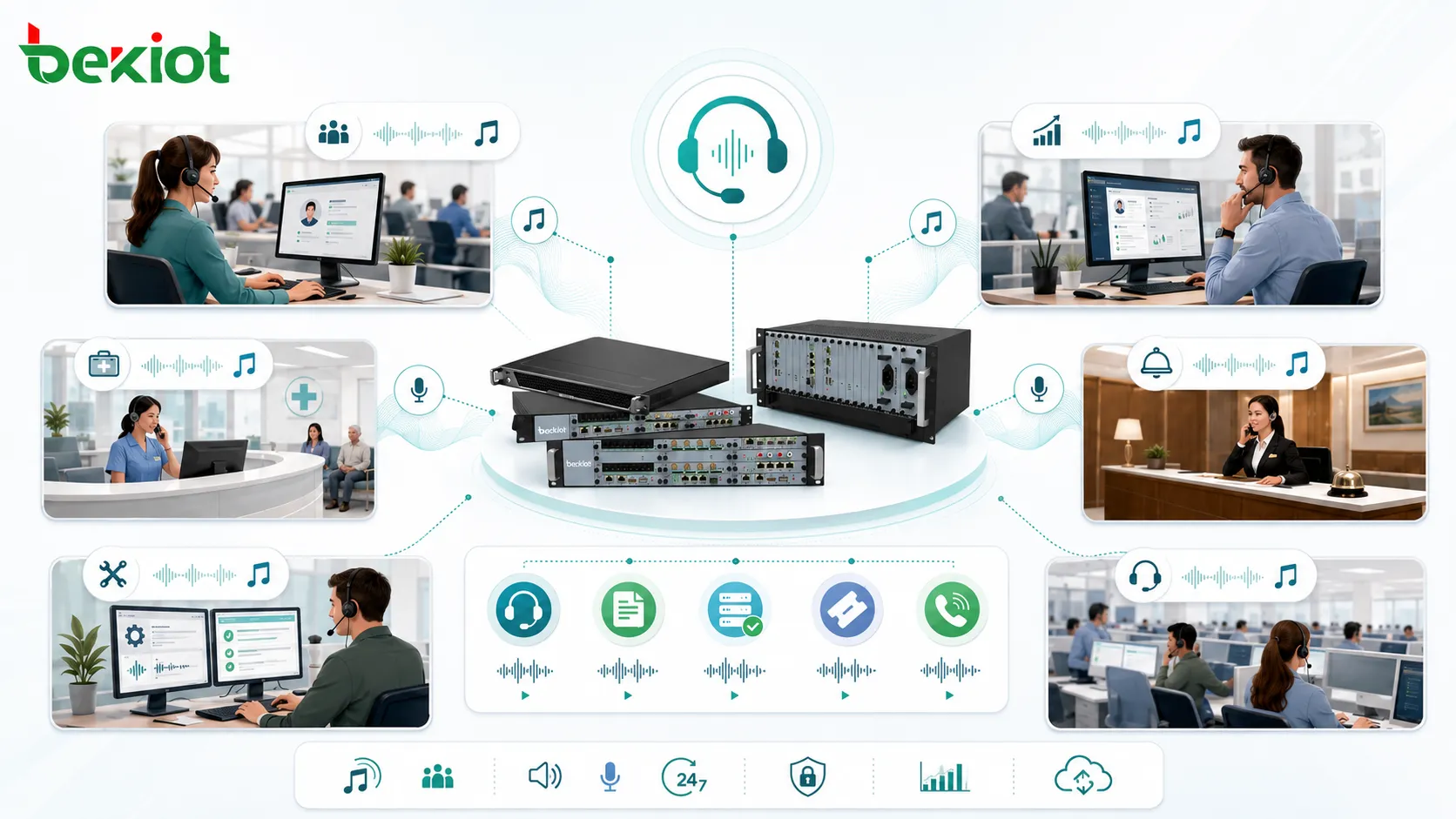
Applications in Business Communication
Customer Service Queues
Customer service teams use MOH while callers wait for agents. The audio can reassure callers, provide service updates, suggest self-service channels, or explain what information they should prepare before speaking with an agent.
This can reduce handle time because callers may already have account numbers, order details, or documents ready when the agent answers.
Sales and Reception Lines
Sales and reception teams can use hold audio to introduce services, highlight business hours, promote current offers, or direct callers to the right department.
The message should remain helpful rather than overly promotional. A caller who is waiting for help may not respond well to aggressive advertising.
Healthcare and Appointment Lines
Clinics, hospitals, and medical offices may use MOH for appointment reminders, preparation instructions, location guidance, privacy notices, and urgent-care alternatives.
Healthcare messages should be carefully reviewed for clarity, privacy, and compliance. Sensitive information should not be presented in a way that creates confusion or risk.
Hotels and Hospitality
Hotels may use hold audio for guest services, restaurant hours, event information, transportation details, and front desk guidance. The tone should match the guest experience and avoid sounding too mechanical.
MOH can also be configured differently for internal staff calls and external guest calls.
Technical Support and IT Helpdesk
Support desks can use hold audio to provide basic troubleshooting steps, system status updates, ticket portal information, or instructions for collecting logs before speaking with an engineer.
This helps reduce repetitive questions and gives callers useful actions while waiting.
Common Problems and Fixes
Caller Hears Silence
Silence may be caused by missing audio files, unsupported file format, wrong MOH class, RTP blocked by firewall, NAT issues, codec mismatch, or direct media behavior. Check both PBX configuration and packet flow.
If silence happens only on external calls, the issue may be related to SIP trunk media routing rather than the audio file itself.
Audio Sounds Distorted
Distortion usually comes from excessive source volume, clipping in the audio file, wrong sample rate conversion, or aggressive transcoding. Normalize the audio file and convert it to the format recommended by the PBX platform.
Also check whether the system is applying gain or compression during playback.
Music Starts Late
Delay before playback may happen because of media server startup, file access delay, SIP re-INVITE negotiation, queue logic, or endpoint behavior. In some systems, using a locally stored and pre-converted file reduces delay.
Testing should include hold, transfer, queue waiting, and parked call scenarios because each call state may behave differently.
Wrong Audio Plays
If callers hear the wrong track, the extension, queue, trunk, or tenant may be assigned to the wrong hold class. Multi-department systems should document which audio source belongs to each route.
After configuration changes, test every main call flow rather than assuming one successful test covers the whole system.
Volume Is Too Loud or Too Quiet
Volume mismatch may come from the source file, PBX playback gain, codec behavior, or endpoint volume. Adjust the audio file first, then review system playback settings.
Do not set the volume too loud to compensate for poor recordings. It may become uncomfortable for callers using headsets.
Licensing and Content Considerations
Organizations should use audio content they have the right to play. Publicly playing commercial music to callers may require proper licensing depending on the region, provider, and use case.
Safer options include licensed hold music, royalty-free business audio, custom recordings, original compositions, or professionally produced voice messages. The legal side should be checked before using popular songs or downloaded tracks.
Content should also be kept current. Outdated opening hours, expired promotions, old web addresses, or incorrect service instructions can damage caller trust.
Good hold audio is not just background sound. It is part of the caller experience, the brand voice, and the call flow design.
Deployment Checklist
Start by defining where MOH is needed: general hold, transfers, queues, call parking, outbound consultation, or conference waiting rooms. Each situation may require different audio behavior.
Prepare audio files in the correct format before uploading. Test file quality through a real phone call, not only through computer speakers. Telephone codecs can change how music and voice messages sound.
Assign audio sources by department, queue, trunk, or call route. Verify that internal callers and external callers hear the intended audio. Test calls from mobile networks, SIP trunks, desk phones, and softphones.
Document the configuration. Include file names, hold classes, queue assignments, playback intervals, language rules, and content update responsibilities.
Ongoing Maintenance
Review MOH content regularly. Business hours, service links, promotional messages, compliance wording, and support instructions may change. Outdated audio can mislead callers.
Monitor caller behavior. If callers abandon queues quickly, the issue may be long wait times, poor audio, repetitive messages, or lack of callback options. MOH improves the waiting experience, but it cannot fix poor staffing or routing by itself.
After PBX upgrades, trunk changes, codec changes, or firewall updates, test hold music again. Media behavior can change when the voice path changes.
FAQ
Can different departments use different hold audio?
Yes. Many PBX and contact center systems support separate hold classes or audio sources for different departments, queues, tenants, or call routes.
Why does hold music work internally but not on external calls?
This often points to SIP trunk media issues, NAT problems, firewall rules, codec negotiation, or direct media settings. Internal calls may use a different media path from external calls.
Should hold music include spoken messages?
It can, but the messages should be short, useful, and not repeated too frequently. Good topics include service hours, preparation tips, callback options, or important notices.
Can copyrighted songs be used for callers on hold?
Not automatically. Commercial music may require licensing for telephone hold use. Organizations should use properly licensed, royalty-free, or custom-produced audio.
What should be tested after uploading a new file?
Test audio clarity, volume, looping behavior, queue playback, transfer hold, external trunk calls, codec compatibility, and whether the correct department or queue receives the new audio.







