


Line input is an audio interface used to receive a line-level signal from an external audio source, such as a mixer, media player, computer, phone system, audio processor, paging gateway, radio interface, recording device, or public address controller. It is commonly found on amplifiers, mixers, audio interfaces, powered speakers, recording equipment, intercom systems, paging systems, broadcast devices, and professional communication platforms.
Unlike a microphone input, which is designed for very low-level microphone signals, line input expects a stronger and more stable audio signal. This makes it suitable for connecting equipment that already has its own audio output stage. When the correct level, connector, and impedance are matched, line input helps deliver cleaner audio with less noise, distortion, and unnecessary gain adjustment.
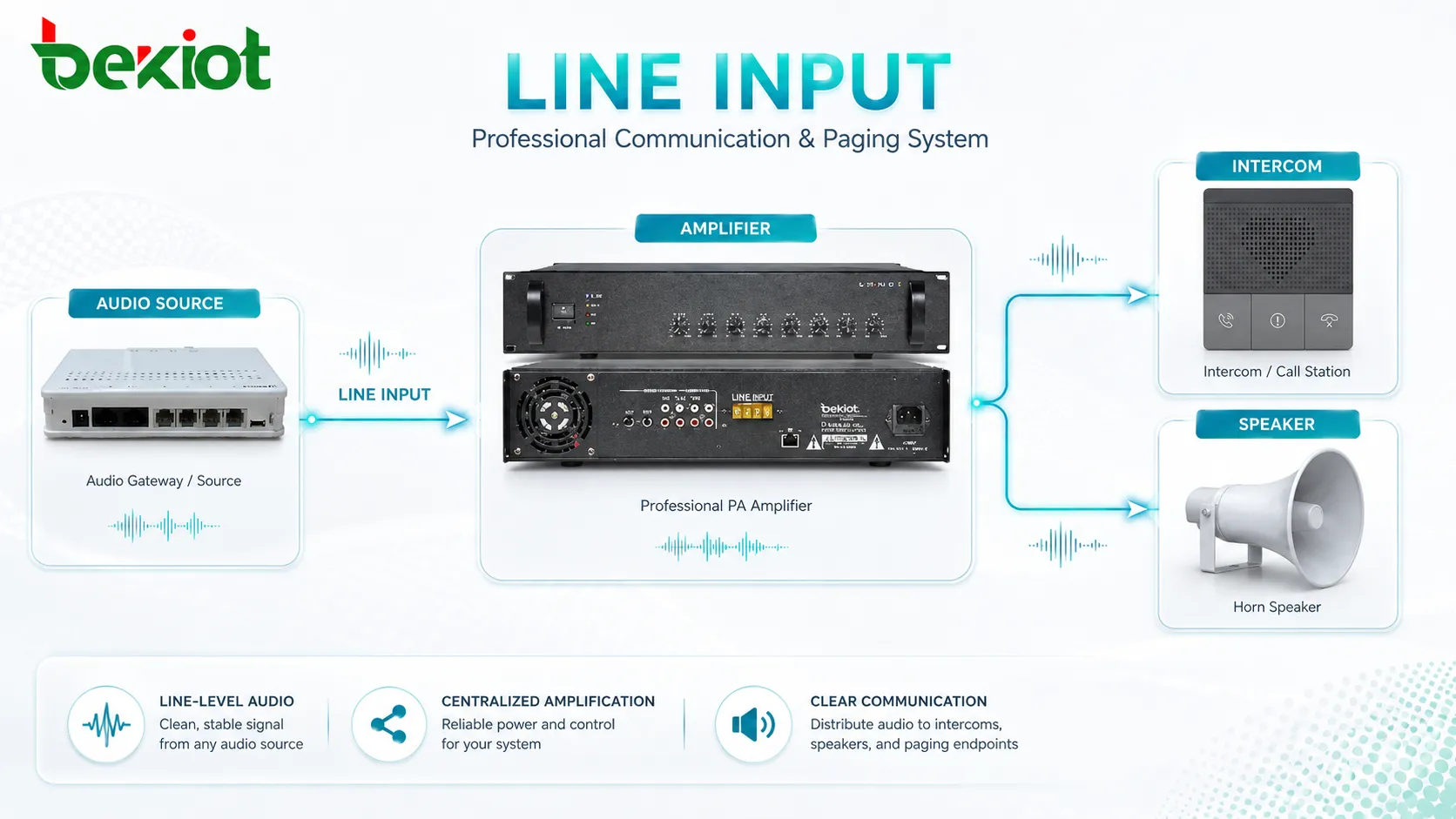
The Role of Line-Level Audio
In audio systems, not every signal has the same strength. A microphone produces a weak signal that needs preamplification. A speaker output produces a strong power signal intended to drive a loudspeaker. A line-level signal sits between these two extremes and is used to transfer audio between equipment.
Line-level audio is important because it provides a practical standard for connecting devices. A music player can feed a mixer, a mixer can feed an amplifier, a paging gateway can feed a public address system, and an audio processor can feed a recorder. Each device does not need to handle raw microphone-level audio if the signal has already been prepared.
This is why line input appears in so many systems. It acts as an audio entry point for sources that are already amplified to a usable signal level but are not intended to drive speakers directly.
How the Signal Path Works
Source Device Output
The audio path begins with a source device. This may be a mixer output, laptop headphone output, media player, radio receiver, SIP paging adapter, phone system audio port, music server, or audio processor. The source sends a line-level signal toward the receiving device.
The quality of the source matters. If the source output is noisy, distorted, too weak, or too strong, the line input cannot fully correct the problem. A clean source signal is the first step toward good audio quality.
Connector and Cable
The signal travels through a cable and connector. Common connector types include 3.5 mm TRS, RCA, 6.35 mm jack, XLR, terminal block, and sometimes dedicated balanced audio connectors. The correct connector depends on the equipment design and installation environment.
Cable quality and routing also matter. Long unbalanced cables may pick up hum or interference. In professional and installed systems, balanced line connections are often preferred for longer distances because they reject noise better.
Input Stage
The receiving device’s input stage accepts the signal and prepares it for internal processing. This may include impedance matching, level adjustment, filtering, analog-to-digital conversion, routing, mixing, priority control, or gain trimming.
If the input stage is overloaded, the audio may distort. If the input level is too low, the system may require extra gain, which can raise noise. Proper level matching is therefore essential.
Output or Processing
After the audio enters the device, it may be amplified, mixed, recorded, streamed, broadcast, routed to zones, or processed by DSP functions. In a paging system, the signal may be sent to selected speakers. In a recorder, it may be stored as an audio file. In a mixer, it may be blended with microphones and other sources.
The final result depends on the full chain, not only the input port. Source level, cable type, input settings, processing, amplifier power, speaker quality, and room acoustics all affect the listening experience.
Key Features to Understand
Line-Level Compatibility
The most important feature is compatibility with line-level audio. A line input is designed for signals stronger than microphone level but weaker than speaker-level power. Connecting the wrong signal type can cause poor audio or equipment damage.
For example, connecting a microphone directly into a line input may produce very low volume. Connecting a speaker output into a line input may overload or damage the input circuit. The signal type should always be verified before connection.
Balanced and Unbalanced Options
Unbalanced line inputs are common in consumer and short-distance audio connections. RCA and 3.5 mm inputs are typical examples. They are simple and convenient but more sensitive to noise over long cable runs.
Balanced line inputs use two signal conductors plus shielding or grounding. They are common in professional audio, installed sound, broadcasting, and industrial communication systems. Balanced connections help reduce hum, electromagnetic interference, and ground-related noise.
Gain or Level Adjustment
Many devices provide a line input level control. This allows users or installers to match the incoming signal to the system’s expected operating range. Proper adjustment prevents distortion and keeps noise low.
Level control should not be used as a fix for every problem. If the source output is badly set, the cable is wrong, or the signal is not line-level, gain adjustment may only hide the real issue.
Mono and Stereo Support
Some line inputs are mono, while others are stereo. A mono input receives one channel, which is common in paging, intercom, public address, and voice communication systems. A stereo input receives left and right channels, which is common in music playback, media systems, and recording equipment.
When connecting stereo sources to mono systems, the signal may need proper summing. Simply shorting left and right outputs together is not always recommended because it can create distortion or stress the source output.
Priority and Mixing Functions
In public address and communication systems, line input may be part of a priority structure. For example, background music may enter through a line input, but a paging microphone or emergency message may override it when needed.
Some systems allow multiple line inputs to be mixed, muted, ducked, or routed to different zones. This makes line-level integration useful in complex audio environments.
A line input works best when the source level, cable type, connector, input sensitivity, and system purpose are matched before installation.
Common Connector Types
| Connector | Typical Signal Type | Common Use |
|---|---|---|
| RCA | Unbalanced line-level audio | Media players, background music sources, consumer audio equipment. |
| 3.5 mm TRS | Stereo unbalanced audio | Computers, phones, tablets, portable players, small audio devices. |
| 6.35 mm Jack | Balanced or unbalanced line signal depending on wiring | Mixers, instruments, processors, professional audio devices. |
| XLR | Balanced audio | Professional audio, broadcast, mixers, installed sound systems. |
| Terminal Block | Balanced or unbalanced installed audio | Amplifiers, paging systems, industrial audio, fixed installations. |
Practical Benefits in Audio Systems
Cleaner Signal Transfer
When used correctly, a line input transfers audio without requiring excessive gain. This helps reduce hiss, hum, and noise compared with trying to amplify a weak signal through the wrong input type.
Clean signal transfer is especially important for announcements, background music, recording, broadcast, and paging because poor input quality becomes more noticeable after amplification.
Easy Equipment Integration
Line input allows different audio devices to work together. A mixer can feed an amplifier, a computer can feed a recording interface, and a paging gateway can feed an existing PA system. This makes system integration simpler and more flexible.
In upgrade projects, a line input can help connect new digital audio sources to existing analog equipment without replacing the entire system at once.
Supports Multiple Audio Sources
Many systems use more than one audio source. A building may need background music, scheduled messages, live paging, emergency tones, and recorded announcements. Line inputs allow these sources to enter the audio system in an organized way.
With proper routing and priority control, the system can decide which source plays, which source is muted, and which zones receive the audio.
Reduces Microphone Input Misuse
Using a microphone input for a line-level source can cause distortion because the signal may be too strong. A dedicated line input prevents this problem by accepting the correct signal range.
This improves reliability and reduces troubleshooting time during installation and daily use.
Better Long-Term Maintainability
Clear input labeling and proper wiring make audio systems easier to maintain. Technicians can quickly identify which source is connected, where the signal enters, and how it should be adjusted.
For large buildings or industrial sites, documented line input connections reduce confusion when equipment is replaced or expanded.
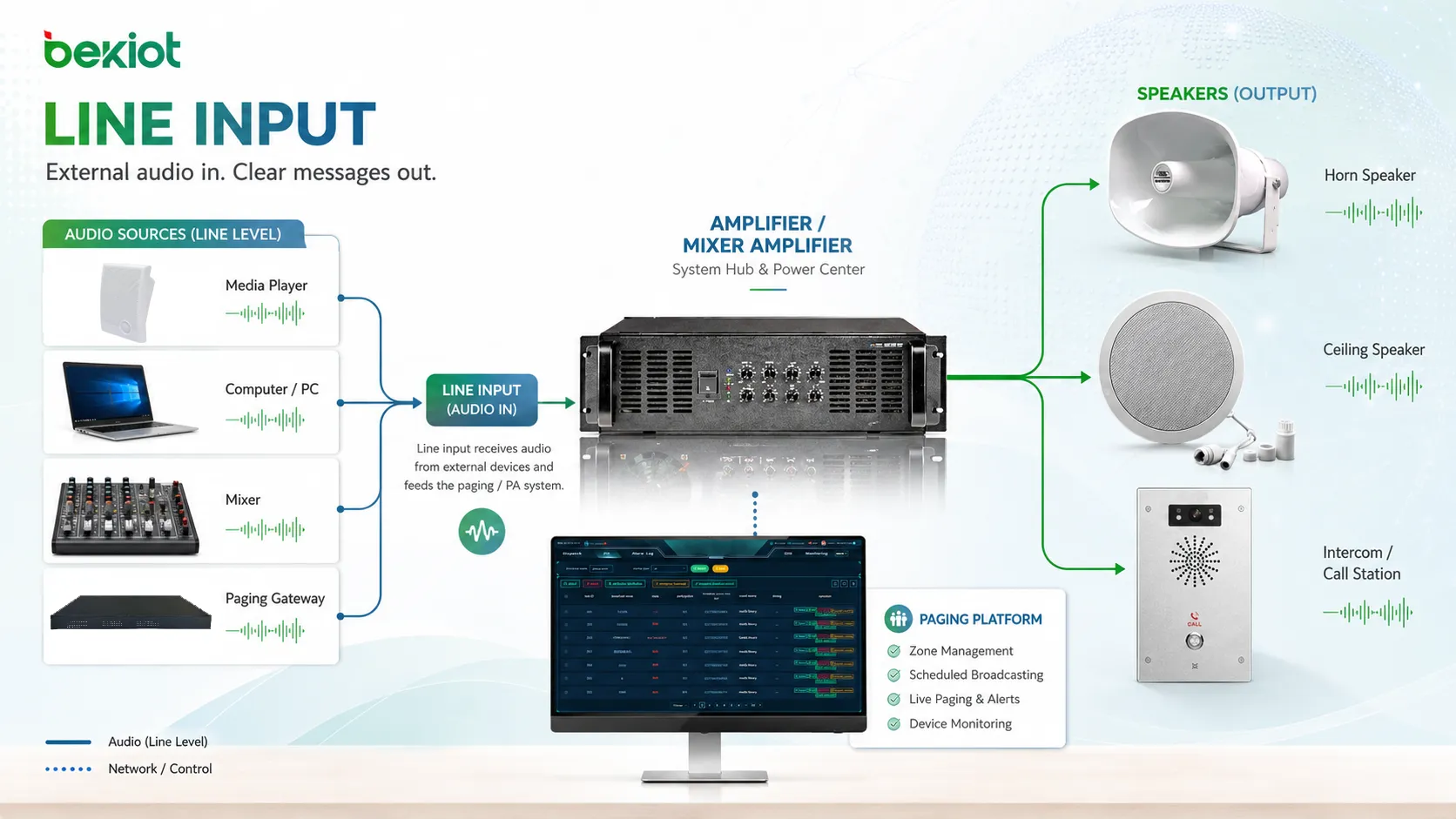
Where This Interface Is Used
Public Address and Paging
Public address systems often use line inputs for background music, message players, SIP paging gateways, audio matrices, and emergency voice sources. The input allows external audio to be routed to speakers or zones.
In paging systems, line input may also connect legacy equipment to newer network-based platforms. This helps modernize audio workflows while keeping existing amplifiers or speakers.
Recording and Broadcast
Recording devices and broadcast equipment use line inputs to capture audio from mixers, processors, receivers, and playback systems. A proper line-level signal helps maintain recording quality and avoid excessive noise.
Broadcast workflows often prefer balanced line connections because cable runs may be longer and electromagnetic interference must be controlled.
Conference and Meeting Rooms
Meeting rooms may use line inputs to connect wireless microphone receivers, laptops, video conferencing systems, audio processors, and room mixers. This allows different audio sources to be integrated into one room sound system.
Correct level matching is important because meeting room audio often moves between speakers, microphones, conferencing software, and recording platforms.
Intercom and Communication Systems
Intercom systems may use line input to accept audio from external sources such as radios, dispatch consoles, alarm tone generators, or paging devices. This allows communication systems to interact with other audio workflows.
For operational environments, input priority and clear labeling are important so that urgent signals are not mixed incorrectly with routine audio.
Industrial and Facility Systems
Factories, warehouses, transportation hubs, campuses, and public buildings may use line inputs to connect scheduled message players, safety announcement devices, background music systems, and control room audio sources.
Industrial installations should consider cable shielding, grounding, electrical noise, enclosure protection, and service access. Audio signals in harsh environments may need more careful wiring than ordinary office setups.
Design Considerations Before Connection
Input Sensitivity
Input sensitivity defines how strong the incoming signal should be for proper operation. If the source output is too high, the input may clip. If it is too low, the system may sound weak or noisy.
Installers should adjust source output and input gain together rather than setting one side randomly.
Impedance Matching
Most modern line-level connections are designed to work without complex impedance matching, but impedance still matters in some systems. Very low or mismatched impedance can affect level, frequency response, or distortion.
Professional equipment manuals usually specify recommended input and output impedance values. These should be checked in critical installations.
Cable Length
Short unbalanced cables may work well in simple setups. Long cable runs should usually use balanced connections to reduce noise. If an unbalanced source must travel a long distance, a transformer, direct box, or audio converter may be needed.
Cable routing should avoid power lines, motors, fluorescent lighting, variable frequency drives, and other sources of electromagnetic interference.
Ground Loop Risk
A ground loop can create hum or buzz when connected devices have different ground references. This is common when audio equipment is connected across different power outlets, racks, or building areas.
Balanced connections, isolation transformers, proper grounding, and careful power design can reduce ground loop problems.
Source Priority
In multi-source systems, priority should be defined clearly. Background music should not override emergency messages. A paging source may need to mute a music input. A scheduled tone may need to pause a media player.
Priority design prevents audio conflict and supports safer communication workflows.
The most common line input problems are caused by wrong signal level, wrong cable type, poor grounding, or connecting a speaker output into an input designed only for line-level audio.
Common Problems and Fixes
Distorted Sound
Distortion often means the input is overloaded. Lower the source output, reduce input gain, and confirm that the signal is line-level rather than speaker-level.
If distortion remains even at lower levels, check the cable, connector, source device, and input circuit.
Very Low Volume
Low volume may happen when a microphone-level signal is connected to a line input, the source output is too low, or the wrong cable is used. Increase source output carefully and check whether the source requires a preamp.
If the source is a microphone, use a microphone input or preamplifier instead of a line input.
Hum or Buzz
Hum or buzz may come from ground loops, unbalanced long cables, poor shielding, nearby power equipment, or damaged connectors. Try balanced wiring, shorter cable runs, proper grounding, or isolation solutions.
In installed systems, cable routing should be checked because audio lines placed near power cables can pick up interference.
Only One Channel Plays
When connecting stereo sources, only one channel may play if the cable or adapter is incorrect. Some mono inputs only accept one side unless the stereo signal is properly summed.
Use a proper stereo-to-mono summing adapter or mixer when needed. Do not simply short left and right outputs together unless the equipment supports it.
Maintenance and Testing Tips
Label each input clearly. A label should show the source name, cable destination, signal type, and any special setting. This makes future troubleshooting much faster.
Inspect connectors regularly. Loose plugs, oxidized terminals, damaged RCA jacks, worn 3.5 mm sockets, and loose terminal block screws can all cause intermittent audio.
Test the signal after system changes. Replacing a media player, mixer, amplifier, or gateway can change output level and noise behavior. A quick level test can prevent later complaints.
Keep documentation updated. Audio systems often change over time as sources are added or removed. Outdated wiring diagrams can cause mistakes during maintenance.
Choosing the Right Input Setup
The right setup depends on the source device, cable distance, environment, and audio purpose. For short desktop connections, a 3.5 mm or RCA input may be enough. For installed systems, balanced XLR, 6.35 mm TRS, or terminal block input may be more reliable.
For public address, paging, or emergency systems, input priority and monitoring may matter more than connector convenience. For recording and broadcast, low noise and balanced signal quality may be the main focus.
Before final installation, test the actual source, cable, and receiving device together. Compatibility on paper does not always guarantee clean audio in the field.
FAQ
Can I connect a microphone directly to a line input?
Usually not with good results. A microphone signal is much weaker than a line-level signal and normally needs a microphone preamp before entering a line input.
Can a speaker output be connected to a line input?
No, not directly. Speaker outputs are much stronger and can damage a line input. Use a proper line-level converter or attenuator if speaker-level audio must be connected to another device.
Why does my music source sound noisy through the system?
Possible causes include low source output, excessive input gain, unbalanced long cable, poor grounding, damaged connector, or interference from nearby power equipment.
Is balanced audio always better?
Balanced audio is generally better for long cable runs and noisy environments. For short, simple connections, unbalanced audio may be acceptable if the source and receiving device are close together.
What should be checked before adding a new audio source?
Check output level, connector type, mono or stereo format, cable distance, grounding, input sensitivity, priority rules, and whether the source should be mixed, muted, recorded, or routed to specific zones.







