


An emergency telephone is a dedicated communication device designed to help people quickly contact a control room, security center, dispatch desk, service team, or emergency operator during urgent situations. Unlike ordinary office phones, emergency telephones are usually installed in visible, accessible, and risk-prone locations where users may need immediate assistance without searching for a number or using a personal mobile phone.
These devices are widely used in campuses, tunnels, highways, parking areas, elevators, railway stations, airports, industrial plants, warehouses, ports, mines, public buildings, hospitals, parks, and remote facilities. Depending on the design, an emergency telephone may support one-button calling, hands-free audio, location identification, beacon activation, alarm linkage, camera integration, SIP communication, weatherproof protection, vandal resistance, and remote monitoring.
Why Dedicated Help Points Still Matter
Mobile phones are common, but they do not replace fixed emergency communication points in many environments. A person may have no signal, no battery, no knowledge of the local emergency number, or no ability to explain their exact location. In some industrial or transport areas, mobile phone use may also be restricted or unreliable.
A fixed help point solves these problems by giving users a known physical location and a simple call method. The device can be mapped to a specific site, floor, platform, tunnel section, parking zone, gate, or equipment area. When a call is placed, the receiving operator can immediately know where help is needed.
For organizations, dedicated emergency communication also improves response control. Calls can be routed to trained personnel, recorded for incident review, linked with alarms, and integrated with security or facility systems.
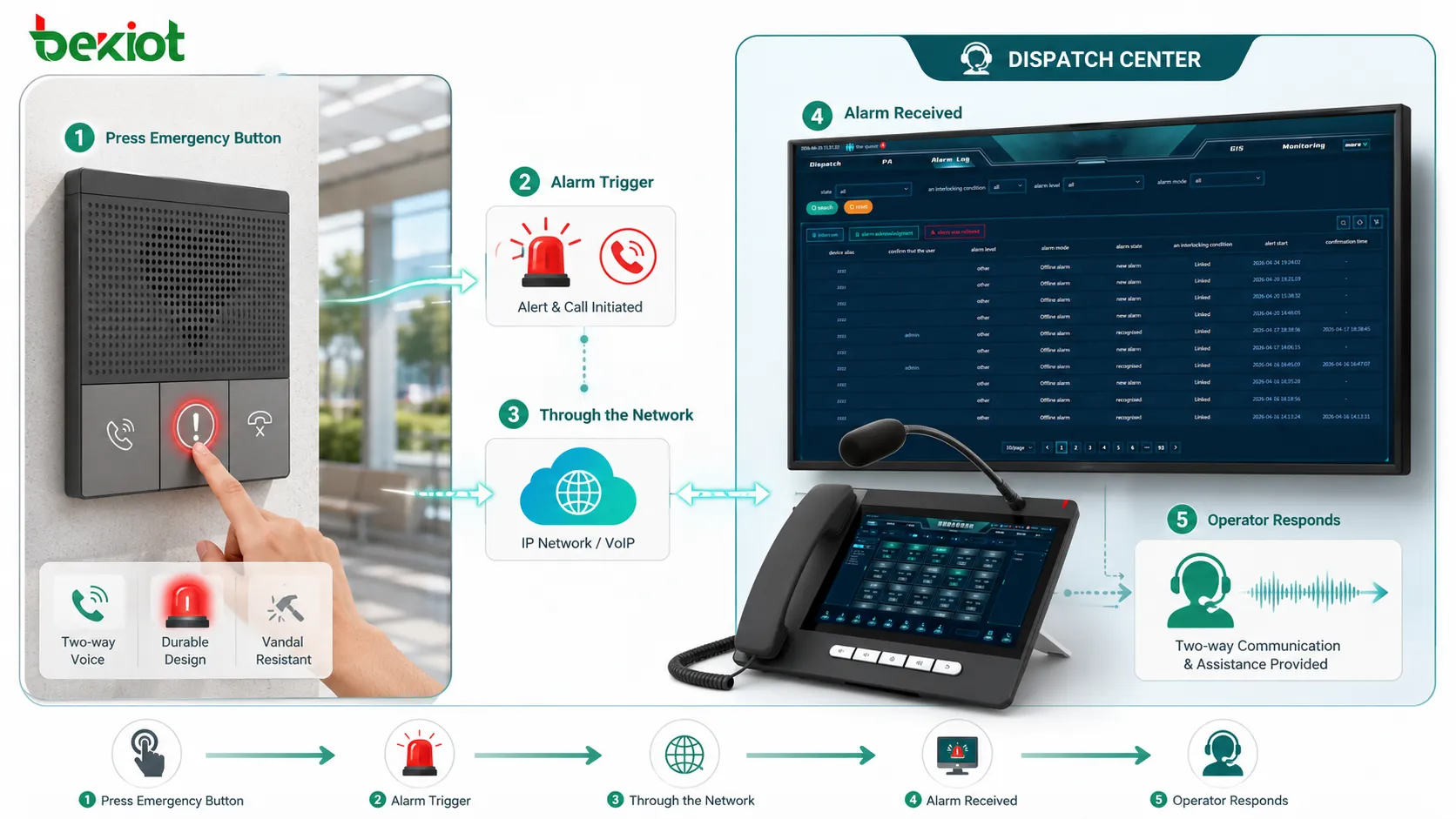
How the Call Process Works
Call Activation
The user usually starts the call by pressing a large emergency button, lifting a handset, touching a call panel, or activating a help point. In many public and industrial systems, one-button calling is preferred because it is simple and easy to use under stress.
Some devices also support automatic calling when a protective door is opened, when an alarm input is triggered, or when a connected system sends a command. The goal is to reduce delay between the incident and the first voice connection.
Routing to the Right Destination
After activation, the call is routed through an analog line, SIP network, IP PBX, VoIP platform, radio gateway, dispatch system, or security communication platform. The destination may be a security desk, control room, emergency operations center, maintenance team, elevator service center, or public safety contact point.
Routing should match the site’s response plan. A campus help point may call the security office first, while a tunnel emergency phone may call a traffic control center. If the primary destination is unavailable, fallback routing should send the call to a backup number or secondary control room.
Location Identification
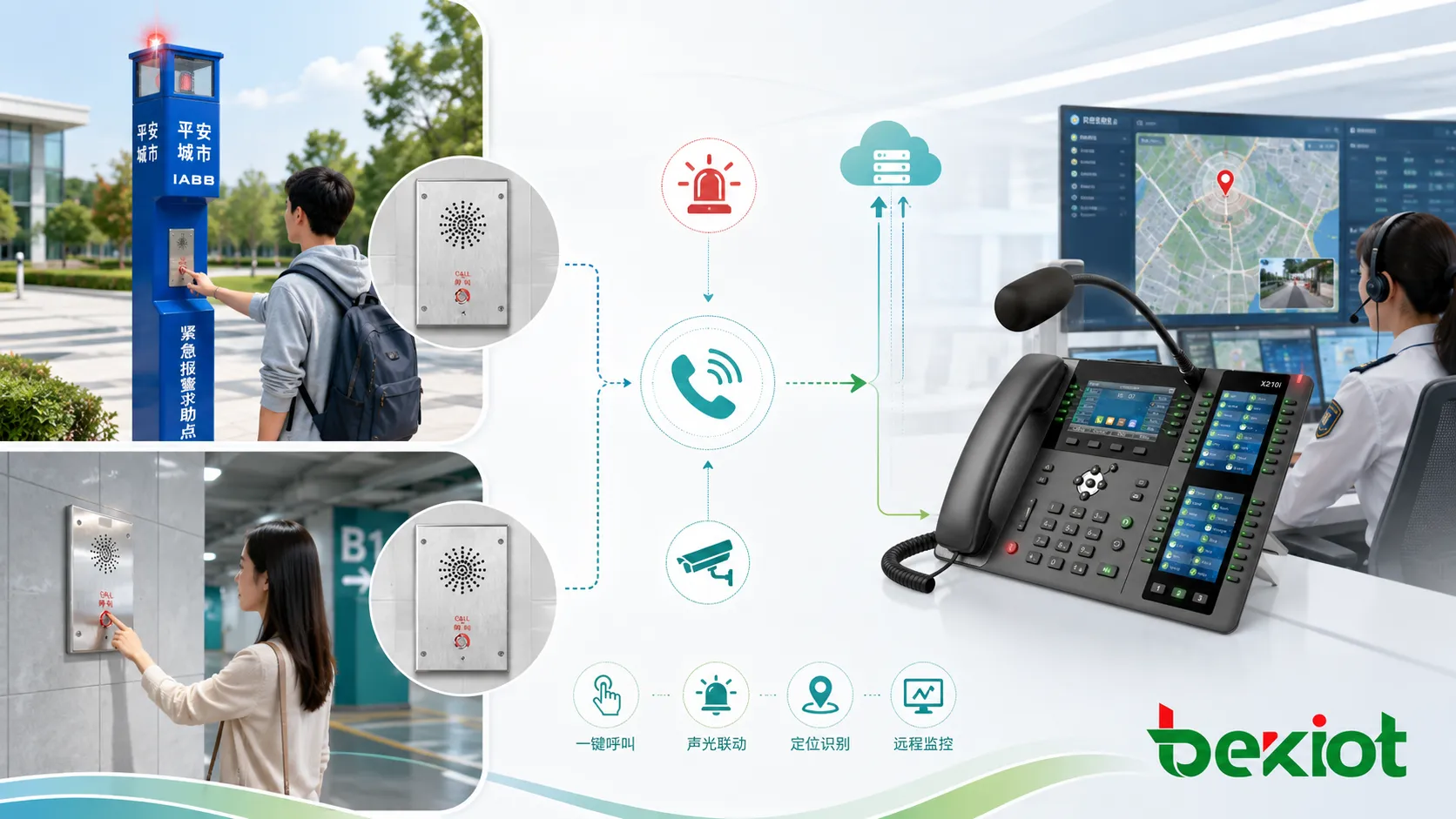
Location information is one of the most important advantages of a fixed device. The system can display the device name, zone, map location, extension number, GPS coordinate, camera association, or installation area when the call arrives.
This reduces the time spent asking “Where are you?” and helps responders move directly to the right place. In large facilities, location accuracy can be as important as voice quality.
Two-Way Voice Communication
Once connected, the user and operator can communicate in real time. Some devices use a handset for privacy and noise control, while others use hands-free speaker and microphone design. Hands-free operation is useful when the user is injured, panicked, carrying something, or unable to hold a handset.
Clear audio is essential. Emergency communication may involve background noise, traffic, machinery, wind, crowd sound, alarms, or echo. The device should provide enough speaker volume, microphone sensitivity, echo control, and acoustic design for the installation environment.
Alarm and System Linkage
Emergency telephones often do more than place a voice call. They may trigger beacon lights, sirens, relay outputs, camera pop-ups, recording, event logs, access control actions, or dispatch alerts. This turns a phone call into a broader response workflow.
For example, when a help point is pressed in a parking garage, the system may call the security desk, flash a beacon, display the nearest camera, and log the event in the security platform.
The value of an emergency telephone is not only the call itself, but the complete response chain it starts: location, voice, alert, visibility, and follow-up action.
Key Features for Real-World Use
One-Button Calling
One-button calling simplifies emergency use. The user does not need to remember a number, select a contact, or navigate a menu. Pressing the button can immediately call the configured destination.
The button should be large, visible, durable, and clearly marked. In public spaces, the design should also help users recognize the device quickly, even from a distance.
Hands-Free Audio
Hands-free audio allows a user to speak without holding a handset. This is useful in elevators, help points, roadside areas, public spaces, and industrial zones where the user may need both hands free.
However, hands-free design must be tested carefully. If the speaker is too quiet or the microphone picks up too much background noise, the call may not be effective. Acoustic echo cancellation and noise control can improve usability.
Rugged Housing
Emergency devices may be exposed to rain, dust, heat, cold, impact, vandalism, chemicals, salt air, or heavy use. A rugged housing helps protect internal electronics, buttons, speakers, microphones, and wiring.
Outdoor and industrial models may require weatherproof ratings, corrosion-resistant materials, impact resistance, UV resistance, sealed cable entries, and secure mounting. The enclosure should match the real environment, not just the expected call function.
Visual Alerting
Many systems include beacon lights, strobes, illuminated signs, or LED indicators. Visual signals help responders locate the caller and help nearby people notice that an emergency call is active.
Visual indicators are especially useful in noisy areas where ringing or voice prompts may not be enough. They also help people with hearing limitations recognize that the device is active.
Remote Monitoring
Remote monitoring allows administrators to check whether the device is online, registered, powered, and ready for use. Advanced systems may monitor button status, speaker health, microphone condition, network connection, line status, and fault alarms.
This is important because emergency devices may remain unused for long periods. A device that fails silently may not be discovered until someone needs help.
Common Types and Installation Forms
Wall-Mounted Help Points
Wall-mounted units are common in corridors, platforms, parking garages, stations, schools, warehouses, factories, and public buildings. They are fixed to walls or columns and usually provide a large call button, speaker, microphone, and status light.
This form is practical where the installation point is protected by nearby structure and where users can easily approach the device.
Pedestal and Blue-Light Stations
Pedestal stations or blue-light emergency towers are often used outdoors on campuses, parking lots, parks, and public areas. Their height and visual lighting make them easier to identify from a distance.
These stations may include beacon lights, CCTV cameras, signage, speakers, and multiple call buttons. They are useful where people need a visible safety point in open spaces.
Roadside and Tunnel Units
Roadside and tunnel systems are used along highways, rail tunnels, metro tunnels, bridges, and service passages. They may need weatherproof, dustproof, and high-visibility design.
In these environments, location identification and connection reliability are critical because responders must know the exact section where help is required.
Elevator and Lift Communication
Elevator emergency phones allow trapped passengers to reach a service center or building operator. These systems often require automatic dialing, hands-free audio, line supervision, and backup power.
Because elevator users may be anxious or confined, audio clarity and reliable call routing are especially important.
Industrial Safety Terminals
Industrial sites may require rugged or explosion-proof communication points for hazardous, dusty, wet, or noisy areas. Devices may be installed near production lines, chemical storage, energy facilities, loading bays, or remote equipment zones.
In some safety and facility projects, Becke Telcom’s BHP-SOS alarm series can be considered for fixed emergency call points where one-button help access, visible alarm indication, and integration with site communication workflows are required.
Applications Across Different Environments
Campuses and Public Areas
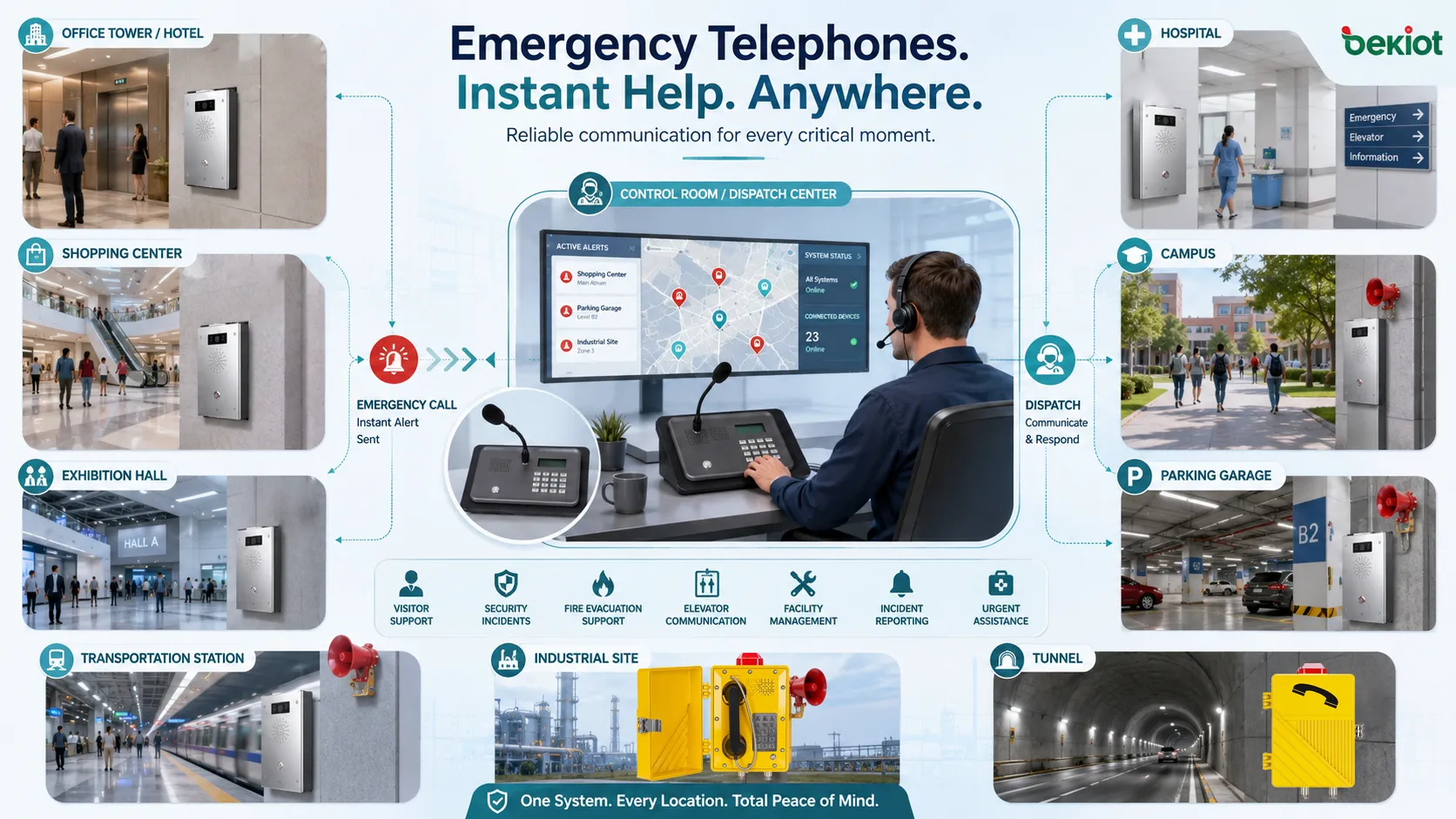
Universities, schools, parks, residential communities, and public plazas use emergency telephones to provide visible help access. They support security calls, medical assistance, lost-person reports, suspicious activity reporting, and nighttime safety response.
Good placement matters. Devices should be installed where people naturally pass, where visibility is clear, and where the location can be described easily by signage or map reference.
Transportation Infrastructure
Railway platforms, metro stations, airports, bus terminals, parking areas, tunnels, and highways use dedicated help points for passenger assistance and incident reporting. They help people reach operators quickly without depending on mobile network coverage.
Transportation sites should integrate emergency calls with control rooms, CCTV, public address, alarms, and incident management workflows. Fast location recognition can reduce response time.
Industrial and Energy Sites
Factories, power plants, refineries, mines, ports, warehouses, and logistics centers use emergency phones to support worker safety and operational response. Devices may be installed near hazardous areas, remote work zones, gates, control cabinets, or safety stations.
Industrial applications often require strong housing, high audio output, noise-resistant microphones, corrosion protection, and compatibility with emergency alarms or dispatch systems.
Healthcare and Assisted Living
Hospitals, clinics, nursing homes, laboratories, and assisted living facilities use help points for patient support, visitor assistance, staff security, and facility emergencies. Devices may be located in entrances, corridors, parking lots, elevators, waiting areas, and restricted zones.
Privacy, accessibility, and reliability should be considered. The device should connect users quickly while supporting the facility’s response procedures.
Commercial Buildings and Hotels
Office towers, shopping centers, hotels, exhibition halls, and large public venues use emergency telephones for visitor support, security incidents, fire evacuation support, elevator communication, and facility management.
For these environments, the device should be easy to recognize, simple to use, and connected to trained staff who understand the building layout.
Design Details That Affect Reliability
Power Supply
The device must remain available when it is needed. Depending on the system, power may come from PoE, local DC power, analog line power, battery backup, UPS systems, or solar-supported outdoor designs.
For critical locations, backup power should be considered. A help point that fails during a power outage may create serious safety risk.
Network and Line Supervision
Modern SIP-based units should be monitored for registration, network connection, IP address, firmware status, and server reachability. Analog units may require line supervision to confirm that the connection remains active.
Supervision helps maintenance teams detect faults before an emergency occurs. Without monitoring, a device may appear installed but not actually work.
Environmental Protection
Outdoor and industrial units may need protection from water, dust, sunlight, corrosion, vibration, impact, and temperature extremes. The installation should consider cable glands, mounting hardware, drainage, sealing, and enclosure material.
Environmental mismatch is a common failure cause. An indoor device placed outdoors may fail quickly, even if the call function works during initial testing.
Audio Coverage
Speaker volume and microphone pickup must match the location. A quiet office corridor and a noisy production area require different acoustic designs. Wind, traffic, machinery, echo, and background crowd noise can all affect intelligibility.
Testing should be performed under real operating conditions. A device that sounds clear during installation may be difficult to hear during peak noise periods.
Visibility and Accessibility
Emergency devices should be easy to find and easy to reach. Mounting height, signage, lighting, button size, wheelchair accessibility, and approach path should be planned carefully.
If users cannot see or reach the device quickly, its technical performance becomes less useful.
Integration with Security and Facility Systems
An emergency call point becomes more valuable when it connects with other response systems. Integration may include CCTV camera pop-up, access control release, public address alerts, dispatch console notification, GIS map display, alarm beacon activation, and event recording.
For example, when a user presses the emergency button, the operator interface can show the device location and nearest camera. A beacon can flash at the physical site, while the system records the call and logs the event time.
Integration should be designed with clear priorities. Emergency calls should not be blocked by routine calls, background music, or low-priority announcements. Operators should know which system actions happen automatically and which require manual confirmation.
A dedicated help point should be designed as part of a response system, not as an isolated phone mounted on a wall.
Deployment Planning Checklist
Start by mapping risk areas. Identify locations where users may need help, where mobile phones may be unreliable, where incidents are more likely, and where response teams need accurate location information.
Define call destinations and fallback routes. If the main control room is busy or offline, the system should still have a backup plan. Important locations may require multiple routing layers.
Choose the right device form. A parking lot may need a visible pedestal station. A tunnel may need a rugged wall-mounted unit. A factory may need a high-output, sealed device. A healthcare facility may need an accessible hands-free help point.
Test the full workflow before handover. Press the button, confirm the call route, verify location display, check audio, test beacon or relay output, confirm recording, and review operator response steps.
Maintenance and Inspection
Emergency devices should be inspected regularly because they may not be used every day. Maintenance should include button testing, call testing, speaker and microphone checks, line or network status review, enclosure inspection, signage check, and backup power verification.
Outdoor devices should be checked for water ingress, corrosion, loose mounting, damaged cables, vandalism, insects, dust, and UV-related wear. Industrial devices should also be checked for chemical exposure, vibration damage, and blocked acoustic openings.
Every test should be documented. Records help prove readiness, support compliance reviews, and identify recurring problems such as unstable network connection or repeated device damage.
Choosing the Right Solution
The right solution depends on the site risk, environment, response workflow, communication platform, and maintenance capability. A simple indoor help point may be enough for a small building, while a large campus or tunnel system may require monitored IP devices, mapping, visual beacons, CCTV linkage, and redundant call routing.
For harsh environments, enclosure rating, material, button durability, audio performance, and cable protection should be evaluated together. For public areas, visibility, vandal resistance, signage, and ease of use are equally important.
Organizations should also consider long-term operation. Device provisioning, firmware updates, spare parts, monitoring, testing procedures, and operator training all affect whether the system remains reliable after installation.
FAQ
Can an emergency telephone call multiple numbers if the first one is busy?
Yes, many systems support sequential or fallback dialing. The device or platform can try a second destination if the primary operator does not answer within a defined time.
Should the device have a handset or hands-free design?
It depends on the site. A handset may improve privacy and reduce noise, while hands-free design is easier for injured users, public help points, elevators, and vandal-resistant installations.
How often should emergency call points be tested?
Testing frequency depends on site risk, local requirements, and internal safety policy. High-risk locations should be tested more often, and every test should confirm both call connection and audio quality.
Can these devices work with SIP phone systems?
Yes, many modern models support SIP registration and can connect to IP PBX, VoIP, dispatch, or unified communication platforms. Network design, QoS, power, and server availability should be planned carefully.
What is the biggest mistake in deployment?
The biggest mistake is installing the device without testing the complete response workflow. A successful deployment must verify call routing, location display, audio clarity, alarm linkage, backup routes, and operator procedures.







