


Emergency override paging is a priority audio function that allows urgent announcements, evacuation messages, alarm tones, or safety instructions to interrupt normal audio sources such as background music, routine paging, scheduled messages, or non-critical broadcasts. It is used when a message must be heard immediately and clearly across selected zones or an entire facility.
In public buildings, industrial sites, campuses, hospitals, transport stations, hotels, warehouses, and energy facilities, paging is not only for daily announcements. During a fire alarm, security incident, gas leak, severe weather event, equipment hazard, or evacuation procedure, the system must give emergency audio the highest priority. Override paging ensures that critical messages are not delayed, blocked, or masked by lower-priority sound.
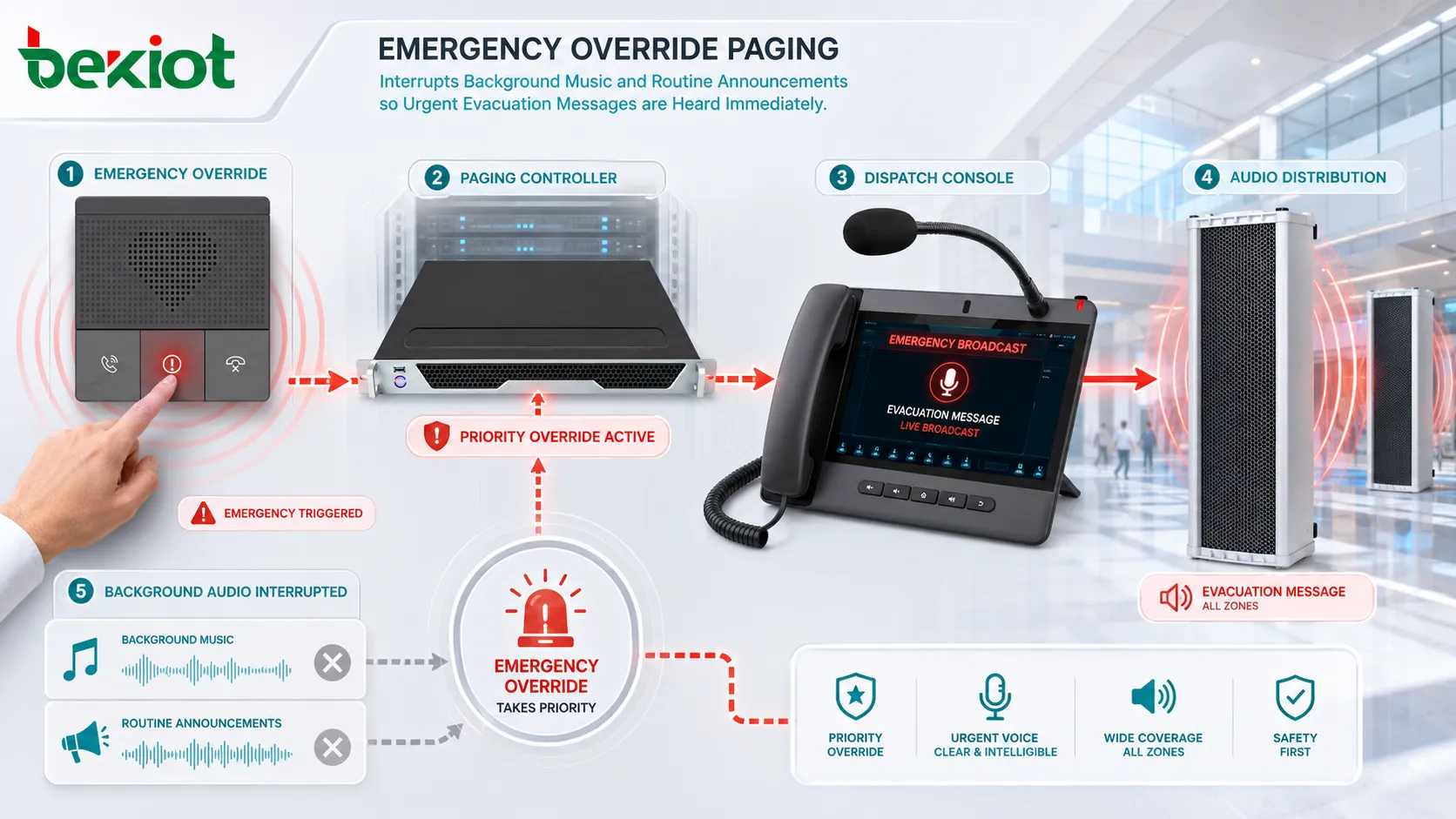
When Normal Audio Control Is Not Enough
A standard paging system may allow users to make live announcements, play scheduled messages, or broadcast background music. This is useful for daily operations, but it may not be enough during an emergency. If an urgent message has to compete with music, room audio, service announcements, or zone paging, people may miss the first critical seconds of instruction.
Override logic solves this by creating a strict audio hierarchy. Emergency audio takes control of the sound path, while lower-priority sources are muted, reduced, paused, or locked out until the emergency event is cleared. This helps avoid confusion when multiple audio sources are active at the same time.
The function is especially important in large or noisy environments. In a factory, station, tunnel, airport, campus, or shopping center, people may already be exposed to machinery noise, crowd sound, vehicle movement, or background music. A priority message must be delivered with enough clarity and authority to guide action.
The Priority Path Behind an Alert
Event Trigger
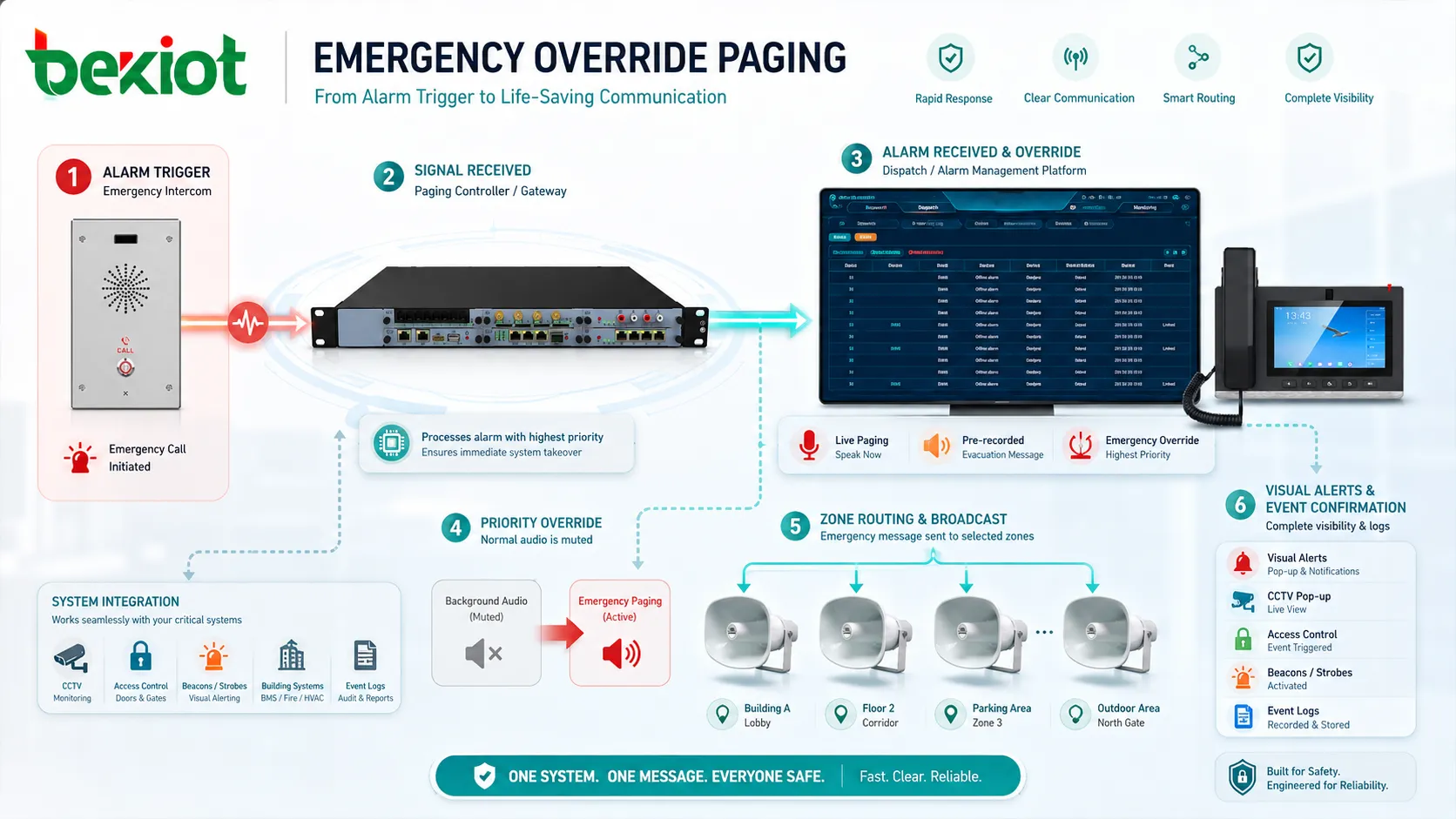
The process usually starts with an emergency trigger. This may come from a fire alarm panel, manual emergency microphone, security console, gas detection system, panic button, building management platform, dispatch system, access control event, or authorized operator command.
The trigger tells the audio system that a higher-priority event has occurred. Depending on the design, the system may activate a pre-recorded message, open a live microphone, play an alarm tone, or route instructions to selected zones.
Priority Decision
After the event is detected, the system compares the emergency source against other active audio sources. If the emergency event has the highest priority, it interrupts lower-level audio automatically. Routine announcements, background music, and non-critical paging are stopped or lowered.
Good priority design prevents conflict. For example, a general staff announcement should not play over a fire evacuation message. A background music feed should not return until the emergency message has ended or the system has received an all-clear signal.
Zone Selection
The emergency broadcast may be sent to one zone, multiple zones, or all zones. In some facilities, a full-site alert is required. In others, a phased evacuation or targeted warning is more appropriate. For example, one building wing may receive an evacuation message while another area receives a standby instruction.
Zone control helps reduce unnecessary panic and supports more precise response. It also allows operators to deliver different messages to different parts of a facility when the emergency plan requires it.
Message Delivery
The priority message is delivered through speakers, IP paging endpoints, network amplifiers, horn speakers, ceiling speakers, wall speakers, PA gateways, or PAGA systems. The message may be live, pre-recorded, multilingual, tone-based, or combined with visual alerts such as strobes and display signs.
Clear delivery depends on speaker coverage, volume setting, room acoustics, background noise, network reliability, amplifier capacity, and the quality of the audio source. Emergency paging should be tested under realistic conditions, not only in a quiet building.
The real purpose of priority paging is not simply to make a louder announcement. It is to make sure the correct message reaches the correct area before lower-priority audio can interfere.
Core Features for Safety-Critical Audio
Highest-Priority Audio Control
The system should define emergency audio as the highest-priority source. When activated, it should override background music, general paging, scheduled bells, commercial audio, and routine voice announcements.
This prevents important instructions from being delayed or mixed with other sound. In safety-related environments, the priority hierarchy should be documented and tested as part of the emergency communication plan.
Automatic Muting and Lockout
Automatic muting removes competing audio sources when the emergency event begins. Lockout prevents lower-priority sources from returning while the alert is still active.
This feature is important because some audio sources may run automatically. Without lockout, a scheduled message or music system might resume during a critical broadcast, reducing intelligibility and creating confusion.
Live and Pre-Recorded Broadcasts
Some emergencies require live operator instructions, while others are better handled with pre-recorded messages. A pre-recorded message provides consistent wording, clear pronunciation, and reduced stress for operators. A live microphone allows flexible instructions when the situation changes quickly.
Many professional systems support both. The emergency plan should define when to use automatic messages, when to use live paging, and who is authorized to speak.
Zone-Based Emergency Routing
Zone-based routing allows emergency audio to reach the exact area affected by an event. This may include floors, buildings, tunnels, platforms, workshops, outdoor areas, parking levels, or restricted zones.
In complex sites, zone logic should match the evacuation plan. Audio zones should not be designed only around speaker wiring; they should reflect how people move and how responders manage incidents.
Visual and System Linkage
Emergency override paging may be linked with beacons, strobes, digital signs, CCTV pop-ups, access control, dispatch consoles, alarm panels, and event logs. This turns the audio alert into part of a wider response workflow.
Visual linkage is especially useful in noisy areas, hearing-accessibility scenarios, or locations where people may not immediately recognize the source of the announcement.
System Value for Facility Response
The main value is response speed. When an emergency occurs, staff should not need to manually turn down music, search for the right amplifier, or ask others to stop routine paging. The system should automatically create a clear path for urgent audio.
It also improves message consistency. Approved pre-recorded instructions can reduce mistakes during stressful events. Operators can still use live paging when needed, but routine emergency wording can be standardized in advance.
Another value is operational control. A well-designed system can show which zones are active, which source has priority, which message is playing, and when the broadcast was triggered. These records support incident review, drills, compliance checks, and maintenance planning.
Related solution: /paga-systems/
Where This Function Is Commonly Used
Industrial Plants and Hazardous Sites
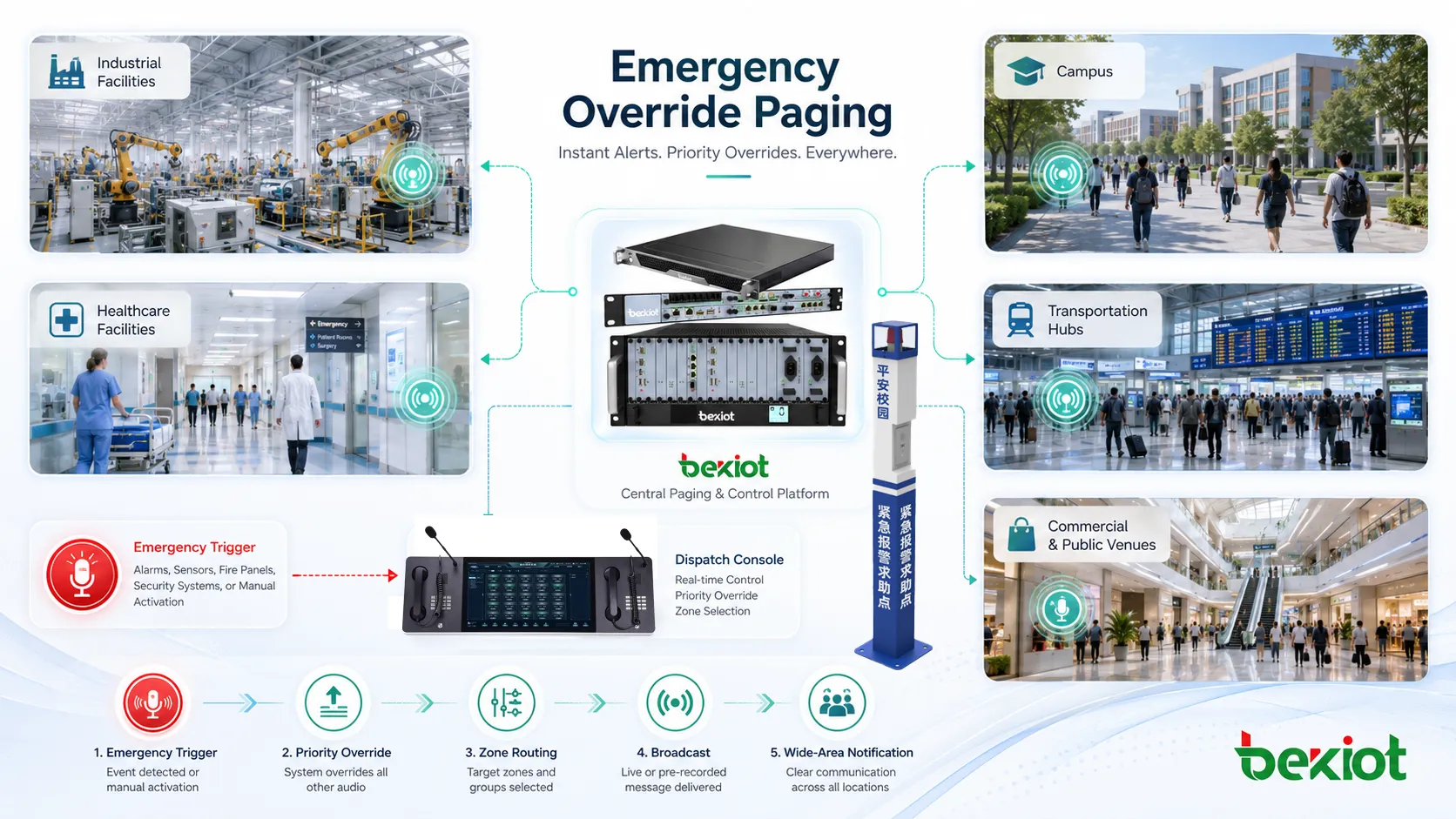
Factories, refineries, chemical plants, power stations, mines, and heavy industrial sites use priority paging for gas leaks, fire incidents, equipment hazards, evacuation instructions, shift safety alerts, and control room announcements.
In these environments, the system may need rugged speakers, high-output horns, redundant amplifiers, monitored circuits, and integration with alarm panels. Becke Telcom can be lightly considered in such projects when industrial communication, PAGA, emergency broadcast, and site-wide voice alerting need to work together as one safety communication layer.
Transportation Hubs
Airports, railway stations, metro platforms, tunnels, ports, and bus terminals need clear emergency announcements for evacuation, platform closure, crowd control, severe weather, fire alarm response, and operational disruption.
Transportation sites often have high ambient noise and large moving crowds. Priority messages should be short, clear, repeated when necessary, and supported by visual signs or staff response procedures.
Schools and Campuses
Schools and universities may use emergency override functions for lockdowns, severe weather alerts, evacuation drills, security incidents, fire alarms, and public safety coordination. Zone control is important because different buildings may require different instructions.
Campus systems should also consider outdoor coverage, dormitories, sports areas, parking lots, and administrative buildings. A message that works indoors may not be enough for open areas.
Hospitals and Healthcare Facilities
Hospitals may use priority paging for emergency codes, fire response, security alerts, facility incidents, evacuation coordination, and staff mobilization. Audio design must balance urgency with patient comfort and privacy.
Not every emergency message should go to every zone. Healthcare environments often require careful routing so clinical areas, public areas, staff-only zones, and quiet zones receive appropriate information.
Commercial Buildings and Hotels
Office towers, hotels, malls, exhibition centers, and public venues use emergency override paging to support fire evacuation, security response, crowd guidance, severe weather alerts, and facility announcements.
In hospitality and commercial spaces, normal background audio may be part of the customer experience, but it must immediately yield to life-safety and emergency instructions when required.
Design Details That Affect Reliability
Speaker Coverage and Intelligibility
Emergency messages must be understandable. Speaker placement, reverberation, background noise, ceiling height, wall materials, and audio equalization all affect intelligibility. Loud sound alone is not enough if words are unclear.
Testing should be done during normal operating conditions. A warehouse during forklift movement, a station during peak travel, or a factory during production may sound very different from a quiet commissioning test.
Power and Backup Strategy
Emergency audio equipment should remain available during power disruptions. Depending on the site, backup power may include UPS systems, battery-backed amplifiers, emergency power circuits, generator support, or redundant network switches.
If the paging system depends on PoE speakers, network switches must also be protected. A powered speaker cannot broadcast if its switch loses power.
Network and Signal Path Redundancy
IP-based paging and PAGA designs may rely on servers, switches, amplifiers, audio controllers, and endpoints. Critical paths should be reviewed for single points of failure.
Redundancy may include backup servers, secondary amplifiers, monitored speaker lines, dual network paths, local fallback messages, or alternative paging microphones.
Permission and Authority Control
Emergency override access should be restricted to authorized users. Not every staff member should be able to trigger full-site emergency audio. Permissions should be based on role, location, training, and responsibility.
Access records are also important. Logs can show who triggered a message, which zones were activated, and when the alert was cleared.
Message Design
Emergency messages should be short, direct, and action-oriented. A good message tells people what is happening, where it applies, what they should do, and whether they should evacuate, stay in place, avoid an area, or wait for further instructions.
Multilingual messages may be necessary in airports, campuses, hotels, ports, and international facilities. Recorded messages should be reviewed and tested before deployment.
The most reliable emergency paging design combines priority logic, clear audio, backup power, zone control, secure permissions, and tested operating procedures.
Integration with PAGA and Facility Systems
In industrial and large facility environments, emergency override paging is often part of a PAGA system, which combines public address and general alarm functions. This allows routine announcements, alarm tones, evacuation messages, and safety broadcasts to share a coordinated audio infrastructure while following strict priority rules.
The paging platform may integrate with fire alarms, gas detection, access control, CCTV, dispatch systems, building management systems, industrial control systems, and emergency operation centers. Integration helps operators respond faster and gives them better visibility into what triggered the alert.
However, integration must be carefully planned. Each trigger should have a defined message, target zone, priority level, fallback action, reset condition, and responsible owner. Without clear logic, multiple connected systems may create conflicting audio events.
Deployment Checklist
Start by defining emergency scenarios. Fire, gas leak, intrusion, medical response, severe weather, evacuation, shelter-in-place, and equipment hazard events may each require different messages and zones.
Next, map the audio zones to the actual response plan. A technical zone map should match real movement paths, assembly points, escape routes, floor divisions, outdoor areas, and restricted spaces.
Then test the complete workflow. Trigger the alarm, confirm the audio priority, verify that background music is muted, check the correct zones, listen for speech clarity, confirm visual alerts, and review event logs.
Finally, train authorized users. Operators should know how to trigger messages, cancel false alarms, use live microphones, select zones, and follow escalation procedures.
Maintenance and Periodic Testing
Emergency audio systems should be tested regularly. Tests should verify microphones, speakers, amplifiers, network endpoints, recorded messages, alarm triggers, zone routing, backup power, priority behavior, and event logging.
Maintenance teams should also inspect speaker lines, PoE switches, amplifier status, batteries, cable connections, software settings, firmware versions, and user permissions. Any failed endpoint should be repaired before the system is needed in a real emergency.
Drills should include realistic listening conditions. If people cannot understand the message during a drill, the system needs adjustment. The purpose of testing is not only to prove that sound plays, but to confirm that people can understand and act on the instruction.
FAQ
Can priority paging work if the main server fails?
It depends on the design. Some systems include local fallback messages, backup controllers, redundant servers, or amplifier-level emergency inputs. Critical sites should plan fallback behavior before deployment.
Should emergency messages be live or recorded?
Both can be useful. Recorded messages provide consistent wording, while live announcements provide flexibility during changing events. Many systems use recorded messages first and allow authorized operators to add live instructions.
How can false activations be reduced?
False activations can be reduced through role-based access, confirmation steps for non-automatic events, protected emergency buttons, clear operator training, and regular review of alarm input logic.
What should be checked after a building layout change?
Check speaker coverage, zone routing, evacuation paths, signage, background noise levels, cable routes, and whether the emergency message still reaches the intended audience clearly.
Can emergency override paging support accessibility needs?
Yes. It can be combined with strobes, digital signage, visual indicators, mobile alerts, and multilingual messages to support people who may not hear or understand voice announcements clearly.







