


Port mapping is a network configuration method that directs traffic from one network address and port to another address and port. It is most commonly used on routers, firewalls, NAT gateways, cloud networks, and security appliances to allow external users or systems to reach a service running inside a private network.
In everyday networking, many devices use private IP addresses that cannot be reached directly from the public internet. Port mapping creates a controlled path from an external port on the router or gateway to a specific internal device, server, camera, phone system, application, or service. This makes it possible to host services, support remote access, connect certain applications, and manage network traffic more precisely.
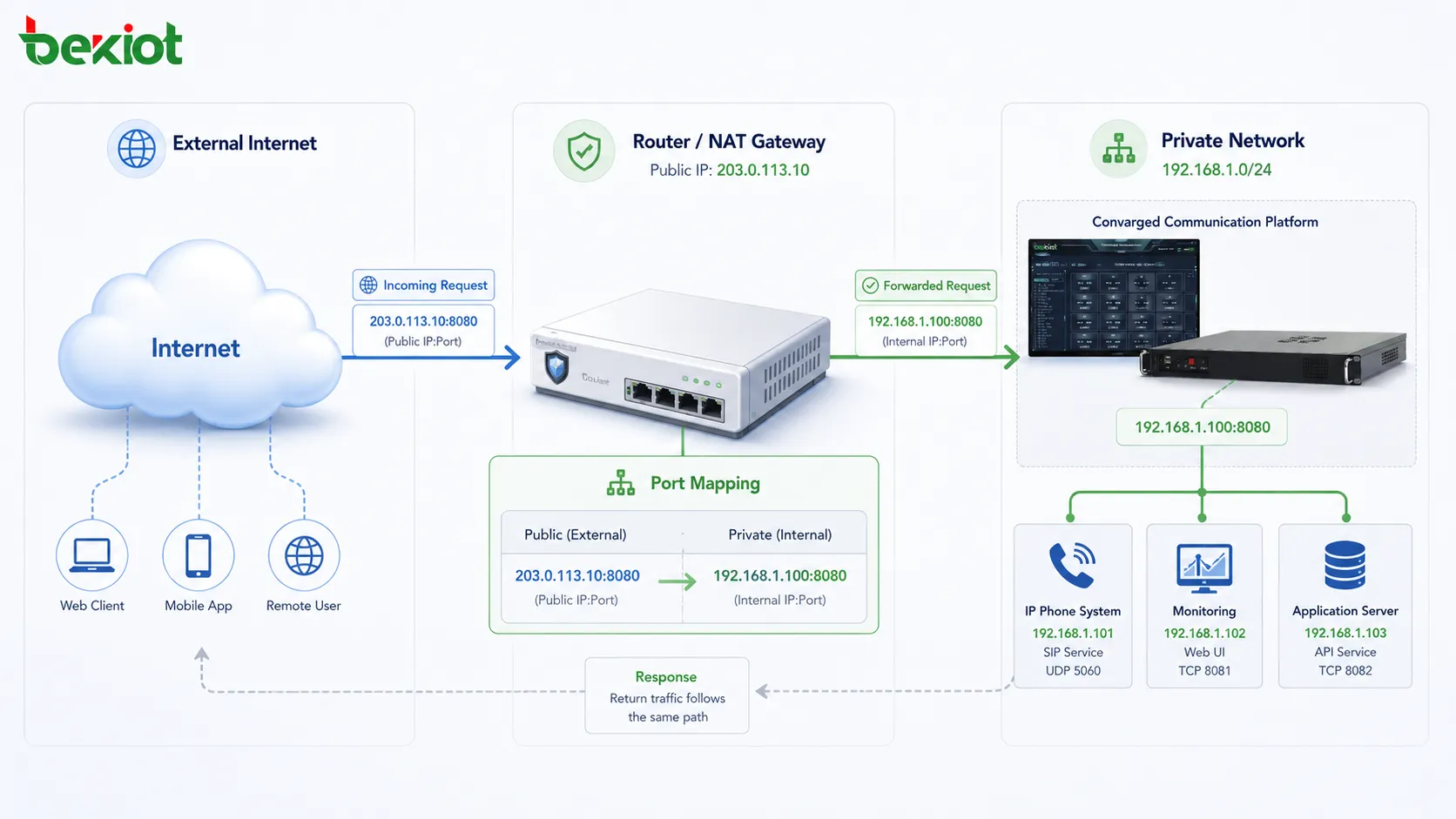
Why Private Networks Need Controlled Access
Most home, office, and enterprise networks use private IP addresses such as 192.168.x.x, 10.x.x.x, or 172.16.x.x ranges. These addresses work inside the local network, but they are not directly reachable from the public internet. A router or firewall usually sits between the private network and the outside world.
When internal users browse the web, send email, or use cloud applications, the router translates private addresses into a public address through Network Address Translation. This outbound traffic is usually easy because the router remembers which internal device started the connection.
Inbound traffic is different. If someone from outside tries to connect to a service inside the network, the router needs a rule that tells it where to send the request. Port mapping provides that rule. Without it, the router may reject or ignore the incoming traffic because it does not know which internal device should receive it.
The Basic Traffic Flow
External Request
The process begins when an external client sends a request to a public IP address and port. For example, a remote user may connect to a public address on port 443 for a web service, port 22 for SSH, port 3389 for remote desktop, or a custom port for a business application.
The router or firewall receives the request first. It checks whether there is a port mapping rule that matches the incoming port, protocol, and destination address.
Rule Matching
If a matching rule exists, the router translates the destination information. It changes the packet destination from the public-facing address and port to the internal private IP address and port specified in the rule.
For example, traffic arriving at public port 8080 may be forwarded to an internal web server at 192.168.1.50 on port 80. The external user connects to one address and port, while the internal service receives traffic on another address and possibly another port.
Internal Delivery
After translation, the packet is sent to the internal device. The internal service processes the request and sends a response back through the router.
The router then translates the response so that the external client sees it as coming from the public-facing address. This keeps the communication session consistent while hiding the private addressing structure.
Session Tracking
Many routers and firewalls maintain session state for mapped connections. This helps them understand which return traffic belongs to which external session. Stateful inspection can improve security and reduce incorrect forwarding.
For high-traffic or enterprise systems, session capacity matters. Too many active connections may overload a small router or firewall, even if the mapping rule itself is correct.
Port mapping acts like a controlled doorway: it does not expose the whole private network, but it allows selected traffic to reach a specific internal service.
Common Terms You Will See
Port Forwarding
Port forwarding is often used as another name for port mapping. In many router interfaces, the feature is labeled “port forwarding,” while technical documentation may use “port mapping” or “NAT mapping.”
The basic idea is the same: traffic arriving at a defined external port is forwarded to a defined internal address and port.
External Port
The external port is the port number visible from outside the network. This is the port that remote users, applications, or systems connect to on the public-facing side of the router.
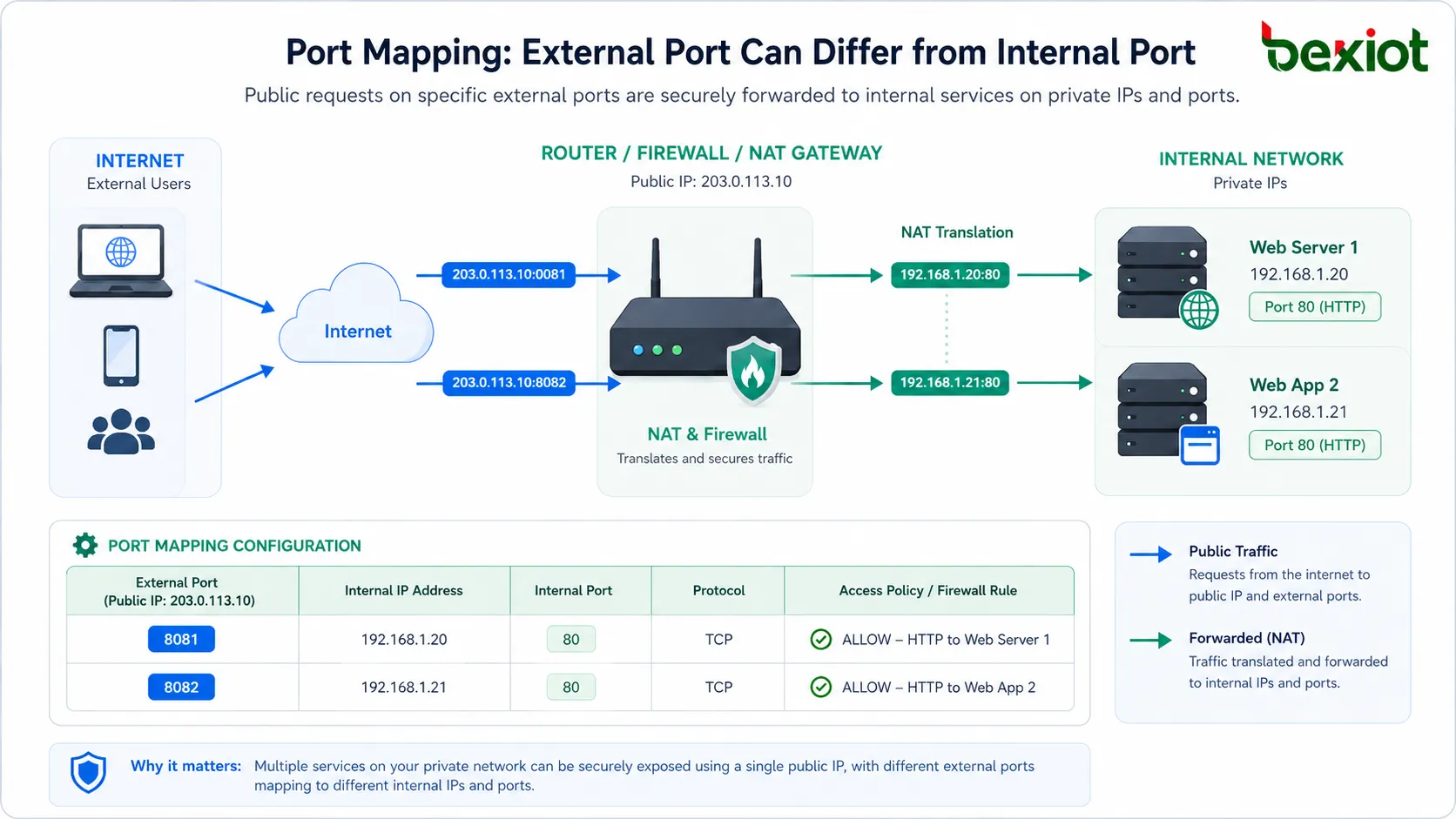
External ports can match internal ports, but they do not have to. Mapping public port 8443 to internal port 443 is a common example of using different external and internal ports.
Internal Address
The internal address is the private IP address of the device that hosts the service. This may be a server, NAS, IP camera, PBX, game server, remote desktop workstation, automation controller, or application host.
The internal address should usually be static or reserved through DHCP. If the internal device receives a different IP address later, the mapping rule may stop working.
Protocol Type
Rules often specify whether the traffic uses TCP, UDP, or both. Web services usually use TCP. Some real-time applications, games, VPNs, VoIP media streams, and discovery services may use UDP.
Selecting the wrong protocol is a common reason why a mapping rule appears correct but does not work.
How It Differs from Related Functions
| Function | Main Purpose | Typical Use |
|---|---|---|
| Port Mapping | Forwards traffic from an external port to an internal address and port. | Remote access, hosted services, cameras, servers, VoIP systems, applications. |
| NAT | Translates private and public IP addresses for network communication. | Internet sharing, outbound connectivity, private network protection. |
| DMZ Host | Forwards many or all unsolicited inbound requests to one internal device. | Temporary testing or special deployments, but usually higher risk. |
| UPnP | Allows applications to request port mappings automatically. | Gaming, media apps, home networks, automatic device connectivity. |
| Firewall Rule | Allows, blocks, or filters traffic based on security policy. | Access control, segmentation, inbound and outbound protection. |
Benefits for Network Deployment
Remote Service Access
The most obvious benefit is remote access. Users can reach selected internal services from outside the local network when the mapping is configured correctly.
This is useful for remote administration, private web applications, surveillance systems, self-hosted tools, branch access, and specialized business platforms that must be reachable from another network.
Better Use of Private Addressing
Private IP addressing allows many devices to operate behind one public address. Port mapping makes this arrangement more flexible by allowing specific services to be exposed without making every internal device directly public.
This helps organizations conserve public IP addresses while still offering selected services to remote users or partner systems.
Controlled Exposure
Instead of opening an entire network, administrators can expose only the required port and service. This is safer than broad forwarding or placing a device fully outside the firewall.
Control still depends on proper security design. A mapped port must be protected by strong authentication, updated software, and appropriate firewall restrictions.
Application Compatibility
Some applications need inbound connectivity to work correctly. This may include multiplayer games, peer-to-peer tools, IP cameras, remote desktop services, VPN servers, VoIP systems, file transfer services, and certain industrial or building management platforms.
Port mapping allows these applications to receive traffic through NAT-based networks when direct public addressing is not available.
Flexible Public-to-Private Translation
The external port can differ from the internal port. This gives administrators more flexibility when several internal services use the same default port or when public-facing ports need to be organized differently.
For example, one public IP address can map port 8081 to one internal web interface and port 8082 to another internal web interface.
Where This Configuration Is Used
Web and Application Hosting
Small businesses, developers, and IT teams may map ports to internal web servers, test environments, API services, or management platforms. This allows selected users to access services from outside the office or lab network.
For public-facing production websites, professional hosting, cloud load balancing, reverse proxies, and stronger security controls are usually preferred. Port mapping is useful, but it should not replace proper production architecture.
Remote Desktop and Administration
Administrators sometimes map ports for remote desktop, SSH, VPN access, or management tools. This can be convenient, but it also creates security risk if exposed directly to the internet.
Best practice is to use a VPN, access control list, IP allowlist, multi-factor authentication, and non-public management design whenever possible.
IP Cameras and Security Devices
Security cameras, NVRs, access control panels, and alarm systems may use mapped ports for remote viewing or management. This is common in small deployments, retail stores, warehouses, and remote facilities.
However, exposing camera interfaces directly can be risky. Strong passwords, firmware updates, encrypted access, and restricted source IPs are important.
VoIP and SIP Systems
Some VoIP deployments use port mapping for SIP signaling and RTP media streams when an IP PBX, gateway, or phone system is located behind NAT. Correct mapping can help external phones, SIP trunks, or remote sites reach the internal voice platform.
VoIP is sensitive to NAT behavior. SIP ALG, RTP port ranges, firewall rules, symmetric NAT, and session timers can affect call setup and audio. Testing should include inbound calls, outbound calls, transfers, registration, and two-way audio.
Gaming and Real-Time Applications
Games and real-time applications may require inbound ports for matchmaking, hosting sessions, voice chat, or peer-to-peer connections. Port mapping can improve connectivity when automatic discovery does not work.
Home routers may also use UPnP for automatic mapping, but users should understand the security implications before leaving automatic port opening enabled.
Industrial and Facility Systems
Industrial controllers, building management systems, energy monitoring platforms, and remote maintenance devices may use port mapping for service access. In these environments, security is especially important because exposed control interfaces can create operational risk.
Remote access should ideally be placed behind VPNs, jump servers, secure gateways, or zero-trust access platforms rather than open internet ports.
Design Details That Affect Reliability
Static Internal Addressing
The internal device should keep the same IP address. If it changes after a reboot or DHCP lease renewal, the mapping rule may point to the wrong device or stop working entirely.
Using DHCP reservation or manual static addressing helps keep the rule stable.
Correct Protocol Selection
TCP and UDP behave differently. A rule created only for TCP will not forward UDP traffic, and a UDP-only rule will not support TCP applications.
Check the application documentation before creating rules. Some services use one port for signaling and a range of ports for media or data transfer.
Firewall Alignment
Port mapping and firewall permission are related but not identical. A NAT rule may forward traffic, but the firewall may still block it. In some systems, creating a mapping automatically creates a firewall rule. In others, the administrator must configure both.
Always confirm that NAT, firewall, and service listening settings align.
Service Listening State
The internal device must actually be listening on the target port. If the application is stopped, bound to another interface, or blocked by the host firewall, the mapping will not work.
Testing from inside the network first can confirm whether the service is active before troubleshooting the router.
Public IP Availability
Port mapping requires inbound traffic to reach the router’s public-facing address. If the internet provider uses Carrier-Grade NAT, the router may not have a true public IP address, and inbound mapping may not work from the public internet.
In that case, options may include requesting a public IP, using VPN tunneling, reverse proxy services, cloud relay, or provider-supported access methods.
A mapping rule is only one part of the path. The public IP, NAT rule, firewall policy, internal address, service port, and application security must all be correct.
Security Risks and Safer Practices
Exposed Services
Any mapped port may be scanned by external systems. If the exposed service has weak passwords, old firmware, default credentials, or known vulnerabilities, it may become a target.
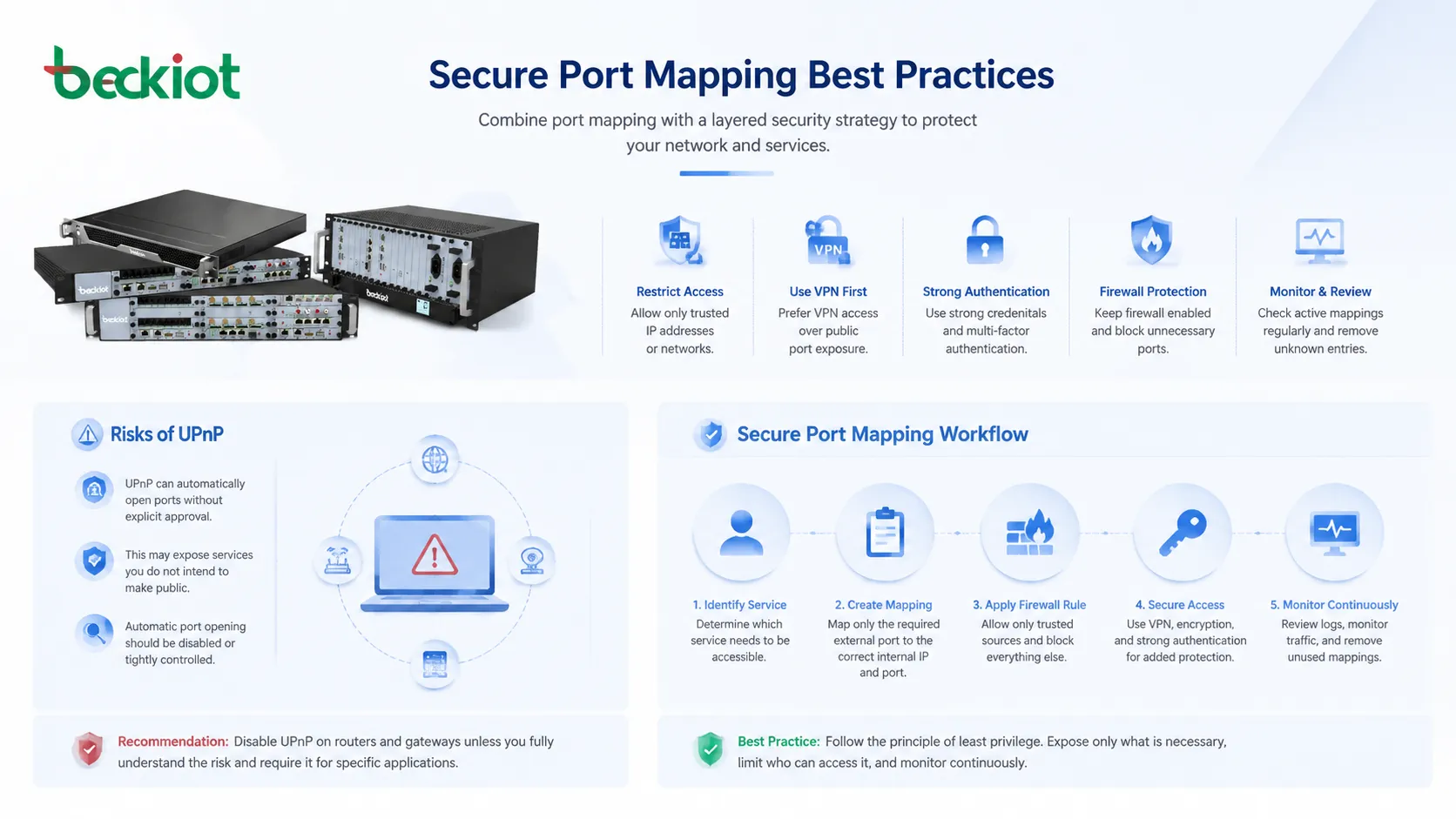
Only expose services that truly need inbound access. Close unused mappings immediately.
Weak Authentication
Port mapping does not provide authentication by itself. It only forwards traffic. The internal service must protect access through strong passwords, certificates, tokens, multi-factor authentication, or other secure methods.
Never assume that a non-standard external port is enough protection. Attackers can scan all ports, not only common ones.
Unrestricted Source Access
If only certain offices, partners, or administrators need access, restrict the allowed source IP addresses. This reduces the number of external systems that can reach the mapped service.
IP allowlisting is not a complete security solution, but it is a useful additional layer when combined with strong authentication and encryption.
Unencrypted Management Interfaces
Some devices expose web interfaces, command interfaces, or management APIs without encryption. Forwarding these directly to the internet can expose credentials and sensitive data.
Use HTTPS, SSH, VPN, or secure management tunnels whenever possible. Avoid exposing plain HTTP, Telnet, or insecure legacy services.
UPnP Overuse
UPnP can automatically create mappings for applications, but it may also allow unwanted or poorly understood exposure. In business environments, automatic port opening should usually be disabled or tightly controlled.
Administrators should review active mappings regularly and remove unknown entries.
Common Problems and Troubleshooting
Connection Times Out
A timeout may mean the request is not reaching the service. Possible causes include wrong public IP address, Carrier-Grade NAT, missing firewall rule, incorrect internal address, offline device, blocked ISP port, or the service not listening.
Start by testing the service locally, then test from an external network. Testing from inside the same LAN using the public address may fail if the router does not support NAT loopback.
Connection Refused
A refused connection often means the traffic reached the destination, but the service is not accepting it. The application may be stopped, listening on a different port, or blocked by the host firewall.
Check the internal device’s service status and listening ports before changing router rules.
Works Internally but Not Externally
If the service works from the LAN but not from outside, check NAT rules, firewall policy, public IP status, ISP restrictions, and whether the router is behind another router.
Double NAT is common when a modem-router and a separate router are both translating traffic. In that case, mapping may be required on both devices or the network design should be simplified.
Wrong Device Receives Traffic
This may happen if the internal IP address changed or if two rules conflict. DHCP reservation can prevent the internal server from receiving a new address unexpectedly.
Review all forwarding rules and confirm that no duplicate external port is assigned to another device.
VoIP Has One-Way Audio
For SIP and RTP systems, one-way audio may occur when signaling reaches the PBX but media ports are not mapped correctly. SIP ALG, firewall restrictions, NAT timeouts, and incorrect external address settings can also cause problems.
Check RTP port ranges, SIP server NAT settings, and packet captures if needed.
Deployment Checklist
Start by confirming whether the service truly needs to be reachable from outside. If remote access can be handled through VPN or secure cloud access, that may be safer than direct port exposure.
Assign a stable internal IP address to the target device. Then create the mapping rule with the correct external port, internal port, protocol, and destination address.
Review firewall rules and host-based firewalls. Make sure the internal service is running and listening on the expected port. Test locally first, then test externally from a different network.
Secure the exposed service before opening the port. Update firmware, change default passwords, enable encryption, restrict source addresses if possible, and monitor logs after deployment.
Maintenance and Review
Port mappings should be reviewed regularly. As systems change, old mappings may remain active even after the original service is no longer needed. These forgotten rules create unnecessary exposure.
Document each mapping with its purpose, owner, internal device, external port, protocol, creation date, and review date. This makes cleanup easier and reduces confusion during troubleshooting.
After router replacement, firewall migration, ISP change, or network redesign, test all required mappings again. Public IP changes, NAT behavior, and firewall defaults may affect remote access.
Choosing the Right Access Method
Port mapping is useful, but it is not always the safest or most scalable option. For simple internal services that need occasional remote access, a VPN may be better. For web applications, a reverse proxy or cloud gateway may provide stronger control. For enterprise environments, secure access platforms can offer identity-based policy and audit trails.
Direct mapping may still be appropriate for controlled services, partner integrations, lab systems, or specific applications that require inbound connections. The decision should consider security, reliability, user convenience, and long-term maintenance.
The best design exposes the minimum necessary service, protects it with strong access controls, and keeps every rule documented and reviewed.
FAQ
Why does my router show a private WAN address?
Your router may be behind another router or Carrier-Grade NAT. If the WAN address is private, inbound mapping from the public internet may not work unless the upstream network also forwards traffic or provides a public address.
Can two internal devices use the same external port?
Not on the same public IP address at the same time. You can map different external ports to the same internal port on different devices, or use multiple public IP addresses if available.
Is changing the external port enough to secure a service?
No. Using a non-standard port may reduce casual noise, but it does not provide real security. Strong authentication, encryption, updates, firewall restrictions, and monitoring are still required.
Why does testing from inside the network fail?
Some routers do not support NAT loopback or hairpin NAT. The mapping may work from outside even if it fails when tested from the same internal network using the public address.
What should be removed during a security review?
Remove mappings for unused devices, old cameras, retired servers, temporary tests, unknown UPnP entries, weak management interfaces, and any service that can be replaced by VPN or more secure access control.







