


A media server is a core communication component that processes, stores, routes, records, mixes, or delivers real-time media such as voice, video, audio announcements, conference streams, call recordings, paging messages, and multimedia sessions. In modern communication systems, the media server works behind the user interface and signaling layer to handle the actual media content that users hear, speak, watch, record, or broadcast.
In a voice communication system, the media server may process RTP audio streams, mix multiple speakers into a conference, play IVR prompts, record calls, transcode audio formats, or connect paging zones. In a video or dispatching platform, it may support video preview, media relay, recording, command communication, emergency broadcasting, and integration with intercom, CCTV, radio, and IP telephony systems.
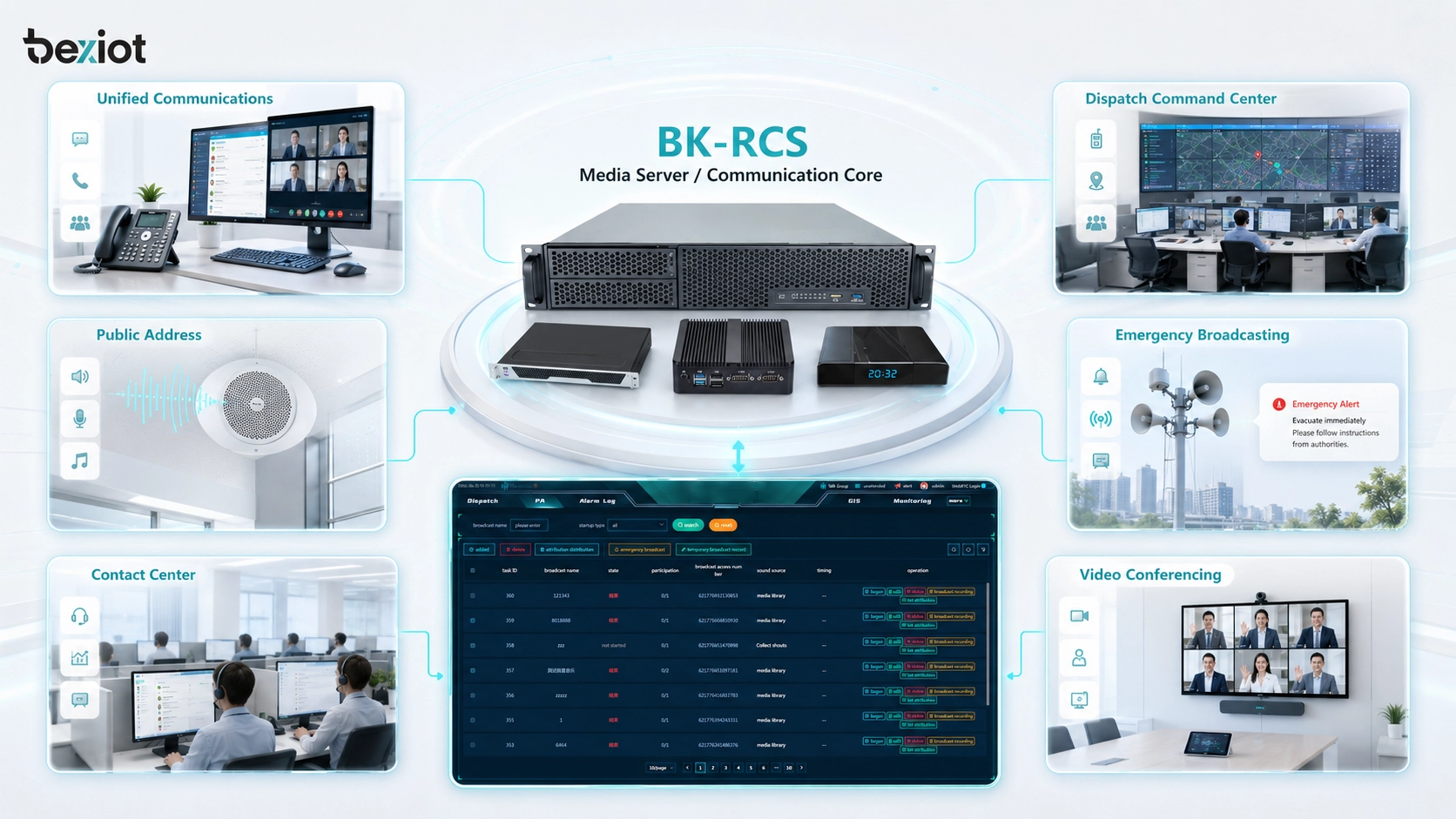
Media servers are widely used in IP PBX systems, SIP communication platforms, contact centers, dispatch systems, emergency command centers, public address systems, video conferencing, unified communications, security operation centers, telemedicine platforms, online education, industrial communication systems, and cloud collaboration services. In an integrated platform such as the Becke Telcom BK-RCS server and BK-RCS communication system, media server capability can become part of the foundation for voice dispatching, intercom linkage, paging, recording, conference communication, and multi-system coordination.
What Is a Media Server?
Definition and Core Meaning
A media server is a server that handles media streams or media files for communication, collaboration, broadcasting, recording, and playback. Unlike a simple file server that only stores data, a media server often processes time-sensitive audio or video in real time. This means it must manage latency, jitter, codec compatibility, session control, media routing, and stream quality.
In telephony and unified communication systems, a media server usually works together with a signaling server. The signaling server controls call setup, user registration, call routing, and session management. The media server handles the actual voice or video stream after the session is established. This separation makes communication systems more scalable and easier to manage.
The core meaning of a media server is media processing and delivery. It ensures that users do not only connect successfully, but also hear, speak, watch, record, broadcast, or participate in media sessions with acceptable quality and reliability.
A media server is the part of a communication system that handles the real audio, video, and media content behind calls, conferences, recordings, announcements, and dispatch sessions.
Why Media Servers Matter
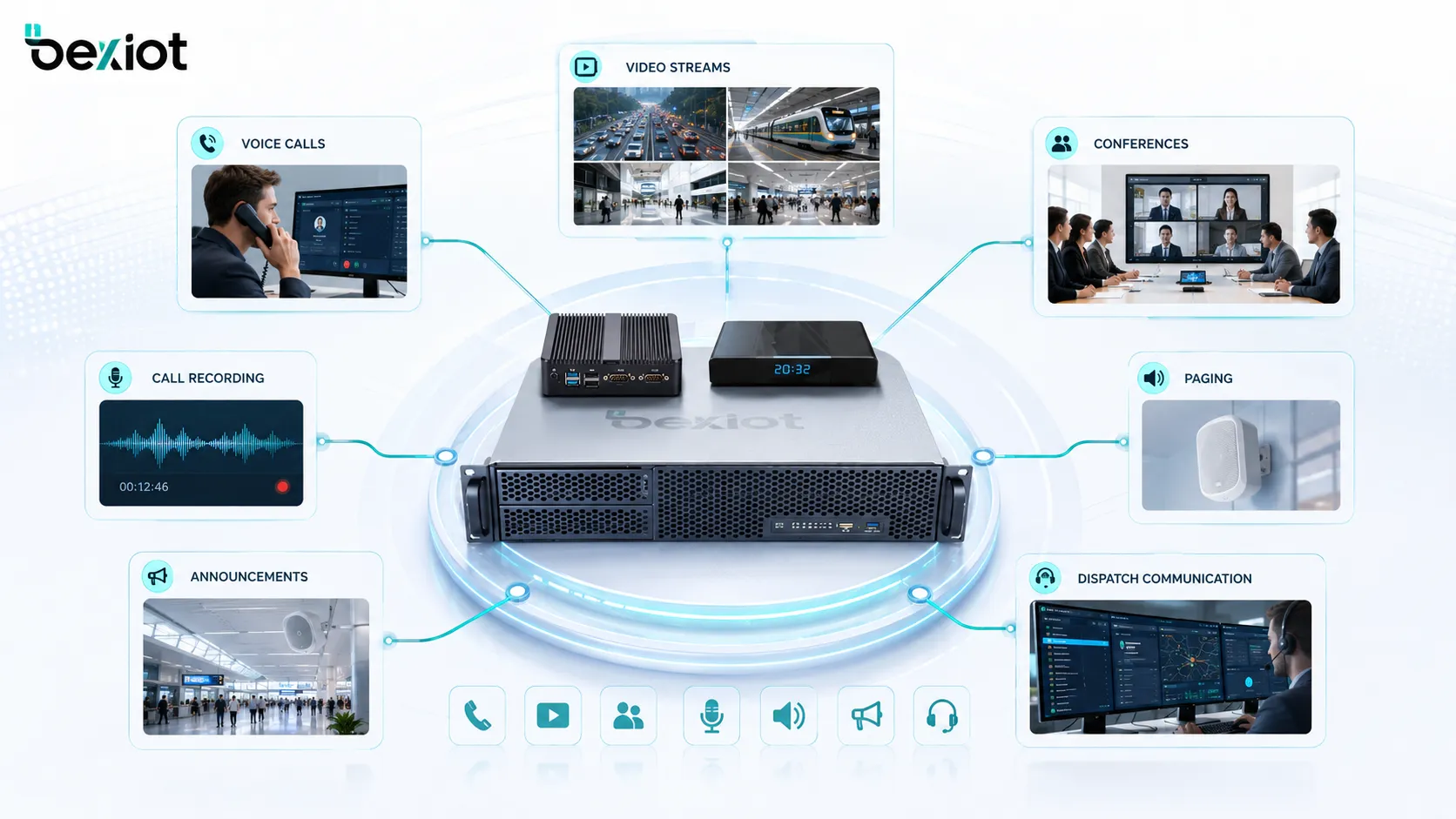
Media servers matter because modern communication is no longer limited to simple one-to-one calls. Organizations need conferencing, recording, paging, voice prompts, video sessions, dispatch communication, emergency announcements, call queues, media relay, and multi-party collaboration. These functions require a dedicated media processing layer.
Without a media server, many advanced communication features would be difficult to implement. A basic SIP server may establish calls, but it may not be enough to mix a conference, play announcements, record conversations, transcode codecs, or distribute audio to multiple paging zones. The media server fills this gap.
In mission-critical and industrial environments, media server performance can affect response speed, audio clarity, command accuracy, and evidence retention. A stable media server helps communication systems remain usable during daily operations and emergency events.
How a Media Server Works
Signaling and Media Separation
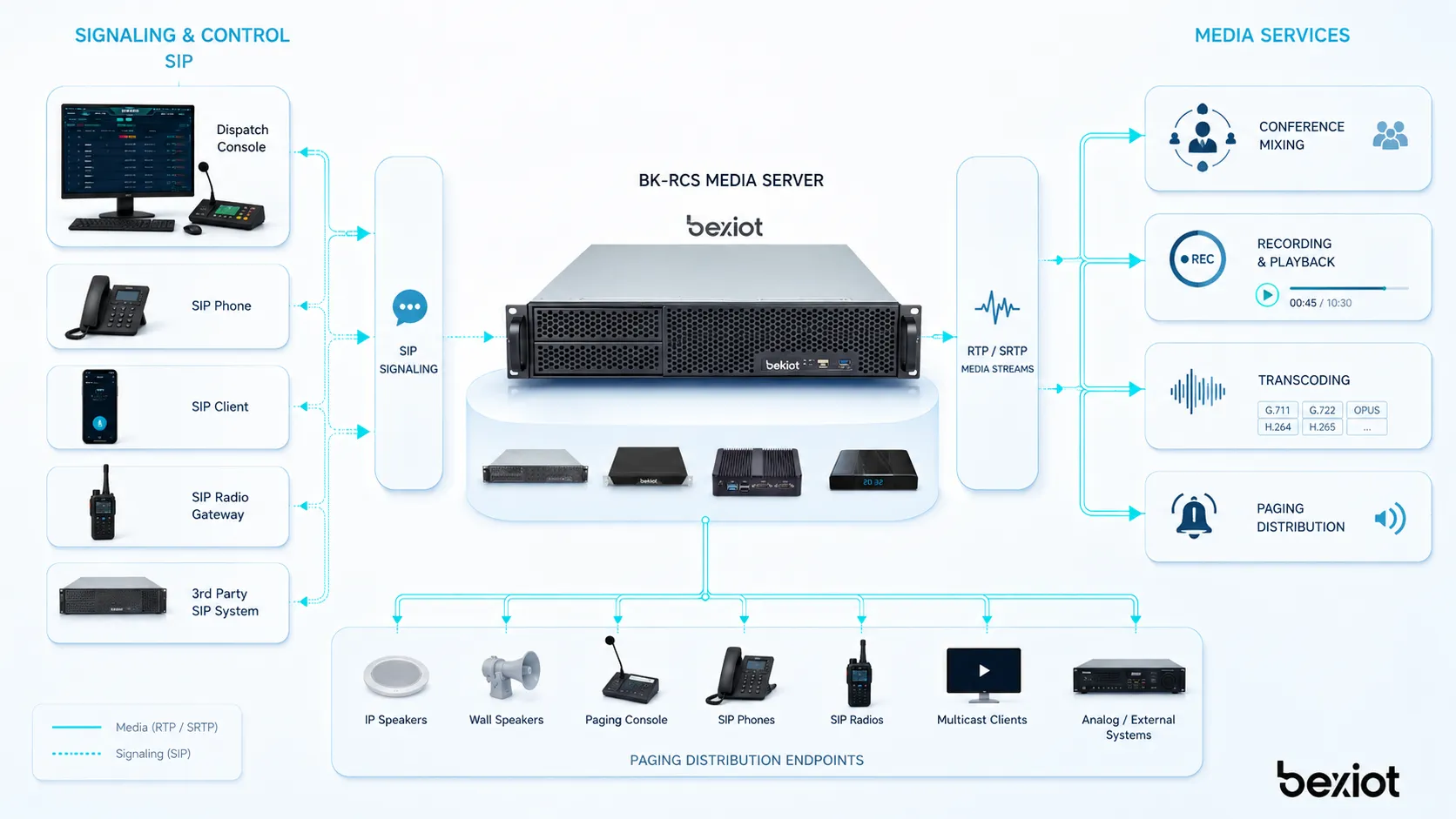
Most communication systems separate signaling from media. Signaling is responsible for setting up, modifying, and ending communication sessions. Media is the actual audio, video, or stream content exchanged between users or devices. In SIP-based systems, SIP handles signaling, while RTP or SRTP often carries the media stream.
A media server usually receives instructions from a call control server, SIP server, dispatch platform, or application server. For example, the signaling system may tell the media server to play a prompt, record a call, join users into a conference, relay media between endpoints, or broadcast an announcement to a paging group.
This architecture allows the communication system to manage complex services. The signaling layer decides what should happen, while the media server performs the actual media operation.
Media Stream Processing
Once a session is active, the media server can receive, process, and send media streams. It may mix audio from several users, forward video streams, convert codec formats, adjust media paths, play pre-recorded files, detect tones, or record audio to storage. The exact function depends on the system design and service requirements.
For conferencing, the media server mixes audio streams so that all participants can hear one another. For recording, it captures the media stream and stores it with call information. For paging, it can distribute an audio message to multiple speakers or zones. For IVR, it plays prompts and collects user input.
Because real-time media is sensitive to delay, the media server must be optimized for performance. High latency, packet loss, overloaded CPU, poor network design, or codec mismatch can reduce voice clarity and user experience.
Storage, Recording, and Playback
Many media servers also provide recording and playback functions. In a call center, the media server may record customer calls for quality control. In a dispatch system, it may record emergency communication for incident review. In a conferencing platform, it may store meeting audio or video for later access.
Recordings are usually linked with metadata such as caller ID, extension, time, channel, group, event type, operator, or dispatch session. This metadata makes recordings searchable and useful for training, compliance, investigation, and service review.
In critical systems, recording storage must be managed carefully. Administrators should consider retention period, access permissions, storage capacity, backup, encryption, privacy policy, and audit requirements.
In a communication platform, the media server does not simply move sound; it can mix, record, replay, transcode, relay, and distribute media according to service logic.
Main Functions of a Media Server
Audio Mixing and Conferencing
Audio mixing is one of the most important media server functions. In a conference call, several participants speak and listen at the same time. The media server receives audio streams from different users, mixes them, and sends a combined stream back to each participant.
This function is used in business meetings, emergency command sessions, dispatch conferences, multi-party calls, remote technical support, and cross-department coordination. Without a media server, multi-party voice communication would be harder to manage, especially when many endpoints or mixed networks are involved.
Good audio mixing should preserve clarity, reduce delay, avoid echo, and support stable participation. In dispatch environments, it may also need priority speaking, operator control, muting, and recording.
Media Recording
Media recording allows voice or video sessions to be captured and stored. In many organizations, recording is needed for quality management, legal compliance, safety review, service confirmation, training, and incident reconstruction.
In a dispatch or emergency communication system, recording can be especially important. It helps teams review when an alarm was received, what instructions were given, who responded, and how communication developed during the event. This supports accountability and process improvement.
Recording functions should be protected by access control. Not every user should be allowed to search, play, download, or delete recordings. The system should support permission management and retention rules.
Prompt Playback and IVR Media
Media servers can play audio prompts for IVR systems, auto attendants, call queues, voicemail, alarm notifications, and service menus. These prompts guide callers through options such as “press 1 for support,” “please wait,” or “the emergency call is being connected.”
In enterprise and public service systems, prompt playback improves call handling and user guidance. It can reduce operator workload by giving callers structured information before they reach a human agent.
The media server must play these prompts clearly and reliably. Poor prompt quality, wrong language, outdated recordings, or delayed playback can reduce the professionalism of the communication system.
Transcoding and Codec Compatibility
Transcoding means converting media from one codec or format to another. This is useful when different devices or networks use different audio or video formats. For example, one endpoint may use G.711, another may use G.729, and another may require Opus or another codec depending on system support.
A media server with transcoding capability can improve interoperability between different endpoints. This is valuable in mixed environments with IP phones, softphones, intercoms, radio gateways, mobile apps, conference clients, and external trunks.
Transcoding consumes computing resources, so it should be planned carefully. Too many simultaneous transcoding sessions can increase server load and affect quality.
Paging and Announcement Distribution
Media servers can support paging and announcement distribution by sending audio to selected speakers, zones, devices, or groups. This is used in public address systems, industrial paging, school announcements, hospital notifications, transportation stations, and emergency broadcasting.
The media server may receive live audio from a dispatcher, microphone station, phone call, or pre-recorded message, then distribute it to the selected zone. In more advanced systems, paging may include priority control, scheduled announcements, emergency override, recording, and integration with alarms.
This function connects voice communication with site-wide notification. It allows communication systems to move from person-to-person calls to group and area-based information delivery.
Media Server in System Architecture
Communication Control Layer
The communication control layer manages users, sessions, signaling, routing, permissions, call policies, and service logic. This layer may include a SIP server, IP PBX, dispatch server, communication management platform, or application server.
The media server usually follows commands from this control layer. For example, the control system may request the media server to create a conference room, start recording, play an announcement, connect a dispatcher to a paging zone, or bridge media between different endpoints.
This division helps the system remain modular. The control layer manages communication logic, while the media server performs the media processing work.
Media Processing Layer
The media processing layer is where real-time audio and video operations happen. This layer may handle RTP streams, audio mixing, video relay, recording, transcoding, tone detection, prompt playback, and media distribution. It must be designed for low latency and stable performance.
In small systems, the media server may run on the same physical server as the communication platform. In larger systems, it may run as a separate server or cluster. Cloud platforms may use distributed media nodes to support users in different regions.
The scale of the media processing layer depends on concurrent calls, conference size, recording demand, paging zones, codec use, video bandwidth, redundancy requirements, and expected traffic peaks.
Endpoint and Network Layer
The endpoint layer includes the devices that send and receive media. These may include IP phones, SIP intercoms, dispatch consoles, mobile clients, video terminals, cameras, paging speakers, radio gateways, call stations, softphones, and conference clients.
The network layer carries signaling and media traffic between endpoints, servers, and gateways. For real-time media, network quality is critical. Packet loss, jitter, delay, bandwidth shortage, firewall issues, or NAT traversal problems can reduce communication quality.
A well-designed media server architecture must therefore include network planning. Quality of Service, VLANs, bandwidth allocation, firewall rules, redundancy, and monitoring all affect media performance.
Industry Case: Becke Telcom BK-RCS Communication System
Media Server Role in BK-RCS Communication
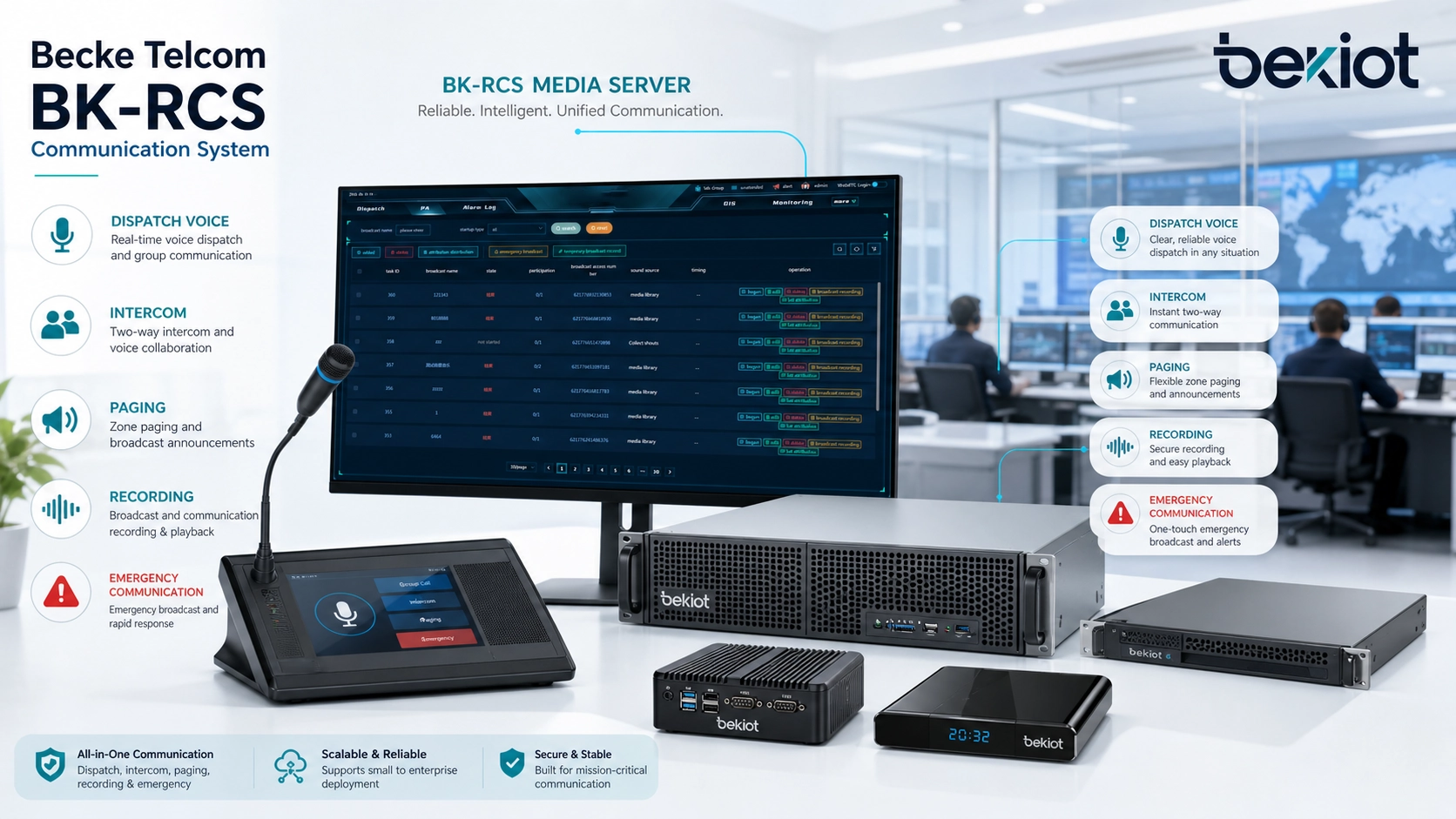
In an integrated communication environment, the media server is not an isolated component. It supports the practical communication functions that users experience every day, such as dispatch voice, conference communication, intercom linkage, paging announcements, recording, and emergency broadcast workflows. This is where the Becke Telcom BK-RCS server and BK-RCS communication system can be positioned as part of a converged communication architecture.
The BK-RCS server can act as the core platform for coordinating voice communication, dispatch operation, intercom access, paging linkage, recording, and system integration depending on the project configuration. In this type of system, media server capability helps process the audio streams and service media needed by operators, field users, intercom terminals, SIP phones, paging devices, and dispatch workstations.
For industrial sites, transportation facilities, utility corridors, parks, campuses, and emergency command centers, the value is not only call connection. The system needs to deliver clear voice, support group communication, record important sessions, and connect different communication endpoints into a unified workflow. Media server capability helps make those functions practical.
Support for Dispatching, Intercom, Paging, and Recording
The BK-RCS communication system can be described as a converged communication platform where media handling supports multiple operational scenarios. A dispatcher may need to talk to a field phone, connect several users into a conference, trigger a zone announcement, record a communication session, or coordinate with intercom and alarm-linked endpoints.
In this workflow, the media server capability helps manage the actual audio. It may support media mixing for multi-party communication, media relay between endpoints, recorded playback, live paging distribution, and session recording for later review. These functions are important in control rooms where operators need fast and reliable communication tools.
By combining communication control with media processing, the BK-RCS system can support more than simple calling. It can help build a command communication environment where dispatch, intercom, paging, and recording are connected through one operational platform.
Value in Industrial and Emergency Communication Projects
Industrial and emergency communication projects often involve harsh environments, multiple device types, noisy sites, control rooms, field teams, public address zones, CCTV systems, alarm inputs, and response procedures. In such projects, a media server helps ensure that voice and media services are processed consistently across different workflows.
With BK-RCS server deployment, project teams can plan communication resources around dispatching, call handling, paging, monitoring, and recording requirements. For example, a tunnel, factory, chemical plant, energy site, or transportation hub may need field communication points, control room dispatching, emergency announcements, and recorded incident communication.
The practical value is system integration. Instead of treating telephone, intercom, paging, and dispatch as separate tools, a BK-RCS communication system can help organize them into a connected communication framework, while media server capability supports the real-time audio services behind that framework.
Benefits of a Media Server
Centralized Media Processing
A major benefit of a media server is centralized media processing. Instead of making every endpoint handle complex media tasks independently, the system can place conferencing, recording, playback, transcoding, and paging distribution on a dedicated server layer.
Centralized processing improves manageability. Administrators can configure recording policies, media resources, prompt files, conference capacity, codec settings, and system logs from a central platform. This reduces endpoint complexity and makes the whole system easier to operate.
In a dispatch or enterprise communication system, centralized media processing also makes it easier to maintain consistent audio behavior across many devices and departments.
Better Scalability
Media servers help systems scale because media resources can be expanded according to demand. As the number of users, calls, conferences, recordings, or paging zones increases, administrators can allocate more media capacity or deploy additional media nodes.
Scalability is important for large organizations and multi-site systems. A small office may need only basic recording and conferencing, while a transportation control center or industrial park may need many simultaneous media streams, dispatch sessions, and recorded communications.
A scalable media server architecture allows the communication system to grow without redesigning every endpoint or service workflow.
Improved Feature Integration
A media server can integrate many functions that would otherwise require separate systems. Conferencing, IVR, voicemail, announcement playback, paging, recording, and media relay can be connected through one platform. This reduces fragmentation and helps users work through a unified communication interface.
Feature integration is especially useful for dispatch and command systems. Operators may need to handle calls, conferences, recordings, announcements, and emergency messages from the same console. The media server provides the underlying media functions that make this possible.
When media functions are integrated, communication workflows become more efficient and easier to train.
Stronger Operational Recordkeeping
Media server recording functions support operational recordkeeping. Recorded calls, dispatch sessions, announcements, and emergency communications can provide valuable evidence for incident review, service quality, training, and compliance.
Recordkeeping is important in control rooms, public safety, industrial operations, customer service, healthcare, transportation, and facility management. It allows supervisors to understand what happened during important events and improve future procedures.
A strong media recording strategy should include secure storage, search functions, access permissions, retention rules, and backup planning.
Applications of Media Servers
Unified Communications and IP PBX Systems
In unified communications and IP PBX systems, media servers support functions such as voicemail, conferencing, call recording, music on hold, announcement playback, IVR prompts, and media relay. These functions improve the phone system from basic call routing into a richer communication platform.
Enterprises use these services for internal collaboration, customer communication, remote work, branch office connectivity, and service management. The media server helps ensure that voice services remain consistent even as the system grows.
In SIP-based environments, the media server often works alongside the SIP server, SBC, IP PBX, and endpoint devices to provide complete call and media services.
Dispatch and Command Centers
Dispatch and command centers use media servers for multi-party voice sessions, operator recording, paging, radio bridge audio, emergency announcements, and intercom linkage. These functions help operators coordinate several teams and communication channels from one control interface.
A media server can support the dispatch workflow by mixing conference audio, recording important calls, playing alert tones, distributing announcements, and connecting different endpoint types. This is useful in public safety, industrial control rooms, transportation systems, energy facilities, and large campuses.
In command environments, the media server must be stable and responsive because delayed or unclear communication can affect response quality.
Public Address and Emergency Broadcasting
Public address and emergency broadcasting systems may use media servers to store, play, and distribute announcements. The server can handle live microphone audio, pre-recorded emergency messages, scheduled broadcasts, zone paging, and priority overrides.
In emergency situations, messages may need to be sent to selected zones or all zones quickly. The media server can help process the audio source and deliver it through paging controllers, SIP speakers, amplifiers, or network audio endpoints.
This application is common in factories, schools, hospitals, stations, airports, public buildings, tunnels, and industrial sites where voice notification is part of safety communication.
Contact Centers and Customer Service
Contact centers use media servers for IVR prompts, queue announcements, call recording, agent monitoring, conferencing, quality review, and sometimes speech analytics input. The media server supports the voice experience between customers and agents.
Call recording is especially important in customer service because organizations may need to review disputes, train agents, measure service quality, or meet compliance requirements. IVR media also helps route callers before they reach an agent.
A reliable media server helps the contact center maintain call quality and service consistency during high call volume.
Video Conferencing and Collaboration
In video conferencing and collaboration platforms, media servers may forward, mix, transcode, or record audio and video streams. Depending on the architecture, the server may act as an MCU, SFU, recording server, or media relay node.
Video media processing is more demanding than voice because it consumes more bandwidth, storage, and computing resources. The system must manage resolution, frame rate, codec compatibility, packet loss, and participant count.
A well-designed media server improves meeting stability, recording quality, and cross-device compatibility.
Deployment Considerations
Capacity and Concurrent Sessions
Capacity planning is one of the most important media server deployment tasks. Administrators should estimate the expected number of concurrent calls, conference participants, recording sessions, paging events, IVR sessions, and video streams.
Different media functions consume different resources. A simple prompt playback may require less processing than a large conference. Transcoding uses more CPU than same-codec relay. Video recording requires more storage and bandwidth than audio recording.
The server should be sized with enough headroom for peak traffic, emergency usage, future expansion, and failover scenarios.
Network Quality and QoS
Media servers depend on network quality. Real-time voice and video are sensitive to delay, jitter, packet loss, and bandwidth shortage. Quality of Service settings can help prioritize media traffic so that important voice and video streams are less affected by ordinary data traffic.
Network planning should include VLAN design, QoS policy, firewall traversal, NAT handling, routing paths, bandwidth reservation, and monitoring. For multi-site deployments, WAN quality and backup links should also be considered.
A powerful media server cannot solve all problems if the network path is unstable. Media quality depends on both server performance and network design.
Storage and Retention Policy
If the media server records calls, conferences, dispatch sessions, or video streams, storage planning becomes essential. Administrators should calculate how much storage is needed based on recording format, bitrate, number of sessions, retention period, and backup policy.
Retention policy should define how long recordings are stored, who can access them, when they are archived, and when they are deleted. Some organizations may need longer retention for compliance or incident review. Others may need shorter retention to reduce privacy and storage risks.
Storage planning should also include redundancy, encryption, search functions, and disaster recovery.
Security and Access Control
Media servers may process sensitive conversations, emergency calls, customer records, internal meetings, or video streams. Security should therefore be part of the design. Access to recordings, configuration files, media services, and administration functions should be controlled by roles and permissions.
Secure media transport, network segmentation, strong authentication, audit logs, encrypted storage, firewall rules, and regular patching can help reduce security risks. If recordings include personal or operationally sensitive information, privacy policy and legal requirements should also be considered.
A media server should be treated as a critical communication asset, not merely as an auxiliary application.
A reliable media server deployment requires capacity planning, network quality, storage control, security policy, redundancy, and regular testing.
Common Challenges
High Latency and Jitter
High latency and jitter can reduce real-time communication quality. Users may hear delayed speech, broken audio, overlapping conversation, or unstable video. These problems are especially noticeable in dispatching, conferencing, and emergency communication.
Causes may include overloaded servers, poor WAN links, network congestion, incorrect QoS settings, firewall inspection delays, or inefficient media routing. Troubleshooting should check both the media server and the network path.
Stable real-time media requires low delay, consistent packet delivery, and enough bandwidth.
Codec Mismatch
Codec mismatch occurs when endpoints do not support a common audio or video codec. The media server may need to transcode between formats, but transcoding increases CPU load and can sometimes reduce media quality.
To reduce this problem, administrators should define supported codec policies and align endpoint configuration. In controlled systems, using a consistent codec strategy can improve performance and simplify troubleshooting.
Transcoding is useful, but it should not replace careful codec planning.
Storage Overload
Recording services can consume storage quickly. If storage fills up, recordings may fail, system performance may decline, or older files may be deleted unexpectedly. This is a common issue in systems that record many calls or video sessions.
Storage overload can be prevented through retention rules, compression strategy, scheduled archiving, monitoring alerts, and capacity expansion planning. Administrators should also check whether recordings are being stored longer than necessary.
Good storage management protects both system reliability and compliance.
Single Point of Failure
If all media functions depend on one server, failure of that server may interrupt conferencing, recording, IVR, paging, or dispatch media. This is a serious concern for emergency communication and mission-critical operations.
Redundancy may include standby servers, media server clusters, distributed media nodes, backup power, storage replication, and failover routing. The required level of redundancy depends on business impact and safety requirements.
Critical media services should be designed with failure scenarios in mind.
Maintenance and Optimization Tips
Monitor Media Resource Usage
Administrators should monitor CPU, memory, network throughput, storage usage, concurrent sessions, transcoding load, recording activity, and packet statistics. These indicators show whether the media server has enough capacity and whether performance is stable.
Monitoring can help detect issues before users complain. For example, rising CPU usage may indicate too many transcoding sessions. Increasing storage usage may show that retention policy needs adjustment. Packet loss statistics may reveal a network problem.
Media server monitoring should be part of regular communication system maintenance.
Test Real User Scenarios
Media server testing should include real user scenarios such as group calls, conference sessions, dispatch recording, emergency paging, IVR playback, voicemail, intercom linkage, and multi-site communication. A system may pass a basic call test but fail under realistic workload.
Testing should include peak traffic, emergency routes, failover conditions, different endpoint types, and remote users. This helps verify whether media services remain stable when the system is under pressure.
Realistic testing is especially important before commissioning a control room, dispatch platform, or emergency communication system.
Keep Prompt Files and Recordings Organized
Prompt files, announcements, IVR messages, and emergency audio files should be organized clearly. Outdated prompts can confuse users, and missing files can break call flows. Administrators should maintain file naming rules, language versions, update procedures, and approval workflows.
Recordings should also be organized with searchable metadata. This makes it easier to find specific calls, dispatch sessions, or incident records. Access should be limited to authorized users.
Organized media files improve both system reliability and operational efficiency.
Review Security and Permission Settings
Because media servers may store sensitive communication content, permissions should be reviewed regularly. Users who no longer need access to recordings or media configuration should have those permissions removed.
Administrators should also review login logs, audit records, access attempts, recording playback history, and configuration changes. This helps protect communication data and supports accountability.
Security review is an ongoing task, especially in systems used for dispatch, emergency response, customer service, and internal operations.
Media Server Versus Similar Components
Media Server Versus SIP Server
A SIP server usually handles signaling, registration, routing, and session control. It decides how calls are established and where they should go. A media server handles the audio or video content of those sessions.
In a simple call between two endpoints, media may flow directly between devices. In a conference, IVR, recording, voicemail, or paging scenario, the media server often becomes involved because additional media processing is required.
Both components are important, but they serve different roles. The SIP server controls the session, while the media server processes the media.
Media Server Versus File Server
A file server stores and shares files. A media server may also store files, but its role is broader because it can process real-time media streams. It may play prompts, record calls, mix conferences, relay RTP streams, or transcode codecs.
A file server is mainly about storage access. A media server is about media service delivery. In communication systems, real-time performance is a key difference.
This is why media servers require careful attention to latency, CPU load, codec processing, and network quality.
Media Server Versus Application Server
An application server provides business logic and service control. It may manage users, workflows, permissions, reports, APIs, dashboards, and service rules. A media server performs media-specific functions such as recording, playback, conferencing, and streaming.
In many systems, the application server instructs the media server. For example, a dispatch application may tell the media server to start recording a call or create a conference session.
Separating these roles makes the system easier to scale and maintain.
Conclusion
A media server is a key component in modern communication systems. It processes real-time voice, video, recordings, conferences, prompts, announcements, paging streams, and media relay services. It works with signaling servers, application platforms, endpoints, and networks to deliver the actual media experience behind calls and collaboration.
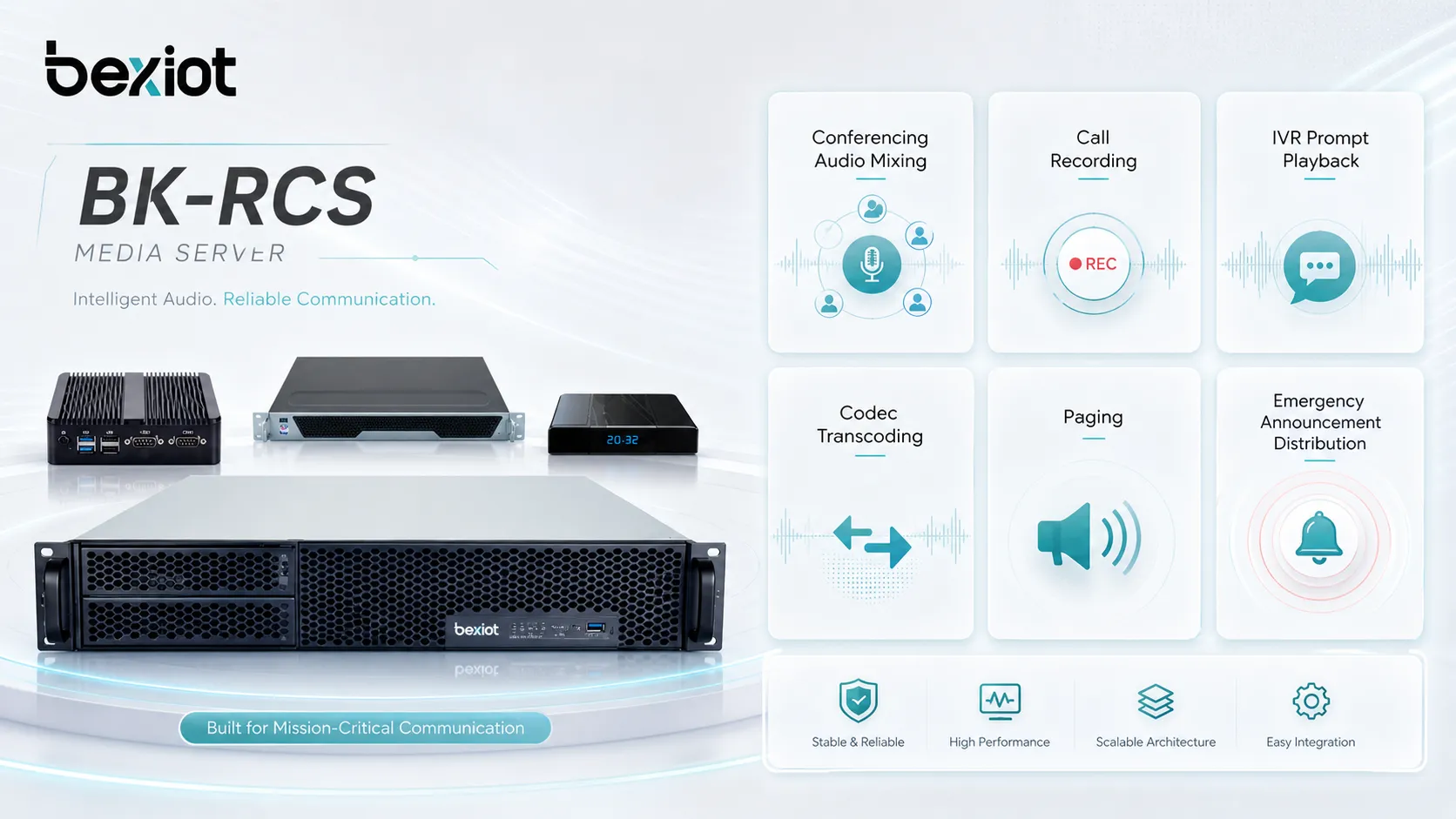
Its main functions include audio mixing, conferencing, call recording, IVR prompt playback, transcoding, media relay, paging distribution, voicemail, video handling, and storage management. These functions help organizations move beyond basic calling and build richer communication workflows.
In integrated communication platforms such as the Becke Telcom BK-RCS server and BK-RCS communication system, media server capability can support dispatch voice, intercom linkage, paging, recording, emergency communication, and multi-system coordination. When deployed with proper capacity planning, network quality, storage policy, security control, and redundancy, a media server becomes a practical foundation for reliable multimedia communication and command operations.
FAQ
What is a media server in simple terms?
A media server is a server that handles audio, video, recordings, announcements, conferences, or other media streams in a communication system. It processes the media that users hear, speak, watch, record, or broadcast.
In telephony systems, it may support voicemail, call recording, IVR prompts, conferencing, and paging.
How does a media server work?
A media server receives instructions from a communication control system, such as a SIP server, IP PBX, dispatch platform, or application server. It then processes media streams by mixing, recording, playing, transcoding, relaying, or distributing them.
The signaling system controls the session, while the media server handles the actual audio or video content.
What are the benefits of a media server?
The benefits include centralized media processing, better scalability, conference support, call recording, prompt playback, codec compatibility, paging distribution, operational recordkeeping, and improved integration between communication services.
It helps communication systems support more advanced functions than simple one-to-one calling.
Where are media servers commonly used?
Media servers are commonly used in IP PBX systems, unified communications, dispatch centers, contact centers, public address systems, emergency broadcasting, video conferencing, intercom systems, and cloud communication platforms.
They are especially useful where real-time voice, video, recording, conferencing, or announcements are required.
How can BK-RCS use media server capability?
In a BK-RCS communication system, media server capability can support dispatch voice, conference communication, intercom linkage, paging announcements, recording, and emergency communication workflows depending on the project configuration.
This helps the BK-RCS server coordinate multiple communication endpoints and media services within a unified command and communication platform.







