


Factory reset is a recovery and maintenance function that restores a device, system, application, gateway, terminal, controller, or software platform to its original default configuration. It is commonly used when equipment needs to be reconfigured, transferred to another user, restored after serious setting errors, or prepared for a clean deployment.
A factory reset is useful because it brings a system back to a known starting point. But it should be used carefully, because it may erase settings, accounts, logs, network parameters, and stored data.
Basic Meaning and Purpose
A factory reset returns a product to the state defined by the manufacturer or system provider. In many devices, this means clearing user-defined settings, restoring default passwords or setup options, removing custom configurations, and returning the interface to its initial setup mode.
The purpose is to remove unwanted changes and create a clean baseline. This can help technicians troubleshoot problems, recover misconfigured equipment, prepare devices for redeployment, or ensure that previous user data is no longer available before transfer or disposal.
Default Settings and Original Configuration
Default settings are the standard values provided by the manufacturer. These may include network mode, admin account status, display language, audio settings, communication parameters, security rules, storage options, and interface preferences.
After a factory reset, the device usually needs to be configured again. For example, a network device may lose its IP address settings, Wi-Fi credentials, SIP account parameters, routing rules, time zone, user permissions, and integration settings.
Difference Between Restart and Factory Reset
A restart simply turns the device or system off and on again. It can clear temporary errors, refresh memory, and reload services without removing configuration. A factory reset is much more significant because it restores default settings and may delete stored data.
This difference matters in maintenance work. Restarting is often the first step for minor issues. Factory reset should usually be considered only when normal troubleshooting, configuration correction, and software recovery cannot solve the problem.
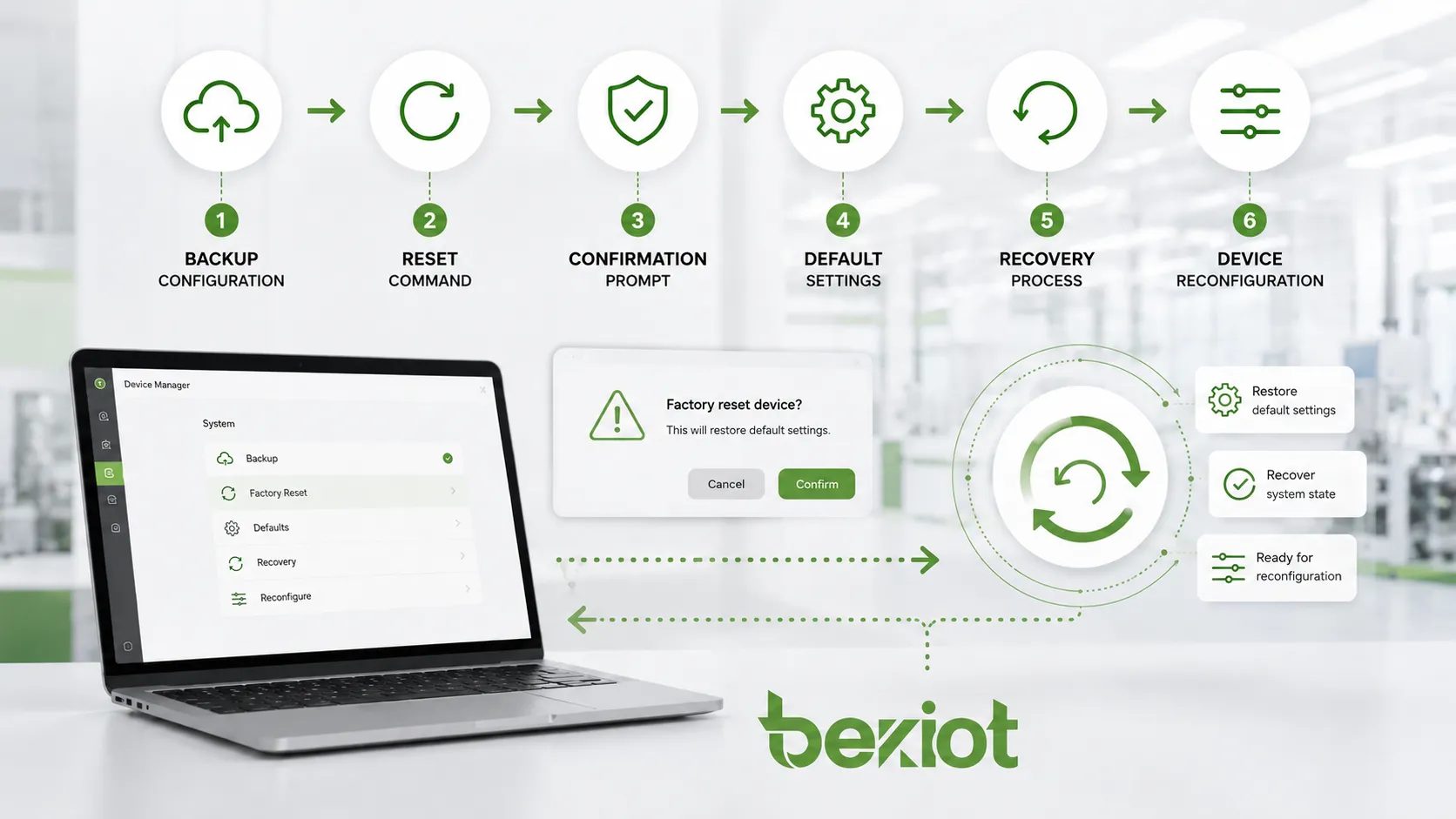
How the Process Usually Works
The factory reset process may be triggered through a hardware button, software menu, web management interface, mobile app, command line, cloud platform, or remote management system. The exact method depends on the device type and manufacturer design.
In most cases, the system asks for confirmation before the reset starts. Some products require an administrator password, long-press button action, reset code, or physical access to prevent accidental or unauthorized reset.
Backup Before Reset
Before performing a factory reset, important data and configuration should be backed up where possible. This may include account information, network settings, call settings, device names, access rules, contact lists, certificates, logs, custom templates, and integration parameters.
Backup is especially important for business systems. A factory reset on a phone, router, gateway, controller, server, or communication terminal may interrupt service if the configuration cannot be restored quickly.
Reset Execution
During reset execution, the system clears selected user data and configuration files, restores default values, restarts services, and may reboot automatically. Some devices complete the process in seconds, while larger systems may require several minutes or longer.
The device should not be powered off during the reset unless the manufacturer specifically instructs it. Power interruption during reset may cause firmware corruption, incomplete recovery, or startup failure.
Reconfiguration After Reset
After the reset, the device normally returns to its initial setup state. The user or technician may need to configure network access, administrator password, time settings, user accounts, service parameters, firmware updates, security settings, and platform connection.
For enterprise and industrial projects, reconfiguration should follow documented commissioning procedures. This helps avoid inconsistent settings between similar devices and reduces future troubleshooting work.
Main Features of Factory Reset
Factory reset is valuable because it provides a defined recovery path. Instead of manually checking every setting, users can return the product to a clean baseline and rebuild the configuration from a known state.
Configuration Cleanup
One major feature is configuration cleanup. Over time, a device may accumulate old accounts, wrong network settings, test parameters, failed integration attempts, temporary rules, or outdated service profiles. A reset can remove these settings quickly.
This is useful when a device has been tested many times, moved between projects, or configured by multiple users. A clean reset prevents old settings from interfering with the next deployment.
Error Recovery
Factory reset can help recover from serious configuration errors. For example, a device may become unreachable after incorrect IP settings, password changes, routing rules, firewall policies, or service parameters. If normal access is not possible, a reset may restore manageability.
However, factory reset does not fix every problem. Hardware failure, damaged firmware, power issues, network faults, corrupted storage, or incompatible software may require other maintenance actions.
Data Removal
Many devices use factory reset to remove stored user data. This may include personal information, call records, Wi-Fi profiles, cached files, account tokens, paired devices, usage history, and local settings.
For privacy and security, factory reset is commonly performed before selling, returning, transferring, or recycling devices. In high-security environments, additional data wiping methods may be required because a simple reset may not always meet strict data sanitization standards.
Deployment Standardization
Factory reset helps standardize deployment. When multiple devices need to be configured for a project, resetting them first ensures that each unit starts from the same baseline.
This is useful for IT equipment, IoT devices, communication terminals, access control devices, industrial gateways, and smart building equipment. After reset, technicians can apply the correct project configuration or import a verified template.
Applications in Different Systems
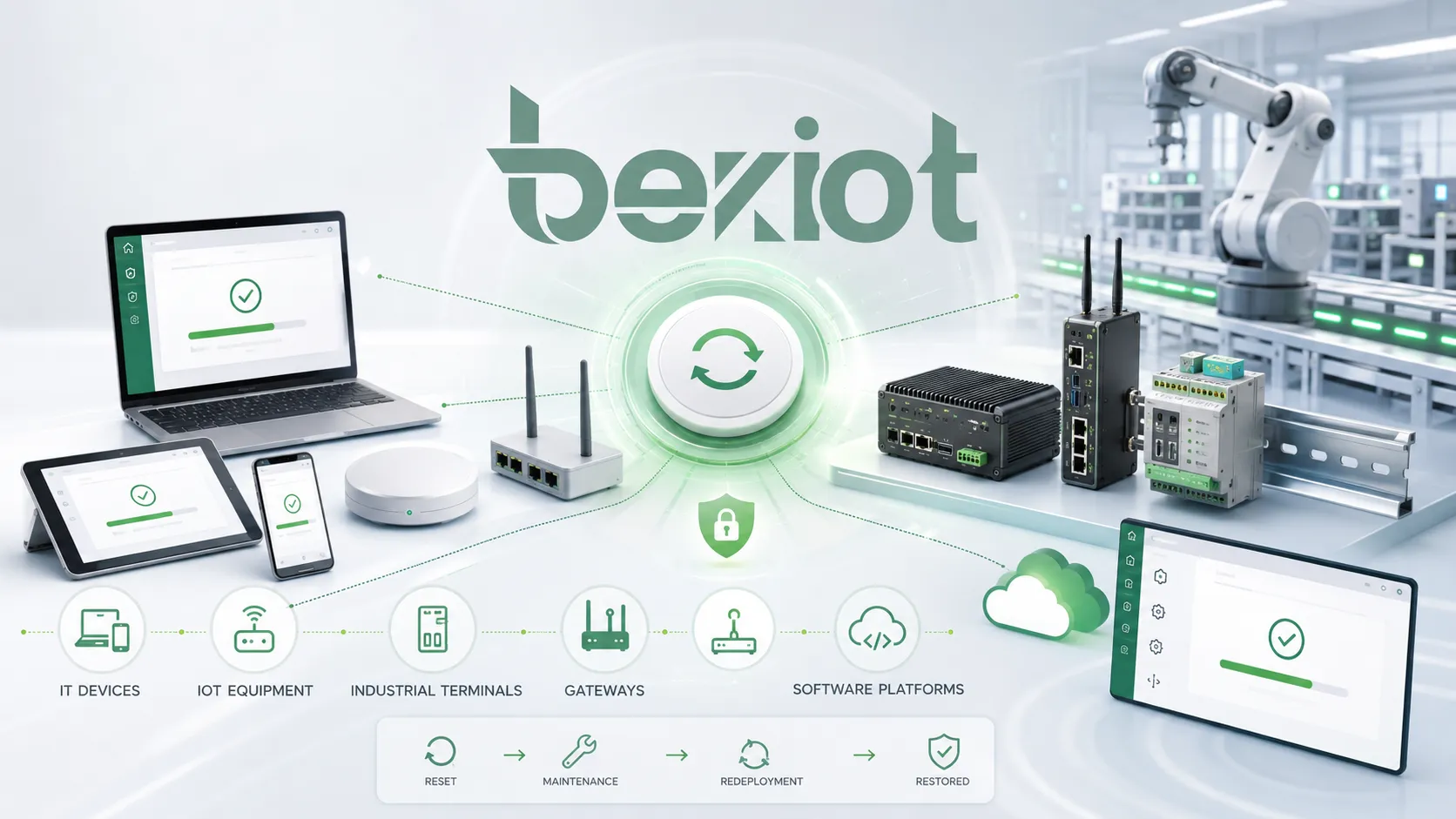
Factory reset is used across many product categories. The function may look simple, but its operational value is important in maintenance, security, commissioning, troubleshooting, and lifecycle management.
Consumer Electronics
Smartphones, tablets, laptops, smart TVs, cameras, routers, and home IoT devices often support factory reset. Users may perform a reset when the device is slow, unstable, locked by wrong settings, or prepared for resale.
In consumer products, factory reset is often combined with account removal, storage cleanup, and initial setup wizard. Users should still back up photos, contacts, files, and authentication data before resetting.
Enterprise IT Equipment
In enterprise environments, factory reset is used for routers, switches, firewalls, access points, servers, workstations, printers, conference systems, and endpoint devices. IT teams may reset equipment before redeployment, inventory transfer, troubleshooting, or decommissioning.
Enterprise resets should follow policy. Devices may contain sensitive data, credentials, certificates, VPN profiles, logs, and business records. Proper documentation and access control are necessary before performing the reset.
Industrial and Communication Devices
Industrial phones, SIP terminals, IP speakers, intercoms, gateways, controllers, and field communication devices may need factory reset during commissioning, maintenance, or project redeployment. Resetting can clear incorrect SIP accounts, IP settings, audio parameters, server addresses, or test configurations.
For industrial communication projects, Becke Telcom devices and related solutions should be reset only by authorized personnel following the project configuration file, network plan, and commissioning record. This helps ensure that field terminals reconnect correctly to SIP servers, dispatch platforms, paging systems, or alarm linkage workflows after reconfiguration.
Software Platforms and Applications
Some software systems offer a reset function to restore default preferences, clear cache, remove local profiles, rebuild configuration, or return a workspace to its original state. This is common in management platforms, mobile apps, embedded systems, and local service tools.
Software reset should be handled carefully if the platform stores user data, logs, database records, license files, or integration credentials. In business systems, a reset may affect multiple users or connected services.
Benefits for Maintenance and Operations
Factory reset can reduce troubleshooting time and improve operational control when used correctly. It gives technicians a reliable way to remove unknown configuration problems and rebuild the system from a controlled baseline.
Faster Troubleshooting
When a device has too many unknown settings, troubleshooting can become slow. A factory reset removes uncertainty and allows technicians to test whether the problem comes from configuration or from hardware, network, firmware, or external systems.
This is especially useful when devices have been handled by multiple teams or used in previous projects. Instead of checking every historical setting, the technician can restart from a clean configuration.
Cleaner Redeployment
Factory reset is useful when devices are moved from one site, user, department, or project to another. It helps remove previous settings and prevents old configuration from causing unexpected behavior in the new environment.
For example, a reused communication terminal should not keep the old SIP account, old server address, old access password, or old emergency contact settings. Resetting and reconfiguring it properly helps avoid project confusion.
Improved Security Hygiene
Factory reset can help remove stored credentials, paired devices, session tokens, and local data. This reduces the chance that the next user can access previous information.
However, organizations should not assume that all factory resets are equal. For sensitive environments, reset should be combined with secure data wiping, account removal, certificate revocation, password policy, and asset disposal procedures.
Risks and Precautions
Factory reset is powerful, but it can create problems if used without preparation. It may erase necessary settings, break system connections, remove evidence logs, or make the device unavailable until reconfiguration is complete.
Possible Data Loss
The most common risk is data loss. Depending on the device, factory reset may delete files, user accounts, call records, configuration profiles, logs, certificates, templates, contacts, or local databases.
Before resetting, users should confirm what will be deleted and what can be backed up. In regulated or security-related environments, logs and evidence records may need to be exported before reset.
Service Interruption
A factory reset can interrupt service because the device may no longer connect to the network, platform, account, server, or management system. This can affect communication, monitoring, access control, automation, or user operation.
For critical systems, reset should be scheduled during a maintenance window or performed with backup equipment available. Operators should be informed before service is interrupted.
Security Exposure After Reset
Some devices return to default usernames, passwords, open network settings, or simple setup modes after factory reset. If the device is connected to a live network before being secured, it may create risk.
After reset, the first steps should include changing default passwords, applying security settings, updating firmware where required, disabling unused services, and restoring approved access control rules.
Factory Reset Compared with Related Actions
Factory reset is often confused with restart, soft reset, hard reset, firmware upgrade, and data wipe. These actions may overlap, but they serve different purposes.
| Action | Main Purpose | Typical Result |
|---|---|---|
| Restart | Reload the device or service | Temporary issues may clear, but settings remain |
| Soft Reset | Reset part of the system or clear temporary state | Some settings may remain unchanged |
| Factory Reset | Restore default manufacturer or system settings | User settings and local data may be removed |
| Firmware Upgrade | Install a newer system version | Software changes, settings may or may not remain |
| Secure Data Wipe | Remove data more thoroughly for privacy or compliance | Data recovery becomes more difficult or impossible |
Factory Reset and Firmware Upgrade
A firmware upgrade updates the system software. It may fix bugs, add features, improve security, or support new compatibility. A factory reset restores configuration to default values. These are different operations.
Sometimes technicians perform a factory reset after a firmware upgrade to avoid conflicts with old settings. This should only be done when recommended by the manufacturer or required by the project procedure.
Factory Reset and Secure Erase
Factory reset may remove user-visible data and settings, but it is not always the same as secure erase. Secure erase is designed to make data recovery difficult by overwriting or cryptographically removing stored data.
For ordinary troubleshooting, factory reset may be enough. For device disposal, resale, compliance, or sensitive data protection, secure erase or certified data destruction may be required.
Best Practices for Safe Use
A factory reset should be treated as a controlled maintenance action, especially in business, industrial, and communication systems. Good preparation reduces downtime and avoids unnecessary configuration loss.
Confirm the Reason
Before resetting, confirm why the reset is needed. Common reasons include serious misconfiguration, device redeployment, lost access, testing cleanup, security preparation, or unresolved software instability.
If the issue can be solved by changing one setting, restarting a service, restoring a backup, or updating firmware, a full factory reset may not be necessary.
Back Up and Record Settings
Important settings should be exported or recorded before reset. These may include IP address, subnet mask, gateway, DNS, VLAN, SIP account, server address, admin users, certificates, device name, time settings, alarm rules, and integration parameters.
For multi-device projects, configuration templates and asset records should be maintained. This makes it easier to restore devices consistently after reset.
Reset Under Authorization
Only authorized users should perform factory reset. In managed environments, reset permission should be limited to administrators, maintenance engineers, or approved technicians.
Unauthorized reset can cause data loss, service interruption, security exposure, or evidence destruction. For critical systems, reset actions should be logged and approved according to maintenance procedures.
Secure the Device After Reset
After reset, the device should not be left in a default or unprotected state. Change default passwords, restore approved configuration, disable unused services, update firmware if needed, and verify that the device reconnects to the correct management or service platform.
Final testing should confirm network connectivity, user access, communication function, alarm linkage, time synchronization, and all project-specific operating requirements.
FAQ
What does factory reset mean?
Factory reset means restoring a device, system, or application to its original default configuration. It usually removes user-defined settings and may delete stored data, accounts, logs, or local files depending on the product design.
Does factory reset delete everything?
Not always. Some factory resets remove all user data, while others only restore configuration settings. The exact result depends on the device, software version, storage design, and reset option selected.
When should factory reset be used?
Factory reset is commonly used when a device is seriously misconfigured, prepared for redeployment, transferred to another user, recovered after lost access, cleaned after testing, or prepared for resale or disposal.
Is factory reset the same as restart?
No. Restart only reloads the device or system and usually keeps all settings. Factory reset restores default settings and may erase stored data. It is a deeper recovery action than a simple restart.
What should be done before factory reset?
Before factory reset, back up important data, export configuration files, record network and account settings, confirm administrator access, check manufacturer instructions, and plan reconfiguration steps after reset.
Can factory reset fix all device problems?
No. Factory reset can fix many configuration-related problems, but it cannot repair damaged hardware, unstable power supply, network faults, corrupted firmware, or incompatible system design. Further troubleshooting may still be required.







