


A dispatch telephone is not just a standard office IP phone. It is designed for duty rooms, control centers, emergency desks, industrial dispatch rooms, monitoring centers, transportation operation rooms, and other communication environments where fast response and reliable operation matter. In these scenarios, users often need hands-free communication, one-touch calling, paging, monitoring, intercom, video display, and integration with IP PBX or SIP-based platforms.
As enterprise and industrial telephone systems move toward IP-based communication, most modern dispatch phones now use VoIP technology. With a network cable, an IP PBX, a softswitch system, or a SIP server, users can build a more flexible dispatch communication environment. Since SIP is the mainstream protocol in VoIP systems, a SIP-compatible dispatch phone can usually interoperate with many IP communication platforms, SIP endpoints, paging systems, and command applications.
However, SIP compatibility alone is not enough. A good dispatch telephone should match the real workflow of the control room. Operators need to speak clearly, keep both hands free, call common contacts quickly, hear important audio in noisy rooms, view video when needed, and connect the phone screen to larger displays when the project requires group monitoring.
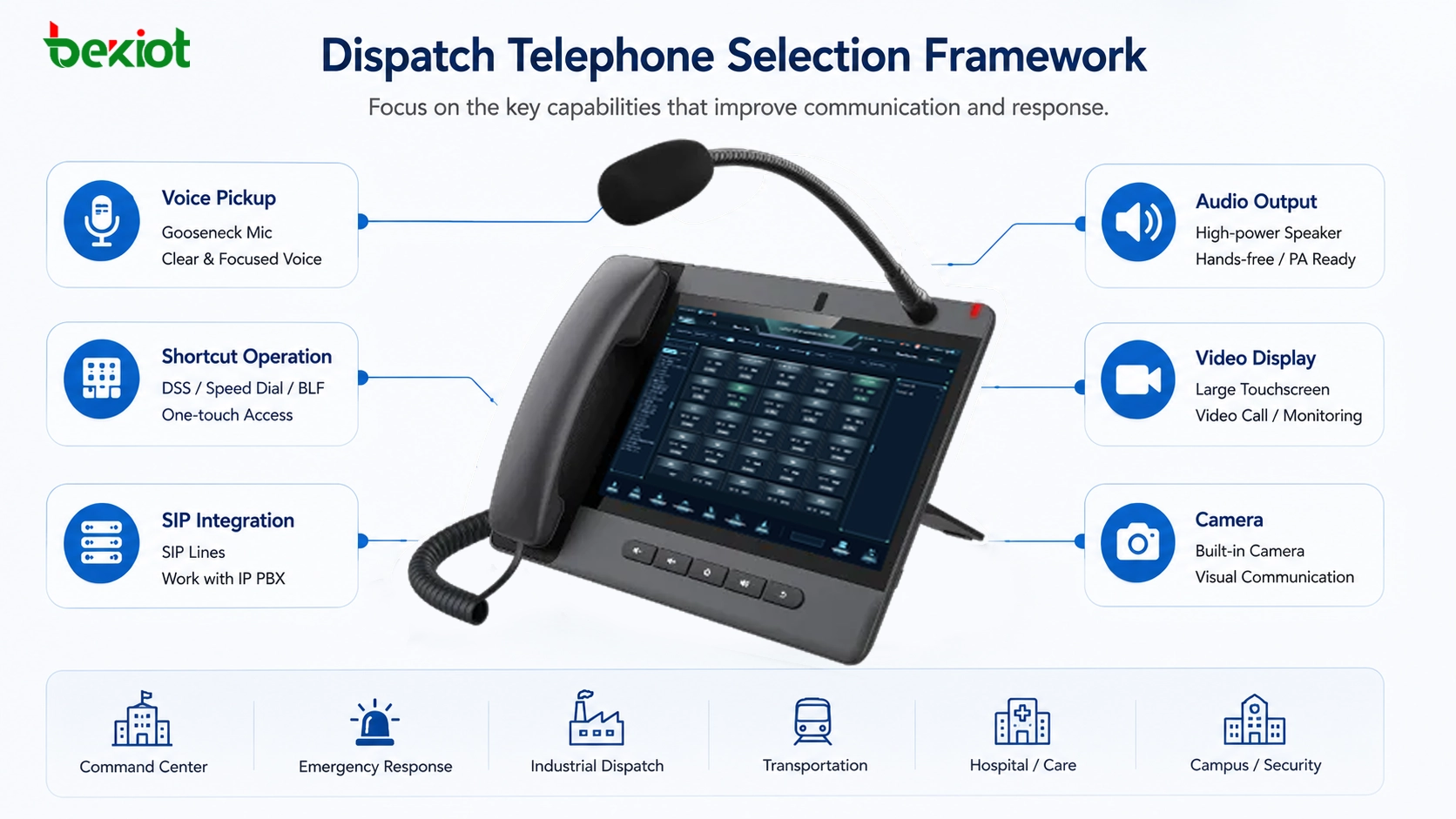
Start from the Operator’s Workflow
The first step in selecting a dispatch telephone is to understand how the operator works. In a control room, the operator may need to answer calls, monitor alarms, check a computer screen, record events, issue paging messages, and coordinate with multiple teams at the same time. If the user must hold a handset throughout the process, work efficiency is reduced.
This is why a dispatch phone should support convenient hands-free operation. A gooseneck microphone is especially useful because it allows the operator to speak while keeping both hands available for keyboard, mouse, dispatch software, event logs, or monitoring controls. Compared with ordinary speakerphone pickup, a directional gooseneck microphone can reduce unnecessary background noise and improve voice clarity.
For duty rooms, industrial control centers, and emergency desks, this small design difference has real operational value. Clearer pickup reduces repeated confirmation, improves command accuracy, and makes long-duration duty work easier.
Directional Pickup Improves Communication Quality
Hands-free calling is helpful, but not all hands-free modes are suitable for dispatch environments. A normal built-in speakerphone microphone usually has a wider pickup range. It may collect keyboard noise, air-conditioning noise, nearby conversations, and other room sounds. This can make the receiving side hear more background noise than useful speech.
A professional gooseneck microphone solves this problem by focusing more directly on the speaker. It is suitable for monitoring centers, management offices, industrial duty rooms, highway control rooms, railway operation rooms, campus security centers, and other environments where clear voice instructions are required.
For Becke Telcom dispatch console products, the gooseneck microphone design is part of the command and paging workflow. It helps operators maintain clearer voice communication during daily management, emergency coordination, and multi-department dispatch.
Programmable Keys Make Response Faster
In dispatch work, many calls are repeated. Operators often need to contact the same departments, posts, extensions, radio channels, emergency phones, paging zones, intercom points, or management terminals. Searching contacts manually each time is slow and creates unnecessary pressure in urgent situations.
A dispatch telephone should therefore support programmable function keys. These keys can be configured for speed dial, BLF status, multicast paging, frequently used contacts, emergency groups, or system functions. When a situation occurs, the operator can press one key to start communication instead of navigating through menus.
This is especially important in multi-department coordination. For example, a control room may need to call security, maintenance, fire response, gate control, production line staff, or an emergency communication terminal. Custom keys make the phone interface more intuitive and reduce operation time.
A dispatch phone should reduce the number of steps between an event and a response. Programmable keys are one of the simplest ways to achieve that.
Speaker Output Matters in Control Rooms
Dispatch rooms are not always quiet. There may be multiple operators, computers, monitoring screens, alarms, radio audio, and background equipment noise. If the dispatch phone speaker is too weak, the operator may miss important information or need to repeat calls.
A dispatch telephone with stronger audio output is useful in these environments. It can make incoming voice, paging messages, and intercom audio easier to hear. In some projects, the phone audio may also need to be connected to an external speaker system, a mixer, or a public address system so that important communication can be shared with a wider group in the room.
For command and duty applications, audio output should not be evaluated only by volume. Clarity, echo control, noise reduction, hands-free performance, and speaker stability are also important. A loud but unclear phone will not solve the real dispatch problem.
Large Screens Help When Video Is Part of the Job
Many modern dispatch environments are no longer voice-only. Video intercom, monitoring linkage, SIP video calling, emergency call box video, and control-room visual confirmation are becoming common. If the project includes video communication, a large-screen dispatch phone can provide a better viewing experience than a small ordinary IP phone display.
A larger screen also supports more intelligent interaction. It can display contacts, shortcut keys, video calls, broadcast controls, app interfaces, and platform functions. For Android-based dispatch phones, the operating system can support third-party applications and more customized workflows.
When selecting a visual dispatch phone, engineers should also check video decoding capability and processing performance. A large screen is valuable only when the phone can display video smoothly, support the required codec, and remain stable during long working hours.
Camera and Display Output Expand Use Cases
For visual dispatch, video capture is also important. A dispatch phone with a built-in camera can support two-way video calling, visual confirmation, remote consultation, management communication, and emergency response workflows. This is useful in command centers, hospitals, property management, industrial parks, transportation systems, and public service environments.
In some control rooms, the phone screen itself may still not be large enough for group viewing. If the dispatch phone or related system supports video output to external displays, the same interface or video call can be shown on a monitor, large screen, or command display wall. This allows more people to view the same information during coordination.
For project design, the key is to decide whether the dispatch phone is used only as a voice terminal, or whether it also needs to become a small visual command endpoint. This decision affects screen size, camera requirement, codec support, installation position, and integration method.
Becke Telcom Console Options for Different Needs
For projects that need SIP paging, visual dispatch, and command-room communication, Becke Telcom provides several dispatch console options that can be selected according to the operator’s workflow. Instead of choosing only by model name, project teams should first decide whether the site mainly needs shortcut paging, visual communication, or a larger touchscreen interface.
| Console Type | Suitable Scenario | Typical Product Option |
|---|---|---|
| Key-rich SIP paging console | Frequent paging, shortcut calling, BLF status, and command-room voice dispatch | BX210i |
| Visual paging console | Video calling, monitoring linkage, Android-based applications, and hands-free communication | GP308i |
| Large-screen visual console | Touchscreen operation, video dispatch, management desks, and intelligent command scenarios | GP320i |
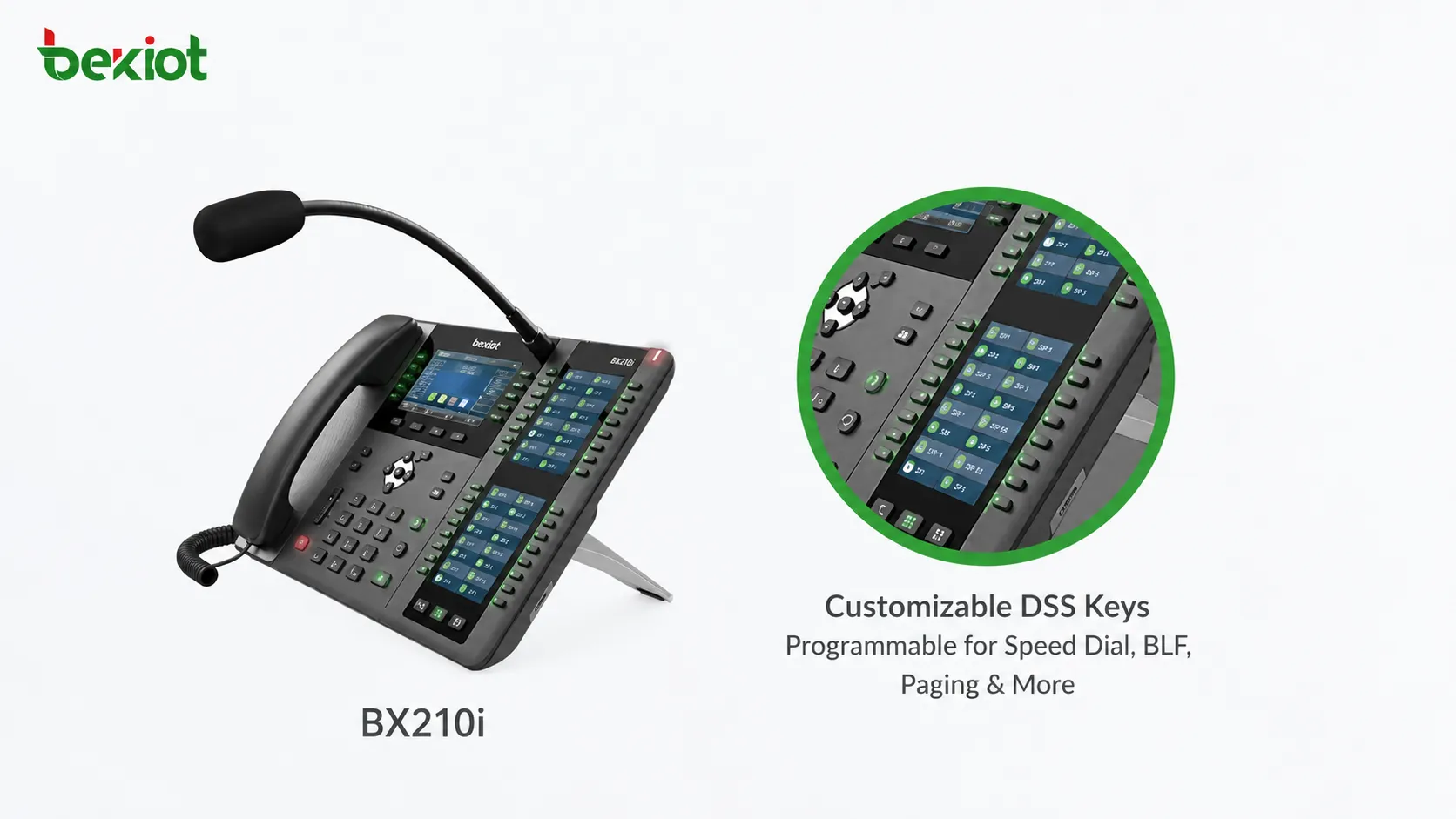
This light product mapping helps integrators select a suitable console without turning the article into a product specification sheet. For detailed parameters, the final selection should still be based on the project’s SIP platform, display requirements, paging workflow, installation method, and operator habits.
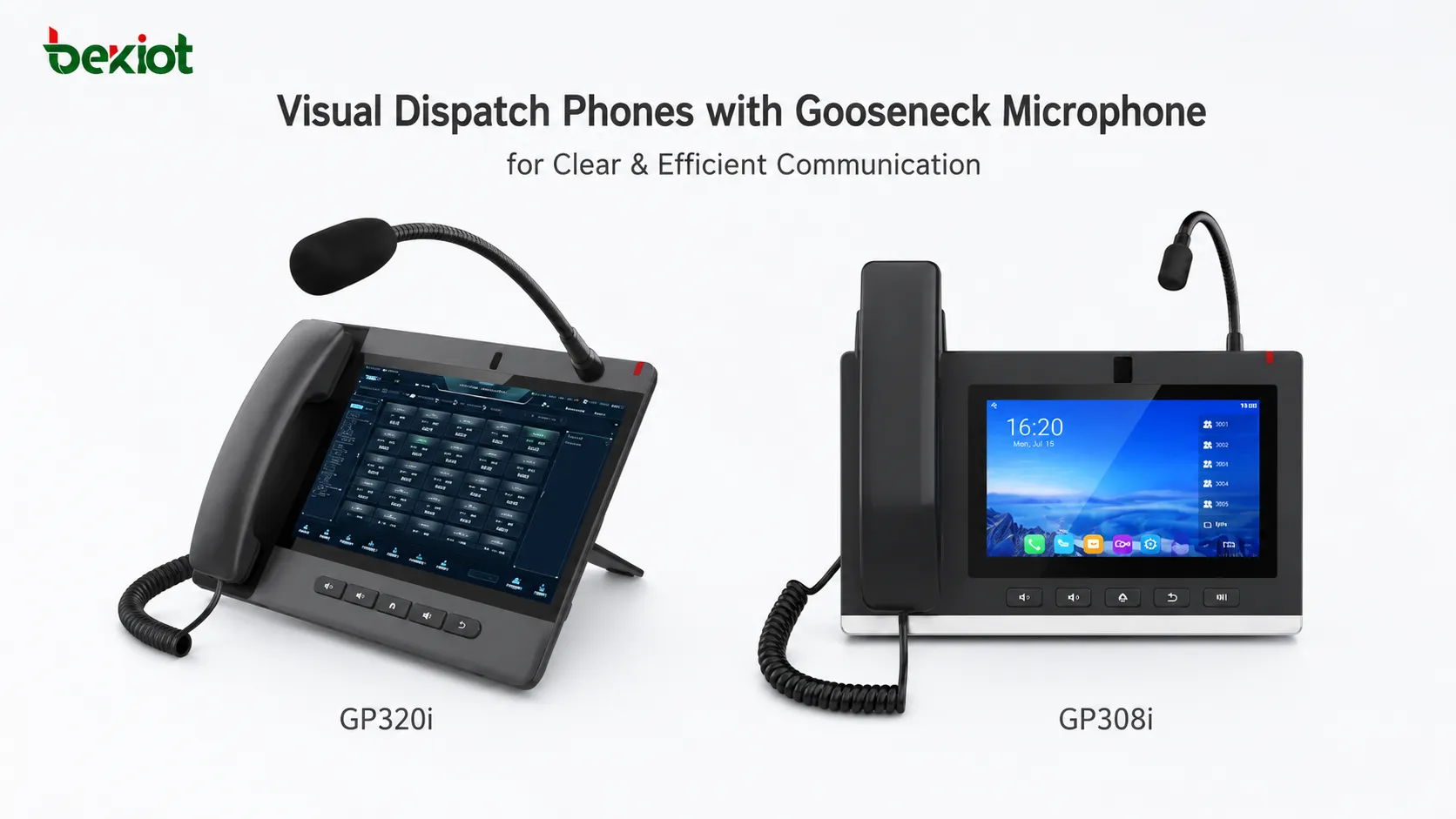
Match the Device to the Scenario
Different dispatch environments require different device priorities. A duty office that mainly handles voice calls and shortcut paging may value DSS keys, gooseneck pickup, SIP lines, and speaker performance more than video. In this case, a key-rich SIP paging console is usually a practical choice.
A monitoring center or industrial control room may require video call capability, loud hands-free communication, and application support. In this case, a visual dispatch console with a medium-size screen can provide a balanced communication endpoint for daily monitoring and emergency coordination.
A management center, nurse station, emergency desk, or intelligent dispatch position may need a larger screen, stronger video interaction, wireless connectivity, headset support, and a more comfortable touchscreen workflow. For these scenarios, a large-screen visual console is more suitable.
Technical Checks Before Deployment
Before deploying a dispatch telephone, engineers should verify SIP registration, IP PBX compatibility, codec support, network design, power supply method, and security policy. If the phone will be used for paging or monitoring, multicast behavior, BLF status, DSS key configuration, and group calling should be tested before acceptance.
For visual dispatch phones, video codecs, camera behavior, screen display, video conference capability, and app compatibility should also be checked. If the device is used in noisy environments, hands-free audio performance, gooseneck microphone pickup, noise reduction, and speaker loudness should be tested under real site conditions.
Installation method is another practical factor. Some phones are placed on control desks, while others may need wall-mounted installation, nurse station deployment, security room use, or management office placement. The best device is not always the one with the most functions, but the one that fits the actual operation process.
| Selection Area | What to Check | Why It Matters |
|---|---|---|
| Voice pickup | Gooseneck microphone, directionality, noise reduction | Improves speech clarity and frees the operator’s hands |
| Shortcut operation | DSS keys, BLF, speed dial, multicast, group call | Reduces response time during daily dispatch and emergencies |
| SIP integration | SIP lines, IP PBX compatibility, codec support | Ensures interoperability with VoIP and command platforms |
| Audio output | Speaker loudness, full-duplex performance, external audio needs | Helps operators hear clearly in busy or noisy rooms |
| Visual communication | Screen size, camera, H.264 support, video conference capability | Supports video dispatch, visual confirmation, and remote collaboration |
| Deployment design | PoE, dual Ethernet, Wi-Fi, Bluetooth, wall or desktop installation | Improves installation flexibility and long-term maintainability |
Where Dispatch Phones Are Most Useful
SIP dispatch phones are useful in many environments where operators must coordinate people, devices, alarms, and communication resources. Typical applications include emergency command centers, industrial control rooms, security duty rooms, transportation operation centers, railway and metro stations, smart parks, hospitals, elderly care facilities, campuses, factories, ports, tunnels, and energy sites.
In these scenarios, the dispatch phone becomes more than a calling device. It can act as a local command terminal, paging microphone, intercom host, monitoring station, visual communication endpoint, or emergency response interface. When connected with IP PBX, SIP servers, public address systems, intercom endpoints, emergency call boxes, and dispatch platforms, it becomes part of a broader communication architecture.
For Becke Telcom projects, dispatch phones can be selected together with SIP intercoms, industrial telephones, paging speakers, gateways, and converged communication platforms. This helps system integrators build a more complete voice, video, intercom, paging, alarm, and command solution.
Conclusion
Choosing a dispatch telephone is not the same as choosing a standard office phone. A real dispatch environment requires clearer voice pickup, faster one-touch operation, stronger audio output, SIP platform compatibility, video capability, camera support, and flexible deployment. These factors directly affect communication efficiency, operator workload, and emergency response performance.
A gooseneck microphone helps operators speak clearly while keeping both hands free. Programmable DSS keys reduce the time needed to contact common users and devices. Strong speaker output improves audibility in busy rooms. Large screens, cameras, and video codecs make visual dispatch possible. SIP compatibility allows the phone to connect with IP PBX, softswitch, paging, intercom, and command platforms.
For projects that need industrial-grade dispatch communication, Becke Telcom can provide suitable SIP paging and visual dispatch console options for voice paging, video communication, intercom linkage, and intelligent command workflows. The final choice should always be based on real site requirements, platform integration needs, and the operator’s daily workflow.
FAQ
What is a dispatch telephone?
A dispatch telephone is a communication terminal designed for duty rooms, command centers, control rooms, and management stations. It usually supports SIP calling, hands-free communication, programmable keys, paging, monitoring, intercom, and sometimes video communication.
Why is a gooseneck microphone important?
A gooseneck microphone allows the operator to keep both hands free while speaking. Its directional pickup helps reduce background noise and improves voice clarity, which is important in busy dispatch environments.
Why do dispatch phones need programmable keys?
Programmable keys allow operators to configure speed dial, BLF, multicast, emergency contacts, paging zones, or frequently used extensions. This reduces operation time and improves response efficiency.
When should I choose a visual dispatch phone?
A visual dispatch phone is suitable when the project requires video calls, monitoring linkage, visual confirmation, large-screen interaction, or Android application support.
How should I choose the right dispatch console?
If the project mainly needs voice paging and shortcut operation, choose a key-rich SIP paging console. If the project needs video calling and visual confirmation, choose a visual dispatch console. If the operator needs a larger touchscreen, camera, wireless connectivity, and more flexible interaction, choose a large-screen visual console.







