


Why Recorded Information Matters
Recording playback is the function that allows users to access, replay, search, review, and analyze previously recorded audio, video, calls, meetings, system events, or communication sessions. It is widely used in security monitoring, call centers, dispatch systems, video surveillance, online meetings, education platforms, healthcare, transportation, industrial operations, and compliance management.
In many systems, recording is only the first step. The real value appears when users can quickly find the right record, play it clearly, confirm what happened, extract useful details, and use the information for decision-making. A well-designed recording playback function turns stored data into traceable evidence, training material, service records, and operational intelligence.
Recording playback is not simply “playing an old file.” It is a structured review process that helps organizations understand past events, verify facts, and improve future actions.
Basic Definition and Purpose
Recording playback refers to the process of retrieving and playing stored media or event records from a recording system. The recorded content may include voice calls, video streams, screen recordings, conference sessions, radio communication, intercom conversations, public address events, alarm-triggered clips, or operator actions.
The main purpose is to make historical information usable. Users may need to confirm a customer conversation, investigate a security incident, review an emergency response, evaluate staff performance, verify compliance, or reconstruct the timeline of a system event.
Recording and Playback as a Complete Process
Recording captures the original content and stores it in a defined format. Playback retrieves that stored content and presents it to the user through a software interface, web platform, mobile app, control console, video management system, or archive tool.
A complete recording playback system usually includes capture, encoding, storage, indexing, search, authorization, playback control, export, retention management, and audit logging. If any part of this chain is weak, users may find it difficult to locate or trust the recorded information.
What Can Be Played Back
Recording playback may apply to audio, video, metadata, text logs, screenshots, screen sharing, alarm events, map tracks, chat messages, or system operation records. In some platforms, playback can combine several sources into one timeline.
For example, a control room may review a video clip together with a call recording, alarm log, access control event, and dispatch note. This synchronized playback helps operators understand not only what was said, but also what was happening in the surrounding environment.
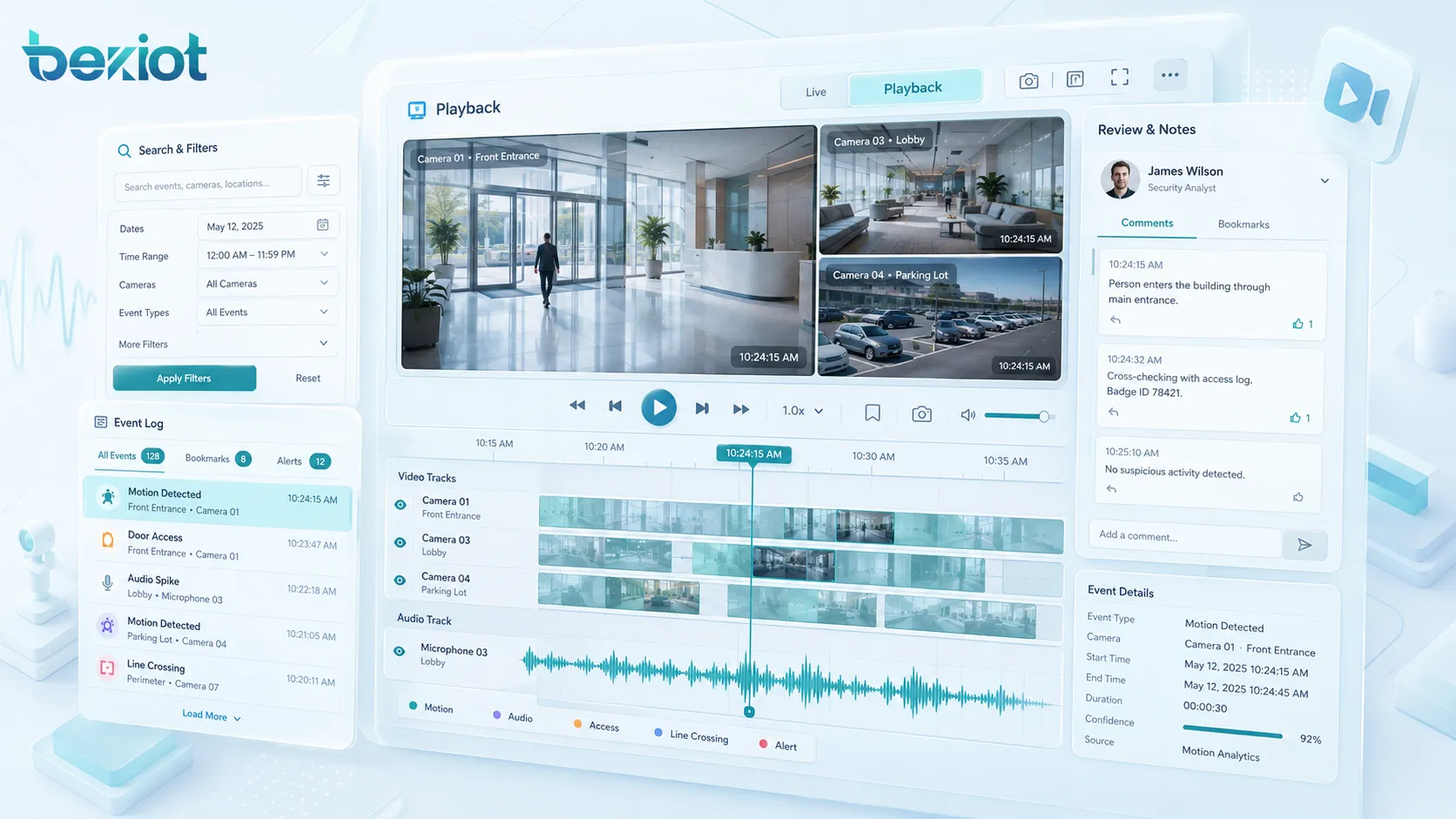
How the Playback Workflow Works
The playback workflow begins when a user searches for a record. The search may be based on time, date, caller, camera, channel, device, user, event type, alarm source, file name, tag, location, or case number. The system then retrieves the matching record from local storage, network storage, cloud storage, or archive media.
After the record is found, the playback engine decodes the file, synchronizes related data if available, and presents it with controls such as play, pause, fast-forward, rewind, timeline jump, volume adjustment, speed control, snapshot, bookmark, and export.
Indexing and Search
Indexing is essential for efficient playback. Without indexing, users may need to manually browse large volumes of recordings. An indexed system can locate records based on structured data such as time range, device ID, user account, phone number, extension, alarm type, or recording category.
Advanced systems may support full-text search for transcribed speech, object search in video, face or license plate search where legally permitted, tag-based retrieval, and incident-based grouping. These functions reduce review time and make recorded content more useful.
Decoding and Media Presentation
Recorded files are usually compressed to save storage space. During playback, the system decodes the file so that users can hear audio, view video, or see related data. The playback quality depends on the original recording quality, codec, bitrate, storage condition, network bandwidth, and playback software.
If the system stores low-quality audio or heavily compressed video, playback may not provide enough detail for investigation. For critical applications, recording settings should balance storage cost with review quality.
Access Control and Audit Trail
Playback should be protected by access control. Not every user should be able to view, replay, export, or delete sensitive recordings. Permissions may depend on department, role, incident level, data type, or legal requirement.
An audit trail records who accessed a recording, when it was played, whether it was exported, and what action was taken. This is important for privacy, compliance, evidence protection, and internal accountability.
Main Features of Recording Playback
A practical recording playback system should make records easy to find, easy to review, and difficult to misuse. The most valuable features are not only playback buttons, but also search, synchronization, tagging, security, export control, and retention management.
Timeline Playback
Timeline playback allows users to move through recorded content by time. This is useful when reviewing incidents because users can jump to a specific moment before, during, or after an event. Some systems display multiple channels on one timeline so that users can compare related recordings.
For example, a security team may review one camera before the alarm, another camera after the alarm, and an intercom call during the same period. Timeline playback helps connect these details into a complete event sequence.
Fast Search and Filtering
Search and filtering help users quickly narrow down large recording libraries. Common filters include date, time, device, user, channel, file type, location, alarm event, call direction, call duration, or recording status.
This feature is especially important in organizations that record continuously or handle many daily calls. Without search filters, finding one important recording may take too long, reducing the value of the entire system.
Playback Speed Control
Playback speed control allows users to review content faster or slower than normal. Faster playback helps reviewers scan long recordings quickly, while slower playback helps analyze difficult audio, detailed actions, or short video moments.
In call review, speed adjustment can improve quality inspection efficiency. In video investigation, slow playback can help identify movement, sequence, timing, or object behavior more clearly.
Bookmarks and Event Tags
Bookmarks and tags allow users to mark important points in a recording. A reviewer may tag a customer complaint, emergency instruction, alarm confirmation, equipment failure, safety violation, or key decision point.
Tags make future retrieval easier. They also help teams build case files, training examples, quality review samples, and incident reports without repeatedly searching the same recording.
Export and Evidence Protection
Export allows authorized users to save a recording clip for reporting, training, legal review, insurance claims, or external investigation. Exported files may include watermarks, timestamps, digital signatures, user information, or evidence numbers.
For sensitive environments, export should be strictly controlled. The system should prevent unauthorized copying and should record every export action. Evidence integrity is important when recordings may be used in formal investigation or compliance review.
System Value for Operations
Recording playback creates value because it helps organizations move from memory-based judgment to evidence-based review. Instead of relying only on verbal reports, managers and investigators can check recorded facts.
Improved Incident Verification
During an incident, different people may describe events differently. Recording playback helps verify what actually happened. Audio, video, timestamps, and event logs can clarify the sequence of actions and reduce misunderstanding.
This is valuable in security incidents, emergency calls, service disputes, workplace accidents, equipment alarms, traffic events, and public safety operations. Reliable playback supports faster and fairer decision-making.
Better Training and Quality Improvement
Recordings can be used for training. Supervisors can review real conversations, emergency responses, dispatch instructions, customer service calls, or operator actions to identify good practices and improvement areas.
In call centers, playback helps evaluate communication quality, script compliance, response accuracy, and customer experience. In control rooms, playback can support scenario review and improve future response workflows.
Compliance and Accountability
Many industries require records for compliance, safety, dispute resolution, or audit purposes. Recording playback helps prove that procedures were followed, notifications were sent, calls were handled, or operational decisions were made at a specific time.
Accountability does not only mean finding mistakes. It also protects staff and organizations by providing objective records when questions arise after an event.
Operational Analysis
Playback data can reveal patterns. Long call handling time, repeated alarm events, unclear communication, slow dispatch response, frequent equipment faults, or recurring customer complaints can all be identified through systematic review.
When combined with reports and analytics, recording playback supports continuous improvement in service, safety, maintenance, training, and workflow design.
Common Application Areas
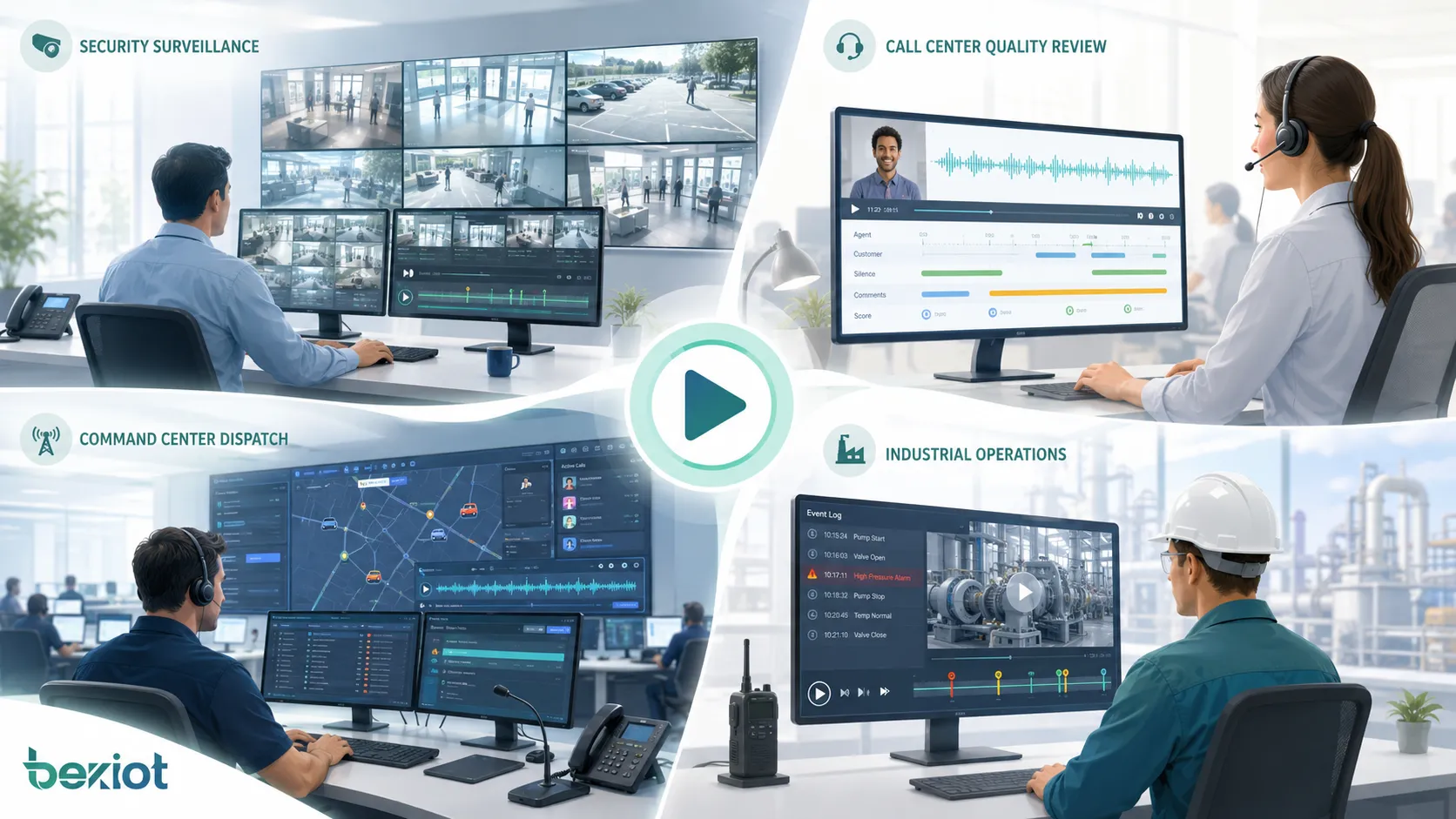
Recording playback is used wherever past audio, video, or event records need to be reviewed. Its role changes by industry, but the core value remains the same: traceability, verification, learning, and control.
Security and Video Surveillance
In video surveillance, playback allows security teams to review recorded footage after alarms, access events, suspicious activity, accidents, or facility incidents. Users may search by camera, time, location, motion event, or alarm trigger.
Video playback is often combined with snapshots, bookmarks, evidence export, and multi-camera synchronization. This helps security teams reconstruct movement across different areas and understand the full incident path.
Call Centers and Customer Service
Call centers use recording playback to review customer conversations, verify service quality, handle disputes, train agents, and monitor compliance. Supervisors can search recordings by agent, customer number, queue, call time, or case ID.
Playback helps teams improve communication skills and service consistency. It also provides evidence when customers question what was promised, explained, or confirmed during a call.
Dispatch and Command Centers
Dispatch and command centers may record voice calls, radio communication, intercom sessions, video feeds, alarms, and operator actions. Playback helps review emergency response, verify instructions, and analyze coordination quality.
In critical operations, synchronized playback is valuable because it can show when an alarm occurred, when the dispatcher responded, when field teams were contacted, and how the incident was closed.
Education and Online Meetings
Education platforms and meeting systems use recording playback for course review, remote learning, meeting minutes, training sessions, and knowledge sharing. Users can replay lectures, presentations, discussions, screen sharing, and Q&A sessions.
Searchable recordings and chapter markers make long sessions easier to review. Some platforms also use transcription to help users find specific topics without watching the entire recording.
Industrial and Facility Operations
Industrial sites and facilities may use recording playback for control room review, machine operation analysis, safety inspection, alarm confirmation, maintenance training, and accident investigation.
When video, audio, sensor data, and event logs are connected, playback can help engineers understand equipment behavior before and after a fault. This supports root cause analysis and maintenance improvement.
Storage, Retention, and File Management
Recording playback depends on reliable storage. If files are missing, corrupted, poorly indexed, or deleted too early, playback cannot support review or evidence needs. Storage planning should be part of the system design from the beginning.
Storage Capacity Planning
Storage capacity depends on recording type, resolution, bitrate, frame rate, codec, number of channels, recording schedule, and retention period. Continuous high-definition video requires much more storage than event-based audio recording.
Organizations should estimate daily recording volume and long-term retention needs before deployment. They should also consider backup, redundancy, archive strategy, and future expansion.
Retention Rules
Retention rules define how long recordings are kept. Some records may only need short-term storage, while compliance, legal, safety, or incident-related records may require longer retention.
Retention should follow applicable laws, industry requirements, company policy, and privacy rules. Automatic deletion can reduce storage pressure, but important evidence should be protected from being removed too early.
File Integrity and Backup
File integrity ensures that recordings can still be played when needed. Systems may use checksums, protected storage, redundant disks, backup copies, or cloud archive to reduce the risk of data loss.
Backup is especially important for critical recordings. If the main storage fails, organizations should still be able to recover important records within an acceptable time.
Privacy and Security Considerations
Recording playback often involves sensitive information. Audio may include personal conversations, customer data, emergency details, or business discussions. Video may capture people, restricted areas, or confidential activities. Therefore, privacy and security must be carefully managed.
Permission Control
Playback permission should follow the principle of least privilege. Users should only access recordings needed for their role. For example, a quality supervisor may access call recordings for assigned teams, while a security administrator may access incident-related video files.
Permission control should cover viewing, downloading, exporting, deleting, sharing, and retention changes. Sensitive recordings may require higher-level approval before export.
Encryption and Secure Transmission
Recordings should be protected during storage and transmission where required. Encryption, secure login, HTTPS access, VPN, watermarking, and access logs can help reduce unauthorized use.
Remote playback should be especially protected because recordings may be accessed outside the local network. Weak passwords, shared accounts, and public links can create serious data security risks.
Legal and Consent Requirements
Recording laws and consent requirements vary by country, region, industry, and use case. Some environments require notification before recording calls, meetings, or video. Some require special handling for personal data.
Organizations should define recording policies clearly and consult applicable legal requirements. Playback access should also follow those policies, especially when records contain private or regulated information.
Selection Factors for a Playback System
Choosing a recording playback system requires more than checking whether it can play files. The system should support the required record types, search speed, playback quality, security level, storage model, export controls, and integration needs.
| Selection Factor | Why It Matters | What to Check |
|---|---|---|
| Search capability | Users need to find records quickly | Time, device, user, event, tag, channel, keyword, case ID |
| Playback quality | Review depends on clear audio and video | Codec, resolution, bitrate, audio clarity, synchronization |
| Access control | Recordings may contain sensitive information | Role permissions, audit logs, export approval, user authentication |
| Storage management | Large recording volumes require planning | Retention, backup, archive, redundancy, capacity expansion |
| Integration | Playback may need related event data | Alarm linkage, call records, video systems, logs, case management |
Single-Channel and Multi-Channel Playback
Single-channel playback is suitable when users only need to review one audio file, call, camera, or meeting. Multi-channel playback is more useful when several related recordings must be reviewed together.
For example, a security incident may involve multiple cameras and one intercom call. A dispatch event may involve radio audio, operator voice, alarm logs, and video. Multi-channel playback helps align these records in time.
Local, Network, and Cloud Playback
Playback may be based on local storage, network video recorders, centralized servers, or cloud platforms. Local playback can be simple and fast for small systems. Centralized or cloud playback is more suitable for multi-site access and large-scale management.
The choice should consider bandwidth, data security, storage cost, disaster recovery, remote access, and regulatory requirements. For critical systems, hybrid storage may be used to balance speed and resilience.
User Interface Design
A good playback interface should be easy to operate under real work conditions. Users should be able to search, filter, play, pause, jump to time, adjust speed, add tags, export clips, and view related information without unnecessary complexity.
In control rooms and service centers, interface efficiency matters. A confusing playback tool can slow investigation and reduce the value of recorded data.
Common Problems and How to Avoid Them
Recording playback problems often appear only when a record is urgently needed. This makes prevention important. The system should be tested regularly to ensure that recordings are complete, searchable, playable, and protected.
Missing or Incomplete Recordings
Missing recordings may be caused by storage failure, wrong schedule settings, disabled channels, network interruption, full disk, permission errors, or device faults. Incomplete recordings can make incident review difficult or impossible.
Regular health checks and recording status alerts can reduce this risk. Systems should notify administrators when recording stops, storage is full, or a channel becomes unavailable.
Poor Audio or Video Quality
Playback quality problems may come from low recording bitrate, bad microphones, poor camera placement, weak lighting, network packet loss, background noise, or incorrect codec settings. Once a low-quality record is captured, it may be impossible to fully recover detail later.
Quality should be tested during commissioning. Critical channels should be reviewed under real operating conditions, not only in a quiet test environment.
Slow Search and Playback Delay
Large recording systems can become slow if indexing is weak, storage is overloaded, or network bandwidth is insufficient. Users may experience delayed loading, failed search, or unstable playback.
Database optimization, storage planning, archive strategy, and proper server sizing can improve performance. For multi-site systems, local caching or distributed storage may also help.
Best Practices for Long-Term Use
Recording playback should be managed as a long-term operational function. It needs policies, maintenance, training, and periodic review. A system that works on the first day may become unreliable if storage grows without planning or permissions are not managed.
Define Recording Policies
Organizations should define what should be recorded, when recording starts, how long records are kept, who can play them, who can export them, and how sensitive records are protected.
Clear policies reduce confusion and support compliance. They also help staff understand how recordings may be used for quality review, investigation, training, or legal purposes.
Test Playback Regularly
Regular playback testing confirms that recordings are usable. Teams should not wait for a serious incident to discover that a camera was not recording, an audio channel was silent, or exported files cannot be opened.
Testing should include search, playback, export, permission control, retention, and recovery from backup. Critical channels should receive more frequent checks.
Train Users and Review Logs
Users should know how to search recordings, interpret timelines, export evidence, protect privacy, and report playback problems. Poor training may lead to slow review or accidental exposure of sensitive data.
Access logs should also be reviewed. Unusual playback or export activity may indicate misuse, policy violation, or account security problems.
FAQ
What is recording playback?
Recording playback is the function that allows users to search, retrieve, and replay stored audio, video, calls, meetings, alarms, or event records. It helps users review past information for verification, investigation, training, compliance, and operational improvement.
What types of recordings can be played back?
Common types include voice calls, video surveillance clips, meeting recordings, screen recordings, dispatch communication, intercom sessions, radio audio, alarm-triggered clips, system logs, and event-related media files.
Why is playback search important?
Playback search is important because recording systems may store large amounts of data. Search by time, user, device, channel, event, tag, or case number helps users find the right record quickly instead of manually browsing long archives.
Can recording playback be used as evidence?
Yes, recording playback can support evidence review when the recording is complete, protected, properly stored, and traceable. For formal evidence use, access logs, timestamps, export controls, and file integrity protection are important.
How long should recordings be kept?
Retention time depends on business needs, storage capacity, legal requirements, industry regulations, and company policy. Some recordings may only need short-term storage, while compliance or incident-related records may require longer retention.
What should be considered when choosing a playback system?
Important factors include search capability, playback quality, multi-channel synchronization, access control, export security, storage capacity, retention policy, audit logs, integration with other systems, and ease of use.







