


Power Continuity at the Equipment Site
Local backup power refers to a nearby power source that keeps equipment, systems, or critical loads operating when the main power supply fails, fluctuates, or becomes unstable. It may be provided by a UPS, battery pack, generator, power station, inverter system, DC power supply, or hybrid backup architecture installed close to the device or facility being protected.
Unlike large utility-scale backup systems, local backup power is usually designed for specific rooms, cabinets, devices, communication terminals, security systems, network equipment, medical devices, control panels, or emergency circuits. Its purpose is to reduce downtime, prevent data loss, maintain safety functions, and allow controlled shutdown or continued operation during power interruptions.
Local backup power is not only about keeping devices on. It is about protecting the function that depends on those devices when the main power source becomes unavailable.
Basic Meaning of Local Backup Power
Local backup power is a standby or auxiliary power source located near the load it protects. When normal power is available, the equipment runs from the main supply. When the main supply fails, the backup source takes over automatically or manually, depending on the system design.
In small systems, local backup power may be a compact UPS supporting a router, switch, IP phone, server, or access control panel. In larger sites, it may include battery cabinets, generator-backed circuits, emergency power distribution, or local DC power systems for communication and control equipment.
Local Backup Power vs Central Backup Power
Central backup power protects a larger facility or many loads through a main generator, central UPS, or emergency power system. Local backup power protects selected equipment close to where it is installed.
Both approaches can work together. A building may have a central generator, while important network cabinets, control panels, communication devices, and security equipment still use local UPS units to bridge the transfer delay and protect against short outages.
Short-Term and Long-Term Backup
Some backup systems are designed for short-term operation, usually a few minutes. Their main role is to bridge a power interruption, protect electronics from sudden shutdown, and allow time for a generator to start.
Other backup systems are designed for longer runtime, such as one hour, several hours, or more. These are used when equipment must remain active during extended outages or when no generator is available.
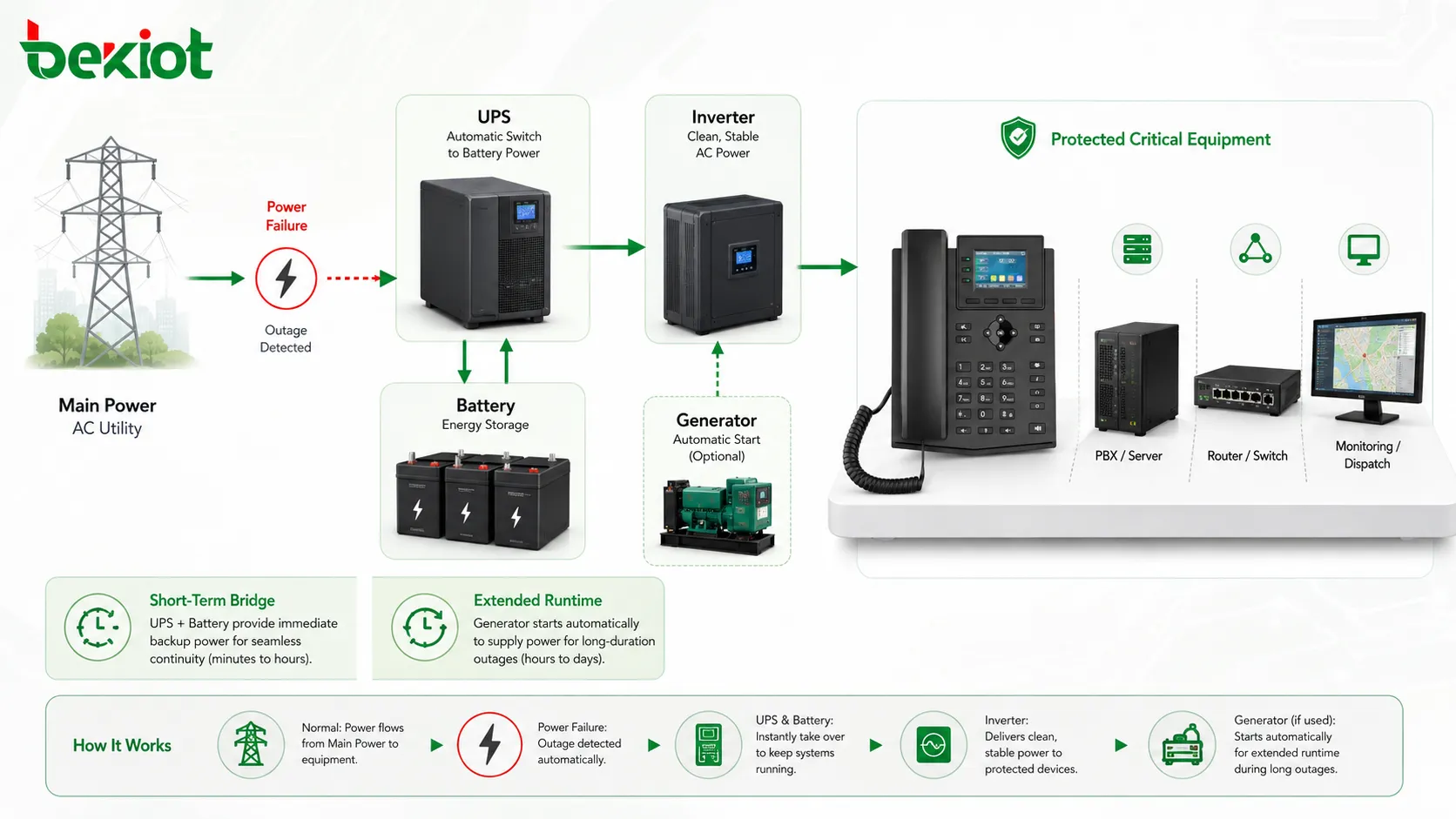
How Local Backup Power Works
The working process depends on the power architecture. In a typical UPS-based design, the UPS receives utility power, charges its internal or external battery, and supplies protected equipment. When utility power fails, the UPS immediately uses battery energy to keep the load running.
In a generator-backed design, local backup power may bridge the gap between utility failure and generator startup. In DC systems, battery strings may directly support telecom, security, control, or communication equipment through a regulated DC power bus.
Power Detection
The backup system monitors the incoming power source. It checks voltage, frequency, phase condition, and sometimes power quality. When the main supply drops below an acceptable range, the system detects the abnormal condition.
Fast detection is important because sensitive electronic equipment may restart, fail, or lose data if power is interrupted even briefly. UPS systems are commonly used where transfer time must be very short.
Automatic Transfer
Many local backup systems transfer automatically. A UPS may switch to battery in milliseconds. A generator system may use an automatic transfer switch to move the load from utility power to generator power after the generator becomes stable.
The required transfer speed depends on the load. Servers, network switches, storage systems, and communication devices usually need very fast backup power. Lighting or some mechanical equipment may tolerate a longer transition.
Runtime Support
Runtime is the amount of time the backup power source can support the connected load. It depends on battery capacity, load power, inverter efficiency, battery age, temperature, and power system design.
Runtime planning should be based on real load measurement, not guesswork. If more equipment is added later, the backup duration may become shorter than expected.
Main Features of Local Backup Power
A reliable local backup power system should provide fast response, stable output, suitable runtime, protection against power quality problems, monitoring, alarms, and safe maintenance access.
Fast Backup Response
Fast response is one of the most important features. When power fails, the backup system should support the load quickly enough to prevent device restart or service interruption.
For IT and communication equipment, even a short outage can cause network disconnection, call interruption, data corruption, or system reboot. UPS systems are commonly selected for these applications because they provide near-instant backup.
Voltage and Power Quality Protection
Many backup devices also protect against power quality problems such as voltage sag, surge, overvoltage, undervoltage, frequency fluctuation, and electrical noise. This helps sensitive equipment operate more reliably.
Power quality protection is especially important for servers, network devices, access control panels, surveillance systems, medical electronics, laboratory devices, and industrial controllers.
Battery and Runtime Management
Battery condition directly affects backup reliability. A local backup system should support battery charging, low-battery warning, battery health monitoring, runtime estimation, and replacement planning.
Batteries age over time. A UPS that worked well when new may provide much shorter runtime after several years. Regular battery testing is necessary for critical systems.
Status Monitoring and Alarms
Monitoring allows administrators to know whether the backup system is normal, on battery, overloaded, low on battery, faulty, or due for maintenance. Alarms may be shown locally or sent to a management platform.
Without monitoring, a backup system may fail silently. The problem may only be discovered during an actual outage, when it is too late to correct.
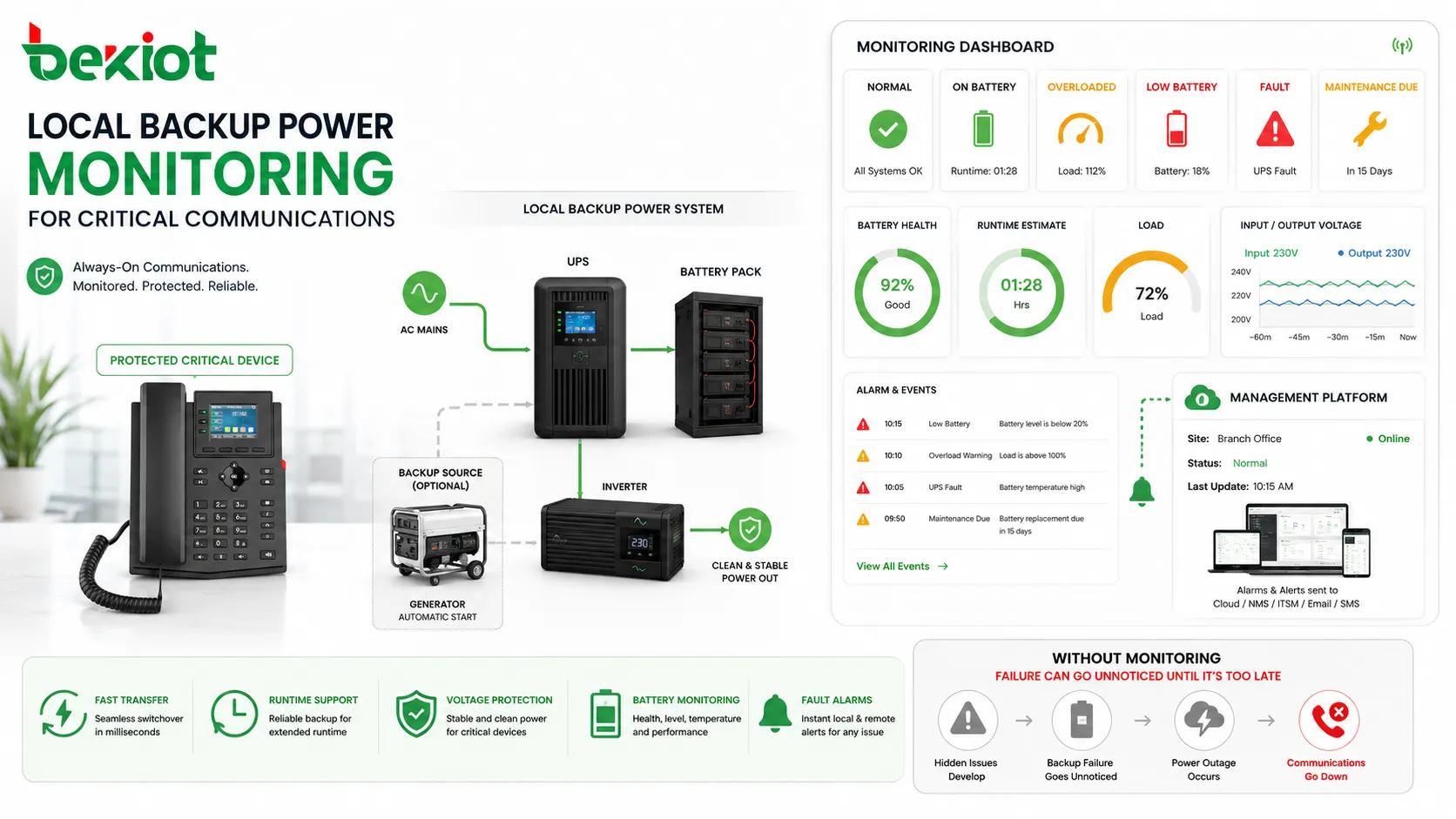
Benefits of Local Backup Power
Local backup power provides practical value by protecting specific equipment and services that must remain available. It helps reduce downtime, protect data, support emergency response, and improve system resilience.
Reduced Service Interruption
The most direct benefit is continuity. When main power fails, protected devices can continue running. This is important for routers, switches, servers, PBX systems, intercom terminals, cameras, access control panels, alarm systems, and monitoring devices.
If these devices shut down unexpectedly, communication, security, and business operations may be interrupted. Local backup power keeps essential functions available during short or moderate outages.
Protection Against Data Loss
Computers, servers, storage systems, and embedded controllers may lose data or become corrupted if power is suddenly removed. Backup power gives systems time to complete operations or shut down safely.
This benefit is especially important for databases, recording systems, file servers, transaction systems, and control platforms that continuously write data.
Improved Safety and Emergency Readiness
Some equipment must remain operational during emergencies. Emergency lighting, alarm panels, communication devices, access control, public address equipment, and security systems may depend on backup power.
Local backup power helps ensure that emergency response functions remain active even when normal utility power is unavailable.
Better Resilience for Distributed Sites
Distributed facilities often have equipment in remote rooms, outdoor cabinets, branch offices, communication shelters, gatehouses, and field stations. These locations may not always be fully protected by central backup power.
Local backup power allows each critical point to have its own resilience. This is useful for multi-site enterprises, industrial parks, campuses, transport facilities, utility sites, and remote monitoring stations.
Common Applications
Local backup power is used wherever a short power interruption can create operational, security, communication, or safety problems. The protected load may be small, but its function can be important.
Network and Communication Equipment
Routers, switches, Wi-Fi access points, SIP phones, IP PBX servers, VoIP gateways, intercom systems, paging controllers, and communication servers often need local backup power. If network equipment loses power, many connected services may fail at once.
In communication rooms and network cabinets, UPS systems are commonly used to maintain connectivity during outages and to bridge the time before generator power becomes available.
Security and Access Control Systems
Access control panels, electric locks, card readers, emergency exit devices, intrusion alarm panels, video surveillance systems, and security workstations may require backup power to maintain site security.
Backup design should consider whether doors should fail safe or fail secure, how long security devices must remain active, and whether local regulations require specific emergency behavior.
Fire and Life Safety Systems
Fire alarm panels, notification devices, emergency communication systems, smoke control interfaces, and evacuation-related equipment may require dedicated backup power according to local codes and safety standards.
These systems should be designed and maintained according to the applicable authority requirements. Backup duration, battery supervision, testing, and documentation are especially important.
IT Servers and Workstations
Servers, storage devices, workstations, and point-of-sale terminals may use local UPS systems to prevent sudden shutdown. For small offices, a UPS may protect a server and network switch. For larger environments, rack-mounted UPS units may protect specific cabinets or systems.
Backup power also supports controlled shutdown. If an outage lasts longer than the battery runtime, the UPS can signal connected systems to shut down safely.
Industrial and Remote Monitoring Equipment
Industrial controllers, PLC panels, remote I/O modules, sensors, gateways, telemetry devices, and monitoring systems may need local backup power to keep processes visible during outages.
For remote sites, solar-assisted battery systems or DC backup power may be used where grid power is unstable or unavailable.
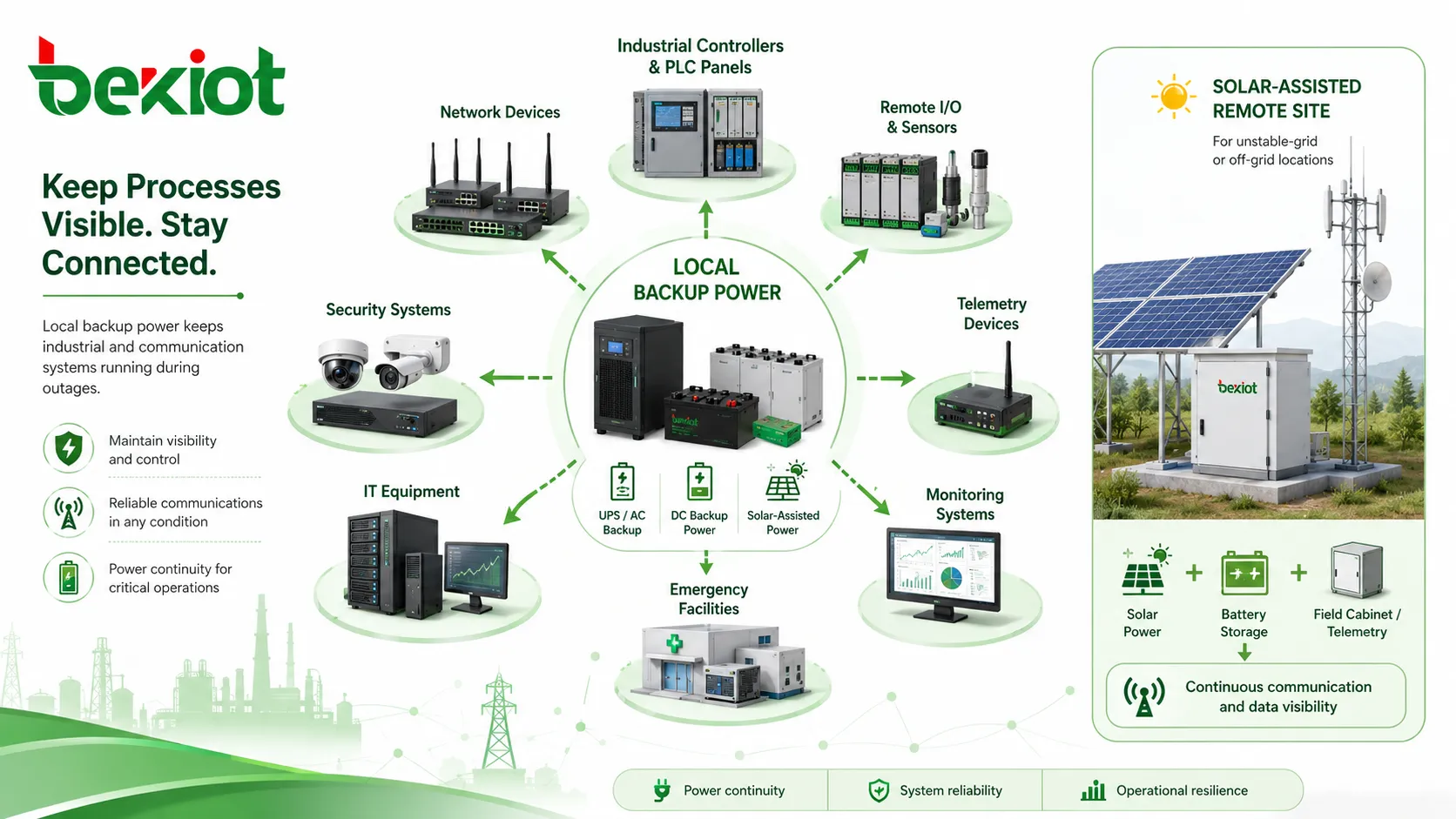
Common Types of Local Backup Power
Different backup power technologies are used depending on runtime, transfer speed, load type, site environment, and maintenance requirements.
| Backup Type | Typical Use | Main Advantage |
|---|---|---|
| UPS | Servers, network devices, communication equipment | Fast transfer and clean power output |
| Battery pack | Alarm panels, access control, small electronics | Simple local runtime support |
| Generator | Longer outages and larger loads | Extended power when fuel is available |
| DC backup system | Telecom, control, remote monitoring equipment | Efficient support for DC-powered loads |
| Solar plus battery | Remote sites and outdoor monitoring points | Useful where grid power is limited |
UPS Systems
A UPS is one of the most common local backup power devices. It can provide battery power quickly when utility power fails and may also protect against power quality problems.
UPS systems are commonly used in IT rooms, network cabinets, control desks, reception systems, communication platforms, and security equipment rooms. The correct model should be selected according to load power, runtime, waveform type, battery capacity, and management features.
Battery-Based Backup
Battery-based backup is widely used in alarm panels, access control systems, emergency devices, and DC-powered equipment. It can be built into the device or installed as an external battery module.
Battery backup is simple and effective, but it needs regular inspection. Battery age, temperature, charging quality, and discharge history all affect performance.
Generator-Supported Backup
Generators are useful for longer outages and larger loads. They may serve a whole building, selected emergency circuits, or critical equipment groups.
Because generators need time to start and stabilize, local UPS or battery backup may still be required for sensitive electronics. The UPS bridges the gap before generator power is available.
Selection Factors
Choosing local backup power requires more than selecting a battery size. The design should consider the protected load, runtime target, transfer time, environment, maintenance ability, and monitoring requirements.
Load Calculation
The first step is calculating the total load. This includes the rated power of every connected device and the actual operating power where available.
Designers should avoid overloading the backup system. Future expansion should also be considered because adding devices later will reduce available runtime.
Runtime Requirement
Runtime should match the operational need. Some systems only need enough time for a safe shutdown. Others must keep running until utility power returns or a generator starts.
Critical communication, emergency, and security systems may require longer runtime than ordinary office equipment. Runtime requirements should be defined before equipment selection.
Transfer Time
Transfer time is the delay between main power failure and backup power availability. Some devices can tolerate a brief interruption, while others may restart immediately if transfer is too slow.
For servers, communication equipment, and network devices, a UPS with suitable transfer performance is usually required.
Environment and Installation Space
Backup power equipment should match the installation environment. Temperature, humidity, dust, ventilation, cabinet space, cable routing, noise, and maintenance access all matter.
Batteries are especially sensitive to temperature. High temperature can shorten battery life and reduce reliability.
Maintenance and Testing Tips
Local backup power must be maintained regularly. A device may look normal during daily operation but fail when an outage occurs if its battery is weak, overloaded, disconnected, or poorly configured.
Test Backup Runtime
Runtime testing confirms whether the backup system can support the load for the required duration. This test should be performed under controlled conditions to avoid service risk.
If runtime is much shorter than expected, the cause may be battery aging, increased load, poor charging, high temperature, or battery fault.
Inspect Batteries
Batteries should be checked for age, swelling, leakage, corrosion, loose terminals, abnormal temperature, and warning indicators. Replacement intervals should follow manufacturer recommendations and site conditions.
For critical systems, battery replacement should be planned before failure. Waiting until a battery fails during an outage is not acceptable for important loads.
Check Load Changes
Connected loads often change over time. New devices may be added to a UPS without recalculating capacity. This can overload the system or reduce runtime.
Maintenance teams should review connected equipment periodically and update load records whenever devices are added or removed.
Monitor Alarms and Events
Backup systems may generate alarms for overload, battery fault, low battery, power failure, charger failure, temperature warning, or self-test failure. These alarms should be monitored and acted upon.
An ignored backup power alarm can become a service outage during the next power failure.
Common Mistakes to Avoid
One common mistake is connecting too many devices to one UPS. This may work during normal power conditions but fail during backup operation because the UPS is overloaded or runtime becomes too short.
Another mistake is protecting only the main device while forgetting related equipment. For example, backing up a server but not the network switch may still leave users unable to access the service.
A third mistake is assuming a generator replaces all UPS needs. Generators are valuable for extended power, but sensitive electronics usually still need UPS protection during generator startup and transfer.
Best Practices for Deployment
Local backup power should be designed as part of the full system, not as an afterthought. The backup plan should include load inventory, runtime targets, maintenance schedule, alarm monitoring, and recovery procedure.
Protect the Complete Service Path
Identify all devices required for the service to work. A communication system may need power for the PBX server, network switch, router, gateway, endpoint, and possibly the recording system.
If one required device is not protected, the service may still fail even when other devices have backup power.
Use Clear Labels
Backup-powered outlets, circuits, UPS outputs, battery cabinets, and connected devices should be labeled clearly. This prevents accidental disconnection or overload.
Labels also help technicians understand which equipment is protected and which equipment is not.
Document Runtime and Responsibility
The backup power plan should document expected runtime, connected load, battery type, replacement date, maintenance owner, alarm contact, and test procedure.
Good documentation helps future maintenance teams manage the system consistently, especially after staff changes or equipment upgrades.
Review Backup Design After Changes
Whenever equipment is added, removed, upgraded, or moved, the backup design should be reviewed. Power demand, runtime, cable routing, and monitoring settings may need adjustment.
This prevents the backup system from becoming outdated as the facility evolves.
FAQ
Can local backup power support both AC and DC devices?
Yes, but the architecture must be designed correctly. AC loads usually use UPS or inverter output, while DC loads may use DC battery systems or regulated DC power supplies. Mixing power types without proper design can cause faults or equipment damage.
How can I know whether a UPS is overloaded?
Most UPS systems show load percentage through a display, software, SNMP card, or alarm indicator. If load percentage is too high, runtime decreases and the UPS may shut down during an outage.
Should backup power be installed in every network cabinet?
Not always. It depends on how important the devices in that cabinet are. Critical switches, routers, access control panels, communication devices, and security equipment often need local backup, while non-critical edge devices may not require the same protection.
What causes backup batteries to fail early?
Common causes include high temperature, frequent deep discharge, poor charging, old battery age, wrong battery type, overloaded systems, lack of maintenance, and poor ventilation around the battery or UPS unit.
Can local backup power protect equipment from lightning?
A UPS may provide some surge protection, but it is not a complete lightning protection system. Sites exposed to lightning should use proper surge protective devices, grounding, bonding, and power protection design.
What should be checked after a long power outage?
After a long outage, check battery status, recharge condition, alarm history, connected load, event logs, equipment restart status, and whether any devices shut down unexpectedly. Critical systems should be tested again after power returns.







