


Load balancing is the process of distributing traffic, service requests, computing tasks, or communication workloads across multiple resources so that no single server, application, gateway, or network path becomes overloaded.
Understanding the Concept
In modern digital systems, users expect websites, applications, communication platforms, databases, and cloud services to respond quickly and remain available even during peak traffic. If all requests are sent to one server or one system component, that resource can become slow, unstable, or unavailable. Load balancing solves this problem by spreading work across several available resources. A load balancer acts as a traffic director. It receives incoming requests, evaluates the available backend resources, and forwards each request to the most appropriate destination according to a configured rule or algorithm. The backend resources may be web servers, application servers, database nodes, media servers, SIP servers, cloud instances, containers, gateways, or network links.
Load balancing is not only about speed. It is also about keeping services available, predictable, and easier to scale when demand changes.
How the Process Works
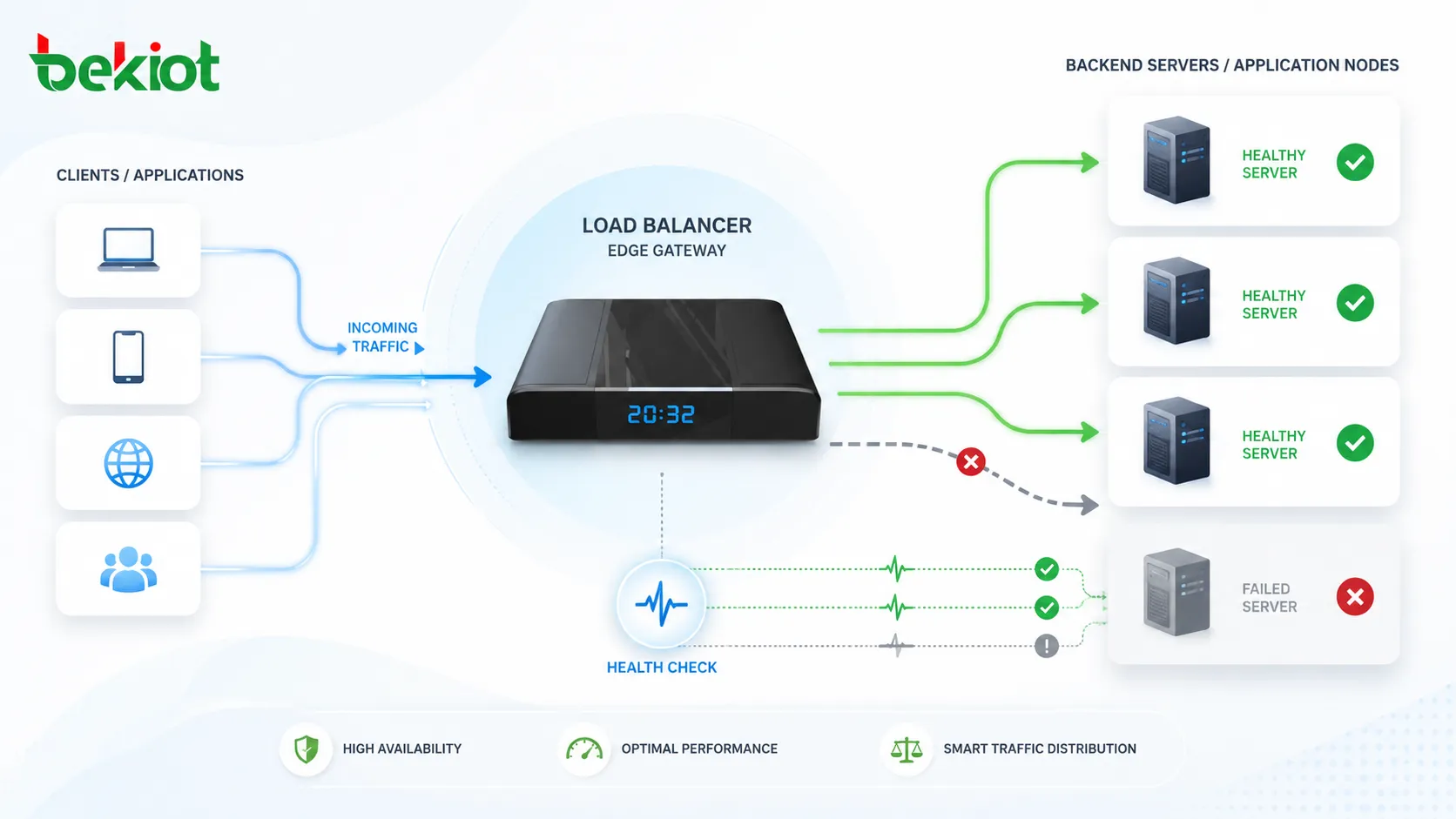
Traffic enters through a shared access point
Users or devices usually connect to a single service address, domain name, virtual IP, gateway address, or application endpoint. Behind this access point, multiple backend systems are ready to handle requests. The user does not need to know which server actually processes the request.
This design simplifies access while giving administrators flexibility. Backend servers can be added, removed, updated, or isolated without changing the address used by customers, employees, applications, or connected devices.
The load balancer evaluates backend status
A good load balancing system does not blindly forward traffic. It checks whether backend resources are healthy, responsive, reachable, and eligible to receive new traffic. Health checks may include simple ping tests, port checks, HTTP status checks, application-level probes, or custom monitoring scripts.
If a backend server fails a health check, the load balancer can temporarily stop sending traffic to it. This prevents users from being directed to a broken or overloaded resource.
Requests are distributed by policy
After checking backend status, the load balancer selects where each request should go. The decision may be based on round-robin order, server weight, active connection count, response time, geographic location, session persistence, application content, or custom rules.
For simple systems, a basic distribution rule may be enough. For high-traffic or business-critical systems, the policy may need to consider application health, user sessions, service priority, security inspection, and failover behavior.
Typical load balancing flow
A basic load balancing process can be understood as a four-stage workflow that keeps traffic controlled and backend resources protected.
Common Distribution Methods
Round robin
Round robin sends requests to backend resources one after another in a rotating order. It is simple, easy to understand, and suitable when backend servers have similar capacity and request complexity is relatively balanced.
However, round robin may not be ideal when some servers are more powerful than others or when some requests require much more processing time. In those cases, a more adaptive method may be needed.
Least connections
The least connections method sends new requests to the backend resource with the fewest active connections. This can be useful when sessions remain open for different lengths of time, such as database connections, long HTTP sessions, media streams, or real-time communication services.
This method helps avoid situations where one server receives many long-running sessions while another server remains underused.
Weighted balancing
Weighted load balancing assigns different traffic shares to different backend resources. A more powerful server may receive more requests, while a smaller or older server receives fewer. This is practical when hardware, cloud instances, or virtual machines have different performance levels.
Weights can also be used during migration. Administrators may send a small portion of traffic to a new version first, then gradually increase the share after confirming stability.
Content and application-aware routing
More advanced load balancers can inspect request information and route traffic based on URL paths, headers, cookies, protocols, tenant identity, application type, or service category. This is often used in web platforms, microservices, APIs, and cloud-native systems.
For example, static content may go to one group of servers, API requests to another group, and real-time communication traffic to a specialized media service. This makes the architecture more flexible and efficient.
Key Features
Health checks and failover
Health checks allow the load balancer to detect whether a backend resource can still process requests. When a server fails, traffic can be shifted to other resources automatically. This improves availability because one failed server does not have to interrupt the entire service.
Failover behavior should be tested carefully. Administrators need to know how quickly the system detects failure, how existing sessions are affected, and how traffic returns when the failed resource is restored.
Session persistence
Some applications need a user to stay connected to the same backend server during a session. This is called session persistence, sticky session, or session affinity. It may be based on cookies, source IP address, tokens, or application identifiers.
Session persistence is useful for applications that store temporary session state locally. However, it should be used carefully because it can reduce traffic distribution efficiency if too many users remain tied to one backend resource.
SSL termination
Many load balancers can handle SSL or TLS encryption at the front end. This means encrypted client traffic is decrypted at the load balancer before being forwarded to backend servers. SSL termination can simplify certificate management and reduce the encryption workload on backend systems.
In sensitive environments, traffic between the load balancer and backend servers may also remain encrypted. The right design depends on security requirements, network trust boundaries, compliance rules, and performance needs.
Traffic can be redirected away from failed or unhealthy resources, helping services remain reachable during partial failures.
Requests can be spread across multiple resources, reducing pressure on individual servers and improving response stability.
New servers, nodes, or service instances can be added behind the load balancer as demand grows.
Main Benefits
Improved service reliability
Load balancing improves reliability by preventing one resource from becoming the only point of service delivery. If one backend server becomes unavailable, healthy servers can continue receiving traffic.
This does not replace full high-availability design, but it is a critical part of it. A reliable service may also need redundant load balancers, multiple network paths, replicated databases, backup power, monitoring, and disaster recovery planning.
Better user experience
When traffic is distributed effectively, users are less likely to experience slow pages, failed requests, dropped sessions, or overloaded service behavior. This is important for websites, online platforms, customer portals, cloud applications, communication services, and internal business systems.
User experience is especially sensitive during peak periods. A system that works well during normal traffic may fail under campaigns, product launches, seasonal demand, public events, or unexpected incidents.
More flexible maintenance
Load balancing can make maintenance easier because backend resources can be removed from service, updated, tested, and returned without shutting down the entire platform. Administrators can drain traffic from one server while other servers continue handling users.
This is useful for software upgrades, security patching, hardware replacement, configuration changes, and staged deployment of new application versions.
Typical Applications
Websites and web applications
Web platforms commonly use load balancing to distribute HTTP and HTTPS traffic across multiple web servers or application servers. This helps websites handle more visitors, stay responsive, and avoid downtime when a single server fails.
For modern web applications, load balancing may also route API calls, static assets, user sessions, and microservice requests to different backend pools based on application rules.
Cloud and container environments
Cloud platforms and container systems rely heavily on load balancing because service instances can be created, replaced, scaled, or moved dynamically. The load balancer provides a stable access point even when backend resources change frequently.
In container orchestration environments, load balancing may operate at several levels, including ingress controllers, service mesh routing, node-level balancing, and external cloud load balancers.
Communication and media services
Communication platforms may use load balancing for SIP signaling, media services, conferencing systems, messaging gateways, recording services, and API access. The design must consider protocol behavior, session persistence, NAT traversal, latency, and real-time media quality.
For voice or video services, ordinary web-style balancing may not be enough. Administrators should confirm whether the load balancer understands the relevant protocol and whether media paths require special handling.
Databases and internal platforms
Database load balancing can distribute read traffic, direct applications to available database replicas, or support failover between nodes. Internal enterprise platforms may also use load balancing for authentication systems, file services, monitoring platforms, and business applications.
Database balancing requires careful planning because data consistency, write routing, replication lag, and transaction behavior can affect application correctness.
Planning Considerations
Choose the right layer
Load balancing can operate at different layers. Layer 4 balancing works mainly with IP addresses and ports, while Layer 7 balancing understands application-level information such as HTTP headers, URLs, cookies, and request content.
Layer 4 is often fast and efficient for general traffic. Layer 7 provides more intelligent routing for web applications, APIs, and application-aware policies. The right choice depends on protocol type, performance requirement, security inspection, and routing complexity.
Avoid hidden single points of failure
Adding one load balancer in front of many servers can improve backend distribution, but the load balancer itself may become a single point of failure if it is not redundant. Critical systems often use active-passive or active-active load balancer pairs.
Network paths, DNS, certificates, firewall rules, monitoring systems, and management access should also be reviewed. A highly available backend pool is not enough if the access path is fragile.
Monitor real performance
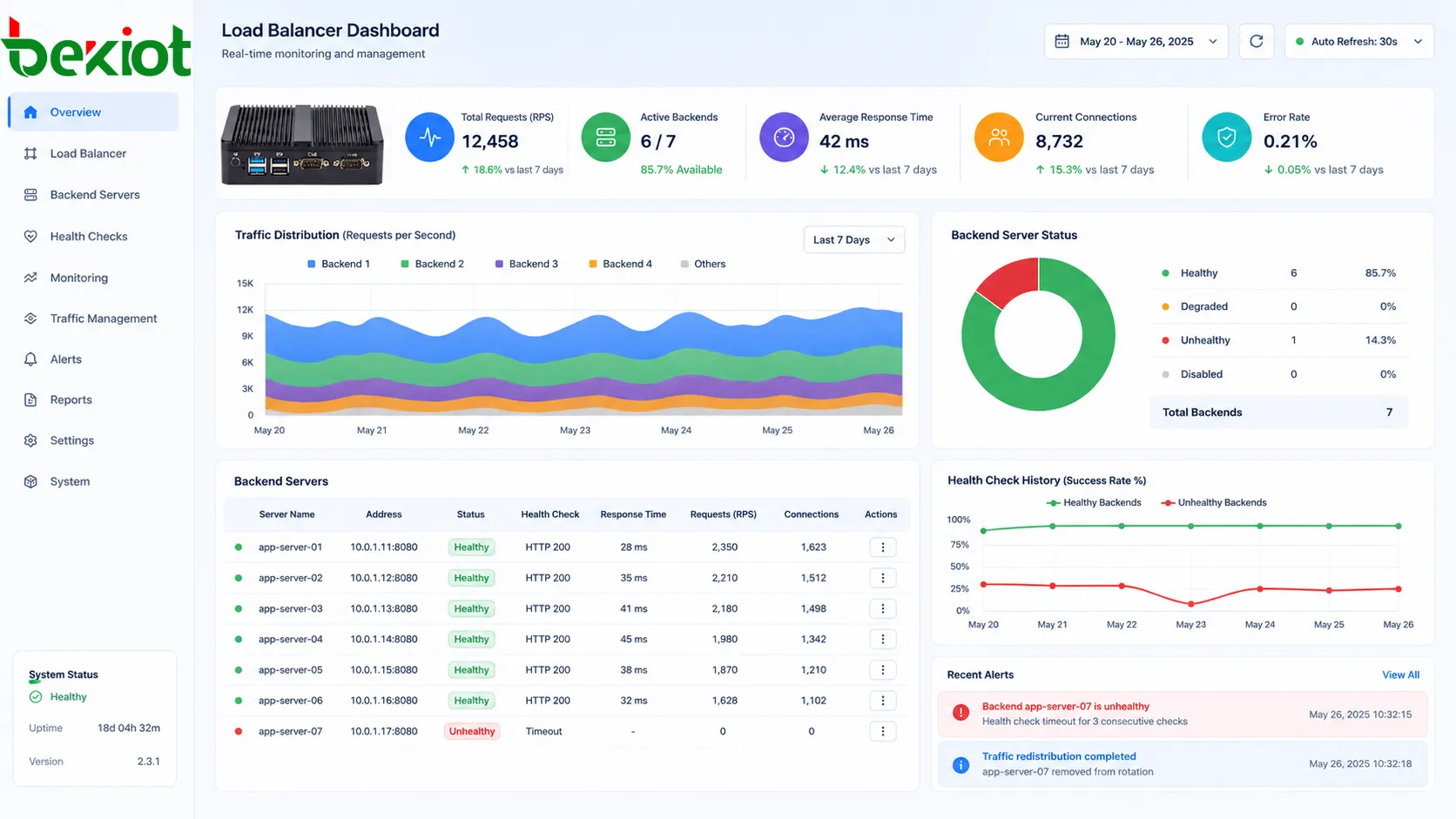
Load balancing should be monitored continuously. Important metrics include request count, response time, error rate, active connections, backend health, bandwidth use, CPU load, memory usage, queue length, and failed health checks.
Reports help administrators tune algorithms, adjust backend capacity, identify bottlenecks, and decide when to scale out. Without monitoring, load balancing may hide problems until users begin to complain.
Practical design reminder
A load balancer should not be treated as a magic performance fix. It works best when backend systems are healthy, monitoring is active, capacity planning is realistic, and failover behavior has been tested before a real outage occurs.
Maintenance Tips
Review health check settings
Health checks should reflect real service availability. A server may respond to a simple ping while the actual application is failing. Application-level checks are often more useful because they confirm that the service can perform meaningful work.
Health check intervals and failure thresholds should also be tuned. Checks that are too aggressive may remove healthy servers during brief delays, while checks that are too slow may keep sending traffic to failed resources.
Test failover and recovery
Failover behavior should be tested during planned maintenance, not discovered during production incidents. Teams should verify what happens when a backend server fails, when the load balancer fails, when a network path is interrupted, and when a recovered server rejoins the pool.
Testing should include both technical metrics and user impact. A failover that looks successful in logs may still create session interruption or application errors if state handling is not designed correctly.
Keep certificates and policies updated
If the load balancer handles SSL termination, certificate expiration must be managed carefully. Expired certificates can make a healthy service appear unavailable to users. Security policies, cipher settings, access rules, and logging configurations should also be reviewed regularly.
In regulated environments, administrators should document certificate changes, access policy updates, and traffic handling rules for audit and troubleshooting purposes.
FAQ
Can load balancing improve security?
It can support security when combined with features such as SSL termination, access control, traffic filtering, web application firewall integration, rate limiting, and logging. However, it should not be treated as a complete security solution by itself.
What is the difference between load balancing and failover?
Load balancing distributes normal traffic across multiple resources. Failover moves traffic away from a failed resource to another available resource. Many systems use both, but they solve different parts of service reliability.
Does every small website need a load balancer?
Not always. A small website with low traffic may run well on a single server. Load balancing becomes more useful when uptime, traffic growth, maintenance flexibility, or performance stability becomes important.
Can load balancing cause problems if configured incorrectly?
Yes. Incorrect session persistence, weak health checks, bad routing rules, certificate errors, or uneven backend weights can cause failed logins, broken transactions, service loops, or traffic concentration on the wrong server.
How often should load balancing rules be reviewed?
Rules should be reviewed after major application changes, traffic growth, server replacement, cloud migration, certificate updates, or repeated performance complaints. For critical services, periodic review should be part of routine operations.







