


IP paging is a paging and broadcast method that uses an IP network to deliver live voice announcements, scheduled audio, alert tones, and emergency notifications to speakers, paging adapters, intercom stations, desk phones, or other network-connected audio endpoints. Instead of depending entirely on traditional analog paging loops and centralized amplifier wiring, an IP paging system moves audio transport and control onto Ethernet and IP infrastructure.
That does not mean every IP paging system looks the same. Some systems are built around SIP and behave like endpoints inside a VoIP platform. Some use multicast audio to send one stream to many devices at the same time. Some combine IP speakers with adapters that connect older analog amplifiers and horn speakers to a modern network. In practice, IP paging is best understood as a network-based paging architecture rather than a single fixed product type.
This matters because voice notification is still operationally important in many real environments. Offices use paging for announcements and group calling. Schools use it for campus communication and emergency messaging. Hospitals use it for staff notification and area paging. Warehouses and factories use it for workflow coordination, shift changes, alarms, and safety broadcasts. Transport sites, public buildings, and industrial facilities use it when messages must reach people quickly across wide physical areas.
Once paging moves onto an IP network, the system becomes easier to integrate with PBX platforms, intercom terminals, alarm systems, schedulers, management software, and remote administration tools. That is the practical reason IP paging has become common: it turns one-way announcement audio into a manageable part of the broader communications infrastructure.
What Is IP Paging?
At a basic level, IP paging is the use of packet-based networking to distribute paging audio and related control signals. A page can be initiated from an IP phone, soft client, paging console, web interface, dispatch platform, or automated notification system. The audio is then delivered across the LAN, WAN, or managed enterprise network to one or more authorized endpoints.
Solution introduction:PAGA Systems
In older analog paging systems, pages were commonly sent through dedicated wiring, local amplifiers, and zone selectors. Those systems are still widely used, but IP paging changes the architecture. The network becomes the transport path, and the endpoint becomes an addressable device. That makes it easier to assign zones, manage priorities, configure schedules, support remote sites, and integrate voice notification into existing IT and voice environments.
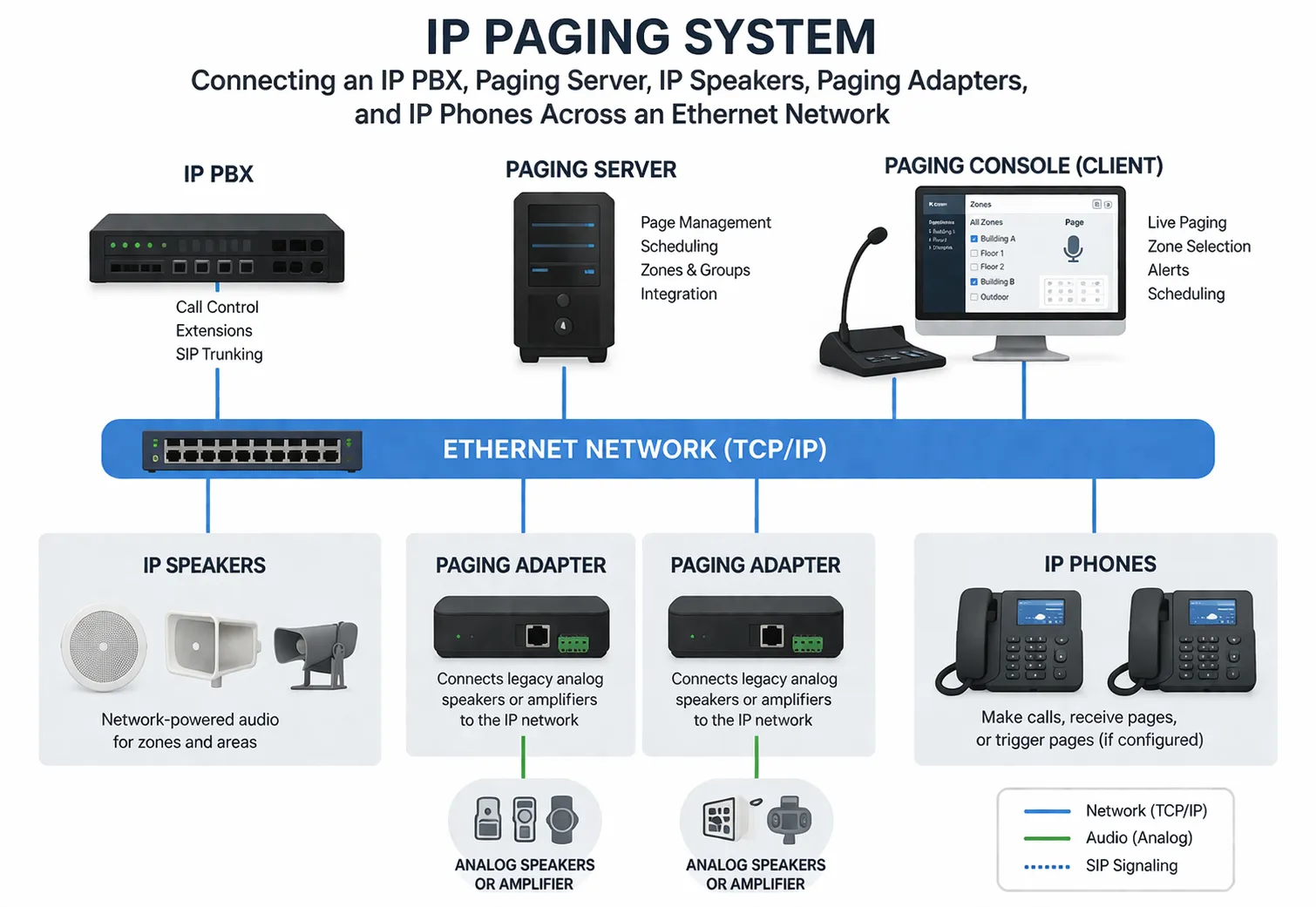
In a modern deployment, IP paging may involve:
IP speakers mounted in ceilings, hallways, outdoor areas, or industrial spaces
SIP paging adapters that bridge analog amplifiers or legacy speakers into the IP network
IP phones that can send or receive paging announcements
Intercom or help-point terminals that support announcement and call functions
Paging servers or PBX platforms that control routing, authorization, and zone logic
Multicast-capable endpoints that can play the same audio stream simultaneously
How IP Paging Works
Although implementations differ by vendor and site design, most IP paging systems follow the same broad sequence. A user or application starts a paging event, the platform determines which zone or devices should receive the message, the system establishes an audio path, and the selected endpoints play the announcement or tone.
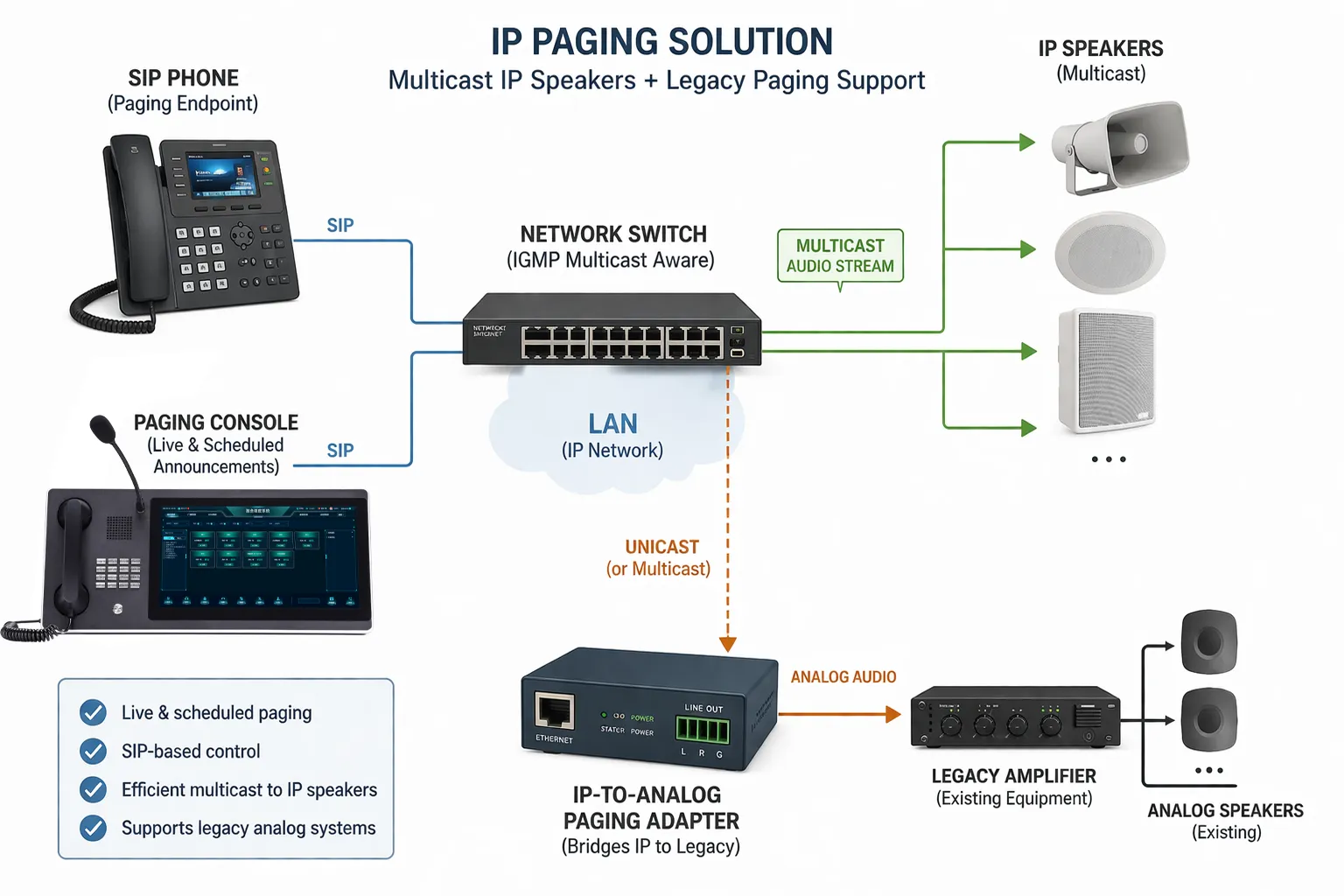
In SIP-based paging, the process usually begins like a normal VoIP session. A phone, console, or application sends a SIP request to a paging endpoint, paging group, or paging server. The session parameters are negotiated, the audio path is created, and the page is transmitted to the destination devices. This approach works well when the paging function needs to integrate tightly with an IP PBX, extension plan, authentication model, or call-control workflow.
In multicast paging, the source transmits one audio stream to a multicast address that multiple endpoints are already configured to monitor. This can be efficient when many speakers or phones must receive the same live page at once, because the source does not need to send a separate unicast stream to each device. Multicast paging is often used for zone-wide announcements, bell schedules, or large-area notifications inside a controlled LAN environment.
Some systems also mix the two approaches. SIP may be used for session setup, authorization, and integration with the PBX, while multicast is used for broad audio delivery. In other cases, an IP paging adapter converts SIP or multicast audio into analog output for legacy amplifiers, horn speakers, or overhead paging circuits.
A user, phone, console, or application initiates a page.
The system identifies the destination zone, group, or individual endpoints.
Audio is delivered using SIP, multicast, or a hybrid method.
Selected speakers, phones, or adapters play the page.
Priority rules may interrupt lower-priority audio if the event is urgent.
From an engineering perspective, successful IP paging depends on more than just audio transport. It also depends on network quality, VLAN design, QoS policy, endpoint registration, power availability, zone logic, and a clear operational model for who can page which areas and under what conditions.
IP paging is not simply “audio over Ethernet.” It is a managed voice-notification workflow built on IP infrastructure.
Core Components in an IP Paging System
IP Speakers
IP speakers are self-contained network endpoints that receive and play audio over the network. Many models support SIP registration, multicast listening, alert tone playback, scheduled announcements, and web-based configuration. Because the amplifier and control electronics are built into the device, deployment can be more distributed and flexible than in purely analog systems.
Paging Adapters
A paging adapter is often used when an organization already has analog amplifiers, ceiling speakers, horns, or legacy overhead paging equipment. The adapter receives audio from the IP side and hands it off to the analog side. This lets organizations modernize their paging architecture without replacing every existing speaker at once.
IP PBX or Paging Server
In many installations, the PBX or a dedicated paging server provides the call-control and management layer. It may authenticate devices, assign paging groups, apply permissions, map zone numbers, and integrate paging with telephony or notification workflows.
Switching and Power Infrastructure
Because many IP speakers and terminals use PoE, the LAN switch layer becomes part of the paging system design. Power budget, uplink resilience, VLAN segmentation, and QoS settings all affect deployment quality. A paging system that looks simple at the endpoint level may still depend heavily on disciplined network planning underneath.
Key Features of IP Paging
1. Network-Based Audio Distribution
The defining feature of IP paging is that the network becomes the delivery path. This reduces dependence on isolated paging cabling and makes it easier to extend announcements to new rooms, buildings, or campuses where network access already exists.
2. Zone and Group Paging
Most IP paging systems support logical zones so announcements can be directed only to relevant areas. A receptionist may page only the office area, a supervisor may page a production zone, and an emergency operator may page all zones at once. This is one of the most practical advantages of moving paging onto a managed platform.
3. SIP Integration
In SIP-based environments, paging becomes part of the enterprise voice system. A user can page from a desk phone, a softphone, or a communications client without needing a separate standalone console for routine use. This also helps with dial plans, permissions, call logging, and multi-site integration.
4. Multicast Efficiency
Where supported, multicast can improve efficiency for large-area paging because a single stream can reach many endpoints. In controlled LAN environments, that can reduce the bandwidth and session overhead associated with one-to-many announcements.
5. Priority and Emergency Notification
IP paging systems are often expected to handle more than routine announcements. Many deployments support priority levels so emergency alerts, lockdown notices, evacuation messages, or critical operational broadcasts can override background music or lower-priority paging traffic.
6. Scheduled Audio and Automation
Some systems support bell schedules, prerecorded announcements, timed reminders, shift-change tones, and event-driven messages from external applications. This is especially useful in schools, factories, warehouses, hospitals, and transport sites where routine notifications happen every day.
7. Easier Multi-Site Expansion
Because the transport is IP-based, IP paging can scale across multiple buildings and sometimes across distributed sites more easily than a purely analog architecture. Expansion still requires design discipline, but the system is no longer tied as tightly to one local amplifier room or one dedicated wiring topology.
Benefits of IP Paging
The appeal of IP paging is not that it makes every installation simpler. Some large sites are still complex. The real benefit is that it gives organizations more flexibility and better integration options.
Better integration: Paging can work with PBX platforms, intercom systems, alarms, and software-based management.
Flexible expansion: New endpoints can often be added wherever suitable network connectivity and power are available.
Improved zoning: Logical groups are easier to manage than fixed analog-only broadcast paths.
Operational visibility: Web interfaces and centralized platforms make configuration and monitoring easier.
Hybrid modernization: Existing analog speakers can often be retained through adapters during phased upgrades.
These benefits explain why IP paging is now common in both greenfield and retrofit projects. In new buildings, it matches modern network-centric design. In older facilities, it offers a path to improve control and integration without forcing a complete rip-and-replace on day one.
Applications of IP Paging
Office Buildings and Corporate Campuses
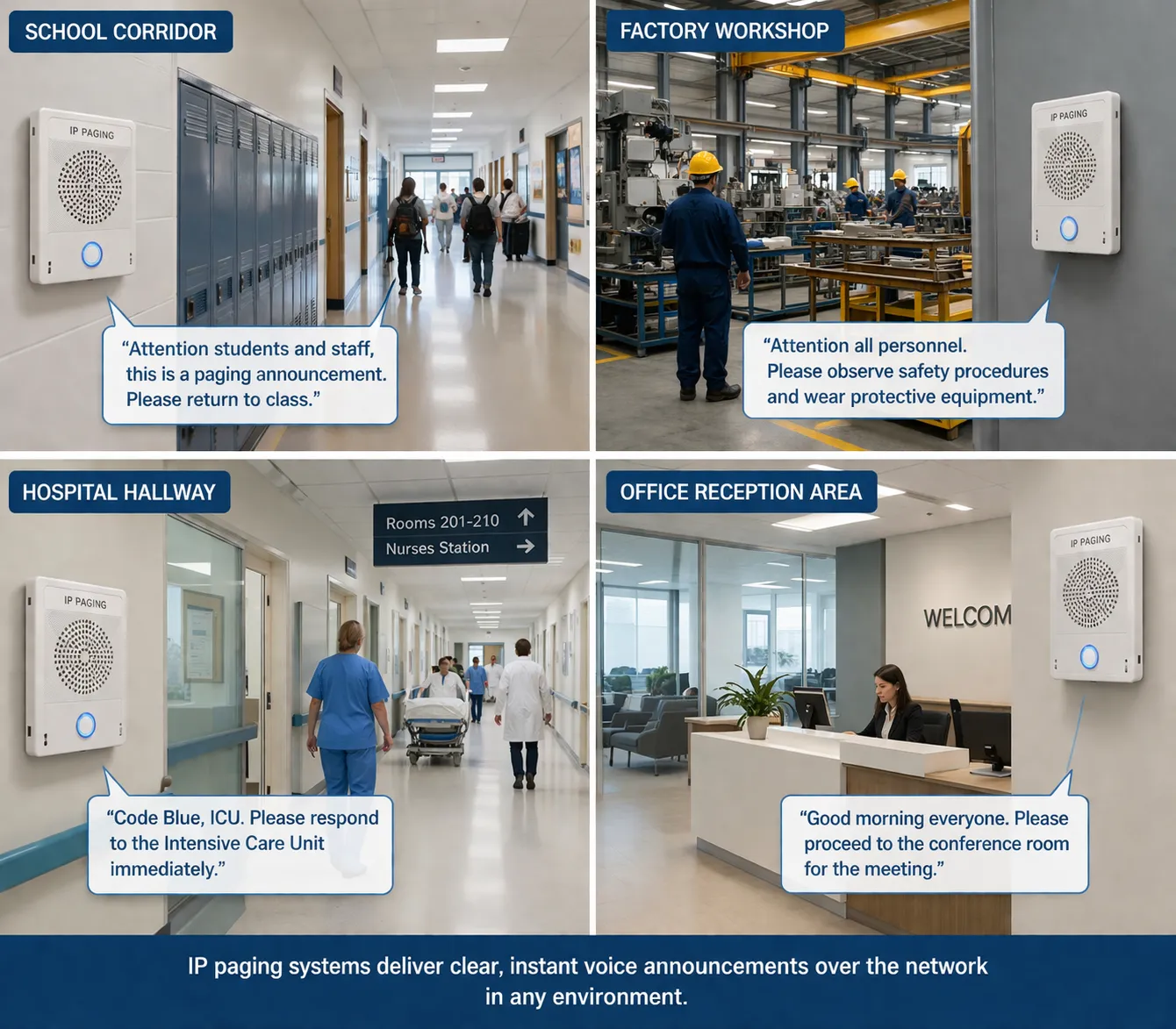
In office environments, IP paging is commonly used for front-desk announcements, staff locating, building-wide notices, and emergency instructions. Integration with the corporate PBX makes everyday paging straightforward for reception or facilities teams.
Schools and Universities
Educational campuses often use IP paging for class-change tones, general announcements, zone paging, and emergency communication. The ability to target one building, one floor, or the whole campus is especially valuable in these environments.
Hospitals and Healthcare Facilities
Healthcare sites need fast internal communication across reception, wards, corridors, waiting areas, and support departments. IP paging can support staff notification, routine public announcements, and urgent operational messaging while still fitting into an IT-managed network model.
Factories, Warehouses, and Industrial Sites
Industrial facilities use paging for production coordination, shift-change messages, safety alerts, dispatch support, and operational announcements across noisy or wide-area environments. Rugged speakers, horns, and intercom endpoints may be chosen where the environment is harsher than a normal office.
Retail, Hospitality, and Commercial Premises
Stores, shopping areas, hotels, and public venues use IP paging for customer announcements, operational notices, back-of-house communication, and integration with background-audio or notification workflows.
Transport Hubs and Public Facilities
Stations, terminals, campuses, car parks, and municipal facilities benefit from zone-based voice distribution, especially when announcements must reach open areas, corridors, waiting zones, and service points from a centrally managed system.
IP Paging vs Traditional Analog Paging
Traditional analog paging systems are still effective in many sites, especially where the architecture is simple and already in place. IP paging does not automatically replace them in every case. Instead, it offers a different operating model.
Analog paging is often straightforward, local, and amplifier-centered.
IP paging is network-centered, easier to integrate, and usually more flexible for zoning and remote management.
In practical terms, organizations often choose hybrid designs. They keep the analog speaker plant where it still works well, then add IP paging adapters, SIP endpoints, and network control layers to gain better management and integration. This hybrid approach is often more realistic than treating analog and IP as mutually exclusive choices.
Deployment Considerations
Even a well-designed IP paging platform can perform poorly if the deployment details are ignored. Before rollout, it is usually worth checking the following points:
Network design: Confirm VLANs, QoS, multicast handling, and bandwidth assumptions.
Power strategy: Verify PoE class, switch budget, and backup power requirements.
Zone planning: Define which users can page which areas and which messages have priority.
Acoustic coverage: Match speaker type and placement to the real environment.
Interoperability: Confirm SIP compatibility and integration behavior with the PBX or server.
Resilience: Consider failover, local survivability, and what happens during network outages.
For retrofit projects, one more question matters: how much of the existing analog infrastructure should be kept? In many buildings, the right answer is not “replace everything,” but “preserve what still works and modernize the control layer.”
Conclusion
IP paging is a network-based approach to voice announcement and notification. It uses IP infrastructure to deliver live or automated audio to speakers, adapters, phones, and intercom devices, often with SIP, multicast, PoE, and software-based management working together in the background.
Its value is not limited to cleaner cabling or newer hardware. The larger benefit is that paging becomes easier to zone, easier to expand, easier to integrate, and easier to manage as part of the broader communications environment. That is why IP paging now appears in offices, schools, hospitals, factories, warehouses, campuses, transport facilities, and many other operational settings.
For organizations that need one-to-many voice communication, IP paging is not merely a modern replacement for analog paging. It is a more flexible architecture for turning announcements, alerts, and routine voice distribution into a controlled network service.
FAQ
Is IP paging the same as a PA system?
Not exactly. IP paging can be part of a broader PA or notification system, but the term specifically emphasizes paging and announcement delivery over an IP network. Some deployments are small and simple, while others are integrated into wider public address, intercom, or emergency communication architectures.
Does IP paging always use SIP?
No. Many systems use SIP, but others use multicast audio, proprietary control methods, or a hybrid approach. SIP is common because it integrates well with PBX and VoIP platforms, but it is not the only implementation model.
Can IP paging work with old analog speakers?
Yes, often through a paging adapter or IP-connected amplifier. This is a common way to modernize a site without replacing every speaker during the first phase of the project.
Why is PoE important in IP paging?
PoE can deliver both data connectivity and electrical power over the same Ethernet cable. That simplifies installation for many IP speakers and intercom endpoints, especially where adding separate local power is inconvenient.
What is the difference between unicast and multicast paging?
Unicast sends a separate stream to each endpoint, while multicast sends one stream that multiple authorized endpoints can receive. Multicast can be more efficient for large paging groups, but it depends on correct network support and configuration.
Where is IP paging most useful?
It is most useful where fast one-to-many voice communication matters and where integration, zoning, or multi-building expansion is important, such as offices, schools, healthcare facilities, industrial sites, warehouses, and public facilities.







