


An IP intercom terminal is a network-connected communication endpoint designed for two-way voice, and in many cases video, between a field location and a person, room, control point, or software client elsewhere on the network. In practical terms, it is the device mounted at a door, gate, corridor, station platform, parking area, control room wall, help point, or industrial site that lets someone call, speak, listen, request access, or trigger assistance through an IP network rather than through a traditional analog intercom line.
The term IP intercom terminal is broader than a door station alone. It can refer to a video door intercom, an emergency help point, a wall-mounted industrial intercom, a clean-room call terminal, a campus assistance point, or a dispatch-linked communication node in transport and public safety systems. What unites these products is that they use Ethernet, SIP, web management, and related IP-based technologies to connect voice interaction with broader communication, access control, and monitoring systems.
For modern projects, that makes the IP intercom terminal especially valuable. It is not just a talking box on the wall. It is often a converged endpoint that can combine voice, video, call control, relay outputs, digital inputs, event logic, remote management, recording linkage, and system integration in one device. This is why IP intercom terminals now appear not only in residential entrances, but also in factories, tunnels, campuses, hospitals, stations, prisons, municipal sites, and high-security buildings.
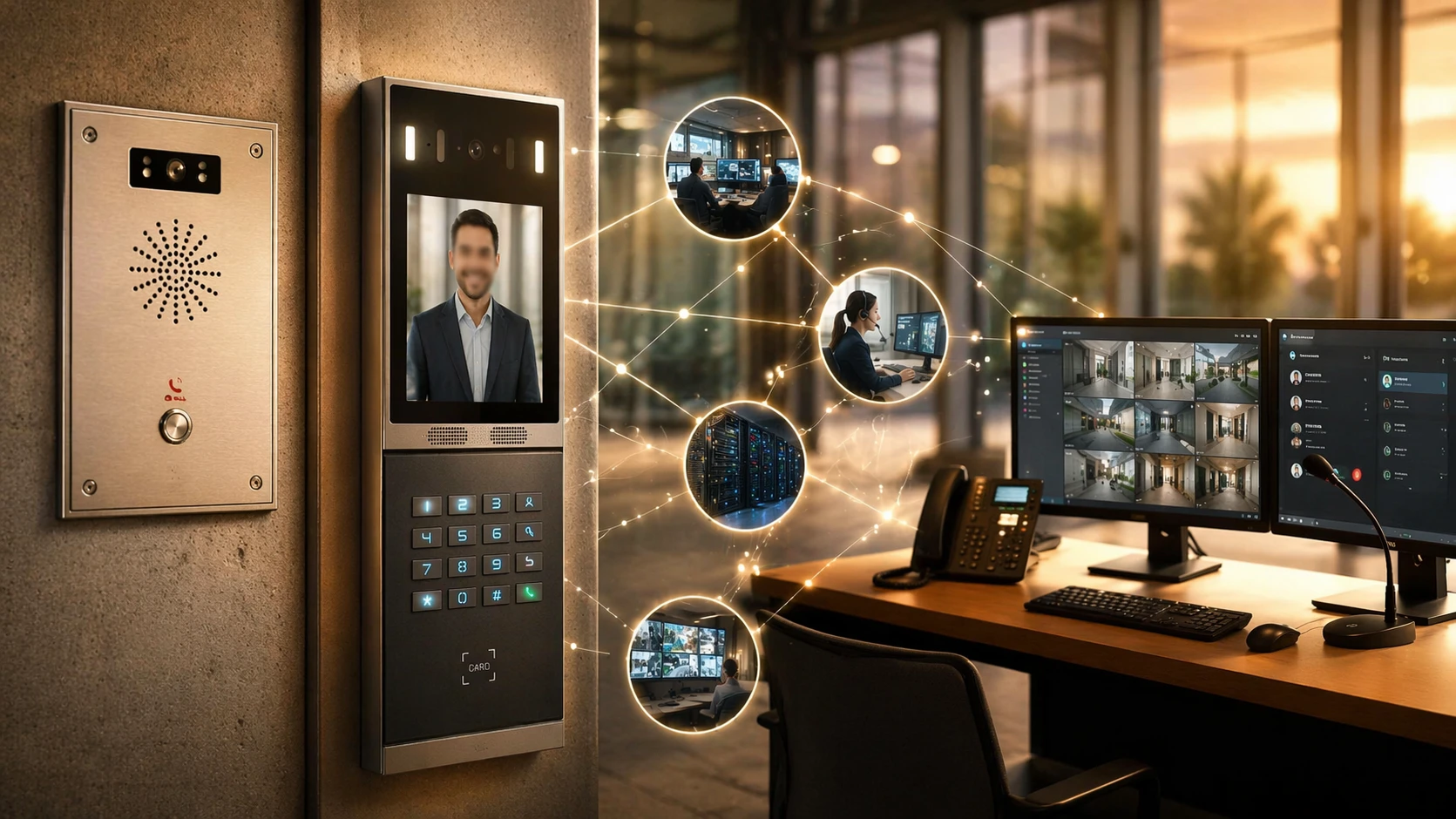
An IP intercom terminal typically acts as a field communication endpoint on the network, linking visitors or field personnel to indoor stations, security desks, SIP platforms, or dispatch systems.
Definition of an IP Intercom Terminal
An IP intercom terminal is an intercom endpoint that sends and receives communication over an Internet Protocol network. Depending on the model and use case, it may support audio only or both audio and video. It can initiate calls, receive calls, exchange signaling with a SIP server or peer device, stream media, trigger relays such as door locks, accept sensor inputs, and report events to management software or third-party platforms.
In everyday engineering language, people sometimes use several nearby terms interchangeably, such as IP intercom, network intercom, SIP intercom terminal, video intercom station, emergency intercom terminal, or IP help point. They are related, but not always identical. A basic IP intercom may focus on voice calling. A video intercom terminal adds a camera and video stream. An emergency intercom terminal emphasizes fast call initiation, visibility, durability, and reliability under stress. An industrial IP intercom terminal often adds high protection ratings, noise handling, glove-friendly buttons, or hazardous-area suitability.
So the best way to understand the term is this: an IP intercom terminal is a networked field endpoint for interactive communication and control. It is built to connect a place, not just a person. That place may be a front door, a loading bay, an underground tunnel, a roadside pillar, a clean manufacturing cell, or an unmanned technical room.
How Does an IP Intercom Terminal Work?
At a high level, the working process is simple. A user presses a call button, taps a screen, scans an identifier, or triggers an emergency call. The terminal then uses its network connection to send a call request to a target destination. That destination may be an indoor station, an IP phone, a SIP extension, a security desk client, a mobile app, a dispatch console, or a call group. Once the call is answered, the terminal exchanges audio, and sometimes video, across the IP network.
Behind that simple user experience, several technical layers work together. The terminal first needs power and network connectivity, often through PoE. It must obtain an IP address, either through DHCP or static configuration. It then registers to a SIP server, IP PBX, or cloud platform, or operates in peer-to-peer mode depending on design requirements. When the user initiates a call, signaling establishes the session, media streams carry the audio or video, and application logic manages related actions such as unlocking a door, activating a beacon, sending an event log, or storing a snapshot.
1. Audio and Video Capture
The device captures voice through a built-in microphone and plays received audio through a speaker. Video models also capture images through an integrated camera. Better terminals include echo cancellation, noise reduction, automatic gain control, and full-duplex audio so both sides can speak naturally without the clipped feeling common in older intercom systems.
2. Signaling and Call Control
Many IP intercom terminals use SIP to register, dial, answer, and manage sessions. In small systems, a terminal may call another device directly by IP or URI. In larger systems, calls are usually controlled by an IP PBX, SIP server, or dedicated intercom management platform, which enables ring groups, failover, schedules, hunt logic, emergency routing, and integration with other endpoints.
3. Media Transmission
Once the session is established, audio is transported over the network using standard media streams. Video, when supported, can be sent to indoor monitors, security clients, mobile apps, or recording platforms. In some deployments, video is also shared with VMS or access control software so operators can see the caller before answering or unlocking a door.
4. Control and Event Actions
An IP intercom terminal often does more than place a call. It may have relay outputs for door strikes or warning lights, inputs for door contacts or alarm sensors, and programmable automation rules. For example, if no one answers within ten seconds, the terminal can forward the call to a secondary control room. If a tamper switch changes state, it can report an event. If a door remains forced open, it can generate a call or alarm notification.
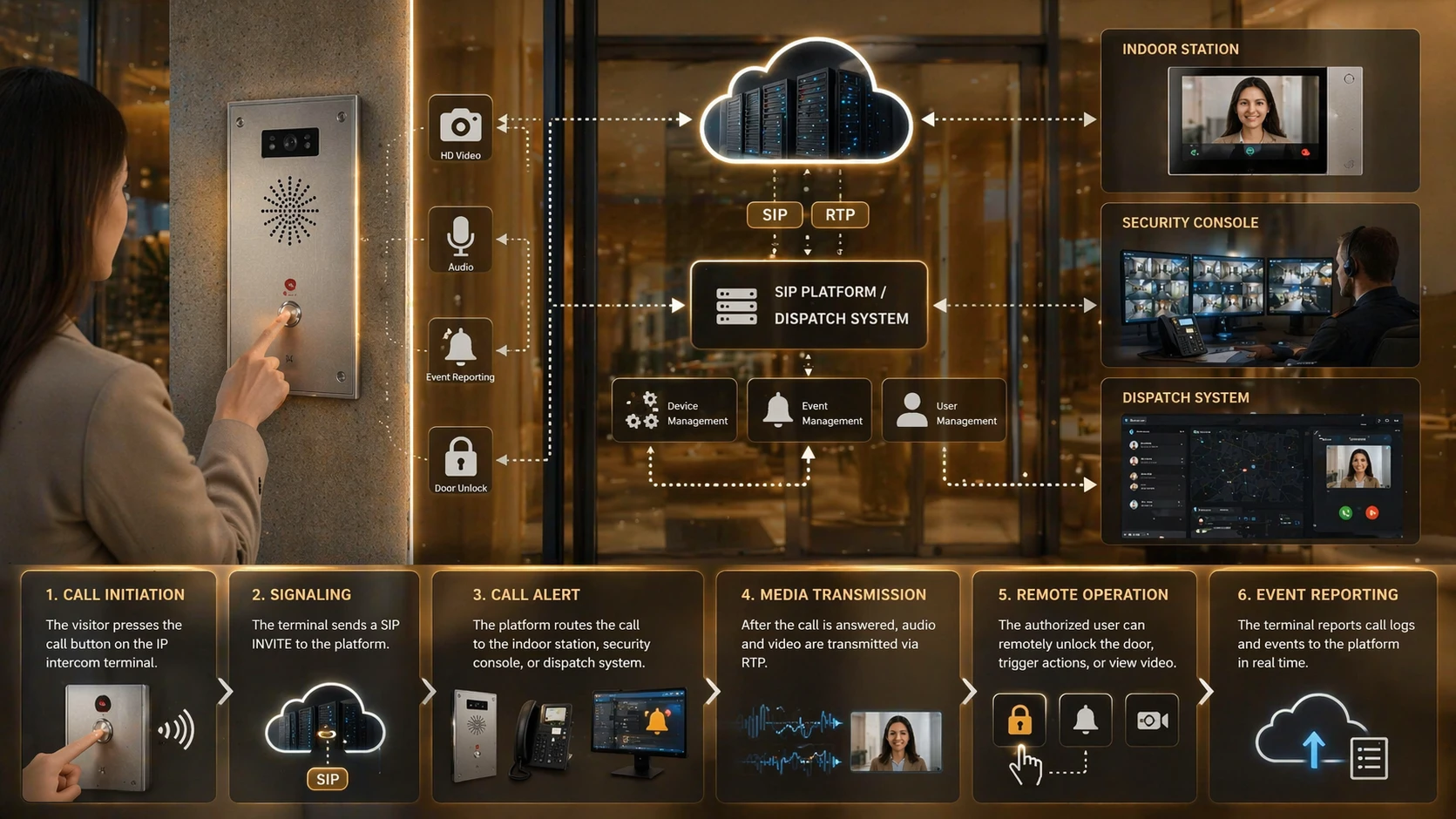
The basic workflow includes call initiation, SIP or platform-based signaling, media transmission, and linked actions such as remote unlock, event reporting, or video display.
Main Components of an IP Intercom Terminal
Although product designs differ, most IP intercom terminals are built around a recognizable set of hardware and software elements.
Microphone and speaker: for two-way voice communication.
Call button, keypad, or touchscreen: for user input and call initiation.
Camera: on video-capable models for visual verification and recording.
Network interface: usually Ethernet, often with PoE support.
SIP or call-control stack: for registration, session setup, and endpoint interoperability.
Relay outputs: for door locks, gates, strobes, or auxiliary devices.
Digital inputs: for door contacts, emergency sensors, tamper switches, or external triggers.
Web interface or device management layer: for configuration, firmware, diagnostics, and maintenance.
Housing and front panel: tailored to indoor, outdoor, vandal-resistant, industrial, or emergency environments.
Some advanced models also include RFID, QR, Bluetooth, NFC, hearing loop support, local storage, HTTPS APIs, ONVIF compatibility, analytics, or cybersecurity functions such as signed firmware and secure access control.
Key Features of an IP Intercom Terminal
The best way to evaluate an IP intercom terminal is not to ask whether it can make a call. Most can. The real question is how well it works as part of a larger operational system. In that sense, the most important features are usually these.
SIP and IP-Based Integration
One of the biggest advantages of an IP intercom terminal is that it can operate as part of a standard IP voice environment. That means it can call IP phones, indoor monitors, soft clients, PBX extensions, or dispatch consoles rather than remaining trapped inside a closed intercom loop. This makes expansion, routing, and maintenance much easier in multi-building or multi-site projects.
Two-Way Voice with Better Audio Control
Compared with older analog units, modern IP intercom terminals often deliver clearer audio and more consistent control over gain, codecs, echo handling, and background noise. In noisy industrial or public environments, this matters more than headline features on a brochure. Clear audio is usually the difference between a usable system and one that fails when stress is highest.
Video and Visual Verification
For entrances, gates, reception points, and public help points, video adds practical value. It helps users verify identity, assess conditions on site, review incidents, and improve decision-making before access is granted. In some systems, video also supports recording, live monitoring, and event playback.
Remote Unlock and Linked Control
Many IP intercom terminals include relay outputs or integration hooks for access control. This allows an operator or authorized user to unlock a door, open a gate, switch on a light, or activate a device from an indoor station or software client. In security-sensitive environments, that same logic can be tied to schedules, user rights, or event-based automation.
Web Configuration and Remote Management
Because these devices are network endpoints, they can usually be configured through a browser or central platform. That simplifies provisioning, status checks, firmware updates, diagnostics, backup, and troubleshooting. For distributed systems, this is a major operational advantage over legacy intercom architectures that require more local intervention.
Open Interfaces and Third-Party Integration
In real projects, intercom terminals rarely stand alone. They are expected to work with PBX systems, access control, security management software, VMS, automation systems, or emergency platforms. Devices that support standard protocols and APIs are usually much easier to deploy in mixed environments.
Durability and Site Suitability
For public-facing, industrial, or transport applications, physical design matters. An intercom terminal may need weather protection, vandal resistance, glove-friendly operation, corrosion resistance, visible call status, strong speaker output, or stable operation in heat, cold, dust, or vibration. In emergency use, these features often matter more than cosmetic design.
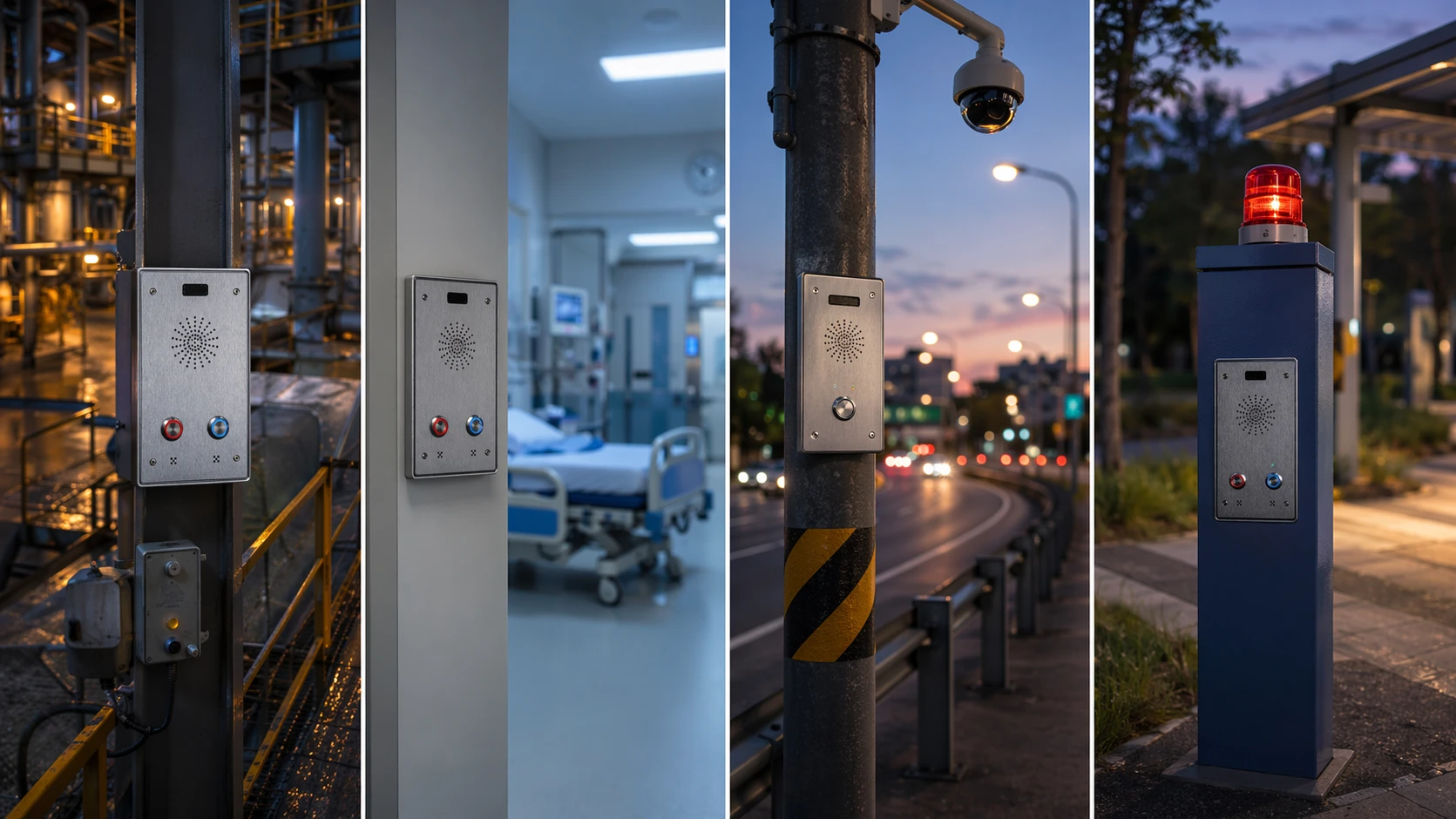
IP intercom terminals are used well beyond building entrances, including industrial communications, healthcare assistance points, transport help points, and public emergency call locations.
Common Applications of IP Intercom Terminals
Because IP intercom terminals are flexible, their applications span many industries and operational models.
Building Entrances and Access Control
This is the most familiar use case. A visitor presses the terminal, the call goes to an indoor station or security desk, the responder verifies identity, and the door or gate is released if appropriate. In larger projects, the same terminal may also connect to a mobile app, cloud access service, or central reception workflow.
Industrial Sites and Harsh Environments
Factories, warehouses, energy facilities, ports, and utility sites often need rugged communication points at loading areas, machine zones, entrances, or unmanned technical spaces. Here the intercom terminal may serve not only for visitor handling, but also for operator communication, fault reporting, remote assistance, or linked alarm handling.
Emergency Help Points
Road tunnels, campuses, stations, parking areas, public roadsides, and municipal spaces often use IP intercom terminals as visible help points. In these cases, the device must support rapid call setup, clear audio, obvious status indication, and strong reliability. Some systems also add recording, beacon activation, location mapping, or automatic escalation to backup destinations.
Healthcare and Assisted Environments
Hospitals, clinics, care facilities, and assisted living environments can use IP intercom terminals at doors, nurse stations, restricted zones, and patient assistance points. The value here is not only voice communication, but also controlled access, identity verification, and integration with broader communication workflows.
Schools, Campuses, and Public Institutions
Schools and campuses use network intercoms for entrance communication, visitor management, after-hours access, and emergency assistance. They are also useful where operators must control multiple locations from one central point without maintaining isolated local intercom wiring for each building.
Transport Hubs and Public Service Locations
Rail stations, bus depots, airports, parking facilities, and service counters often deploy IP intercom terminals for passenger assistance, restricted-area access, operations coordination, and emergency contact. In these sites, integration with video monitoring and centralized dispatch is especially important.
IP Intercom Terminal vs IP Phone vs Analog Intercom
An IP intercom terminal and an IP phone may both use SIP, but they are designed for different roles. An IP phone is a person-oriented endpoint for desk or handset communication. An IP intercom terminal is a location-oriented endpoint for public, shared, controlled, or field interaction. It typically emphasizes hands-free use, durable hardware, relay control, environmental protection, and integration with access or event systems.
Compared with a traditional analog intercom, the IP intercom terminal is easier to scale across sites, easier to integrate with PBX and software platforms, and often easier to manage remotely. Analog systems can still be useful in small or legacy environments, but they are usually more limited when video, centralized routing, analytics, event logging, or multi-site networking becomes important.
| Type | Main Role | Typical Strength | Typical Limitation |
|---|---|---|---|
| IP Intercom Terminal | Field communication and control | Integration with access, video, and event workflows | Needs proper network and system planning |
| IP Phone | User extension communication | Enterprise telephony features | Less suited to public or exposed locations |
| Analog Intercom | Basic point-to-point or local intercom | Simple deployment in small legacy setups | Limited scalability and platform integration |
Deployment Considerations
Choosing an IP intercom terminal is not only about appearance or button count. Real deployment success depends on matching the device to the site and workflow.
Define the communication path: decide whether the terminal calls a PBX extension, an indoor station, a dispatch console, a mobile app, or a ring group.
Check network and power design: confirm PoE budget, VLAN policy, QoS requirements, addressing method, and cable environment.
Match the environment: indoor, outdoor, washdown, vandal-prone, industrial, low-light, high-noise, or emergency-specific conditions should shape the model choice.
Confirm integration needs: access control, VMS, API, directory service, event recording, and third-party software all affect terminal selection.
Review user interaction: button size, display visibility, accessibility, call indication, and audio intelligibility matter in public or stressful situations.
Plan cybersecurity and maintenance: HTTPS access, credential policy, firmware updates, certificate handling, and remote diagnostics should be considered from the start.
Frequently Asked Questions
Is an IP intercom terminal the same as a SIP intercom?
Not always, but they often overlap. A SIP intercom emphasizes use of SIP for call signaling, while IP intercom terminal is a broader device category. Many IP intercom terminals are SIP-based, but some also rely on vendor platforms, apps, APIs, or hybrid workflows.
Can an IP intercom terminal call an IP PBX extension?
Yes, in many deployments that is exactly how it works. The terminal registers as a SIP endpoint or communicates through a compatible platform, then calls extensions, ring groups, or hunt logic on the PBX.
Do all IP intercom terminals include video?
No. Some are audio-only, especially for industrial or emergency use. Others include integrated cameras for identity verification, monitoring, and recording. The right choice depends on the application rather than on marketing trends.
Can an IP intercom terminal unlock a door?
Many models can. They often include relay outputs or access control integration that allows door release, gate opening, or linked actions after authorization.
Where are rugged IP intercom terminals most useful?
They are particularly useful in factories, transport hubs, public help points, parking areas, energy facilities, tunnels, ports, and outdoor entrances where communication must remain available despite weather, noise, or physical abuse.
What matters most when choosing one?
The most important factors are usually the communication workflow, integration requirements, environment, audio clarity, management model, and long-term maintainability rather than just the number of features listed on a datasheet.
Conclusion
An IP intercom terminal is best understood as a networked field communication endpoint that combines intercom functions with IP-based integration. It can connect visitors, staff, operators, and responders across entrances, industrial sites, public areas, and emergency locations. More importantly, it can do so as part of a wider communication and control system rather than as an isolated device.
That is why IP intercom terminals have become so important in modern projects. They support two-way communication, integrate with SIP and software platforms, extend naturally into access control and video workflows, and fit a wide range of environments from office reception to harsh industrial deployment. When selected carefully and integrated properly, they provide not just communication, but clearer operations, better response paths, and more manageable site infrastructure.







