


IP PBX stands for Internet Protocol Private Branch Exchange. It is a business telephone system that uses IP networks to control, route, and manage voice communications between internal users and external parties. Instead of depending mainly on traditional circuit-switched telephone infrastructure, an IP PBX handles calls through packet-based networking, allowing voice to become part of the broader enterprise IT environment.
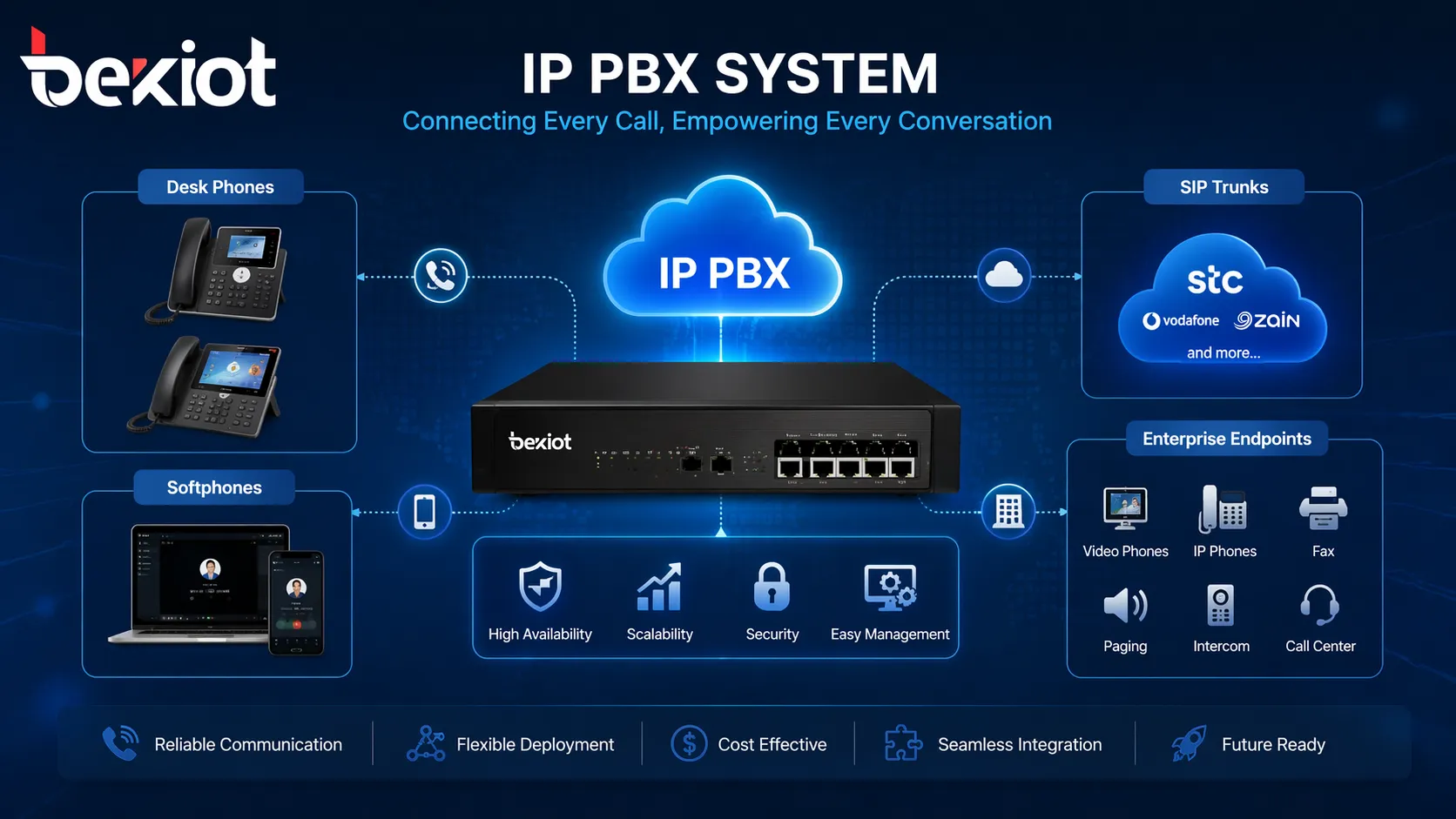
In modern organizations, IP PBX is more than a replacement for legacy office telephony. It is the communication control core that connects desk phones, softphones, SIP trunks, gateways, remote users, voicemail, auto attendants, and conferencing resources into one manageable platform. Because of this, IP PBX is widely used in offices, branch networks, campuses, hotels, hospitals, industrial sites, and many other environments that need scalable and flexible telephony.
What Is an IP PBX?
Definition and basic role
An IP PBX is a private telephone switching system built on Internet Protocol networks. Its main job is to manage extensions, control call routing, apply dial plans, and provide business telephony services such as transfer, hold, forwarding, voicemail, and conference calling. In practical use, it acts as the central brain of an enterprise voice network.
Unlike a traditional PBX that relies heavily on fixed voice circuits and proprietary switching hardware, an IP PBX uses Ethernet and IP-based communication methods. This means voice services can run over the same network foundation used for data, making deployment, expansion, and management more adaptable to modern business needs.
The term is also important from an architecture point of view. The word “PBX” refers to the internal exchange of calls between company users, while “IP” shows that this exchange is handled through packet-based networking rather than only through legacy telephony methods. That combination is what gives IP PBX its flexibility and long-term value.
How IP PBX differs from traditional PBX
Traditional PBX systems are usually associated with dedicated telephone cabling, hardware-bound features, and more rigid expansion paths. They can still provide stable voice services, but adding users, moving departments, or connecting multiple locations often requires more specialized hardware planning and more physical telephony work.
comprehensive introduction:IP PBX vs Traditional PBX
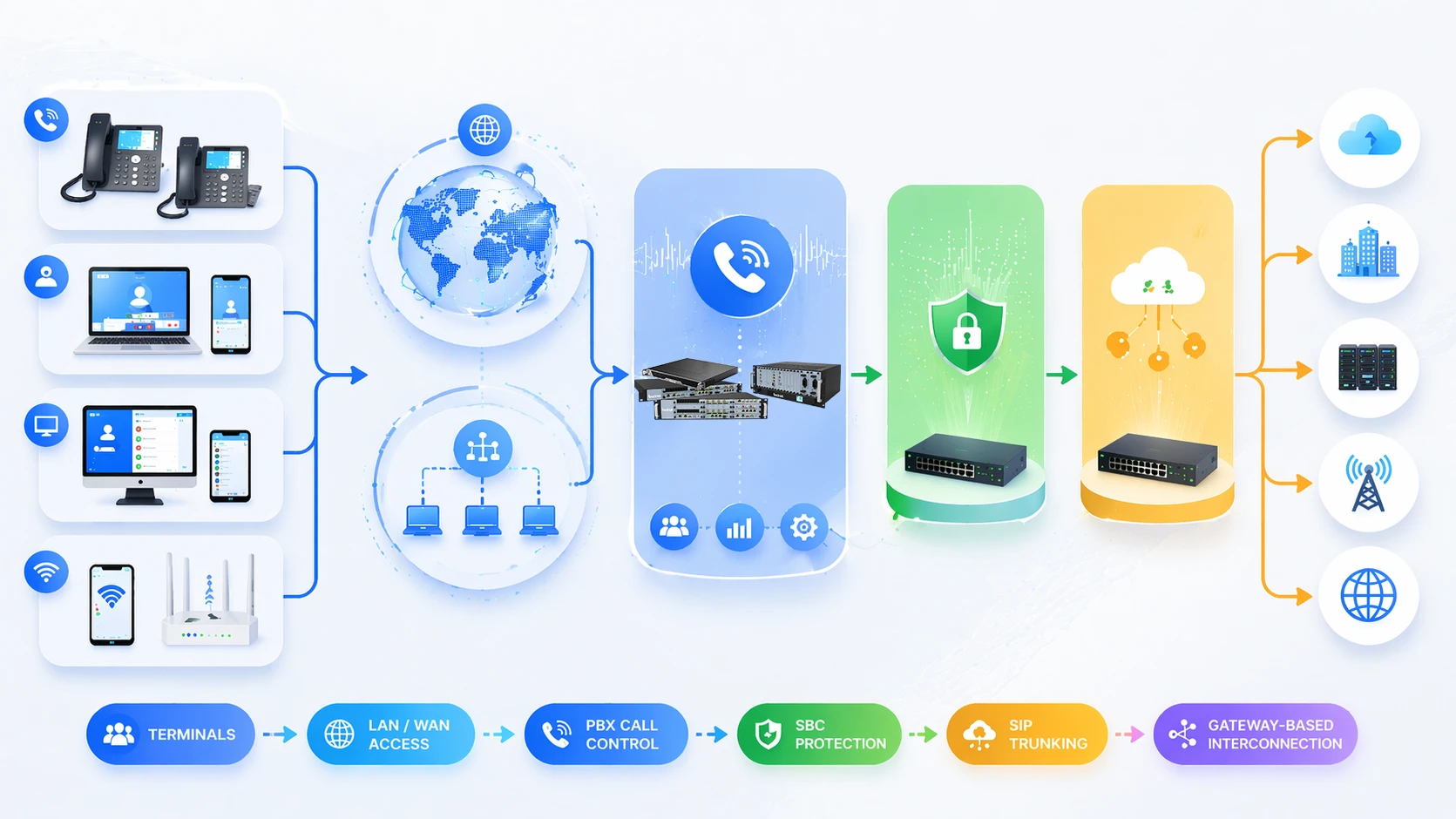
An IP PBX changes that model by moving call control into a network-centric environment. Endpoints can register through LANs, WANs, VPNs, or managed remote access connections, while external calling can be handled through SIP trunks or gateways. This makes the system easier to scale, easier to integrate, and more suitable for hybrid work or multi-site operation.
Another key difference is the service layer. Traditional PBX focuses mainly on voice switching, while IP PBX is often expected to support unified communications, remote extensions, mobile clients, CRM integration, call recording, reporting, video endpoints, and interoperability with other IP-based business systems.
IP PBX is not simply a newer phone switch. It is the evolution of enterprise telephony into a software-driven, network-based communications platform.
How IP PBX Works
Signaling, control, and session setup
When a user places a call from an IP phone, softphone, or SIP terminal, the endpoint sends signaling information to the IP PBX. The system examines the dialed number, caller permissions, destination rules, and dial plan logic. It then decides whether the call should remain inside the enterprise, go to another branch, reach a remote user, or be forwarded to an outside number through a SIP trunk or voice gateway.
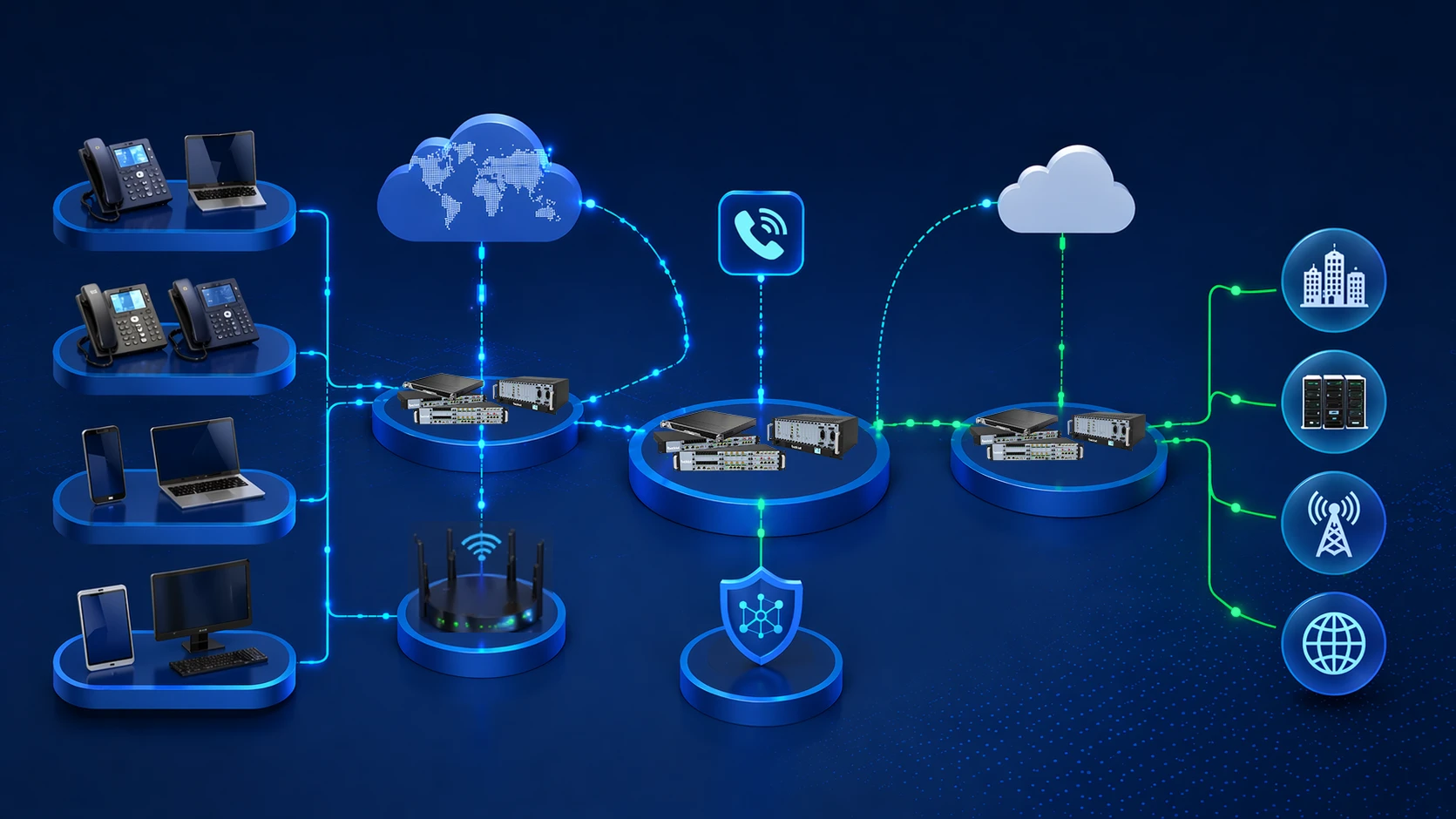
This signaling process is central to how the platform works. Before voice packets begin to flow, the IP PBX already determines which user or service the call should reach, whether IVR or auto attendant treatment is needed, whether the call should be recorded, and what rules apply to the session. In other words, the system controls the communication logic before the media path is fully active.
During the same process, the IP PBX may also apply service functions such as call transfer, call pickup, call parking, ring group handling, time-based routing, least-cost routing, or department-level distribution. These are not separate systems in many deployments; they are built into the core PBX call control framework.
Voice media transmission over IP networks
After the call is established, voice is transmitted as media streams over the IP network. This is usually done through RTP, with codecs selected according to bandwidth planning, voice quality goals, and interoperability requirements. Common codec choices may include G.711 for standard quality and compatibility, G.722 for higher-definition audio, or other codecs depending on deployment needs.
Because voice now shares network resources with other applications, the underlying LAN and WAN design directly affects communication quality. Latency, jitter, and packet loss become important planning factors. This is why IP PBX is not only a telephony solution but also a network engineering project that requires thoughtful bandwidth, switching, and QoS design.
In many enterprise environments, the media path may flow directly between endpoints after signaling is completed, while in other cases it may pass through media servers, conference bridges, SBCs, or gateways. The exact traffic behavior depends on the system design, the services used, and the security model of the organization.
Core Features of IP PBX
Extension management and centralized administration
One of the most important IP PBX features is centralized extension control. Administrators can create users, assign extension numbers, apply permissions, define class of service, and adjust department logic through software-based management instead of relying mainly on physical rewiring or hardware-bound expansion patterns.
This becomes especially valuable in organizations that change frequently. New staff can be added faster, departments can be reorganized more easily, and branch users can often be managed from a central platform. The result is a communication system that better matches how real businesses evolve over time.
Centralized administration also improves visibility. IT teams can monitor registrations, troubleshoot endpoint status, review logs, manage call policies, and update service rules with greater consistency across the organization.
Business telephony features and service logic
IP PBX platforms usually include a broad set of telephony features such as voicemail, auto attendant, IVR, call forwarding, transfer, call hold, call park, ring groups, extension pickup, music on hold, caller ID management, conference calling, and recording options. These features allow a business to structure both internal and inbound calling flows more professionally.
The value is not just that these features exist, but that they can be combined into service logic. For example, incoming calls can be routed differently during office hours and after hours, sales calls can enter a specific queue, support calls can be recorded automatically, and key users can have advanced routing or priority rules.
Because this functionality is typically software-controlled, it is more adaptable than legacy feature sets tied to proprietary hardware boards. As business requirements change, the PBX service model can often change with them.
Remote access and mobility support
IP PBX is well suited to remote and hybrid work because extensions do not need to exist only inside one physical office. Softphones on laptops and mobile devices can register to the system and function as business extensions, allowing users to place and receive calls with company identity and workflow integration even when they are away from the main site.
This helps organizations maintain continuity during travel, distributed operations, temporary relocation, emergency response, or branch expansion. A user working remotely can still join conferences, transfer calls, use extension dialing, and remain part of the company’s normal communication structure.
Mobility support is one of the clearest examples of why IP PBX is more aligned with modern communications than a purely location-bound traditional PBX model.
Scalability and interoperability
Another major feature is scalability. An IP PBX can often grow from a small office deployment to a multi-site communication platform without forcing a complete architectural reset. Adding new extensions, branches, SIP trunks, or compatible endpoints is generally more straightforward than in older systems.
Interoperability also matters. Many IP PBX systems can work with SIP phones, video phones, analog telephones through gateways, intercoms, paging speakers, conference devices, call center tools, and industry-specific terminals. This means the PBX can support much more than standard desk calling.
In practical terms, this turns IP PBX into a communication integration layer. It can sit between users, external networks, service applications, and specialized field devices, allowing the enterprise voice environment to expand beyond classic office telephony.
The strongest advantage of IP PBX is that it turns telephony from isolated hardware into a flexible network service that can grow with business structure and communication demands.
IP PBX Network Architecture
Core architectural components
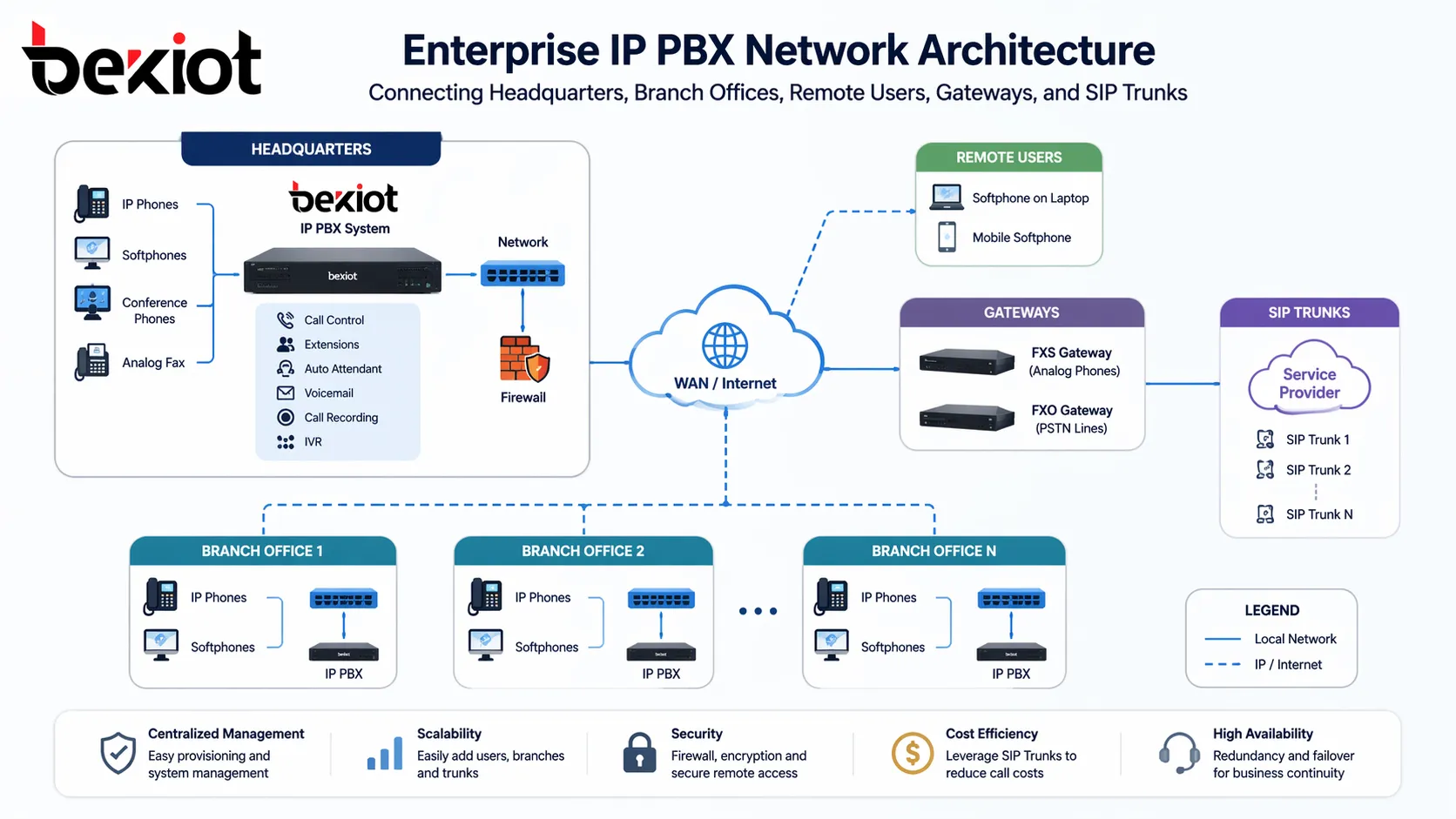
A typical IP PBX architecture includes the IP PBX server or controller, IP phones or soft clients, Ethernet switching, voice gateways, SIP trunks, management interfaces, and sometimes session border controllers. The PBX server is the central control node. Endpoints register to it, external trunks connect through it, and service policies are enforced by it.
IP phones and softphones are the user-facing endpoints. They may be powered and connected through PoE switches in the local LAN. If analog devices or PSTN lines still need to be used, the architecture may also include analog telephone adapters, FXS or FXO gateways, or digital trunk gateways depending on the migration strategy.
Where external SIP services are used, the system often connects to one or more SIP trunk providers. In more security-sensitive or interoperability-sensitive deployments, an SBC may be positioned at the network edge to manage signaling normalization, NAT traversal, encryption, session security, and exposure control.
Single-site, multi-site, and hybrid deployment models
In a single-site deployment, the IP PBX commonly resides inside the office or data room and serves local users directly across the LAN. This model is common in small and medium business environments where one facility contains most staff and communication resources.
In a multi-site model, several offices or branches can share one centralized IP PBX or use a distributed architecture with coordinated call routing. WAN connectivity, VPN tunnels, or other secure IP paths allow users in different locations to function as part of one numbering plan and one communications environment.
Hybrid models are also common. Some users may connect from headquarters with desk phones, some from branches with local endpoints, and others from remote locations through soft clients. The IP PBX binds these connection types together so the organization can operate one telephony framework across diverse locations.
Network quality and security design
Because IP PBX depends on IP transport, network quality planning is essential. Voice traffic is sensitive to delay, jitter, and packet loss, so many deployments use voice VLANs, QoS prioritization, bandwidth planning, and switch-level optimization to protect call quality. A poorly designed network can reduce the value of even a well-designed PBX platform.
Security is equally important. Exposing SIP services without proper control can create risks such as unauthorized registration, toll fraud, signaling attacks, and service disruption. For this reason, administrators often use TLS, SRTP, authentication controls, firewall policies, SBCs, restricted access ranges, and segmented voice network design.
The best IP PBX architectures treat telephony, network quality, and security as connected responsibilities rather than separate tasks. Stable business communication depends on all three working together.
Applications of IP PBX
Office and enterprise communication systems
The most common application of IP PBX is business telephony in offices and enterprise environments. It supports internal extension dialing, departmental communication, receptionist workflows, inbound service numbers, conference calling, voicemail, and flexible routing for growing teams.
Compared with traditional PBX, the IP-based model fits better with branch expansion, remote work, and modern IT management. Organizations can centralize call control while still supporting users across multiple rooms, floors, buildings, or office locations.
For businesses trying to modernize communication without losing structured telephony control, IP PBX remains one of the most practical deployment choices.
Customer service, call handling, and operational coordination
IP PBX is widely used in support centers, service teams, sales departments, and other environments where inbound and outbound call handling matters. Features such as IVR, ring groups, call recording, queue logic, extension policies, and CRM connectivity help organizations manage customer interactions more efficiently.
Even outside formal call center environments, the platform improves operational coordination. Calls can be directed to the correct team faster, unanswered calls can follow backup paths, and business rules can be applied consistently rather than relying on manual forwarding or ad hoc practices.
This makes IP PBX suitable not only for customer-facing communication, but also for internal workflow efficiency.
Hotels, campuses, healthcare, and industrial environments
IP PBX is also used in many vertical industries. Hotels can use it for room telephony, front desk coordination, and service workflows. Campuses can use it to connect administration, help points, paging resources, and emergency communication endpoints. Healthcare environments may use it to support internal staff communication, department coordination, and integration with related communication workflows.
In industrial or infrastructure environments, IP PBX may operate as part of a broader unified communication solution that includes SIP intercoms, paging systems, broadcast equipment, emergency telephones, radio gateways, and dispatch platforms. In these cases, the PBX is not the whole solution, but it is often a central voice control component.
This wide application range shows why IP PBX is still highly relevant. It is flexible enough to serve general office needs and structured enough to support specialized communication environments.
In many modern projects, IP PBX functions as the voice control foundation that connects enterprise calling with intercom, paging, mobility, and application-level communication workflows.
Benefits of IP PBX
Flexibility for growing organizations
One of the clearest benefits of IP PBX is operational flexibility. Businesses can add users, relocate departments, connect new branches, and enable remote workers without being constrained by a purely hardware-bound telephony model. This makes the communication system more adaptable to organizational change.
The same flexibility also reduces disruption during expansion. As long as endpoints and network paths are planned correctly, the business can extend communication coverage with less structural complexity than older voice platforms typically require.
For organizations with evolving staffing patterns or multiple operating locations, this is a major practical advantage.
Better alignment with modern IT infrastructure
IP PBX aligns voice with the broader enterprise network. Instead of operating as a completely separate telephony island, it becomes part of the company’s managed IP environment. This can simplify maintenance, encourage standardization, and make communication services easier to integrate with business tools.
It also supports more unified communication strategies. Voice, mobility, video, conferencing, and application integration can be planned as related services rather than disconnected systems. That is an important shift for organizations moving toward more digital and service-oriented operations.
In this sense, IP PBX supports not only telephony modernization but also communication modernization at a wider business level.
Long-term scalability and service expansion
IP PBX provides a strong foundation for long-term growth because it can support more users, more services, and more endpoints over time. A business may begin with desk phones and SIP trunks, then later add mobile clients, conference devices, paging integration, intercom terminals, recording systems, or branch-level policy control.
This staged growth model is often more realistic for real organizations than a one-time full replacement strategy. The PBX can evolve as communication requirements evolve, which protects the long-term usefulness of the platform.
For many businesses, this combination of scalability, service richness, and architectural flexibility is the main reason IP PBX remains a core enterprise telephony solution.
Conclusion
IP PBX is a private branch exchange built on IP networking. It manages call control, extensions, business telephony features, and external voice connectivity through a more flexible and software-driven architecture than traditional PBX systems. As a result, it is widely used in modern enterprise communication environments.
Its value comes from several directions at once. It supports centralized administration, rich telephony functions, multi-site connectivity, remote access, SIP trunk integration, and compatibility with a broad range of communication endpoints. At the same time, it depends on good network design, quality planning, and security discipline to deliver stable performance.
For businesses building modern voice infrastructure, IP PBX is not just a phone system upgrade. It is a communication platform that can connect users, branches, devices, and business workflows through one controllable IP-based framework.
FAQ
Is IP PBX the same as VoIP?
No. VoIP refers to the method of transmitting voice over IP networks, while IP PBX is the business communication system that manages extensions, routing, and telephony features. VoIP is the transmission method, and IP PBX is the platform that uses it.
Can IP PBX work with traditional telephone lines?
Yes. Many IP PBX systems can connect to legacy telephone infrastructure through analog or digital gateways. This allows businesses to migrate in stages instead of replacing all existing voice resources at once.
What devices can connect to an IP PBX?
Common connected devices include SIP desk phones, softphones, conference phones, video phones, analog phones through gateways, intercoms, paging devices, and other compatible SIP or voice terminals.
Why do businesses replace traditional PBX with IP PBX?
Businesses usually move to IP PBX for better scalability, easier administration, remote work support, richer telephony features, multi-site flexibility, and stronger integration with modern IT and communication systems.
Where is IP PBX commonly used?
IP PBX is commonly used in offices, enterprise headquarters, branch networks, hotels, schools, hospitals, customer service departments, and industrial communication projects that need structured voice control and flexible deployment.







