


A database problem rarely stays inside the database. When the only data copy becomes slow, unreachable, corrupted, or overloaded, the business system above it starts to feel the impact immediately: orders cannot be placed, reports cannot be generated, devices cannot upload records, users cannot log in, and recovery becomes a race against time.
Database replication exists for this reason. It creates one or more additional copies of data and keeps them synchronized with the source database so that systems can read faster, recover faster, distribute workloads, and continue operating when a single database node is no longer enough.
The basic idea behind database replication
Database replication is the process of copying data from one database node to another and keeping those copies updated as changes occur. The source database may be called the primary, master, publisher, or leader, depending on the database technology. The receiving database may be called a replica, standby, subscriber, secondary, or follower. The names vary, but the purpose is similar: changes made in one place are delivered to another place in a controlled way.
The copied data may include complete databases, selected tables, partitions, schemas, transaction logs, or specific data streams. In some systems, the replica is used only for backup or failover. In others, replicas handle read traffic, analytics, reporting, regional access, or downstream data processing. Replication is therefore not one fixed feature; it is a design method used to support different operational goals.
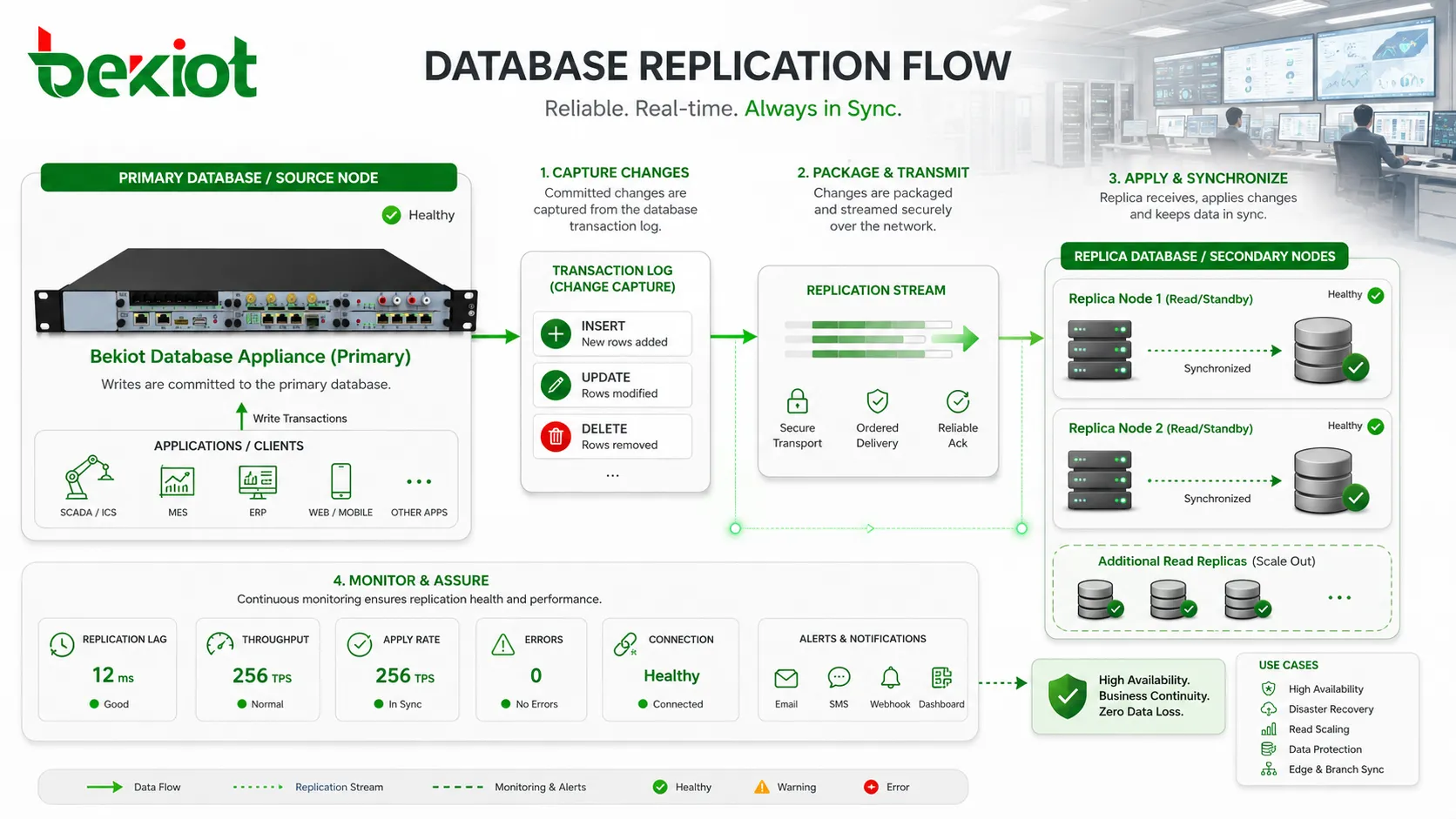
At the center of replication is change tracking. When data is inserted, updated, or deleted, the database must identify that change, package it in a reliable form, send it to another node, and apply it in the correct order. If this process is careless, the replica may become inconsistent. If it is too slow, the replica may lag behind. If it is not monitored, teams may not notice problems until recovery is needed.
A good replication design answers several practical questions: which data should be copied, how quickly it must arrive, who can write to the data, how conflicts are handled, what happens during network failure, and how applications should behave when a database node is unavailable. These questions determine whether replication becomes a resilience tool or a hidden source of confusion.
What actually moves between database nodes
Replication is not always a simple file copy. In most production systems, the database does not resend the entire dataset every time a record changes. Instead, it captures the change and transfers only what is needed to reproduce that change on the replica. This reduces bandwidth usage and allows the replica to stay close to the source without rebuilding from scratch.
One common method is log-based replication. The primary database records changes in transaction logs, binary logs, write-ahead logs, or redo logs. The replica reads those logs and applies the same operations in sequence. This method is widely used because the log already represents the authoritative order of database changes.
Another method is statement-based replication, where SQL statements are sent to the replica. This may be simpler in some systems, but it can create differences if a statement depends on non-deterministic functions, time values, random values, or environment-specific behavior. Row-based replication avoids many of these problems by sending the actual row changes instead of only the statement that produced them.
Some systems use snapshot replication. A full or partial copy of the data is taken at a point in time and delivered to another location. This is useful for initial synchronization, reporting databases, or periodic data distribution. However, snapshots alone may not be enough for systems that require near-real-time updates.
Modern architectures may also use change data capture. CDC extracts database changes and sends them to downstream systems such as analytics platforms, search indexes, message queues, or data lakes. In this case, replication is no longer only about maintaining another database copy; it becomes part of the organization’s data movement pipeline.
Primary-replica replication in daily operation
The most familiar pattern is primary-replica replication. One database node accepts writes, while one or more replicas receive copies of the changes. Applications send insert, update, and delete operations to the primary. Read-only queries may be sent to replicas if the application and database architecture support it.
This pattern is easy to understand and widely used because it keeps write ownership clear. The primary is the authority for changes. Replicas follow its state. If a replica fails, the primary can continue operating. If the primary fails, one replica may be promoted to become the new primary, depending on the failover design.
The benefit is practical separation of workload. Transactional writes, user operations, and business updates remain on the primary, while reports, dashboards, search queries, or read-heavy services can use replicas. This can reduce pressure on the main database and improve response time for users.
However, applications must understand that replicas may not always be perfectly current, especially in asynchronous replication. A user who writes data to the primary and immediately reads from a lagging replica may not see the latest change. This is not necessarily a failure; it is a design trade-off that must be handled carefully.
Multi-primary and distributed replication patterns
Some environments require more than one writable database node. In multi-primary replication, multiple nodes can accept write operations and then replicate changes to each other. This can support distributed sites, regional operations, local write access, or high availability across data centers. It sounds attractive, but it is more complex than primary-replica replication.
The main challenge is conflict. If two nodes update the same record at the same time, the system must decide which change wins or how the changes should be merged. Conflict rules may be based on timestamps, version numbers, application logic, node priority, or manual resolution. Poor conflict handling can damage data quality.
Distributed replication may also be used in edge systems, retail branches, industrial sites, mobile applications, or remote operations where local data must remain available even when the central network is unstable. A local node may store and update data temporarily, then synchronize with the central system later. This improves local continuity but requires careful synchronization rules.
Multi-primary designs should be chosen only when the business need justifies the complexity. For many applications, a single write primary with read replicas is easier to operate. For systems that truly require local writes in multiple places, conflict management, data ownership, and monitoring must be designed before deployment.
Synchronous and asynchronous replication
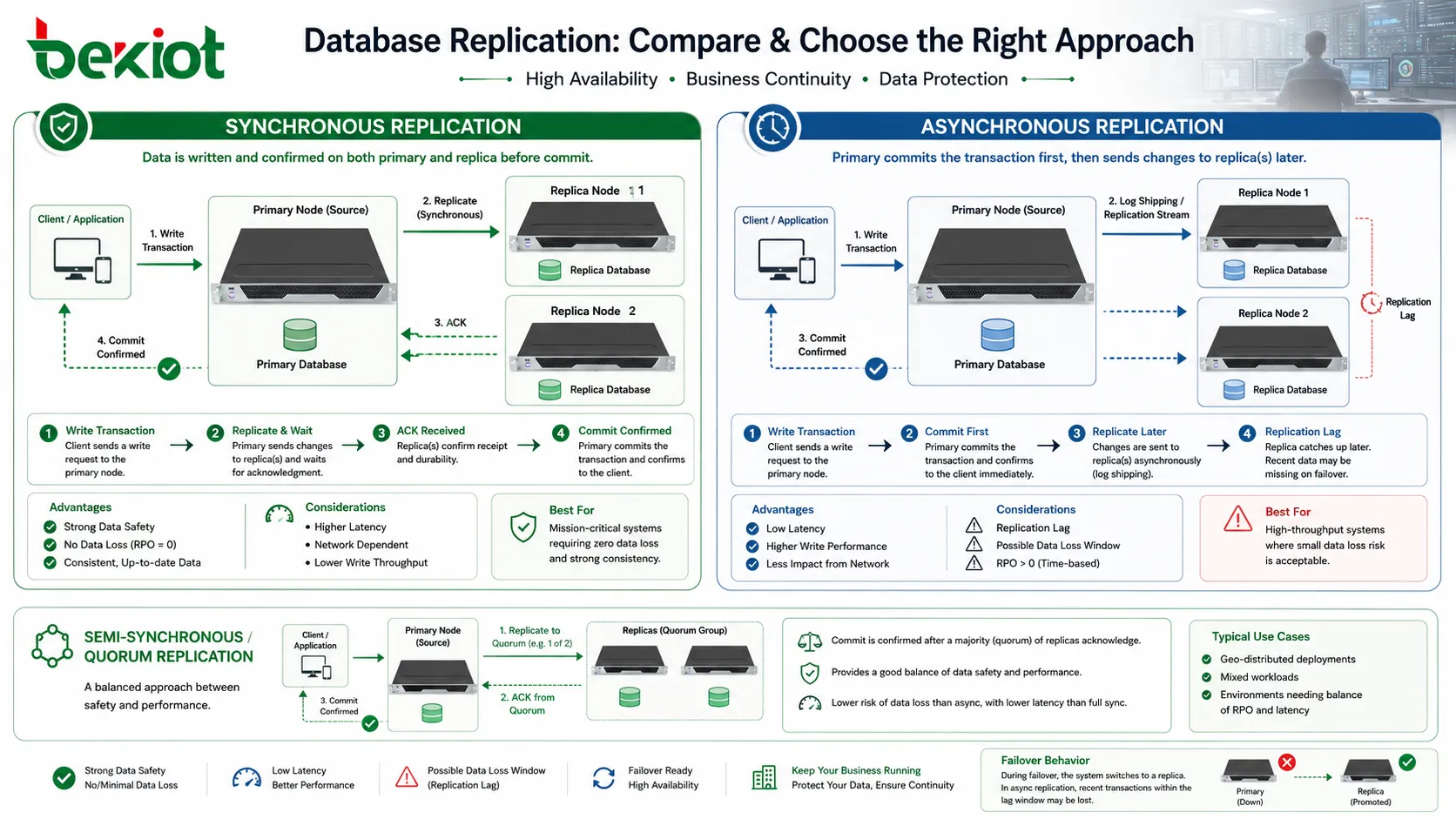
Replication timing is one of the most important design decisions. In synchronous replication, a transaction is not considered fully committed until the change has been confirmed by another database node. This can improve data safety because the replica has the change before the application receives success confirmation. If the primary fails shortly after commit, the confirmed data is more likely to exist on another node.
The cost is latency. If the replica is far away or the network is slow, the primary must wait longer before completing the transaction. This can affect application response time. Synchronous replication is therefore often used where data loss tolerance is very low and the network path between nodes is reliable enough to support it.
In asynchronous replication, the primary commits the transaction first and sends the change to replicas afterward. This improves write performance because the application does not need to wait for remote confirmation. It is common in systems where replicas are used for reporting, read scaling, or disaster recovery across longer distances.
The trade-off is replication lag. If the primary fails before changes have reached the replica, some recent transactions may be lost or require recovery from logs. This is why asynchronous replication should be matched with clear recovery objectives. The team must know how much data loss is acceptable and how quickly the replica should catch up during normal operation.
Some systems use semi-synchronous or quorum-based methods to balance performance and safety. These designs acknowledge a transaction after one or more replicas confirm it, but they do not necessarily wait for every replica. The best choice depends on business risk, network quality, transaction volume, and recovery requirements.
Availability and failover advantages
The most direct benefit of database replication is improved availability. If the primary database fails, a replica may be promoted to continue service. Without replication, recovery may depend on restoring from backup, which can take longer and may lose more recent data. Replication gives operations teams a live or near-live copy that can be used for faster restoration.
Failover can be manual or automatic. Manual failover gives administrators more control, which is useful when the environment is complex or when split-brain risk must be avoided. Automatic failover can reduce downtime, but it must be designed carefully so that two nodes do not both believe they are the active primary. In high-availability systems, the failover decision is often supported by monitoring, health checks, quorum rules, or cluster management.
Availability also depends on application behavior. Promoting a replica is not enough if applications cannot reconnect, if DNS updates are slow, if connection pools keep using the failed address, or if users must manually change settings. Database replication should therefore be planned with application routing, load balancers, connection strings, service discovery, and operational procedures.
A replica can also support maintenance. During planned upgrades, patching, hardware replacement, or storage migration, workloads can sometimes be moved to another node. This reduces planned downtime and gives administrators more flexibility. The strongest replication designs support both emergency recovery and routine maintenance.
Read scaling without changing the main data model
Many database systems become overloaded not because writes are too heavy, but because read queries grow over time. Dashboards, reports, search pages, customer portals, monitoring tools, and API calls may all read from the same database. If every read hits the primary, normal transactions may slow down. Replication provides a way to distribute read traffic across replicas.
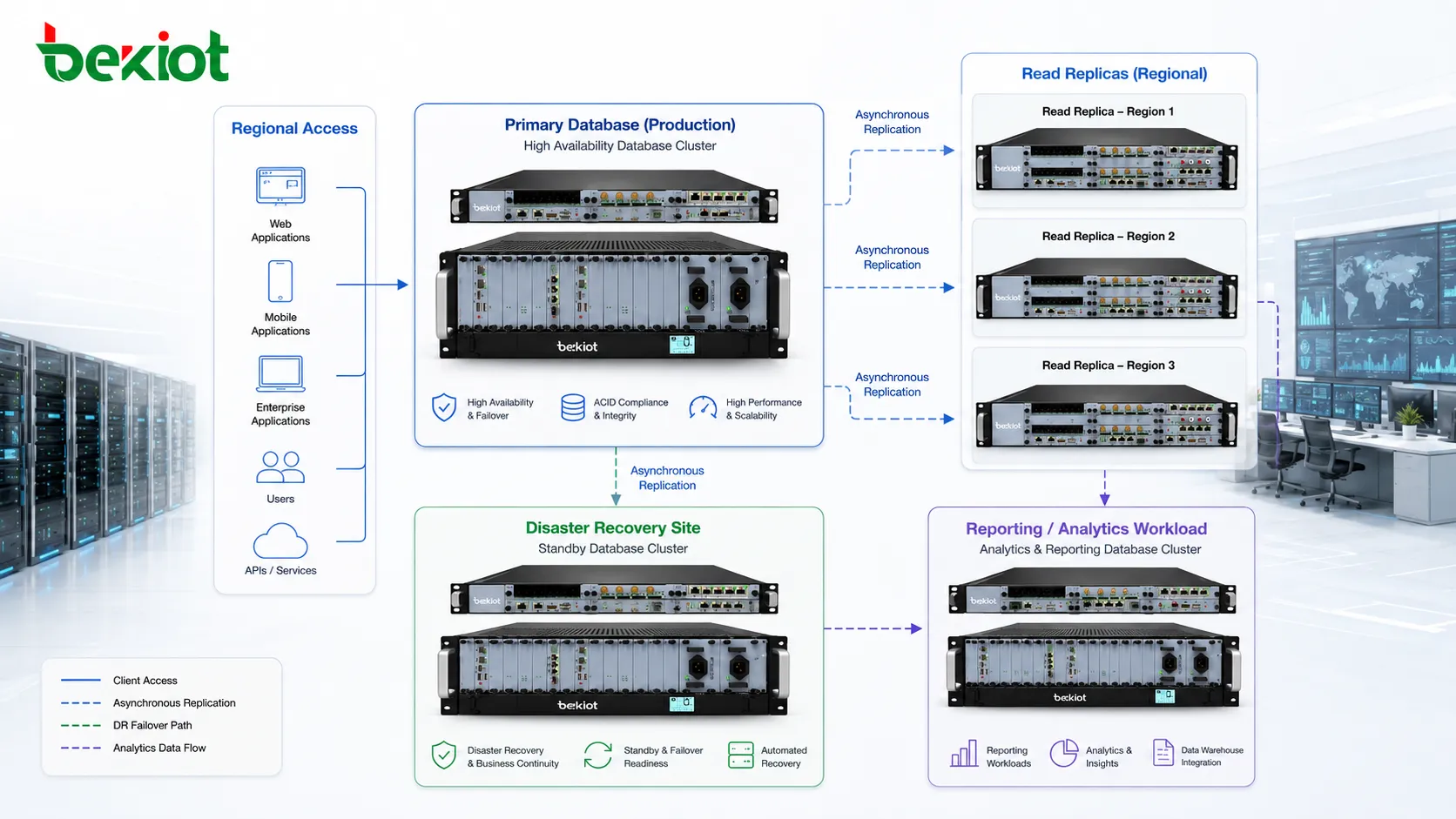
Read replicas are commonly used for reporting and analytics. Long-running queries can run on replicas without blocking or slowing critical transactional work on the primary. This is useful when business teams need frequent reports but the production database must remain responsive for users.
Application read splitting can also improve scalability. The application sends writes to the primary and sends selected read queries to replicas. This must be done carefully because replicas may lag behind. For data that must be immediately consistent, reading from the primary may still be necessary. For data that can tolerate slight delay, replicas are suitable.
This approach allows organizations to increase read capacity without redesigning the entire data model. Instead of immediately moving to a new database architecture, the team can add replicas, optimize query routing, and separate reporting workloads. It is often a practical intermediate step in database scaling.
Disaster recovery and geographic resilience
Replication is often used to support disaster recovery. A replica in another data center, cloud region, or physical location can protect against local failures such as fire, power outage, network disruption, storage failure, or site-level disaster. If the primary site becomes unavailable, the remote replica may provide a recovery path.
Geographic replication requires careful planning because distance increases latency. Synchronous replication across long distances may be too slow for some applications. Asynchronous replication is more common for remote disaster recovery, but it introduces possible data loss if the primary site fails before all changes are copied.
Recovery planning should define Recovery Time Objective and Recovery Point Objective. RTO describes how quickly the service should be restored. RPO describes how much data loss is acceptable. A system with strict RPO may need more synchronous protection or very low replication lag. A system with flexible RPO may use asynchronous replication with periodic checks.
Disaster recovery also requires testing. A replica that has never been promoted, never been checked for application compatibility, or never been restored under realistic conditions may not be reliable when a real disaster occurs. Replication provides the technical foundation, but recovery drills prove whether the process works.
Data locality and regional performance
Replication can bring data closer to users, branches, or regional applications. When users in different locations read from a nearby database replica, response time may improve. This is useful for global applications, multi-region services, retail chains, logistics networks, financial platforms, and distributed enterprise systems.
Regional replicas can also reduce pressure on central network links. Instead of sending every query across a long-distance connection, local users or services can read from a nearby copy. This is especially useful when read traffic is heavy and data freshness requirements are manageable.
Data locality also supports local reporting. A regional office may need to analyze its own transactions, inventory, service records, or operational data without putting constant load on the central production database. A replicated local database can provide that access while the central system remains focused on core transactions.
However, regional replication must respect data governance rules. Some data may be restricted by privacy law, internal policy, customer contract, or industry regulation. Copying data to another region or country may require approval, encryption, access control, or data minimization. Replication should improve performance without weakening governance.
Backup is not the same as replication
Replication and backup are often mentioned together, but they solve different problems. Replication keeps another database copy updated, usually for availability, performance, or data distribution. Backup creates recoverable historical copies that can be restored after deletion, corruption, ransomware, accidental changes, or long-term data loss.
A replica may faithfully copy a mistake. If a user deletes important records on the primary, replication may quickly delete them on the replica as well. If an application writes corrupted data, the replica may receive the same corrupted state. In this case, replication does not protect the organization unless point-in-time recovery, delayed replication, or backups are available.
Backups are slower to restore but safer for historical recovery. They allow the team to recover data from a previous point in time. Replication is faster for service continuity but may not provide historical rollback. A strong database strategy usually includes both replication and backup, not one or the other.
The distinction should be clear in operational planning. If the goal is fast failover, replication is useful. If the goal is recovering data from last week, backup is required. If the goal is both, the organization must design both processes and test both regularly.
Monitoring replication health
Replication should be monitored continuously. A replica that is hours behind the primary may still appear online, but it may be useless for failover or inaccurate for reporting. Common monitoring points include replication lag, replica status, log shipping progress, apply rate, error messages, connection status, disk usage, transaction delay, and failed synchronization events.
Replication lag is especially important. It measures the delay between a change occurring on the primary and being available on the replica. Small lag may be acceptable for reporting. Large lag may break application assumptions or increase data loss risk during failover. Monitoring should define acceptable lag thresholds for each use case.
Storage and capacity should also be watched. Replication can generate logs, temporary files, relay logs, archive logs, or staging data. If disk space runs out, replication may stop. If the replica is underpowered, it may not apply changes fast enough during peak load. A replica should be sized for its workload, not treated as a lightweight spare with no performance requirements.
Operational alerts should be meaningful. An alert should not only say that replication failed; it should help the team identify whether the issue is network connectivity, authentication, log position, disk capacity, schema mismatch, permission error, or conflicting writes. The faster the cause is known, the faster the data path can be restored.
Security and access control considerations
Database replication increases the number of places where sensitive data exists. Each replica must be protected with the same seriousness as the primary database. If a replica is less secure, it may become the easiest path to data exposure. Security planning should therefore include encryption, access control, audit logging, network restriction, and credential management for every node.
Replication traffic should be protected, especially when it crosses data centers, cloud regions, public networks, or third-party links. Encryption in transit helps prevent interception. Authentication between nodes helps prevent unauthorized systems from joining the replication relationship. Network segmentation can reduce exposure to unrelated systems.
Access permissions should be reviewed separately for replicas. A reporting replica may be read-only for analysts, but that does not mean every table should be visible to every user. Sensitive fields may require masking, filtering, or separate access policy. In some cases, a replica should contain only the data needed for its purpose.
Administrative access also needs control. Users who can stop replication, promote a replica, change replication filters, or modify replication credentials have significant power. These actions should be logged and restricted to authorized personnel. Replication is part of the database’s trust boundary, not only a background data movement feature.
Common mistakes during deployment
A frequent mistake is deploying replication without defining the real purpose. If the goal is availability, the design must include failover procedure and application reconnection. If the goal is reporting, the design must handle query load and data freshness. If the goal is disaster recovery, the design must include remote location, RTO, RPO, and recovery drills. A vague goal leads to vague architecture.
Another mistake is assuming the replica is always current. Asynchronous replicas can lag. Heavy writes, network instability, slow disks, schema changes, or long transactions can all delay replication. Applications that read from replicas must be designed with this delay in mind.
Some teams fail to test promotion. They create replicas but never practice switching to them. During an emergency, they discover permission problems, application connection issues, missing jobs, incomplete configuration, or inconsistent data. Failover should be tested before it is needed.
Replication filters can also create confusion. If only selected tables or databases are replicated, teams must know exactly what is included and excluded. A reporting team may assume all data is available when only part of the schema is copied. Clear documentation prevents false assumptions.
Finally, many deployments underestimate maintenance. Replication must survive upgrades, schema changes, certificate renewals, password rotation, storage growth, network changes, and database version differences. It is not a set-and-forget feature. It needs ownership.
When replication brings the most value
Database replication brings the most value when the organization has a clear need for availability, read scaling, disaster recovery, data distribution, or workload separation. It is less useful when the database is small, downtime tolerance is high, read traffic is light, and backup recovery is sufficient. Like every architecture choice, it should match the problem.
For business-critical systems, replication can reduce downtime and improve recovery options. For growing applications, it can move reporting and read queries away from the primary. For distributed organizations, it can support regional access. For data teams, it can deliver operational data to analytics systems without disturbing the production workload.
The strongest designs are usually modest and clear. They define which node accepts writes, which nodes serve reads, how lag is monitored, how failover works, how backups are maintained, and who is responsible for the replication relationship. Complexity should be added only when the business reason is strong enough.
Replication is not a magic copy of safety. It is a disciplined way to keep data available in more than one place. Its benefits appear when the technical design, application behavior, monitoring, security, and recovery process are planned together.
FAQ
Is database replication mainly used for backup?
No. Replication can support recovery, but it is not a replacement for backup. A replica may copy accidental deletion or corrupted data from the primary. Backups are still needed for historical recovery and point-in-time restoration.
What is replication lag?
Replication lag is the delay between a change being committed on the primary database and the same change appearing on the replica. It is common in asynchronous replication and must be monitored when replicas are used for reading or failover.
Can applications write to replicas?
In primary-replica designs, replicas are usually read-only. Multi-primary systems allow writes on more than one node, but they require conflict handling and stronger operational control. The correct model depends on the application’s consistency requirements.
Does replication improve database performance?
It can improve performance by moving read traffic, reporting, and analytics away from the primary database. It does not automatically speed up all workloads. Write-heavy systems may still need indexing, query optimization, partitioning, hardware improvement, or architecture changes.
What should be tested before relying on replication?
Teams should test initial synchronization, replication lag under load, failover, replica promotion, application reconnection, backup recovery, monitoring alerts, security permissions, and behavior during network interruption.







