


A unified command and control center greets the eye as a wall of screens. But when it comes alive, those screens are only the tip of the iceberg. Beneath them lie buzzing alarms, crisscrossing communication links, field devices scattered across the site, cameras and sensors, centrally managed software platforms, standard operating procedures, duty teams, escalation rules, and decisions that must be made under split-second pressure.
A unified command and control center exists for one purpose alone: to make vast and complex site conditions visible, understandable, and actionable — before a small anomaly becomes a major incident.
From scattered signals to one operating picture
Many organizations operate across large spaces, multiple buildings, production areas, transport routes, remote sites, or public facilities. Information comes from different sources: cameras, access control systems, fire alarms, communication terminals, industrial sensors, environmental monitoring, public address systems, dispatch consoles, maintenance platforms, and security reports. If each source is handled separately, operators may see fragments but miss the full situation.
The central value of an operations center is that it brings these fragments together. It allows staff to observe equipment status, receive incident alerts, communicate with field teams, check video, confirm locations, and coordinate response from one managed position. This does not mean every system becomes one single software product. More often, different systems remain specialized, but their outputs are organized into a shared operational view.
This shared view helps teams understand what is happening now, what may happen next, and who needs to act. A camera image may confirm an alarm. A device status change may explain a communication fault. A call from a field point may provide human context to a sensor warning. When these inputs appear together, operators can respond with less guesswork.
The result is not only faster reaction. It is also better judgment. Operators can compare signals, identify patterns, and avoid treating every alarm as an isolated event. In environments where safety, production, traffic, energy supply, security, or public service depends on continuous awareness, this combined operating picture becomes essential.
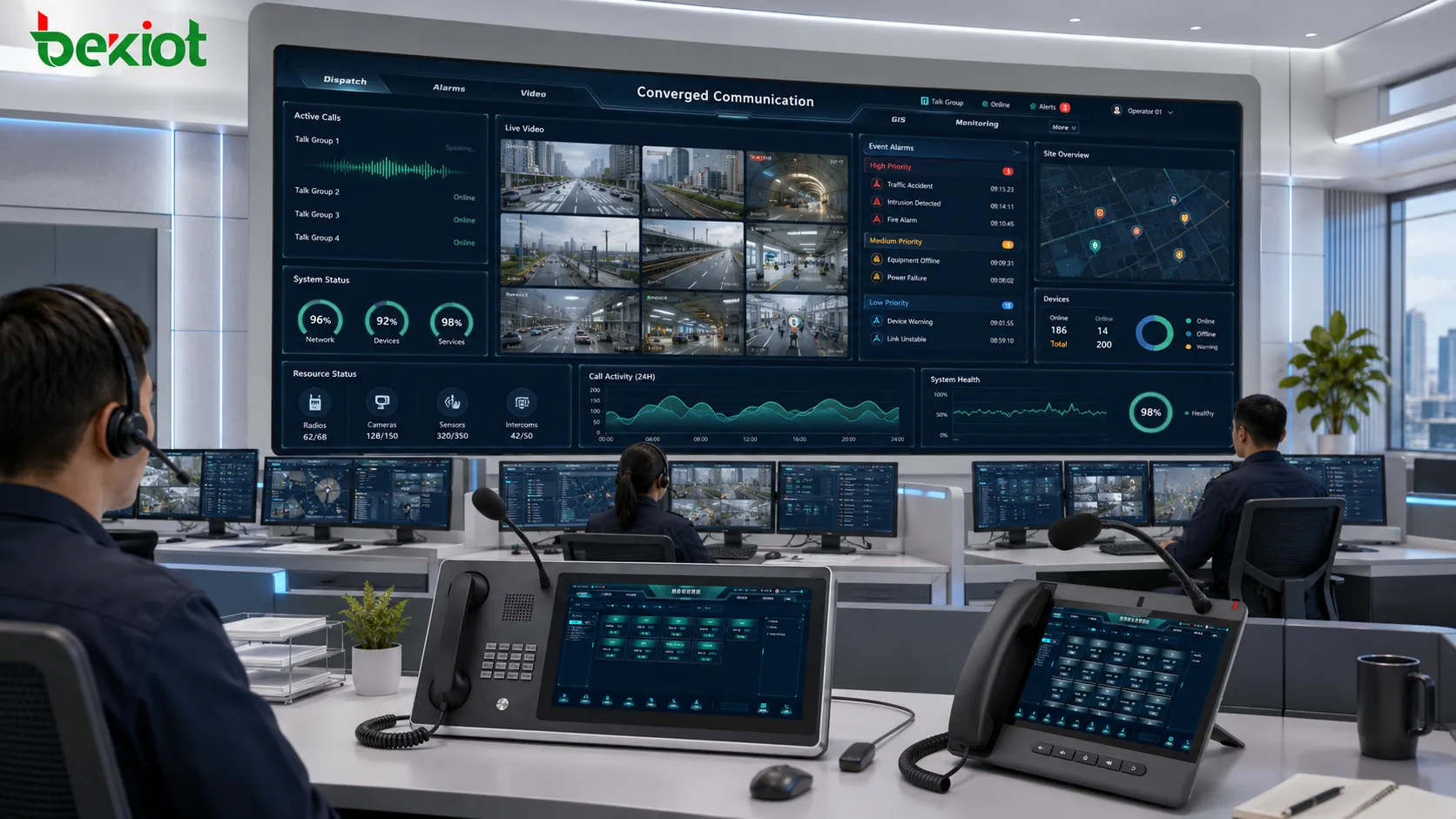
How information reaches the operator
The operating process usually begins in the field. A sensor detects an abnormal value, a camera records a scene, a call point is activated, a machine reports a fault, a security device triggers an alarm, or a field worker contacts the duty desk. These events travel through network links, control systems, gateways, servers, or management platforms before they appear to the operator.
Once the information arrives, the system must present it in a way that is usable. Raw data alone is not enough. Operators need location, device identity, alarm level, time, status, related video, contact options, and suggested response procedures where applicable. A temperature value, for example, becomes meaningful only when the operator knows which area it belongs to, whether it exceeds a threshold, and who should be notified.
Good system design reduces the time between detection and understanding. Important alarms should be visible without being buried in low-priority notifications. Repeated or related events should be grouped where appropriate. Field locations should be clear. Communication options should be close to the event information. The operator should not have to search five different systems just to answer one basic question: what is happening and where?
After the operator understands the event, the next step is action. This may include making a call, dispatching a team, opening a video view, triggering a public announcement, escalating to management, logging a ticket, or closing a false alarm. The operating platform should support this flow from information to decision to follow-up.
Decision flow behind the screens
The working logic can be described as a continuous loop: collect, display, judge, communicate, act, record, and review. First, information is collected from field devices and systems. Then it is displayed to operators through screens, dashboards, alarm panels, maps, consoles, or software interfaces. Operators judge the event based on severity, location, procedure, and available evidence.
Communication then connects the room to the field. Operators may contact security staff, maintenance workers, emergency teams, drivers, production supervisors, station personnel, or public service departments. In some environments, communication may include radios, telephones, intercom systems, paging, video calls, public address, or digital messaging. The ability to reach the right person quickly is as important as seeing the alarm.
Action follows communication. A responder may be dispatched. A gate may be opened. A machine may be stopped. A warning may be broadcast. A maintenance order may be created. A supervisor may be informed. The system should help operators carry out these actions according to procedure, especially when the event is urgent or involves multiple teams.
The final step is record and review. Events, calls, alarms, instructions, response times, and handling results should be stored where needed. These records support investigation, training, accountability, and process improvement. Without a record, an incident may be handled in the moment but forgotten as an operational lesson.
People, platforms, and procedures must work together
A well-designed operating environment is not created by screens alone. It depends on three elements working together: trained people, reliable platforms, and clear procedures. If any one of these elements is weak, the whole system becomes less effective.
People are responsible for judgment. Software can highlight abnormal events, but operators must understand context, prioritize tasks, communicate clearly, and follow escalation rules. This requires training, shift management, role definition, and regular drills. In stressful situations, unclear responsibility can slow down response even when the technology works.
Platforms provide visibility and control. They collect data, present alarms, manage communication, support recording, and connect subsystems. The platform should be stable, understandable, and matched to the site’s workflow. Overly complex interfaces can increase operator burden. A simpler screen that supports real decisions is often more valuable than a crowded display full of unused data.
Procedures connect people and platforms. They define what should happen when a fire alarm appears, when a camera goes offline, when a field call arrives, when a production line stops, when a security breach occurs, or when communication fails. Procedures should be practical enough to use under pressure, not only written for documentation.
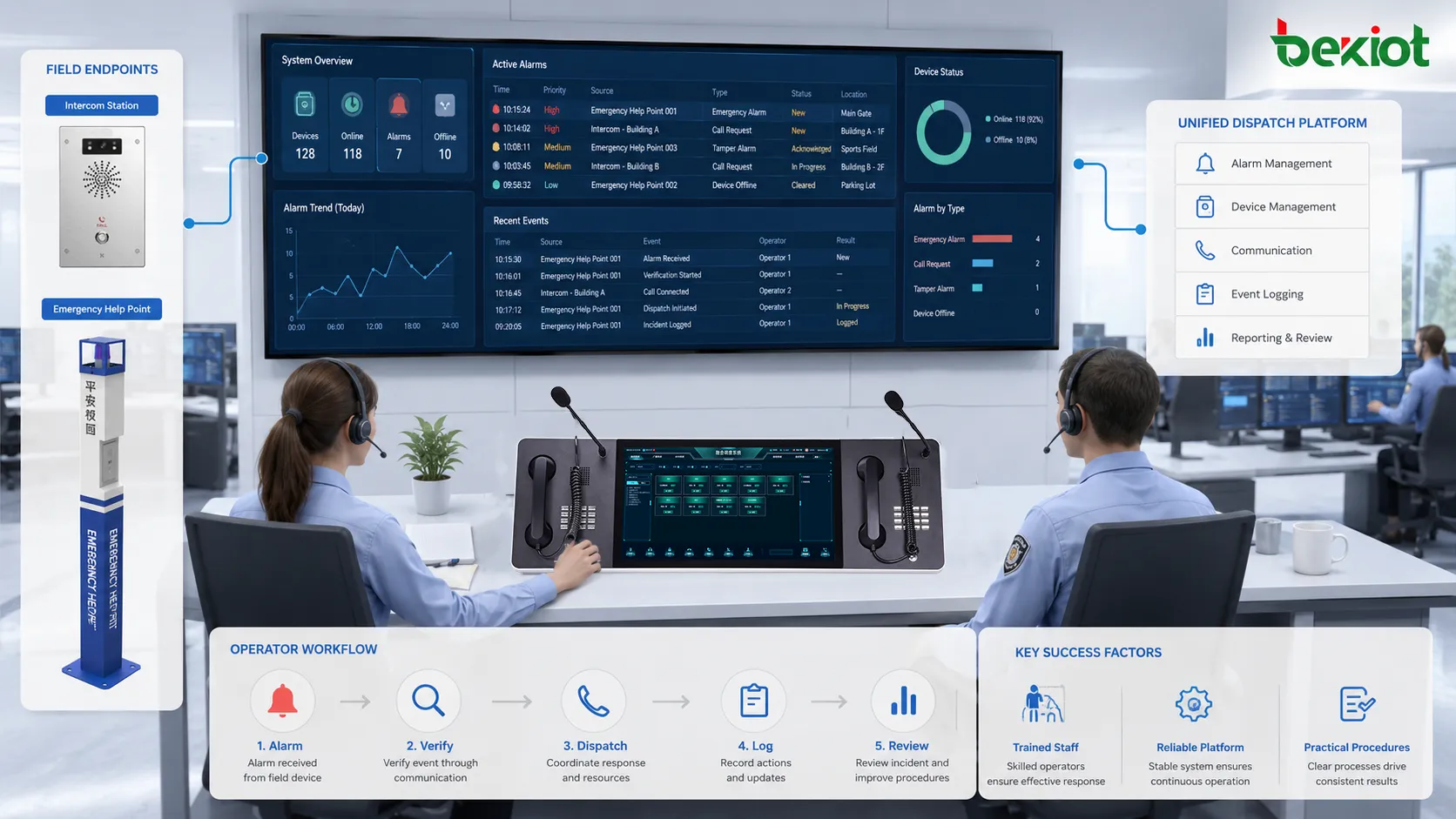
Layouts that support attention and response
Physical layout affects performance more than many projects expect. Operators may work long shifts, watch multiple systems, answer calls, handle alarms, and coordinate with field staff. If the layout is poorly planned, fatigue and mistakes increase. The space should support visibility, communication, concentration, and fast access to critical tools.
Workstations should be arranged according to role. A security operator, dispatch operator, maintenance coordinator, and supervisor may not need the same screen layout or communication tools. Shared video walls should show information that benefits the whole team, while individual screens should support role-specific tasks. Putting everything on the largest wall is not always helpful.
Lighting, acoustics, seating, screen distance, cable organization, and equipment placement also matter. Glare can make video difficult to read. Noise can interfere with voice communication. Poor seating can increase fatigue. Bad cable management can complicate maintenance. These details influence daily work, especially in 24-hour operations.
Layout should also support escalation. Supervisors need to see key information quickly. Visitors or managers may need a separate viewing area. Emergency coordination may require space for temporary staff. The room should not only look organized during normal operation; it should remain usable when pressure rises.
Why centralized monitoring improves daily management
The most obvious benefit is visibility. A central team can see equipment status, alarm conditions, communication events, camera images, access records, or operating indicators without waiting for someone to report the problem manually. This helps organizations detect faults earlier and manage sites more consistently.
Another benefit is faster coordination. When multiple teams share one event, the operator can connect them through defined communication channels rather than relying on personal phone calls or informal messages. This is useful for maintenance, security, production, emergency response, visitor handling, transport operation, and facility services.
Centralized monitoring also improves accountability. Events can be logged, response times measured, instructions recorded, and follow-up actions reviewed. This helps managers understand whether procedures are working, whether certain areas generate repeated problems, and whether staffing or system design should be improved.
Daily operation becomes more predictable. Instead of every shift handling problems differently, the organization can use standardized screens, alarm levels, contact groups, and response rules. This reduces dependence on individual memory and makes training easier for new staff.
Coordination during abnormal events
The real test comes when several things happen at once. A power fault may trigger equipment alarms, camera outages, communication interruptions, access control failures, and user reports. If each issue is handled separately, operators may lose time and miss the cause. A coordinated operating environment helps connect related signals and manage them as one incident.
During abnormal events, priority becomes important. Not every alarm deserves the same response. A life-safety alarm, emergency call, intrusion alert, production shutdown, or major network failure should be displayed and handled differently from routine maintenance notices. Alarm classification helps operators focus on what matters first.
Communication routing should also support abnormal operation. Operators may need to contact several teams at once, issue group instructions, broadcast public messages, or escalate to external agencies. If these communication paths are prepared in advance, response becomes faster and less dependent on improvisation.
After the event, review is necessary. What was detected first? Was the location clear? Did the right team respond? Were there delays? Did the system generate too many false alarms? These questions turn one incident into future improvement. A room that only watches events is incomplete; a room that helps the organization learn from events is much more valuable.
Fields where this model is widely used
Industrial facilities use centralized monitoring to supervise production lines, utility systems, environmental conditions, safety alarms, equipment status, and maintenance communication. In these sites, operators need to see both process information and field response resources. Fast communication between the central desk and workshop areas can reduce downtime and improve safety control.
Transportation systems use similar environments for railway stations, metro lines, airports, ports, tunnels, highways, and bus networks. Operators may monitor passenger flow, traffic status, platform conditions, public announcements, emergency calls, CCTV, access points, and field teams. Timely coordination is important because incidents can affect many people quickly.
Energy and utility sectors use them for power plants, substations, water treatment, pipelines, district heating, renewable energy sites, and grid operation. These environments require continuous awareness of system status and fast escalation when abnormal readings appear. Remote sites and unmanned facilities make centralized visibility even more important.
Security and public facility management also rely on this model. Campuses, hospitals, office parks, data centers, government buildings, logistics hubs, stadiums, and commercial complexes may all need integrated monitoring, visitor support, emergency calls, access control, patrol coordination, and incident records. The scale may vary, but the need for organized response remains similar.
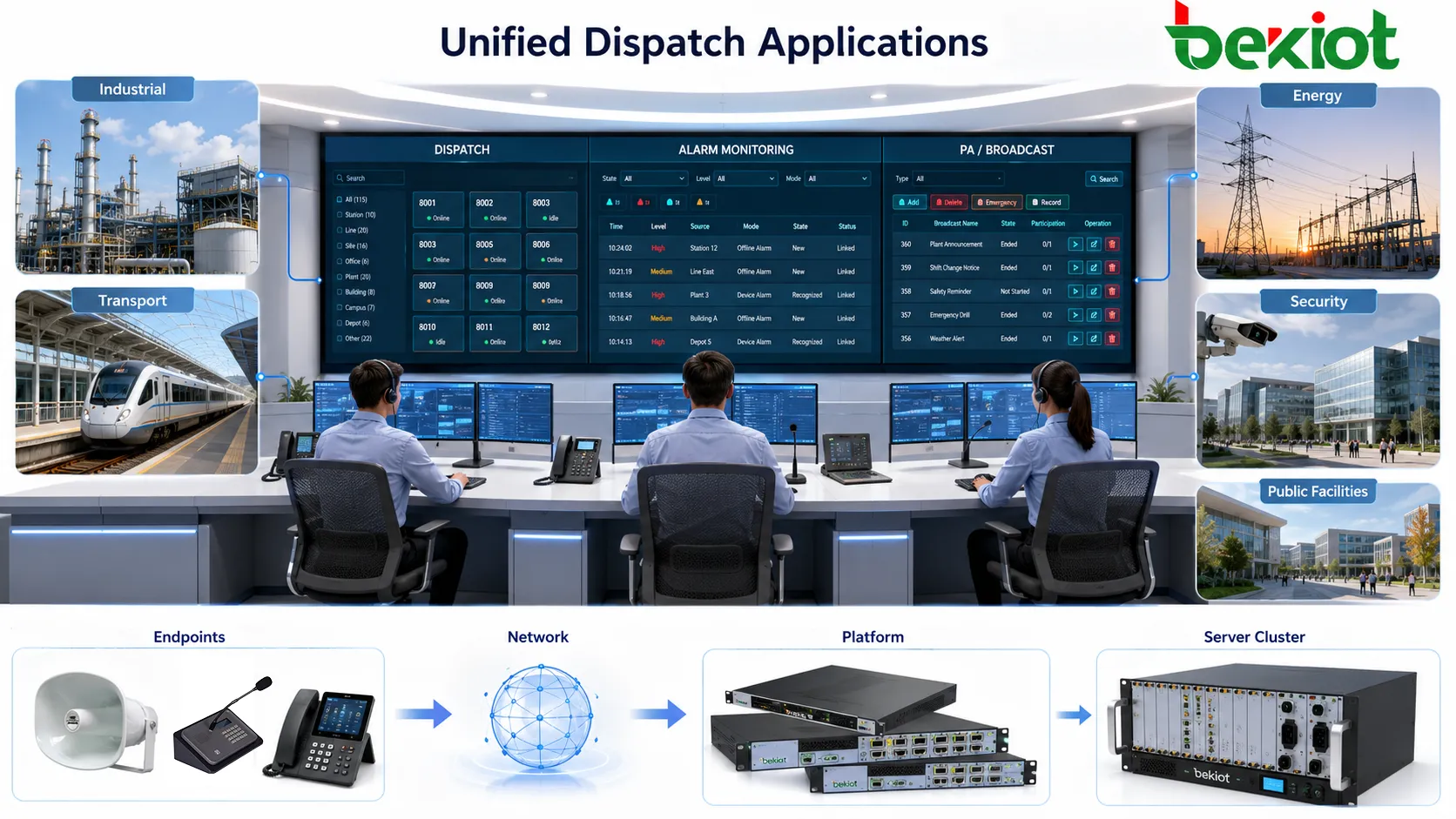
Technical systems behind daily operation
Several systems usually work behind the visible interface. Video management systems provide camera views and recording. Alarm systems detect abnormal events. Communication systems provide calls, intercom, radio, paging, or dispatch. SCADA or building management platforms provide equipment and process data. Access control systems show entry events and door status. Ticketing or maintenance systems support follow-up.
Network infrastructure connects these systems. Switches, routers, firewalls, servers, storage, gateways, and time synchronization systems all affect reliability. A delayed camera feed, unstable voice channel, missing alarm, or slow dashboard may be caused by the network, not the operator interface. Technical design must therefore consider bandwidth, latency, redundancy, cybersecurity, and device management.
Data integration is another challenge. Not every system uses the same protocol, database, alarm format, or user permission model. Integration may require APIs, gateways, middleware, event platforms, or custom interfaces. The goal is not to force every system into one format, but to ensure that critical information can be presented and acted on consistently.
Cybersecurity should be included from the beginning. A central operating environment often has access to sensitive cameras, doors, communication systems, alarms, and operational data. User permissions, network segmentation, audit logs, secure remote access, patching, and backup policies should be planned carefully. A powerful operating platform must also be a protected platform.
Reliability and continuity planning
Because the room often supports critical activity, reliability planning is essential. Power backup, redundant networks, spare workstations, failover servers, backup communication links, and emergency procedures should be considered according to site risk. If the central position fails, the organization may lose visibility and coordination exactly when it needs them most.
Continuity planning should include both technology and people. A backup server is useful only if operators know how to switch to it. A spare console is useful only if it has the right permissions and configuration. A secondary location is useful only if communication paths and procedures are prepared. Continuity must be practiced, not only designed.
Maintenance also affects reliability. Cameras need cleaning and alignment. Communication terminals need testing. Alarm points need verification. Servers need updates. Storage needs capacity management. Operator accounts need review. A room that appears modern at handover can become unreliable if maintenance is weak.
For 24-hour sites, shift handover is another part of continuity. Incoming operators should know open incidents, disabled devices, temporary bypasses, maintenance activities, and abnormal trends. Good handover prevents information loss between shifts and keeps response consistent throughout the day.
Common design mistakes
One mistake is focusing too much on visual impact. Large video walls and impressive dashboards may look professional, but they do not guarantee better operation. If operators cannot find important information quickly, the design has failed. Function should lead the visual design, not the other way around.
Another mistake is connecting too many alarms without classification. When every minor event appears as urgent, operators become tired and may ignore important warnings. Alarm design should include priority, grouping, filtering, acknowledgement rules, and escalation logic. Fewer meaningful alerts are better than thousands of unmanaged notifications.
Poor workflow planning is also common. Some projects integrate systems technically but do not define who responds, how communication should happen, what records are required, or when escalation is needed. Integration without procedure only moves confusion onto a bigger screen.
A final mistake is ignoring future change. New buildings, devices, cameras, users, communication channels, and software platforms may be added later. The design should allow expansion in workstation space, network capacity, storage, licensing, naming rules, and operational procedures. A room designed only for today may become crowded and confusing within a short time.
Conclusion: value depends on workflow, not screens
A modern operations center is best understood as a working system rather than a display space. Its value comes from the way it collects information, supports judgment, connects people, records actions, and improves response over time. Screens are useful only when they help operators make better decisions.
The strongest designs begin with operational questions: what must be monitored, which events are critical, who needs to respond, what communication channels are required, how decisions are recorded, and what must continue during failure. When these questions are answered clearly, technology can support real work instead of becoming decorative infrastructure.
For industrial sites, transport networks, public facilities, utilities, campuses, and security-sensitive environments, this model improves visibility, coordination, safety, and management discipline. It turns scattered signals into a practical operating capability and helps organizations act faster with better context.
FAQ
What is the main purpose of this type of operating environment?
Its main purpose is to centralize monitoring, communication, alarm handling, decision support, and response coordination so that operators can understand site conditions and act quickly when routine or abnormal events occur.
Does it always need a large video wall?
No. A video wall can be useful for shared visibility, but it is not always necessary. Small sites may work better with well-designed operator workstations, clear dashboards, and reliable communication tools. The layout should match the workflow.
Which systems are commonly connected?
Common connected systems include CCTV, alarms, access control, intercom, telephony, radio, public address, building management, SCADA, fire signals, maintenance platforms, and event logging systems. The exact combination depends on the site.
How can false alarms be reduced?
False alarms can be reduced through proper sensor placement, threshold tuning, alarm verification, event grouping, maintenance, operator feedback, and periodic review of repeated alarm sources. Alarm design should focus on meaningful response, not just event collection.
What should be considered before construction or renovation?
Key considerations include workflow, operator roles, screen layout, communication tools, system integration, cybersecurity, power backup, network redundancy, lighting, acoustics, future expansion, and maintenance access. The room should be designed around operation, not decoration.







