


Commissioning is the structured process of checking, testing, adjusting, documenting, and approving a system before it enters normal operation. It confirms that equipment, software, infrastructure, and workflows perform as intended in the real operating environment.
Commissioning is used in buildings, industrial plants, communication systems, energy facilities, data centers, security systems, software platforms, automation projects, and many other technical environments. It bridges the gap between installation and reliable operation. A system may be physically installed, powered on, and connected, but it is not truly ready until it has been verified under defined requirements.
The purpose is to reduce hidden defects before handover. Commissioning helps project teams confirm that design intent, installation quality, configuration settings, integration logic, safety requirements, performance targets, user workflows, and maintenance documents are complete enough for daily use.
Understanding the Concept
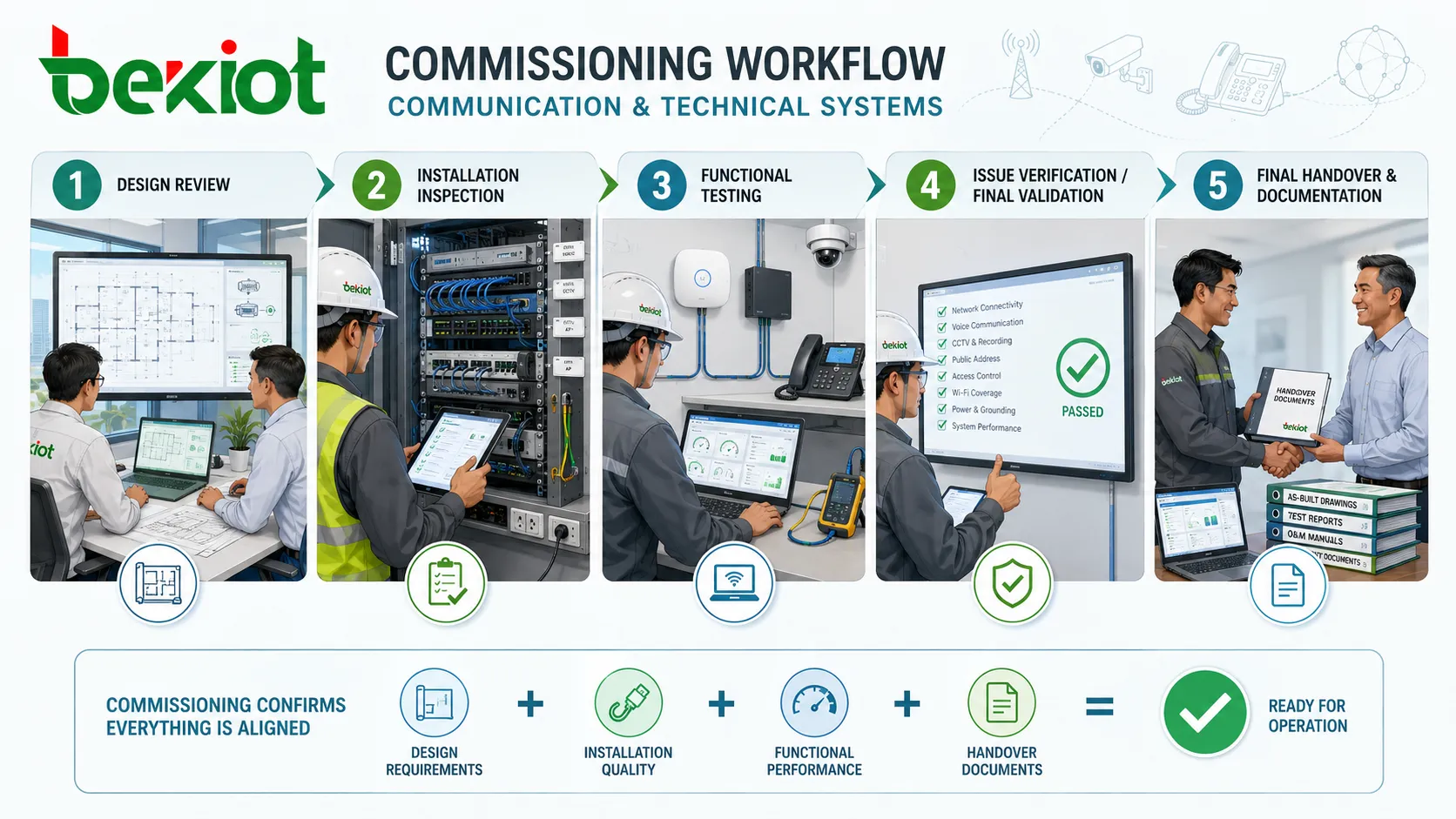
Commissioning is not a single test at the end of a project. It is a planned quality process that may begin during design review and continue through installation, configuration, functional testing, operator training, final documentation, and operational handover. The exact scope depends on the system type and project risk.
In a simple project, commissioning may involve checking connections, confirming settings, testing functions, and signing an acceptance report. In a complex project, it may include factory acceptance testing, site acceptance testing, integration testing, performance validation, failover tests, cybersecurity checks, user training, and post-handover support.
Commissioning turns a completed installation into a verified operating system by proving that the system performs correctly, safely, and consistently.
How the Process Works
Requirement review
The commissioning process starts with understanding what the system is supposed to do. This includes reviewing design documents, technical specifications, drawings, network plans, configuration requirements, safety rules, performance criteria, and acceptance standards.
This stage prevents teams from testing only visible functions while missing important operational details. Clear requirements also help avoid disputes later because the project team, owner, contractor, integrator, and operator can compare test results against agreed criteria.
Installation inspection
Before detailed testing begins, the physical or technical installation must be checked. Inspectors may verify equipment models, cabling, labeling, power supply, grounding, environmental conditions, mounting, software versions, network addressing, licenses, and basic connectivity.
This inspection is important because many functional failures are caused by installation issues. Loose cables, wrong ports, missing licenses, incorrect firmware, poor ventilation, or undocumented changes can create problems that appear later during operation.
Functional and performance testing
Functional testing checks whether each feature works as expected. Performance testing checks whether the system can meet capacity, response time, accuracy, redundancy, safety, or reliability requirements under realistic conditions.
For example, a communication system may need call routing tests, paging zone tests, recording verification, network failover tests, alarm linkage tests, and user permission checks. A building system may need HVAC balancing, sensor calibration, emergency power tests, and control sequence validation.
Main Stages
Commissioning can be organized in different ways, but most projects follow a progression from planning to verification and handover. The following table summarizes common stages and what each stage helps confirm.
| Stage | Main purpose | Typical evidence | Common risk if skipped |
|---|---|---|---|
| Planning | Define scope, roles, test standards, and acceptance criteria. | Commissioning plan, checklist, schedule, responsibility matrix. | Unclear ownership and inconsistent testing expectations. |
| Inspection | Confirm equipment, installation quality, labeling, and readiness. | Inspection forms, photos, wiring records, device inventory. | Physical defects remain hidden until operation begins. |
| Functional testing | Verify that features, sequences, controls, and workflows operate correctly. | Test scripts, pass/fail results, issue logs, configuration records. | System functions may work individually but fail in real use. |
| Handover | Transfer a verified system with documents, training, and support notes. | Acceptance report, as-built documents, user manuals, training records. | Operators receive a system they cannot maintain confidently. |
Key Features
Structured checklists
Checklists help ensure that important details are not missed. They may cover device status, configuration parameters, interface behavior, safety items, backup settings, alarm outputs, user permissions, network paths, and documentation requirements.
A checklist should not be a generic form copied from another project without adjustment. It should reflect the actual design, system type, operating environment, and acceptance criteria.
Traceable test records
Commissioning records provide proof that tests were performed and results were reviewed. Good records include test date, tester name, equipment number, software version, test condition, expected result, actual result, corrective action, and final status.
Traceability is useful after handover because it helps maintenance teams understand what was verified and where remaining limitations may exist. It also supports warranty claims, audits, troubleshooting, and future upgrades.
Issue tracking and correction
Commissioning usually reveals issues. These may include configuration errors, integration conflicts, incomplete installation work, missing documentation, device faults, network restrictions, performance bottlenecks, or user workflow problems.
The important part is not simply finding defects, but recording them, assigning responsibility, correcting them, retesting them, and confirming closure before acceptance.
Commissioning confirms whether the installed system matches the approved design and required operating behavior.
Test results, configuration records, drawings, manuals, and acceptance forms create a reliable handover package.
Operators receive a system that has been tested, explained, and prepared for real service conditions.
Benefits
Reduced operational risk
Commissioning reduces the chance that hidden problems will appear during daily operation. By testing functions, interfaces, failover behavior, alarms, and user workflows before handover, the project team can correct issues when technical resources are still available.
This is especially important for critical systems, such as power distribution, fire safety, emergency communication, industrial automation, building controls, healthcare systems, data centers, security platforms, and transportation infrastructure.
Better performance and reliability
Many systems can technically operate even when they are not optimized. Commissioning helps tune settings, verify performance, check control logic, confirm capacity, and remove configuration conflicts. The result is a system that is more stable and easier to operate.
Performance validation can also reveal whether the design assumptions were realistic. If the system cannot meet expected loads or response times, commissioning gives the project team an opportunity to adjust before formal acceptance.
Smoother handover
A project handover is not only a document exchange. Operators and maintenance teams need to understand how the system works, what has been tested, what limits exist, and how to respond when something changes.
Commissioning supports this by producing records, training materials, operation notes, backup files, configuration exports, as-built drawings, spare parts lists, and maintenance recommendations.
Typical Applications
Building systems
Commissioning is widely used for HVAC, lighting control, fire alarm, access control, elevators, energy monitoring, emergency power, building automation, and smart building platforms. These systems often depend on sensors, controllers, schedules, control logic, and integration between subsystems.
Without commissioning, a building may consume more energy than expected, respond poorly to occupancy changes, generate false alarms, or fail to deliver the comfort and safety levels intended by the design.
Industrial and manufacturing environments
Industrial commissioning may involve production lines, control panels, PLC systems, SCADA platforms, sensors, drives, safety interlocks, communication networks, and machine interfaces. Testing must often be coordinated with production schedules and safety procedures.
The goal is to confirm that equipment can operate reliably under site conditions, that safety controls function correctly, and that operators can monitor and manage the process effectively.

IT, communication, and security systems
IT and communication commissioning may include servers, switches, routers, wireless networks, VoIP systems, video platforms, access terminals, databases, identity systems, and monitoring tools. These systems require configuration accuracy, network reliability, user permissions, service availability, and backup planning.
Security-related commissioning may also verify camera coverage, event recording, access rights, intrusion detection, alarm linkage, retention policies, and operator response procedures.
Energy and infrastructure projects
Power plants, substations, renewable energy sites, water treatment facilities, tunnels, airports, rail systems, and large infrastructure projects use commissioning to confirm that technical systems can operate safely and consistently.
These projects often require formal documentation, regulatory review, staged testing, safety validation, and coordination among multiple contractors and system suppliers.
Planning Considerations
Define acceptance criteria early
Acceptance criteria should be agreed before testing begins. If the criteria are unclear, different parties may disagree about whether the system is complete. Criteria should be measurable where possible, such as response time, capacity, coverage area, alarm behavior, redundancy function, or user permission result.
Early agreement also helps commissioning teams prepare the correct test tools, sample data, device lists, network access, and operational scenarios.
Test integrated workflows
Individual components may pass separate tests while the full workflow still fails. Integrated testing checks how systems behave together. This may include alarm-to-notification flow, sensor-to-control response, access event-to-video linkage, call routing-to-recording behavior, or automation sequence-to-operator display.
Integrated workflows are often where commissioning creates the most value because they reveal problems that are invisible during isolated device checks.
Include operators in the process
Operators and maintenance teams understand real daily usage. Their participation can reveal workflow issues, interface confusion, missing alarms, unclear labels, impractical settings, or documentation gaps that technical installers may not notice.
When operators are involved before handover, they gain confidence in the system and can provide feedback before the project team leaves the site.
Practical commissioning reminder
A good commissioning plan should include test scope, test sequence, responsible parties, required tools, success criteria, issue tracking, retesting rules, document control, training records, and final approval steps.
Maintenance Value After Handover
Commissioning records continue to be useful after the project is complete. They provide a baseline for future maintenance, upgrades, troubleshooting, and performance comparison. When a system fails months later, the maintenance team can compare current behavior against the accepted condition.
For long-term reliability, commissioning documents should be stored where operations teams can access them. Configuration backups, as-built drawings, software versions, test records, and training documents should not disappear after the contractor leaves.
FAQ
Is commissioning the same as installation?
No. Installation places equipment, software, wiring, or devices in position. Commissioning verifies that the installed system works correctly, meets requirements, and is ready for use. A system can be installed but not yet commissioned.
Who should be responsible for final commissioning approval?
Final approval is usually given by the owner, client representative, consultant, or authorized project manager. Contractors and integrators may perform the tests, but the acceptance authority should be clearly defined in the project documents.
What happens if a system fails a commissioning test?
The failure should be recorded in an issue log, assigned to a responsible party, corrected, and retested. The affected function should not be accepted until the corrective action is verified and documented.
Can commissioning be performed remotely?
Some software, network, communication, and monitoring tests can be performed remotely if secure access, logs, screenshots, configuration exports, and local support are available. Physical inspection and safety-related checks may still require on-site verification.
When is recommissioning needed?
Recommissioning may be needed after major upgrades, equipment replacement, system expansion, control logic changes, building renovation, repeated performance problems, cybersecurity changes, or long periods without formal maintenance review.







