


Remote deployment is the process of installing, updating, configuring, or activating software, firmware, system settings, and connected devices from a central location without requiring technicians to visit every site in person.
Understanding the Concept
Remote deployment is widely used in IT systems, industrial communication networks, cloud services, telecom infrastructure, security platforms, IoT devices, and enterprise endpoint management. Instead of manually installing applications or changing settings on each device, administrators can push deployment tasks through a management platform, automation script, provisioning server, device management system, or cloud-based control console.
The purpose is not only to save travel time. Remote deployment also helps organizations maintain consistency across many locations, reduce human configuration errors, standardize security settings, and respond faster when systems need updates or recovery. For distributed organizations, it becomes a foundation for scalable operations.
Remote deployment turns device rollout from a manual site-by-site task into a controlled, repeatable, and traceable management process.
How Remote Deployment Works
Centralized preparation
A remote deployment process usually begins with a prepared package, image, configuration profile, firmware file, application build, or policy template. The administrator defines what should be installed, which devices should receive it, what conditions must be checked, and what should happen if the deployment fails.
This preparation stage is important because a single deployment task may affect hundreds or thousands of endpoints. Version compatibility, network access, device type, user permissions, storage space, and rollback options must be reviewed before the task is released.
Secure delivery
After the deployment package is ready, it is delivered through a secure channel. Depending on the system, this may involve HTTPS, VPN tunnels, device management agents, zero-touch provisioning servers, mobile device management platforms, remote monitoring tools, or vendor-specific management protocols.
Security is a core requirement because deployment channels can change device behavior. Authentication, encryption, signed packages, access control, and audit logs help prevent unauthorized changes or malicious software from entering the system.
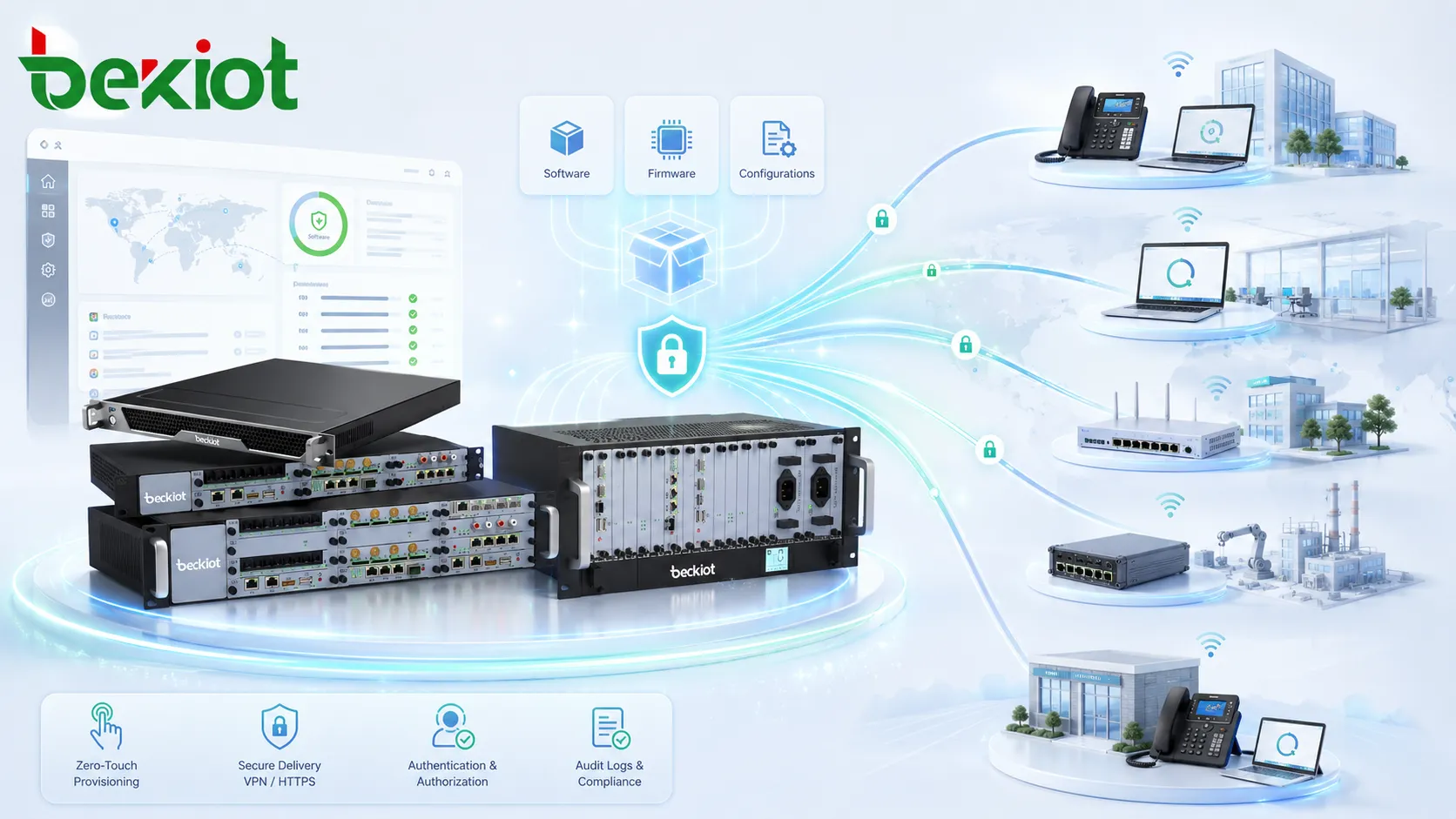
Execution and verification
Once the endpoint receives the deployment task, it executes the required action. This may include downloading files, installing software, applying configuration, restarting services, validating version numbers, reporting status, or joining a management group.
Good systems do not stop at delivery. They confirm whether the task succeeded, failed, timed out, or requires manual review. Status feedback is essential for large-scale operations because administrators need to know which devices are ready and which ones still need attention.
Key Features
Device discovery and grouping
Remote deployment platforms often include device discovery or inventory functions. These functions identify connected endpoints, operating systems, software versions, network addresses, device models, and current configuration status.
Grouping allows administrators to deploy changes by location, department, device type, user role, firmware version, or risk level. A phased rollout is usually safer than deploying to all endpoints at once, especially when the update affects critical systems.
Policy-based automation
Policy-based deployment reduces repetitive work. Administrators can define rules such as installing a required application when a device joins a group, applying a security baseline to new endpoints, updating firmware outside business hours, or restoring configuration after device replacement.
Automation is especially valuable for organizations with multiple branches, unmanned sites, field devices, and frequently replaced equipment. It helps keep the environment aligned even when hardware changes over time.
Rollback and recovery
Rollback is one of the most important features in remote deployment. If an update causes instability, a system should be able to restore a previous configuration, reinstall an earlier firmware version, or return the device to a known working state.
Recovery planning should be included before deployment begins. Without rollback, a failed remote update may require emergency site visits, service interruption, or manual reconfiguration.
Remote deployment applies the same package, policy, or configuration across selected endpoints, reducing differences caused by manual work.
Administrators can track deployment progress, success rates, failed devices, version status, and exception cases from one interface.
New sites, devices, or users can be added more efficiently because deployment steps are repeatable and centrally controlled.
System Value
Faster rollout
Remote deployment speeds up system rollout because teams no longer need to configure each endpoint manually. Software updates, user profiles, device settings, certificates, language packs, and system policies can be distributed from a central platform.
This is especially useful during new office openings, hardware replacement projects, security updates, software migrations, telecom endpoint rollout, and large-scale IoT deployment. The larger the environment, the more valuable remote deployment becomes.
Lower operational cost
On-site service visits are expensive when devices are spread across cities, campuses, factories, stores, substations, warehouses, or remote facilities. Remote deployment reduces travel, shortens maintenance windows, and allows technical teams to support more sites with fewer manual tasks.
Cost savings also come from fewer configuration mistakes. When a standard profile is deployed automatically, the chance of missing a parameter, using the wrong file, or applying inconsistent settings is reduced.
Improved security response
Security patches and configuration changes often need to be applied quickly. Remote deployment helps organizations push updates to affected systems before vulnerabilities remain exposed for too long.
For better control, security-focused deployments should include staged release, device eligibility checks, maintenance scheduling, package signing, compliance reporting, and clear rollback procedures.
Typical Applications
Remote deployment is used across many technical environments because modern systems are increasingly distributed. A single organization may manage office computers, cloud workloads, communication endpoints, industrial controllers, access devices, mobile terminals, cameras, gateways, and application servers from different locations.
Enterprise IT and endpoint management
IT teams use remote deployment to install applications, update operating systems, apply security baselines, configure user environments, and manage laptops or desktops across different offices. This helps maintain a predictable work environment for employees and reduces dependency on local technicians.
Remote deployment also supports onboarding and replacement workflows. When a new device is issued, required applications and settings can be delivered automatically based on the user role or department.
Telecom and communication systems
In communication networks, remote deployment may involve IP phones, SIP endpoints, gateways, dispatch terminals, paging devices, conferencing systems, and network communication servers. Administrators can distribute account settings, firmware updates, codec preferences, dial plans, and service parameters without touching each device individually.
This is useful for multi-site offices, industrial plants, campuses, transport hubs, hotels, hospitals, and service organizations where communication devices must remain consistent and ready for daily operation.
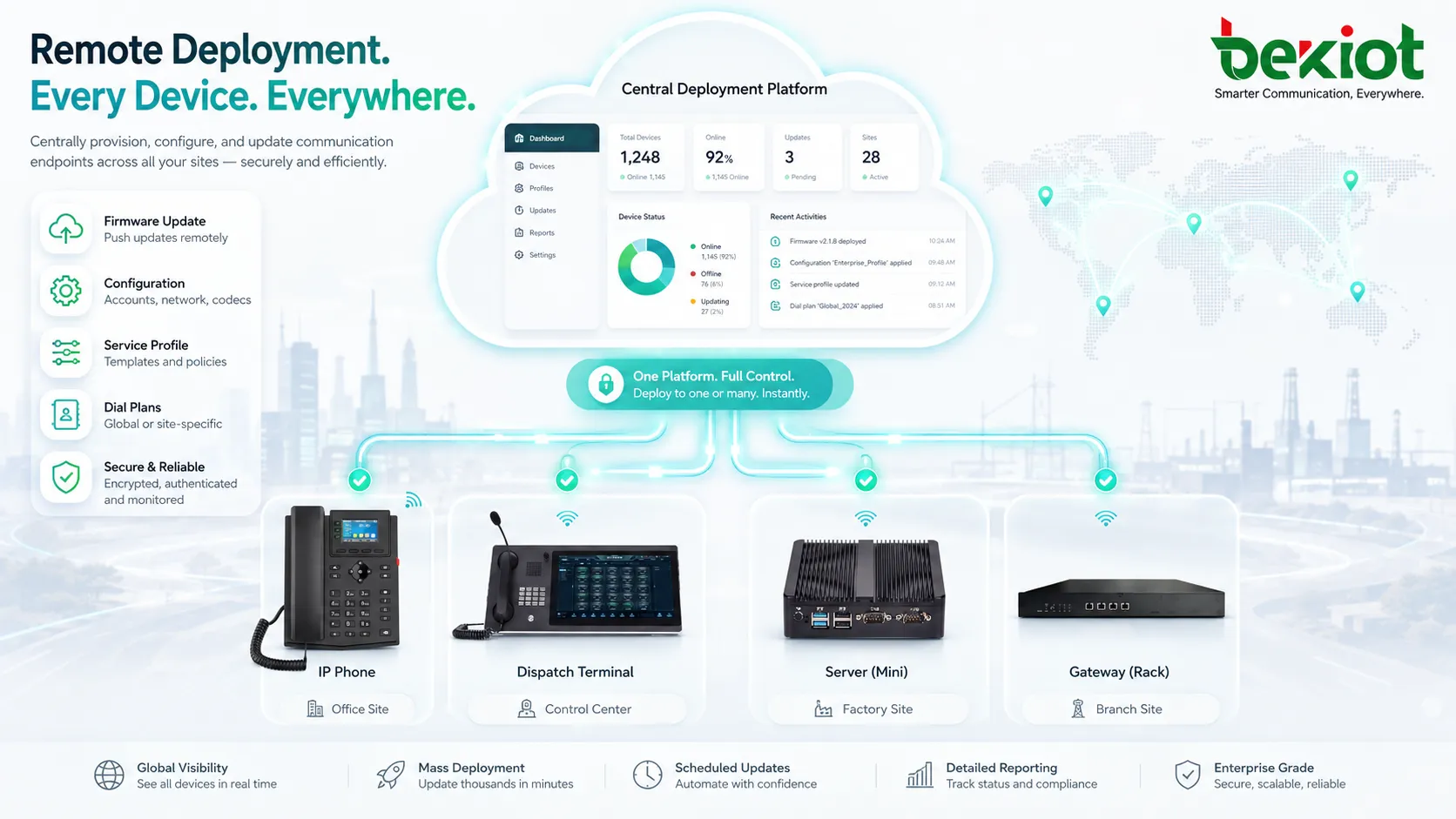
IoT, security, and industrial devices
IoT and industrial systems often include devices that are difficult to access physically. Remote deployment allows administrators to update firmware, adjust device behavior, enable new features, or restore configuration across sensors, controllers, cameras, access terminals, and edge gateways.
Because these environments can be sensitive, deployment should be carefully scheduled. Systems that support production, safety, access control, or monitoring may require approval workflows, maintenance windows, redundancy checks, and local fallback plans.
Planning Considerations
Network readiness
Remote deployment depends on stable network connectivity. If bandwidth is limited, packages may need to be compressed, cached locally, scheduled during off-peak hours, or distributed through regional servers. A large update pushed to many endpoints at once can overload weak links if bandwidth planning is ignored.
Firewalls, NAT traversal, DNS, proxy settings, VPN access, certificate validation, and management ports should be checked before deployment. Many failed rollouts are caused by connectivity problems rather than package problems.
Version control and compatibility
Deployment packages should be clearly versioned. Administrators need to know which devices are running which version, which files were deployed, who approved the change, and what dependencies are required.
Compatibility testing is important when devices have different models, hardware revisions, operating systems, or firmware branches. A package that works well on one device group may not be suitable for another.
Monitoring after deployment
After a deployment is complete, the system should continue monitoring device health, service status, error logs, user complaints, and performance indicators. Successful installation does not always mean successful operation.
Post-deployment monitoring helps administrators detect hidden problems such as service restart failures, configuration conflicts, missing permissions, endpoint registration issues, or degraded performance.
A reliable remote deployment strategy includes preparation, controlled release, verification, rollback, and ongoing monitoring—not just pushing files to devices.
Best Practices
Use phased rollout
A phased rollout reduces risk by deploying to a small test group before expanding to more devices. This allows administrators to detect unexpected behavior in a controlled environment before it affects the entire organization.
The first phase may include internal test devices, then one department, then one site, and finally the full device fleet. Each phase should have clear success criteria before moving forward.
Keep deployment records
Every deployment should be traceable. Records should include package name, version, target group, deployment time, operator, approval status, success result, failed devices, rollback action, and related change notes.
This documentation is useful for troubleshooting, compliance, vendor support, and future upgrade planning. It also helps teams understand what changed when a problem appears later.
Prepare a fallback path
Fallback planning is necessary for critical systems. A fallback path may include automatic rollback, backup configuration, redundant devices, local emergency access, offline recovery files, or a temporary service mode.
The more critical the device, the more carefully the fallback plan should be tested. A remote deployment method is only reliable when failure has been considered before it happens.
FAQ
Can remote deployment work without an internet connection?
It can work on a private network if the deployment server, management platform, or local repository is reachable inside that network. Internet access is not always required, but the endpoints still need a reliable path to the deployment source.
What is the difference between remote deployment and remote access?
Remote access usually means logging into a device or system to operate it directly. Remote deployment focuses on delivering packages, settings, updates, or policies to many devices in a repeatable and managed way.
Should all devices receive updates at the same time?
Usually not. A staged rollout is safer because it allows teams to test compatibility, monitor early results, and stop the deployment if unexpected issues appear. Critical systems should be updated in planned maintenance windows.
How can administrators reduce failed deployments?
They can reduce failures by checking network reachability, confirming device eligibility, testing packages on representative hardware, using clear version control, keeping enough storage available, and monitoring device status after installation.
Is remote deployment suitable for small businesses?
Yes. Even small businesses can benefit when they manage multiple computers, communication endpoints, cameras, mobile devices, or branch locations. The key is choosing a deployment method that matches the size and complexity of the environment.







