


Edge deployment is the practice of placing applications, services, data processing, storage, or control functions closer to the devices and users that generate or consume data. Instead of sending every task to a central cloud or remote data center, part of the workload runs at the network edge.
Understanding the Concept
In a traditional centralized model, devices send data to a remote server for processing, analysis, storage, and decision-making. This model works well for many business systems, but it can become inefficient when response time, bandwidth, privacy, or local continuity is critical. Edge deployment changes this structure by moving selected computing resources closer to where operations happen.
The edge can be a local server, gateway, industrial computer, network appliance, branch office device, micro data center, smart camera, telecom node, vehicle system, or embedded controller. The exact location depends on the application, but the goal is the same: reduce unnecessary distance between the data source and the system action.
How Edge-Based Systems Work
Local workload placement
Edge deployment begins by deciding which workloads should run locally and which should remain in the cloud or central data center. Time-sensitive tasks, local control logic, device communication, video analytics, protocol conversion, data filtering, and emergency functions are often good candidates for local execution.
Not every workload needs to be moved to the edge. Long-term storage, cross-site analytics, central reporting, user management, machine learning model training, and large-scale administrative functions may still remain centralized. A good architecture separates immediate local actions from broader system coordination.
Data filtering and event handling
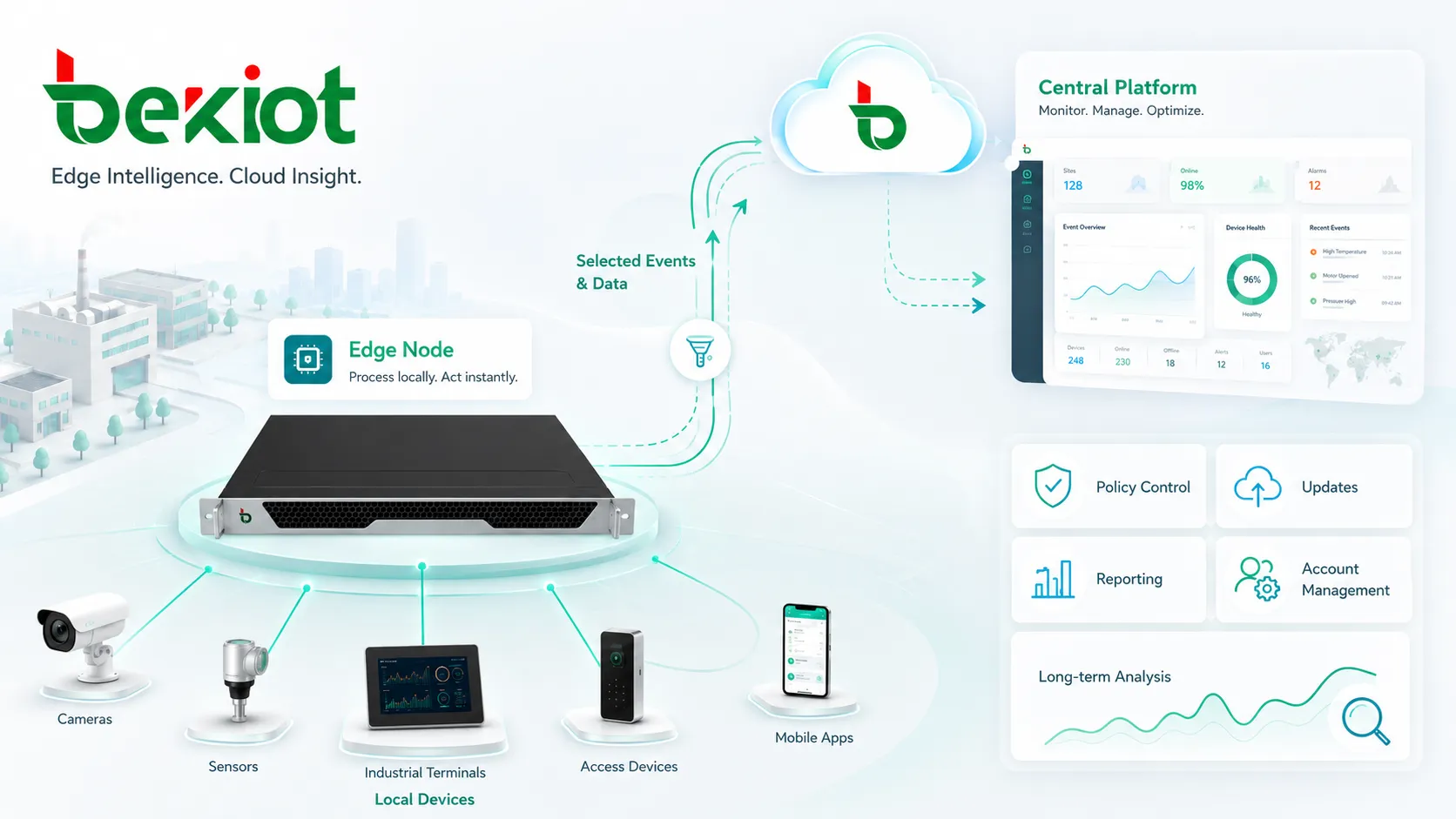
Many edge systems collect large amounts of raw data from sensors, cameras, terminals, machines, mobile devices, or communication endpoints. Instead of transmitting everything upstream, the edge layer can filter, compress, classify, or summarize data before sending only useful information to central platforms.
This reduces bandwidth pressure and improves operational focus. For example, a video system may detect motion or abnormal events locally, while a central platform receives alerts, clips, and metadata instead of continuous raw footage from every camera.
Coordination with central platforms
Edge deployment does not mean removing the cloud. In most modern systems, edge nodes and central platforms work together. The edge performs local execution, while the cloud or data center provides centralized monitoring, policy control, updates, reporting, account management, and long-term analysis.
This hybrid structure is useful because it combines local responsiveness with centralized visibility. The system can continue operating near the site while still being managed at scale.
Main Benefits
Lower latency
Latency is one of the strongest reasons to use edge deployment. When data must travel to a distant server before action can happen, response time increases. By processing data closer to the source, the system can react faster.
This is important for industrial automation, safety monitoring, real-time communication, access control, video analytics, traffic systems, autonomous equipment, healthcare environments, and any application where delayed response may reduce value or increase risk.
Reduced bandwidth usage
Sending all raw data to a central platform can overload network links, especially when systems involve high-resolution video, continuous sensor streams, large log files, or many distributed sites. Edge deployment reduces this load by processing or filtering data locally.
Bandwidth savings can also reduce operating cost. Sites with limited WAN links, cellular connections, satellite networks, or expensive backhaul can benefit from sending only alarms, reports, compressed data, or selected event records upstream.
Better local continuity
If a site depends entirely on a remote data center, network outages can interrupt critical functions. Edge deployment allows selected services to continue running locally even when the connection to the cloud is slow, unstable, or temporarily unavailable.
This is valuable for factories, energy facilities, transportation sites, campuses, hospitals, remote stations, retail branches, and public safety environments where basic operation must continue during network disruption.
| Benefit area | What improves | Why it matters | Common example |
|---|---|---|---|
| Response speed | Data is processed closer to the source. | Critical actions can happen with less delay. | Local alarm processing in an industrial site. |
| Network efficiency | Raw data can be filtered before transmission. | WAN links carry fewer unnecessary data streams. | Sending event clips instead of continuous video. |
| Service resilience | Local services can keep running during network issues. | Operations are less dependent on constant cloud access. | Branch systems that continue basic functions offline. |
| Data control | Sensitive data can stay near the site. | Organizations can reduce exposure and support compliance needs. | Local processing of access or monitoring records. |
Important Features
Edge nodes and gateways
An edge node is the local computing point that runs workloads near the device layer. It may be a rugged industrial computer, virtualized server, smart gateway, communication controller, router, local appliance, or embedded platform.
Gateways are often used when field devices speak different protocols or operate on isolated networks. They can translate data, manage device connections, enforce security rules, and forward selected information to central systems.
Remote management
Because edge devices are often distributed across many sites, remote management is essential. Administrators need visibility into device health, software versions, configuration status, storage usage, network condition, service uptime, and security events.
Without remote management, maintaining edge systems can become expensive and inconsistent. A good platform should support updates, monitoring, log collection, access control, configuration backup, and controlled rollback.
Local security controls
Edge systems may sit close to production equipment, cameras, access terminals, sensors, or communication endpoints. This makes security especially important. Local authentication, encrypted communication, certificate management, firewall rules, secure boot, and signed updates can reduce the risk of unauthorized access.
Security planning should also include physical protection. Edge devices may be installed in cabinets, equipment rooms, vehicles, roadside enclosures, utility sites, or industrial areas where environmental and tamper risks must be considered.
Edge deployment is not only about moving computing power closer to devices. It also requires secure management, lifecycle planning, and reliable site-level operation.
Maintenance Tips
Standardize hardware and software versions
Edge environments become difficult to maintain when each site uses different hardware, firmware, operating systems, application builds, and configuration styles. Standardization makes troubleshooting easier and helps administrators apply updates more confidently.
Version records should include device model, operating system, application release, firmware branch, configuration profile, security patch level, and deployment date. These records are useful when comparing site performance or investigating faults.
Monitor health continuously
Edge nodes should report CPU load, memory usage, disk status, temperature, service status, network latency, packet loss, application logs, and local event counts. Continuous monitoring helps teams detect early warning signs before a failure affects operations.
For remote sites, alerts should be practical and prioritized. Too many low-value alerts can hide serious issues, while too few alerts may leave administrators unaware of device degradation.
Plan updates carefully
Updates should be tested before wide deployment. A small pilot group can reveal compatibility issues, performance changes, or unexpected service behavior. For critical sites, updates should be scheduled during maintenance windows and paired with rollback procedures.
Edge devices may be connected to local equipment that cannot tolerate long downtime. Administrators should confirm whether restarting a service, rebooting a node, or changing a configuration will interrupt dependent systems.
Practical maintenance reminder
Before changing an edge node, confirm the current configuration backup, available rollback method, local service dependency, network reachability, power condition, and monitoring status. This simple checklist can prevent many avoidable field issues.
Typical Applications
Industrial automation and monitoring
Industrial sites use edge deployment to process machine data, sensor readings, alarms, production metrics, and control signals near the equipment layer. Local processing can reduce response delay and keep essential functions available even if the central network connection is interrupted.
Edge nodes may also translate between industrial protocols and enterprise platforms, allowing older equipment to participate in modern monitoring and analytics systems without replacing the entire production environment.
Video analytics and security systems
Video systems generate large amounts of data. Edge deployment allows cameras, gateways, or local servers to perform motion detection, object recognition, license plate recognition, face matching, behavior analysis, or event filtering before data is sent upstream.
This reduces bandwidth consumption and enables faster local response. Security teams can receive meaningful events instead of sorting through large volumes of raw footage after the fact.
Retail branches and distributed offices
Retail and branch environments often need local services for point-of-sale systems, inventory synchronization, access control, digital signage, network management, and customer analytics. Edge deployment allows these services to operate near the store or office.
When the WAN connection is weak, the local system can continue supporting basic business operations. Once the connection is restored, selected data can synchronize with the central platform.
Telecom and communication infrastructure
Telecom networks use edge deployment to support low-latency services, local traffic handling, content delivery, device access, real-time media processing, and site-level service continuity. Communication systems may also use edge nodes for local routing, protocol handling, emergency notification, or distributed service management.
This approach is useful when users, devices, or endpoints are spread across campuses, factories, transport hubs, remote facilities, or multi-site operations.
Smart city and transportation systems
Smart city and transportation applications often require local processing at intersections, stations, tunnels, roadside cabinets, vehicles, or command points. Edge deployment helps process traffic signals, cameras, environmental sensors, passenger information, and emergency events closer to the physical location.
Local response is especially valuable when safety, congestion control, incident detection, or public service continuity depends on quick decisions.
Planning Considerations
Choose the right workload
The best edge candidates are workloads that benefit from fast response, lower bandwidth use, local continuity, or site-level data control. Workloads that require heavy centralized analytics, long-term storage, or global coordination may remain better suited to central platforms.
A balanced architecture usually combines edge, cloud, and central data center resources. The goal is not to move everything to the edge, but to place each function where it performs best.
Design for limited site resources
Edge sites may have limited power, cooling, rack space, bandwidth, technical staff, and physical security. Devices should be sized realistically for local workloads and future growth. Overloading a small edge node can create instability that is difficult to diagnose remotely.
Environmental conditions should also be reviewed. Industrial, outdoor, transportation, and utility environments may require rugged hardware, surge protection, wide temperature tolerance, dust resistance, or redundant power.
Keep lifecycle management in mind
Edge deployment is a long-term operating model. Devices must be installed, updated, monitored, secured, replaced, and eventually retired. Lifecycle planning should include asset records, configuration backup, remote access policy, spare device strategy, software support dates, and end-of-life planning.
Organizations that ignore lifecycle management may gain short-term performance improvements but face long-term maintenance complexity.
FAQ
Is edge deployment the same as edge computing?
They are closely related, but not identical. Edge computing describes the processing model, while edge deployment focuses on how applications, services, devices, and workloads are actually placed, managed, updated, and operated at edge locations.
Can small organizations use edge deployment?
Yes. A small organization may use a local server, gateway, or appliance to support branch operations, local video processing, communication services, or offline continuity. The design should match the scale of the business rather than copy a large enterprise architecture.
What happens if an edge node fails?
The result depends on the redundancy design. Some systems fail over to another local node, some continue with reduced functionality, and others send traffic back to a central platform. Critical sites should define failure behavior before deployment.
How often should edge devices be inspected?
Remote health checks should be continuous, while physical inspection depends on the environment. Clean indoor sites may need less frequent visits, while outdoor, industrial, or high-vibration locations may require more regular inspection of power, cabling, cooling, enclosure condition, and physical security.
Does edge deployment increase security risk?
It can if devices are unmanaged or physically exposed. The risk can be reduced with secure access control, encryption, signed updates, monitoring, hardened configuration, physical protection, and clear ownership of patching and lifecycle maintenance.







