


A cluster is a group of connected computers, servers, gateways, devices, applications, or network nodes that work together as a single coordinated system. Instead of depending on one standalone unit, a clustered design distributes workloads, improves availability, supports failover, and allows services to continue even when one part of the system becomes unavailable.
The word “cluster” is used in many fields, including IT infrastructure, cloud computing, databases, communication platforms, telephony systems, radio networks, industrial automation, storage systems, and edge computing. Although the technical design may differ, the main idea is the same: multiple components cooperate so the whole system becomes more reliable, scalable, and manageable.
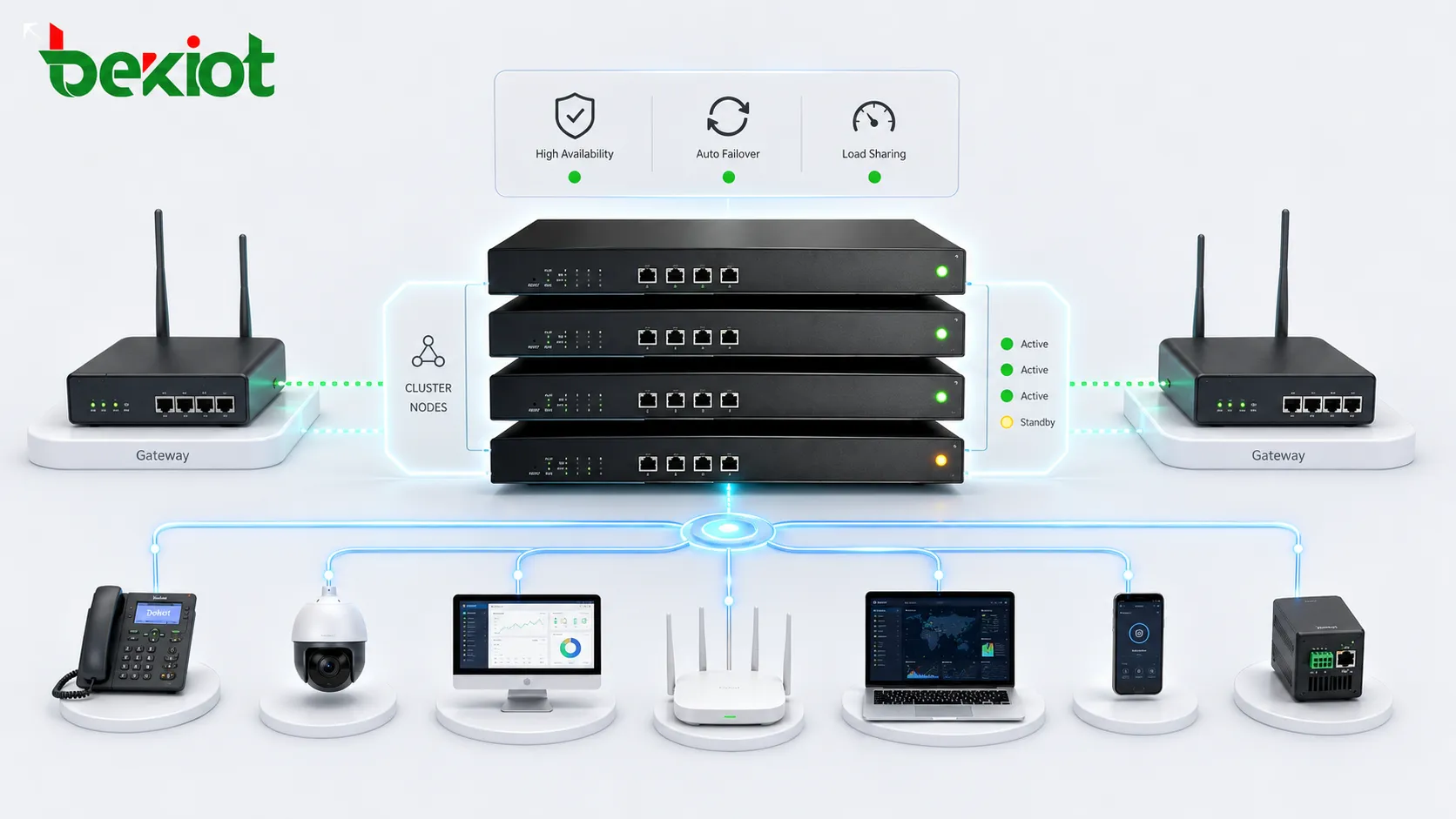
The Basic Idea Behind Grouped Systems
In a simple standalone system, one server or device handles the service alone. If that unit fails, the service may stop. If user demand grows, the unit may become overloaded. If maintenance is required, service interruption may be difficult to avoid.
A clustered system changes this model. Several nodes are connected through a network and managed under shared rules. One node may handle the current workload, another may wait as a backup, or all nodes may process traffic together. The design depends on the purpose of the system.
For example, in a business communication platform, several servers may share user registration, call routing, recording, or media processing. In a radio-over-IP environment, multiple gateways may connect distributed radio channels, dispatch centers, and IP networks so that communication remains available across sites.
How Grouped Nodes Work Together
Node Participation
A node is a participating unit inside the system. It may be a physical server, virtual machine, gateway, controller, storage device, communication endpoint, or software service. Each node has a defined role and communicates with other nodes through the network.
Some nodes may perform the same function, while others may have specialized tasks. In a database environment, one node may accept writes while others replicate data. In a communication system, one node may handle signaling while another manages media, recording, or gateway access.
Heartbeat and Health Checking
Many clustered systems use heartbeat signals to check whether nodes are alive. A heartbeat is a regular status message exchanged between nodes or sent to a management controller. If a node stops responding, the system assumes that it may have failed.
Health checking may also monitor CPU usage, memory, network status, application response, service process state, disk space, gateway connection, or device registration. This helps the system decide whether a node should continue serving traffic or be removed temporarily.
Workload Distribution
Some clustered systems distribute work across multiple nodes. This can be done through load balancers, routing policies, shared queues, distributed databases, or application-level coordination. The purpose is to avoid overloading one node while others remain idle.
Workload distribution can improve performance and scalability. However, it also requires proper session handling, data synchronization, network capacity, and monitoring. A poorly designed distribution method may create uneven load or service instability.
Failover Behavior
Failover means that when one node fails, another node takes over its role. In an active-standby design, the backup node may remain idle until the active node fails. In an active-active design, several nodes may already be serving traffic and can absorb additional workload when one node goes offline.
Failover must be tested carefully. A backup node is only useful if it has the right configuration, current data, network access, license capacity, and application state required to continue service.
A clustered design is not only about adding more equipment. It is about coordinating nodes so failure, growth, and maintenance can be handled without unnecessary service interruption.
Architecture Patterns You May See
Active-Standby Design
In an active-standby design, one node provides the service while another node waits as a backup. If the active node fails, the standby node takes over. This model is common in systems where consistency and controlled failover are more important than using every node at the same time.
The advantage is simplicity. The disadvantage is that backup resources may remain underused during normal operation. However, for critical systems, this spare capacity is often acceptable because it improves continuity.
Active-Active Design
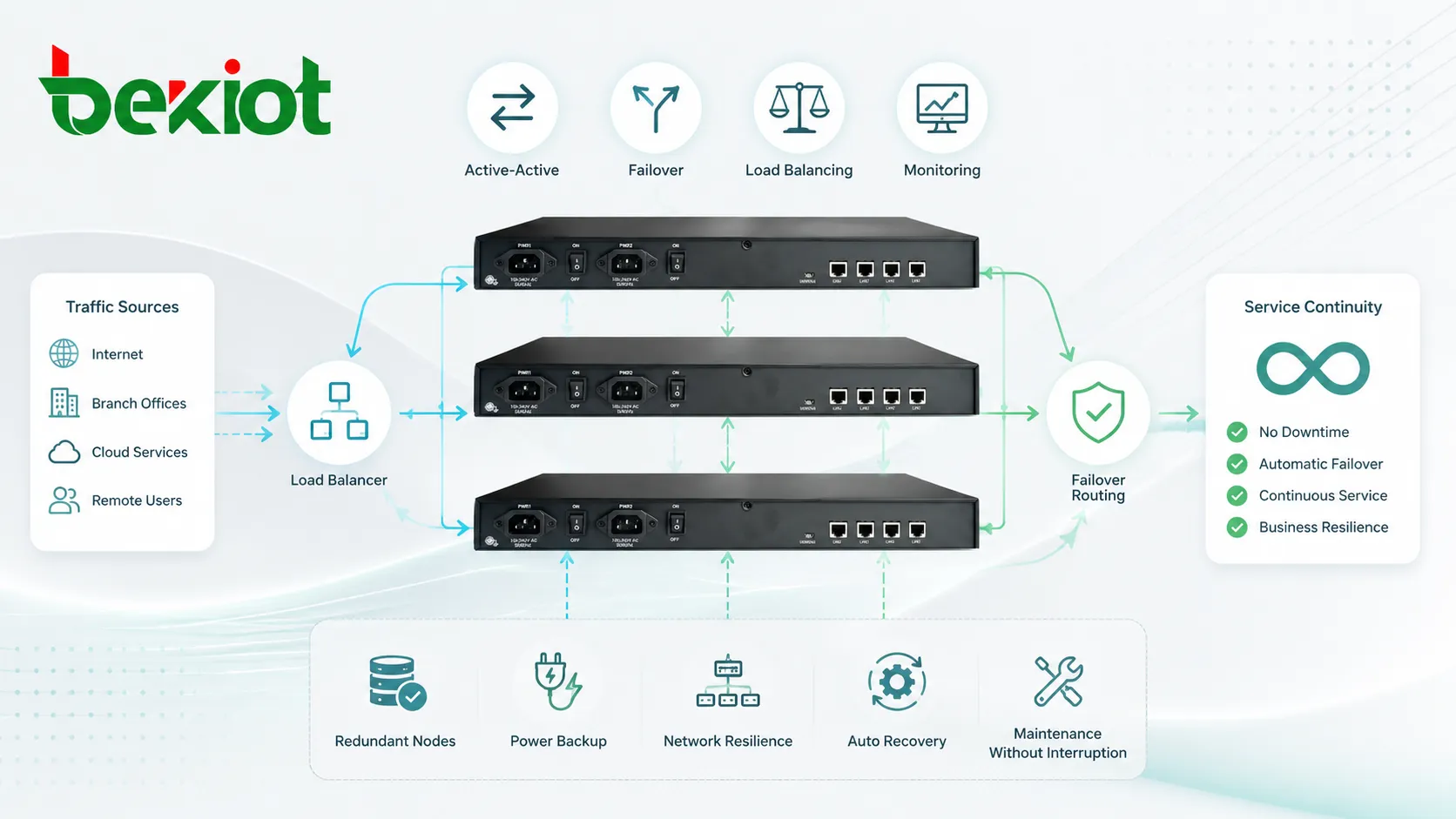
In an active-active design, multiple nodes provide service at the same time. Traffic or tasks are distributed between them. If one node fails, the remaining nodes continue serving users, although capacity may be reduced.
This model can improve resource utilization and scalability. It is often used in cloud platforms, web applications, communication systems, distributed databases, and multi-node service platforms.
Load-Balanced Deployment
A load-balanced deployment uses a front-end component to distribute traffic across several backend nodes. The load balancer may use rules such as round-robin, least connections, health status, source address, service priority, or geographic location.
This design is common for web services, SIP platforms, APIs, application servers, media systems, and enterprise portals. The load balancer itself should also be designed with redundancy, otherwise it may become a single point of failure.
Distributed Edge Design
Some systems place nodes across different locations rather than inside one data center. This is common in branch communication, industrial sites, transportation networks, radio integration, IoT platforms, and public safety systems.
Distributed edge design reduces dependency on one central site and can improve local response. However, it requires reliable synchronization, remote monitoring, security controls, and clear maintenance procedures.
Why Organizations Use This Design
Higher Availability
Availability is one of the main reasons for using grouped systems. If a standalone unit fails, service may stop. If several coordinated nodes are available, another node may continue the service or take over the affected workload.
This is important for communication platforms, emergency services, business applications, financial systems, healthcare systems, industrial control, and customer-facing services where downtime can cause operational or commercial impact.
Scalability for Growth
As user demand increases, organizations may need more processing power, more call capacity, more database throughput, more storage, more gateway channels, or more service endpoints. A clustered design allows capacity to grow by adding nodes rather than replacing the entire system.
Scalability is especially valuable when traffic changes over time. A system may start small and expand as sites, users, channels, services, or customer demand increase.
Maintenance with Less Disruption
Clustered systems can make maintenance easier. Administrators may remove one node from service, update it, test it, and return it to operation while other nodes continue handling traffic.
This does not eliminate the need for planning. Maintenance should still consider compatibility, synchronization, user sessions, failover behavior, and rollback. But the design gives teams more flexibility than a single-node system.
Better Resource Utilization
In active-active or load-balanced systems, multiple nodes can share work. This improves resource utilization because capacity is not limited to one machine or device.
For example, several application servers can handle more users than one server. Several media gateways can support more voice channels than one gateway. Several storage nodes can provide more capacity and resilience than one storage device.
Improved Service Resilience
Resilience means the system can continue operating under stress, partial failure, maintenance, or traffic change. Clustered design helps by distributing responsibility and reducing dependency on one component.
For mission-critical environments, resilience should also include power backup, network redundancy, geographic separation, monitoring, security hardening, and tested recovery procedures.
Important Technical Components
Shared Configuration
Nodes need consistent configuration so they behave predictably. This may include network settings, user data, routing rules, security certificates, service parameters, license information, and application policies.
If configurations drift apart, failover or load sharing may become unreliable. Centralized configuration management or automated deployment can reduce this risk.
Data Synchronization
Some systems require data synchronization between nodes. This may include user sessions, call states, database records, queue status, device registration, voicemail data, access permissions, or alarm records.
Synchronization design is critical. If data is not current, a backup node may take over but fail to provide the expected service state. If synchronization is too heavy, it may create performance overhead.
Quorum and Split-Brain Protection
In certain clustered systems, quorum is used to decide which nodes are allowed to make decisions. This helps prevent split-brain situations, where two parts of the system believe they are active at the same time after a network separation.
Split-brain can be dangerous because it may lead to conflicting data, duplicate service control, or unstable failover. Proper quorum design, fencing, and network redundancy help reduce this risk.
Monitoring and Alerting
Monitoring is essential because clustered systems can hide partial failures. A service may still appear online even though one node, link, disk, gateway, or process has failed.
Administrators should monitor node health, traffic distribution, failover events, synchronization status, resource usage, error logs, and service-level indicators. Alerts should identify not only that something failed, but which component needs attention.
Security Control
Grouped systems usually have more internal communication than standalone systems. Nodes may exchange status, configuration, data, credentials, or control messages. These channels should be protected with authentication, encryption, segmentation, and access control.
Administrative access should also be controlled. If one node is compromised, the attacker should not automatically gain control of the entire environment.
Communication and Gateway Scenarios
In communication networks, the cluster concept often appears in PBX platforms, SIP servers, dispatch systems, gateways, radio-over-IP networks, recording platforms, contact centers, and emergency communication systems. These services need continuity because communication failures can affect daily operations, safety response, or customer service.
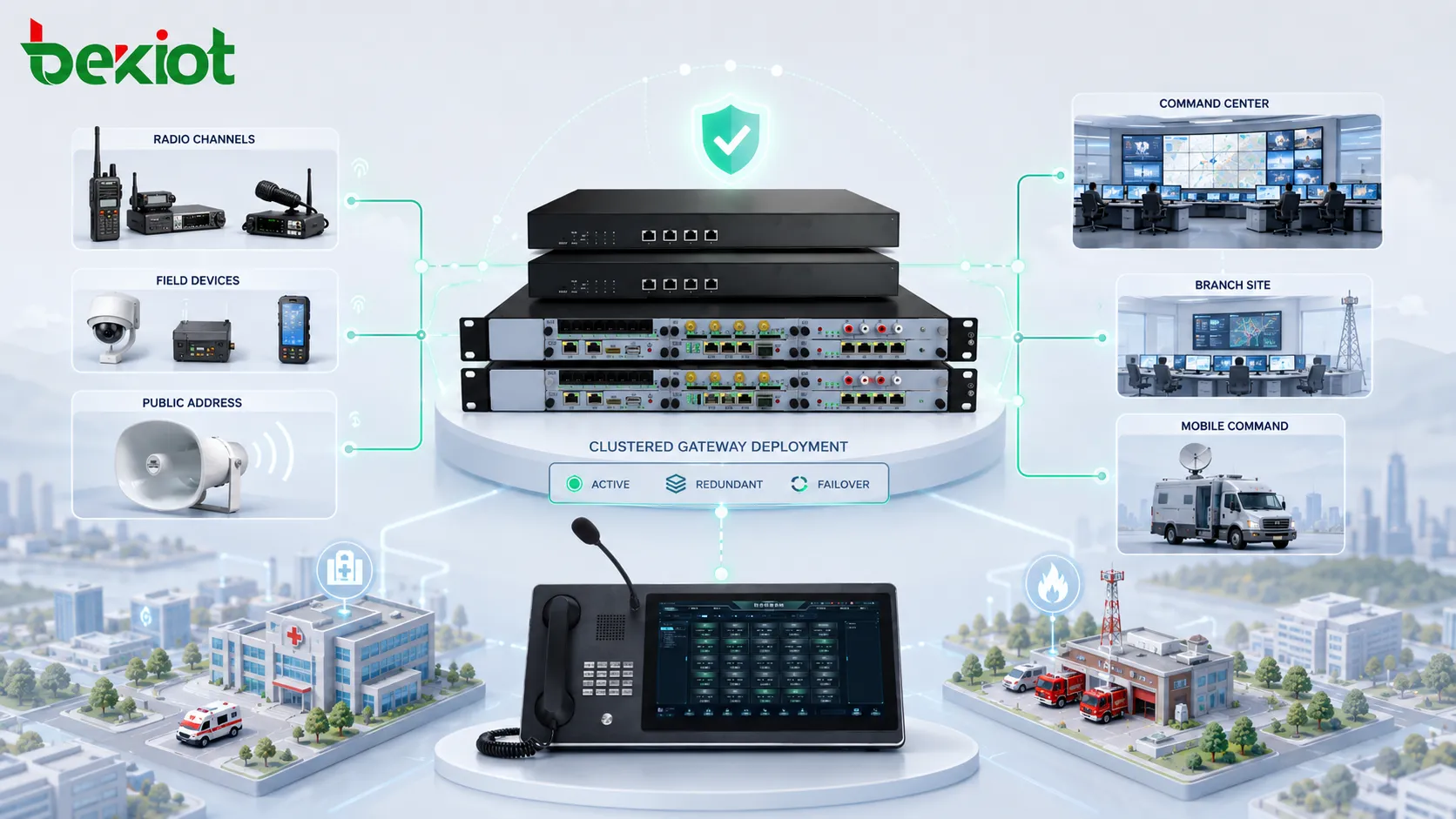
For radio and dispatch integration, clustered gateway design can help connect multiple radio channels, IP networks, and control centers. A gateway group may provide channel expansion, failover, remote access, and centralized management across different sites.
For example, Becke Telcom’s BK-ROIP series cluster gateway can be used in projects where radio systems need to connect with IP dispatch platforms, multi-site command centers, or enterprise communication networks. In such scenarios, the gateway layer helps bridge radio voice, IP transmission, and operational dispatch workflows while keeping the solution scalable and easier to manage.
Applications Across Industries
Enterprise IT Systems
Companies use clustered servers for business applications, databases, file services, email systems, identity platforms, and internal portals. These systems often need to remain available during hardware failure, software updates, or traffic peaks.
For enterprise IT, the main goals are uptime, predictable performance, easier maintenance, and business continuity. The design should match the importance of each application.
Cloud and Data Centers
Cloud platforms rely heavily on grouped resources. Compute nodes, storage nodes, network controllers, and application services are distributed across infrastructure so workloads can scale and recover from failures.
In data centers, this design supports high availability, resource pooling, virtualization, container orchestration, and automated workload migration.
Telephony and Unified Communications
Voice platforms may use grouped servers for registration, call routing, media services, voicemail, recording, contact center queues, or SIP trunk control. This reduces the risk that one server failure will interrupt communication for all users.
For multi-site businesses, distributed communication nodes can also improve local survivability. A branch may continue internal communication even if a connection to the central site is temporarily unavailable.
Industrial and Energy Facilities
Industrial plants, utilities, oil and gas sites, mines, ports, and power facilities may use grouped systems for monitoring, dispatch, alarm handling, radio integration, access control, and control room communication.
In these environments, uptime and resilience are especially important. The system should be planned together with redundant power, network protection, environmental conditions, and maintenance procedures.
Public Safety and Emergency Response
Emergency response organizations may use grouped communication servers, dispatch platforms, radio gateways, recording systems, and notification tools. The goal is to keep communication available when demand rises or when part of the infrastructure fails.
These systems should be tested under realistic conditions, including failover, backup power, high call volume, multi-agency coordination, and network disruption.
Planning the Right Setup
Define the Service Goal First
Before choosing a clustered design, organizations should define the service goal. The goal may be high availability, load sharing, geographic redundancy, maintenance flexibility, channel expansion, disaster recovery, or multi-site integration.
Each goal leads to a different architecture. A system designed mainly for failover may not be the same as a system designed for performance scaling.
Identify Failure Points
A clustered system can still fail if other components are not redundant. Power supply, network switches, routers, storage, firewalls, load balancers, licenses, databases, and management platforms may all become single points of failure.
Planning should look beyond the nodes themselves. The complete service path must be reviewed.
Check Application Compatibility
Not every application or device is designed for clustering. Some systems require special licenses, database support, synchronization logic, shared storage, or vendor-specific architecture.
Compatibility should be confirmed before deployment. A design that looks good on paper may fail if the application cannot handle active-active operation or state synchronization.
Test Recovery Behavior
Failover should be tested before production use. Testing should include node failure, network interruption, service restart, database delay, power loss, maintenance mode, and recovery back to normal operation.
Recovery testing helps reveal hidden problems such as slow failover, incomplete data sync, incorrect routing, or user session loss.
Common Challenges
One common challenge is complexity. More nodes, more links, and more synchronization rules create more things to configure and monitor. A poorly managed clustered system can become harder to troubleshoot than a simple standalone system.
Another challenge is false confidence. Some organizations assume that adding more nodes automatically creates high availability. In reality, the full design must include redundancy, monitoring, failover logic, tested recovery, and skilled maintenance.
Cost is also a consideration. Extra nodes, licenses, storage, switches, gateways, software modules, and support services may increase project cost. The investment should match the business risk of downtime or limited capacity.
A clustered system should be designed around real service requirements, not around the idea that more nodes automatically mean better reliability.
Maintenance and Operations
Regular maintenance should include node health checks, configuration review, backup validation, failover testing, log analysis, performance monitoring, and security updates. A cluster that is never tested may fail unexpectedly when it is needed most.
Administrators should also watch for configuration drift. When one node is updated manually and another is not, behavior may become inconsistent. Automated configuration tools and documented change control help reduce this risk.
Capacity should be reviewed over time. If one node fails, the remaining nodes must have enough capacity to handle critical workloads. Otherwise, failover may keep the service online but with unacceptable performance.
How to Choose a Suitable Solution
The right solution depends on workload type, service importance, user scale, site distribution, recovery requirements, and budget. A small office application may only need basic backup and restore, while a carrier-grade communication platform may need active-active redundancy across multiple sites.
For communication projects, selection should consider call capacity, channel capacity, SIP compatibility, media handling, radio integration, gateway redundancy, centralized management, logging, and failover behavior. If the solution connects radio, IP dispatch, and enterprise communication systems, gateway scalability and site-level resilience become especially important.
Organizations should also consider long-term maintenance. A solution should be understandable, documented, monitored, and supportable by the team responsible for daily operation.
FAQ
Can a small business use clustered systems?
Yes. A small business may not need a complex multi-node platform, but it can still use simple high-availability designs such as redundant firewalls, backup servers, replicated storage, or cloud-managed services.
Does clustering always require identical hardware?
Not always. Some systems require identical hardware or software versions, while others allow mixed nodes. However, mismatched capacity or version differences can affect performance, failover, and supportability.
What is the difference between redundancy and clustering?
Redundancy means having backup components. Clustering is a coordinated design where multiple components work together under shared logic. A cluster usually includes redundancy, but redundancy alone does not always mean the system is clustered.
Why does failover sometimes take longer than expected?
Failover may be delayed by health-check timers, database synchronization, service startup time, routing convergence, DNS caching, session recovery, or manual approval steps. These factors should be tested before production use.
What should be documented after deployment?
Documentation should include node roles, IP addresses, service dependencies, failover rules, management accounts, monitoring thresholds, backup procedures, maintenance windows, recovery steps, and contact responsibilities.







