


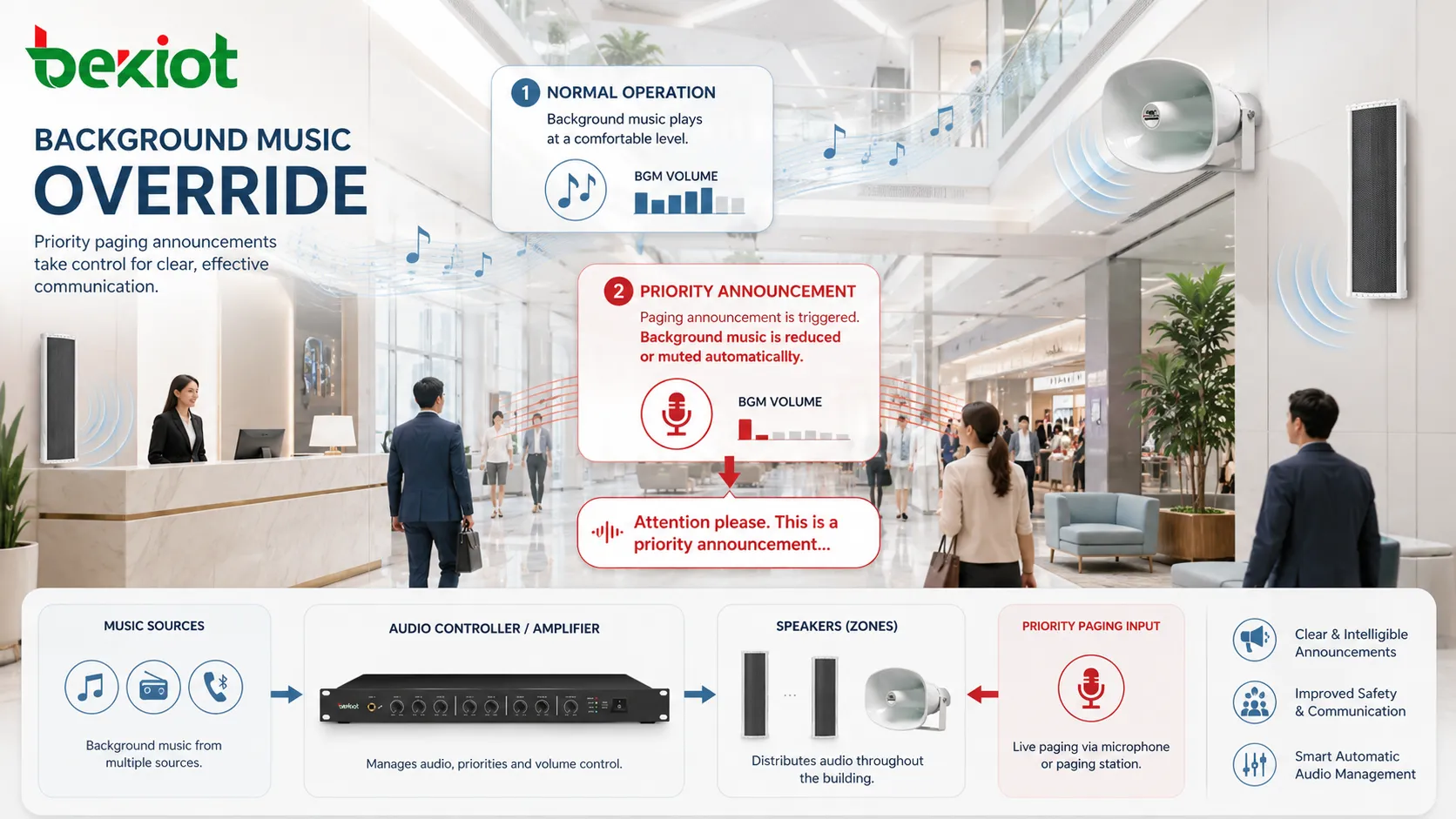
Background Music Override is an audio system function that allows higher-priority audio signals to interrupt, reduce, mute, or replace background music when an announcement, paging message, alarm, emergency broadcast, or operational instruction needs to be heard clearly. It is commonly used in public address systems, commercial audio systems, voice alarm systems, paging networks, transportation facilities, schools, hospitals, shopping centers, offices, hotels, factories, and public buildings.
In many facilities, background music is used to create a comfortable environment. However, when important information must be delivered, music should not compete with speech or warning tones. Background Music Override solves this problem by giving priority to critical audio sources so that people can hear the message without confusion.
Where the Override Concept Comes From
Most building audio systems handle more than one type of sound. A retail store may play music during normal business hours, a hotel lobby may use background audio for atmosphere, and an office building may use soft music in public areas. At the same time, these same systems may also need to broadcast paging, security alerts, fire evacuation messages, service calls, or operational notices.
If all audio sources play at the same priority, important messages may be buried under music. People may hear sound but fail to understand the words. This is especially problematic in large spaces, noisy areas, or emergency situations where speech intelligibility is essential.
Background Music Override creates a priority relationship between audio sources. Music remains available during normal operation, but it automatically gives way when a more important signal appears.
How Background Music Override Works
Audio Source Priority
The system assigns different priority levels to different audio sources. Background music usually has a low priority, while microphone paging, emergency messages, alarm tones, evacuation instructions, or control room announcements have higher priority.
When a higher-priority source becomes active, the system changes the music behavior. It may mute the music completely, reduce its volume, fade it down smoothly, or switch the zone to the announcement source.
Trigger Detection
The override action begins when the system detects a trigger. This trigger may come from a paging microphone, emergency panel, fire alarm interface, SIP paging command, dry contact input, relay signal, control software, audio matrix, amplifier, DSP processor, or scheduled announcement platform.
Some systems use audio-sensing detection, where the presence of speech or signal level activates the override. Others use control signals that are more predictable and better suited for emergency or professional paging applications.
Music Reduction or Muting
Once the override is triggered, background music is reduced or muted. In some systems, this happens instantly. In others, a short fade-out is used so the transition sounds smoother and less abrupt.
The choice depends on the use case. A routine retail announcement may use a gentle fade-down, while a fire evacuation message or safety warning may require immediate music cutoff.
Message Playback or Live Announcement
After the music is reduced, the priority audio is broadcast to the selected zone or zones. This may be a live voice announcement, recorded voice prompt, chime, alarm tone, paging message, evacuation instruction, or operational notification.
For speech-based messages, clarity is critical. The system should be designed so the announcement is loud enough, intelligible, and not masked by remaining music, echo, background noise, or poor speaker coverage.
Return to Normal Audio
When the priority message ends, the system returns to background music. This may happen immediately or after a short delay. Some systems fade the music back in gradually to avoid a sudden jump in volume.
Return behavior should be planned carefully. In emergency systems, music may remain muted until an all-clear condition is confirmed. In commercial spaces, automatic fade-in after routine paging is usually preferred.
Why This Feature Matters in Audio Systems
Background Music Override may look like a small audio feature, but it directly affects message delivery. A public address system is not useful if people cannot understand the announcement. The override function helps ensure that speech and warning signals are not competing with entertainment audio.
It also improves operational discipline. Staff do not need to manually turn down music every time they make an announcement. The system handles the transition automatically, which reduces mistakes and makes the workflow faster.
In safety-related environments, override control can be even more important. Emergency messages must take priority over all non-essential audio. Background music should never delay or weaken evacuation instructions, security alerts, or life-safety announcements.
Background Music Override is not just about muting music. It is about making sure the right message becomes the most important sound at the right moment.
Core Features to Look For
Adjustable Priority Levels
A professional system should allow different audio sources to have different priority levels. For example, emergency evacuation may have the highest priority, followed by security paging, general paging, scheduled announcements, and then background music.
This prevents conflict when multiple signals occur at the same time. If a routine announcement and an emergency alert happen together, the system should know which one wins.
Zone-Based Override
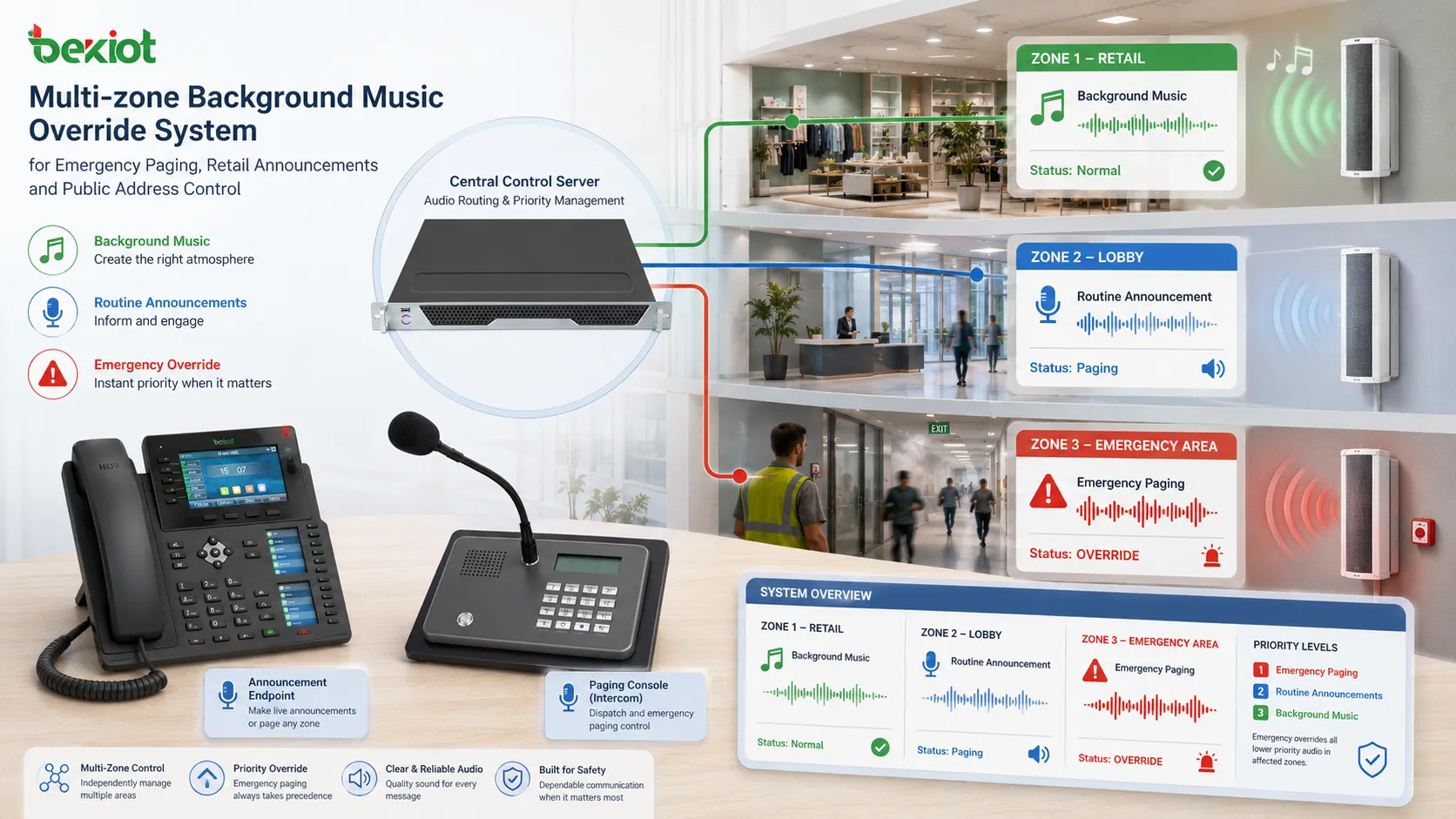
Many buildings are divided into audio zones. A background music override may apply to one zone, several zones, or the entire site. Zone-based control allows targeted communication without interrupting areas that do not need the message.
For example, a boarding announcement may only override music in one terminal area, while a fire alarm message may override all zones. This flexibility helps balance communication effectiveness and user comfort.
Fade Control
Fade control determines how music volume changes before and after the priority message. A soft fade-down may be suitable for hospitality, retail, and office environments. Immediate muting may be better for emergency alerts, safety warnings, or urgent paging.
Fade timing should be short enough that the announcement is not delayed. The goal is to make the transition smooth without weakening the priority message.
Chime or Pre-Announcement Tone
Some systems play a chime before the voice message. This catches attention and prepares listeners for speech. It is often used in offices, schools, airports, shopping centers, and public buildings.
The chime should also be controlled by the override logic. Music should reduce before the chime begins, not after the announcement has already started.
Emergency Priority Lockout
For life-safety applications, emergency audio should override normal music and ordinary paging. A priority lockout prevents lower-priority sources from interrupting emergency messages.
This is especially important in voice alarm and evacuation systems. During an emergency, the system should maintain message integrity until the emergency condition is cleared or a higher-authority control point takes over.
Common Override Methods
Different systems implement Background Music Override in different ways. Simple systems may use relay contacts or amplifier priority inputs. More advanced systems may use DSP routing, IP audio control, SIP paging, networked amplifiers, audio matrix processors, or voice alarm controllers.
| Override Method | How It Works | Typical Use |
|---|---|---|
| Priority Input | A high-priority input automatically interrupts the background music input. | Small public address systems, shops, offices, and simple paging setups. |
| Dry Contact Trigger | A relay or contact signal tells the system to mute music and play a message. | Fire alarm interfaces, security systems, and industrial control panels. |
| Audio Matrix Control | An audio matrix routes priority sources to selected zones while lowering music. | Hotels, campuses, malls, airports, and multi-zone buildings. |
| IP Paging Command | A network-based paging command triggers override through software or IP endpoints. | VoIP paging, SIP speakers, networked PA systems, and distributed sites. |
| Voice Alarm Controller | A certified emergency audio controller manages evacuation message priority. | Life-safety systems and emergency voice communication. |
The best method depends on system size, required reliability, emergency requirements, existing audio infrastructure, number of zones, and whether the system is analog, IP-based, or hybrid.
Benefits of Background Music Override
Clearer Announcements
The most obvious benefit is improved message clarity. When music is muted or reduced, speech becomes easier to understand. This is useful for paging, visitor instructions, staff calls, transportation updates, and safety messages.
Clear announcements reduce repeated messages and prevent confusion. In busy public spaces, this can improve both user experience and operational efficiency.
Faster Response During Urgent Events
When an urgent message must be broadcast, staff should not need to manually locate a music control panel or adjust volume settings. Override automation makes the system respond immediately when a priority signal appears.
This saves time during security alerts, fire events, evacuation procedures, equipment warnings, or urgent operational notices.
Better Customer and Visitor Experience
In commercial spaces, background music creates atmosphere, but announcements still need to be understood. Smooth override behavior keeps the environment professional. Music fades down, the message plays clearly, and normal audio returns when appropriate.
This is more polished than a system where music and announcements overlap or where staff manually cut music on and off.
Supports Multi-Zone Audio Control
Large buildings often need different messages in different areas. Override control allows specific zones to receive priority audio while other areas continue normal background music.
This is useful in airports, schools, hotels, factories, office buildings, retail centers, and transportation hubs where not every announcement applies to every space.
Improves Safety Communication
In emergency communication, music must not interfere with warning tones or voice instructions. Background Music Override helps ensure that evacuation messages, lockdown notices, severe weather alerts, or hazard warnings are not masked by normal audio.
For safety-related systems, the override logic should be tested regularly and documented as part of the facility’s emergency communication plan.
Applications in Different Environments
Retail Stores and Shopping Centers
Retail environments use background music to improve atmosphere, but they also need announcements for promotions, lost items, customer service, opening hours, safety notices, and emergency guidance. Background Music Override ensures that these announcements are heard clearly.
In shopping centers, zone control is especially useful. A message for one store area does not always need to interrupt the entire building.
Hotels and Hospitality Venues
Hotels may use background music in lobbies, corridors, restaurants, conference rooms, spas, and public areas. Override allows staff to deliver announcements, event updates, evacuation messages, or operational instructions without manually adjusting music in each area.
Smooth fade behavior is important in hospitality because abrupt audio changes can feel disruptive. However, emergency messages should still take immediate priority.
Schools and Campuses
Schools, universities, and training centers may use music in halls, event spaces, cafeterias, or public areas. Override supports bell schedules, paging, emergency drills, lockdown notices, weather alerts, and administrative announcements.
Campus systems often require clear zone planning. A classroom building, sports hall, dormitory, library, and outdoor area may need different override rules.
Transportation Facilities
Airports, train stations, bus terminals, ports, and parking facilities require clear public announcements. Background music should never compete with boarding calls, gate changes, safety messages, evacuation instructions, or operational alerts.
Transportation facilities often have high ambient noise, so override should be combined with good speaker placement, audio zoning, message repetition, and intelligibility testing.
Healthcare Buildings
Hospitals and clinics may use background music in waiting areas, reception zones, therapy rooms, and public corridors. Override allows paging, staff calls, emergency codes, visitor notices, or evacuation messages to take priority.
Healthcare audio design should consider privacy and stress levels. Not every announcement should be broadcast everywhere, and emergency priority should be handled carefully.
Factories and Industrial Sites
Some industrial facilities use music in workshops, rest areas, production halls, or staff zones. However, safety announcements, machine alarms, shift change notices, evacuation instructions, and maintenance calls must remain audible.
In noisy industrial environments, override may need to work together with visual alarms, strobes, digital signs, and high-output speakers because music reduction alone may not be enough.
Design Details That Affect Performance
Speech Intelligibility
Override is useful only if the priority message can be understood. Speaker placement, reverberation, background noise, microphone quality, amplifier settings, and message level all affect intelligibility.
Reducing music is the first step, but the announcement audio must also be clear, properly equalized, and loud enough for the target area.
Priority Hierarchy
Facilities should define a clear priority hierarchy. Emergency messages should override general paging. General paging should override music. Routine music should not override any operational or safety message.
Without a clear hierarchy, two audio sources may conflict. This can create confusion during urgent situations.
Zone Mapping
Zone mapping defines which speakers or areas respond to each override event. Poor zone mapping can cause messages to play in the wrong area or fail to reach the affected zone.
Each zone should be documented, labeled, tested, and matched with real building use. As rooms are renovated or repurposed, zone maps should be updated.
Volume Matching
The announcement level should be louder than the background music but not painfully loud. If the difference is too small, the message may remain unclear. If the difference is too large, listeners may be startled.
Volume levels should be tested during real operating conditions, not only in an empty building.
Fail-Safe Behavior
For emergency systems, override should fail in a safe direction. If a fire alarm or voice evacuation message is active, background music should remain muted even if a normal audio source tries to resume.
Fail-safe behavior should be verified during commissioning, maintenance, and emergency drills.
A good override design is not measured by how quickly music stops, but by whether the correct people can clearly understand the correct message at the correct time.
Common Problems and How to Avoid Them
Announcements Start Before Music Drops
If the message begins before music is reduced, the first words may be covered. This is a common problem when trigger timing is not configured correctly.
A short pre-announcement chime or delay can help ensure that music drops before speech starts.
Music Does Not Return Properly
Sometimes music fails to return after the priority message ends, or it returns too loudly. This may be caused by incorrect trigger release, control logic errors, amplifier settings, or software configuration.
Return behavior should be tested for every type of override source, including paging microphones, scheduled messages, alarm inputs, and emergency triggers.
Wrong Zones Are Interrupted
If zone routing is incorrect, an announcement may interrupt music in areas where it is not needed while missing the intended area. This can create confusion and reduce trust in the system.
Regular zone testing and clear labeling help prevent this issue.
Overuse of Priority Paging
If routine messages constantly override music, people may become annoyed or ignore announcements. Priority should be used carefully, especially in hospitality, retail, and office environments.
Not every message requires full override. Some routine information may be better delivered through signage, mobile notifications, or scheduled low-priority announcements.
Maintenance and Testing Tips
Background Music Override should be tested after installation, after audio system changes, and during regular maintenance. Tests should confirm trigger input, music reduction, announcement level, zone routing, return behavior, and priority conflict handling.
Facilities should test the system under real conditions. A message that sounds clear in an empty store may be hard to understand during business hours. A factory announcement that works during shutdown may be too quiet during production.
Maintenance teams should also check amplifier status, speaker lines, control contacts, network audio devices, paging microphones, message players, emergency interfaces, and software schedules. The override function depends on the whole signal chain, not only one setting.
Choosing the Right Override Setup
The right setup depends on the building type, number of zones, audio sources, emergency requirements, and daily operating workflows. A small café may only need a simple priority input on an amplifier. A large campus may need networked audio control, zone management, emergency priority, and software-based scheduling.
For life-safety applications, the system should follow applicable emergency audio and voice alarm requirements. Routine background music control should not interfere with certified emergency communication functions.
For commercial and hospitality spaces, user experience matters. The system should provide smooth transitions, clear announcements, and reliable return to music without staff needing to adjust settings manually throughout the day.
FAQ
Is Background Music Override the same as volume ducking?
They are related but not always identical. Volume ducking usually means lowering one audio source when another source is active. Background Music Override may include ducking, muting, source switching, priority routing, or emergency lockout depending on the system.
Can background music continue at a lower level during announcements?
Yes, some systems allow music to continue quietly under the announcement. However, for important paging or emergency messages, full muting is often better because it improves speech intelligibility.
Does every public address system support music override?
No. Basic systems may have limited priority control, while professional PA, paging, and voice alarm systems usually provide more advanced override options. The feature depends on the amplifier, mixer, controller, or audio platform.
Why is the first part of an announcement sometimes hard to hear?
This may happen when the override trigger is too slow or when speech starts before music has been reduced. A pre-announcement chime, trigger delay, or faster priority control can help solve the issue.
Should emergency messages always override background music?
Yes. Emergency messages should take priority over background music and routine paging. In safety-related systems, this priority behavior should be tested regularly and protected from accidental misconfiguration.







