


Certificate management is the process of controlling the full lifecycle of digital certificates used to secure websites, applications, devices, users, servers, APIs, VPNs, email systems, and enterprise networks. A digital certificate helps prove the identity of a system or entity and enables encrypted communication through technologies such as TLS, SSL, S/MIME, code signing, and device authentication.
In modern IT environments, certificates are everywhere. They protect public websites, internal portals, cloud services, IoT devices, Wi-Fi access, remote access systems, software packages, and machine-to-machine communication. Without proper certificate management, organizations may face expired certificates, service outages, security warnings, failed authentication, compliance risks, and weakened trust across digital systems.
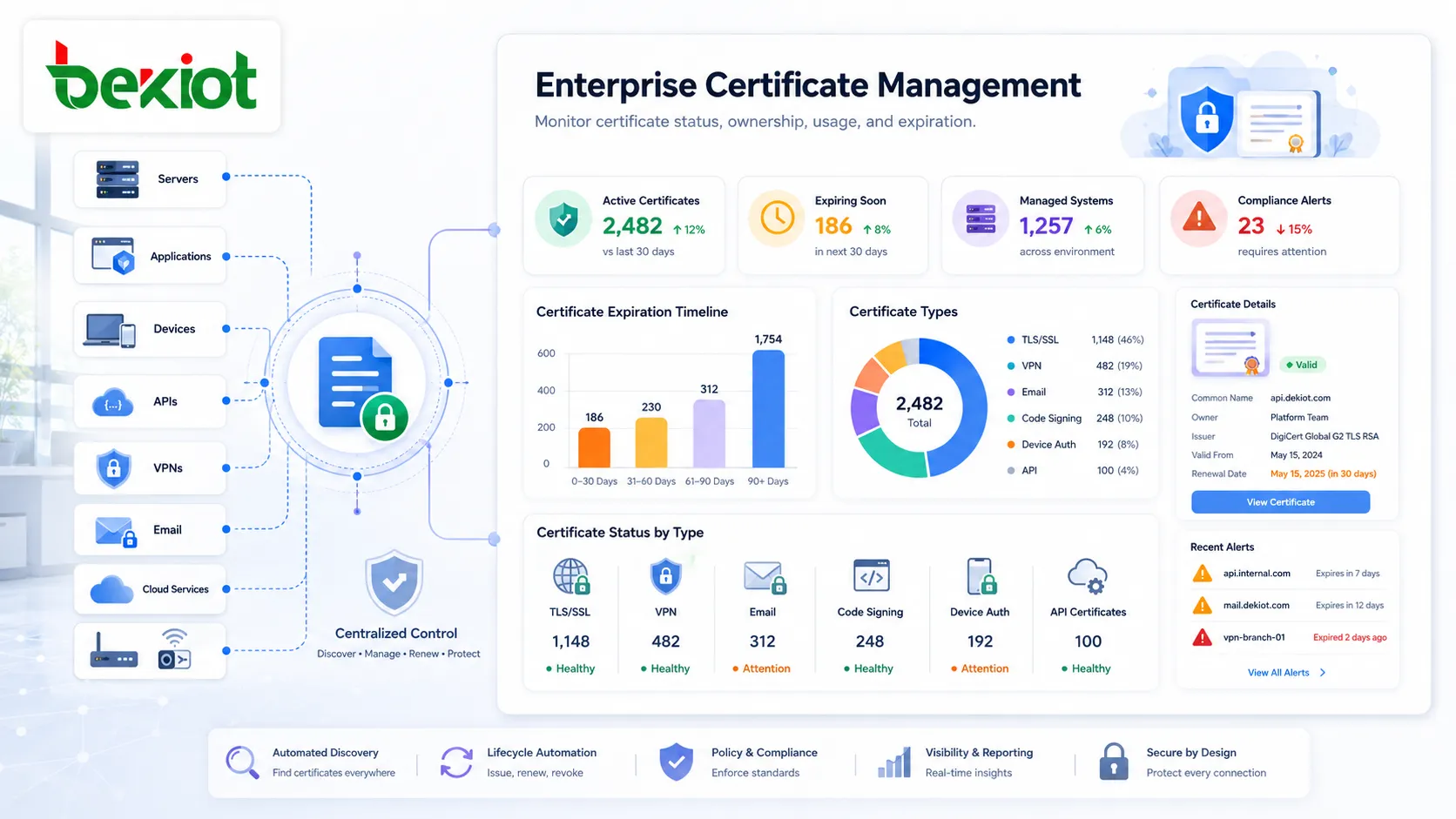
What Certificate Management Means
Certificate management covers all tasks required to request, issue, deploy, monitor, renew, revoke, and audit digital certificates. It ensures that each certificate is valid, trusted, correctly configured, assigned to the right system, and replaced before it expires.
A certificate usually includes information such as the subject name, issuer, public key, validity period, serial number, signature algorithm, and usage type. For example, a TLS certificate used by a website helps browsers confirm that they are connecting to the expected domain and not an impostor service.
In a small environment, certificate management may be handled manually by one administrator. In a large enterprise, manual management becomes risky because certificates may be spread across cloud platforms, web servers, load balancers, firewalls, VPN gateways, containers, Kubernetes clusters, databases, mobile device systems, and internal applications.
Why Certificates Are Important
Digital certificates support trust. They allow systems to verify identity, encrypt communication, and prevent unauthorized interception or impersonation. When a certificate is missing, expired, misconfigured, or issued by an untrusted authority, users and systems may receive security warnings or fail to connect.
For websites, certificates protect HTTPS sessions. For enterprise networks, they may authenticate devices and users. For software developers, code signing certificates help prove that applications or updates have not been tampered with. For email systems, certificates can support encrypted and signed messages.
As organizations adopt cloud services, remote work, APIs, microservices, and connected devices, certificates become even more important. They are no longer limited to public websites; they are part of the security foundation for many digital workflows.
How Certificate Management Works
Certificate Discovery
The first step is discovering where certificates are used. Organizations need to identify certificates installed on web servers, application servers, load balancers, firewalls, routers, VPN systems, endpoints, cloud services, containers, and internal tools.
Discovery helps eliminate blind spots. Many certificate failures happen because a certificate exists on a system that nobody is actively tracking. Automated discovery can scan networks, domains, certificate stores, and cloud environments to build an accurate inventory.
Certificate Inventory
After discovery, certificates should be recorded in a centralized inventory. This inventory may include certificate name, domain, issuer, owner, expiration date, key size, algorithm, usage type, installation location, business application, and renewal method.
A reliable inventory helps administrators know which certificates are critical, who is responsible for them, and when action is required. It also supports audit reviews, incident response, compliance reporting, and risk reduction.
Issuance and Enrollment
Certificate issuance is the process of obtaining a certificate from a certificate authority. The certificate authority may be a public CA for internet-facing services or a private CA for internal enterprise systems. Before issuing a certificate, the CA validates the request according to the certificate type and policy.
Enrollment may be manual or automated. In automated environments, systems can request certificates through protocols or platform integrations, reducing delays and avoiding configuration errors. This is especially useful for DevOps, cloud, and container-based environments where services may change frequently.
Deployment and Configuration
Once issued, the certificate must be installed on the correct system and configured properly. This may involve placing certificate files, private keys, and intermediate certificates in the right location, updating service settings, restarting services, or configuring a load balancer or reverse proxy.
Incorrect deployment can cause trust failures even when the certificate itself is valid. Common problems include missing intermediate certificates, incorrect hostname binding, weak protocol settings, mismatched private keys, or certificates installed on the wrong server.
Core Features of Certificate Management
Expiration Monitoring
Certificate expiration is one of the most common causes of service disruption. When a certificate expires, browsers, applications, APIs, or devices may reject the connection. This can affect websites, customer portals, payment systems, remote access, and internal services.
Certificate management systems monitor expiration dates and send alerts before certificates expire. The best systems provide multiple alert levels, owner notifications, dashboard views, and escalation rules so that renewal tasks are not missed.
Automated Renewal
Automated renewal reduces the risk of human error. Instead of relying on manual reminders and repeated configuration work, the system can renew certificates before expiration and deploy the updated certificate to the correct location.
Automation is especially valuable for short-lived certificates, large-scale web environments, microservices, cloud workloads, and organizations with hundreds or thousands of certificates. It improves reliability and reduces administrative workload.
Revocation Management
Certificates may need to be revoked before their expiration date. This can happen if a private key is compromised, a domain changes ownership, a device is decommissioned, an employee leaves the organization, or a certificate was issued incorrectly.
Revocation management ensures that untrusted certificates are no longer accepted. It may involve certificate revocation lists, online status checking, CA updates, and internal policy enforcement. Timely revocation is important for reducing security exposure.
Policy Enforcement
Certificate policies define which certificate types can be used, which key lengths are acceptable, which algorithms are allowed, how long certificates remain valid, who can request certificates, and how certificates should be approved and deployed.
Policy enforcement prevents inconsistent certificate practices across departments and systems. It also helps organizations avoid weak encryption, unauthorized certificate issuance, and certificates that do not meet internal security requirements.
Access Control and Role Management
Certificate management involves sensitive assets, especially private keys and administrative permissions. Access control ensures that only authorized users can request, approve, export, renew, revoke, or delete certificates.
Role-based access control is useful in larger organizations where security teams, network administrators, application owners, DevOps teams, and compliance teams may all interact with certificates in different ways.
Certificate management is not just a technical maintenance task. It is a trust management process that protects digital identity, encrypted communication, and service continuity.
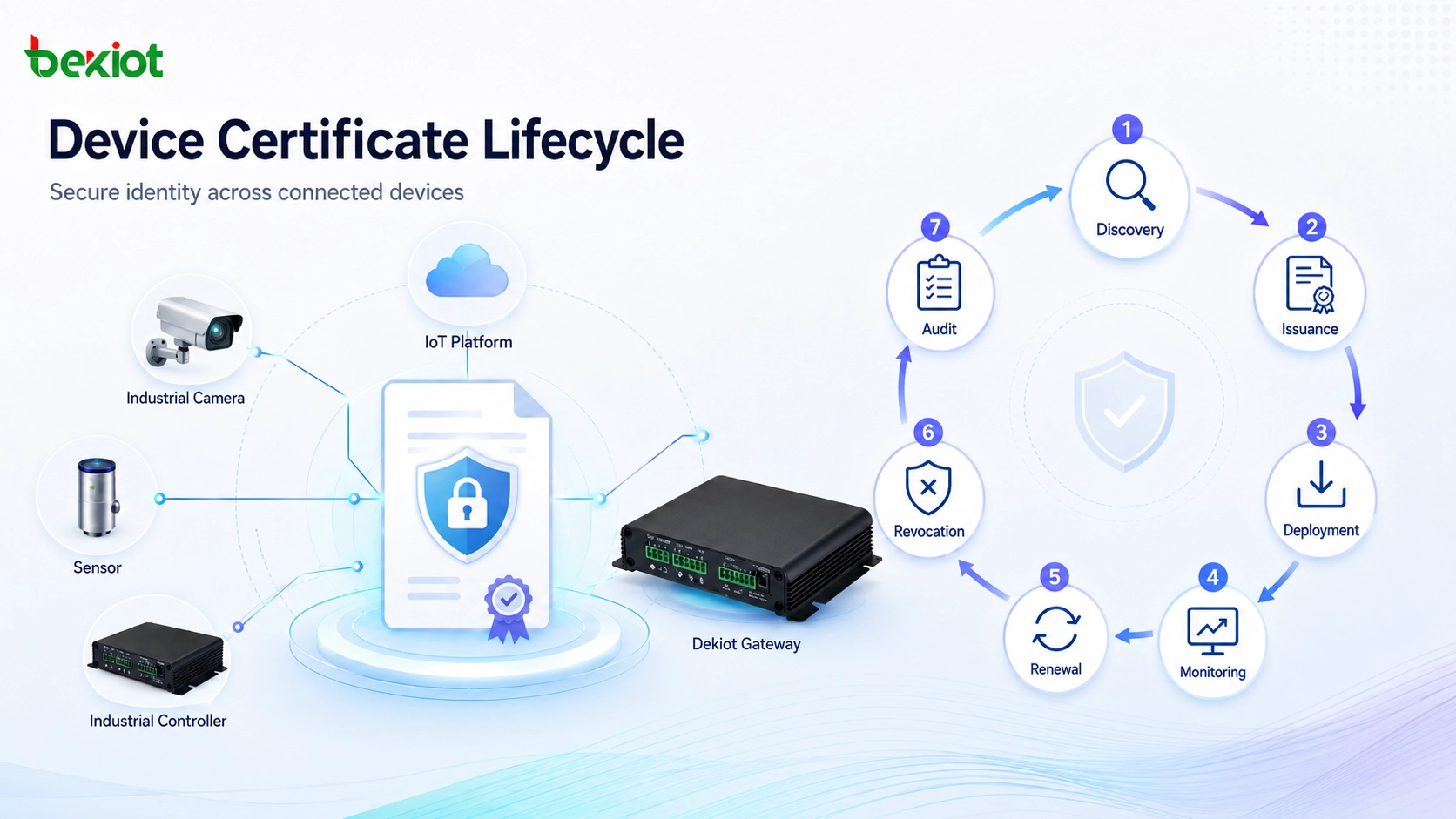
Certificate Lifecycle Stages
A complete certificate management process follows the entire certificate lifecycle. Each stage matters because a failure at any point can create security or availability problems.
| Lifecycle Stage | Main Purpose | Common Risk |
|---|---|---|
| Discovery | Find certificates across systems, networks, applications, and cloud services. | Unknown certificates remain unmanaged and may expire unexpectedly. |
| Issuance | Request and obtain a trusted certificate from a public or private CA. | Incorrect subject names, weak keys, or improper approval workflows. |
| Deployment | Install and configure certificates on the correct systems. | Missing intermediates, wrong bindings, or mismatched private keys. |
| Monitoring | Track validity, expiration, ownership, and configuration health. | Expired certificates cause outages or security warnings. |
| Renewal | Replace certificates before expiration. | Manual renewal delays or deployment mistakes. |
| Revocation | Invalidate certificates that should no longer be trusted. | Compromised or outdated certificates remain active. |
Types of Certificates Managed by Enterprises
TLS and SSL Certificates
TLS certificates are widely used to secure HTTPS websites, APIs, portals, and application connections. They help encrypt traffic between clients and servers while confirming the identity of the service being accessed.
Although many people still use the term SSL certificate, modern systems usually rely on TLS. Organizations should manage TLS certificates carefully because expired or misconfigured certificates can immediately affect user trust and service availability.
Client Authentication Certificates
Client certificates are used to authenticate users, devices, or applications. They are often used in VPN access, Wi-Fi authentication, enterprise device management, zero trust architectures, and machine-to-machine communication.
These certificates are important because they provide stronger identity assurance than passwords alone. However, they also require careful issuance, renewal, device binding, and revocation when users or devices are no longer authorized.
Code Signing Certificates
Code signing certificates allow software publishers to digitally sign applications, drivers, scripts, firmware, and updates. A valid signature helps users and operating systems verify that the software comes from a trusted source and has not been modified after signing.
Because code signing certificates can be abused if compromised, they require strong protection. Private keys should be stored securely, signing access should be limited, and signing activity should be auditable.
Email Certificates
Email certificates can be used for signing and encrypting email messages. A signed message helps prove the identity of the sender, while encryption protects message content from unauthorized reading.
In enterprises, email certificate management may involve user enrollment, directory integration, key recovery policies, mobile device support, and certificate renewal processes.
Device and IoT Certificates
Connected devices, sensors, industrial controllers, cameras, gateways, and IoT platforms may use certificates for device identity and secure communication. Certificates help ensure that only trusted devices can connect to a platform or network.
Device certificate management can be challenging because devices may be deployed in large numbers, distributed locations, harsh environments, or remote sites. Automated provisioning and renewal are often necessary.
Business Benefits of Certificate Management
Reduces Service Outages
Expired certificates can stop users from accessing websites, applications, APIs, VPNs, and internal systems. In some cases, a single expired certificate can affect payment processing, customer portals, remote access, or cloud integrations.
Certificate management reduces outage risk by tracking expiration dates, notifying responsible owners, and automating renewal workflows. This helps organizations maintain service continuity.
Strengthens Security
Proper certificate management helps prevent the use of weak, expired, unauthorized, or misconfigured certificates. It also supports timely revocation when certificates are compromised or no longer needed.
By controlling issuance and enforcing policies, organizations can reduce the risk of impersonation, man-in-the-middle attacks, unauthorized access, and insecure communication paths.
Improves Compliance Readiness
Many security frameworks and internal governance programs require organizations to control encryption, identity, access, and key management practices. Certificate management provides records that show how certificates are issued, monitored, renewed, and revoked.
Audit trails, approval workflows, inventory reports, and policy enforcement can help organizations demonstrate that certificate-related risks are being managed responsibly.
Supports Digital Transformation
Cloud migration, API integration, microservices, remote work, and IoT expansion increase certificate usage. Without a structured management process, certificate sprawl can become difficult to control.
Certificate management supports digital transformation by making trust and encryption scalable. It allows teams to deploy secure services faster while maintaining governance and visibility.
Reduces Manual Workload
Manual certificate handling is repetitive and error-prone. Administrators may need to track dates, request renewals, install files, update service bindings, and document changes. As certificate volume grows, manual work becomes inefficient.
Automation reduces these routine tasks and allows IT teams to focus on higher-value work such as security architecture, monitoring, incident response, and infrastructure improvement.
Applications of Certificate Management
Website and Web Application Security
Public websites, customer portals, e-commerce platforms, SaaS applications, and internal web tools rely on TLS certificates to protect user sessions. Certificate management ensures these services remain trusted and accessible.
For organizations with multiple domains, subdomains, load balancers, and web servers, centralized management is important because certificates may be installed in several locations at the same time.
Enterprise Network Access
Certificates are commonly used for VPN authentication, Wi-Fi access, endpoint identity, and network access control. They help organizations verify devices and users before allowing access to sensitive resources.
This is especially valuable for remote work, bring-your-own-device policies, contractor access, and zero trust security models. Certificate lifecycle control ensures that lost, retired, or unauthorized devices do not keep valid access credentials.
Cloud and DevOps Environments
Cloud platforms and DevOps pipelines often create and destroy services quickly. Applications, containers, APIs, and service meshes may require certificates for secure communication between workloads.
Automated certificate management helps DevOps teams avoid delays while still following security policies. It also reduces the risk of certificates being forgotten inside temporary or fast-changing environments.
API and Machine-to-Machine Communication
APIs often connect business systems, payment platforms, partner services, mobile apps, and backend applications. Certificates can help authenticate servers and encrypt traffic between systems.
For machine-to-machine communication, certificate management ensures that trusted systems can communicate securely while unauthorized or expired identities are blocked.
IoT and Industrial Systems
IoT devices and industrial systems may use certificates to authenticate devices, encrypt telemetry, connect to management platforms, or secure remote maintenance channels. This is important in environments where devices operate outside traditional office networks.
Certificate management helps maintain trust across distributed devices. It also supports secure replacement, decommissioning, ownership change, and remote updates.
Common Challenges
Certificate Sprawl
Certificate sprawl happens when certificates are issued and deployed across many systems without centralized tracking. Different teams may request certificates from different authorities, store them in different locations, and renew them using different methods.
This creates blind spots. Administrators may not know which certificates exist, who owns them, or when they expire. Discovery and inventory are the first steps in controlling certificate sprawl.
Expired Certificates
Expired certificates remain one of the most visible certificate management failures. They can trigger browser warnings, application errors, API failures, failed authentication, and customer trust issues.
Expiration problems often occur when certificate ownership is unclear, renewal reminders are missed, or certificates are installed in multiple locations that are not all updated at the same time.
Private Key Exposure
A certificate is only trustworthy if its private key is protected. If a private key is copied, stolen, shared insecurely, or stored without controls, an attacker may impersonate a trusted service or sign unauthorized software.
Organizations should use secure storage, access controls, hardware security modules where appropriate, and strict handling procedures for private keys.
Inconsistent Policies
When teams manage certificates independently, they may use different key lengths, algorithms, naming rules, expiration periods, and approval processes. This inconsistency creates operational and security risk.
A centralized policy helps ensure certificates meet the same security and compliance expectations across the enterprise.
Complex Hybrid Environments
Many organizations operate a mix of on-premises systems, cloud platforms, SaaS services, legacy applications, and remote devices. Certificates may be deployed across all of these environments.
Hybrid complexity makes manual tracking difficult. Certificate management tools must support different platforms, deployment methods, and ownership models.
The most dangerous certificate is often not the one administrators are watching, but the one that nobody remembers exists until it expires or is abused.
Best Practices for Certificate Management
Organizations should maintain a centralized certificate inventory and regularly scan for unknown certificates. Each certificate should have an assigned owner, clear business purpose, approved issuer, and documented renewal process.
Automation should be used where possible, especially for renewal, deployment, monitoring, and alerting. However, automation should still follow security policies and include proper approval controls for sensitive certificates.
Private keys should be protected carefully. They should not be shared through email, stored in unsecured folders, or reused across unrelated services. Access to certificate files and key material should be limited to authorized users and systems.
Certificate policies should be reviewed periodically. As encryption standards, compliance expectations, and business systems change, organizations may need to update key lengths, algorithms, validity periods, and approval workflows.
How to Choose a Certificate Management Solution
When selecting a certificate management solution, organizations should consider certificate volume, platform diversity, automation needs, reporting requirements, and integration capabilities. A small business may need basic expiration alerts, while a large enterprise may need CA integration, DevOps support, API access, role-based permissions, and audit reporting.
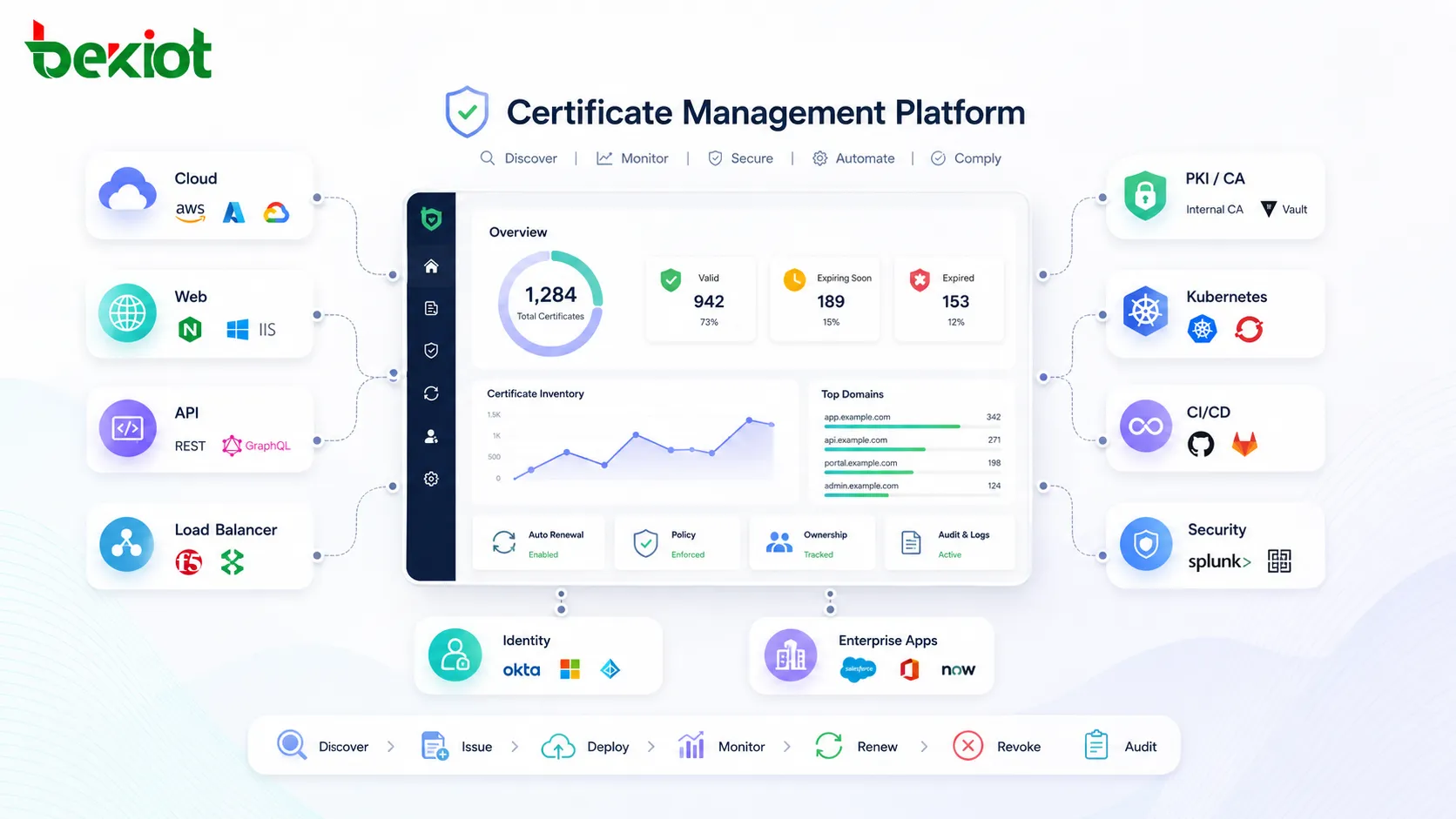
The solution should be able to discover certificates across public domains, internal networks, cloud services, and application environments. It should also provide clear dashboards, ownership tracking, renewal workflows, and policy enforcement.
Integration is important. Certificate management may need to work with public certificate authorities, private PKI systems, identity platforms, cloud providers, load balancers, web servers, Kubernetes, CI/CD tools, and security monitoring systems.
FAQ
Is certificate management only needed for public websites?
No. Public websites are only one use case. Certificates are also used for internal applications, VPNs, Wi-Fi access, APIs, cloud workloads, code signing, email security, device identity, and machine-to-machine communication.
What happens if a certificate expires?
An expired certificate may cause browser warnings, application connection failures, API errors, VPN login problems, or service outages. The impact depends on where the certificate is used and how critical that system is to the organization.
What is the difference between a public CA and a private CA?
A public certificate authority issues certificates trusted by browsers and public internet users. A private certificate authority is usually operated for internal systems, devices, users, or enterprise applications where public trust is not required.
Why is private key protection important?
The private key proves control of the certificate identity. If it is exposed, an attacker may impersonate a trusted service, decrypt traffic in some scenarios, or sign unauthorized content. Protecting private keys is essential to certificate security.
Can certificate renewal be fully automated?
Yes, many certificate renewal workflows can be automated, especially for web services and cloud environments. However, organizations should still define policies, approvals, monitoring, and exception handling for critical or high-risk certificates.







