


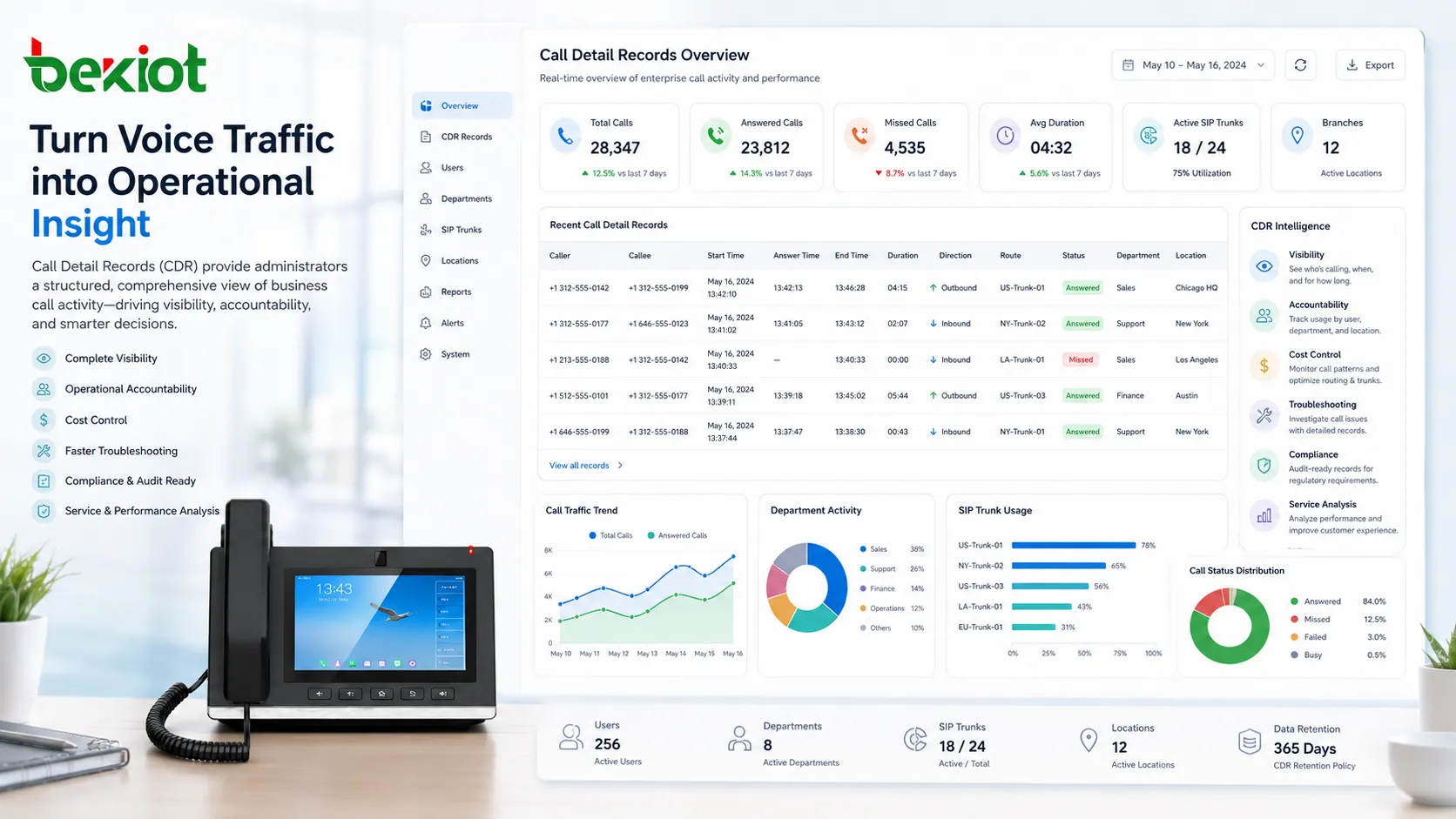
Call Detail Records, commonly known as CDR, are structured records generated by a telephone system, VoIP platform, PBX, contact center, carrier network, or unified communications system whenever a call event occurs. A CDR does not usually contain the actual voice content of a conversation. Instead, it stores metadata about the call, such as caller number, called number, call start time, answer time, end time, duration, direction, route, status, and sometimes cost or quality-related information.
In enterprise communications, CDR plays an important role in visibility, accountability, cost control, troubleshooting, compliance support, and service analysis. For organizations that manage many extensions, branches, departments, SIP trunks, call queues, or customer-facing teams, CDR data helps transform daily voice traffic into measurable operational information.
What Call Detail Records Mean
A Call Detail Record is a data entry created for a call or communication session. In a simple office PBX, one phone call may generate a basic CDR that includes the calling extension, destination number, call time, and duration. In a more advanced VoIP or contact center system, the record may include SIP trunk information, queue name, agent ID, transfer events, call disposition, recording reference, billing code, codec information, or quality statistics.
CDR is useful because voice communication is often time-sensitive and distributed across many users and channels. Without call records, it can be difficult to know who called whom, when a missed call occurred, whether a customer reached an agent, how long a support call lasted, or which trunk carried the call.
For enterprise managers, CDR provides a factual basis for reviewing communication behavior. For technical teams, it provides diagnostic clues. For finance teams, it can support cost allocation and telecom expense management. For compliance teams, it can help confirm whether call-handling policies were followed.
How CDR Is Generated
CDR is generated by communication systems during or after a call session. In traditional telephony, records may be created by PBX systems, switches, gateways, or carrier billing platforms. In VoIP environments, CDR may be created by IP PBX software, SIP servers, session border controllers, softswitches, call center platforms, or cloud calling services.
When a call starts, the system captures the initial signaling information. This may include caller identity, dialed number, call direction, route selection, trunk group, and timestamp. When the call is answered, the system may record answer time and connected party information. When the call ends, the system records disconnect time, duration, termination cause, and final call status.
In some systems, one call may create multiple related CDR entries. For example, a call that is transferred from reception to support and then forwarded to voicemail may generate separate records for each call leg. This allows administrators to reconstruct the complete communication path.
Common Fields in a CDR
The exact fields in a CDR vary depending on the system, vendor, platform, and configuration. However, most enterprise communication systems include a group of common fields that describe the basic call event.
| CDR Field | Meaning | Enterprise Use |
|---|---|---|
| Caller ID | The source number, extension, or user that initiated the call. | Used to identify user activity, call origin, and department usage. |
| Called Number | The destination number, extension, queue, or external contact. | Helps analyze call destinations, customer contact patterns, and routing behavior. |
| Start Time | The time when the call attempt began. | Supports traffic analysis, peak-hour planning, and call timeline review. |
| Answer Time | The time when the call was answered by a user, queue, voicemail, or system. | Helps calculate response time and call handling efficiency. |
| Duration | The length of the connected call or call attempt. | Used for billing, productivity review, and usage analysis. |
| Call Direction | Inbound, outbound, internal, forwarded, or transferred call type. | Helps separate customer calls, internal communication, and external dialing. |
| Call Status | Answered, missed, busy, failed, abandoned, voicemail, or rejected. | Supports service quality review and missed-call follow-up. |
| Route or Trunk | The SIP trunk, gateway, carrier, or path used by the call. | Useful for troubleshooting, carrier comparison, and cost control. |
Some platforms also include advanced fields such as codec, packet loss, jitter, MOS score, recording file ID, billing account, agent group, disposition code, call queue result, or SIP response code. These additional fields make CDR more valuable for technical analysis and business reporting.
Role of CDR in Enterprise Communications
Call Visibility Across the Organization
Enterprise communication systems may include many users, departments, sites, extensions, mobile clients, gateways, SIP trunks, and call queues. CDR provides a central source of call activity data, allowing administrators to understand how the system is being used.
For example, CDR can show how many calls a sales team makes each day, how many inbound calls a reception group misses, how long support calls usually last, and whether branch offices are using the correct outbound routes.
Operational Accountability
CDR helps organizations verify call-handling performance. Managers can review whether calls were answered on time, whether missed calls were returned, whether customer calls were transferred correctly, and whether certain departments are overloaded.
This does not mean CDR should be used only as a monitoring tool for employees. When used properly, it helps improve workflows, identify staffing gaps, reduce missed opportunities, and support fair performance evaluation based on real communication data.
Telecom Cost Management
CDR can support cost analysis by showing call volumes, call durations, external dialing behavior, trunk usage, international calls, premium-rate numbers, and department-level consumption. This is especially important for organizations with multiple branches, carrier contracts, or high outbound call volume.
Finance and IT teams can use CDR data to detect unusual usage, allocate telecom costs by department, compare carrier routes, and optimize trunk capacity. Over time, CDR can help reduce unnecessary telecom spending.
Service Quality and Customer Experience
Customer-facing teams depend on timely call handling. CDR helps reveal whether inbound calls are being answered, abandoned, forwarded, or sent to voicemail. It can also show call peaks, queue pressure, average talk time, and repeat call patterns.
When combined with call center statistics, recordings, CRM data, and customer feedback, CDR gives a more complete view of the customer communication experience.
CDR turns daily call traffic into measurable communication intelligence, helping enterprises understand not only that calls happened, but how effectively they were handled.
CDR and VoIP Systems
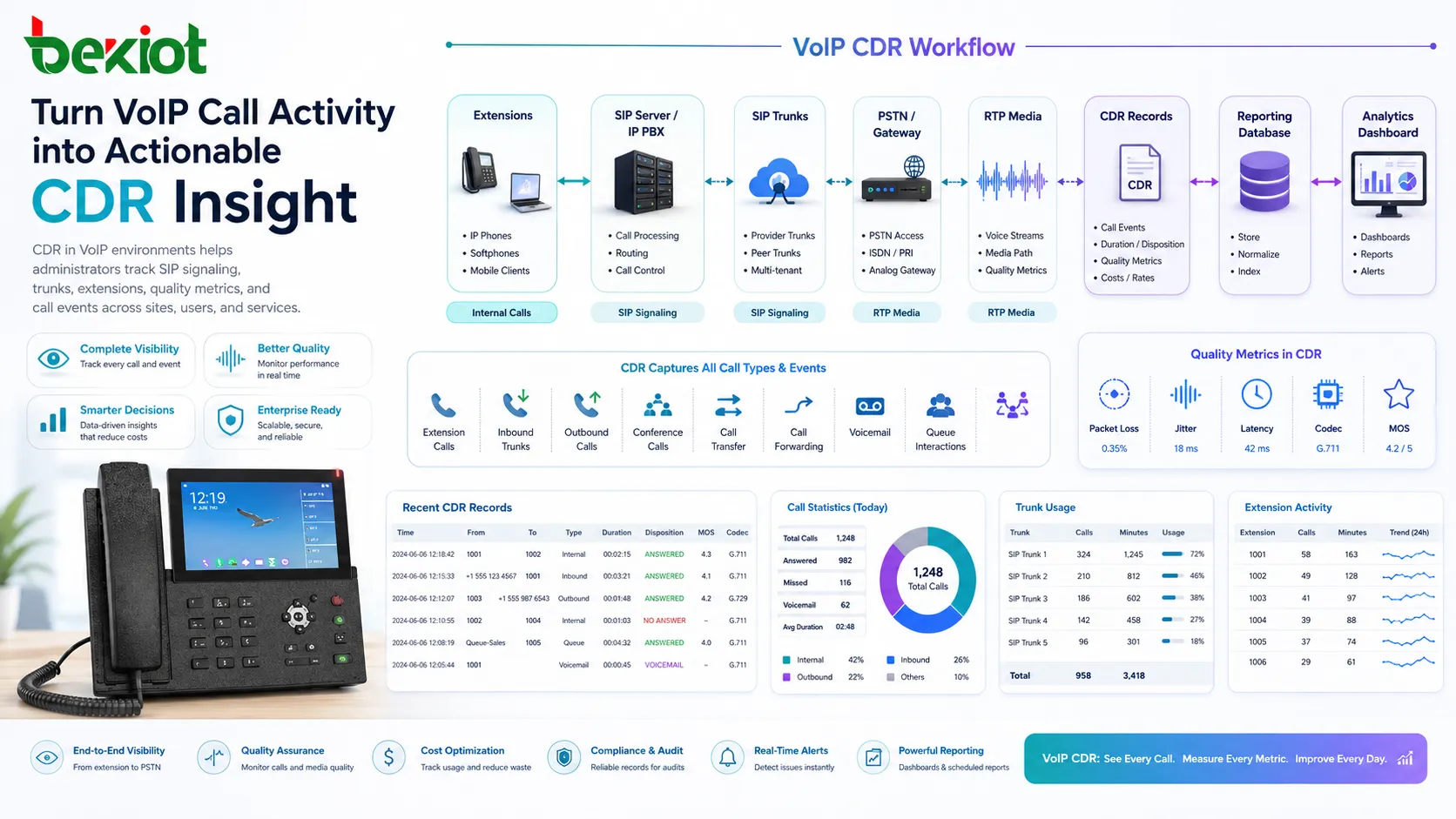
In VoIP systems, CDR is closely connected to SIP signaling, RTP media flow, extension registration, trunk routing, and call control. A VoIP platform may generate CDR for internal extension calls, outbound PSTN calls, inbound trunk calls, conference calls, call forwarding, call transfer, voicemail access, and queue interactions.
Because VoIP systems often rely on IP networks, CDR may also be linked with quality metrics. Some systems store packet loss, jitter, latency, codec, or MOS information alongside call metadata. This helps administrators understand whether a call completed successfully and whether the audio experience was acceptable.
For multi-site VoIP deployments, CDR can help compare performance across office networks, remote users, SIP trunks, WAN links, and cloud services. This makes it easier to troubleshoot problems that only affect certain users or locations.
Technical Features of CDR Systems
Real-Time and Historical Reporting
Some systems provide near real-time CDR dashboards, while others generate scheduled reports or export data periodically. Real-time visibility is useful for active operations, such as contact centers or dispatch environments. Historical reporting is useful for trend analysis, audits, capacity planning, and management review.
A good reporting system should allow users to filter CDR by time range, extension, department, trunk, call direction, status, destination, duration, or site. This makes it easier to answer practical business questions without manually reviewing raw logs.
Search and Filtering
CDR databases may contain thousands or millions of records. Search and filtering features are essential for locating specific calls. Administrators may need to search by caller number, called number, time window, call ID, SIP trunk, agent, queue, or recording reference.
Advanced filtering helps reduce investigation time. For example, a support manager can quickly find all missed calls from a key customer during a specific day, while an engineer can isolate failed outbound calls through a certain trunk.
Export and Integration
Enterprise CDR systems often support export formats such as CSV, Excel, JSON, XML, or database access. This allows CDR data to be used in billing platforms, BI tools, CRM systems, compliance archives, reporting dashboards, or custom analytics applications.
Integration is especially valuable when CDR is connected with customer records, ticketing workflows, call recordings, workforce management systems, or telecom expense management tools.
Retention and Archiving
Organizations should define how long CDR data is stored and who can access it. Retention periods may depend on business needs, internal policies, legal requirements, telecom regulations, or customer service review cycles.
Long-term archiving helps with audits and dispute resolution, but it also increases storage, security, and privacy responsibilities. A clear retention policy prevents unnecessary data accumulation and reduces compliance risk.
Access Control and Data Security
CDR may reveal sensitive business information, such as customer numbers, employee communication patterns, supplier contacts, department activity, or international calling behavior. Access should be limited to authorized users.
Role-based permissions, secure authentication, encrypted storage, audit logs, and controlled export privileges help protect CDR data from misuse or accidental disclosure.
Business Benefits of CDR
Improved Decision-Making
CDR helps managers make decisions based on communication evidence instead of assumptions. It can show whether a team needs more staff during peak hours, whether a branch office has low call activity, or whether a call queue is causing delays.
By reviewing call trends over weeks or months, enterprises can better align phone system capacity, team schedules, call routing rules, and customer service processes.
Better Troubleshooting
When users report failed calls, dropped calls, missed calls, or unexpected routing, CDR gives technical teams a starting point for investigation. It can show when the call occurred, which route was used, whether it was answered, and how it ended.
When combined with SIP logs, network monitoring, RTP statistics, and device status, CDR helps narrow down whether the issue is related to dialing rules, trunk failure, endpoint configuration, carrier response, or network conditions.
Enhanced Customer Follow-Up
Missed calls are often missed opportunities. CDR can identify unanswered customer calls and help teams create callback tasks. This is valuable for sales departments, healthcare offices, service desks, repair centers, booking teams, and public service organizations.
Some enterprises connect CDR with CRM or ticketing systems so that missed calls, call attempts, and call durations become part of the customer interaction history.
Compliance and Audit Support
In regulated industries, communication records may be needed for internal review, dispute handling, quality control, or audit purposes. CDR can help confirm whether a call happened, when it happened, and which parties or systems were involved.
CDR alone does not replace full compliance records, but it can serve as an important supporting data source when combined with recordings, user activity logs, access logs, and documented procedures.
Applications in Enterprise Environments
Office Phone Systems
In office environments, CDR helps administrators review employee call activity, department call volume, missed calls, outbound dialing, internal communication, and trunk usage. It supports everyday phone system management and helps identify communication bottlenecks.
For growing companies, CDR can also reveal when the existing phone system needs more capacity, better routing rules, or updated user permissions.
Contact Centers
Contact centers use CDR to evaluate inbound and outbound call activity, agent performance, call duration, missed calls, abandoned calls, queue distribution, and customer response patterns. CDR is often combined with more detailed contact center reports for service improvement.
Supervisors can use this data to adjust staffing, improve call scripts, monitor campaigns, and identify recurring customer service issues.
Multi-Site Enterprises
Organizations with multiple branches need visibility across locations. CDR can show which sites handle the most calls, which trunks are used most heavily, and whether certain locations experience more failed or missed calls than others.
This helps IT teams optimize routing policies, plan bandwidth, compare carrier services, and standardize communication performance across the enterprise.
Healthcare, Education, and Public Services
Healthcare offices, schools, universities, government service centers, and public facilities often rely on phone communication for appointments, inquiries, coordination, and emergency-related support. CDR helps these organizations review call handling and improve service accessibility.
For example, a clinic may use CDR to analyze missed appointment calls, while a school office may use it to review call peaks during enrollment or emergency notification periods.
Industrial Operations and Control Rooms
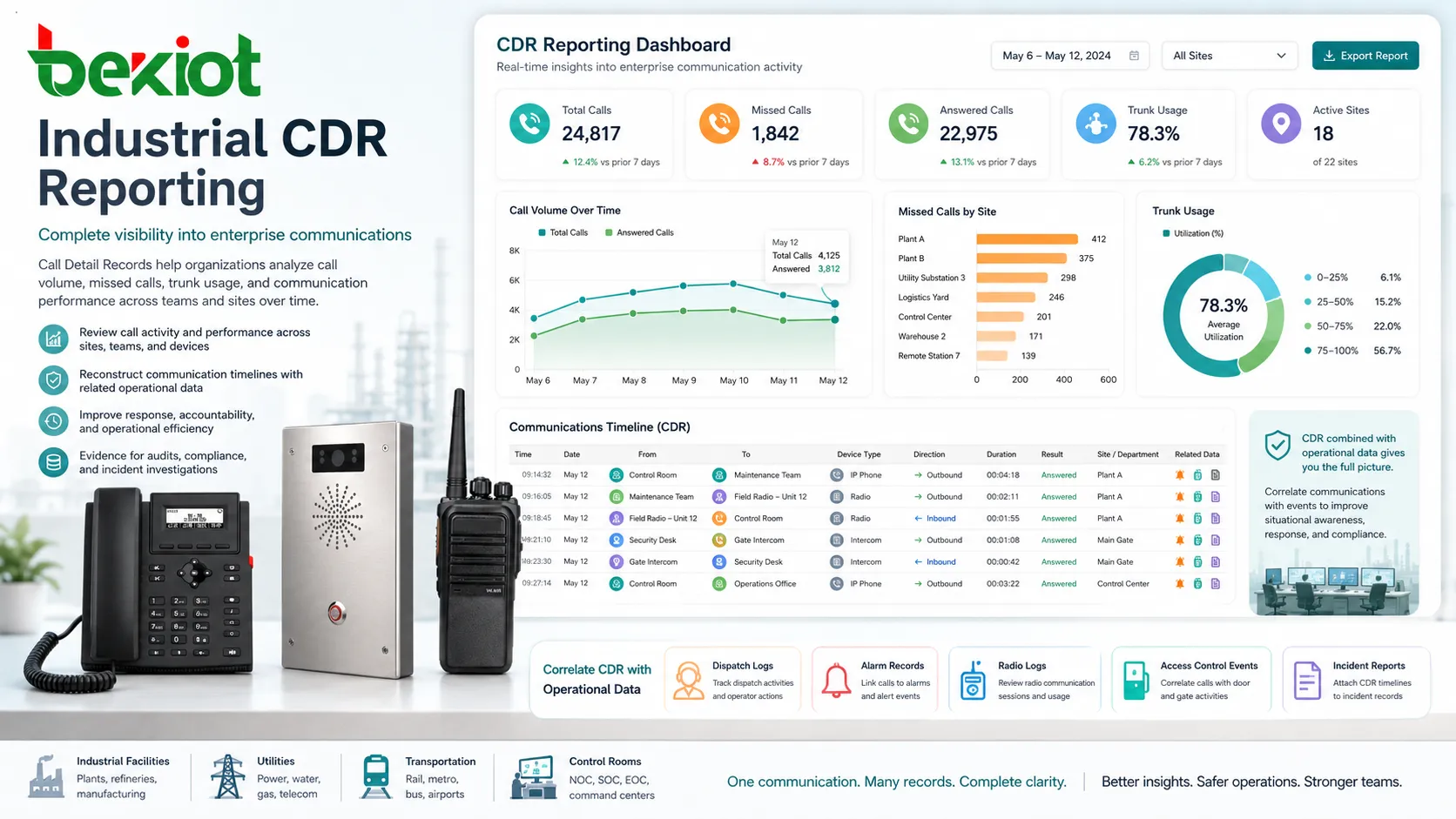
Industrial facilities, utilities, transportation systems, and control rooms often require reliable communication between operations teams, maintenance staff, security desks, and field personnel. CDR can support operational review by showing call activity between key communication points.
In these environments, CDR may be used alongside dispatch logs, alarm records, radio communication logs, access control events, and incident reports to reconstruct communication timelines.
CDR for Troubleshooting Call Problems
CDR is often one of the first places to check when call problems occur. If a user says an outbound call failed, the CDR may show whether the call was dialed, which route was selected, whether the carrier rejected it, and what disconnect reason was returned.
If customers report that nobody answered their calls, CDR can show whether calls reached the correct queue, rang for too long, went to voicemail, were abandoned, or failed before reaching the phone system. This helps separate technical faults from staffing or process issues.
CDR can also support recurring problem analysis. If failed calls are concentrated on one trunk, one site, one number range, or one time period, administrators can investigate the responsible system component more efficiently.
CDR and Call Billing
One of the traditional uses of CDR is billing. Carriers, hotels, managed service providers, and enterprises may use CDR to calculate call charges, allocate costs, or track usage by department, tenant, customer, or account code.
In enterprise environments, billing may not always mean charging users directly. It may involve internal cost allocation, telecom expense review, project billing, or service usage reporting. CDR provides the raw data needed for these calculations.
For billing accuracy, the system must handle time zones, rate plans, call rounding, trunk selection, call direction, international prefixes, and special number categories correctly. Poor configuration can lead to inaccurate cost reports.
Limitations of CDR
CDR is powerful, but it does not show everything. It usually does not include the actual conversation content unless linked to a separate call recording system. It may show that a call was answered, but not whether the customer’s issue was solved.
CDR accuracy also depends on system configuration. Incorrect time settings, incomplete routing records, missing trunk identifiers, or inconsistent user naming can reduce reporting value. In complex call flows, multiple call legs may need to be interpreted carefully.
Another limitation is privacy. CDR can reveal communication behavior even without audio content. Organizations should handle it as sensitive operational data and avoid giving unnecessary access to users who do not need it.
CDR is most valuable when it is combined with clear call routing design, accurate user data, secure access control, and regular reporting practices.
Best Practices for Managing CDR
Enterprises should define what CDR data is collected, how long it is retained, who can access it, and how reports are used. These rules should match the organization’s operational, financial, technical, and compliance needs.
Administrators should also keep extension names, department structures, trunk labels, site codes, and route names consistent. Clean naming improves report readability and reduces confusion during troubleshooting.
Regular review is important. CDR reports should not only be checked after a problem occurs. Monthly or weekly analysis can reveal missed-call trends, overloaded teams, unusual outbound usage, or trunk capacity issues before they become serious.
How to Choose a CDR Reporting Solution
When choosing a CDR reporting solution, organizations should consider compatibility with their PBX, VoIP platform, SIP trunks, gateways, and databases. The solution should support the required export formats, search filters, user permissions, and reporting templates.
Ease of use is also important. A technically powerful CDR system may still fail if managers cannot understand the reports. Dashboards should present key metrics clearly, while advanced tools should remain available for administrators and engineers.
For larger enterprises, integration capability matters. CDR data may need to connect with CRM, ERP, billing, helpdesk, BI, compliance archive, or monitoring platforms. A flexible reporting system can make communication data more useful across the organization.
FAQ
Does a CDR include the voice recording of a call?
No. A CDR usually contains call metadata, not the audio content. It may include a reference to a recording file if the phone system is integrated with a call recording platform, but the CDR itself is not the recording.
Why can one call create more than one CDR entry?
A single user experience may involve multiple call legs, such as an inbound trunk leg, an internal extension leg, a transfer leg, and a voicemail leg. Some systems record each leg separately to show the full call path.
Can CDR help prove that a customer called?
CDR can usually show whether a call attempt reached the system, what time it occurred, which number was involved, and how the call ended. However, it should be interpreted together with system logs, carrier records, and call recordings when stronger evidence is needed.
How often should enterprises review CDR reports?
High-volume teams such as contact centers may review CDR data daily. General office environments may review it weekly or monthly. The review frequency should match call volume, service requirements, and the importance of phone communication to the organization.
Is CDR data sensitive?
Yes. Even without voice content, CDR can reveal customer numbers, employee calling patterns, supplier relationships, and business activity. Access should be controlled, and retention should follow internal security and privacy policies.







