


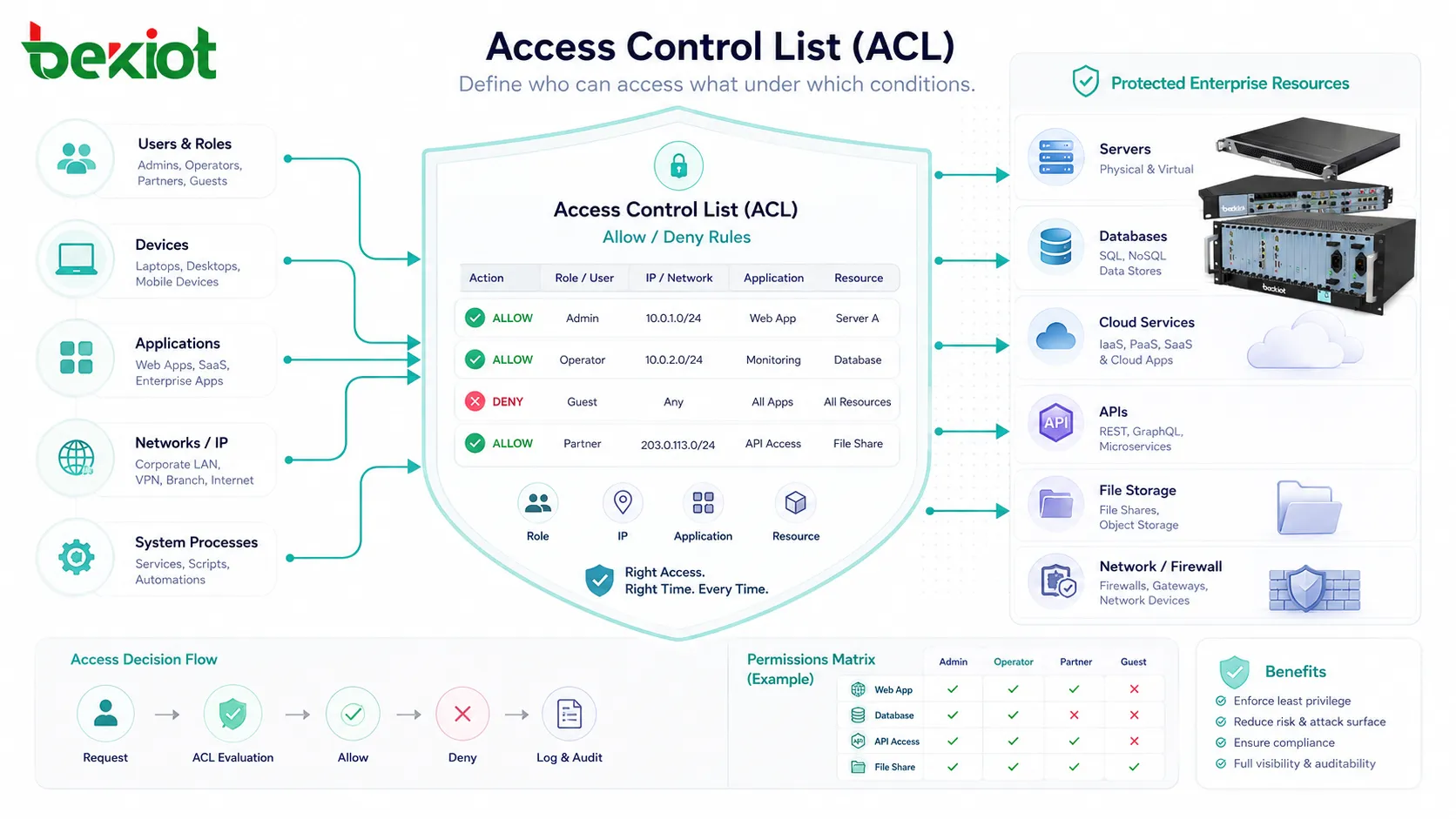
An Access Control List, commonly known as an ACL, is a set of rules that defines which users, devices, applications, IP addresses, network segments, or system processes are allowed or denied access to specific resources. These resources may include files, folders, databases, routers, firewalls, switches, servers, cloud services, APIs, applications, or enterprise networks.
In simple terms, an ACL answers an important security question: who can access what, and under which conditions? It is widely used in operating systems, network infrastructure, cybersecurity platforms, cloud environments, storage systems, and enterprise applications to enforce access control and reduce unauthorized activity.
What an Access Control List Means
An Access Control List is a rule-based permission structure. Each rule usually identifies a subject, an object, and an action. The subject may be a user, group, IP address, device, service account, or network interface. The object is the resource being protected. The action defines what the subject is allowed or denied to do.
For example, a file system ACL may allow a manager to read and edit a document while allowing another employee to only read it. A network ACL may permit traffic from one subnet to a server but deny traffic from unknown external addresses. A cloud ACL may allow a specific application to access a storage bucket while blocking public access.
Although ACLs are implemented differently across systems, the core idea remains the same. They provide a structured way to control access based on predefined rules instead of leaving resources open to everyone.
How Access Control Lists Work
Rule Matching
ACLs work by checking access requests against a list of rules. When a user, device, packet, or process tries to access a resource, the system compares the request with the ACL entries. If the request matches a rule, the system applies the action defined by that rule.
In many systems, rule order matters. The system may process ACL entries from top to bottom and stop when it finds the first matching rule. This means that a poorly ordered ACL can accidentally allow or block traffic or users in ways the administrator did not intend.
Allow and Deny Decisions
Most ACLs use allow and deny logic. An allow rule grants access to a resource or permits a type of traffic. A deny rule blocks access or rejects a request. In security design, deny rules are often used to stop unauthorized access, while allow rules define trusted users, systems, or network paths.
Many ACL systems also follow a default-deny principle. This means that if no rule explicitly allows access, the request is denied. This approach is generally safer because it avoids accidental exposure caused by missing rules.
Identity and Resource Evaluation
Before an ACL can make a decision, the system must understand who or what is requesting access. In user-based systems, this may depend on login credentials, user accounts, groups, roles, or directory services. In network systems, it may depend on source IP address, destination IP address, port number, protocol, VLAN, or interface.
The system then evaluates the requested resource and action. For example, one user may be allowed to read a file but not delete it. One subnet may be allowed to reach a web server on HTTPS but not access database ports. These fine-grained decisions make ACLs useful for both security and operational control.
Common Types of Access Control Lists
File System ACLs
File system ACLs control access to files, folders, and storage locations. They are commonly used in operating systems and shared file servers. A file system ACL may define who can read, write, modify, execute, delete, or take ownership of a file.
This type of ACL is important for protecting sensitive documents, financial records, engineering files, HR data, legal files, and shared project folders. It allows organizations to separate access by department, role, project, or responsibility.
Network ACLs
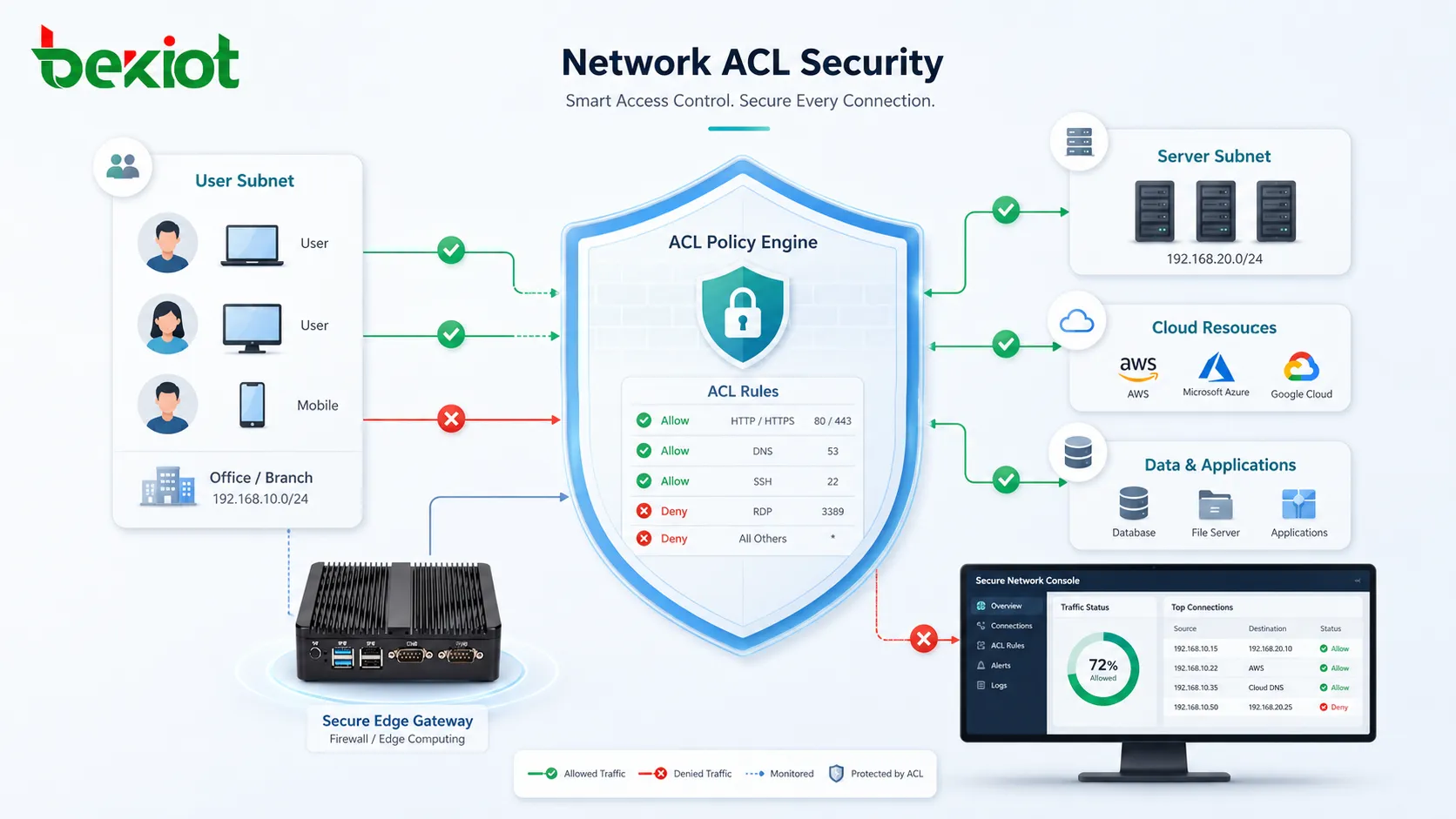
Network ACLs control traffic between network segments, interfaces, hosts, or services. They are commonly configured on routers, switches, firewalls, cloud networks, and security gateways. A network ACL may permit or deny packets based on source address, destination address, protocol, port, and direction.
For example, an administrator may allow internal users to access a web server but block direct access to the database server. Another ACL may allow management traffic only from a trusted administrator subnet.
Application ACLs
Application ACLs control what users or roles can do inside software platforms. They may define access to dashboards, records, reports, workflows, configuration pages, customer data, or administrative functions.
Application ACLs are useful in CRM systems, ERP systems, ticketing platforms, document management systems, collaboration tools, and business portals. They help ensure that users only access functions and data relevant to their job.
Cloud ACLs
Cloud ACLs control access to cloud resources such as storage buckets, virtual networks, databases, serverless functions, APIs, and management interfaces. They may be used alongside identity and access management policies, security groups, resource policies, and service roles.
Because cloud resources are often internet-accessible by design, cloud ACLs must be configured carefully. Misconfigured ACLs can expose sensitive data, APIs, backups, or administrative interfaces to unauthorized users.
Key Components of an ACL
A typical ACL includes several important elements. The subject identifies the user, group, device, service, or network source requesting access. The resource identifies what is being protected. The permission defines the action allowed or denied. The condition may define extra rules, such as location, time, protocol, or authentication status.
In network ACLs, entries often include source IP address, destination IP address, subnet mask, port number, protocol, and action. In file systems, entries may include user account, group name, read permission, write permission, execute permission, inheritance behavior, and ownership settings.
Administrators should document these components clearly. Without documentation, ACLs can become difficult to understand, especially in large systems where rules are added over time by different teams.
An ACL is only effective when its rules are clear, current, and aligned with the real access needs of the organization.
Benefits of Access Control Lists
Improved Security
ACLs reduce unauthorized access by allowing organizations to define exactly who can reach specific resources. Instead of relying on broad access, administrators can apply controlled permissions based on business need, network design, or system role.
This helps reduce the attack surface. If an account is compromised or a device is exposed, properly configured ACLs can limit what the attacker can reach.
Granular Permission Control
ACLs support fine-grained access decisions. One user may be allowed to view a report but not edit it. One server may be allowed to connect to an API but not access an internal database. One network segment may be allowed to send monitoring traffic while other traffic is blocked.
This level of control is important for enterprises that need to separate departments, applications, tenants, production systems, management systems, and sensitive data.
Better Network Segmentation
Network ACLs help enforce segmentation between users, servers, departments, guest networks, industrial systems, cloud workloads, and management zones. Segmentation reduces unnecessary communication and limits the movement of threats across the network.
For example, an organization may use ACLs to prevent guest Wi-Fi users from accessing internal file servers, or to restrict database access only to approved application servers.
Operational Accountability
ACLs make access rules visible and manageable. When combined with logs, audits, and change management, they help administrators understand why access was allowed or denied. This improves troubleshooting and supports internal accountability.
If a user cannot access a resource, the ACL can be reviewed to confirm whether the denial is intentional, outdated, or caused by a configuration error.
Compliance Support
Many security and privacy frameworks require organizations to restrict access to sensitive systems and data. ACLs help support these requirements by enforcing least privilege, separating duties, and documenting access decisions.
Although ACLs alone do not guarantee compliance, they are an important technical control for protecting confidential data, regulated systems, and business-critical infrastructure.
Applications of Access Control Lists
Enterprise Network Security
In enterprise networks, ACLs are commonly used to control access between departments, branch offices, data centers, internet gateways, VPN users, and cloud environments. They help enforce security boundaries and reduce unnecessary exposure.
For example, an ACL may allow employees to access an internal web portal while blocking direct access to backend database systems. Another ACL may allow IT administrators to manage network devices only from a secure management subnet.
Server and File Protection
ACLs protect files, folders, shared drives, backup locations, and server directories. They help ensure that only authorized users can access confidential documents, application files, configuration files, or system logs.
This is especially important in organizations where multiple teams share the same infrastructure. Proper ACL design prevents accidental changes, data leakage, and unauthorized file deletion.
Cloud Resource Control
Cloud platforms use ACLs and related access policies to control who can access storage, compute resources, virtual networks, databases, APIs, and administrative consoles. Cloud ACLs are important for preventing public exposure and controlling service-to-service communication.
For example, a storage bucket may be accessible only to a specific application role, while public anonymous access is denied. A virtual network ACL may allow application traffic from one subnet but block all other inbound connections.
Application and Database Access
Business applications use ACLs to control access to records, functions, and administrative actions. A sales user may access customer accounts assigned to their region, while a finance user may access billing data but not system configuration pages.
Databases may also use ACL-like permission models to define which users or services can read, write, update, delete, or manage database objects. This helps protect sensitive data and reduce unauthorized changes.
Industrial and Operational Technology Networks
In industrial environments, ACLs can help separate control systems, monitoring systems, engineering workstations, operator terminals, and corporate IT networks. This segmentation is important because operational technology systems often require strict availability and controlled communication paths.
ACLs may be used to allow only approved protocols between specific systems, block unnecessary internet access, and restrict remote maintenance connections to authorized sources.
ACLs and the Principle of Least Privilege
The principle of least privilege means that users, devices, and applications should only receive the access they need to perform their required tasks. ACLs are one of the practical tools used to apply this principle.
Instead of giving broad permissions to everyone, administrators can create targeted rules. A finance team may access accounting folders but not engineering repositories. A web server may access an application database but not administrative systems. A contractor may access a limited project workspace for a defined period.
This approach reduces risk because unnecessary access is removed. If something goes wrong, the impact is more contained.
ACLs Compared with Role-Based Access Control
ACLs and role-based access control are closely related but not identical. ACLs usually focus on permission rules attached to specific resources or network paths. Role-based access control focuses on assigning permissions to roles, then assigning users to those roles.
For example, an ACL may say that user A can read file X and user B can modify file X. A role-based model may say that members of the “Finance Manager” role can approve invoices. Many enterprise systems use both methods together.
ACLs are useful for precise resource-level control, while role-based access control is often easier to manage at scale when many users share the same job responsibilities.
Common Challenges of ACL Management
Rule Complexity
As systems grow, ACLs can become long and difficult to manage. Rules may overlap, conflict, or become outdated. Without a clear structure, administrators may struggle to understand which rule is responsible for a specific access decision.
Complex ACLs also increase the chance of mistakes. A single rule placed in the wrong order may block legitimate users or expose sensitive resources.
Overly Broad Permissions
To save time, some teams create broad allow rules. While this may solve short-term access problems, it weakens security. Broad rules can give users or systems more access than they actually need.
Over time, these permissions may remain in place even after projects end, users change roles, or systems are retired. Regular review is necessary to remove unnecessary access.
Incomplete Documentation
ACLs are often created during troubleshooting, deployment, or urgent operations. If changes are not documented, future administrators may not know why a rule exists. This makes cleanup risky because removing a rule might break a hidden dependency.
Clear naming, comments, change records, and ownership information help keep ACLs maintainable.
Performance and Processing Impact
In some network and security devices, very large or inefficient ACLs may affect processing performance. This depends on the device architecture, traffic volume, rule design, and hardware capabilities.
Administrators should design ACLs efficiently and avoid unnecessary duplicate rules. Periodic cleanup can improve both clarity and performance.
Best Practices for Using ACLs
Organizations should start with a clear access policy before creating rules. Administrators should know which users, systems, networks, and applications need access, and which should be blocked. Rules should be based on business requirements, not temporary convenience.
ACLs should follow least privilege. Access should be allowed only when necessary, and unnecessary permissions should be removed. Sensitive systems should use default-deny logic whenever possible, with explicit allow rules for trusted access paths.
Rule order should be reviewed carefully. More specific rules are often placed before broader rules, depending on the platform. Administrators should test ACL changes before applying them to production systems, especially when they affect critical applications or network traffic.
Regular audits are also important. ACLs should be reviewed after staff changes, application migrations, cloud deployments, network redesigns, security incidents, and compliance assessments. Outdated rules should be removed or updated.
How to Choose an ACL Strategy
The right ACL strategy depends on the environment. A small office may need simple file and firewall ACLs, while a large enterprise may need structured access control across identity systems, cloud platforms, network devices, applications, and databases.
For network environments, administrators should consider segmentation, traffic flow, management access, remote access, and logging requirements. For file and application environments, they should consider user roles, data sensitivity, workflow needs, and audit requirements.
In cloud and hybrid environments, ACLs should be designed together with identity policies, security groups, resource policies, encryption controls, and monitoring tools. This helps prevent gaps between traditional infrastructure and cloud-based resources.
FAQ
Is an ACL the same as a firewall rule?
Not exactly. A firewall rule is one common form of network access control, but ACLs are broader. ACLs can also control file permissions, application functions, cloud resources, database access, and system processes.
Can ACLs block cyberattacks?
ACLs can reduce exposure and block unauthorized access paths, but they are not a complete security solution by themselves. They should be combined with authentication, monitoring, encryption, patching, intrusion detection, logging, and incident response.
What is an implicit deny in ACLs?
An implicit deny means that if a request does not match any allow rule, it is denied automatically. This is a common security approach because it prevents access unless permission is clearly granted.
Why do ACL rules need regular review?
Business systems, users, devices, and applications change over time. Without regular review, ACLs may contain outdated permissions, unused rules, duplicate entries, or excessive access that increases security risk.
What is the biggest mistake in ACL configuration?
One of the biggest mistakes is creating rules that are too broad, such as allowing large networks, all users, or unnecessary ports without a clear reason. Broad rules may solve access problems quickly, but they can create long-term security exposure.







