


Automatic Gain Control, commonly known as AGC, is an audio processing function that automatically adjusts the gain of an audio signal to keep volume levels within a usable range. In voice communication, AGC helps make quiet speech louder and overly loud signals more controlled, so listeners receive a more consistent audio experience.
AGC is widely used in VoIP systems, IP phones, intercoms, headsets, microphones, dispatch consoles, conference systems, mobile devices, radio communication, call recording platforms, public address systems, video conferencing tools, and speech recognition applications. Its main purpose is not to make every sound equally loud, but to keep speech at a comfortable and intelligible level when input volume changes.
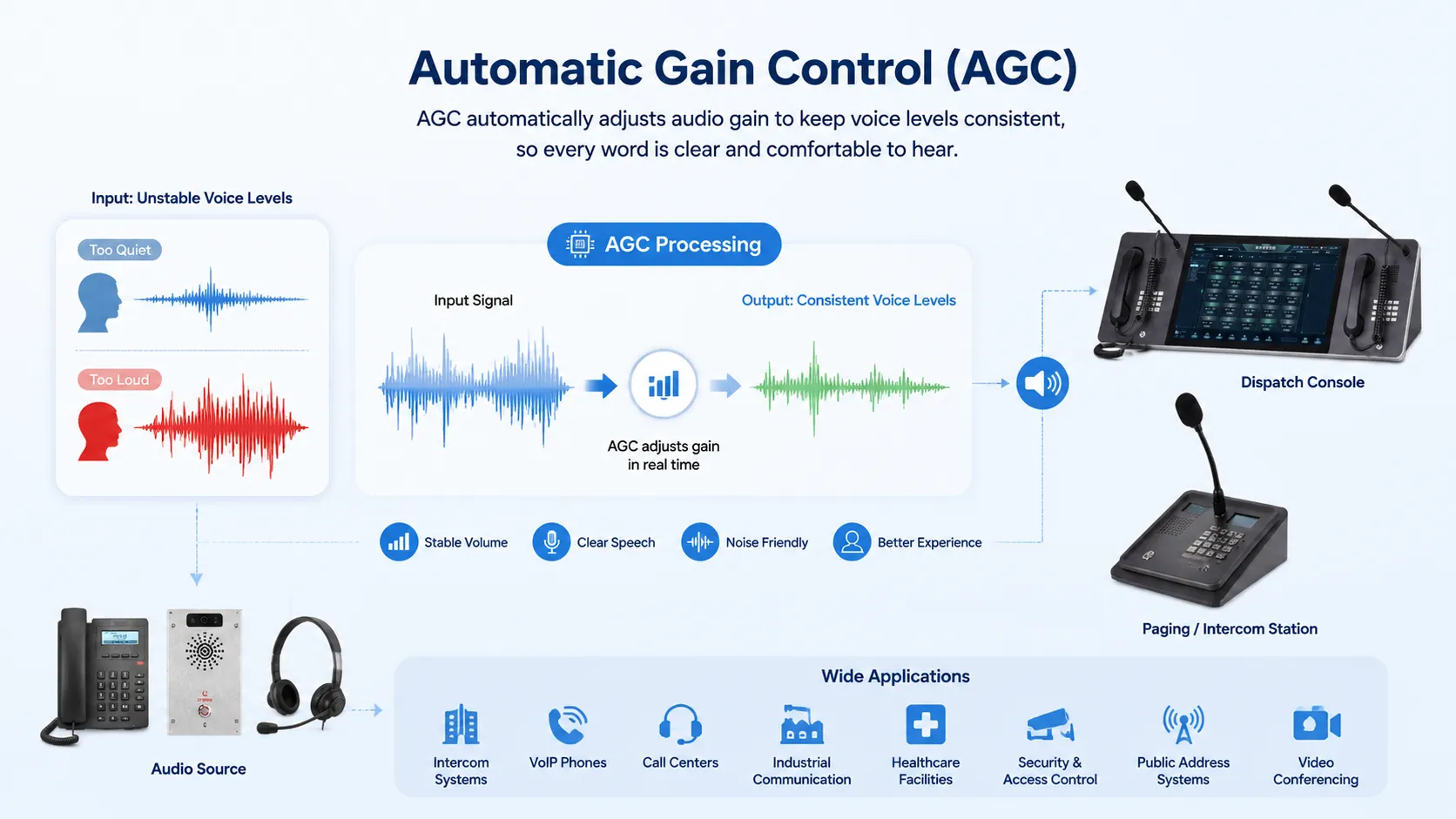
Understanding AGC in Simple Terms
In real communication, people rarely speak at exactly the same volume. One person may speak softly, another may speak loudly, and a user may move closer to or farther away from the microphone during a call. Without gain control, the far-end listener may hear sudden volume changes, weak speech, or distorted loud sounds.
AGC solves this problem by monitoring the incoming audio level and adjusting amplification automatically. When the voice level is too low, AGC increases gain. When the signal becomes too strong, AGC reduces gain to avoid discomfort or distortion.
This makes AGC especially useful in hands-free calling, shared conference rooms, noisy workplaces, mobile communication, and environments where microphone distance is unpredictable.
The Role of AGC in Audio Communication
Keeping Speech at a Comfortable Level
The most direct role of AGC is volume stabilization. It helps prevent conversations from becoming too quiet to understand or too loud to tolerate. This improves comfort for users who need to listen for long periods, such as call center agents, dispatchers, operators, and remote meeting participants.
Stable volume is also important when multiple speakers join the same communication session. AGC can reduce the difference between a loud speaker near the microphone and a quiet speaker farther away.
Supporting Speech Intelligibility
Speech intelligibility depends on more than volume, but volume is a key part of the listening experience. If speech is too quiet, listeners may miss consonants, numbers, names, or instructions. If it is too loud, distortion may make words harder to recognize.
AGC helps keep the voice signal in a range where speech details remain easier to hear. This is useful in business calls, emergency communication, industrial coordination, healthcare communication, online meetings, and recorded conversations.
Protecting Audio from Overload
When microphone input becomes too strong, the audio system may overload and create clipping. Clipping cuts off part of the waveform and makes speech sound harsh, broken, or distorted. Once clipping occurs, the lost detail cannot be fully restored by later processing.
AGC can help reduce overload risk by lowering gain when the signal approaches an excessive level. However, AGC must be tuned properly, because very sudden loud sounds may still exceed the system’s safe range before gain adjustment reacts.
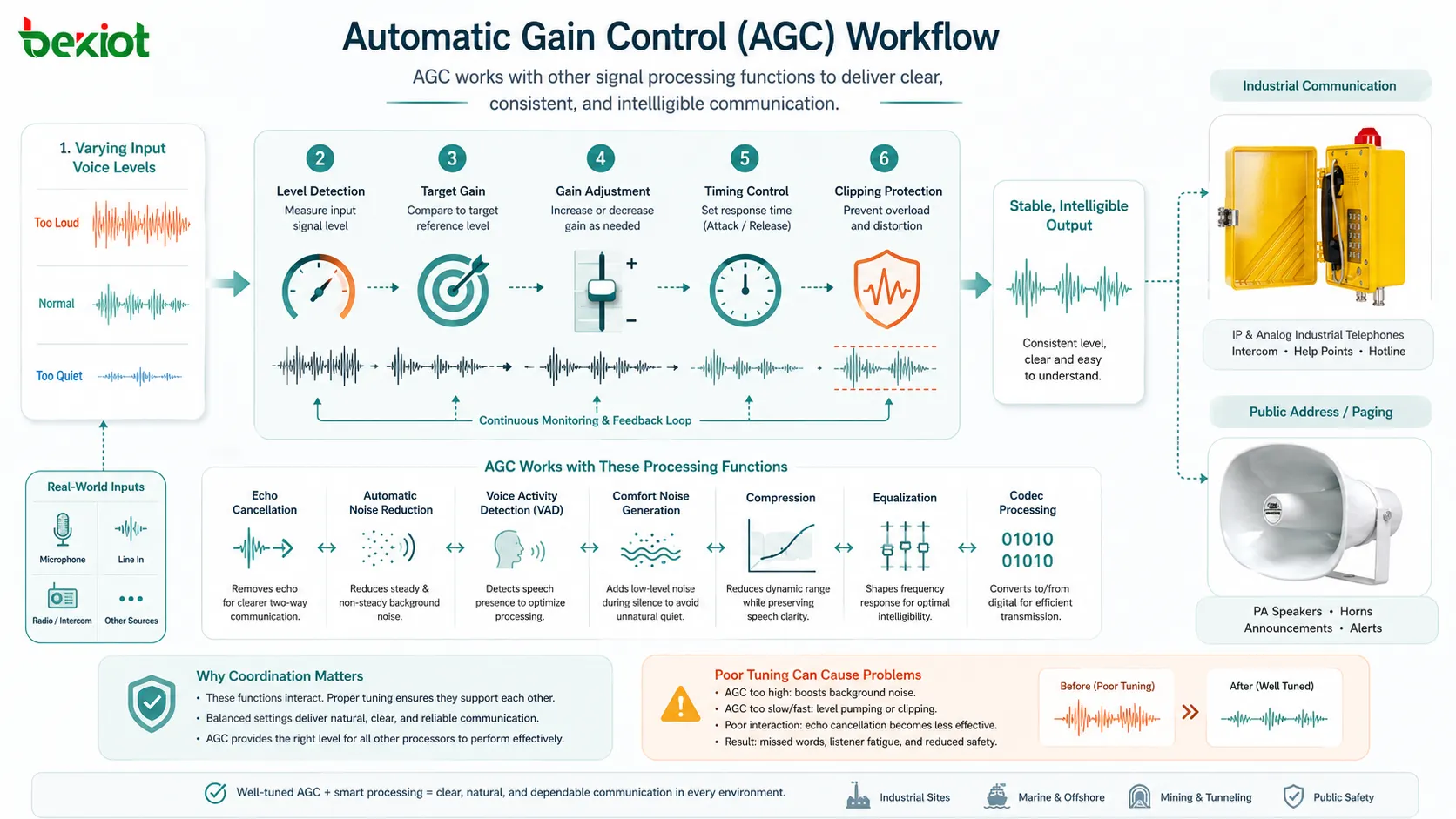
How Automatic Gain Control Works
Level Detection
AGC begins by measuring the audio signal level. The system may analyze peak level, average level, root mean square level, or other indicators of signal strength. The goal is to estimate whether the incoming audio is too quiet, too loud, or close to the target range.
For voice communication, level detection must be responsive but not unstable. If the system reacts too quickly to every small sound, the audio may pump up and down unnaturally. If it reacts too slowly, quiet speech may remain hard to hear for too long.
Target Level Control
Most AGC systems use a target level. This target represents the desired output range for comfortable listening or recording. When the detected level is lower than the target, gain is increased. When the detected level is higher than the target, gain is reduced.
The target level should match the application. A conference system, public address system, call recording platform, and speech recognition system may all require different gain behavior.
Attack and Release Timing
Attack time controls how quickly AGC reduces gain when the signal becomes too loud. Release time controls how quickly AGC raises gain again after the signal becomes quieter. These timing settings strongly affect how natural the audio sounds.
If attack is too slow, loud speech may distort before the system reacts. If attack is too fast, speech may sound compressed or unstable. If release is too fast, background noise may rise during pauses. If release is too slow, soft speech after a loud sound may remain too quiet.
Gain Range Limits
AGC usually includes maximum and minimum gain limits. These limits prevent the system from amplifying weak signals too much or reducing loud signals excessively. Gain limits are important because not every quiet signal should be boosted.
For example, if nobody is speaking, raising gain too much may amplify background noise, fan sound, electrical hum, or room echo. A well-designed AGC system should avoid making silence or noise louder than necessary.
Good AGC should feel almost invisible: users notice that speech is easier to hear, but they do not notice the gain control constantly working.
Key Technical Features
Adaptive Gain Adjustment
Adaptive gain adjustment allows AGC to respond to changing audio conditions. This is useful when a speaker moves around, changes speaking volume, switches between handset and speakerphone mode, or joins a call from a different acoustic environment.
Adaptive behavior is especially valuable for hands-free endpoints and mobile communication. These scenarios often involve changing microphone distance and background conditions.
Noise-Aware Processing
Modern AGC may include logic that avoids boosting background noise during silence. This is important because a simple gain system might increase volume whenever the signal is low, even if the low signal is only room noise.
Noise-aware AGC can work with voice activity detection, noise reduction, and echo cancellation to make better gain decisions. The system should increase speech clarity without making unwanted background sound more obvious.
Dynamic Range Management
Dynamic range refers to the difference between quiet and loud parts of an audio signal. AGC reduces extreme differences so that the output remains easier to listen to. This is useful for recordings, conference calls, dispatch audio, and multi-speaker conversations.
However, too much dynamic range control may make speech sound flat or unnatural. The goal is controlled consistency, not lifeless audio.
Clipping Prevention
Many AGC systems include overload protection to reduce the chance of clipping. This may involve gain reduction, limiting, or coordination with other audio processing functions. Clipping prevention is important because distorted audio can reduce intelligibility and make recordings less useful.
In safety-related or professional communication, clipping can be more than an audio quality problem. It may cause important words, instructions, or alarm details to become unclear.
Integration with Other Audio Functions
AGC often works together with echo cancellation, automatic noise reduction, voice activity detection, comfort noise generation, compression, equalization, and codec processing. These functions must be coordinated carefully.
If AGC raises gain aggressively, it may make echo cancellation harder. If noise reduction removes too much background sound, AGC may respond differently. If voice activity detection is inaccurate, AGC may boost noise during pauses. Proper tuning matters more than simply enabling every feature.
Where AGC Makes the Biggest Difference
AGC is most valuable in environments where input volume changes frequently. This may happen because users move around, microphones are shared, background noise changes, or different speakers have different voice levels. In these cases, fixed gain settings may not be enough.
For example, a speakerphone in a meeting room must capture voices from different distances. A dispatch console may receive audio from many field users. A call recording system may store calls from different devices and networks. AGC helps these systems maintain a more usable audio level.
| Scenario | AGC Challenge | Expected Result |
|---|---|---|
| Conference Room | Speakers sit at different distances from the microphone. | More balanced voice volume across participants. |
| Contact Center | Agents and callers use different devices and speaking levels. | More consistent listening and recording quality. |
| Industrial Communication | Users may speak from noisy or variable acoustic conditions. | Clearer voice level for control rooms and operators. |
| Mobile Calling | Microphone distance and surrounding noise change during movement. | Reduced volume swings during real-time calls. |
| Speech Recognition | Input level inconsistency affects recognition accuracy. | More stable audio input for recognition engines. |
Benefits of Automatic Gain Control
More Consistent Listening Experience
AGC helps reduce sudden changes in voice volume. Listeners do not need to adjust speaker volume repeatedly when one caller speaks loudly and another speaks softly. This improves comfort in daily communication.
For long calls, conferences, and dispatch sessions, consistent volume can reduce fatigue and make the audio easier to follow.
Better Recording Quality
Call recording, meeting recording, compliance recording, and training recordings benefit from controlled audio levels. If recorded speech is too quiet, it may be difficult to review later. If it is too loud and clipped, important details may be lost.
AGC helps recordings remain more usable by keeping voice levels within a practical range. This is valuable for customer service, legal review, quality monitoring, and incident analysis.
Improved Hands-Free Communication
Hands-free communication is challenging because users may not stay close to the microphone. AGC can help compensate for distance changes by increasing gain when a speaker moves away and reducing gain when the speaker moves closer.
This is useful for speakerphones, intercoms, meeting devices, control room terminals, and operator stations.
Reduced Manual Adjustment
Without AGC, users or technicians may need to adjust microphone gain or speaker volume manually. This can be inconvenient and inconsistent, especially when devices are used by different people or installed across many locations.
AGC reduces the need for constant manual adjustment, making audio systems easier to use and maintain.
Supports Multi-Device Environments
Modern communication systems often include desk phones, softphones, mobile clients, headsets, gateways, intercoms, radios, and conferencing endpoints. These devices may produce different audio levels.
AGC can help smooth some of these differences, although it should not replace proper endpoint calibration and audio testing.
Applications of AGC
VoIP and IP Telephony
In VoIP systems, AGC helps maintain stable voice levels across IP phones, softphones, SIP trunks, gateways, and remote users. It can improve the experience when callers use different devices or speak at different distances from the microphone.
AGC may be implemented in endpoints, media servers, communication clients, or gateways. Administrators should test where AGC is applied because multiple layers of gain control can sometimes create unnatural audio.
Video Conferencing
Video meetings often include participants using built-in laptop microphones, external headsets, conference microphones, mobile devices, and room systems. These input sources can vary widely in volume.
AGC helps make voices more consistent so participants do not need to constantly change volume settings. It is especially useful in hybrid meetings where both room participants and remote users speak in the same session.
Contact Centers
Contact centers need clear and consistent audio for live conversations, call recording, quality monitoring, and speech analytics. AGC can help normalize audio from different callers, headsets, agents, and network paths.
However, contact centers should tune AGC carefully. If processing is too aggressive, it may affect recordings or make speech analytics less accurate.
Public Address and Intercom Systems
In public address and intercom systems, AGC can help keep announcements at a stable level even when users speak with different intensity. This improves message clarity in buildings, campuses, transport facilities, and industrial sites.
For public address applications, AGC should be combined with proper microphone discipline and speaker system design. It cannot fully correct poor microphone technique or badly positioned speakers.
Radio and Dispatch Communication
Radio and dispatch systems may receive audio from different handheld radios, vehicle radios, gateways, and operator microphones. AGC helps balance incoming signals so dispatchers do not hear large volume differences between users.
In operational communication, AGC must preserve short voice bursts, urgency, and important speech details. Over-processing may reduce natural voice cues that dispatchers rely on.
Speech Recognition and Voice AI
Automatic speech recognition systems work better when input levels are stable. If speech is too quiet, recognition may miss words. If it is clipped, the recognition engine may misinterpret sounds.
AGC can help prepare audio for voice assistants, transcription systems, IVR platforms, voice bots, meeting transcription, and command recognition. It should be tuned with the recognition engine in mind rather than only for human listening.
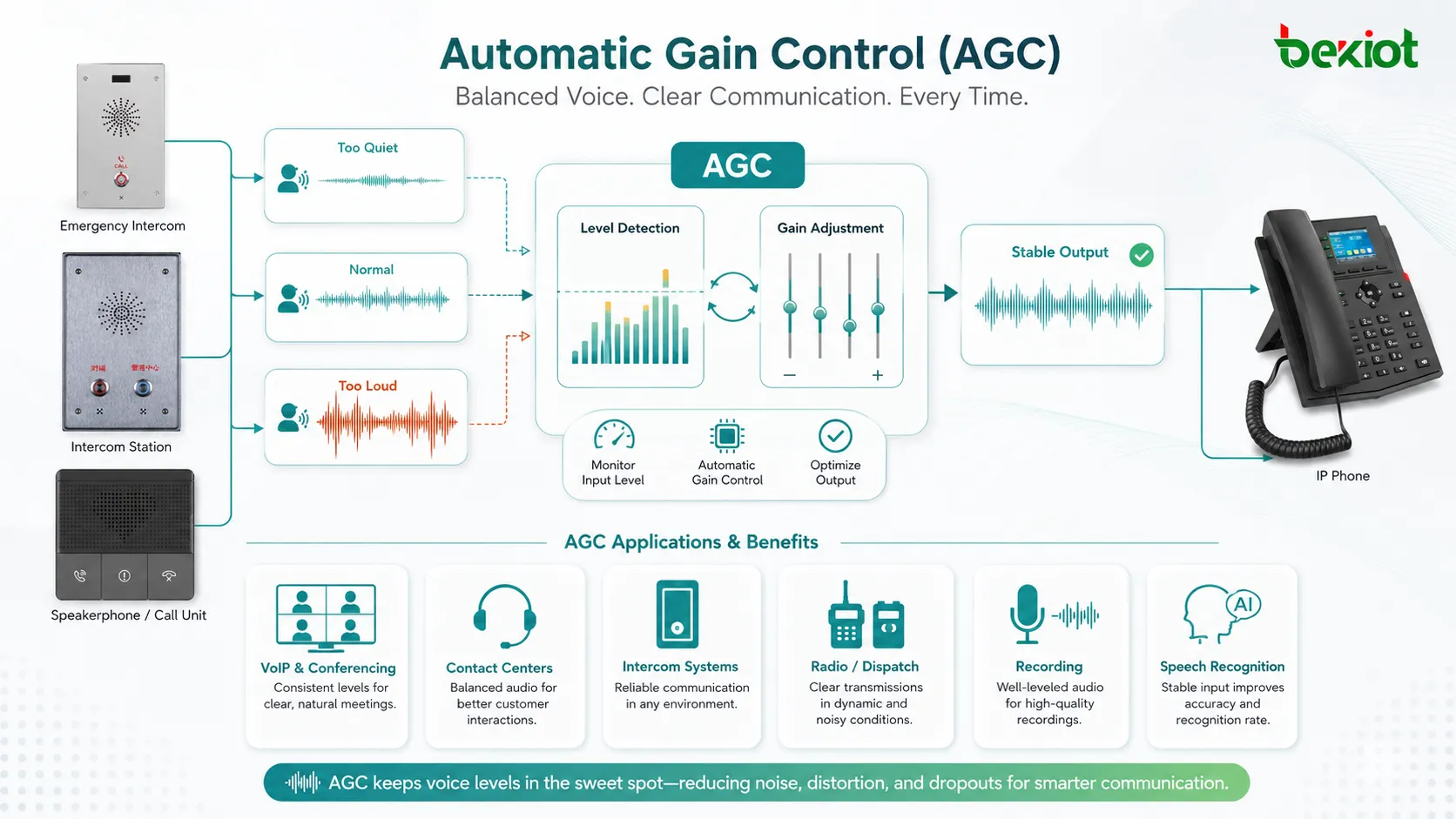
Common Problems with Poor AGC Tuning
Background Noise Becomes Louder
If AGC increases gain during pauses, background noise may become more noticeable. Users may hear room noise, fan sound, keyboard noise, or electrical hum rising when nobody is speaking.
This problem can be reduced by combining AGC with voice activity detection and noise-aware processing. The system should avoid treating background noise as speech that needs amplification.
Volume Pumping
Volume pumping happens when the audio level rises and falls in a noticeable way. This can make speech sound unstable and distracting. It often happens when attack and release settings are poorly tuned.
Smoother timing, better thresholds, and careful interaction with noise reduction can reduce pumping.
Speech Sounds Compressed
AGC that is too aggressive may make speech sound compressed, flat, or unnatural. The voice may remain understandable, but it may lose normal dynamics and emotional tone.
This is a common issue when systems prioritize loudness consistency too strongly. Professional communication requires both clarity and naturalness.
Clipped Words Still Occur
AGC cannot always prevent clipping if the input signal is already overloaded before processing. If microphone gain is set too high or the speaker is too close to the microphone, distortion may occur before AGC has a chance to react.
Proper input gain, microphone distance, and hardware design remain important.
Deployment and Maintenance Tips
Start with Correct Input Gain
AGC works best when the original input level is reasonable. If the microphone input is too weak, AGC may amplify noise. If the input is too strong, clipping may occur before processing.
During deployment, technicians should test normal speech, loud speech, soft speech, and real background conditions before relying on AGC settings.
Avoid Multiple Uncontrolled AGC Layers
Some audio paths may include AGC in the microphone, headset, softphone, operating system, communication platform, and recording system. If several AGC functions work at the same time, the result may be unstable.
Administrators should understand where gain control is applied and disable unnecessary duplicate processing when possible.
Test with Real Users
AGC should be tested with real user behavior, not only test tones. People speak at different speeds, volumes, and distances. They may turn their heads, move away from the microphone, or speak over background noise.
Real-world testing helps confirm whether AGC improves communication or creates artifacts.
Review Recordings and Live Audio
Live audio and recorded audio may behave differently. A call may sound acceptable during conversation but appear too compressed or noisy in recordings. Reviewing both helps identify tuning issues.
This is especially important for contact centers, compliance recording, incident review, and training systems.
AGC should support the communication goal. For some systems, that goal is natural conversation; for others, it is reliable recording, clear announcements, or stable input for speech recognition.
AGC Compared with Manual Gain Control
Manual gain control uses fixed settings chosen by a user or technician. It can work well when the speaker, microphone position, and environment remain consistent. However, manual settings may fail when the acoustic condition changes.
AGC adapts automatically, which makes it more suitable for variable environments. But automatic control also requires good tuning. A fixed manual setting may sound more natural in controlled studio conditions, while AGC may be better for practical communication environments where users move and speak differently.
The best choice depends on the use case. Professional recording may prefer careful manual gain. Enterprise communication, conferencing, and intercom systems often benefit from automatic adjustment.
How to Evaluate AGC Performance
Evaluation should include quiet speech, normal speech, loud speech, background noise, microphone distance changes, double-talk, and long pauses. The goal is to check whether the system keeps speech stable without boosting noise or creating pumping effects.
Administrators should also test different devices and call paths. AGC may perform differently on a desk phone, softphone, headset, conference terminal, SIP gateway, or recording platform.
User feedback is important. Technical measurements can show signal levels, but users can tell whether the audio feels comfortable, natural, and easy to understand.
Limitations of AGC
AGC cannot fix every audio problem. It cannot fully repair clipped audio, remove background noise, eliminate echo, correct poor microphone placement, or solve packet loss and jitter. It is one part of the audio processing chain, not a complete voice quality solution.
AGC can also create problems if it is poorly configured. It may amplify noise, flatten voice dynamics, react too slowly, or produce unnatural volume changes. For critical communication, AGC should be tested together with the full audio system.
A good voice system usually combines AGC with proper hardware, acoustic design, codec selection, echo cancellation, noise reduction, network quality management, and user training.
FAQ
Is AGC the same as volume control?
No. Volume control is usually adjusted manually by a user. AGC automatically changes gain based on the input signal level so that speech remains closer to a target range.
Can AGC make background noise louder?
Yes, if it is poorly tuned. When no one is speaking, AGC may raise gain and make background noise more noticeable. Noise-aware processing and proper thresholds can reduce this issue.
Should AGC be enabled on every device?
Not always. AGC is useful in variable environments, but controlled recording setups or professional audio systems may prefer fixed manual gain. The decision should be based on the application and testing results.
Why does AGC sometimes make audio sound unnatural?
Audio may sound unnatural when gain changes too quickly, compression is too strong, or multiple gain control systems are active at the same time. Poor interaction with noise reduction or echo cancellation can also affect sound quality.
What should be checked before adjusting AGC settings?
Check microphone placement, input gain, background noise, endpoint settings, codec behavior, echo cancellation, noise reduction, recording requirements, and whether another AGC function is already active in the audio path.







