


When Audio Needs to Leave One Device and Enter Another
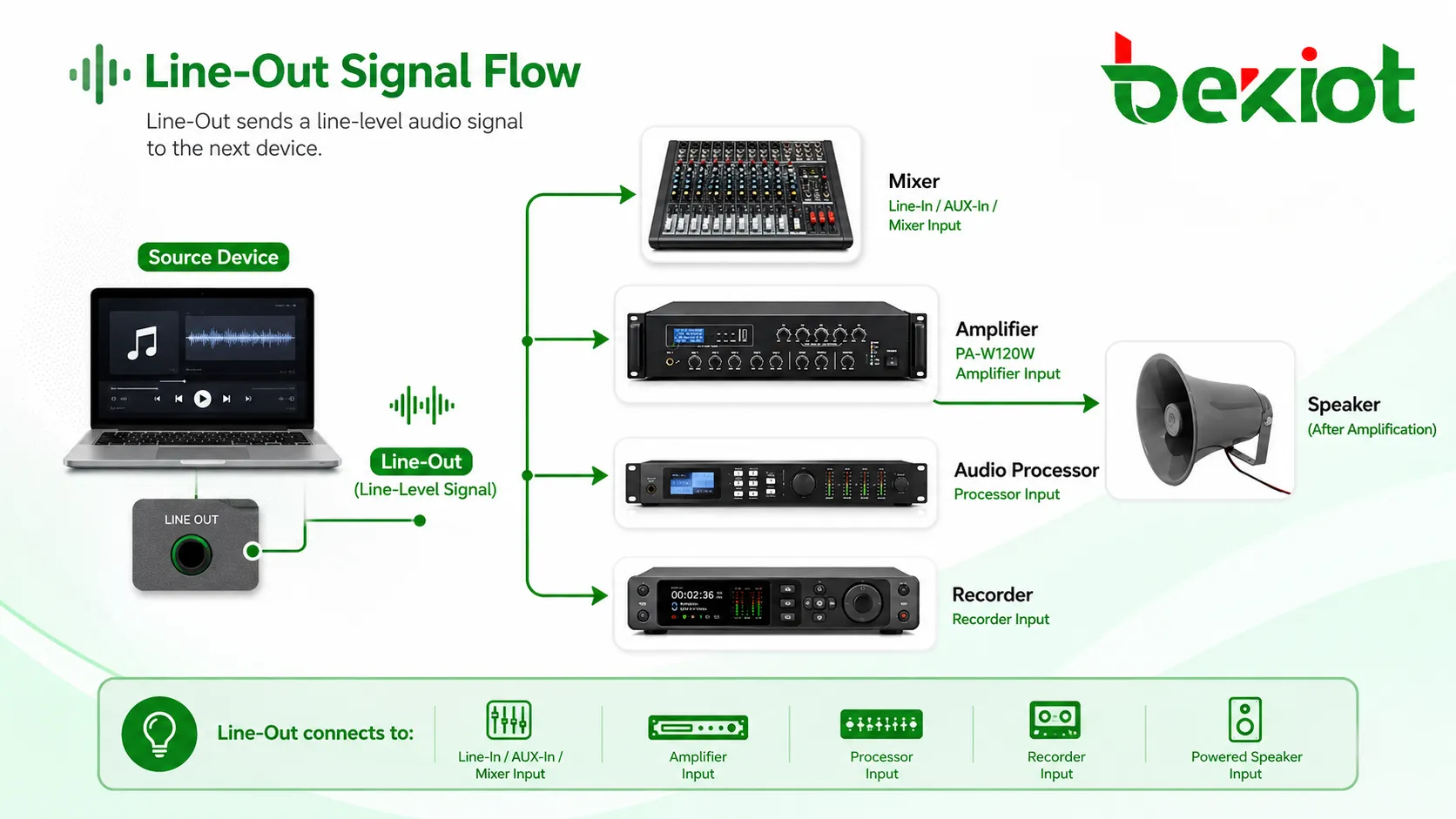
Audio Output, often labeled as Line-Out, is an audio connection that sends a line-level signal from one device to another. It is commonly found on computers, audio interfaces, mixers, media players, phones, PBX audio ports, broadcast devices, public address equipment, recorders, amplifiers, conference systems, and industrial audio terminals.
The main purpose of Line-Out is signal transfer. It does not directly power passive speakers like a speaker output does. Instead, it provides a clean audio signal that can be received by an amplifier, powered speaker, mixer, recorder, processor, or another audio input device.
Line-Out is the bridge between audio sources and audio systems. It carries the sound signal, while the receiving equipment amplifies, records, processes, or distributes it.
Basic Meaning of Audio Output Line-Out
Line-Out is an output interface designed to send audio at line level. Line level is stronger than a microphone-level signal but weaker than a speaker-level signal. This makes it suitable for connecting audio equipment without overloading the input or requiring excessive amplification.
For example, a computer’s Line-Out can send music to powered speakers. A mixer’s Line-Out can send a program signal to a recorder. A media player’s Line-Out can feed an amplifier. A public address controller’s Line-Out can send audio to a power amplifier or zone processor.
Line-Level Signal
A line-level signal is an audio signal designed for interconnection between audio devices. It is not intended to drive passive speakers directly. The signal contains the audio information, but it still needs an amplifier if the final output must be played through passive loudspeakers.
This distinction is important. If a Line-Out port is connected directly to a passive speaker, the sound may be extremely quiet or not work properly. If a speaker output is connected to a line input, the input may be overloaded or damaged.
Output, Not Input
Line-Out sends audio out of a device. Line-In receives audio into a device. These two ports may look similar, especially when both use 3.5mm, RCA, or terminal connectors, but their signal direction is different.
Using the wrong port is a common installation mistake. A source device should usually connect from Line-Out to the Line-In, AUX-In, mixer input, amplifier input, recorder input, or powered speaker input of the next device.
How Line-Out Works
Line-Out works by taking an internal audio signal from a device and sending it through an output circuit at a standard usable level. The receiving device accepts the signal through its line input, processes or amplifies it, and then passes it to the next stage.
The full audio chain may include a source, output stage, cable, input stage, processor, amplifier, and speaker. Line-Out is only one part of this chain, but it strongly affects signal clarity, noise level, compatibility, and system reliability.
Source Signal Generation
The source device first generates or plays audio. This may come from a digital file, microphone mix, radio source, communication system, media player, alarm message, streaming platform, or internal tone generator.
If the audio is digital, the device converts it into an analog signal through a digital-to-analog converter before sending it to the Line-Out port. If the audio is already analog, it may pass through a buffer or output stage before leaving the device.
Output Circuit
The output circuit prepares the signal for transmission. It controls output level, impedance, noise performance, grounding, and sometimes protection against short circuits or incorrect connection.
A well-designed Line-Out circuit should deliver a stable signal without excessive distortion, noise, or frequency loss. Poor output design can create weak sound, hum, hiss, distortion, or poor compatibility with downstream devices.
Receiving Device
The receiving device expects a line-level signal. This may be an amplifier, powered speaker, mixer, recorder, audio processor, paging system, conference processor, or broadcast input.
If the receiving input is too sensitive, the Line-Out signal may cause clipping. If it is not sensitive enough, the signal may be too quiet. Gain staging helps match the output level and input level properly.
Final Amplification
When audio must be heard through speakers, the line-level signal usually goes to an amplifier stage. The amplifier increases the signal power enough to drive loudspeakers.
Powered speakers include built-in amplifiers, so they can accept Line-Out directly. Passive speakers require a separate amplifier between the Line-Out source and the speaker.
Line-Out Compared with Other Audio Ports
Line-Out is often confused with headphone output, speaker output, microphone input, and auxiliary input. These connections may carry audio, but they are not the same.
| Port Type | Signal Role | Typical Use |
|---|---|---|
| Line-Out | Sends line-level audio signal | Connects source devices to amplifiers, mixers, powered speakers, or recorders |
| Line-In | Receives line-level audio signal | Accepts audio from players, mixers, processors, and other source devices |
| Headphone Out | Drives headphones or earphones | Personal listening, monitoring, mobile devices, laptops |
| Speaker Out | Sends amplified power signal | Connects amplifiers to passive loudspeakers |
| Mic Input | Receives low-level microphone signal | Microphones, headsets, voice capture, recording inputs |
| AUX Output | Often sends line-level auxiliary audio | Secondary feeds, external recorders, zone outputs, monitors |
Line-Out vs Headphone Output
A headphone output is designed to drive headphones. It usually has volume control and can deliver more current to a low-impedance load. A Line-Out is designed to feed another audio device at a more stable line level.
In some small devices, the headphone output may also be used as a practical audio output. However, it may not be ideal for professional systems because volume settings, impedance, noise, and distortion can affect the signal.
Line-Out vs Speaker Output
A speaker output is a high-power output from an amplifier. It is designed to drive passive speakers. A Line-Out is a low-power signal output designed for signal transfer.
Connecting a speaker output to a line input can overload or damage equipment. Connecting Line-Out directly to passive speakers usually produces little or no useful sound.
Line-Out vs Mic Input
A microphone input expects a very low-level signal from a microphone. A Line-Out signal is much stronger. If Line-Out is connected directly to a mic input without proper attenuation, the sound may distort heavily.
Some systems provide switchable mic/line inputs. In that case, the input mode should be set correctly before connection.
Main Technical Features
Line-Out quality depends on level, impedance, noise performance, connector type, balance mode, grounding, and cable design. These technical details affect whether the connection is quiet, clear, stable, and compatible.
Output Level
Output level defines how strong the signal is. Consumer audio often uses lower nominal levels, while professional audio systems may use higher line-level standards.
When the output level is too high for the receiving input, distortion or clipping may occur. When it is too low, the receiving system may need excessive gain, which can increase noise.
Output Impedance
Output impedance affects how the Line-Out port interacts with the input impedance of the receiving device. In general, the receiving input impedance should be much higher than the output impedance.
This helps transfer voltage efficiently and reduces tonal change. Poor impedance matching can reduce level, affect frequency response, or make the connection more sensitive to cable problems.
Balanced and Unbalanced Output
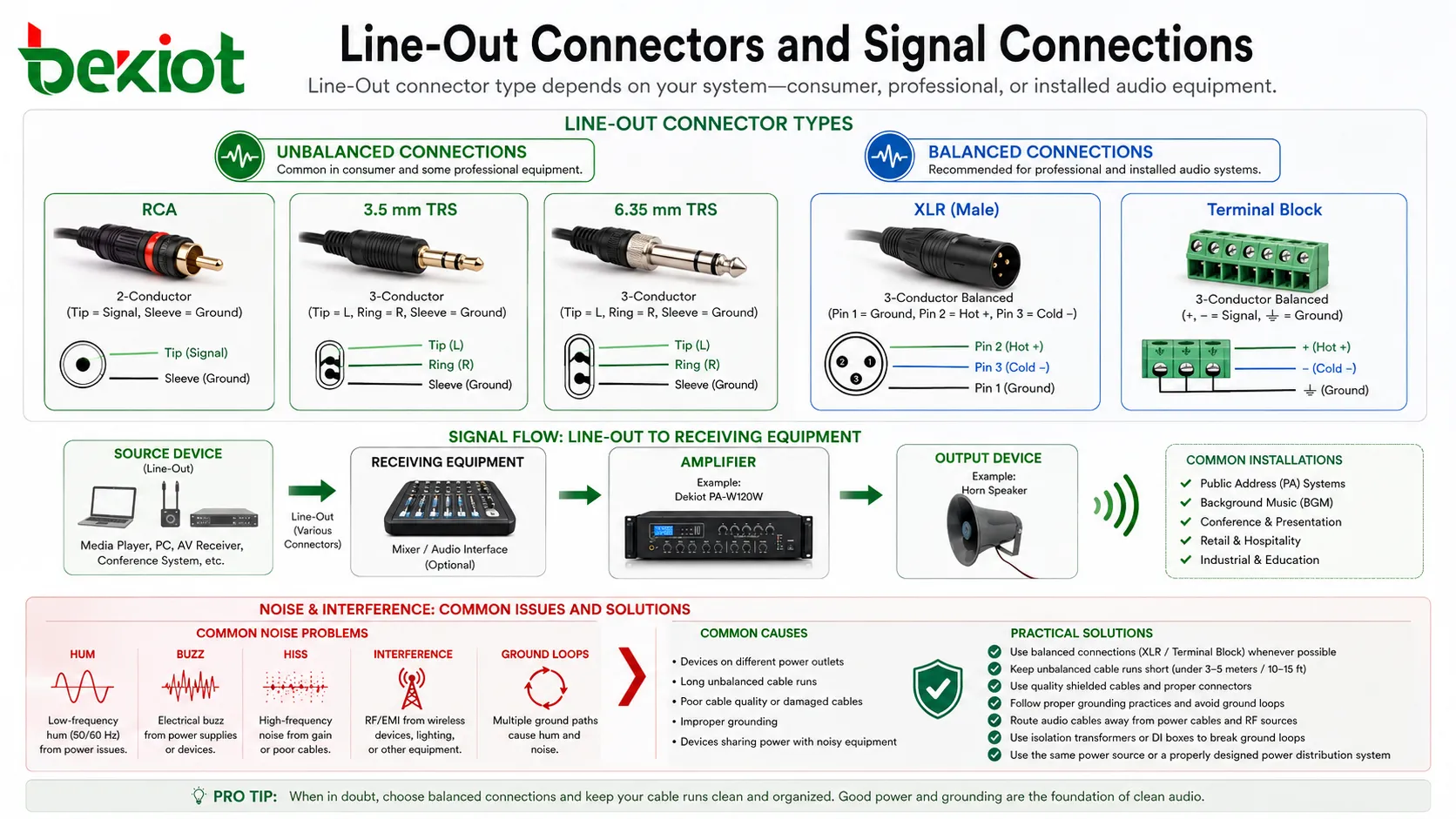
Line-Out can be balanced or unbalanced. Unbalanced outputs commonly use RCA, 3.5mm, or TS connectors. Balanced outputs commonly use XLR, TRS, or terminal connectors.
Balanced connections are better for longer cable runs and noisy electrical environments because they reject common-mode noise. Unbalanced connections are simpler and common in consumer audio, short cable runs, and desktop systems.
Connector Types
Line-Out may appear as RCA, 3.5mm stereo jack, 6.35mm TRS, XLR, terminal block, Phoenix connector, USB audio interface output, or dedicated equipment connector.
The connector type should match the receiving equipment and installation environment. For permanent installations, secure terminal or balanced connectors may be more reliable than loose consumer-style plugs.
Noise and Grounding
Line-Out connections can be affected by hum, buzz, hiss, interference, and ground loops. These problems are common when devices are powered from different outlets or when long unbalanced cables are used.
Good grounding, balanced lines, proper cable routing, isolation transformers, and correct power distribution can reduce noise problems.
Benefits of Line-Out in Audio Systems
Line-Out provides a practical and standardized way to move audio between devices. It improves flexibility, expandability, signal routing, and system integration.
Clean Signal Transfer
A proper Line-Out connection transfers audio without unnecessary amplification at the source. This helps preserve sound quality before the signal reaches the amplifier or processor.
When the output and input are matched correctly, the system can achieve better clarity, lower noise, and more stable audio performance.
Flexible System Expansion
Line-Out makes it easy to connect one device to another. A source device can feed an amplifier, a mixer can feed a recorder, a paging controller can feed a power amplifier, and an audio processor can feed powered speakers.
This flexibility is useful in both small systems and large installations. Audio can be routed, recorded, processed, distributed, and expanded according to project needs.
Better Control of Gain Staging
Line-Out supports better gain staging. Each device in the chain can operate at an appropriate signal level, reducing the chance of distortion or noise.
Good gain staging is important in recording, broadcasting, public address, conferencing, and professional audio systems where audio clarity matters.
Compatibility with Many Devices
Line-Out is widely supported by audio equipment. This makes it a practical connection method for mixers, amplifiers, powered speakers, recorders, PCs, media players, conference processors, and sound cards.
Because it is widely used, technicians can usually integrate Line-Out with standard cables, adapters, and audio interfaces. However, connector and level compatibility should still be checked.
Common Applications
Line-Out appears in many audio systems because it provides a simple way to send sound from one device to another. Its role changes depending on whether the system is used for playback, recording, conferencing, broadcasting, or public address.
Home and Desktop Audio
Computers, music players, televisions, and desktop audio devices may use Line-Out to send sound to powered speakers, amplifiers, or external audio systems.
In these cases, Line-Out helps separate the source from the playback system. The source provides audio, while the speaker or amplifier handles volume and power output.
Professional Audio and Mixing
Mixers and audio interfaces use Line-Out to send main mixes, monitor feeds, auxiliary sends, and recording feeds to other devices. These outputs are essential in studios, live sound, broadcast rooms, and event systems.
Balanced Line-Out connections are often preferred in professional environments because they reduce noise over longer cable runs.
Public Address and Paging Systems
Public address controllers, media players, emergency announcement systems, and paging sources may use Line-Out to feed power amplifiers or zone processors.
In these systems, correct line-level connection helps announcements remain clear and consistent across speakers and zones.
Conference and Meeting Rooms
Conference processors, video bars, DSP units, wireless microphone receivers, and audio bridges may use Line-Out to connect to amplifiers, ceiling speaker systems, recording devices, or streaming equipment.
Line-Out helps meeting room audio connect with external systems while maintaining proper signal level and routing flexibility.
Recording and Monitoring
Recorders, cameras, streaming encoders, and audio interfaces can receive Line-Out from mixers or media systems. This allows clean recording of program audio without relying on room microphones.
For monitoring, Line-Out can feed reference speakers, monitor controllers, or headphone distribution systems through suitable equipment.
Industrial and Facility Audio
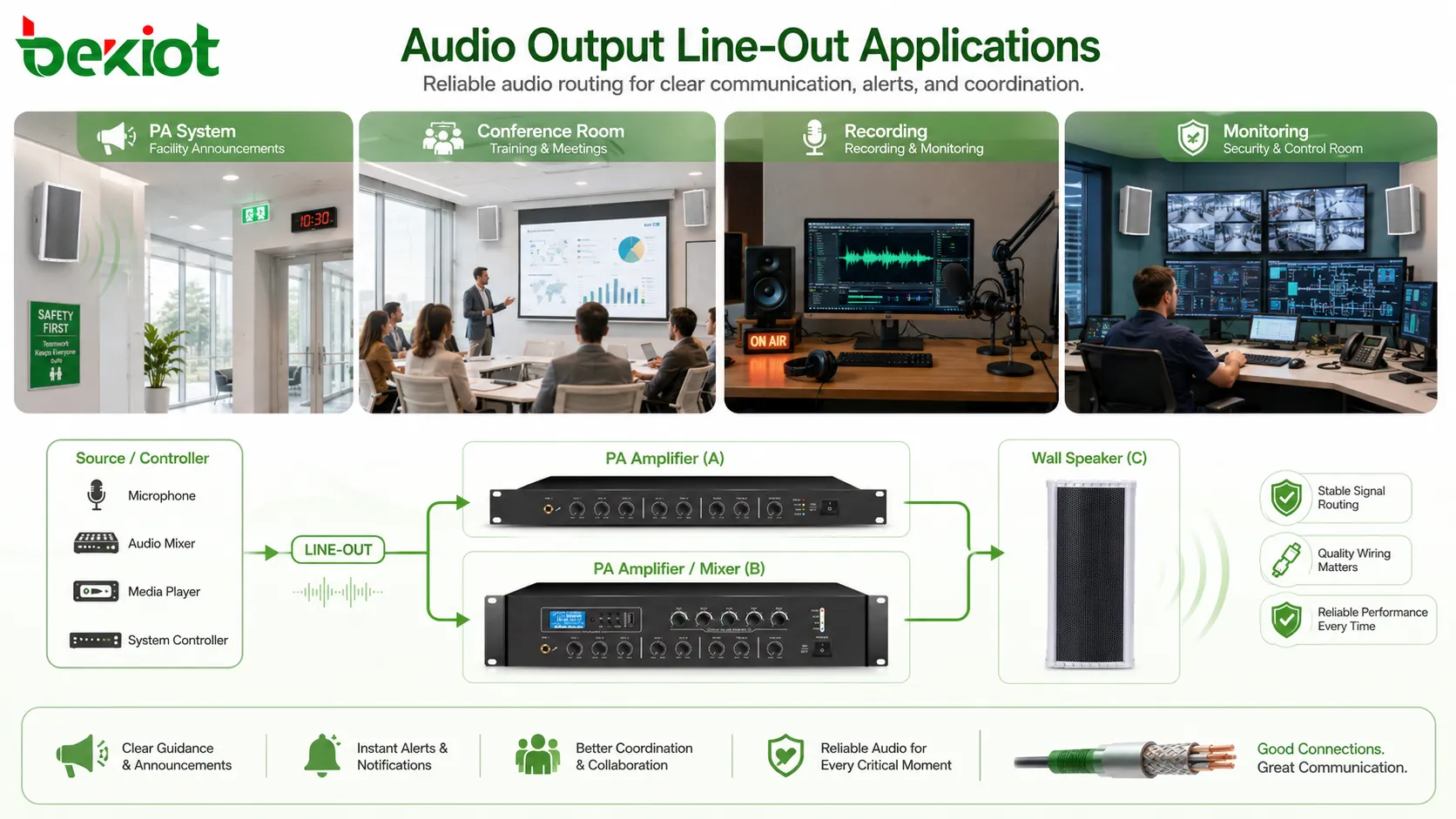
Industrial control rooms, facility announcement systems, training rooms, security desks, and monitoring stations may use Line-Out to route audio between controllers, amplifiers, recorders, and speakers.
In these environments, reliability and wiring quality are important because audio may support operational guidance, alerts, announcements, or coordination.
Line-Out in Installed Audio Design
In installed audio systems, Line-Out is often part of a larger signal chain. The system may include source devices, DSP processors, matrix routers, amplifiers, wall controllers, paging microphones, and loudspeaker zones.
Source to Processor
A media player, computer, wireless receiver, or communication device may send audio through Line-Out to a DSP processor. The processor can then equalize, mix, delay, limit, or route the signal.
This is common in meeting rooms, lecture halls, retail spaces, hotels, and public facilities where several audio sources must be controlled centrally.
Processor to Amplifier
A DSP processor or mixer may send Line-Out to one or more amplifiers. The amplifier then drives passive speakers in different rooms or zones.
This structure is common in commercial audio and public address systems. It separates signal processing from power amplification, making the system easier to expand and service.
Zone Output
Some systems provide separate Line-Out ports for different zones. Each zone can receive different audio content, volume level, or processing settings.
Zone outputs are useful in campuses, factories, transport stations, hotels, shopping centers, and office buildings where different areas need different announcements or background audio.
Setup and Wiring Considerations
Line-Out connections are simple in concept, but installation details matter. Wrong levels, poor cables, long unbalanced runs, grounding issues, and connector mismatch can all reduce sound quality.
Match Output and Input Levels
The source Line-Out should match the receiving device’s line input. If the receiving device has adjustable gain, start with moderate settings and increase carefully while checking for distortion.
If the signal is too hot, reduce the output level or input gain. If the signal is too weak, check whether the device is connected to the correct input type and whether the source output is fixed or volume-controlled.
Use the Right Cable
Use cables appropriate for the connector and signal type. Balanced lines should use balanced cables. Stereo unbalanced outputs should not be treated as balanced mono outputs without proper wiring.
For long runs, balanced audio is usually better. For short desktop connections, unbalanced cables may be acceptable if the environment is not electrically noisy.
Avoid Ground Loops
Ground loops can create hum or buzz. They often happen when connected devices have different grounding paths or are powered from different circuits.
Solutions may include balanced connections, proper power distribution, audio isolation transformers, shorter cable runs, or improved grounding design. Ground safety conductors should not be removed as a shortcut.
Check Stereo and Mono Wiring
Some Line-Out ports are stereo, while some are mono. Connecting stereo outputs incorrectly into mono inputs can cause phase cancellation, weak sound, or missing audio elements.
If a stereo source must feed a mono system, use a proper summing circuit, mixer, or suitable adapter rather than directly tying channels together in an unsafe way.
Common Problems and Troubleshooting
Line-Out issues usually appear as no sound, low volume, distortion, hum, channel imbalance, or wrong routing. Most problems can be solved by checking signal path step by step.
No Sound
No sound may be caused by the wrong port, muted source, low output level, incorrect input selection, broken cable, powered speaker turned off, amplifier not enabled, or wrong routing setting.
Start by confirming the source is playing audio. Then check cable connection, input selection, volume level, mute status, and whether the receiving device shows signal activity.
Low Volume
Low volume may occur when a Line-Out is connected to the wrong input, the source output is fixed too low, the receiving input gain is too low, or the system expects a different level standard.
If the connection uses a headphone output as a substitute, volume control may also affect signal level. A true Line-Out is usually more stable for system integration.
Distortion
Distortion often means the signal is too strong for the receiving input. It may also come from overdriven source output, wrong input type, clipping in a mixer, or excessive EQ boost.
Reduce the output level or input gain and check each stage of the signal chain. Good gain staging prevents distortion from spreading through the system.
Hum or Buzz
Hum or buzz is commonly caused by grounding issues, power interference, poor shielding, long unbalanced cables, or nearby electrical equipment.
Try a balanced connection where possible, separate audio cables from power cables, check grounding design, and use professional isolation solutions when needed.
One Channel Missing
A missing left or right channel may be caused by a damaged cable, wrong adapter, mono input connection, incorrect stereo-to-mono wiring, or software balance setting.
Check both channels at the source and receiver. Test with a known good cable before changing system settings.
Best Practices for Better Audio Output
Good Line-Out performance depends on correct connection, clean gain structure, suitable cables, and real-world testing. Small setup details can make a large difference in audio quality.
Keep the Signal Chain Clear
Document the signal path from source to output. A clear signal chain helps technicians understand where audio starts, where it is processed, where it is amplified, and where it is heard.
This is especially useful in installed systems with multiple processors, amplifiers, and zones.
Use Balanced Audio for Long Runs
For long cable distances or electrically noisy environments, balanced Line-Out is usually preferred. It helps reduce interference and keeps the signal cleaner.
Unbalanced connections should be kept short and routed away from power cables, motors, lighting dimmers, and high-current equipment.
Set Levels Before Final Testing
Set output and input levels carefully before judging sound quality. A system can sound poor simply because one stage is too low and another is compensating with too much gain.
After level setting, test with real program material such as speech, music, announcements, and system prompts.
Label Ports and Cables
Labeling helps prevent wrong connections during maintenance. Line-Out, Line-In, speaker output, mic input, and control wiring should be clearly identified.
This is especially important in racks, control rooms, PA systems, conference rooms, and industrial cabinets where many cables may look similar.
Test After Equipment Changes
Whenever a source device, amplifier, processor, cable, or speaker system changes, test the Line-Out path again. Different devices may have different output levels, grounding behavior, or connector wiring.
Testing after changes prevents hidden problems from appearing during meetings, announcements, recordings, or live events.
FAQ
Can Line-Out drive passive speakers directly?
No. Line-Out provides a line-level signal, not speaker power. Passive speakers require a power amplifier between the Line-Out source and the speaker.
Is Line-Out always fixed volume?
Not always. Some Line-Out ports provide a fixed level, while others are affected by the device’s volume control. This depends on the equipment design and should be checked in the manual or tested during setup.
Can a headphone output be used as Line-Out?
It can sometimes work for simple connections, but it is not always ideal. Headphone outputs are designed for headphones and may introduce level changes, impedance differences, or distortion if used as a professional line source.
Why does my Line-Out connection produce hum?
Hum may come from ground loops, poor shielding, long unbalanced cables, power interference, or devices connected to different electrical circuits. Balanced connections and proper grounding design can help.
Can Line-Out be recorded directly?
Yes, if the recorder has a compatible line input. Connecting Line-Out to a microphone input may cause distortion unless attenuation or proper input mode is used.
What is the safest way to connect stereo Line-Out to mono equipment?
Use a mixer, proper summing adapter, or audio interface designed for stereo-to-mono conversion. Directly shorting left and right outputs together can cause level loss, distortion, or equipment stress.







