


Listening Before Audio Reaches the Audience
Audio monitoring is the process of listening to, checking, or measuring an audio signal during recording, broadcasting, communication, live sound, conferencing, customer service, public address, or system operation. It allows users to confirm whether the sound is clear, balanced, properly routed, free from distortion, and suitable for the intended listener.
In real applications, audio monitoring may happen through headphones, monitor speakers, control room speakers, level meters, software dashboards, waveform displays, VU meters, peak meters, network audio tools, recording platforms, or communication consoles. The goal is simple: detect audio problems before they affect the user, listener, audience, caller, operator, or recording result.
Audio monitoring is not only about hearing sound. It is about confirming that the right signal is present, at the right level, with the right quality, at the right time.
Basic Meaning of Audio Monitoring
Audio monitoring means observing or listening to an audio signal so that a person or system can evaluate its condition. The monitored signal may come from a microphone, mixer, playback device, phone call, radio channel, conference platform, media server, public address controller, recording system, or network audio endpoint.
Monitoring is used before, during, and after audio transmission. Before transmission, it helps technicians set levels and test routing. During transmission, it helps operators detect faults. After transmission, it supports review, troubleshooting, and quality control.
Real-Time Listening
Real-time listening is the most direct form of audio monitoring. A user listens through headphones or speakers while the audio is being captured, mixed, transmitted, or played. This allows immediate correction if the sound is too quiet, too loud, noisy, distorted, delayed, or missing.
Real-time monitoring is essential in recording studios, broadcast rooms, live events, call centers, dispatch systems, online meetings, and public address control rooms where audio problems must be corrected quickly.
Signal Checking
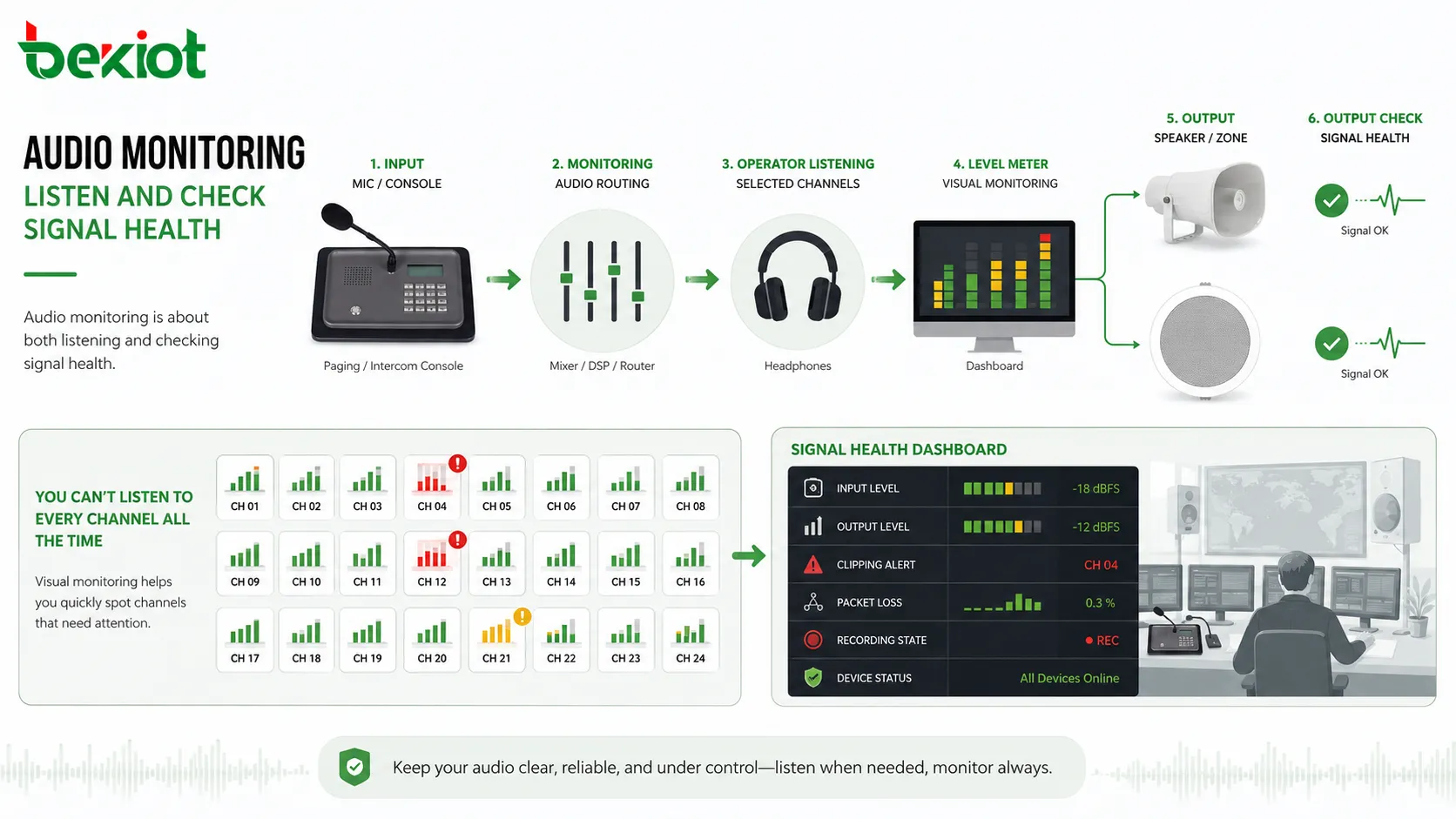
Audio monitoring is also about checking signal presence and signal health. A meter may show whether audio is active even when the operator is not listening continuously. A dashboard may show input level, output level, clipping, packet loss, recording state, or device status.
This is useful in complex systems where many audio channels operate at the same time. Operators cannot listen to everything at once, but visual monitoring helps them identify channels that need attention.
How Audio Monitoring Works
Audio monitoring works by taking a copy of an audio signal and sending it to a listening device, display, meter, or analysis tool. The monitored signal may be identical to the final output, or it may be a selected channel, pre-fader signal, post-fader signal, return feed, recording feed, or network stream.
The monitoring path should be reliable and correctly routed. If the monitoring feed is wrong, the operator may hear one thing while the audience or remote listener hears something different. This is why monitoring design must be treated as part of the full audio system.
Input Monitoring
Input monitoring allows users to hear or measure the signal entering the system. For example, a recording engineer may monitor a microphone before recording. A conference technician may check whether a table microphone is active. A call center supervisor may monitor an agent’s microphone quality.
Input monitoring helps detect problems at the source. Common issues include low microphone gain, background noise, incorrect input selection, cable faults, poor placement, or overloaded preamps.
Output Monitoring
Output monitoring checks what is leaving the system. This may include the main mix from a mixer, the final broadcast output, the public address feed, the conference room speaker output, or the audio sent to a recorder.
Output monitoring is important because the final signal may include processing, routing, mixing, compression, equalization, delay, or volume changes. A clean input does not guarantee a clean output.
Return Monitoring
Return monitoring allows users to hear the signal coming back from another device, network, platform, or remote endpoint. This is common in broadcasting, remote production, VoIP, video conferencing, and communication systems.
Return monitoring helps verify that the far end is receiving the correct sound and that the return path is working. It can also reveal network delay, echo, codec quality problems, or remote-side audio issues.
Main Features of Audio Monitoring
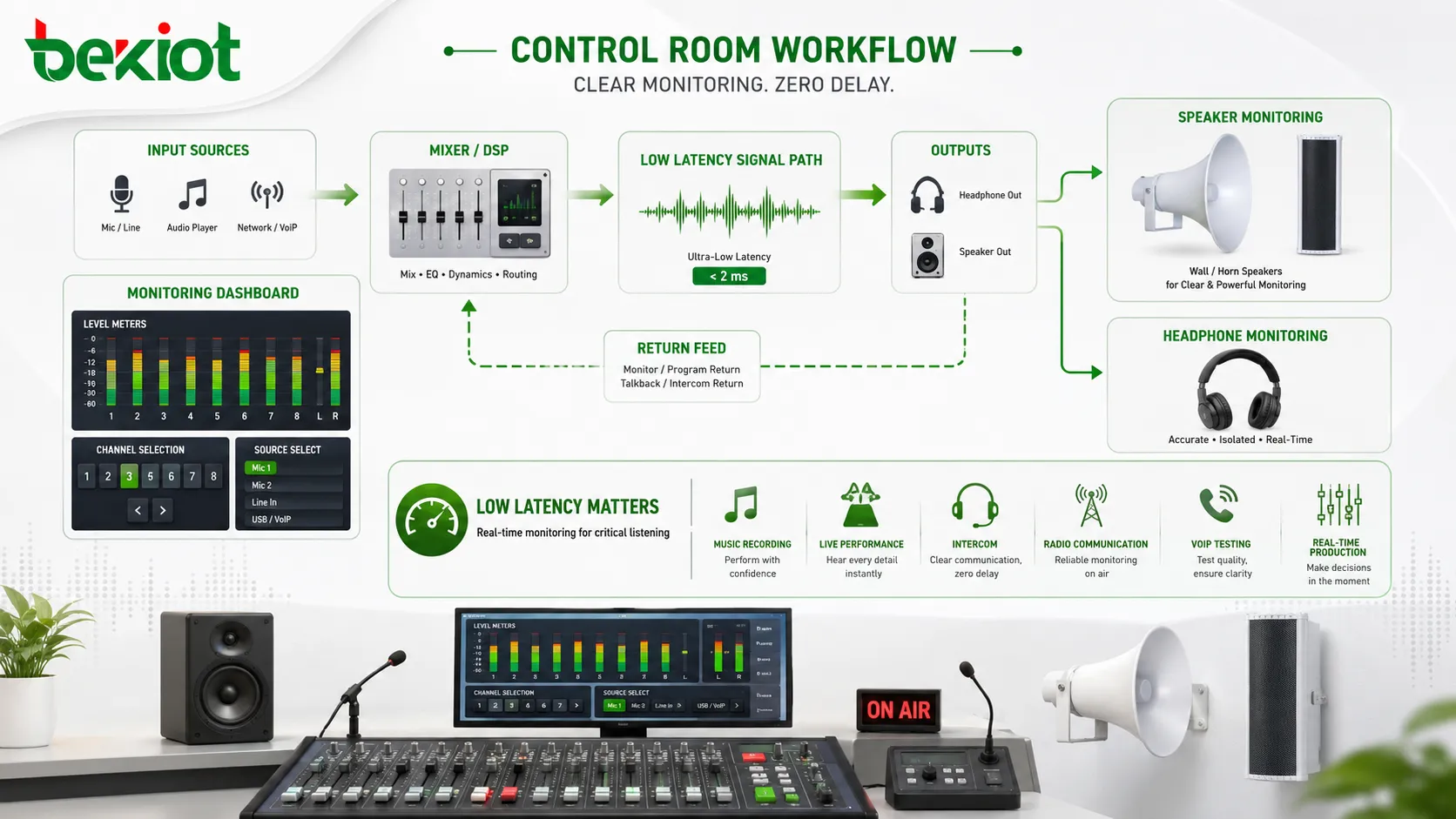
A useful audio monitoring setup should provide clear listening, accurate level indication, flexible routing, low latency, reliable status display, and suitable output devices. The best features depend on whether the system is used for studio production, live sound, communication, or facility operation.
Headphone Monitoring
Headphone monitoring allows users to listen closely without disturbing others. It is widely used in recording, broadcasting, call centers, live sound, conferencing, translation booths, and control rooms.
Headphones reveal details that may be missed through small speakers, such as noise, clicks, hum, breath noise, channel imbalance, or low-level distortion. Closed-back headphones are often used when isolation is needed.
Speaker Monitoring
Speaker monitoring uses loudspeakers to evaluate sound in a room. Studio monitors, control room speakers, nearfield monitors, and reference speakers help users judge tonal balance, stereo image, loudness, and overall listening experience.
Speaker monitoring is affected by room acoustics. A good speaker may still sound inaccurate in a poorly treated room, so placement and acoustic conditions matter.
Level Meters
Level meters show signal strength. They help users avoid signals that are too low, too high, or clipping. Common display types include peak meters, VU meters, RMS meters, loudness meters, and waveform views.
Meters are important because ears can be fooled by fatigue, room noise, or speaker level. Visual level monitoring provides a more consistent reference during setup and operation.
Channel Selection
Many systems allow operators to select which channel they want to monitor. A mixer may support solo, PFL, AFL, cue, monitor bus, or headphone bus functions. A communication console may allow monitoring of different lines or channels.
Flexible channel selection helps operators isolate problems. They can listen to one microphone, one caller, one zone, one source, or one output without disturbing the main program.
Low-Latency Monitoring
Low latency is critical when performers, speakers, agents, or operators need to hear themselves in real time. If the monitoring signal is delayed, the user may become distracted or unable to perform naturally.
Low-latency monitoring is especially important in music recording, live performance, intercom, radio communication, VoIP testing, and real-time production.
Benefits of Audio Monitoring
Audio monitoring improves sound quality, reduces mistakes, supports faster troubleshooting, and helps operators maintain control over audio workflows. It is valuable because many audio problems are only obvious when someone listens or measures the signal.
Better Quality Control
Monitoring helps users confirm whether audio is clean, intelligible, balanced, and correctly routed. This improves the quality of recordings, broadcasts, meetings, announcements, calls, and live events.
Without monitoring, problems may go unnoticed until listeners complain or recordings are reviewed later. By then, the original event may already be lost.
Faster Fault Detection
Audio faults can come from microphones, cables, connectors, mixers, processors, network links, software settings, codecs, amplifiers, or speakers. Monitoring helps identify the fault location faster.
For example, if the input meter shows signal but the output is silent, the issue may be routing or output configuration. If the input is already noisy, the problem may be near the microphone or source.
Improved Speech Intelligibility
In communication and announcement systems, monitoring helps confirm whether speech is understandable. Operators can identify muffled sound, excessive background noise, low volume, echo, or distortion.
This is important for conference rooms, public address systems, customer service centers, dispatch rooms, classrooms, and emergency notification workflows.
Lower Risk of Recording Errors
Recording errors can be costly. A missing microphone, clipped voice, wrong input, muted channel, or noisy recording may not be repairable afterward. Monitoring reduces this risk by allowing users to check the signal during recording.
For interviews, training videos, podcasts, lectures, legal recordings, meetings, and broadcast programs, monitoring is a basic quality safeguard.
More Reliable Live Operation
Live events and real-time communication leave little room for correction after the fact. Monitoring helps operators respond immediately when feedback, silence, overload, echo, or wrong routing appears.
Reliable monitoring makes live operation more controlled and less dependent on guesswork.
Applications in Different Systems
Audio monitoring is used in many environments because every audio system can fail, drift, overload, or produce unexpected sound. The monitoring method depends on the application.
Recording Studios
Recording studios rely on monitoring to judge microphone sound, instrument balance, headphone mixes, recording levels, noise, and final playback quality. Musicians also use monitoring to hear themselves while performing.
Accurate studio monitoring requires suitable speakers, headphones, audio interfaces, room treatment, and level calibration. Poor monitoring can lead to poor mixing decisions.
Broadcast and Streaming
Broadcast and streaming systems use monitoring to check program audio, microphone feeds, remote guests, playback sources, return audio, loudness, and final output. Operators must know what the audience is hearing.
Monitoring is especially important when multiple sources are mixed live, such as hosts, callers, video clips, remote interviews, advertisements, and background music.
Live Sound and Events
Live sound monitoring supports front-of-house mixing, stage monitoring, in-ear monitoring, and backstage communication. Performers need to hear themselves, while engineers need to hear the audience-facing mix.
Monitoring helps control feedback, balance vocals, adjust instruments, and detect microphone or cable problems before they become obvious to the audience.
Conference Rooms and Online Meetings
Meeting systems use monitoring to check microphone pickup, speaker playback, echo cancellation, remote audio, recording feeds, and streaming output. A room may sound fine locally but poor to remote participants if the monitoring path is not checked.
Technicians may use test calls, platform meters, DSP status pages, and return audio to confirm that remote users receive clear speech.
Call Centers and Customer Service
Call centers use audio monitoring for quality review, agent coaching, compliance, supervisor support, and technical troubleshooting. Supervisors may listen to live calls or review recordings depending on policy.
Monitoring helps identify unclear microphones, background noise, poor headset use, low volume, and customer communication issues. Privacy and consent rules should always be followed.
Public Address and Emergency Audio
Public address and emergency systems use monitoring to confirm that announcements, tones, voice prompts, and zone outputs are working. In larger systems, operators may monitor specific zones, amplifier status, speaker circuits, and recorded messages.
For emergency communication, monitoring should support confidence that messages are being delivered clearly and to the correct zones.
Security and Control Rooms
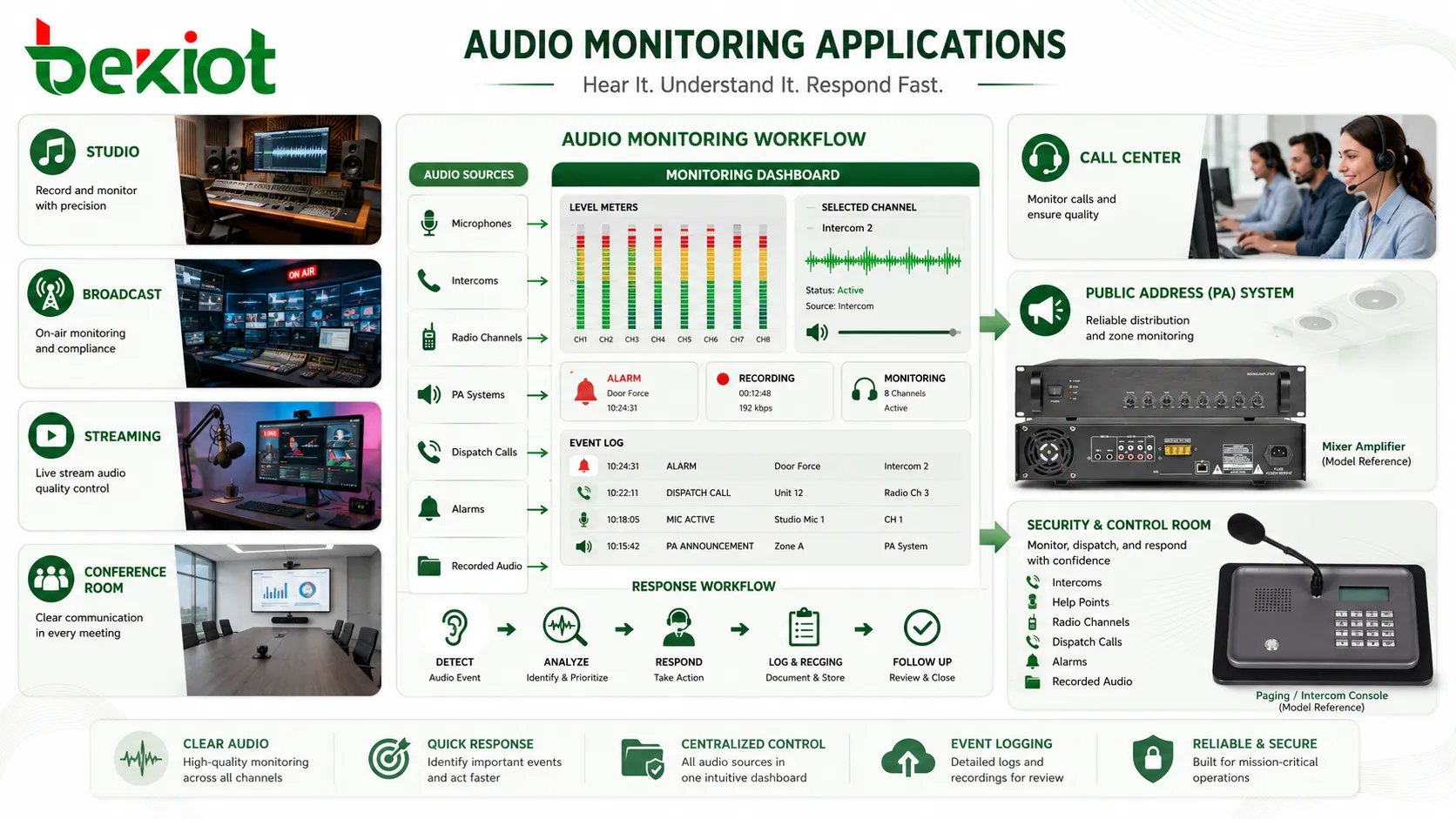
Security and control rooms may monitor intercoms, help points, radio channels, dispatch calls, alarms, and recorded audio. Operators need to identify important audio events quickly and keep records where required.
Audio monitoring in these environments should be clear, organized, and linked with event logging or response workflows.
Audio Monitoring in System Design
Monitoring should be planned during system design, not added only after problems appear. A system may have excellent microphones and speakers but still be difficult to operate if users cannot monitor the right signal at the right point.
Define What Must Be Monitored
The first step is deciding which signals matter. Important monitoring points may include microphone inputs, program output, recording feed, remote return, amplifier output, zone output, emergency message playback, or network stream status.
Not every signal needs constant listening, but critical paths should be visible or testable. This helps operators confirm system health quickly.
Separate Monitoring from Main Output
Monitoring should not disturb the main output. Operators should be able to check a microphone, source, zone, or return feed without changing what the audience, caller, or public area hears.
This is why mixers and DSP systems often include cue buses, monitor outputs, headphone outputs, and solo functions.
Plan Monitoring Locations
The monitoring location should match the operator’s work. A control room may need speakers and headphones. A rack room may need a test speaker or headphone jack. A remote platform may need software meters and logs.
For distributed systems, remote monitoring may help administrators check audio status without traveling to every site.
Include Visual Monitoring
Listening is important, but visual status is also useful. Meters, alarms, waveform displays, device dashboards, and recording indicators can show problems even when no one is listening continuously.
Visual monitoring is essential for multi-channel systems where operators cannot listen to every signal at the same time.
Technical Considerations
Audio monitoring quality depends on signal path, latency, level calibration, device accuracy, room acoustics, and operator workflow. Poor monitoring can mislead users and result in wrong decisions.
Latency
Latency is the delay between the original sound and the monitored sound. Small latency may be acceptable for review, but real-time performance and conversation monitoring require very low delay.
High latency can distract speakers, musicians, presenters, agents, and operators. Direct monitoring or optimized audio routing may be needed for real-time work.
Gain Staging
Monitoring should show accurate signal level. If gain is too high, the monitored signal may distort. If it is too low, users may increase volume and hear more noise.
Proper gain staging helps maintain headroom and prevents clipping. It also makes meters and listening levels more meaningful.
Monitor Accuracy
Monitor speakers and headphones should suit the task. Studio work requires accurate monitoring. Call center supervision may prioritize speech clarity. Public address control may require checking intelligibility and routing rather than full-range music quality.
The monitoring device should not hide important problems. Very poor speakers or headphones may make distorted or noisy audio seem acceptable.
Room Acoustics
Speaker monitoring is affected by the room. Reflections, standing waves, hard surfaces, glass walls, and background noise can change what the operator hears.
For critical monitoring, acoustic treatment and proper speaker placement are important. Headphones can help when room acoustics are poor, but they do not fully replace speaker monitoring for every task.
Privacy and Permission
Monitoring live conversations may involve privacy, legal, and policy requirements. Call centers, security systems, meeting platforms, and workplace systems should define who can monitor audio and under what conditions.
Monitoring should be transparent and controlled according to applicable rules. Unauthorized listening can create serious privacy and trust problems.
| Monitoring Element | Main Purpose | Practical Checkpoint |
|---|---|---|
| Headphones | Detailed personal listening | Check isolation, comfort, clarity, and latency |
| Monitor speakers | Room-based sound evaluation | Check placement, room acoustics, and level calibration |
| Level meters | Signal level and clipping detection | Check input gain, output level, and headroom |
| Return feed | Confirms far-end or platform audio | Check delay, codec quality, and remote receive path |
| Recording indicator | Confirms recording status | Check file creation, channel routing, and storage status |
Common Problems and Troubleshooting
Audio monitoring problems can lead operators in the wrong direction. If the monitoring path is faulty, users may think the main system has a problem when only the monitor feed is incorrect.
No Audio in Monitor
No monitor audio may be caused by muted channels, wrong output selection, incorrect routing, unplugged headphones, disabled monitor bus, software settings, or failed hardware.
Start by checking whether the source signal exists. Then confirm routing, monitor volume, mute status, output device selection, and cable connection.
Monitoring Sounds Different from Final Output
This happens when the monitor feed is taken from a different point in the signal chain than the final output. For example, the operator may monitor a pre-fader signal while the audience hears a processed post-fader output.
To avoid confusion, operators should know whether they are monitoring input, pre-fader, post-fader, main mix, return feed, or recorded output.
Delayed Monitoring
Delayed monitoring is common in software audio systems, network audio, Bluetooth devices, and conferencing platforms. It can make speaking or performing difficult.
Solutions may include direct monitoring, lower buffer size, wired monitoring, optimized drivers, reduced processing, or low-latency audio routing.
Distorted Monitor Signal
Distortion may come from input clipping, overloaded output, headphone amplifier overload, excessive monitor volume, wrong gain settings, or processing overload.
Check meters at each stage. If distortion appears before the monitor output, the problem is upstream. If only the monitor is distorted, the monitor device or output level may be the issue.
False Confidence from Poor Monitoring
A weak monitoring setup may hide real problems. For example, low-quality speakers may not reveal noise, clipped peaks, or tonal imbalance. A noisy control room may make subtle audio faults impossible to hear.
Critical systems need monitoring equipment that is good enough for the decisions being made.
Best Practices for Audio Monitoring
Good monitoring practice combines technical setup with operator discipline. The goal is to make audio status clear, reliable, and easy to verify during real operation.
Monitor the Correct Point
Choose the monitoring point according to the question being asked. To check a microphone, monitor the input. To check the audience feed, monitor the main output. To check what remote users hear, monitor the return or platform output.
Using the wrong monitoring point can lead to incorrect troubleshooting decisions.
Use Both Listening and Meters
Listening reveals tone, clarity, noise, echo, and distortion. Meters show level, clipping, silence, and activity. Both are needed for reliable monitoring.
A signal can look active on a meter but still sound bad. A signal can also sound acceptable while silently clipping during peaks. Combining both methods reduces risk.
Calibrate Monitoring Levels
Monitoring levels should be consistent. If operators constantly change volume, it becomes harder to judge loudness and balance accurately.
In studios, broadcast rooms, and control environments, reference monitoring levels help maintain consistent decisions.
Test Before Live Use
Before meetings, broadcasts, recordings, announcements, or events, test microphones, playback sources, outputs, return feeds, and recording paths. Confirm that monitoring reflects the real signal path.
Pre-use testing catches many problems before they reach the audience or user.
Document Routing
Complex systems should document monitoring routes. Diagrams should show which sources feed which monitor outputs, recorders, amplifiers, and remote platforms.
Documentation helps new operators, maintenance teams, and troubleshooting staff understand the system quickly.
FAQ
Can audio monitoring be done without recording?
Yes. Monitoring and recording are different functions. A system can allow live listening or level checking without saving audio, depending on design and privacy policy.
Why do I hear myself with a delay during monitoring?
Delayed self-monitoring is usually caused by software buffering, network transmission, Bluetooth latency, heavy processing, or routing through a conferencing platform. Direct monitoring or low-latency routing can reduce the delay.
What is sidetone in audio monitoring?
Sidetone is a small amount of the user’s own microphone signal fed back into their headset. It helps users hear themselves naturally during phone calls, radio communication, and headset-based work.
Should operators use headphones or speakers for monitoring?
Both can be useful. Headphones reveal details and isolate the listener, while speakers show how sound behaves in a room. The best choice depends on the task and environment.
Why does the meter show signal but I hear nothing?
The signal may be present at the input but not routed to the monitor output. Check monitor source selection, mute status, headphone output, speaker amplifier, software output device, and routing configuration.
Can audio monitoring raise privacy concerns?
Yes. Monitoring calls, meetings, intercoms, or room audio may involve privacy rules and consent requirements. Organizations should define who can monitor audio, when monitoring is allowed, and whether users must be notified.







