


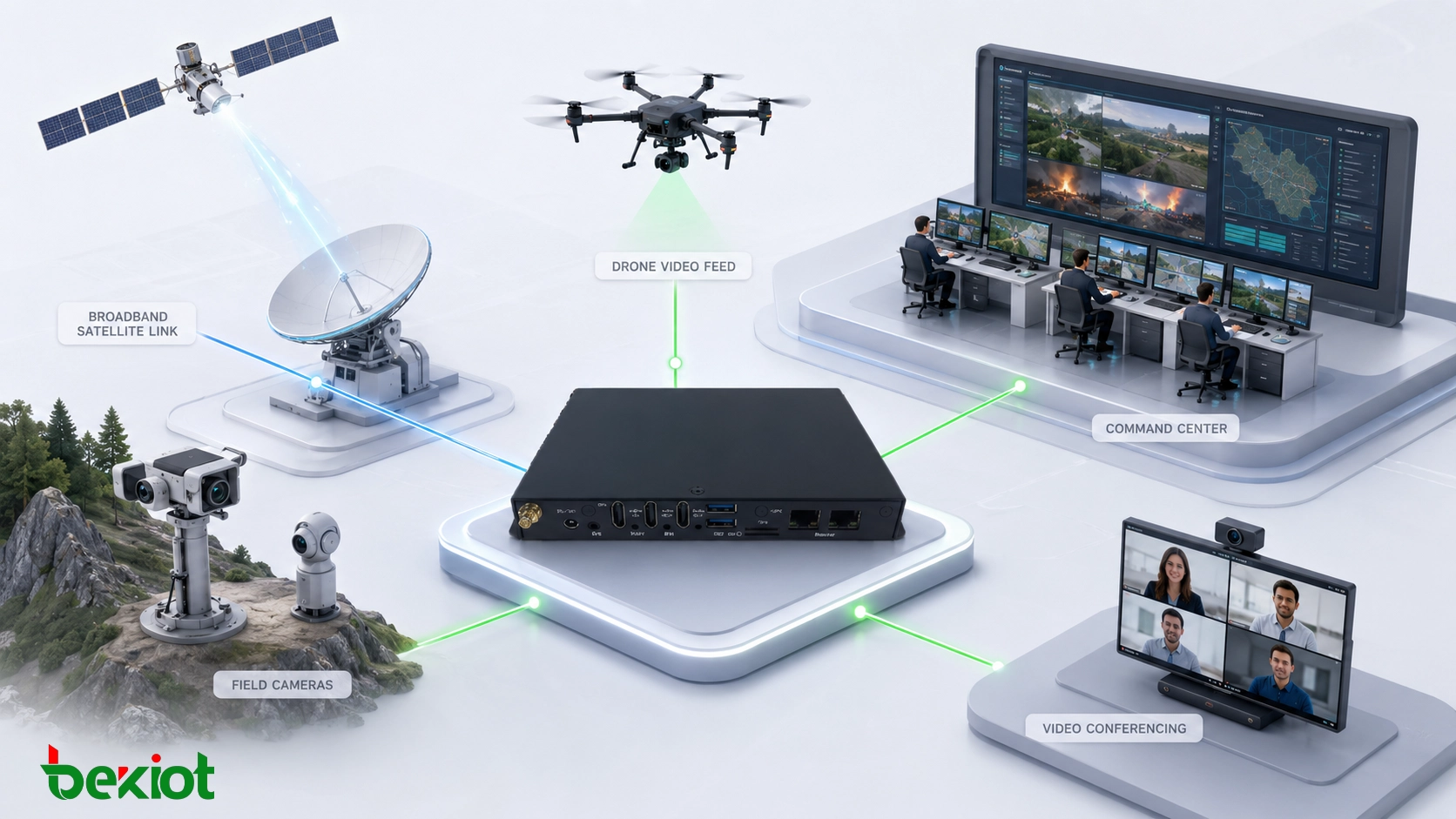
Broadband satellite communication has greatly improved the way emergency teams, mobile command units, remote worksites, and field response organizations transmit video from difficult environments. With satellite portable terminals, emergency communication vehicles, and high-capacity satellite links, it is now common to send multiple HD video streams, drone footage, mobile camera feeds, and remote conference video back to a command center.
However, satellite connectivity solves only one part of the problem: network transmission. It does not automatically solve video integration, protocol conversion, platform compatibility, bandwidth adaptation, or unified dispatch. In real projects, many users discover that the link is available, the bandwidth is usable, and the video source is active, yet different systems still cannot be connected smoothly.
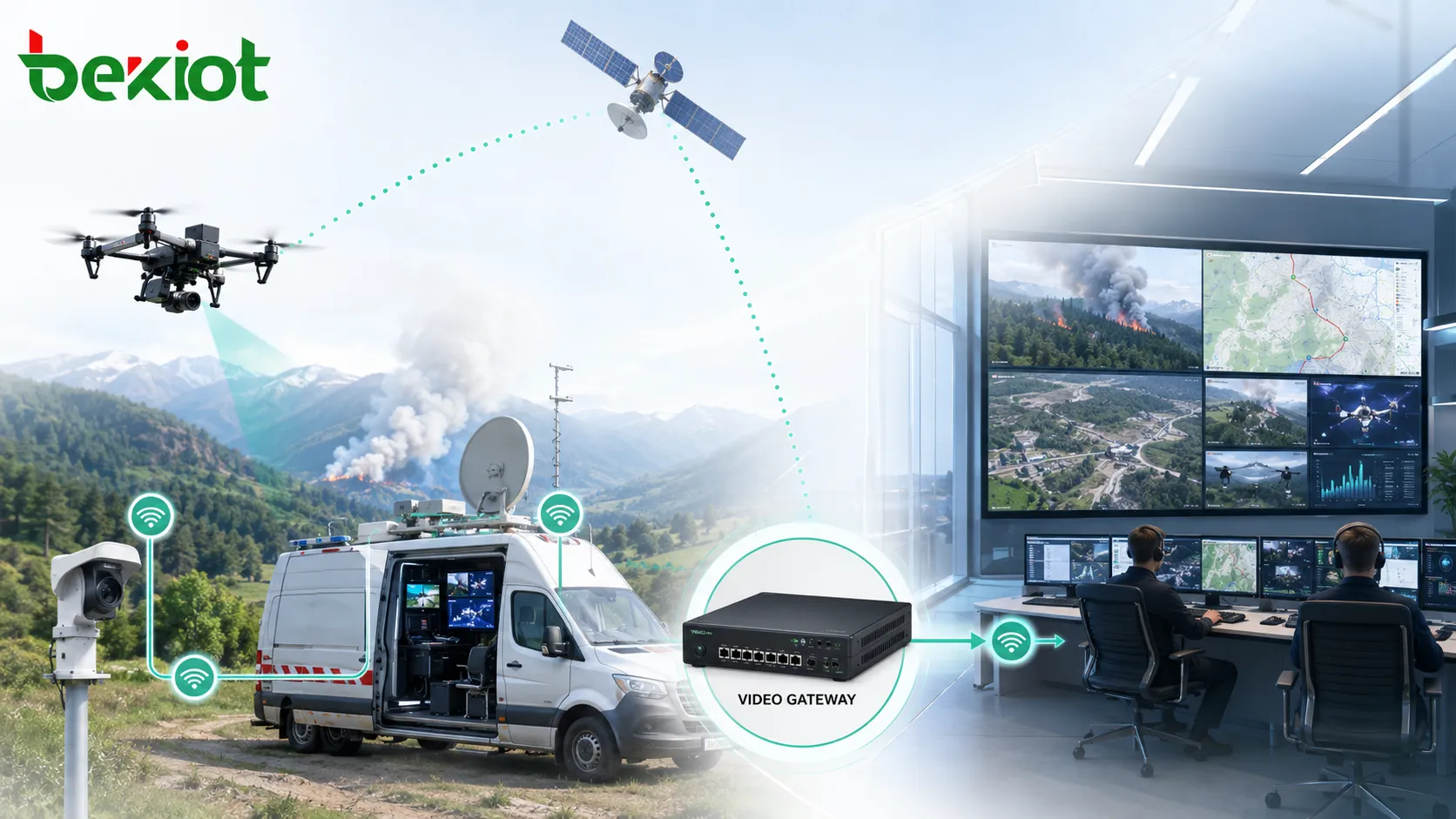
Satellite Links Carry Video, But They Do Not Unify Video Systems
In an emergency site or temporary field operation, video sources often come from different devices and different technical systems. A drone may output an RTSP stream. A mobile video transmission unit may use RTMP. A public safety command platform may rely on GB28181. A surveillance camera may support ONVIF. A video conferencing system may use SIP or H.323. Local HDMI video may also need to be encoded before it can be transmitted over IP.
From a network perspective, these devices may already be connected through a broadband satellite link. From a video system perspective, they are still fragmented. Each source may use a different protocol, resolution, stream format, codec setting, authentication method, or platform access rule. Without a video gateway, the command center may see isolated video islands instead of one unified visual information system.
This is why a video gateway remains valuable even when the satellite link is already available. It works as the translation, aggregation, adaptation, and forwarding layer between field video sources and upper-level command platforms.
The Real Challenge Is Protocol Fragmentation
Emergency communication environments rarely rely on one single video standard. Field teams may bring drones, body-worn cameras, portable video transmitters, vehicle-mounted cameras, temporary surveillance devices, conference terminals, and existing monitoring systems. These devices are often purchased at different times, supplied by different vendors, and designed for different platforms.
A practical video gateway should support common video and communication protocols such as RTSP, RTMP, GB28181, ONVIF, SIP, H.323, and HDMI encoding access. This allows video from drones, individual field units, mobile surveillance devices, local monitoring systems, and video conferencing terminals to be collected and converted into formats that a command platform can actually use.
In field command scenarios, the key question is no longer only whether video can be transmitted. The more important question is whether all video can be accessed, managed, forwarded, viewed, and coordinated through one operational workflow.
Unified Access for Multi-Source Field Video
A video gateway provides a unified entry point for video sources that would otherwise remain separated. Instead of configuring each device independently on the command platform, the gateway can aggregate multiple video inputs and expose them in a more standardized way. This reduces integration complexity and makes video resources easier to manage during fast-moving operations.
For example, a field command post may need to combine drone aerial video, body camera video, vehicle camera video, temporary control-point video, local HDMI signal input, and video meeting feeds. If each system uses a different access method, operators may need to switch between platforms, applications, or terminals. A gateway helps convert these video feeds into a unified resource pool for viewing, dispatch, recording, forwarding, and collaborative command.
This capability is especially important for emergency response, disaster relief, transportation incidents, industrial safety events, border and coastal operations, energy infrastructure inspection, and public safety command scenarios where video sources are temporary, mobile, and highly diverse.
Better Use of Limited Satellite Bandwidth
Although broadband satellite capacity has improved significantly, satellite bandwidth is still a valuable and limited resource in many field environments. Bandwidth may fluctuate because of weather, antenna conditions, terminal movement, service priority, network congestion, or the number of simultaneous users. Sending every video source at its original quality may quickly overload the available link.
A video gateway can help improve link efficiency through bitrate control, resolution adaptation, stream format conversion, and multi-stream forwarding. High-priority video can be kept clear and stable, while lower-priority feeds can be adjusted to a more suitable bitrate or resolution. This makes it easier to protect critical video services during command operations.
In practical terms, the gateway helps the system answer several operational questions: Which video needs to be transmitted in HD? Which feed can use a lower bitrate? Which stream should be forwarded to the command center? Which video should enter a meeting room? Which source should be recorded or displayed on a video wall? These decisions are not solved by the satellite link alone.
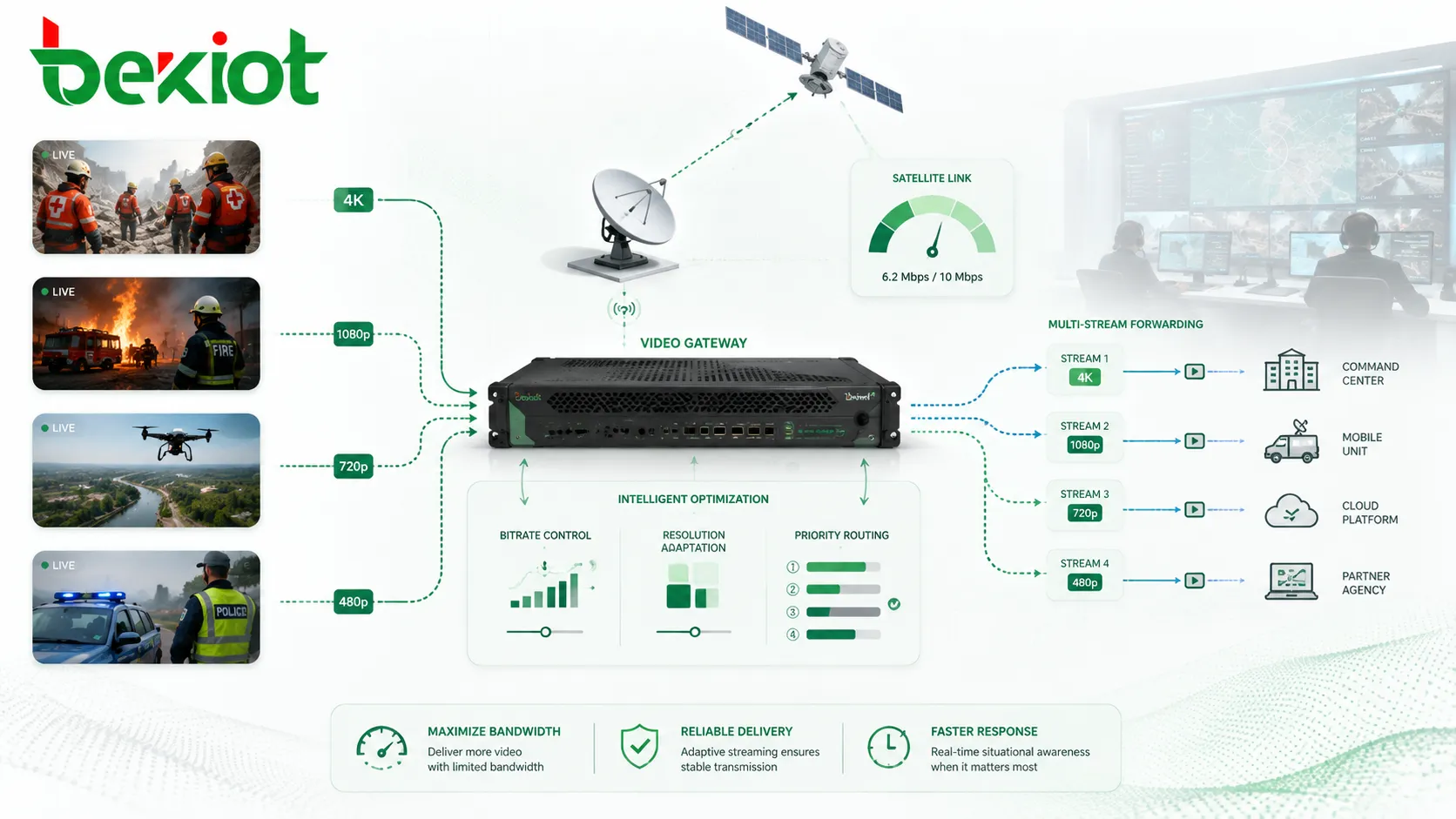
Connecting Field Video Directly Into Meetings
One of the most useful functions of a video gateway is the ability to bring field video directly into a remote consultation or video conference workflow. In emergency command, decision-makers often need to see live footage from the front line while discussing response plans with experts, leaders, dispatchers, and support teams.
Without a gateway, drone video, body camera streams, and local monitoring feeds may not be compatible with the video conferencing system. Operators may need to use screen sharing, secondary encoding, manual switching, or temporary software tools. These workarounds are often unstable and inefficient.
With proper protocol conversion, a video gateway can make field video available to video conference systems that use SIP or H.323, or to command platforms that need standard IP video input. This helps front-line teams, remote experts, and command-center operators share the same visual context in real time.
Fast Deployment for Temporary and Mobile Command Networks
Broadband satellite systems are often used in places where fixed fiber, public cellular networks, or wired transmission networks are unavailable, damaged, congested, or not trusted for mission-critical operations. Typical deployment environments include emergency communication vehicles, satellite portable stations, forward command posts, temporary meeting systems, disaster response sites, remote industrial areas, and large outdoor event security operations.
In these environments, time is critical. The communication system must be built quickly, often with mixed equipment from different teams. A video gateway helps simplify deployment by allowing multiple field video sources to be connected, converted, and distributed through a more manageable architecture.
For system integrators and emergency communication teams, this means less time spent solving protocol compatibility problems and more time focused on command coordination, situational awareness, and operational decision-making.
A Practical Architecture for Field Video Integration
A typical field video architecture can be divided into four layers. The first layer is the video source layer, including drones, body-worn cameras, mobile video units, vehicle-mounted cameras, ONVIF cameras, HDMI signal sources, and video conferencing terminals. The second layer is the video gateway, which handles protocol conversion, stream aggregation, encoding access, bitrate adaptation, and forwarding.
The third layer is the satellite or IP transmission network. This may include a broadband satellite terminal, emergency communication vehicle, portable satellite station, private network, 4G/5G backup link, or hybrid WAN connection. The fourth layer is the command application layer, including a dispatch platform, video wall, recording system, video conference system, GIS command interface, or emergency management platform.
In this structure, the satellite link provides connectivity, while the video gateway provides media interoperability. Both are necessary. One moves the data; the other makes the video usable across systems.
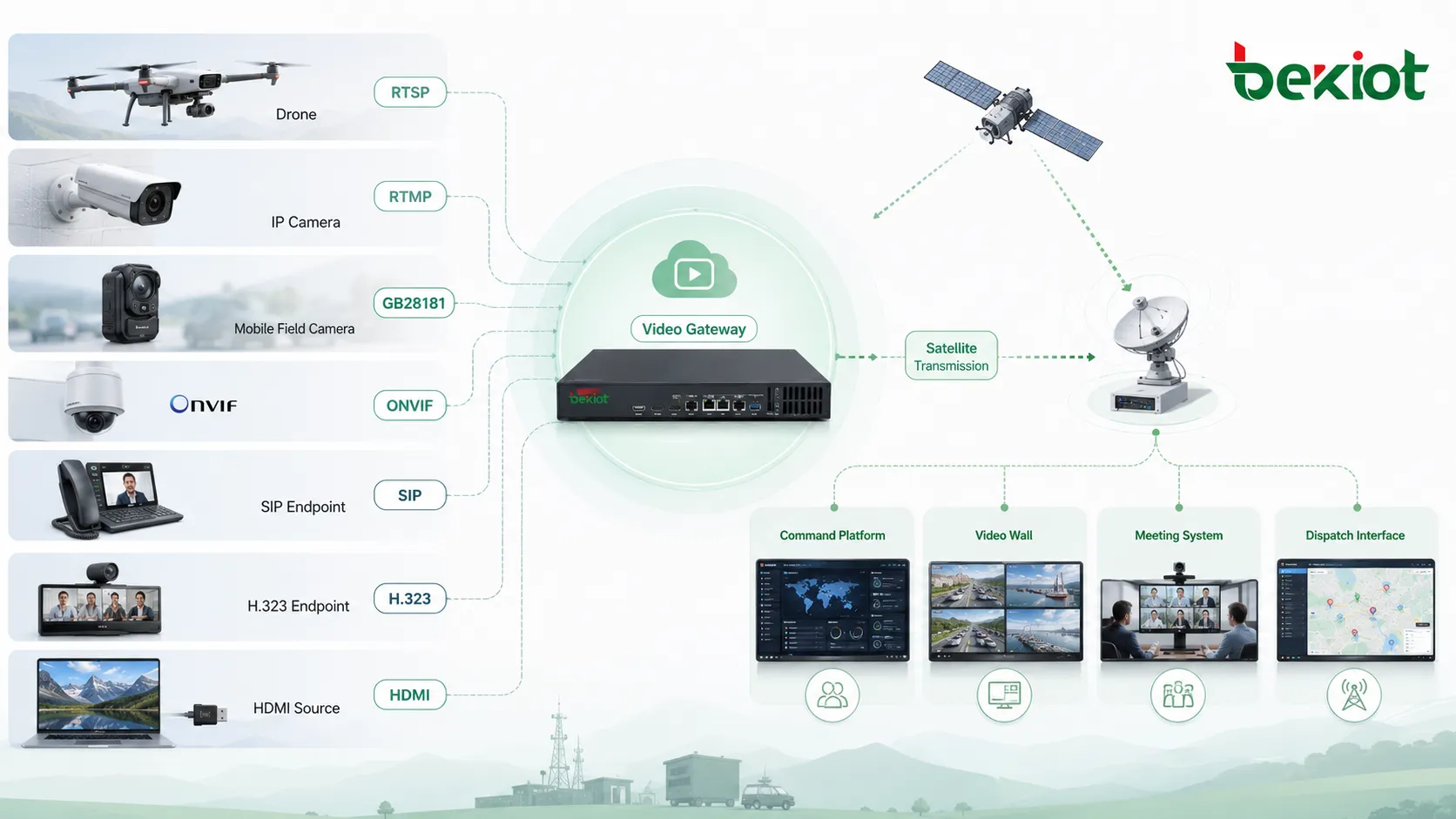
Why Command Platforms Need a Video Gateway Layer
A command platform is most effective when it can receive, display, dispatch, and share video resources without requiring operators to understand every underlying protocol. The operator should not need to know whether a feed originates from RTSP, RTMP, GB28181, ONVIF, HDMI encoding, SIP, or H.323. The video should appear as a controllable operational resource.
The video gateway layer helps hide this technical complexity. It can convert incompatible streams, standardize access, forward video to different destinations, and support more flexible routing between field sites and command centers. This improves the usability of video resources and reduces the burden on operators during high-pressure events.
For Becke Telcom communication solutions, this type of video gateway capability can be combined with dispatch platforms, SIP communication, industrial terminals, public address, emergency notification, and command-center workflows when a project needs voice, video, alarm, and field collaboration in one integrated system.
Deployment Considerations for System Integrators
When selecting or designing a video gateway solution for satellite-based field communication, integrators should first identify the real video sources used on site. This includes drone output formats, camera protocols, conferencing systems, local HDMI requirements, monitoring platforms, and command-center access standards.
The second consideration is bandwidth planning. Not every video feed needs the same resolution and bitrate. Critical command video, aerial overview footage, and safety-related monitoring streams should be prioritized. Less important video can be compressed, reduced in resolution, or forwarded only when needed.
The third consideration is platform compatibility. A gateway should not only receive video but also deliver it to the systems that decision-makers actually use, such as a GB28181 platform, SIP/H.323 video meeting system, dispatch console, recording server, video wall, or mobile command terminal.
The fourth consideration is operational simplicity. In emergency deployment, the system should reduce manual configuration, support fast access, and allow operators to switch, share, and manage video quickly. The value of a video gateway is not only technical conversion; it is also workflow efficiency.
From “Having a Link” to “Having Coordinated Video”
As broadband satellite communication continues to improve, emergency response and field command systems are moving into a new stage. In the past, the main challenge was whether the site could connect to the command center. Today, many sites already have connectivity. The next challenge is whether video from multiple systems can be unified, scheduled, optimized, and shared.
A satellite link makes transmission possible. A video gateway makes multi-source video operationally useful. For command centers, emergency vehicles, portable stations, and temporary field headquarters, the combination of satellite connectivity and video gateway integration creates a more complete visual communication system.
Future emergency communication systems will not compete only on link availability. They will compete on how well they integrate video, voice, data, dispatch, and real-time collaboration into one coordinated response workflow.
FAQ
Can a broadband satellite terminal replace a video gateway?
No. A broadband satellite terminal provides network connectivity, but it does not usually solve video protocol conversion, stream aggregation, video conferencing access, platform adaptation, or command workflow integration. A video gateway works above the transmission layer to make video usable across different systems.
Which video protocols are commonly involved in field command projects?
Common protocols and interfaces include RTSP, RTMP, GB28181, ONVIF, SIP, H.323, and HDMI encoding access. The exact combination depends on the drones, cameras, body-worn systems, video conferencing terminals, and command platforms used in the project.
Why is bandwidth control important when satellite bandwidth is already high?
Satellite bandwidth may still fluctuate or become congested when multiple HD streams, voice services, data applications, and conference systems operate at the same time. Bitrate control and resolution adaptation help protect important video services and reduce unnecessary bandwidth consumption.
Is a video gateway only useful for emergency response?
No. It is also useful for remote industrial sites, transportation command, energy facilities, temporary security operations, maritime communication, large event control, mobile inspection, and any scenario where different video systems need to be connected through limited or mobile networks.
How should organizations plan a video gateway deployment?
They should list all video sources, confirm protocol requirements, evaluate satellite bandwidth, define command platform access methods, and decide which video streams need priority transmission. The goal is to design a practical workflow, not just connect devices technically.







