


Wireless two-way radios remain one of the most practical communication tools for security teams, industrial sites, construction projects, transportation operations, emergency response teams, and facility management departments. Compared with mobile phones, a radio allows instant push-to-talk communication, group calling, simple field operation, and fast response in environments where stable, short-distance voice coordination is required.
This guide rewrites and expands the key operating instructions and safety precautions for wireless walkie-talkies. It explains how to use the PTT button, how channel communication works, when forced receiving should be used, why antenna protection matters, and how radios can be connected with Becke Telcom industrial communication, dispatch, SIP, and RoIP gateway solutions.
What Is a Wireless Two-Way Radio?
A wireless two-way radio, also called a walkie-talkie, is a half-duplex voice communication device. In most daily operations, only one person speaks at a time while other users on the same channel listen. This makes the radio especially suitable for command dispatch, patrol coordination, production safety, warehouse operations, campus security, event management, and emergency response.
Most common handheld radios are designed with multiple channels. In many standard models, there are 16 channel positions. When two or more radios are set to the same channel and frequency, users can communicate with each other by pressing the PTT button. If different radio models use the same frequency band, communication may also be achieved after frequency programming through professional programming software.
Basic Two-Way Radio Operation Instructions
1. Press the PTT Button to Transmit
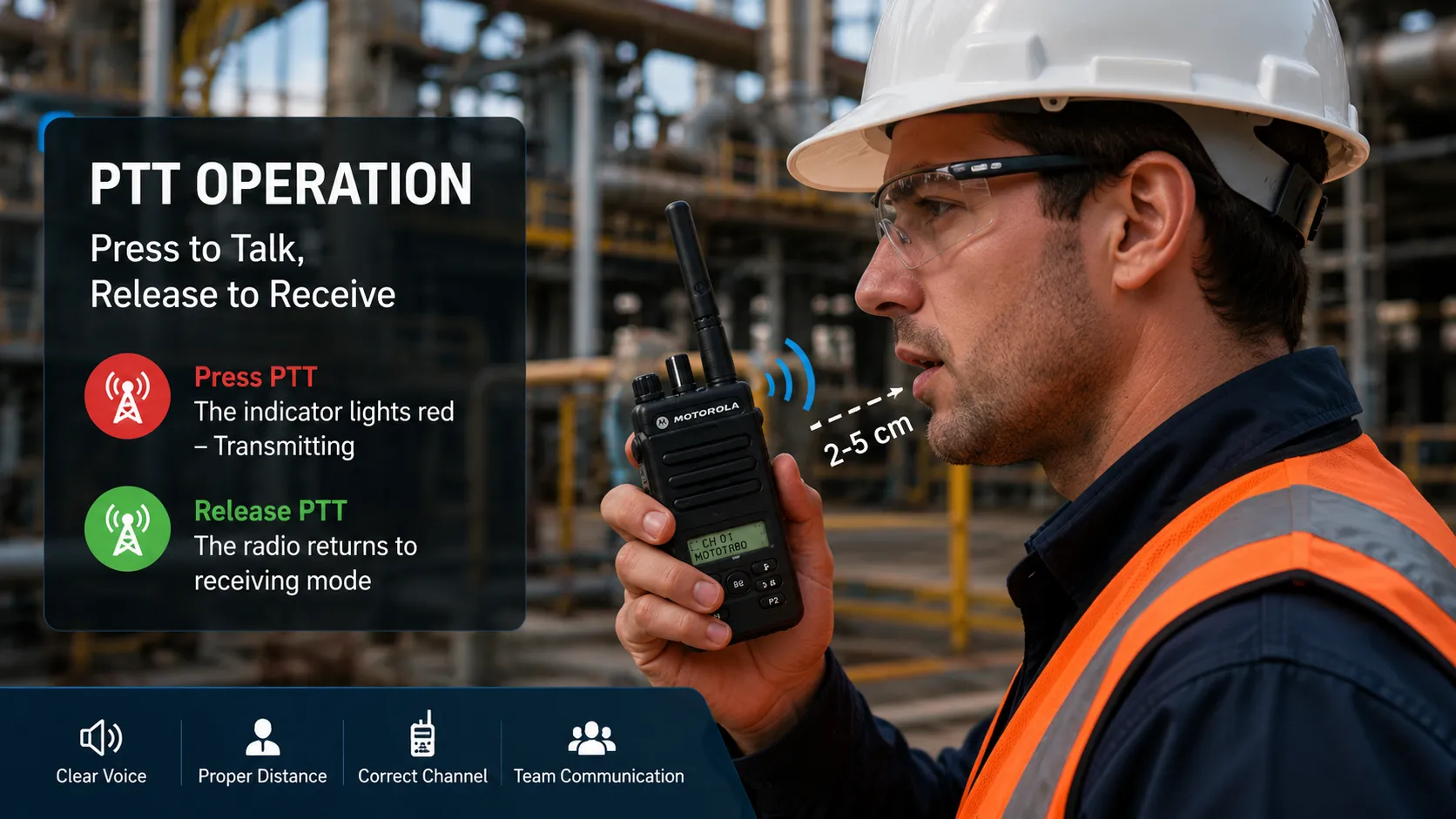
The PTT button means Push-to-Talk. When the user presses and holds the PTT transmit key, the indicator light usually turns red. This means the radio is in transmitting mode. At this moment, the user can speak into the microphone, and other radios on the same channel can receive the voice.
For clear audio, keep the microphone about 2–5 cm from the mouth. Speak clearly and avoid shouting directly into the microphone, because excessive sound pressure may cause distortion. After speaking, release the PTT button immediately so that the radio returns to receiving mode.
2. Release the PTT Button to Receive
When receiving messages, no key needs to be pressed. The radio should remain on the same channel as the transmitting radio. Once the other party presses PTT and speaks, the receiving radio will play the voice through its speaker.
In field communication, a simple rule should be followed: press, pause briefly, speak, and release. The short pause after pressing PTT gives the radio time to enter transmission mode and helps avoid missing the first word of the message.
3. Use Forced Receiving Only When Necessary
Some radios include a monitor or forced receiving function. When this key is pressed, the indicator light may turn green, showing that the radio is in forced receiving mode. This function is mainly used when the received signal is weak and the operator needs to monitor faint audio or open the squelch temporarily.
Forced receiving is not normally required during daily use. It consumes more power than standard receiving mode, so it should not be used continuously unless there is a clear communication need.
4. Keep Radios on the Same Channel
Radios of the same brand and same model are often shipped with the same default frequency plan, so they can communicate directly when set to the same channel. Radios of different models may also communicate if they operate on the same frequency band and are correctly programmed.
In professional deployments, frequency settings should be managed carefully. Channel planning helps avoid interference, improves operational discipline, and makes it easier for dispatch centers to organize teams by area, department, task, or emergency level.
5. Understand the Channel Scan Function
Not every two-way radio includes a channel scan function. On some models, channel position 16 may not be marked as “16” but as “S,” which usually indicates scan mode. However, this function often needs to be configured through programming software before it can work properly.
When scan mode is enabled, the radio can search channels 1–15 and stop on a channel where active communication is detected. If scan mode is not configured, the “S” position may simply work like a normal channel with a temporary fixed frequency.
Important Safety and Maintenance Precautions
Keep the Radio in the Correct Position During Transmission
When transmitting, keep the radio vertical and keep the microphone close enough for clear speech. The recommended speaking distance is about 2–5 cm from the mouth. For RF safety and product reliability, operators should follow the minimum distance requirements stated in the specific radio model manual.
If the handheld radio is carried on the body, avoid pressing PTT when the antenna is pressed directly against the body. The antenna should remain properly positioned and unobstructed during transmission.
Avoid Frequent Power On and Power Off Operations
During use, avoid repeatedly switching the radio on and off in a short time. Frequent power cycling may affect user experience, battery stability, and device reliability. The volume should also be adjusted to a comfortable level that is loud enough for the working environment but not excessive.
Do Not Twist, Bend, or Use a Damaged Antenna
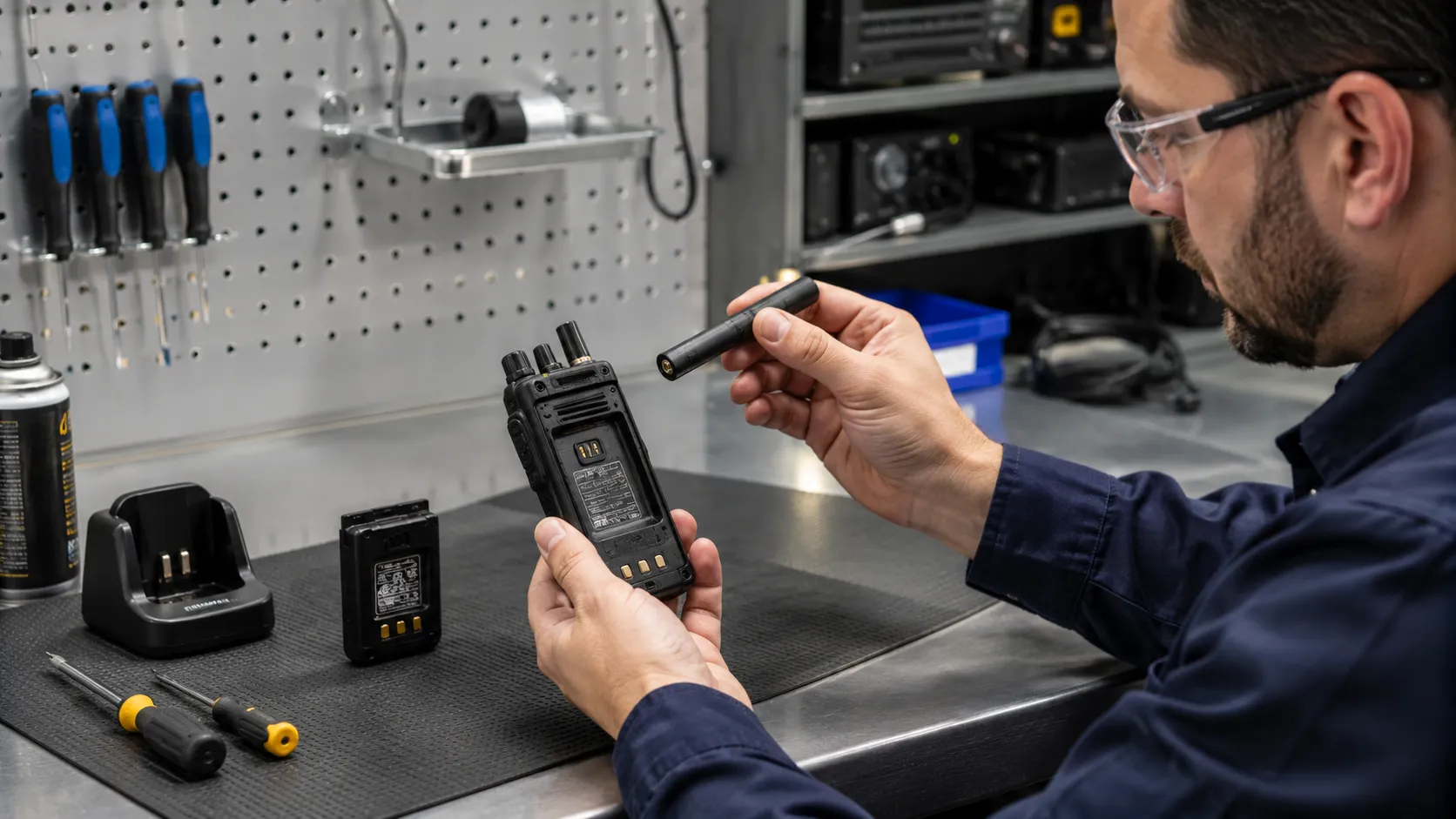
The antenna is one of the most important parts of a wireless two-way radio. During use, do not twist, bend, pull, or remove the antenna casually. A damaged, cracked, loose, or broken antenna should not be used.
A faulty antenna can reduce communication distance, cause unstable transmission, increase signal loss, and may even damage the radio’s RF circuit in serious cases. For industrial users, regular antenna inspection should be included in routine equipment maintenance.
Keep the Radio Dry in Rainy or Humid Conditions
In rainy weather or humid environments, the radio should be kept as dry as possible. Do not place the radio directly under an air conditioner outlet or in a location where condensation may occur. Moisture can enter the device and cause circuit board oxidation.
When using a radio outdoors in rain, a waterproof protective cover is recommended. Even for radios with waterproof protection, operators should still avoid unnecessary water exposure, especially around the speaker, microphone, battery contacts, and accessory ports.
Clean the Radio Correctly
If the radio housing is covered with mud, dust, or oil, do not place the whole radio directly into water for cleaning. Use a soft cloth with neutral detergent to wipe the surface. For waterproof models, gentle rinsing may be possible, but high water pressure should be avoided.
After cleaning, dry the radio surface before storage or charging. Pay special attention to the battery interface, charging contacts, microphone area, speaker grille, and antenna base.
What to Do If Water Enters the Radio
If water enters the radio, remove the battery immediately. Do not press PTT, do not test the speaker, and do not attempt voice communication. Continuing to operate a wet radio may cause short circuits and further internal damage.
Wipe the radio with a dry cloth and send it to a repair station or qualified maintenance center as soon as possible. Early handling can reduce the risk of circuit corrosion and improve the chance of repair.
From Standalone Radios to Becke Telcom Industrial Communication Solutions
Traditional walkie-talkies are useful for local team communication, but many industrial users need more than short-range voice. Control rooms, emergency command centers, tunnel operations, factories, ports, mines, power plants, and transportation sites often need radio communication to connect with IP phones, SIP dispatch consoles, public address systems, CCTV, alarms, and recording platforms.
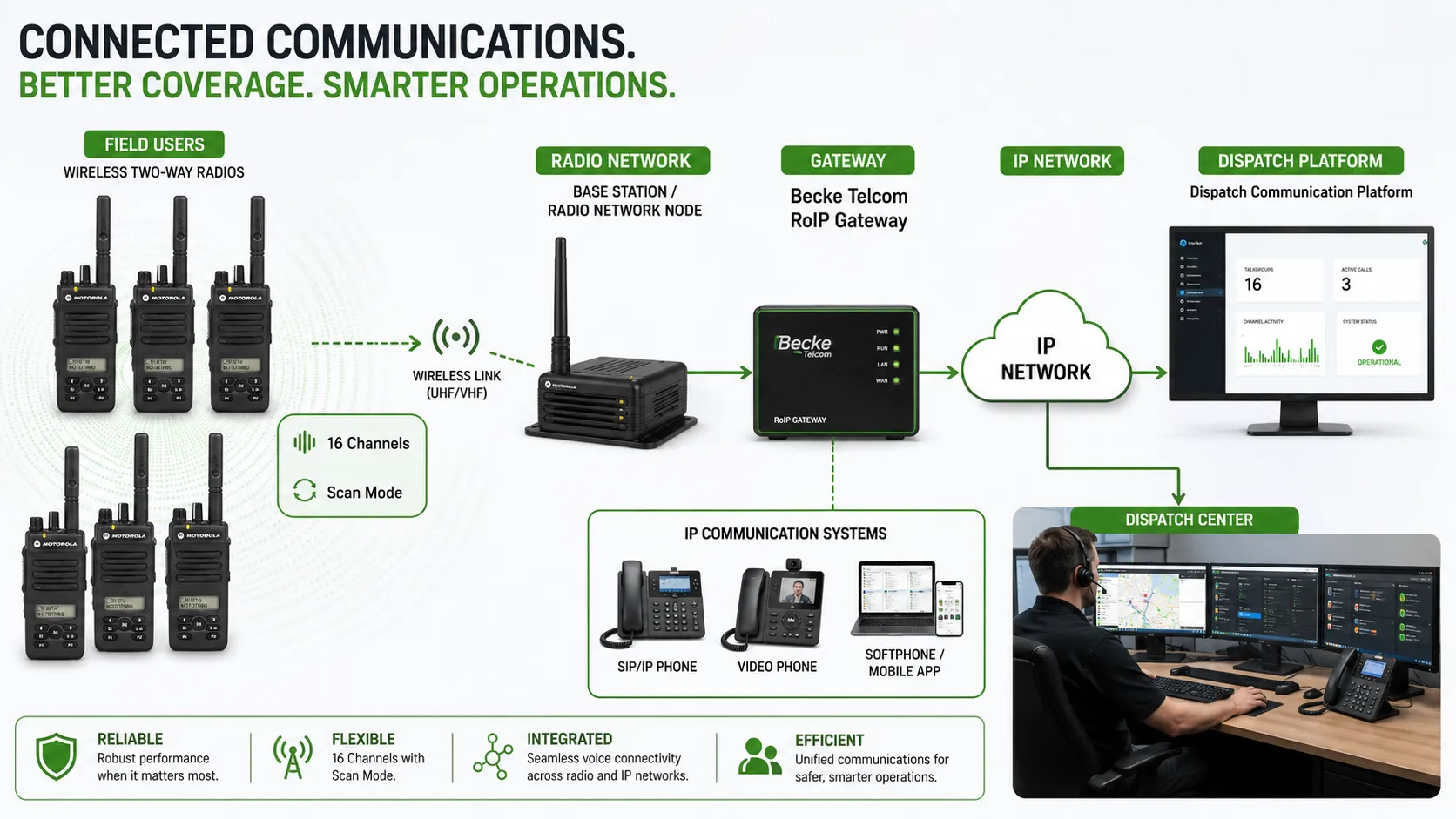
Becke Telcom provides industrial communication solutions that can integrate wireless radio networks with IP-based communication systems. Through RoIP gateways, SIP servers, dispatch platforms, industrial telephones, emergency intercoms, and broadcast systems, radio users can communicate with control-room operators and other IP endpoints in a unified architecture.
Typical Becke Telcom Integration Architecture
Radio Network and RoIP Gateway
A RoIP gateway connects radio communication with IP networks. It allows walkie-talkie users to communicate with SIP phones, dispatch consoles, or remote command centers. This is especially valuable when field teams use handheld radios while managers and operators use IP-based communication terminals.
Dispatch Console and SIP Communication Platform
A dispatch console can help operators monitor communication groups, initiate calls, coordinate emergency response, and connect radio users with other communication systems. In Becke Telcom solutions, SIP communication can be combined with industrial telephones, emergency call stations, IP speakers, paging gateways, and control-room systems.
Emergency Broadcast and Alarm Linkage
In high-risk environments, radio communication can be linked with emergency broadcasting, CCTV, access control, fire alarms, and environmental monitoring systems. When an incident occurs, the command center can coordinate voice dispatch, site paging, emergency notification, and event handling in one workflow.
For industrial users, two-way radio operation is not only about pressing PTT. It is also about channel planning, device maintenance, safe transmission habits, and integration with a reliable communication command system.
Applications of Wireless Radio and Becke Telcom Communication Systems
Factories and Industrial Parks
Wireless radios support daily production coordination, equipment inspection, logistics communication, security patrol, and emergency response. When connected with Becke Telcom dispatch and SIP systems, factory teams can communicate with control rooms, office extensions, emergency phones, and PA broadcast points.
Tunnels, Transportation, and Utility Corridors
In tunnels and transportation facilities, radio communication can support maintenance teams and emergency workers. Integration with broadcast systems, CCTV linkage, fire alarms, and dispatch platforms helps build a closed-loop emergency response process.
Ports, Mines, Energy, and Petrochemical Sites
Harsh environments require stable and disciplined communication. Radio users may work in noisy, dusty, humid, or outdoor areas. Becke Telcom industrial communication solutions can combine rugged telephones, SIP intercoms, paging systems, dispatch consoles, and RoIP gateways to improve field-to-control-room coordination.
Best Practices for Professional Two-Way Radio Management
For business and industrial users, radios should be managed as part of a communication system rather than as isolated devices. Each team should have a clear channel plan, charging routine, maintenance checklist, antenna inspection rule, and emergency communication procedure.
Operators should be trained to press PTT before speaking, keep the microphone 2–5 cm from the mouth, release the button after speaking, avoid unnecessary forced receiving, protect the antenna, keep the device dry, and remove the battery immediately if water enters the radio.
Conclusion
Wireless two-way radios are simple to use, but correct operation and maintenance directly affect communication quality, battery life, device reliability, and field safety. The most important rules are to use the same channel, press and hold PTT only when speaking, keep the microphone at the right distance, avoid damaged antennas, protect the radio from water, and handle water ingress immediately.
For organizations that need more advanced communication, Becke Telcom can help extend traditional radio communication into a unified industrial communication system. With RoIP gateways, SIP dispatch, emergency telephones, public address systems, CCTV linkage, and alarm integration, field radio users can become part of a complete command and emergency response network.
FAQ
How do I talk on a wireless two-way radio?
Set all radios to the same channel, press and hold the PTT button, keep the microphone about 2–5 cm from your mouth, speak clearly, and release the button after speaking.
Why does the radio indicator light turn red?
A red indicator usually means the radio is transmitting. Other radios on the same channel can receive your voice while you are pressing the PTT button.
What does the green indicator mean during forced receiving?
On many radios, a green indicator may appear when the monitor or forced receiving function is active. This function is mainly used for weak signals and is not recommended for continuous daily use because it consumes more power.
Can different radio models communicate with each other?
Yes, different radio models may communicate if they use the same frequency band and are correctly programmed. In professional use, programming software is often used to adjust frequency and channel settings.
What should I do if water enters my radio?
Remove the battery immediately, do not press any keys, do not test voice operation, wipe the device dry, and send it to a qualified repair center as soon as possible.
How can Becke Telcom help with radio communication integration?
Becke Telcom can integrate wireless radio networks with RoIP gateways, SIP servers, dispatch platforms, industrial telephones, emergency intercoms, PA broadcasting, CCTV linkage, and alarm systems for unified industrial communication.







