


LCD, short for Liquid Crystal Display, is a flat-panel display technology that uses liquid crystal materials, polarizers, electrodes, and a backlight system to present images, text, graphics, video, and user interface information. It is widely used in office monitors, embedded terminals, industrial panels, medical devices, control rooms, kiosks, communication equipment, consumer electronics, building systems, transportation displays, and public information screens.
From a deployment perspective, LCD technology is valued not only because it can show clear visual content. Its real advantage comes from a combination of thin structure, predictable power consumption, mature supply chain, wide size range, flexible installation, stable image performance, and compatibility with many control interfaces. These qualities make it suitable for both everyday office environments and specialized equipment applications.
From Display Component to Deployment Asset
When a display is selected for a project, the decision is rarely based on image quality alone. Engineers, system integrators, facility managers, and product designers also consider thickness, weight, mounting method, heat output, power budget, viewing distance, brightness, interface type, maintenance access, and long-term availability.
LCD panels perform well in many of these practical areas. They can be made thin enough for wall-mounted screens, compact enough for embedded devices, large enough for conference rooms, and rugged enough for many industrial panels when protected by suitable enclosure design.
This is why LCD technology continues to appear in many deployment scenarios even as other display technologies evolve. It offers a balanced combination of cost, performance, availability, and integration convenience.
Thin Structure and Space Efficiency
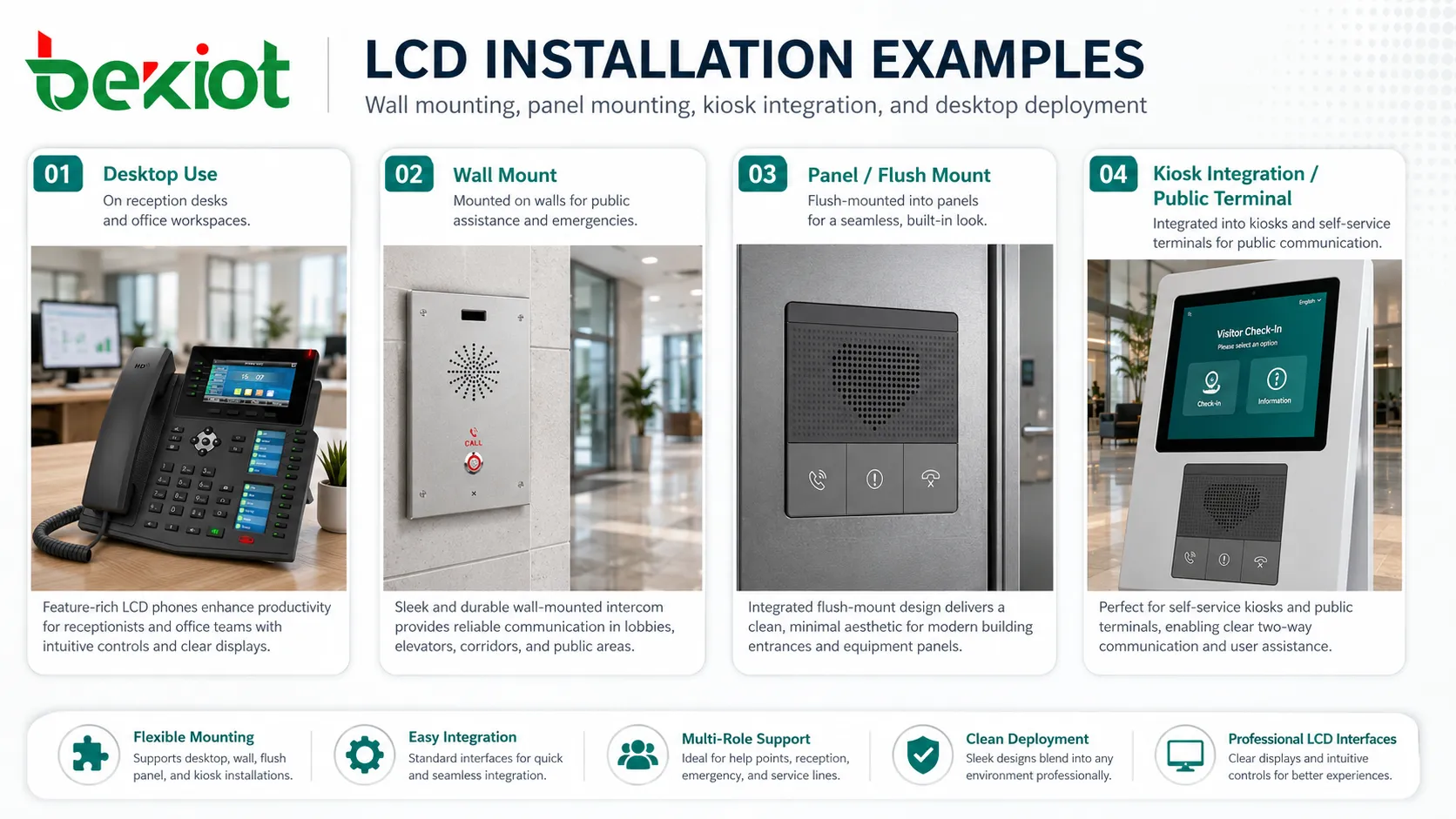
One of the strongest deployment advantages is the flat and lightweight structure. Compared with older display technologies, LCD screens require much less depth, making them easier to install in desks, cabinets, consoles, kiosks, racks, wall panels, vehicle dashboards, medical carts, and equipment front panels.
In offices, this means more workspace and cleaner cable management. In embedded systems, it means product designers can create smaller and lighter devices. In control rooms, it allows multiple displays to be mounted on walls or consoles without consuming excessive space.
For environments where equipment density matters, the physical profile of the display can directly affect layout efficiency. A thinner screen may allow better airflow, easier service access, improved operator ergonomics, and more flexible mounting options.
Power Consumption and Heat Control
LCD screens are generally efficient for long-hour operation, especially when brightness is properly configured. Power consumption varies by screen size, backlight type, brightness level, refresh rate, resolution, and usage pattern, but the technology is well suited to environments where displays remain active for many hours each day.
Lower power use also helps reduce heat output. This is important in enclosed terminals, industrial cabinets, medical devices, small kiosks, and control consoles where thermal design is limited. Less heat can support longer component life and reduce the need for aggressive cooling.
In large deployments, power savings become more visible. A building with many monitors, kiosks, status panels, room displays, and digital signage screens benefits from predictable energy planning and simpler electrical load management.
Readable Visual Output for Daily Operation
Stable Text and Interface Display
Many deployment scenarios involve text-heavy interfaces rather than full-motion video. Examples include menus, dashboards, device status pages, alarm lists, configuration screens, spreadsheets, reports, call status windows, maps, and monitoring panels. LCD technology is well suited to stable, sharp, structured information display.
This makes it practical for office work, industrial HMI panels, medical instruments, network management systems, POS terminals, and service kiosks. Clear text display reduces operator fatigue and helps users make decisions faster.
Wide Resolution Options
LCD products are available across many resolutions, from small embedded panels to high-resolution desktop and professional monitors. This allows designers to match the display to the amount of information that must be shown.
A small device may need only a simple status screen, while a control room may need high-resolution layouts with maps, camera feeds, alarms, charts, and multiple application windows. The wide resolution range makes system design more flexible.
Adjustable Brightness
Brightness control is important during deployment. A screen used in a bright public area may need higher brightness, while a screen used in an office, hospital room, control room, or nighttime environment may need lower brightness to reduce glare and eye strain.
Adjustable backlight control allows the same display technology to serve different lighting conditions. Some systems also support automatic brightness adjustment through ambient light sensors.
Installation Flexibility in Real Projects
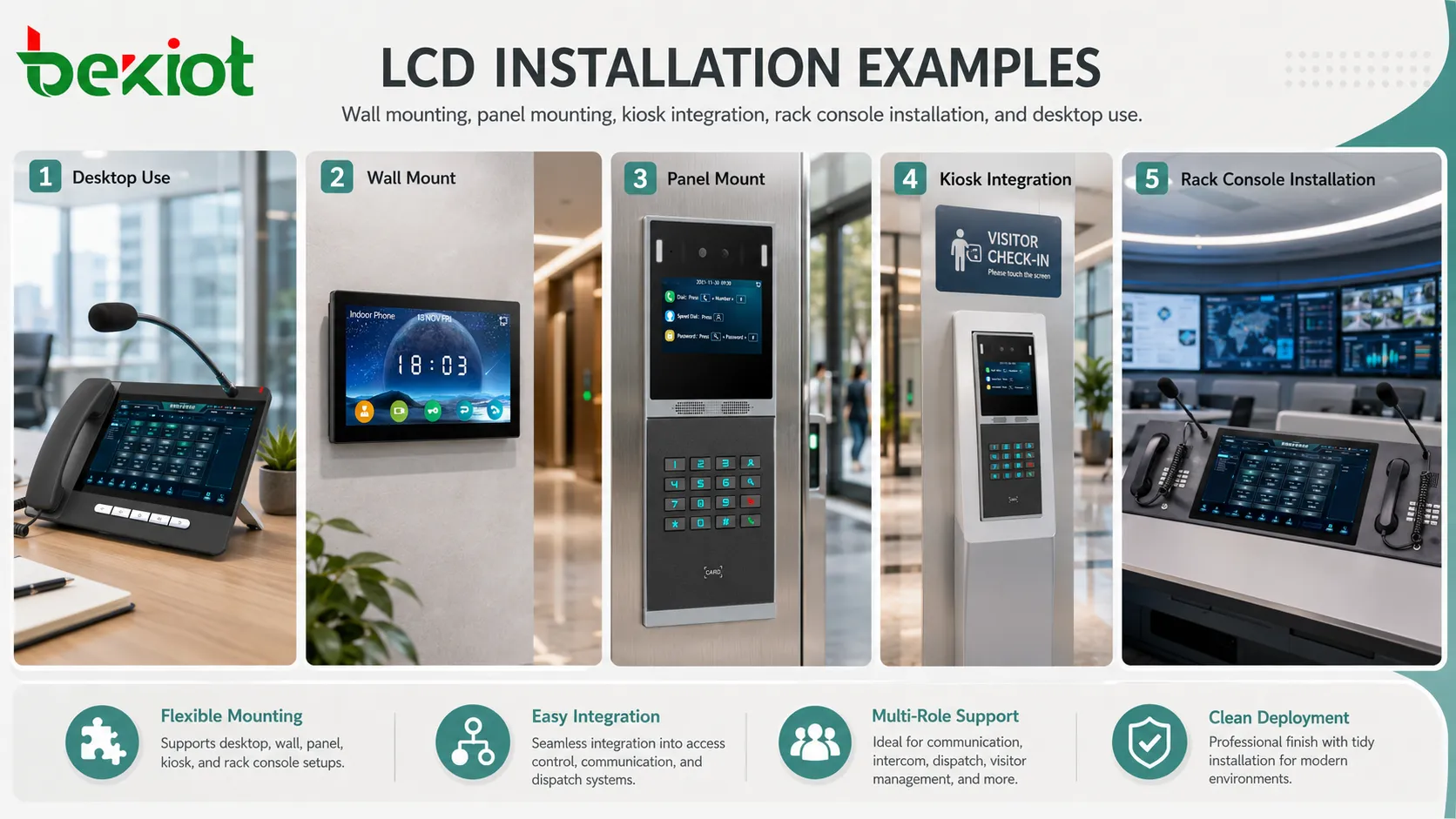
LCD displays can be deployed in many physical formats. They may be installed as desktop monitors, wall displays, open-frame panels, rack console screens, touch terminals, embedded HMI modules, portable device screens, vehicle displays, or digital signage panels.
Mounting options are also diverse. Depending on the model, a display may support VESA mounting, panel mounting, flush mounting, bracket mounting, arm mounting, kiosk integration, or custom enclosure installation. This gives integrators more freedom when designing workstations, public terminals, production equipment, or monitoring stations.
Deployment flexibility is especially useful in projects that combine multiple user roles. Operators may need large dashboard screens, technicians may need embedded maintenance panels, visitors may use kiosk displays, and managers may use office monitors. A mature display ecosystem makes it easier to support all of these requirements.
Interface Compatibility and System Integration
Common Display Interfaces
LCD modules and monitors can support many connection types, such as HDMI, DisplayPort, VGA, DVI, LVDS, eDP, MIPI, USB-C, or custom embedded interfaces depending on the product category. This compatibility makes integration easier across consumer, office, industrial, and embedded systems.
For office and conference environments, standard interfaces simplify connection to PCs, laptops, docking stations, media devices, and presentation systems. For embedded products, board-level interfaces allow compact integration with main control boards.
Touchscreen Support
Many LCD deployments include touch input. Resistive touch, capacitive touch, infrared touch, and optical touch technologies can be combined with the screen depending on environment and use case.
Touch integration is valuable for kiosks, industrial HMIs, medical carts, meeting room panels, building control terminals, vending machines, self-service devices, and access control interfaces. The display becomes both an output device and an input surface.
Embedded Control Options
In product design, LCD modules can be paired with controllers, driver boards, backlight boards, touch controllers, interface converters, and firmware settings. This allows manufacturers to adapt the display to specific equipment functions.
For example, an industrial terminal may need wide-temperature operation, fixed brightness control, glove-compatible touch input, and a sealed front panel. An office monitor may instead prioritize color quality, comfort settings, and multiple input ports.
Cost, Availability, and Lifecycle Value
LCD technology is mature and widely produced. This creates a broad supply chain with many panel sizes, formats, resolutions, brightness levels, and price points. For project deployment, this availability helps buyers choose a practical balance between performance and cost.
Cost is not limited to the purchase price. Installation cost, mounting accessories, power use, maintenance requirements, replacement availability, and compatibility with existing infrastructure also matter. A display that is easy to source and replace can reduce long-term operational risk.
For products with long lifecycle requirements, panel availability should still be reviewed carefully. Consumer display models may change quickly, while industrial or embedded displays may offer longer supply continuity. Selecting the right product class is important for future maintenance.
Environmental Adaptation
Office and Indoor Areas
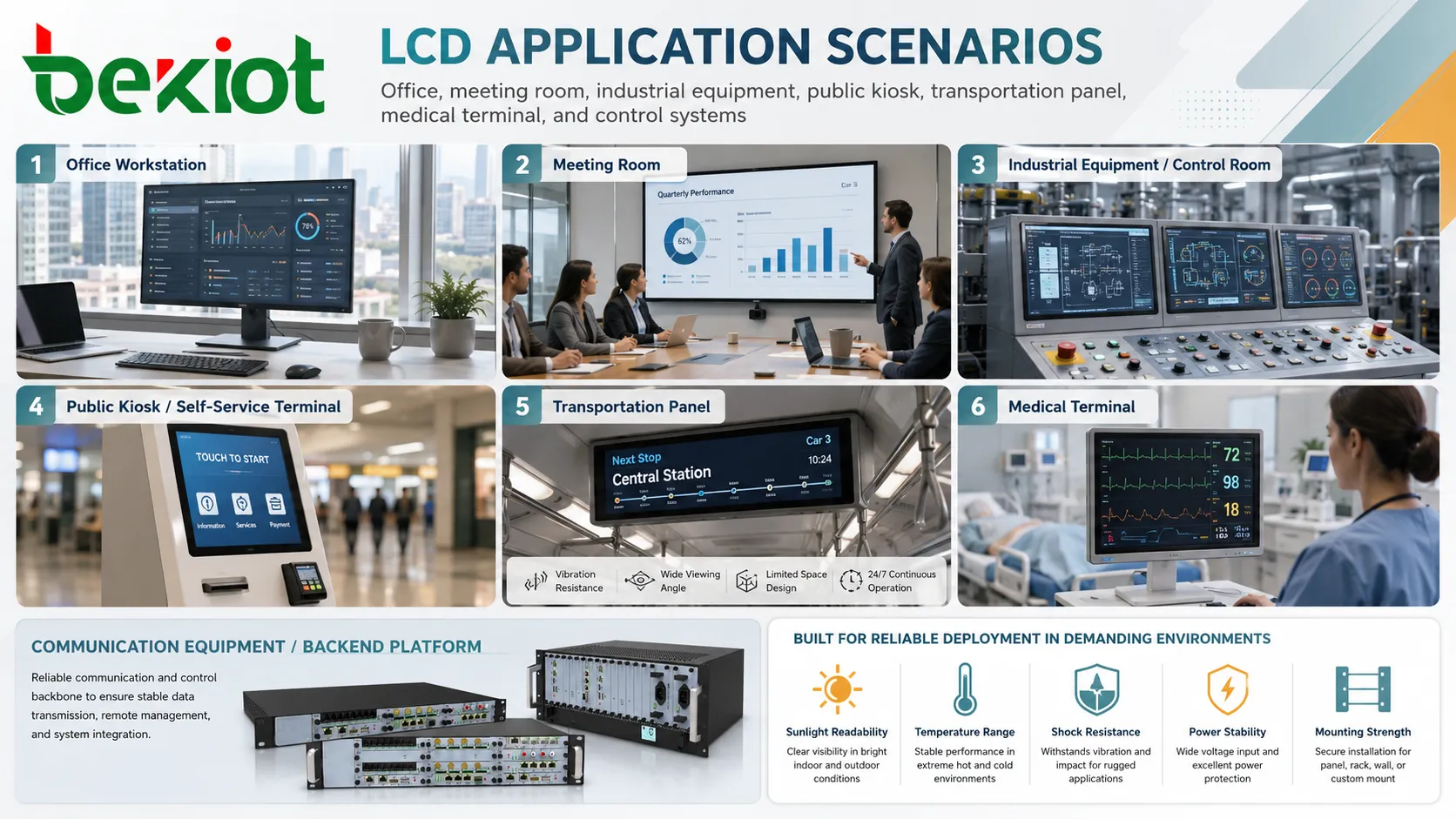
In office environments, LCD screens are used for workstations, meeting rooms, reception displays, scheduling panels, dashboards, and collaboration systems. The main priorities are comfort, resolution, color consistency, low eye strain, and reliable daily operation.
Adjustable stands, anti-glare surfaces, blue-light reduction modes, and ergonomic mounting can improve the user experience in long working sessions.
Industrial and Equipment Panels
In industrial use, the display may need protection against dust, vibration, temperature variation, electrical noise, moisture, oil, cleaning chemicals, or mechanical impact. The panel itself is only one part of the design; enclosure, sealing, grounding, shielding, and mounting are equally important.
Industrial LCD terminals often use strengthened front glass, sealed bezels, wide-temperature panels, high-brightness backlights, and rugged connectors to support harsh environments.
Public and Self-Service Terminals
Kiosks, ticketing machines, wayfinding terminals, parking payment stations, and public inquiry systems require screens that remain readable and easy to operate. The display may need touch support, vandal resistance, brightness control, and protection against continuous use.
For public deployment, interface design and screen placement are as important as panel specifications. Users should be able to see and operate the screen without confusion.
Transportation and Vehicle Systems
Transportation environments may include vibration, changing light conditions, limited space, and continuous operation. LCDs are used in dashboards, passenger information displays, ticketing systems, railway panels, marine displays, and vehicle terminals.
Deployment should consider sunlight readability, temperature range, shock resistance, power stability, and mounting strength.
Visual Performance Factors to Review
Brightness should match the installation location. A screen placed near windows, outdoors under shade, or in a bright lobby needs a different brightness level from a screen used in a dim control room.
Viewing angle matters when several users view the same screen. Wide viewing angles are useful in meeting rooms, monitoring stations, public displays, and equipment panels viewed from different positions.
Contrast and color quality affect readability and interpretation. For office and monitoring work, consistent contrast helps users read interface elements. For design, medical imaging, and inspection tasks, color accuracy may become more important.
Response time and refresh rate may matter for video, gaming, real-time camera feeds, or moving graphics. For static dashboards or text displays, readability and stability may matter more than fast motion performance.
Maintenance and Long-Term Reliability
LCD maintenance usually focuses on screen cleaning, backlight performance, connector stability, power adapter health, mounting security, firmware settings, and environmental protection. In commercial or industrial deployments, preventive inspection can reduce unexpected failures.
Backlight aging should be considered. Over time, brightness may decrease, especially in high-brightness or long-hour operation. Systems that run 24/7 should use display models designed for continuous operation rather than ordinary consumer-grade screens.
Touchscreen surfaces may require additional care. Scratches, chemical cleaners, dust, grease, gloves, water droplets, or damaged protective films can affect usability. Cleaning procedures should match the screen material and application environment.
Selection Guidance for Deployment
Start with the use case, not only the panel size. A control room display, kiosk panel, office monitor, embedded terminal, and vehicle screen have different requirements for brightness, viewing angle, mounting, durability, interface, and power.
Check the operating environment. Temperature, humidity, sunlight, dust, vibration, cleaning frequency, electrical noise, and user behavior can all affect display performance. A screen that works well on a desk may fail in a public kiosk or factory cabinet.
Match the interface to the host system. Embedded products may need specific panel interfaces and driver support, while office deployments may need HDMI, DisplayPort, USB-C, or docking compatibility.
Consider lifecycle and replacement. Large deployments should avoid hard-to-source models unless long-term supply is confirmed. For public or industrial systems, spare parts and mounting compatibility may be important.
Test before rollout. A pilot installation can reveal glare, viewing angle issues, touch response problems, mounting height errors, cable strain, heat buildup, or user interface problems before a full deployment begins.
The deployment strength of LCD technology comes from balance: thin structure, practical power use, mature integration, flexible mounting, broad availability, and stable visual performance.
FAQ
Is an LCD screen suitable for continuous 24/7 operation?
It depends on the model. Some displays are designed for continuous commercial or industrial use, while ordinary consumer monitors may not be suitable for uninterrupted operation.
What causes poor readability after installation?
Common causes include insufficient brightness, glare, wrong mounting angle, low contrast, unsuitable viewing distance, dirty surface, or poor interface scaling.
Can LCD panels be used outdoors?
They can be used outdoors when the display is designed with suitable brightness, temperature range, sealing, UV protection, enclosure design, and sunlight readability. Standard indoor screens are usually not enough.
How should a touchscreen LCD be cleaned?
Use cleaning methods recommended for the screen surface. Avoid harsh chemicals, excessive liquid, abrasive cloths, and pressure that may damage coatings or touch sensors.
What should be checked before replacing an embedded display?
Check size, resolution, interface type, connector pinout, backlight voltage, touch controller compatibility, mounting holes, firmware support, brightness level, and operating temperature range.







