


Disaster recovery technology is a combination of backup systems, replicated infrastructure, standby environments, recovery procedures, monitoring tools, and operational plans used to restore business services after a major failure. It helps organizations recover from events such as hardware failure, data corruption, ransomware, fire, flood, power outage, cloud service interruption, network collapse, accidental deletion, or site-level disruption.
The purpose is not only to “save data.” A complete recovery design must bring applications, databases, servers, identity systems, communication platforms, network routes, user access, security policies, and operating workflows back to a usable state. This is why disaster recovery is both a technical architecture and a business continuity discipline.
Starting from the Business Impact
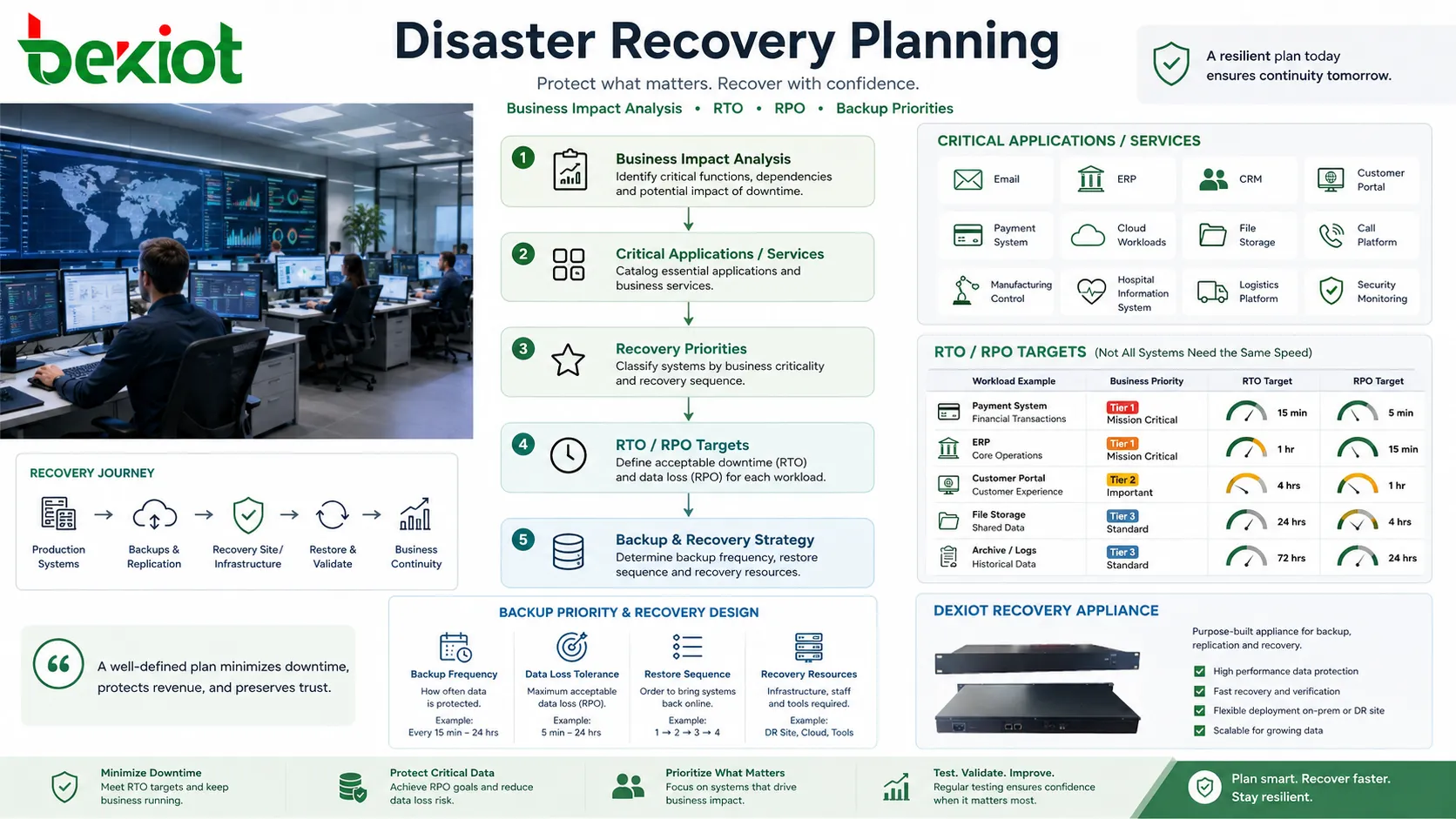
A reliable recovery plan begins with understanding which services are truly critical. Email, ERP, CRM, customer portals, payment systems, cloud workloads, file storage, call platforms, manufacturing control systems, hospital information systems, logistics platforms, and security monitoring may have very different recovery priorities.
Not every system needs the same recovery speed. A public-facing transaction system may need to return within minutes, while an archive system may tolerate several hours. Treating every workload as equally urgent increases cost and complexity. Treating important workloads too casually increases business risk.
Two concepts are often used during planning. Recovery Time Objective, or RTO, defines how quickly a service should be restored. Recovery Point Objective, or RPO, defines how much data loss is acceptable, measured by time. For example, an RPO of 15 minutes means the organization should be able to recover data to a point no more than 15 minutes before the failure.
Core Layers Behind the Technology
Data Protection Layer
The first technical layer protects data. This may include full backup, incremental backup, differential backup, snapshots, continuous data protection, immutable backup, database dump, object storage versioning, and offsite replication.
Good data protection should include multiple restore points. If the latest backup contains corrupted or encrypted data, the organization may need to restore from an earlier clean version. This is especially important during ransomware or accidental deletion events.
Compute Recovery Layer
Data alone is not enough. Applications need servers, virtual machines, containers, operating systems, runtime environments, middleware, licenses, and configuration files. The compute layer defines where workloads will run after the primary environment fails.
Recovery compute may be prepared in another data center, a cloud region, a standby cluster, a virtualized platform, or a managed recovery environment. The more prepared the environment is, the faster recovery can be.
Network Continuity Layer
After systems are restored, users and other systems must reach them. This requires network routes, DNS updates, VPN access, firewall rules, load balancers, IP address plans, certificates, NAT policies, and secure remote access.
Network recovery is often underestimated. An application may be running in the recovery site, but users still cannot access it because DNS records, routing tables, identity paths, or firewall rules were not updated.
Identity and Access Layer
Users, administrators, applications, and service accounts need authentication and authorization after a failure. If identity services are unavailable, many recovered applications may still be unusable.
Directory services, MFA systems, certificate authorities, privileged access tools, password vaults, and SSO platforms should be included in recovery planning. A recovery site without working identity control can become a security and operational problem.
Operational Orchestration Layer
Recovery requires actions in the right order. Databases may need to start before applications. Network rules may need to change before users connect. Storage must be mounted before services run. Monitoring must confirm that the recovered system is healthy.
Orchestration tools automate these steps. They can start workloads, apply scripts, update configurations, trigger failover, validate dependencies, and generate recovery reports. Automation reduces human error during stressful incidents.
How the Recovery Process Usually Runs
Detection and Incident Confirmation
The process begins when monitoring tools, users, administrators, or security systems detect an abnormal event. This may be a server failure, database error, storage outage, ransomware alert, application crash, site power loss, or cloud region problem.
The team must confirm whether the event requires full recovery, partial restoration, or local repair. Not every fault should trigger a full failover. A small application issue may be resolved faster than activating a secondary environment.
Decision and Activation
Once the incident is confirmed, authorized personnel decide whether to activate the recovery plan. The decision should be based on business impact, expected outage duration, safety risk, customer impact, data integrity, and whether the primary site can be restored quickly.
Clear decision authority matters. If no one knows who can approve failover, the organization may waste valuable time during a serious incident.
Data Restoration or Replication Cutover
The recovery environment needs usable data. If the design uses backups, the team restores data from a selected restore point. If the design uses replication, the standby copy may be promoted to active use.
Data selection is critical. Restoring the newest copy is not always correct if corruption or malware already reached that copy. Teams may need to identify the last clean recovery point.
Service Restart and Dependency Order
Applications are restarted according to dependency. Databases, storage, identity services, middleware, application servers, web front ends, APIs, and integrations may need a defined sequence.
Skipping dependency order can create confusing failures. A recovered application may appear broken simply because the database, license server, message queue, or DNS record is not ready.
Validation Before Handover
Before users return to the service, the team should validate that the recovered environment works. This may include login tests, data consistency checks, transaction tests, call tests, API checks, report generation, security review, and monitoring confirmation.
Only after validation should the recovery environment be treated as the active production service. A fast but unverified recovery can create data loss, security gaps, or user confusion.
Disaster recovery works best when it is not treated as a single backup job, but as a coordinated restart of data, systems, networks, identities, users, and business processes.
Main Architecture Models
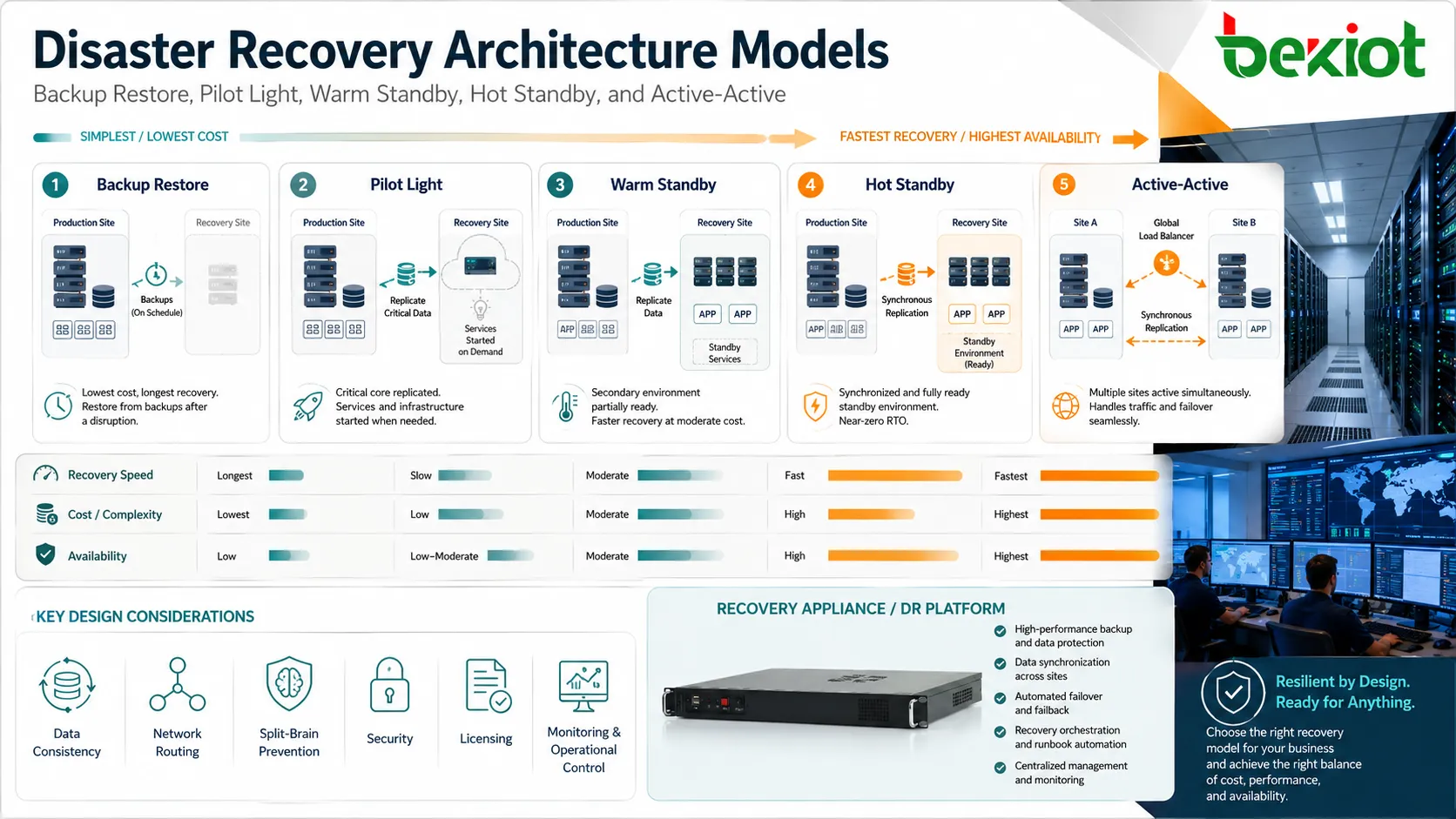
Backup and Restore
The simplest model stores backups and restores them when needed. It is usually lower cost but slower because servers, applications, data, and configurations may need to be rebuilt or restored manually.
This model can work for non-critical systems, small businesses, archive workloads, or applications with longer acceptable downtime. It should still be tested because untested backups may fail during real recovery.
Pilot Light Environment
A pilot light design keeps a minimal recovery environment running. Core components such as databases, network foundation, identity services, or configuration templates may already exist, while application servers are scaled up only during recovery.
This approach balances cost and speed. It is faster than building everything from scratch but cheaper than running a full duplicate environment all the time.
Warm Standby
A warm standby environment keeps more systems running in advance. Data may be replicated regularly, and application services may be installed and partially active. During an incident, the environment is scaled, promoted, or reconfigured to handle production traffic.
This model is useful when downtime must be reduced but a fully active secondary site is too expensive.
Hot Standby or Active-Active
The fastest designs keep a secondary environment continuously synchronized and ready to serve users. In active-active designs, multiple sites may handle live traffic at the same time, with load balancing and replication across locations.
These models reduce downtime but require careful design. Data consistency, network routing, split-brain prevention, licensing, security, monitoring, and operational control become more complex.
Important Technical Features
Automated Backup Scheduling
Automated schedules reduce dependence on manual backup operations. Systems can create backups hourly, daily, weekly, or continuously depending on the required RPO.
Schedules should be aligned with workload behavior. A database that changes every minute needs a different protection strategy from a static document archive.
Immutable and Offline Copies
Immutable backups cannot be changed or deleted for a defined period. Offline or air-gapped copies are separated from the live environment. These protections are important against ransomware, insider threats, accidental deletion, and compromised administrator accounts.
A recovery plan that stores all backups in the same compromised environment may fail when it is needed most.
Replication and Synchronization
Replication copies data from the primary environment to another location. It may be synchronous, where writes are committed to both sides before completion, or asynchronous, where changes are copied shortly after they happen.
Synchronous replication can reduce data loss but requires low-latency links and may affect performance. Asynchronous replication is more flexible across distance but may lose recent changes if the primary site fails suddenly.
Application-Aware Protection
Application-aware protection understands the workload being backed up. Databases, mail systems, virtual machines, file servers, and enterprise applications may need special steps to ensure consistent backups.
For example, simply copying database files while they are changing may not produce a clean restore point. Application-aware snapshots and transaction log handling can improve recovery quality.
Recovery Automation
Automation can start virtual machines, attach storage, update network rules, run scripts, adjust DNS, verify services, and generate incident records. It reduces manual work and makes recovery more repeatable.
Manual recovery may work in small environments, but complex systems usually need documented and automated workflows to reduce mistakes during pressure.
Applications in Different Environments
Enterprise IT Systems
Enterprises use recovery technology to protect ERP, CRM, email, identity systems, file shares, databases, intranet platforms, and business applications. The goal is to keep core operations available after major incidents.
These environments often require tiered recovery. Mission-critical applications receive faster recovery targets, while less urgent systems use lower-cost protection.
Cloud and Hybrid Infrastructure
Cloud environments support snapshots, cross-region replication, infrastructure as code, managed databases, object storage versioning, and automated failover patterns. Hybrid systems may combine on-premises data centers with cloud recovery resources.
Cloud-based recovery can reduce the need for a full secondary data center, but it still requires network planning, security design, cost control, and regular testing.
Industrial and Utility Operations
Factories, power plants, water treatment systems, oil and gas sites, and logistics centers may need recovery plans for control systems, historians, monitoring servers, communication platforms, and operator workstations.
These environments must consider safety, real-time process control, legacy protocols, field device access, and strict change control. Recovery should not create unsafe operating conditions.
Healthcare and Public Services
Hospitals, emergency response centers, government services, and public facilities need access to records, communications, scheduling, security systems, and operational data during disruptions.
Recovery planning should include privacy, audit trails, patient or citizen impact, emergency procedures, and staff access under abnormal conditions.
Telecom and Communication Services
Communication platforms require recovery for call control, routing, media services, recording, voicemail, SIP trunks, gateways, contact center platforms, and user registration data.
Because communication systems often support emergency response and customer interaction, recovery testing should include real call flows rather than only server startup.
Data Integrity and Cybersecurity
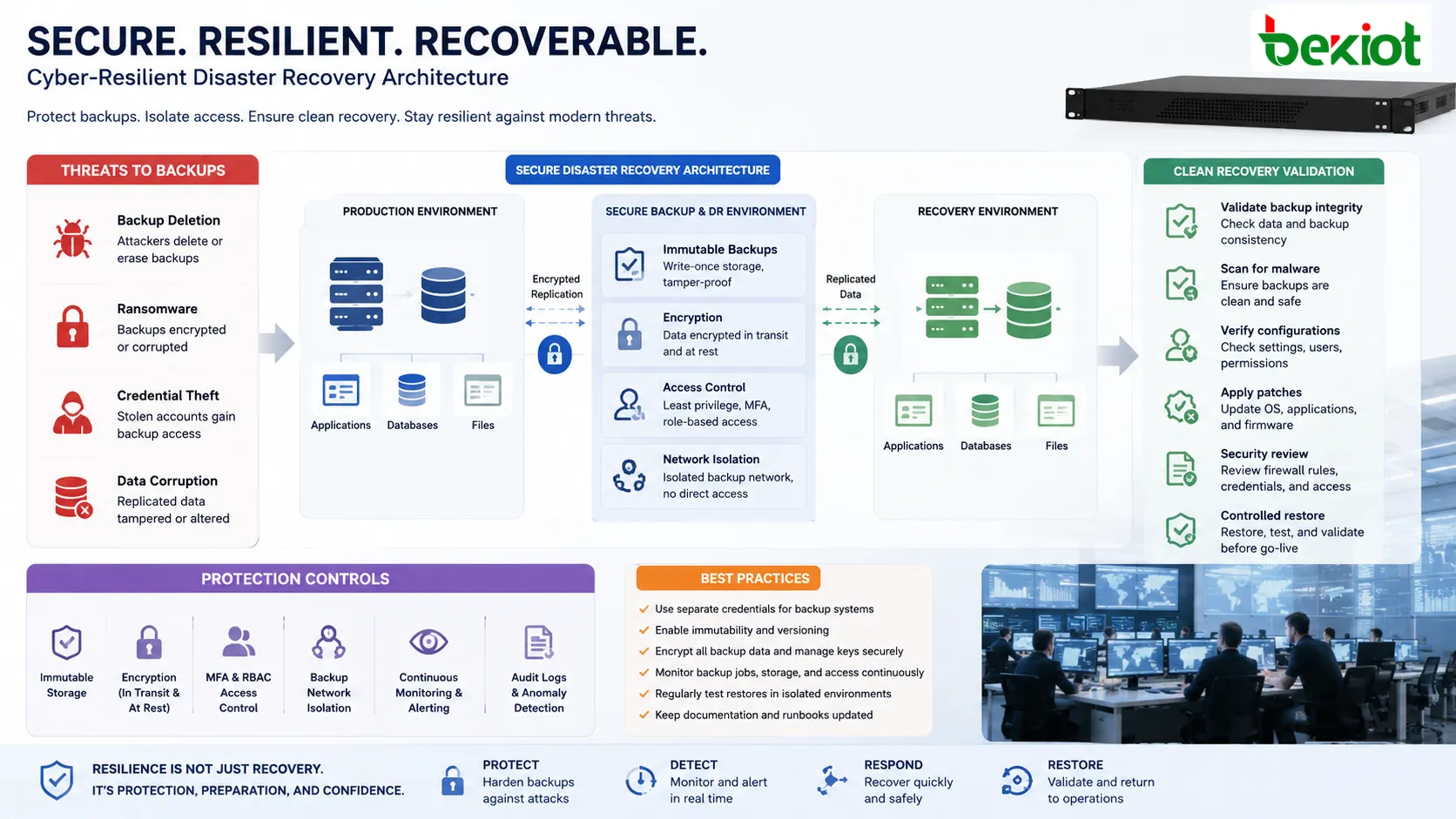
Modern recovery planning must assume that cyberattacks can target backups as well as production systems. Attackers may delete backups, encrypt backup repositories, steal credentials, or corrupt replicated data. This is why backup isolation, access control, immutability, encryption, and monitoring are essential.
Recovery data should be protected in transit and at rest. Encryption keys should be managed carefully because losing the key can make recovery impossible. Backup repositories should not use the same credentials and permissions as ordinary production accounts.
Security validation after recovery is also important. Restoring a system from backup may also restore outdated software, vulnerable configurations, or compromised accounts. Teams should check patches, credentials, firewall rules, and endpoint security before returning service to users.
Testing and Readiness Drills
A recovery plan that is never tested is only an assumption. Testing confirms whether backups are restorable, applications start correctly, users can log in, data is consistent, network routes work, and staff know what to do.
Testing can be performed at different levels. A file restore test checks whether individual data can be recovered. An application recovery test checks whether one service can be restored. A full simulation tests a complete site-level failure and failover process.
Drills should be documented. The team should record recovery time, problems found, missing access, failed scripts, outdated documentation, and corrective actions. Each test should improve the plan.
Common Failure Points
Backups That Were Never Restored
Many organizations discover too late that their backup jobs completed but the data cannot be restored correctly. This may happen because of corrupted files, missing dependencies, wrong credentials, unsupported versions, or incomplete application data.
Restore testing is the only reliable way to prove that backup data is useful.
Missing Configuration Files
Applications may depend on configuration files, certificates, environment variables, routing tables, firewall rules, licenses, and service accounts. If these items are not protected, the data may be restored but the application may not run.
Configuration backup should be treated as part of the recovery scope.
Unclear Ownership
During an incident, confusion over who makes decisions can slow recovery. IT, security, operations, business managers, cloud teams, and vendors may all be involved.
The plan should define roles, approval authority, escalation contacts, and communication channels before a crisis occurs.
Replication of Bad Data
Replication is useful, but it can copy corruption, deletion, or encrypted files to the secondary site. This is why point-in-time recovery and immutable backups remain important even when replication exists.
Replication improves continuity; it does not replace clean historical recovery points.
Network Access Not Ready
A recovered application is not useful if users cannot reach it. DNS, VPN, firewall, load balancer, certificate, routing, and identity dependencies should be included in recovery tests.
Network readiness is often the difference between a technical restore and a usable service.
The real measure of recovery technology is not whether data exists somewhere. It is whether the right people can safely resume the right service within the required time window.
Implementation Checklist
Classify systems by business priority. Define RTO and RPO for each service instead of using one generic target for everything.
Choose the right protection method. Backup restore, snapshots, replication, standby environments, and active-active designs serve different needs and cost levels.
Protect copies from cyber risk. Use immutability, separate credentials, encryption, least privilege, backup monitoring, and offline or isolated copies where appropriate.
Document recovery steps. Include system dependencies, startup order, network changes, login methods, vendor contacts, license requirements, and validation tests.
Test regularly. A recovery process should be practiced before a real incident. Update the plan after infrastructure changes, cloud migrations, application upgrades, and security policy changes.
FAQ
Does cloud hosting automatically provide disaster recovery?
No. Cloud platforms provide useful tools, but the customer still needs to configure backups, replication, regions, permissions, monitoring, recovery procedures, and testing.
How often should recovery plans be tested?
The frequency depends on business risk and system criticality. Critical systems may require regular drills, while less important systems may be tested during scheduled review periods or after major changes.
Can ransomware affect backup systems?
Yes. Attackers may target backup repositories and administrator credentials. Immutable copies, offline copies, separate permissions, and monitoring help reduce this risk.
What is the difference between high availability and disaster recovery?
High availability focuses on keeping services running during smaller failures. Disaster recovery focuses on restoring services after larger disruptions, including site failure, cyberattack, or major data loss.
What should be reviewed after a real recovery event?
Review recovery time, data loss, failed steps, communication gaps, user impact, security findings, vendor response, documentation accuracy, and improvements needed before the next incident.







