


A voice gateway is a network device that connects different voice communication systems and allows them to exchange calls across IP, analog, digital, and legacy telephony environments. In modern VoIP networks, it often works as the bridge between SIP-based communication platforms and traditional systems such as PSTN lines, PBX trunks, analog phones, fax machines, E1/T1 circuits, intercom systems, radio access points, or emergency communication endpoints.
Understanding the Role of a Voice Gateway
Voice communication networks rarely use one technology only. Many organizations already have legacy PBX systems, analog phones, elevator phones, fax devices, public telephone lines, and existing copper wiring. At the same time, they may also be upgrading to SIP servers, IP PBX platforms, cloud communication services, unified communication systems, and dispatch platforms. A voice gateway allows these systems to work together without forcing every device to be replaced at once.
At its simplest level, the gateway converts voice traffic from one side to another. On the IP side, voice is usually carried through SIP signaling and RTP media streams. On the traditional telephony side, the gateway may connect to FXS ports, FXO ports, E1/T1 trunks, GSM channels, or other voice interfaces. By handling signaling conversion, audio encoding, number routing, and interface adaptation, the voice gateway becomes a key part of hybrid communication architecture.
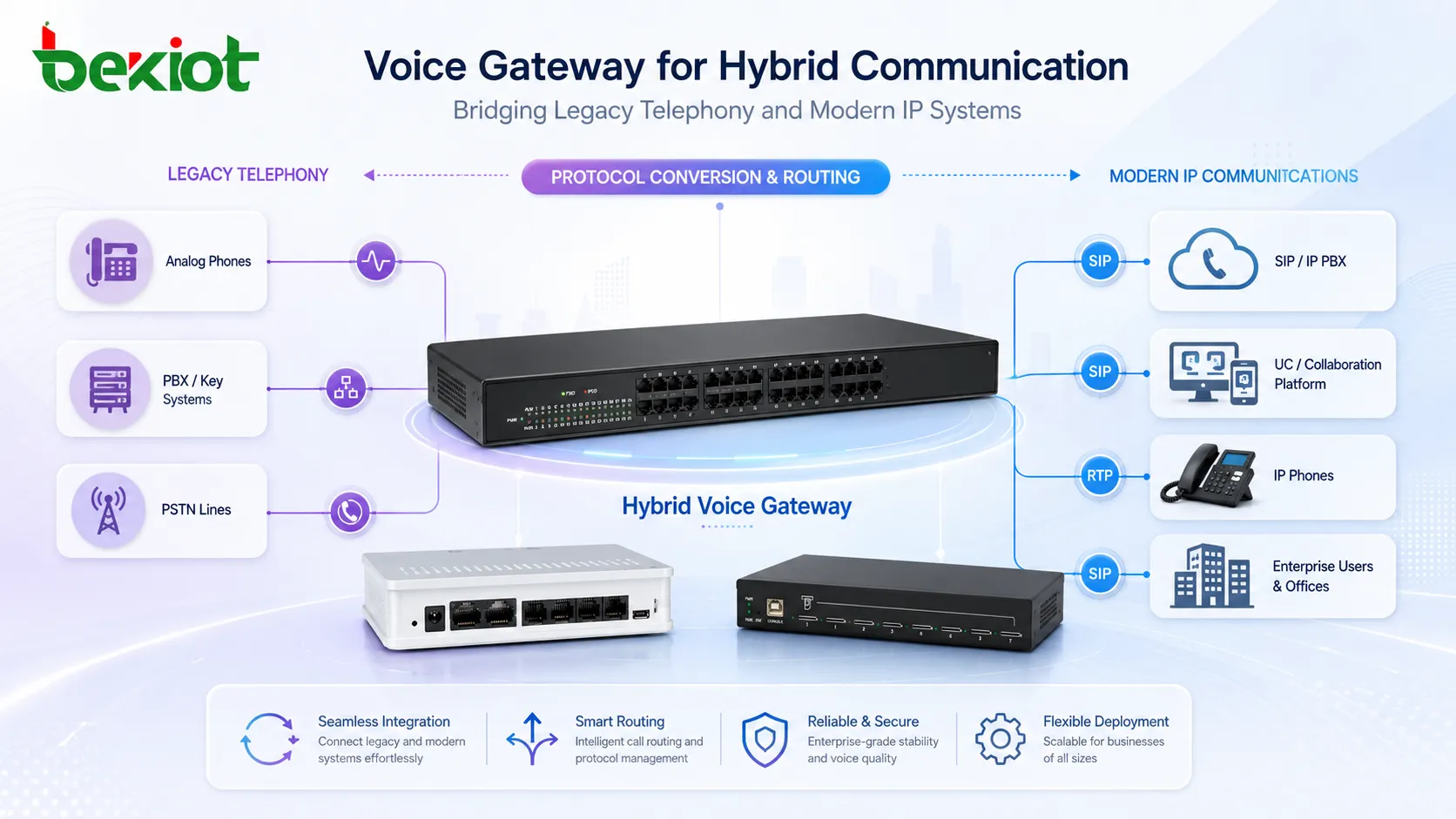
How a Voice Gateway Works
Signaling Conversion
Voice calls require signaling before audio can be transmitted. Signaling controls call setup, ringing, answering, caller ID, hang-up, forwarding, and other telephony functions. In a VoIP network, SIP is the most common signaling protocol. In legacy environments, signaling may come from analog line voltage, FXO/FXS behavior, ISDN PRI, E1, SS7-related interfaces, or PBX trunk protocols.
A voice gateway translates these signaling methods so that one network can understand the other. For example, when an analog phone connected to an FXS port makes a call, the gateway detects off-hook status, receives dialed digits, converts the request into SIP signaling, and sends it to an IP PBX or SIP server. When a SIP user calls a PSTN number, the gateway can route the call through an FXO or E1 trunk to the public telephone network.
Media Processing and Codec Handling
After a call is established, the gateway processes the audio stream. It may convert analog voice into digital packets, decode and encode audio, negotiate codecs, adjust gain, suppress echo, and forward RTP packets across the IP network. Common codecs include G.711, G.729, G.722, and other formats depending on bandwidth, audio quality, and platform compatibility.
Codec selection matters because different networks may have different requirements. A local enterprise LAN may use high-quality codecs, while a bandwidth-limited WAN connection may require compressed audio. A voice gateway helps maintain compatibility between endpoints that do not support the same codec or audio format.
Call Routing and Number Mapping
A gateway also controls how calls move between systems. It may apply dialing rules, prefix processing, inbound route mapping, outbound trunk selection, failover rules, and emergency number routing. These functions are especially important in organizations with multiple branches, mixed PBX systems, or several types of external lines.
For example, internal extensions may be routed to a SIP server, local emergency calls may be sent through a PSTN trunk, long-distance calls may use a selected VoIP carrier, and backup calls may fail over to analog lines when the IP link is unavailable. This makes the voice gateway not only an interface converter, but also a practical routing control point.
Main Features of a Voice Gateway
Multi-Interface Connectivity
Different voice gateway models support different physical and logical interfaces. Some are designed for analog telephony, while others focus on digital trunks, SIP trunk access, GSM channels, radio connection, or branch office integration. The correct choice depends on what the organization needs to connect.
| Gateway Type | Common Interface | Typical Use |
|---|---|---|
| FXS gateway | Analog extension ports | Connects analog phones, fax machines, elevator phones, or emergency phones to VoIP systems |
| FXO gateway | Analog PSTN line ports | Connects IP PBX systems to public telephone lines or legacy PBX extensions |
| E1/T1 gateway | Digital trunk interface | Connects VoIP platforms with carrier trunks or traditional enterprise PBX systems |
| SIP trunk gateway | IP network and SIP signaling | Routes calls between enterprise systems, carriers, and hosted communication platforms |
| Radio or RoIP gateway | Radio interface and IP network | Links two-way radio systems with dispatch platforms or IP voice networks |
Protocol and Codec Compatibility
A reliable voice gateway should support common SIP features, RTP media transport, DTMF transmission methods, caller ID handling, echo cancellation, jitter buffering, NAT traversal support, and major voice codecs. These capabilities help reduce compatibility problems between IP PBX systems, SIP platforms, analog equipment, and carrier services.
In real projects, compatibility is often more important than the number of ports alone. A gateway must work smoothly with the organization’s call server, carrier trunk, existing PBX, emergency endpoint, or dispatch platform. Good interoperability reduces call failure, one-way audio, incorrect caller ID, and dialing rule conflicts.
Failover and Reliability
Voice communication often supports business continuity, site safety, emergency calling, and service response. For this reason, gateways may include failover routing, backup trunk selection, heartbeat detection, power recovery behavior, configuration backup, and network redundancy options.
When an IP PBX, WAN link, or SIP trunk becomes unavailable, a gateway can sometimes route important calls through local PSTN lines or backup trunks. This is valuable for branch offices, security rooms, industrial plants, transportation sites, and emergency communication points that cannot rely on a single call path.
Network Architecture of a Voice Gateway
Basic Enterprise VoIP Architecture
In a basic enterprise architecture, the voice gateway sits between the IP PBX and legacy telephony interfaces. IP phones register to the IP PBX through the LAN. Analog phones or PSTN lines connect to the gateway. The gateway then registers or trunks with the IP PBX using SIP. In this design, the IP PBX handles extension management and call control, while the gateway provides physical connectivity and voice conversion.
This architecture is common in office buildings, hotels, schools, hospitals, manufacturing plants, and branch networks. It allows organizations to keep useful analog endpoints while gradually moving the core system toward VoIP.
Multi-Site and Branch Office Architecture
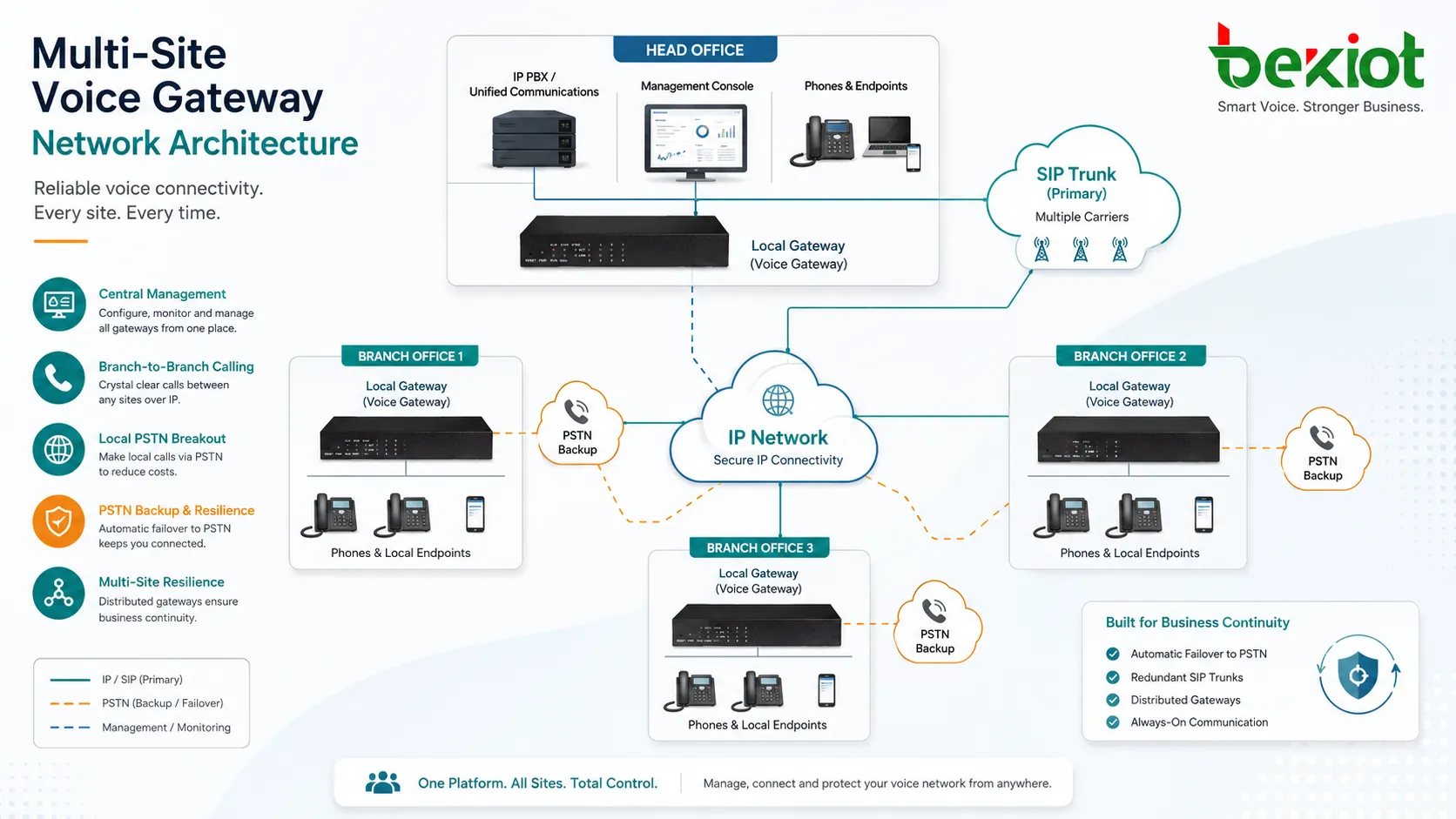
In a multi-site network, each branch may have its own local gateway. Calls between branches can travel over the IP network, while local PSTN access remains available for external calls or backup communication. This design can reduce long-distance costs and improve local resilience.
For large organizations, gateways may be centrally managed or integrated with a unified communication platform. Numbering plans, route rules, emergency numbers, and trunk permissions should be planned carefully to avoid routing loops or inconsistent call behavior between sites.
Hybrid Migration Architecture
Many organizations do not replace legacy telephony systems in one step. A hybrid migration architecture allows old and new systems to run together during the transition period. The voice gateway connects the existing PBX, analog endpoints, carrier trunks, and new SIP-based platform so users can continue making calls during the upgrade.
This approach reduces migration risk. Departments can be moved to VoIP gradually, emergency phones can remain connected, and existing public telephone numbers can continue to operate. It also gives IT teams more time to test call routing, codec behavior, emergency dialing, and user training before full cutover.
Common Applications of Voice Gateways
Connecting Analog Phones to VoIP
Many organizations still use analog phones in elevators, warehouses, guest rooms, security booths, emergency help points, and production areas. Replacing all of these devices may be costly or unnecessary. An FXS gateway allows these analog devices to connect to a SIP-based IP PBX while keeping familiar hardware in place.
This is useful when analog endpoints are reliable, rugged, or already installed in difficult locations. The gateway extends the life of existing equipment while enabling centralized call management through VoIP infrastructure.
Connecting IP PBX to PSTN Lines
An FXO or E1 gateway can connect an IP PBX to public telephone lines. This is useful when organizations need local PSTN access, carrier trunk backup, emergency calling, or integration with an older telephone network. It can also support phased migration from traditional PBX to VoIP.
For small sites, several FXO ports may be enough. For larger offices or carrier-grade access, E1/T1 gateways may provide higher channel capacity and more structured trunk management.
Industrial and Emergency Communication
Industrial sites, power plants, transportation hubs, tunnels, campuses, ports, and emergency operation centers may use voice gateways to connect rugged telephones, dispatch consoles, radio systems, public address systems, alarm endpoints, and control room platforms. In these environments, communication reliability and system interoperability are often more important than simple call cost reduction.
A gateway may help connect field emergency phones to a command center, route alarm calls to a dispatcher, bridge SIP endpoints with legacy PBX lines, or keep a PSTN backup path for critical calls. This makes it a practical component in safety communication and operational continuity design.
Related Product: Becke Telcom IPGA Series Voice Gateway
Key Benefits for Organizations
Lower Migration Cost
A voice gateway allows organizations to reuse existing lines, phones, PBX trunks, and wiring while introducing VoIP step by step. This reduces the need for immediate full replacement and makes communication modernization easier to budget and manage.
For sites with many legacy devices, the gateway can protect previous investment while still enabling SIP trunking, centralized management, and IP-based call routing.
Better Interoperability
Voice gateways solve one of the most common problems in communication projects: different systems cannot talk to each other directly. By supporting multiple interfaces and protocols, a gateway creates a bridge between old and new networks.
This is especially useful for enterprises that have acquired different systems over time, operate multiple locations, or need to integrate emergency, industrial, and office communication into one manageable structure.
Improved Business Continuity
When designed correctly, a voice gateway can support backup call paths and local survivability. If the main SIP trunk or IP network fails, selected calls may still be routed through PSTN lines or local trunks. This can help maintain basic communication during network outages.
For critical sites, gateway redundancy, backup power, local routing rules, and emergency dialing policies should be included in the architecture from the beginning.
Selection Considerations
Port Type and Capacity
The first step is to identify what must be connected. Analog phones require FXS ports. PSTN lines require FXO ports. Digital carrier trunks may require E1 or T1 interfaces. SIP trunk integration may require strong SIP compatibility and security features. Port count should be calculated based on current requirements and near-term expansion.
It is also important to consider call concurrency. A gateway may have many physical ports, but the actual number of simultaneous calls depends on channel capacity, licensing, codec processing, and trunk configuration.
Compatibility with the Voice Platform
Before deployment, the gateway should be tested with the organization’s IP PBX, SIP server, carrier trunk, analog endpoint, or dispatch system. Important test items include registration, inbound calls, outbound calls, caller ID, DTMF, fax behavior, emergency numbers, transfer, hold, call release, and failover routing.
For projects involving Becke Telcom IPGA series gateways, the device can be positioned as a practical bridge for connecting SIP-based platforms with analog or trunk-side voice resources in hybrid VoIP deployment. The final model selection should be based on port type, channel quantity, project topology, and required integration scenario.
Security and Management
Because a voice gateway can connect internal systems with external telephone networks, security should not be ignored. Administrators should configure strong passwords, access control, trusted IP ranges, SIP security rules, call permission policies, and firmware maintenance procedures.
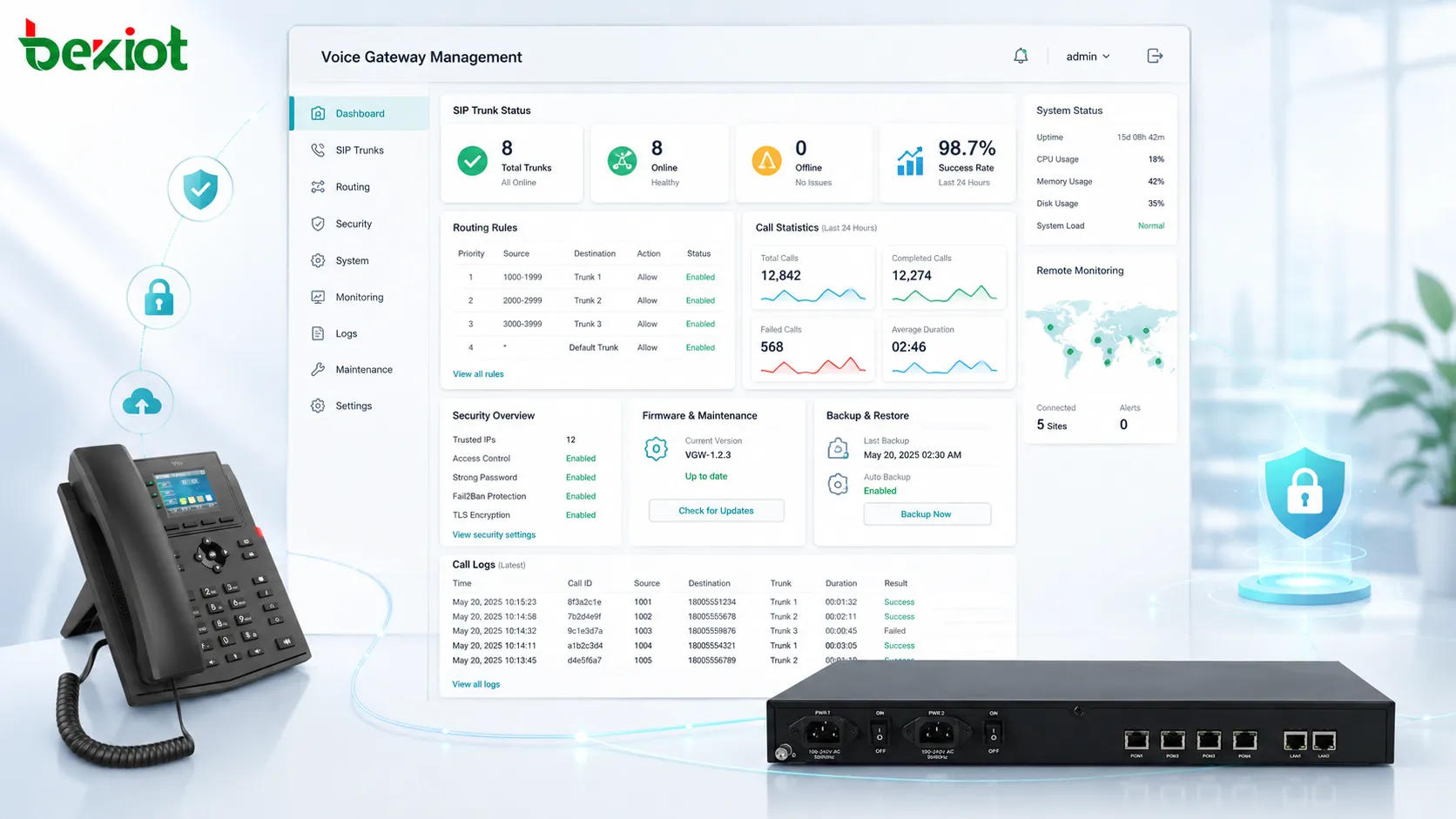
Management convenience is also important. Web configuration, logs, backup and restore, remote monitoring, call statistics, and clear routing tables help reduce maintenance difficulty and shorten troubleshooting time.
Conclusion
A voice gateway is an essential bridge between IP voice networks and traditional telephony infrastructure. It supports protocol conversion, media processing, call routing, trunk connection, analog endpoint integration, and hybrid migration. For organizations moving toward VoIP, it provides a practical way to modernize communication without abandoning useful legacy systems immediately.
The right gateway design depends on interface type, call capacity, platform compatibility, routing requirements, reliability goals, and long-term migration plans. Whether used in office telephony, industrial communication, public safety, hospitality, transportation, or branch networks, a well-planned voice gateway can improve interoperability, reduce migration risk, and strengthen communication continuity.
FAQ
Can a voice gateway work without an IP PBX?
Yes, in some limited scenarios. Certain gateways can route calls directly between ports or connect to a SIP trunk without a full IP PBX. However, most enterprise deployments use an IP PBX or SIP server for extension management, call control, voicemail, permissions, and advanced features.
What causes one-way audio in voice gateway deployment?
One-way audio is often caused by NAT configuration, firewall rules, incorrect RTP port settings, codec mismatch, or routing problems between network segments. Checking SIP signaling alone is not enough because call setup and audio media may travel through different paths.
Is a voice gateway the same as an SBC?
No. A voice gateway mainly connects different voice interfaces and converts between IP and legacy telephony systems. An SBC focuses more on SIP security, session control, NAT traversal, topology hiding, and carrier interconnection. Some products may include overlapping functions, but their primary roles are different.
Can fax machines work through a voice gateway?
Yes, but fax support depends on gateway features, network quality, codec settings, and fax mode. T.38 is commonly used for fax over IP, while G.711 pass-through may work in stable LAN environments. Fax should always be tested before production use.
How should emergency calls be handled through a voice gateway?
Emergency calls should have clearly defined routing rules, caller identification behavior, location information where required, and backup paths. Organizations should test emergency dialing regularly and confirm that calls reach the correct destination under normal and failover conditions.







